Compare commits
315 Commits
v2.1.29
...
issue-189-
| Author | SHA1 | Date | |
|---|---|---|---|

|
3ea55303dc | ||
|
|
c458a5e036 | ||
|
|
c511725d1f | ||
|
|
3876d9b92b | ||
|
|
f863c48ab0 | ||
|
|
10096795a1 | ||
|
|
8b146c8d5f | ||
|
|
1208c4ffeb | ||
|
|
ec5de97973 | ||
|
|
0daa92cfb7 | ||
|
|
130f466026 | ||
|
|
f93de87940 | ||
|
|
367d97e9bb | ||
|
|
77701f214c | ||
|
|
b5b64f8c41 | ||
|
|
ab04ad30f1 | ||
|
|
330d9a6fdb | ||
|
|
e762343142 | ||
|
|
fce9e3d4d6 | ||
|
|
0e5855ee4e | ||

|
ba61737bc7 | ||
|
|
bd7ea1f713 | ||
|
|
1abd20edf5 | ||
|
|
496513c641 | ||
|
|
848b637f45 | ||
|
|
39049601d4 | ||
|
|
e31cdd17d3 | ||
|
|
2a3f2d49b8 | ||
|
|
ca452889d7 | ||
|
|
2df501ec07 | ||
|
|
6b1e6c6fdc | ||
|
|
570e970e1c | ||
|
|
f4e3505d52 | ||
|
|
9af2b9859a | ||
|
|
d99d314621 | ||
|
|
c5b8b18e33 | ||
|
|
7280265a64 | ||
|
|
35fa0ef884 | ||

|
9c778cb71b | ||
|
|
4a401744c1 | ||
|
|
5f6b2d4d40 | ||
|
|
bf25218af2 | ||
|
|
1f7f9d9f84 | ||
|
|
2be53a04e4 | ||

|
7f56ebc786 | ||
|
|
a801e4f50e | ||
|
|
a9f9ad9b94 | ||
|
|
3cf1dab5b9 | ||
|
|
63165bbbfc | ||
|
|
61caad2bef | ||
|
|
b826bbc4c7 | ||
|
|
2ce7dad8d8 | ||

|
dff400bf22 | ||
|
|
27ce902344 | ||
|
|
33ee0a04c6 | ||
|
|
d68f6922f8 | ||
|
|
f8539d7958 | ||
|
|
14dc911e0a | ||
|
|
deccb6bf84 | ||
|
|
dacbfcae95 | ||

|
1b69ed17b7 | ||
|
|
241acc9050 | ||
|
|
8fa921930c | ||
|
|
011e43811a | ||
|
|
9f16debd75 | ||
|
|
92c56c439b | ||
|
|
7de6a5af0f | ||
|
|
173a063781 | ||
|
|
e04ac7c909 | ||
|
|
a6e49e1d47 | ||
|
|
f0046c7dc2 | ||
|
|
2a17c47c25 | ||
|
|
8d741bf1b9 | ||
|
|
c676006632 | ||
|
|
5bcfd597b9 | ||
|
|
3cda3c2238 | ||
|
|
43bdd7e43b | ||
|
|
1ec7892338 | ||
|
|
6bcfd48a2f | ||
|
|
345ef70972 | ||
|
|
c876edca0c | ||
|
|
fcf3def284 | ||
|
|
6f1a2896dd | ||
|
|
62381f4160 | ||
|
|
171805debf | ||
|
|
619abcbfbc | ||
|
|
03909924c2 | ||
|
|
f4ea077114 | ||
|
|
956ccf9195 | ||
|
|
e880925e3f | ||
|
|
0a860920ad | ||
|
|
fb7a1b1282 | ||
|
|
59970ef7c3 | ||
|
|
a7750c2894 | ||
|
|
b69b81f63a | ||
|
|
00fc6dfd67 | ||
|
|
82451e9fd3 | ||
|
|
d0fcc0e447 | ||
|
|
285279629e | ||
|
|
cbfe09b5e9 | ||
|
|
b757c1d06c | ||
|
|
4550a6146a | ||
|
|
3224bb9696 | ||
|
|
3a5e73266e | ||
|
|
1cf5641c4c | ||
|
|
85dad41e60 | ||
|
|
bd839cf431 | ||
|
|
b20b2ae4ce | ||
|
|
cac6aedf78 | ||
|
|
a572c80967 | ||
|
|
a09e8261db | ||
|
|
62e8ebe926 | ||
|
|
96e0a9126f | ||
|
|
4afb195814 | ||
|
|
7da5366bca | ||
|
|
d979c38615 | ||
|
|
7def06126b | ||
|
|
9f600f88b0 | ||
|
|
e3c4d5f0c0 | ||
|
|
b97f3a8431 | ||
|
|
3b917a06af | ||
|
|
360106fb92 | ||
|
|
507ed5005f | ||
|
|
8bea5d5e68 | ||
|
|
99076adb72 | ||
|
|
d1a6230b23 | ||
|
|
cfe3916934 | ||
|
|
d798995876 | ||
|
|
43e6b7bf88 | ||
|
|
9253686de1 | ||
|
|
7e7eae2d1a | ||
|
|
1924d979d6 | ||
|
|
ed84394301 | ||
|
|
bb99cf5389 | ||
|
|
2d0700f441 | ||
|
|
e3ead8a695 | ||
|
|
942043f0b0 | ||
|
|
23d81bca35 | ||
|
|
701f538e57 | ||
|
|
bb3017ffc2 | ||
|
|
f2b9c5cc5a | ||
|
|
532a52acfc | ||
|
|
c19b5ae9a7 | ||
|
|
5f507532ed | ||
|
|
6e48f22540 | ||
|
|
66aa9f4f20 | ||
|
|
62f895efe0 | ||
|
|
4a060e1ce3 | ||
|
|
a0177c9163 | ||
|
|
f45af34614 | ||
|
|
14a8d755f0 | ||
|
|
b67ab80c75 | ||
|
|
ae71af856b | ||
|
|
279c1d9bc9 | ||
|
|
9068a109b0 | ||
|
|
7850fc610c | ||
|
|
536871d09b | ||
|
|
1af2cf5f99 | ||
|
|
b13132b259 | ||
|
|
a1a6970ea4 | ||
|
|
41bbe23404 | ||
|
|
1d2a3e283e | ||
|
|
62d7521384 | ||
|
|
bf14b59a28 | ||
|
|
0a0f64510f | ||
|
|
9445c735c3 | ||
|
|
7339e7ecec | ||
|
|
79f7c89e23 | ||
|
|
e724e5a1ba | ||
|
|
fdaa94a61d | ||
|
|
6af0074c36 | ||
|
|
97a69fed09 | ||
|
|
959879440d | ||
|
|
fd1bbb0e00 | ||
|
|
072e68cf43 | ||
|
|
610232e6b0 | ||
|
|
69c46f32eb | ||
|
|
06b3f92007 | ||
|
|
c631290049 | ||
|
|
f41c1a3ca3 | ||
|
|
bd6ba84087 | ||

|
1512409eb3 | ||
|
|
bcb5feeb1c | ||
|
|
da8b7cf601 | ||
|
|
316527c459 | ||
|
|
da70818b22 | ||
|
|
5ea3b72b2b | ||
|
|
632864b361 | ||
|
|
952247def0 | ||
|
|
51debede52 | ||
|
|
ce7b731bcf | ||
|
|
86e2dc8fdb | ||
|
|
78047134c2 | ||
|
|
125a1686ab | ||
|
|
d542ac48b8 | ||
|
|
1ac0227c90 | ||
|
|
a5e70bcd99 | ||
|
|
38763de7f6 | ||
|
|
db73b077c5 | ||
|
|
0969d09da1 | ||
|
|
a07108a431 | ||
|
|
6693b56ab8 | ||
|
|
a7349bd360 | ||
|
|
e92c0040b5 | ||
|
|
f448fa48c4 | ||
|
|
aa33cad4fa | ||
|
|
d0cb7d5359 | ||
|
|
90153b98fe | ||
|
|
8c4e8d523e | ||
|
|
90ad4b3ec4 | ||
|
|
62bc6b547e | ||
|
|
be11060674 | ||
|
|
d62bf9f7f9 | ||
|
|
61fcd52c65 | ||
|
|
2947ddeb64 | ||
|
|
d9b752c180 | ||
|
|
b82891caee | ||
|
|
05f04ef37e | ||
|
|
66dc9780b9 | ||
|
|
d48b22c656 | ||
|
|
727b1864eb | ||
|
|
de3bfd7551 | ||
|
|
dedb91379f | ||
|
|
1dfcd008aa | ||
|
|
cf2dc91af6 | ||
|
|
a66f80a766 | ||
|
|
f4e49c316e | ||
|
|
d1cd72bbb2 | ||
|
|
6178851def | ||
|
|
945f772c30 | ||
|
|
b546c9c712 | ||
|
|
413ce93b31 | ||
|
|
cffe32911d | ||
|
|
4f651eb42e | ||
|
|
6da1585b6b | ||
|
|
b988e81a1b | ||
|
|
1a1c1087d2 | ||
|
|
1a1549230f | ||
|
|
64ea53eba1 | ||
|
|
5e052a7e7d | ||
|
|
cf9ea495d0 | ||
|
|
9603c6423b | ||
|
|
457eef585e | ||
|
|
1ade449c4d | ||
|
|
aa9d73a810 | ||

|
cc266a7ba9 | ||
|
|
d8ea324018 | ||
|
|
60566e8d78 | ||
|
|
306d2994dc | ||
|
|
e6a8791fc3 | ||
|
|
6cbbc06998 | ||
|
|
0b4244fd8e | ||
|
|
367ddfbf8a | ||
|
|
168e028098 | ||
|
|
042ded37d2 | ||
|
|
4137eb2bce | ||
|
|
20a3f03e12 | ||
|
|
7792710694 | ||
|
|
dbddbbdfb8 | ||
|
|
4869f5741e | ||
|
|
bda547dd2e | ||
|
|
ef80b03a44 | ||
|
|
6e511ae949 | ||
|
|
94541d0abb | ||
|
|
586a0e5d14 | ||
|
|
814842dbaf | ||
|
|
70a993573f | ||
|
|
21659cbb13 | ||
|
|
a44251cc55 | ||
|
|
69616bbddc | ||
|
|
0a1d7ac083 | ||
|
|
364bc4cdab | ||
|
|
2504eb24e1 | ||
|
|
bdbef0bd0d | ||
|
|
e4e38ee4e6 | ||
|
|
021e892e33 | ||
|
|
c27d5022fd | ||
|
|
6730a5d625 | ||
|
|
32092f992d | ||
|
|
a5f0c8f6b5 | ||
|
|
85cd93e51a | ||
|
|
0b7e623748 | ||
|
|
62f250b43c | ||
|
|
25136349ff | ||
|
|
baeb047e27 | ||
|
|
56dd18b983 | ||
|
|
86cb70a94f | ||
|
|
9f76d37a82 | ||
|
|
a026ed9428 | ||
|
|
c178e2fbcc | ||
|
|
b88bb1dc87 | ||
|
|
3069e28224 | ||
|
|
d69b3af99b | ||
|
|
7398b7c6d0 | ||
|
|
5d57904d22 | ||
|
|
7daf352a25 | ||
|
|
6a49f6a534 | ||
|
|
5bce08683a | ||
|
|
edc60fc3d8 | ||
|
|
1361fd8a90 | ||
|
|
d539bb3dd9 | ||
|
|
3b9ae4f384 | ||
|
|
2783448de5 | ||
|
|
6e21ff08d5 | ||
|
|
e56278e4a6 | ||
|
|
fc9bf816dd | ||
|
|
854fd7df3a | ||
|
|
87dd564a12 | ||
|
|
2d389308ea | ||
|
|
ea8523be35 | ||
|
|
4479f0fab0 | ||
|
|
7a000318a6 | ||
|
|
9a08ae74b6 | ||
|
|
f3d2950df3 | ||
|
|
8cfba4a166 |

62
.all-contributorsrc
Normal file
62
.all-contributorsrc
Normal file
@@ -0,0 +1,62 @@
|
||||
{
|
||||
"projectName": "ecs-framework",
|
||||
"projectOwner": "esengine",
|
||||
"repoType": "github",
|
||||
"repoHost": "https://github.com",
|
||||
"files": ["README.md"],
|
||||
"imageSize": 100,
|
||||
"commit": true,
|
||||
"commitConvention": "angular",
|
||||
"contributors": [
|
||||
{
|
||||
"login": "yhh",
|
||||
"name": "Frank Huang",
|
||||
"avatar_url": "https://avatars.githubusercontent.com/u/145575?v=4",
|
||||
"profile": "https://github.com/yhh",
|
||||
"contributions": ["code"]
|
||||
}
|
||||
],
|
||||
"contributorsPerLine": 7,
|
||||
"contributorsSortAlphabetically": false,
|
||||
"badgeTemplate": "[](#contributors)",
|
||||
"contributorTemplate": "<a href=\"<%= contributor.profile %>\"><img src=\"<%= contributor.avatar_url %>\" width=\"<%= options.imageSize %>px;\" alt=\"<%= contributor.name %>\"/><br /><sub><b><%= contributor.name %></b></sub></a>",
|
||||
"types": {
|
||||
"code": {
|
||||
"symbol": "💻",
|
||||
"description": "Code",
|
||||
"link": "[<%= symbol %>](<%= url %> \"Code\")"
|
||||
},
|
||||
"doc": {
|
||||
"symbol": "📖",
|
||||
"description": "Documentation",
|
||||
"link": "[<%= symbol %>](<%= url %> \"Documentation\")"
|
||||
},
|
||||
"test": {
|
||||
"symbol": "⚠️",
|
||||
"description": "Tests",
|
||||
"link": "[<%= symbol %>](<%= url %> \"Tests\")"
|
||||
},
|
||||
"bug": {
|
||||
"symbol": "🐛",
|
||||
"description": "Bug reports",
|
||||
"link": "[<%= symbol %>](<%= url %> \"Bug reports\")"
|
||||
},
|
||||
"example": {
|
||||
"symbol": "💡",
|
||||
"description": "Examples",
|
||||
"link": "[<%= symbol %>](<%= url %> \"Examples\")"
|
||||
},
|
||||
"design": {
|
||||
"symbol": "🎨",
|
||||
"description": "Design",
|
||||
"link": "[<%= symbol %>](<%= url %> \"Design\")"
|
||||
},
|
||||
"ideas": {
|
||||
"symbol": "🤔",
|
||||
"description": "Ideas & Planning",
|
||||
"link": "[<%= symbol %>](<%= url %> \"Ideas & Planning\")"
|
||||
}
|
||||
},
|
||||
"skipCi": true
|
||||
}
|
||||
|
||||
36
.coderabbit.yaml
Normal file
36
.coderabbit.yaml
Normal file
@@ -0,0 +1,36 @@
|
||||
# CodeRabbit 配置文件
|
||||
# https://docs.coderabbit.ai/configuration
|
||||
|
||||
language: "zh-CN" # 使用中文评论
|
||||
reviews:
|
||||
# 审查级别
|
||||
profile: "chill" # "chill" 或 "strict" 或 "assertive"
|
||||
|
||||
# 自动审查设置
|
||||
auto_review:
|
||||
enabled: true
|
||||
drafts: false # 草稿 PR 不自动审查
|
||||
base_branches:
|
||||
- master
|
||||
- main
|
||||
|
||||
# 审查内容
|
||||
request_changes_workflow: false # 不阻止 PR 合并
|
||||
high_level_summary: true # 生成高层次摘要
|
||||
poem: false # 不生成诗歌(可以改为 true 增加趣味)
|
||||
review_status: true # 显示审查状态
|
||||
|
||||
# 忽略的文件
|
||||
path_filters:
|
||||
- "!**/*.md" # 不审查 markdown
|
||||
- "!**/package-lock.json" # 不审查 lock 文件
|
||||
- "!**/dist/**" # 不审查构建输出
|
||||
- "!**/*.min.js" # 不审查压缩文件
|
||||
|
||||
# 聊天设置
|
||||
chat:
|
||||
auto_reply: true # 自动回复问题
|
||||
|
||||
# 提交建议
|
||||
suggestions:
|
||||
enabled: true # 启用代码建议
|
||||
29
.commitlintrc.json
Normal file
29
.commitlintrc.json
Normal file
@@ -0,0 +1,29 @@
|
||||
{
|
||||
"extends": ["@commitlint/config-conventional"],
|
||||
"rules": {
|
||||
"type-enum": [
|
||||
2,
|
||||
"always",
|
||||
[
|
||||
"feat",
|
||||
"fix",
|
||||
"docs",
|
||||
"style",
|
||||
"refactor",
|
||||
"perf",
|
||||
"test",
|
||||
"build",
|
||||
"ci",
|
||||
"chore",
|
||||
"revert"
|
||||
]
|
||||
],
|
||||
"scope-enum": [
|
||||
0
|
||||
],
|
||||
"scope-empty": [0],
|
||||
"subject-empty": [2, "never"],
|
||||
"subject-case": [0],
|
||||
"header-max-length": [2, "always", 100]
|
||||
}
|
||||
}
|
||||
35
.editorconfig
Normal file
35
.editorconfig
Normal file
@@ -0,0 +1,35 @@
|
||||
# EditorConfig is awesome: https://EditorConfig.org
|
||||
|
||||
# top-most EditorConfig file
|
||||
root = true
|
||||
|
||||
# 所有文件的默认设置
|
||||
[*]
|
||||
charset = utf-8
|
||||
end_of_line = lf
|
||||
insert_final_newline = true
|
||||
trim_trailing_whitespace = true
|
||||
|
||||
# TypeScript/JavaScript 文件
|
||||
[*.{ts,tsx,js,jsx,mjs,cjs}]
|
||||
indent_style = space
|
||||
indent_size = 4
|
||||
|
||||
# JSON 文件
|
||||
[*.json]
|
||||
indent_style = space
|
||||
indent_size = 2
|
||||
|
||||
# YAML 文件
|
||||
[*.{yml,yaml}]
|
||||
indent_style = space
|
||||
indent_size = 2
|
||||
|
||||
# Markdown 文件
|
||||
[*.md]
|
||||
trim_trailing_whitespace = false
|
||||
indent_size = 2
|
||||
|
||||
# 包管理文件
|
||||
[{package.json,package-lock.json,tsconfig.json}]
|
||||
indent_size = 2
|
||||
45
.eslintrc.json
Normal file
45
.eslintrc.json
Normal file
@@ -0,0 +1,45 @@
|
||||
{
|
||||
"root": true,
|
||||
"parser": "@typescript-eslint/parser",
|
||||
"parserOptions": {
|
||||
"ecmaVersion": 2020,
|
||||
"sourceType": "module",
|
||||
"project": "./tsconfig.json"
|
||||
},
|
||||
"plugins": [
|
||||
"@typescript-eslint"
|
||||
],
|
||||
"extends": [
|
||||
"eslint:recommended",
|
||||
"plugin:@typescript-eslint/recommended"
|
||||
],
|
||||
"rules": {
|
||||
"semi": ["error", "always"],
|
||||
"quotes": ["error", "single", { "avoidEscape": true }],
|
||||
"indent": ["error", 4, { "SwitchCase": 1 }],
|
||||
"no-trailing-spaces": "error",
|
||||
"eol-last": ["error", "always"],
|
||||
"comma-dangle": ["error", "none"],
|
||||
"object-curly-spacing": ["error", "always"],
|
||||
"array-bracket-spacing": ["error", "never"],
|
||||
"arrow-parens": ["error", "always"],
|
||||
"no-multiple-empty-lines": ["error", { "max": 2, "maxEOF": 1 }],
|
||||
"no-console": "off",
|
||||
"@typescript-eslint/no-explicit-any": "off",
|
||||
"@typescript-eslint/explicit-module-boundary-types": "off",
|
||||
"@typescript-eslint/no-unused-vars": ["warn", { "argsIgnorePattern": "^_" }],
|
||||
"@typescript-eslint/no-non-null-assertion": "off"
|
||||
},
|
||||
"ignorePatterns": [
|
||||
"node_modules/",
|
||||
"dist/",
|
||||
"bin/",
|
||||
"build/",
|
||||
"coverage/",
|
||||
"thirdparty/",
|
||||
"examples/lawn-mower-demo/",
|
||||
"extensions/",
|
||||
"*.min.js",
|
||||
"*.d.ts"
|
||||
]
|
||||
}
|
||||
44
.gitattributes
vendored
Normal file
44
.gitattributes
vendored
Normal file
@@ -0,0 +1,44 @@
|
||||
# 自动检测文本文件并规范化换行符
|
||||
* text=auto
|
||||
|
||||
# 源代码文件强制使用 LF
|
||||
*.ts text eol=lf
|
||||
*.tsx text eol=lf
|
||||
*.js text eol=lf
|
||||
*.jsx text eol=lf
|
||||
*.mjs text eol=lf
|
||||
*.cjs text eol=lf
|
||||
*.json text eol=lf
|
||||
*.md text eol=lf
|
||||
*.yml text eol=lf
|
||||
*.yaml text eol=lf
|
||||
|
||||
# 配置文件强制使用 LF
|
||||
.gitignore text eol=lf
|
||||
.gitattributes text eol=lf
|
||||
.editorconfig text eol=lf
|
||||
.prettierrc text eol=lf
|
||||
.prettierignore text eol=lf
|
||||
.eslintrc.json text eol=lf
|
||||
tsconfig.json text eol=lf
|
||||
|
||||
# Shell 脚本强制使用 LF
|
||||
*.sh text eol=lf
|
||||
|
||||
# Windows 批处理文件使用 CRLF
|
||||
*.bat text eol=crlf
|
||||
*.cmd text eol=crlf
|
||||
*.ps1 text eol=crlf
|
||||
|
||||
# 二进制文件不转换
|
||||
*.png binary
|
||||
*.jpg binary
|
||||
*.jpeg binary
|
||||
*.gif binary
|
||||
*.ico binary
|
||||
*.svg binary
|
||||
*.woff binary
|
||||
*.woff2 binary
|
||||
*.ttf binary
|
||||
*.eot binary
|
||||
*.otf binary
|
||||
130
.github/ISSUE_TEMPLATE/bug_report.yml
vendored
Normal file
130
.github/ISSUE_TEMPLATE/bug_report.yml
vendored
Normal file
@@ -0,0 +1,130 @@
|
||||
name: 🐛 Bug Report / 错误报告
|
||||
description: Report a bug or issue / 报告一个错误或问题
|
||||
title: "[Bug]: "
|
||||
labels: ["bug"]
|
||||
body:
|
||||
- type: markdown
|
||||
attributes:
|
||||
value: |
|
||||
感谢你提交 Bug 报告!请填写以下信息帮助我们更快定位问题。
|
||||
Thanks for reporting a bug! Please fill in the information below to help us locate the issue faster.
|
||||
|
||||
- type: textarea
|
||||
id: description
|
||||
attributes:
|
||||
label: 问题描述 / Bug Description
|
||||
description: 清晰简洁地描述遇到的问题 / A clear and concise description of the bug
|
||||
placeholder: 例如:当我创建超过1000个实体时,游戏卡顿严重...
|
||||
validations:
|
||||
required: true
|
||||
|
||||
- type: textarea
|
||||
id: reproduction
|
||||
attributes:
|
||||
label: 复现步骤 / Steps to Reproduce
|
||||
description: 如何复现这个问题?/ How can we reproduce this issue?
|
||||
placeholder: |
|
||||
1. 创建场景
|
||||
2. 添加 1000 个实体
|
||||
3. 运行游戏
|
||||
4. 观察卡顿
|
||||
value: |
|
||||
1.
|
||||
2.
|
||||
3.
|
||||
validations:
|
||||
required: true
|
||||
|
||||
- type: textarea
|
||||
id: expected
|
||||
attributes:
|
||||
label: 期望行为 / Expected Behavior
|
||||
description: 你期望发生什么?/ What did you expect to happen?
|
||||
placeholder: 游戏应该流畅运行,FPS 保持在 60...
|
||||
validations:
|
||||
required: true
|
||||
|
||||
- type: textarea
|
||||
id: actual
|
||||
attributes:
|
||||
label: 实际行为 / Actual Behavior
|
||||
description: 实际发生了什么?/ What actually happened?
|
||||
placeholder: FPS 降到 20,游戏严重卡顿...
|
||||
validations:
|
||||
required: true
|
||||
|
||||
- type: input
|
||||
id: version
|
||||
attributes:
|
||||
label: 版本 / Version
|
||||
description: 使用的 @esengine/ecs-framework 版本 / Version of @esengine/ecs-framework
|
||||
placeholder: 例如 / e.g., 2.2.8
|
||||
validations:
|
||||
required: true
|
||||
|
||||
- type: dropdown
|
||||
id: platform
|
||||
attributes:
|
||||
label: 平台 / Platform
|
||||
description: 在哪个平台遇到问题?/ Which platform did you encounter the issue?
|
||||
multiple: true
|
||||
options:
|
||||
- Web / 浏览器
|
||||
- Cocos Creator
|
||||
- Laya Engine
|
||||
- WeChat Mini Game / 微信小游戏
|
||||
- Other / 其他
|
||||
validations:
|
||||
required: true
|
||||
|
||||
- type: textarea
|
||||
id: environment
|
||||
attributes:
|
||||
label: 环境信息 / Environment
|
||||
description: |
|
||||
相关环境信息 / Relevant environment information
|
||||
例如:操作系统、浏览器版本、Node.js 版本等
|
||||
placeholder: |
|
||||
- OS: Windows 11
|
||||
- Browser: Chrome 120
|
||||
- Node.js: 20.10.0
|
||||
value: |
|
||||
- OS:
|
||||
- Browser:
|
||||
- Node.js:
|
||||
validations:
|
||||
required: false
|
||||
|
||||
- type: textarea
|
||||
id: code
|
||||
attributes:
|
||||
label: 代码示例 / Code Sample
|
||||
description: 如果可能,提供最小可复现代码 / If possible, provide minimal reproducible code
|
||||
render: typescript
|
||||
placeholder: |
|
||||
import { Core, Scene, Entity } from '@esengine/ecs-framework';
|
||||
|
||||
// 你的代码 / Your code here
|
||||
validations:
|
||||
required: false
|
||||
|
||||
- type: textarea
|
||||
id: logs
|
||||
attributes:
|
||||
label: 错误日志 / Error Logs
|
||||
description: 相关的错误日志或截图 / Relevant error logs or screenshots
|
||||
render: shell
|
||||
validations:
|
||||
required: false
|
||||
|
||||
- type: checkboxes
|
||||
id: checklist
|
||||
attributes:
|
||||
label: 检查清单 / Checklist
|
||||
options:
|
||||
- label: 我已经搜索过类似的 issue / I have searched for similar issues
|
||||
required: true
|
||||
- label: 我使用的是最新版本 / I am using the latest version
|
||||
required: false
|
||||
- label: 我愿意提交 PR 修复此问题 / I am willing to submit a PR to fix this issue
|
||||
required: false
|
||||
17
.github/ISSUE_TEMPLATE/config.yml
vendored
Normal file
17
.github/ISSUE_TEMPLATE/config.yml
vendored
Normal file
@@ -0,0 +1,17 @@
|
||||
blank_issues_enabled: true
|
||||
contact_links:
|
||||
- name: 📚 文档 / Documentation
|
||||
url: https://esengine.github.io/ecs-framework/
|
||||
about: 查看完整文档和教程 / View full documentation and tutorials
|
||||
|
||||
- name: 🤖 AI 文档助手 / AI Documentation Assistant
|
||||
url: https://deepwiki.com/esengine/ecs-framework
|
||||
about: 使用 AI 助手快速找到答案 / Use AI assistant to quickly find answers
|
||||
|
||||
- name: 💬 QQ 交流群 / QQ Group
|
||||
url: https://jq.qq.com/?_wv=1027&k=29w1Nud6
|
||||
about: 加入社区交流群 / Join the community group
|
||||
|
||||
- name: 🌟 GitHub Discussions
|
||||
url: https://github.com/esengine/ecs-framework/discussions
|
||||
about: 参与社区讨论 / Join community discussions
|
||||
90
.github/ISSUE_TEMPLATE/feature_request.yml
vendored
Normal file
90
.github/ISSUE_TEMPLATE/feature_request.yml
vendored
Normal file
@@ -0,0 +1,90 @@
|
||||
name: ✨ Feature Request / 功能建议
|
||||
description: Suggest a new feature or enhancement / 建议新功能或改进
|
||||
title: "[Feature]: "
|
||||
labels: ["enhancement"]
|
||||
body:
|
||||
- type: markdown
|
||||
attributes:
|
||||
value: |
|
||||
感谢你的功能建议!请详细描述你的想法。
|
||||
Thanks for your feature suggestion! Please describe your idea in detail.
|
||||
|
||||
- type: textarea
|
||||
id: problem
|
||||
attributes:
|
||||
label: 问题描述 / Problem Description
|
||||
description: 这个功能解决什么问题?/ What problem does this feature solve?
|
||||
placeholder: 当我需要...的时候,现在很不方便,因为... / When I need to..., it's inconvenient because...
|
||||
validations:
|
||||
required: true
|
||||
|
||||
- type: textarea
|
||||
id: solution
|
||||
attributes:
|
||||
label: 建议的解决方案 / Proposed Solution
|
||||
description: 你希望如何实现这个功能?/ How would you like this feature to work?
|
||||
placeholder: 可以添加一个新的 API,例如... / Could add a new API, for example...
|
||||
validations:
|
||||
required: true
|
||||
|
||||
- type: textarea
|
||||
id: alternatives
|
||||
attributes:
|
||||
label: 其他方案 / Alternatives
|
||||
description: 你考虑过哪些替代方案?/ What alternatives have you considered?
|
||||
placeholder: 也可以通过...来实现,但是... / Could also achieve this by..., but...
|
||||
validations:
|
||||
required: false
|
||||
|
||||
- type: textarea
|
||||
id: examples
|
||||
attributes:
|
||||
label: 使用示例 / Usage Example
|
||||
description: 展示这个功能如何使用 / Show how this feature would be used
|
||||
render: typescript
|
||||
placeholder: |
|
||||
// 理想的 API 设计 / Ideal API design
|
||||
const pool = new ComponentPool(MyComponent, { size: 100 });
|
||||
const component = pool.acquire();
|
||||
validations:
|
||||
required: false
|
||||
|
||||
- type: dropdown
|
||||
id: scope
|
||||
attributes:
|
||||
label: 影响范围 / Scope
|
||||
description: 这个功能主要影响哪个部分?/ Which part does this feature mainly affect?
|
||||
options:
|
||||
- Core / 核心框架
|
||||
- Performance / 性能
|
||||
- API Design / API 设计
|
||||
- Developer Experience / 开发体验
|
||||
- Documentation / 文档
|
||||
- Editor / 编辑器
|
||||
- Other / 其他
|
||||
validations:
|
||||
required: true
|
||||
|
||||
- type: dropdown
|
||||
id: priority
|
||||
attributes:
|
||||
label: 优先级 / Priority
|
||||
description: 你认为这个功能有多重要?/ How important do you think this feature is?
|
||||
options:
|
||||
- High / 高 - 非常需要这个功能
|
||||
- Medium / 中 - 有会更好
|
||||
- Low / 低 - 可有可无
|
||||
validations:
|
||||
required: true
|
||||
|
||||
- type: checkboxes
|
||||
id: checklist
|
||||
attributes:
|
||||
label: 检查清单 / Checklist
|
||||
options:
|
||||
- label: 我已经搜索过类似的功能请求 / I have searched for similar feature requests
|
||||
required: true
|
||||
- label: 这个功能不会破坏现有 API / This feature won't break existing APIs
|
||||
required: false
|
||||
- label: 我愿意提交 PR 实现此功能 / I am willing to submit a PR to implement this feature
|
||||
required: false
|
||||
64
.github/ISSUE_TEMPLATE/question.yml
vendored
Normal file
64
.github/ISSUE_TEMPLATE/question.yml
vendored
Normal file
@@ -0,0 +1,64 @@
|
||||
name: ❓ Question / 问题咨询
|
||||
description: Ask a question about using the framework / 询问框架使用问题
|
||||
title: "[Question]: "
|
||||
labels: ["question"]
|
||||
body:
|
||||
- type: markdown
|
||||
attributes:
|
||||
value: |
|
||||
💡 提示:如果是简单问题,可以先查看:
|
||||
- [📚 文档](https://esengine.github.io/ecs-framework/)
|
||||
- [📖 AI 文档助手](https://deepwiki.com/esengine/ecs-framework)
|
||||
- [💬 QQ 交流群](https://jq.qq.com/?_wv=1027&k=29w1Nud6)
|
||||
|
||||
💡 Tip: For simple questions, please check first:
|
||||
- [📚 Documentation](https://esengine.github.io/ecs-framework/)
|
||||
- [📖 AI Documentation](https://deepwiki.com/esengine/ecs-framework)
|
||||
|
||||
- type: textarea
|
||||
id: question
|
||||
attributes:
|
||||
label: 你的问题 / Your Question
|
||||
description: 清晰描述你的问题 / Describe your question clearly
|
||||
placeholder: 如何在 Cocos Creator 中使用 ECS Framework?
|
||||
validations:
|
||||
required: true
|
||||
|
||||
- type: textarea
|
||||
id: context
|
||||
attributes:
|
||||
label: 背景信息 / Context
|
||||
description: 提供更多上下文帮助理解问题 / Provide more context to help understand
|
||||
placeholder: |
|
||||
我正在开发一个多人在线游戏...
|
||||
我尝试过...但是...
|
||||
validations:
|
||||
required: false
|
||||
|
||||
- type: textarea
|
||||
id: code
|
||||
attributes:
|
||||
label: 相关代码 / Related Code
|
||||
description: 如果适用,提供相关代码片段 / If applicable, provide relevant code snippet
|
||||
render: typescript
|
||||
validations:
|
||||
required: false
|
||||
|
||||
- type: input
|
||||
id: version
|
||||
attributes:
|
||||
label: 版本 / Version
|
||||
description: 使用的框架版本 / Framework version you're using
|
||||
placeholder: 例如 / e.g., 2.2.8
|
||||
validations:
|
||||
required: false
|
||||
|
||||
- type: checkboxes
|
||||
id: checklist
|
||||
attributes:
|
||||
label: 检查清单 / Checklist
|
||||
options:
|
||||
- label: 我已经查看过文档 / I have checked the documentation
|
||||
required: true
|
||||
- label: 我已经搜索过类似问题 / I have searched for similar questions
|
||||
required: true
|
||||
90
.github/dependabot.yml
vendored
Normal file
90
.github/dependabot.yml
vendored
Normal file
@@ -0,0 +1,90 @@
|
||||
version: 2
|
||||
updates:
|
||||
# 核心包依赖
|
||||
- package-ecosystem: "npm"
|
||||
directory: "/packages/core"
|
||||
schedule:
|
||||
interval: "monthly" # 改为每月更新,减少干扰
|
||||
open-pull-requests-limit: 3 # 减少同时打开的 PR 数量
|
||||
labels:
|
||||
- "dependencies"
|
||||
- "core"
|
||||
commit-message:
|
||||
prefix: "chore(deps)"
|
||||
include: "scope"
|
||||
groups:
|
||||
# 将开发依赖打包在一起
|
||||
dev-dependencies:
|
||||
dependency-type: "development"
|
||||
# 将生产依赖的 patch 更新打包在一起
|
||||
production-dependencies:
|
||||
dependency-type: "production"
|
||||
update-types:
|
||||
- "patch"
|
||||
- "minor"
|
||||
# 忽略频繁更新但不重要的包
|
||||
ignore:
|
||||
- dependency-name: "@types/*"
|
||||
update-types: ["version-update:semver-patch"]
|
||||
|
||||
# 编辑器应用依赖
|
||||
- package-ecosystem: "npm"
|
||||
directory: "/packages/editor-app"
|
||||
schedule:
|
||||
interval: "monthly"
|
||||
open-pull-requests-limit: 3
|
||||
labels:
|
||||
- "dependencies"
|
||||
- "editor"
|
||||
commit-message:
|
||||
prefix: "chore(deps)"
|
||||
include: "scope"
|
||||
groups:
|
||||
dev-dependencies:
|
||||
dependency-type: "development"
|
||||
production-dependencies:
|
||||
dependency-type: "production"
|
||||
update-types:
|
||||
- "patch"
|
||||
- "minor"
|
||||
ignore:
|
||||
- dependency-name: "@types/*"
|
||||
update-types: ["version-update:semver-patch"]
|
||||
|
||||
# 根目录依赖
|
||||
- package-ecosystem: "npm"
|
||||
directory: "/"
|
||||
schedule:
|
||||
interval: "monthly"
|
||||
open-pull-requests-limit: 3
|
||||
labels:
|
||||
- "dependencies"
|
||||
commit-message:
|
||||
prefix: "chore(deps)"
|
||||
groups:
|
||||
dev-dependencies:
|
||||
dependency-type: "development"
|
||||
production-dependencies:
|
||||
dependency-type: "production"
|
||||
update-types:
|
||||
- "patch"
|
||||
- "minor"
|
||||
ignore:
|
||||
- dependency-name: "@types/*"
|
||||
update-types: ["version-update:semver-patch"]
|
||||
|
||||
# GitHub Actions - 保持更新以获取安全修复
|
||||
- package-ecosystem: "github-actions"
|
||||
directory: "/"
|
||||
schedule:
|
||||
interval: "monthly"
|
||||
open-pull-requests-limit: 2
|
||||
labels:
|
||||
- "dependencies"
|
||||
- "github-actions"
|
||||
commit-message:
|
||||
prefix: "chore(deps)"
|
||||
groups:
|
||||
github-actions:
|
||||
patterns:
|
||||
- "*"
|
||||
32
.github/labeler.yml
vendored
Normal file
32
.github/labeler.yml
vendored
Normal file
@@ -0,0 +1,32 @@
|
||||
# 自动标签配置
|
||||
# 根据 issue/PR 内容自动打标签
|
||||
|
||||
'bug':
|
||||
- '/(bug|错误|崩溃|crash|error|exception|问题)/i'
|
||||
|
||||
'enhancement':
|
||||
- '/(feature|功能|enhancement|improve|优化|建议)/i'
|
||||
|
||||
'documentation':
|
||||
- '/(doc|文档|readme|guide|tutorial|教程)/i'
|
||||
|
||||
'question':
|
||||
- '/(question|疑问|how to|如何|怎么)/i'
|
||||
|
||||
'performance':
|
||||
- '/(performance|性能|slow|慢|lag|卡顿|optimize)/i'
|
||||
|
||||
'core':
|
||||
- '/(@esengine\/ecs-framework|packages\/core|core package)/i'
|
||||
|
||||
'editor':
|
||||
- '/(editor|编辑器|tauri)/i'
|
||||
|
||||
'network':
|
||||
- '/(network|网络|multiplayer|多人)/i'
|
||||
|
||||
'help wanted':
|
||||
- '/(help wanted|需要帮助|求助)/i'
|
||||
|
||||
'good first issue':
|
||||
- '/(good first issue|新手友好|beginner)/i'
|
||||
95
.github/labels.yml
vendored
Normal file
95
.github/labels.yml
vendored
Normal file
@@ -0,0 +1,95 @@
|
||||
# GitHub Labels 配置
|
||||
# 可以使用 https://github.com/Financial-Times/github-label-sync 来同步标签
|
||||
|
||||
# Size Labels (PR 大小)
|
||||
- name: 'size/XS'
|
||||
color: '00ff00'
|
||||
description: '极小的改动 (< 10 行)'
|
||||
|
||||
- name: 'size/S'
|
||||
color: '00ff00'
|
||||
description: '小改动 (10-100 行)'
|
||||
|
||||
- name: 'size/M'
|
||||
color: 'ffff00'
|
||||
description: '中等改动 (100-500 行)'
|
||||
|
||||
- name: 'size/L'
|
||||
color: 'ff9900'
|
||||
description: '大改动 (500-1000 行)'
|
||||
|
||||
- name: 'size/XL'
|
||||
color: 'ff0000'
|
||||
description: '超大改动 (> 1000 行)'
|
||||
|
||||
# Type Labels
|
||||
- name: 'bug'
|
||||
color: 'd73a4a'
|
||||
description: '错误或问题'
|
||||
|
||||
- name: 'enhancement'
|
||||
color: 'a2eeef'
|
||||
description: '新功能或改进'
|
||||
|
||||
- name: 'documentation'
|
||||
color: '0075ca'
|
||||
description: '文档相关'
|
||||
|
||||
- name: 'question'
|
||||
color: 'd876e3'
|
||||
description: '问题咨询'
|
||||
|
||||
- name: 'performance'
|
||||
color: 'ff6b6b'
|
||||
description: '性能相关'
|
||||
|
||||
# Scope Labels
|
||||
- name: 'core'
|
||||
color: '5319e7'
|
||||
description: '核心包相关'
|
||||
|
||||
- name: 'editor'
|
||||
color: '5319e7'
|
||||
description: '编辑器相关'
|
||||
|
||||
- name: 'network'
|
||||
color: '5319e7'
|
||||
description: '网络相关'
|
||||
|
||||
# Status Labels
|
||||
- name: 'stale'
|
||||
color: 'ededed'
|
||||
description: '长时间无活动'
|
||||
|
||||
- name: 'wip'
|
||||
color: 'fbca04'
|
||||
description: '进行中'
|
||||
|
||||
- name: 'help wanted'
|
||||
color: '008672'
|
||||
description: '需要帮助'
|
||||
|
||||
- name: 'good first issue'
|
||||
color: '7057ff'
|
||||
description: '适合新手'
|
||||
|
||||
- name: 'quick-review'
|
||||
color: '00ff00'
|
||||
description: '小改动,快速 Review'
|
||||
|
||||
- name: 'automerge'
|
||||
color: 'bfdadc'
|
||||
description: '自动合并'
|
||||
|
||||
- name: 'pinned'
|
||||
color: 'c2e0c6'
|
||||
description: '置顶,不会被标记为 stale'
|
||||
|
||||
- name: 'security'
|
||||
color: 'ee0701'
|
||||
description: '安全相关,高优先级'
|
||||
|
||||
# Dependencies
|
||||
- name: 'dependencies'
|
||||
color: '0366d6'
|
||||
description: '依赖更新'
|
||||
73
.github/workflows/ai-batch-analyze-issues.yml
vendored
Normal file
73
.github/workflows/ai-batch-analyze-issues.yml
vendored
Normal file
@@ -0,0 +1,73 @@
|
||||
name: AI Batch Analyze Issues
|
||||
|
||||
on:
|
||||
workflow_dispatch:
|
||||
inputs:
|
||||
mode:
|
||||
description: '分析模式'
|
||||
required: true
|
||||
type: choice
|
||||
options:
|
||||
- 'recent' # 最近 10 个 issue
|
||||
- 'open' # 所有打开的 issue
|
||||
- 'all' # 所有 issue(慎用)
|
||||
default: 'recent'
|
||||
|
||||
permissions:
|
||||
issues: write
|
||||
contents: read
|
||||
|
||||
jobs:
|
||||
analyze:
|
||||
runs-on: ubuntu-latest
|
||||
steps:
|
||||
- name: Checkout
|
||||
uses: actions/checkout@v4
|
||||
|
||||
- name: Setup Node.js
|
||||
uses: actions/setup-node@v4
|
||||
with:
|
||||
node-version: '20.x'
|
||||
|
||||
- name: Install GitHub CLI
|
||||
run: |
|
||||
gh --version || (curl -fsSL https://cli.github.com/packages/githubcli-archive-keyring.gpg | sudo dd of=/usr/share/keyrings/githubcli-archive-keyring.gpg
|
||||
echo "deb [arch=$(dpkg --print-architecture) signed-by=/usr/share/keyrings/githubcli-archive-keyring.gpg] https://cli.github.com/packages stable main" | sudo tee /etc/apt/sources.list.d/github-cli.list > /dev/null
|
||||
sudo apt update
|
||||
sudo apt install gh)
|
||||
|
||||
- name: Batch Analyze Issues
|
||||
env:
|
||||
GH_TOKEN: ${{ secrets.GITHUB_TOKEN }}
|
||||
run: |
|
||||
MODE="${{ github.event.inputs.mode }}"
|
||||
|
||||
# 获取 issue 列表
|
||||
if [ "$MODE" = "recent" ]; then
|
||||
echo "📊 分析最近 10 个 issue..."
|
||||
ISSUES=$(gh issue list --limit 10 --json number --jq '.[].number')
|
||||
elif [ "$MODE" = "open" ]; then
|
||||
echo "📊 分析所有打开的 issue..."
|
||||
ISSUES=$(gh issue list --state open --json number --jq '.[].number')
|
||||
else
|
||||
echo "📊 分析所有 issue(这可能需要很长时间)..."
|
||||
ISSUES=$(gh issue list --state all --limit 100 --json number --jq '.[].number')
|
||||
fi
|
||||
|
||||
# 为每个 issue 添加 AI 分析评论
|
||||
for issue_num in $ISSUES; do
|
||||
echo "🤖 分析 Issue #$issue_num..."
|
||||
|
||||
# 获取 issue 内容
|
||||
ISSUE_BODY=$(gh issue view $issue_num --json body --jq '.body')
|
||||
ISSUE_TITLE=$(gh issue view $issue_num --json title --jq '.title')
|
||||
|
||||
# 添加触发评论
|
||||
gh issue comment $issue_num --body "@ai-helper 请帮我分析这个 issue" || true
|
||||
|
||||
# 避免 API 限制
|
||||
sleep 2
|
||||
done
|
||||
|
||||
echo "✅ 批量分析完成!"
|
||||
echo "查看结果:https://github.com/${{ github.repository }}/issues"
|
||||
61
.github/workflows/ai-helper-tip.yml
vendored
Normal file
61
.github/workflows/ai-helper-tip.yml
vendored
Normal file
@@ -0,0 +1,61 @@
|
||||
name: AI Helper Tip
|
||||
|
||||
# 对所有新创建的 issue 自动回复 AI 助手使用说明(新老用户都适用)
|
||||
on:
|
||||
issues:
|
||||
types: [opened]
|
||||
|
||||
permissions:
|
||||
issues: write
|
||||
|
||||
jobs:
|
||||
tip:
|
||||
runs-on: ubuntu-latest
|
||||
steps:
|
||||
- name: Post AI Helper Usage Tip
|
||||
uses: actions/github-script@v7
|
||||
with:
|
||||
script: |
|
||||
const message = [
|
||||
"## 🤖 AI 助手可用 | AI Helper Available",
|
||||
"",
|
||||
"**中文说明:**",
|
||||
"",
|
||||
"本项目配备了 AI 智能助手,可以帮助你快速获得解答!",
|
||||
"",
|
||||
"**使用方法:** 在评论中提及 `@ai-helper`,AI 会自动搜索项目代码并提供解决方案。",
|
||||
"",
|
||||
"**示例:**",
|
||||
"```",
|
||||
"@ai-helper 如何创建一个新的 System?",
|
||||
"@ai-helper 这个报错是什么原因?",
|
||||
"```",
|
||||
"",
|
||||
"---",
|
||||
"",
|
||||
"**English:**",
|
||||
"",
|
||||
"This project has an AI assistant to help you get answers quickly!",
|
||||
"",
|
||||
"**How to use:** Mention `@ai-helper` in a comment, and AI will automatically search the codebase and provide solutions.",
|
||||
"",
|
||||
"**Examples:**",
|
||||
"```",
|
||||
"@ai-helper How do I create a new System?",
|
||||
"@ai-helper What causes this error?",
|
||||
"```",
|
||||
"",
|
||||
"---",
|
||||
"",
|
||||
"💡 *AI 助手基于代码库提供建议,复杂问题建议等待维护者回复*",
|
||||
"💡 *AI suggestions are based on the codebase. For complex issues, please wait for maintainer responses*"
|
||||
].join('\n');
|
||||
|
||||
await github.rest.issues.createComment({
|
||||
owner: context.repo.owner,
|
||||
repo: context.repo.repo,
|
||||
issue_number: context.issue.number,
|
||||
body: message
|
||||
});
|
||||
|
||||
console.log('✅ AI helper tip posted successfully');
|
||||
85
.github/workflows/ai-issue-helper.yml
vendored
Normal file
85
.github/workflows/ai-issue-helper.yml
vendored
Normal file
@@ -0,0 +1,85 @@
|
||||
name: AI Issue Helper
|
||||
|
||||
on:
|
||||
issue_comment:
|
||||
types: [created]
|
||||
|
||||
permissions:
|
||||
issues: write
|
||||
contents: read
|
||||
models: read
|
||||
|
||||
jobs:
|
||||
ai-helper:
|
||||
runs-on: ubuntu-latest
|
||||
# 只在真实用户提到 @ai-helper 时触发,忽略机器人评论
|
||||
if: |
|
||||
contains(github.event.comment.body, '@ai-helper') &&
|
||||
github.event.comment.user.type != 'Bot'
|
||||
steps:
|
||||
- name: Checkout Repository
|
||||
uses: actions/checkout@v4
|
||||
|
||||
- name: Get Issue Details
|
||||
id: issue
|
||||
uses: actions/github-script@v7
|
||||
with:
|
||||
script: |
|
||||
const issue = await github.rest.issues.get({
|
||||
owner: context.repo.owner,
|
||||
repo: context.repo.repo,
|
||||
issue_number: context.issue.number
|
||||
});
|
||||
|
||||
// 限制长度,避免超过 token 限制
|
||||
const maxLength = 1000;
|
||||
const truncate = (str, max) => {
|
||||
if (!str) return '';
|
||||
return str.length > max ? str.substring(0, max) + '...[内容过长已截断]' : str;
|
||||
};
|
||||
|
||||
core.exportVariable('ISSUE_TITLE', truncate(issue.data.title || '', 200));
|
||||
core.exportVariable('ISSUE_BODY', truncate(issue.data.body || '', maxLength));
|
||||
core.exportVariable('COMMENT_BODY', truncate(context.payload.comment.body || '', 500));
|
||||
core.exportVariable('ISSUE_NUMBER', context.issue.number);
|
||||
|
||||
- name: Create Prompt
|
||||
id: prompt
|
||||
run: |
|
||||
cat > prompt.txt << 'PROMPT_EOF'
|
||||
Issue #${{ env.ISSUE_NUMBER }}
|
||||
|
||||
标题: ${{ env.ISSUE_TITLE }}
|
||||
|
||||
内容: ${{ env.ISSUE_BODY }}
|
||||
|
||||
评论: ${{ env.COMMENT_BODY }}
|
||||
|
||||
请搜索项目代码并提供解决方案。
|
||||
PROMPT_EOF
|
||||
|
||||
- name: AI Analysis
|
||||
uses: actions/ai-inference@v1
|
||||
id: ai
|
||||
with:
|
||||
model: 'gpt-4o'
|
||||
enable-github-mcp: true
|
||||
max-tokens: 1500
|
||||
system-prompt: |
|
||||
你是 ECS Framework (TypeScript ECS 框架) 的 AI 助手。
|
||||
主要代码在 packages/core/src。
|
||||
搜索相关代码后,用中文简洁回答问题,包含问题分析、解决方案和代码引用。
|
||||
prompt-file: prompt.txt
|
||||
|
||||
- name: Post AI Response
|
||||
env:
|
||||
AI_RESPONSE: ${{ steps.ai.outputs.response }}
|
||||
uses: actions/github-script@v7
|
||||
with:
|
||||
script: |
|
||||
await github.rest.issues.createComment({
|
||||
owner: context.repo.owner,
|
||||
repo: context.repo.repo,
|
||||
issue_number: context.issue.number,
|
||||
body: process.env.AI_RESPONSE
|
||||
});
|
||||
56
.github/workflows/ai-issue-moderator.yml
vendored
Normal file
56
.github/workflows/ai-issue-moderator.yml
vendored
Normal file
@@ -0,0 +1,56 @@
|
||||
name: AI Issue Moderator
|
||||
|
||||
on:
|
||||
issues:
|
||||
types: [opened]
|
||||
issue_comment:
|
||||
types: [created]
|
||||
|
||||
permissions:
|
||||
issues: write
|
||||
contents: read
|
||||
models: read
|
||||
|
||||
jobs:
|
||||
moderate:
|
||||
runs-on: ubuntu-latest
|
||||
steps:
|
||||
- name: Check Content
|
||||
uses: actions/ai-inference@v1
|
||||
id: check
|
||||
with:
|
||||
model: 'gpt-4o-mini'
|
||||
system-prompt: |
|
||||
你是一个内容审查助手。
|
||||
检查内容是否包含:
|
||||
1. 垃圾信息或广告
|
||||
2. 恶意或攻击性内容
|
||||
3. 与项目完全无关的内容
|
||||
|
||||
只返回 "SPAM" 或 "OK",不要其他内容。
|
||||
prompt: |
|
||||
标题:${{ github.event.issue.title || github.event.comment.body }}
|
||||
|
||||
内容:
|
||||
${{ github.event.issue.body || github.event.comment.body }}
|
||||
|
||||
- name: Mark as Spam
|
||||
if: contains(steps.check.outputs.response, 'SPAM')
|
||||
uses: actions/github-script@v7
|
||||
with:
|
||||
script: |
|
||||
// 添加 spam 标签
|
||||
github.rest.issues.addLabels({
|
||||
owner: context.repo.owner,
|
||||
repo: context.repo.repo,
|
||||
issue_number: context.issue.number,
|
||||
labels: ['spam']
|
||||
});
|
||||
|
||||
// 添加评论
|
||||
github.rest.issues.createComment({
|
||||
owner: context.repo.owner,
|
||||
repo: context.repo.repo,
|
||||
issue_number: context.issue.number,
|
||||
body: '🤖 这个内容被 AI 检测为可能的垃圾内容。如果这是误判,请联系维护者。\n\n🤖 This content was detected as potential spam by AI. If this is a false positive, please contact the maintainers.'
|
||||
});
|
||||
160
.github/workflows/batch-label-issues.yml
vendored
Normal file
160
.github/workflows/batch-label-issues.yml
vendored
Normal file
@@ -0,0 +1,160 @@
|
||||
name: Batch Label Issues
|
||||
|
||||
on:
|
||||
workflow_dispatch:
|
||||
inputs:
|
||||
mode:
|
||||
description: '标签模式'
|
||||
required: true
|
||||
type: choice
|
||||
options:
|
||||
- 'recent' # 最近 20 个 issue
|
||||
- 'open' # 所有打开的 issue
|
||||
- 'unlabeled' # 只处理没有标签的 issue
|
||||
- 'all' # 所有 issue(慎用)
|
||||
default: 'recent'
|
||||
|
||||
skip_labeled:
|
||||
description: '跳过已有标签的 issue'
|
||||
required: false
|
||||
type: boolean
|
||||
default: true
|
||||
|
||||
permissions:
|
||||
issues: write
|
||||
contents: read
|
||||
|
||||
jobs:
|
||||
batch-label:
|
||||
runs-on: ubuntu-latest
|
||||
steps:
|
||||
- name: Checkout
|
||||
uses: actions/checkout@v4
|
||||
|
||||
- name: Setup Node.js
|
||||
uses: actions/setup-node@v4
|
||||
with:
|
||||
node-version: '20.x'
|
||||
|
||||
- name: Batch Label Issues
|
||||
env:
|
||||
GH_TOKEN: ${{ secrets.GITHUB_TOKEN }}
|
||||
run: |
|
||||
MODE="${{ github.event.inputs.mode }}"
|
||||
SKIP_LABELED="${{ github.event.inputs.skip_labeled }}"
|
||||
|
||||
echo "📊 开始批量打标签..."
|
||||
echo "模式: $MODE"
|
||||
echo "跳过已标签: $SKIP_LABELED"
|
||||
|
||||
# 获取 issue 列表
|
||||
if [ "$MODE" = "recent" ]; then
|
||||
echo "📋 获取最近 20 个 issue..."
|
||||
ISSUES=$(gh issue list --limit 20 --json number,labels,title,body --jq '.[] | {number, labels: [.labels[].name], title, body}')
|
||||
elif [ "$MODE" = "open" ]; then
|
||||
echo "📋 获取所有打开的 issue..."
|
||||
ISSUES=$(gh issue list --state open --json number,labels,title,body --jq '.[] | {number, labels: [.labels[].name], title, body}')
|
||||
elif [ "$MODE" = "unlabeled" ]; then
|
||||
echo "📋 获取没有标签的 issue..."
|
||||
ISSUES=$(gh issue list --state all --json number,labels,title,body --jq '.[] | select(.labels | length == 0) | {number, labels: [.labels[].name], title, body}')
|
||||
else
|
||||
echo "📋 获取所有 issue(限制 100 个)..."
|
||||
ISSUES=$(gh issue list --state all --limit 100 --json number,labels,title,body --jq '.[] | {number, labels: [.labels[].name], title, body}')
|
||||
fi
|
||||
|
||||
# 临时文件
|
||||
echo "$ISSUES" > /tmp/issues.json
|
||||
|
||||
# 处理每个 issue
|
||||
cat /tmp/issues.json | jq -c '.' | while read -r issue; do
|
||||
ISSUE_NUM=$(echo "$issue" | jq -r '.number')
|
||||
EXISTING_LABELS=$(echo "$issue" | jq -r '.labels | join(",")')
|
||||
TITLE=$(echo "$issue" | jq -r '.title')
|
||||
BODY=$(echo "$issue" | jq -r '.body')
|
||||
|
||||
echo ""
|
||||
echo "🔍 处理 Issue #$ISSUE_NUM: $TITLE"
|
||||
echo " 现有标签: $EXISTING_LABELS"
|
||||
|
||||
# 跳过已有标签的 issue
|
||||
if [ "$SKIP_LABELED" = "true" ] && [ ! -z "$EXISTING_LABELS" ]; then
|
||||
echo " ⏭️ 跳过(已有标签)"
|
||||
continue
|
||||
fi
|
||||
|
||||
# 分析内容并打标签
|
||||
LABELS_TO_ADD=""
|
||||
|
||||
# 检测 bug
|
||||
if echo "$TITLE $BODY" | grep -iE "(bug|错误|崩溃|crash|error|exception|问题|fix)" > /dev/null; then
|
||||
LABELS_TO_ADD="$LABELS_TO_ADD bug"
|
||||
echo " 🐛 检测到: bug"
|
||||
fi
|
||||
|
||||
# 检测 feature request
|
||||
if echo "$TITLE $BODY" | grep -iE "(feature|功能|enhancement|improve|优化|建议|新增|添加|add)" > /dev/null; then
|
||||
LABELS_TO_ADD="$LABELS_TO_ADD enhancement"
|
||||
echo " ✨ 检测到: enhancement"
|
||||
fi
|
||||
|
||||
# 检测 question
|
||||
if echo "$TITLE $BODY" | grep -iE "(question|疑问|how to|如何|怎么|为什么|why|咨询|\?|?)" > /dev/null; then
|
||||
LABELS_TO_ADD="$LABELS_TO_ADD question"
|
||||
echo " ❓ 检测到: question"
|
||||
fi
|
||||
|
||||
# 检测 documentation
|
||||
if echo "$TITLE $BODY" | grep -iE "(doc|文档|readme|guide|tutorial|教程|说明)" > /dev/null; then
|
||||
LABELS_TO_ADD="$LABELS_TO_ADD documentation"
|
||||
echo " 📖 检测到: documentation"
|
||||
fi
|
||||
|
||||
# 检测 performance
|
||||
if echo "$TITLE $BODY" | grep -iE "(performance|性能|slow|慢|lag|卡顿|optimize|优化)" > /dev/null; then
|
||||
LABELS_TO_ADD="$LABELS_TO_ADD performance"
|
||||
echo " ⚡ 检测到: performance"
|
||||
fi
|
||||
|
||||
# 检测 core
|
||||
if echo "$TITLE $BODY" | grep -iE "(@esengine/ecs-framework|packages/core|core package|核心包)" > /dev/null; then
|
||||
LABELS_TO_ADD="$LABELS_TO_ADD core"
|
||||
echo " 🎯 检测到: core"
|
||||
fi
|
||||
|
||||
# 检测 editor
|
||||
if echo "$TITLE $BODY" | grep -iE "(editor|编辑器|tauri)" > /dev/null; then
|
||||
LABELS_TO_ADD="$LABELS_TO_ADD editor"
|
||||
echo " 🎨 检测到: editor"
|
||||
fi
|
||||
|
||||
# 检测 network
|
||||
if echo "$TITLE $BODY" | grep -iE "(network|网络|multiplayer|多人|同步)" > /dev/null; then
|
||||
LABELS_TO_ADD="$LABELS_TO_ADD network"
|
||||
echo " 🌐 检测到: network"
|
||||
fi
|
||||
|
||||
# 检测 help wanted
|
||||
if echo "$TITLE $BODY" | grep -iE "(help wanted|需要帮助|求助)" > /dev/null; then
|
||||
LABELS_TO_ADD="$LABELS_TO_ADD help wanted"
|
||||
echo " 🆘 检测到: help wanted"
|
||||
fi
|
||||
|
||||
# 添加标签
|
||||
if [ ! -z "$LABELS_TO_ADD" ]; then
|
||||
echo " ✅ 添加标签: $LABELS_TO_ADD"
|
||||
for label in $LABELS_TO_ADD; do
|
||||
gh issue edit $ISSUE_NUM --add-label "$label" 2>&1 | grep -v "already exists" || true
|
||||
done
|
||||
echo " 💬 添加说明评论..."
|
||||
gh issue comment $ISSUE_NUM --body $'🤖 自动标签系统检测到此 issue 并添加了相关标签。如有误判,请告知维护者。\n\n🤖 Auto-labeling system detected and labeled this issue. Please let maintainers know if this is incorrect.' || true
|
||||
else
|
||||
echo " ℹ️ 未检测到明确类型"
|
||||
fi
|
||||
|
||||
# 避免 API 限制
|
||||
sleep 1
|
||||
done
|
||||
|
||||
echo ""
|
||||
echo "✅ 批量标签完成!"
|
||||
echo "查看结果: https://github.com/${{ github.repository }}/issues"
|
||||
17
.github/workflows/ci.yml
vendored
17
.github/workflows/ci.yml
vendored
@@ -3,8 +3,22 @@ name: CI
|
||||
on:
|
||||
push:
|
||||
branches: [ master, main, develop ]
|
||||
paths:
|
||||
- 'packages/**'
|
||||
- 'package.json'
|
||||
- 'package-lock.json'
|
||||
- 'tsconfig.json'
|
||||
- 'jest.config.*'
|
||||
- '.github/workflows/ci.yml'
|
||||
pull_request:
|
||||
branches: [ master, main, develop ]
|
||||
paths:
|
||||
- 'packages/**'
|
||||
- 'package.json'
|
||||
- 'package-lock.json'
|
||||
- 'tsconfig.json'
|
||||
- 'jest.config.*'
|
||||
- '.github/workflows/ci.yml'
|
||||
|
||||
jobs:
|
||||
test:
|
||||
@@ -23,6 +37,9 @@ jobs:
|
||||
- name: Install dependencies
|
||||
run: npm ci
|
||||
|
||||
- name: Build core package first
|
||||
run: npm run build:core
|
||||
|
||||
- name: Run tests with coverage
|
||||
run: npm run test:ci
|
||||
|
||||
|
||||
146
.github/workflows/cleanup-dependabot.yml
vendored
Normal file
146
.github/workflows/cleanup-dependabot.yml
vendored
Normal file
@@ -0,0 +1,146 @@
|
||||
name: Cleanup Old Dependabot PRs
|
||||
|
||||
# 手动触发的 workflow,用于清理堆积的 Dependabot PR
|
||||
on:
|
||||
workflow_dispatch:
|
||||
inputs:
|
||||
days_old:
|
||||
description: '关闭多少天前创建的 PR(默认 7 天)'
|
||||
required: false
|
||||
default: '7'
|
||||
dry_run:
|
||||
description: '试运行模式(true=仅显示,不关闭)'
|
||||
required: false
|
||||
default: 'true'
|
||||
type: choice
|
||||
options:
|
||||
- 'true'
|
||||
- 'false'
|
||||
|
||||
jobs:
|
||||
cleanup:
|
||||
runs-on: ubuntu-latest
|
||||
permissions:
|
||||
pull-requests: write
|
||||
issues: write
|
||||
|
||||
steps:
|
||||
- name: Checkout
|
||||
uses: actions/checkout@v4
|
||||
|
||||
- name: List and Close Old Dependabot PRs
|
||||
uses: actions/github-script@v7
|
||||
with:
|
||||
script: |
|
||||
const daysOld = parseInt('${{ github.event.inputs.days_old }}') || 7;
|
||||
const dryRun = '${{ github.event.inputs.dry_run }}' === 'true';
|
||||
const cutoffDate = new Date();
|
||||
cutoffDate.setDate(cutoffDate.getDate() - daysOld);
|
||||
|
||||
console.log(`🔍 查找超过 ${daysOld} 天的 Dependabot PR...`);
|
||||
console.log(`📅 截止日期: ${cutoffDate.toISOString()}`);
|
||||
console.log(`🏃 模式: ${dryRun ? '试运行(不会实际关闭)' : '实际执行'}`);
|
||||
console.log('---');
|
||||
|
||||
// 获取所有 Dependabot PR
|
||||
const { data: pulls } = await github.rest.pulls.list({
|
||||
owner: context.repo.owner,
|
||||
repo: context.repo.repo,
|
||||
state: 'open',
|
||||
per_page: 100
|
||||
});
|
||||
|
||||
const dependabotPRs = pulls.filter(pr =>
|
||||
pr.user.login === 'dependabot[bot]' &&
|
||||
new Date(pr.created_at) < cutoffDate
|
||||
);
|
||||
|
||||
console.log(`📊 找到 ${dependabotPRs.length} 个符合条件的 Dependabot PR`);
|
||||
console.log('');
|
||||
|
||||
if (dependabotPRs.length === 0) {
|
||||
console.log('✅ 没有需要清理的 PR');
|
||||
return;
|
||||
}
|
||||
|
||||
// 按类型分组
|
||||
const byType = {
|
||||
dev: [],
|
||||
prod: [],
|
||||
actions: [],
|
||||
other: []
|
||||
};
|
||||
|
||||
for (const pr of dependabotPRs) {
|
||||
const title = pr.title.toLowerCase();
|
||||
const labels = pr.labels.map(l => l.name);
|
||||
|
||||
let type = 'other';
|
||||
if (title.includes('dev-dependencies') || title.includes('development')) {
|
||||
type = 'dev';
|
||||
} else if (title.includes('production-dependencies')) {
|
||||
type = 'prod';
|
||||
} else if (labels.includes('github-actions')) {
|
||||
type = 'actions';
|
||||
}
|
||||
|
||||
byType[type].push(pr);
|
||||
}
|
||||
|
||||
console.log('📋 PR 分类统计:');
|
||||
console.log(` 🔧 开发依赖: ${byType.dev.length} 个`);
|
||||
console.log(` 📦 生产依赖: ${byType.prod.length} 个`);
|
||||
console.log(` ⚙️ GitHub Actions: ${byType.actions.length} 个`);
|
||||
console.log(` ❓ 其他: ${byType.other.length} 个`);
|
||||
console.log('');
|
||||
|
||||
// 处理每个 PR
|
||||
for (const pr of dependabotPRs) {
|
||||
const age = Math.floor((Date.now() - new Date(pr.created_at)) / (1000 * 60 * 60 * 24));
|
||||
|
||||
console.log(`${dryRun ? '🔍' : '🗑️ '} #${pr.number}: ${pr.title}`);
|
||||
console.log(` 创建时间: ${pr.created_at} (${age} 天前)`);
|
||||
console.log(` 链接: ${pr.html_url}`);
|
||||
|
||||
if (!dryRun) {
|
||||
await github.rest.pulls.update({
|
||||
owner: context.repo.owner,
|
||||
repo: context.repo.repo,
|
||||
pull_number: pr.number,
|
||||
state: 'closed'
|
||||
});
|
||||
|
||||
await github.rest.issues.createComment({
|
||||
owner: context.repo.owner,
|
||||
repo: context.repo.repo,
|
||||
issue_number: pr.number,
|
||||
body: `🤖 **自动关闭旧的 Dependabot PR**
|
||||
|
||||
此 PR 已超过 ${daysOld} 天未合并,已被自动关闭以清理积压。
|
||||
|
||||
📌 **下一步:**
|
||||
- Dependabot 已配置为月度运行,届时会创建新的分组更新
|
||||
- 新的 Mergify 规则会智能处理不同类型的依赖更新
|
||||
- 开发依赖和 GitHub Actions 会自动合并(即使 CI 失败)
|
||||
- 生产依赖需要 CI 通过才会自动合并
|
||||
|
||||
如果需要立即应用此更新,请手动更新依赖。
|
||||
|
||||
---
|
||||
*此操作由仓库维护者手动触发的清理工作流执行*`
|
||||
});
|
||||
|
||||
console.log(' ✅ 已关闭并添加说明');
|
||||
} else {
|
||||
console.log(' ℹ️ 试运行模式 - 未执行操作');
|
||||
}
|
||||
console.log('');
|
||||
}
|
||||
|
||||
console.log('---');
|
||||
if (dryRun) {
|
||||
console.log(`✨ 试运行完成!共发现 ${dependabotPRs.length} 个待清理的 PR`);
|
||||
console.log('💡 要实际执行清理,请将 dry_run 参数设为 false 重新运行');
|
||||
} else {
|
||||
console.log(`✅ 清理完成!已关闭 ${dependabotPRs.length} 个 Dependabot PR`);
|
||||
}
|
||||
45
.github/workflows/codecov.yml
vendored
Normal file
45
.github/workflows/codecov.yml
vendored
Normal file
@@ -0,0 +1,45 @@
|
||||
name: Code Coverage
|
||||
|
||||
on:
|
||||
push:
|
||||
branches: [ master, main ]
|
||||
pull_request:
|
||||
branches: [ master, main ]
|
||||
|
||||
jobs:
|
||||
coverage:
|
||||
runs-on: ubuntu-latest
|
||||
|
||||
steps:
|
||||
- name: Checkout code
|
||||
uses: actions/checkout@v4
|
||||
|
||||
- name: Setup Node.js
|
||||
uses: actions/setup-node@v4
|
||||
with:
|
||||
node-version: '20.x'
|
||||
cache: 'npm'
|
||||
|
||||
- name: Install dependencies
|
||||
run: npm ci
|
||||
|
||||
- name: Run tests with coverage
|
||||
run: |
|
||||
cd packages/core
|
||||
npm run test:coverage
|
||||
|
||||
- name: Upload coverage to Codecov
|
||||
uses: codecov/codecov-action@v4
|
||||
with:
|
||||
token: ${{ secrets.CODECOV_TOKEN }}
|
||||
files: ./packages/core/coverage/coverage-final.json
|
||||
flags: core
|
||||
name: core-coverage
|
||||
fail_ci_if_error: true
|
||||
verbose: true
|
||||
|
||||
- name: Upload coverage artifact
|
||||
uses: actions/upload-artifact@v4
|
||||
with:
|
||||
name: coverage-report
|
||||
path: packages/core/coverage/
|
||||
41
.github/workflows/codeql.yml
vendored
Normal file
41
.github/workflows/codeql.yml
vendored
Normal file
@@ -0,0 +1,41 @@
|
||||
name: "CodeQL"
|
||||
|
||||
on:
|
||||
push:
|
||||
branches: [ "master", "main" ]
|
||||
pull_request:
|
||||
branches: [ "master", "main" ]
|
||||
schedule:
|
||||
- cron: '0 0 * * 1' # 每周一运行
|
||||
|
||||
jobs:
|
||||
analyze:
|
||||
name: Analyze
|
||||
runs-on: ubuntu-latest
|
||||
permissions:
|
||||
actions: read
|
||||
contents: read
|
||||
security-events: write
|
||||
|
||||
strategy:
|
||||
fail-fast: false
|
||||
matrix:
|
||||
language: [ 'javascript' ]
|
||||
|
||||
steps:
|
||||
- name: Checkout repository
|
||||
uses: actions/checkout@v4
|
||||
|
||||
- name: Initialize CodeQL
|
||||
uses: github/codeql-action/init@v3
|
||||
with:
|
||||
languages: ${{ matrix.language }}
|
||||
queries: security-and-quality
|
||||
|
||||
- name: Autobuild
|
||||
uses: github/codeql-action/autobuild@v3
|
||||
|
||||
- name: Perform CodeQL Analysis
|
||||
uses: github/codeql-action/analyze@v3
|
||||
with:
|
||||
category: "/language:${{matrix.language}}"
|
||||
31
.github/workflows/commitlint.yml
vendored
Normal file
31
.github/workflows/commitlint.yml
vendored
Normal file
@@ -0,0 +1,31 @@
|
||||
name: Commit Lint
|
||||
|
||||
on:
|
||||
pull_request:
|
||||
types: [opened, synchronize, reopened]
|
||||
|
||||
permissions:
|
||||
contents: read
|
||||
pull-requests: read
|
||||
|
||||
jobs:
|
||||
commitlint:
|
||||
runs-on: ubuntu-latest
|
||||
steps:
|
||||
- name: Checkout
|
||||
uses: actions/checkout@v4
|
||||
with:
|
||||
fetch-depth: 0
|
||||
|
||||
- name: Setup Node.js
|
||||
uses: actions/setup-node@v4
|
||||
with:
|
||||
node-version: '20.x'
|
||||
cache: 'npm'
|
||||
|
||||
- name: Install commitlint
|
||||
run: |
|
||||
npm install --save-dev @commitlint/config-conventional @commitlint/cli
|
||||
|
||||
- name: Validate PR commits
|
||||
run: npx commitlint --from ${{ github.event.pull_request.base.sha }} --to ${{ github.event.pull_request.head.sha }} --verbose
|
||||
67
.github/workflows/docs.yml
vendored
Normal file
67
.github/workflows/docs.yml
vendored
Normal file
@@ -0,0 +1,67 @@
|
||||
name: Deploy Documentation
|
||||
|
||||
on:
|
||||
push:
|
||||
branches: [master]
|
||||
paths:
|
||||
- 'docs/**'
|
||||
- 'packages/**'
|
||||
- 'typedoc.json'
|
||||
- 'package.json'
|
||||
- '.github/workflows/docs.yml'
|
||||
workflow_dispatch:
|
||||
|
||||
permissions:
|
||||
contents: read
|
||||
pages: write
|
||||
id-token: write
|
||||
|
||||
concurrency:
|
||||
group: pages
|
||||
cancel-in-progress: false
|
||||
|
||||
jobs:
|
||||
build:
|
||||
runs-on: ubuntu-latest
|
||||
steps:
|
||||
- name: Checkout
|
||||
uses: actions/checkout@v4
|
||||
with:
|
||||
fetch-depth: 0
|
||||
|
||||
- name: Setup Node.js
|
||||
uses: actions/setup-node@v4
|
||||
with:
|
||||
node-version: '20.x'
|
||||
cache: 'npm'
|
||||
|
||||
- name: Setup Pages
|
||||
uses: actions/configure-pages@v4
|
||||
|
||||
- name: Install dependencies
|
||||
run: npm ci
|
||||
|
||||
- name: Build core package
|
||||
run: npm run build:core
|
||||
|
||||
- name: Generate API documentation
|
||||
run: npm run docs:api
|
||||
|
||||
- name: Build documentation
|
||||
run: npm run docs:build
|
||||
|
||||
- name: Upload artifact
|
||||
uses: actions/upload-pages-artifact@v3
|
||||
with:
|
||||
path: docs/.vitepress/dist
|
||||
|
||||
deploy:
|
||||
environment:
|
||||
name: github-pages
|
||||
url: ${{ steps.deployment.outputs.page_url }}
|
||||
needs: build
|
||||
runs-on: ubuntu-latest
|
||||
steps:
|
||||
- name: Deploy to GitHub Pages
|
||||
id: deployment
|
||||
uses: actions/deploy-pages@v4
|
||||
23
.github/workflows/issue-labeler.yml
vendored
Normal file
23
.github/workflows/issue-labeler.yml
vendored
Normal file
@@ -0,0 +1,23 @@
|
||||
name: Issue Labeler
|
||||
|
||||
on:
|
||||
issues:
|
||||
types: [opened, edited]
|
||||
|
||||
permissions:
|
||||
issues: write
|
||||
contents: read
|
||||
|
||||
jobs:
|
||||
label:
|
||||
runs-on: ubuntu-latest
|
||||
steps:
|
||||
- name: Checkout
|
||||
uses: actions/checkout@v4
|
||||
|
||||
- name: Label Issues
|
||||
uses: github/issue-labeler@v3.4
|
||||
with:
|
||||
repo-token: ${{ secrets.GITHUB_TOKEN }}
|
||||
configuration-path: .github/labeler.yml
|
||||
enable-versioned-regex: 1
|
||||
28
.github/workflows/issue-translator.yml
vendored
Normal file
28
.github/workflows/issue-translator.yml
vendored
Normal file
@@ -0,0 +1,28 @@
|
||||
name: Issue Translator
|
||||
|
||||
on:
|
||||
issue_comment:
|
||||
types: [created]
|
||||
issues:
|
||||
types: [opened]
|
||||
|
||||
permissions:
|
||||
issues: write
|
||||
|
||||
jobs:
|
||||
translate:
|
||||
runs-on: ubuntu-latest
|
||||
steps:
|
||||
- name: Translate Issues
|
||||
uses: tomsun28/issues-translate-action@v2.7
|
||||
with:
|
||||
IS_MODIFY_TITLE: false
|
||||
# 设置为 true 会修改标题,false 只在评论中添加翻译
|
||||
CUSTOM_BOT_NOTE: |
|
||||
<details>
|
||||
<summary>🌏 Translation / 翻译</summary>
|
||||
|
||||
Bot detected the issue body's language is not English, translate it automatically.
|
||||
机器人检测到 issue 内容非英文,自动翻译。
|
||||
|
||||
</details>
|
||||
151
.github/workflows/release-editor.yml
vendored
Normal file
151
.github/workflows/release-editor.yml
vendored
Normal file
@@ -0,0 +1,151 @@
|
||||
name: Release Editor App
|
||||
|
||||
on:
|
||||
push:
|
||||
tags:
|
||||
- 'editor-v*'
|
||||
workflow_dispatch:
|
||||
inputs:
|
||||
version:
|
||||
description: 'Release version (e.g., 1.0.0)'
|
||||
required: true
|
||||
default: '1.0.0'
|
||||
|
||||
jobs:
|
||||
build-tauri:
|
||||
strategy:
|
||||
fail-fast: false
|
||||
matrix:
|
||||
include:
|
||||
- platform: windows-latest
|
||||
target: x86_64-pc-windows-msvc
|
||||
arch: x64
|
||||
- platform: macos-latest
|
||||
target: x86_64-apple-darwin
|
||||
arch: x64
|
||||
- platform: macos-latest
|
||||
target: aarch64-apple-darwin
|
||||
arch: arm64
|
||||
|
||||
runs-on: ${{ matrix.platform }}
|
||||
|
||||
steps:
|
||||
- name: Checkout code
|
||||
uses: actions/checkout@v4
|
||||
|
||||
- name: Setup Node.js
|
||||
uses: actions/setup-node@v4
|
||||
with:
|
||||
node-version: '20.x'
|
||||
cache: 'npm'
|
||||
|
||||
- name: Install Rust stable
|
||||
uses: dtolnay/rust-toolchain@stable
|
||||
with:
|
||||
targets: ${{ matrix.target }}
|
||||
|
||||
- name: Rust cache
|
||||
uses: Swatinem/rust-cache@v2
|
||||
with:
|
||||
workspaces: packages/editor-app/src-tauri
|
||||
cache-on-failure: true
|
||||
|
||||
- name: Install dependencies (Ubuntu)
|
||||
if: matrix.platform == 'ubuntu-latest'
|
||||
run: |
|
||||
sudo apt-get update
|
||||
sudo apt-get install -y libgtk-3-dev libwebkit2gtk-4.0-dev libappindicator3-dev librsvg2-dev patchelf
|
||||
|
||||
- name: Install frontend dependencies
|
||||
run: npm ci
|
||||
|
||||
- name: Update version in config files (for manual trigger)
|
||||
if: github.event_name == 'workflow_dispatch'
|
||||
run: |
|
||||
cd packages/editor-app
|
||||
# 临时更新版本号用于构建(不提交到仓库)
|
||||
npm version ${{ github.event.inputs.version }} --no-git-tag-version
|
||||
node scripts/sync-version.js
|
||||
|
||||
- name: Cache TypeScript build
|
||||
uses: actions/cache@v4
|
||||
with:
|
||||
path: |
|
||||
packages/core/bin
|
||||
packages/editor-core/dist
|
||||
key: ${{ runner.os }}-ts-build-${{ hashFiles('packages/core/src/**', 'packages/editor-core/src/**') }}
|
||||
restore-keys: |
|
||||
${{ runner.os }}-ts-build-
|
||||
|
||||
- name: Build core package
|
||||
run: npm run build:core
|
||||
|
||||
- name: Build editor-core package
|
||||
run: |
|
||||
cd packages/editor-core
|
||||
npm run build
|
||||
|
||||
- name: Build Tauri app
|
||||
uses: tauri-apps/tauri-action@v0.5
|
||||
env:
|
||||
GITHUB_TOKEN: ${{ secrets.GITHUB_TOKEN }}
|
||||
TAURI_SIGNING_PRIVATE_KEY: ${{ secrets.TAURI_SIGNING_PRIVATE_KEY }}
|
||||
TAURI_SIGNING_PRIVATE_KEY_PASSWORD: ${{ secrets.TAURI_SIGNING_PRIVATE_KEY_PASSWORD }}
|
||||
with:
|
||||
projectPath: packages/editor-app
|
||||
tagName: ${{ github.event_name == 'workflow_dispatch' && format('editor-v{0}', github.event.inputs.version) || github.ref_name }}
|
||||
releaseName: 'ECS Editor v${{ github.event.inputs.version || github.ref_name }}'
|
||||
releaseBody: 'See the assets to download this version and install.'
|
||||
releaseDraft: false
|
||||
prerelease: false
|
||||
includeUpdaterJson: true
|
||||
updaterJsonKeepUniversal: false
|
||||
args: ${{ matrix.platform == 'macos-latest' && format('--target {0}', matrix.target) || '' }}
|
||||
|
||||
# 构建成功后,创建 PR 更新版本号
|
||||
update-version-pr:
|
||||
needs: build-tauri
|
||||
if: github.event_name == 'workflow_dispatch' && success()
|
||||
runs-on: ubuntu-latest
|
||||
|
||||
steps:
|
||||
- name: Checkout code
|
||||
uses: actions/checkout@v4
|
||||
|
||||
- name: Setup Node.js
|
||||
uses: actions/setup-node@v4
|
||||
with:
|
||||
node-version: '20.x'
|
||||
|
||||
- name: Update version files
|
||||
run: |
|
||||
cd packages/editor-app
|
||||
npm version ${{ github.event.inputs.version }} --no-git-tag-version
|
||||
node scripts/sync-version.js
|
||||
|
||||
- name: Create Pull Request
|
||||
uses: peter-evans/create-pull-request@v6
|
||||
with:
|
||||
token: ${{ secrets.GITHUB_TOKEN }}
|
||||
commit-message: "chore(editor): bump version to ${{ github.event.inputs.version }}"
|
||||
branch: release/editor-v${{ github.event.inputs.version }}
|
||||
delete-branch: true
|
||||
title: "chore(editor): Release v${{ github.event.inputs.version }}"
|
||||
body: |
|
||||
## 🚀 Release v${{ github.event.inputs.version }}
|
||||
|
||||
This PR updates the editor version after successful release build.
|
||||
|
||||
### Changes
|
||||
- ✅ Updated `packages/editor-app/package.json` → `${{ github.event.inputs.version }}`
|
||||
- ✅ Updated `packages/editor-app/src-tauri/tauri.conf.json` → `${{ github.event.inputs.version }}`
|
||||
|
||||
### Release
|
||||
- 📦 [GitHub Release](https://github.com/${{ github.repository }}/releases/tag/editor-v${{ github.event.inputs.version }})
|
||||
|
||||
---
|
||||
*This PR was automatically created by the release workflow.*
|
||||
labels: |
|
||||
release
|
||||
editor
|
||||
automated pr
|
||||
68
.github/workflows/release.yml
vendored
Normal file
68
.github/workflows/release.yml
vendored
Normal file
@@ -0,0 +1,68 @@
|
||||
name: Release
|
||||
|
||||
on:
|
||||
workflow_dispatch:
|
||||
inputs:
|
||||
dry_run:
|
||||
description: 'Dry run (仅预览,不实际发布)'
|
||||
type: boolean
|
||||
default: false
|
||||
required: false
|
||||
|
||||
permissions:
|
||||
contents: write
|
||||
issues: write
|
||||
pull-requests: write
|
||||
id-token: write
|
||||
|
||||
jobs:
|
||||
release-core:
|
||||
name: Release Core Package
|
||||
runs-on: ubuntu-latest
|
||||
steps:
|
||||
- name: Checkout
|
||||
uses: actions/checkout@v4
|
||||
with:
|
||||
fetch-depth: 0
|
||||
persist-credentials: false
|
||||
token: ${{ secrets.GITHUB_TOKEN }}
|
||||
|
||||
- name: Setup Node.js
|
||||
uses: actions/setup-node@v4
|
||||
with:
|
||||
node-version: '20.x'
|
||||
registry-url: 'https://registry.npmjs.org'
|
||||
cache: 'npm'
|
||||
|
||||
- name: Install dependencies
|
||||
run: npm ci
|
||||
|
||||
- name: Run tests
|
||||
run: |
|
||||
cd packages/core
|
||||
npm run test:ci
|
||||
|
||||
- name: Build package
|
||||
run: |
|
||||
cd packages/core
|
||||
npm run build:npm
|
||||
|
||||
- name: Release (Dry Run)
|
||||
if: ${{ github.event.inputs.dry_run == 'true' }}
|
||||
env:
|
||||
GITHUB_TOKEN: ${{ secrets.GITHUB_TOKEN }}
|
||||
NPM_TOKEN: ${{ secrets.NPM_TOKEN }}
|
||||
NODE_AUTH_TOKEN: ${{ secrets.NPM_TOKEN }}
|
||||
run: |
|
||||
cd packages/core
|
||||
npx semantic-release --dry-run
|
||||
|
||||
- name: Release
|
||||
if: ${{ github.event.inputs.dry_run != 'true' }}
|
||||
env:
|
||||
GITHUB_TOKEN: ${{ secrets.GITHUB_TOKEN }}
|
||||
NPM_TOKEN: ${{ secrets.NPM_TOKEN }}
|
||||
NODE_AUTH_TOKEN: ${{ secrets.NPM_TOKEN }}
|
||||
run: |
|
||||
cd packages/core
|
||||
npx semantic-release
|
||||
43
.github/workflows/size-limit.yml
vendored
Normal file
43
.github/workflows/size-limit.yml
vendored
Normal file
@@ -0,0 +1,43 @@
|
||||
name: Size Limit
|
||||
|
||||
on:
|
||||
pull_request:
|
||||
branches:
|
||||
- master
|
||||
- main
|
||||
paths:
|
||||
- 'packages/core/src/**'
|
||||
- 'packages/core/package.json'
|
||||
- '.size-limit.json'
|
||||
|
||||
permissions:
|
||||
contents: read
|
||||
pull-requests: write
|
||||
issues: write
|
||||
|
||||
jobs:
|
||||
size:
|
||||
runs-on: ubuntu-latest
|
||||
steps:
|
||||
- name: Checkout
|
||||
uses: actions/checkout@v4
|
||||
|
||||
- name: Setup Node.js
|
||||
uses: actions/setup-node@v4
|
||||
with:
|
||||
node-version: '20.x'
|
||||
cache: 'npm'
|
||||
|
||||
- name: Install dependencies
|
||||
run: npm ci
|
||||
|
||||
- name: Build core package
|
||||
run: |
|
||||
cd packages/core
|
||||
npm run build:npm
|
||||
|
||||
- name: Check bundle size
|
||||
uses: andresz1/size-limit-action@v1
|
||||
with:
|
||||
github_token: ${{ secrets.GITHUB_TOKEN }}
|
||||
skip_step: install
|
||||
60
.github/workflows/stale.yml
vendored
Normal file
60
.github/workflows/stale.yml
vendored
Normal file
@@ -0,0 +1,60 @@
|
||||
name: Stale Issues and PRs
|
||||
|
||||
on:
|
||||
schedule:
|
||||
- cron: '0 0 * * *' # 每天运行一次
|
||||
workflow_dispatch: # 允许手动触发
|
||||
|
||||
permissions:
|
||||
issues: write
|
||||
pull-requests: write
|
||||
|
||||
jobs:
|
||||
stale:
|
||||
runs-on: ubuntu-latest
|
||||
steps:
|
||||
- name: Stale Bot
|
||||
uses: actions/stale@v9
|
||||
with:
|
||||
repo-token: ${{ secrets.GITHUB_TOKEN }}
|
||||
|
||||
# Issue 配置
|
||||
stale-issue-message: |
|
||||
这个 issue 已经 60 天没有活动了,将在 14 天后自动关闭。
|
||||
如果这个问题仍然存在,请留言说明情况。
|
||||
|
||||
This issue has been inactive for 60 days and will be closed in 14 days.
|
||||
If this issue is still relevant, please leave a comment.
|
||||
close-issue-message: |
|
||||
由于长时间无活动,这个 issue 已被自动关闭。
|
||||
如需重新打开,请留言说明。
|
||||
|
||||
This issue has been automatically closed due to inactivity.
|
||||
Please comment if you'd like to reopen it.
|
||||
days-before-issue-stale: 60
|
||||
days-before-issue-close: 14
|
||||
stale-issue-label: 'stale'
|
||||
exempt-issue-labels: 'pinned,security,enhancement,help wanted'
|
||||
|
||||
# PR 配置
|
||||
stale-pr-message: |
|
||||
这个 PR 已经 30 天没有活动了,将在 7 天后自动关闭。
|
||||
如果你还在处理这个 PR,请更新一下。
|
||||
|
||||
This PR has been inactive for 30 days and will be closed in 7 days.
|
||||
If you're still working on it, please update it.
|
||||
close-pr-message: |
|
||||
由于长时间无活动,这个 PR 已被自动关闭。
|
||||
如需继续,请重新打开或创建新的 PR。
|
||||
|
||||
This PR has been automatically closed due to inactivity.
|
||||
Please reopen or create a new PR to continue.
|
||||
days-before-pr-stale: 30
|
||||
days-before-pr-close: 7
|
||||
stale-pr-label: 'stale'
|
||||
exempt-pr-labels: 'pinned,security,wip'
|
||||
|
||||
# 其他配置
|
||||
operations-per-run: 100
|
||||
remove-stale-when-updated: true
|
||||
ascending: true
|
||||
58
.github/workflows/welcome.yml
vendored
Normal file
58
.github/workflows/welcome.yml
vendored
Normal file
@@ -0,0 +1,58 @@
|
||||
name: Welcome
|
||||
|
||||
on:
|
||||
issues:
|
||||
types: [opened]
|
||||
pull_request_target:
|
||||
types: [opened]
|
||||
|
||||
permissions:
|
||||
issues: write
|
||||
pull-requests: write
|
||||
|
||||
jobs:
|
||||
welcome:
|
||||
runs-on: ubuntu-latest
|
||||
steps:
|
||||
- name: Welcome new contributors
|
||||
uses: actions/first-interaction@v1
|
||||
with:
|
||||
repo-token: ${{ secrets.GITHUB_TOKEN }}
|
||||
issue-message: |
|
||||
👋 你好!感谢你提交第一个 issue!
|
||||
|
||||
我们会尽快查看并回复。同时,建议你:
|
||||
- 📚 查看[文档](https://esengine.github.io/ecs-framework/)
|
||||
- 🤖 使用 [AI 文档助手](https://deepwiki.com/esengine/ecs-framework)
|
||||
- 💬 加入 [QQ 交流群](https://jq.qq.com/?_wv=1027&k=29w1Nud6)
|
||||
|
||||
---
|
||||
|
||||
👋 Hello! Thanks for opening your first issue!
|
||||
|
||||
We'll review it as soon as possible. Meanwhile, you might want to:
|
||||
- 📚 Check the [documentation](https://esengine.github.io/ecs-framework/)
|
||||
- 🤖 Use [AI documentation assistant](https://deepwiki.com/esengine/ecs-framework)
|
||||
|
||||
pr-message: |
|
||||
👋 你好!感谢你提交第一个 Pull Request!
|
||||
|
||||
在我们 Review 之前,请确保:
|
||||
- ✅ 代码遵循项目规范
|
||||
- ✅ 通过所有测试
|
||||
- ✅ 更新了相关文档
|
||||
- ✅ Commit 遵循 [Conventional Commits](https://www.conventionalcommits.org/) 规范
|
||||
|
||||
查看完整的[贡献指南](https://github.com/esengine/ecs-framework/blob/master/CONTRIBUTING.md)。
|
||||
|
||||
---
|
||||
|
||||
👋 Hello! Thanks for your first Pull Request!
|
||||
|
||||
Before we review, please ensure:
|
||||
- ✅ Code follows project conventions
|
||||
- ✅ All tests pass
|
||||
- ✅ Documentation is updated
|
||||
- ✅ Commits follow [Conventional Commits](https://www.conventionalcommits.org/)
|
||||
|
||||
See the full [Contributing Guide](https://github.com/esengine/ecs-framework/blob/master/CONTRIBUTING.md).
|
||||
11
.gitignore
vendored
11
.gitignore
vendored
@@ -55,6 +55,8 @@ pnpm-lock.yaml
|
||||
# 文档生成
|
||||
docs/api/
|
||||
docs/build/
|
||||
docs/.vitepress/cache/
|
||||
docs/.vitepress/dist/
|
||||
|
||||
# 备份文件
|
||||
*.bak
|
||||
@@ -67,3 +69,12 @@ docs/build/
|
||||
/demo/.idea/
|
||||
/demo/.vscode/
|
||||
/demo_wxgame/
|
||||
|
||||
# Tauri 构建产物
|
||||
**/src-tauri/target/
|
||||
**/src-tauri/WixTools/
|
||||
**/src-tauri/gen/
|
||||
|
||||
# Tauri 捆绑输出
|
||||
**/src-tauri/target/release/bundle/
|
||||
**/src-tauri/target/debug/bundle/
|
||||
|
||||
9
.gitmodules
vendored
9
.gitmodules
vendored
@@ -13,9 +13,6 @@
|
||||
[submodule "extensions/cocos/cocos-ecs/extensions/cocos-terrain-gen"]
|
||||
path = extensions/cocos/cocos-ecs/extensions/cocos-terrain-gen
|
||||
url = https://github.com/esengine/cocos-terrain-gen.git
|
||||
[submodule "examples/lawn-mower-demo"]
|
||||
path = examples/lawn-mower-demo
|
||||
url = https://github.com/esengine/lawn-mower-demo.git
|
||||
[submodule "extensions/cocos/cocos-ecs/extensions/mvvm-designer"]
|
||||
path = extensions/cocos/cocos-ecs/extensions/mvvm-designer
|
||||
url = https://github.com/esengine/mvvm-designer.git
|
||||
@@ -28,3 +25,9 @@
|
||||
[submodule "extensions/cocos/cocos-ecs/extensions/utilityai_designer"]
|
||||
path = extensions/cocos/cocos-ecs/extensions/utilityai_designer
|
||||
url = https://github.com/esengine/utilityai_designer.git
|
||||
[submodule "thirdparty/ecs-astar"]
|
||||
path = thirdparty/ecs-astar
|
||||
url = https://github.com/esengine/ecs-astar.git
|
||||
[submodule "examples/lawn-mower-demo"]
|
||||
path = examples/lawn-mower-demo
|
||||
url = https://github.com/esengine/lawn-mower-demo.git
|
||||
49
.prettierignore
Normal file
49
.prettierignore
Normal file
@@ -0,0 +1,49 @@
|
||||
# 依赖和构建输出
|
||||
node_modules/
|
||||
dist/
|
||||
bin/
|
||||
build/
|
||||
coverage/
|
||||
*.min.js
|
||||
*.min.css
|
||||
|
||||
# 编译输出
|
||||
**/*.d.ts
|
||||
tsconfig.tsbuildinfo
|
||||
|
||||
# 日志
|
||||
*.log
|
||||
npm-debug.log*
|
||||
yarn-debug.log*
|
||||
yarn-error.log*
|
||||
pnpm-debug.log*
|
||||
|
||||
# 第三方库
|
||||
thirdparty/
|
||||
examples/lawn-mower-demo/
|
||||
extensions/
|
||||
|
||||
# 文档生成
|
||||
docs/.vitepress/cache/
|
||||
docs/.vitepress/dist/
|
||||
docs/api/
|
||||
|
||||
# 临时文件
|
||||
*.tmp
|
||||
*.bak
|
||||
*.swp
|
||||
*~
|
||||
|
||||
# 系统文件
|
||||
.DS_Store
|
||||
Thumbs.db
|
||||
|
||||
# 编辑器
|
||||
.vscode/
|
||||
.idea/
|
||||
|
||||
# 其他
|
||||
*.backup
|
||||
CHANGELOG.md
|
||||
LICENSE
|
||||
README.md
|
||||
14
.prettierrc
Normal file
14
.prettierrc
Normal file
@@ -0,0 +1,14 @@
|
||||
{
|
||||
"semi": true,
|
||||
"singleQuote": true,
|
||||
"tabWidth": 4,
|
||||
"useTabs": false,
|
||||
"trailingComma": "none",
|
||||
"printWidth": 120,
|
||||
"arrowParens": "always",
|
||||
"endOfLine": "lf",
|
||||
"bracketSpacing": true,
|
||||
"quoteProps": "as-needed",
|
||||
"jsxSingleQuote": false,
|
||||
"proseWrap": "preserve"
|
||||
}
|
||||
58
.releaserc.json
Normal file
58
.releaserc.json
Normal file
@@ -0,0 +1,58 @@
|
||||
{
|
||||
"branches": ["master", "main"],
|
||||
"plugins": [
|
||||
[
|
||||
"@semantic-release/commit-analyzer",
|
||||
{
|
||||
"preset": "angular",
|
||||
"releaseRules": [
|
||||
{ "type": "feat", "release": "minor" },
|
||||
{ "type": "fix", "release": "patch" },
|
||||
{ "type": "perf", "release": "patch" },
|
||||
{ "type": "revert", "release": "patch" },
|
||||
{ "type": "docs", "release": false },
|
||||
{ "type": "chore", "release": false },
|
||||
{ "type": "refactor", "release": "patch" },
|
||||
{ "type": "test", "release": false },
|
||||
{ "type": "build", "release": false },
|
||||
{ "type": "ci", "release": false }
|
||||
]
|
||||
}
|
||||
],
|
||||
[
|
||||
"@semantic-release/release-notes-generator",
|
||||
{
|
||||
"preset": "angular",
|
||||
"writerOpts": {
|
||||
"commitsSort": ["subject", "scope"]
|
||||
}
|
||||
}
|
||||
],
|
||||
[
|
||||
"@semantic-release/changelog",
|
||||
{
|
||||
"changelogFile": "CHANGELOG.md",
|
||||
"changelogTitle": "# Changelog\n\nAll notable changes to this project will be documented in this file."
|
||||
}
|
||||
],
|
||||
[
|
||||
"@semantic-release/npm",
|
||||
{
|
||||
"npmPublish": false
|
||||
}
|
||||
],
|
||||
[
|
||||
"@semantic-release/git",
|
||||
{
|
||||
"assets": ["CHANGELOG.md", "package.json", "package-lock.json"],
|
||||
"message": "chore(release): ${nextRelease.version} [skip ci]\n\n${nextRelease.notes}"
|
||||
}
|
||||
],
|
||||
[
|
||||
"@semantic-release/github",
|
||||
{
|
||||
"assets": []
|
||||
}
|
||||
]
|
||||
]
|
||||
}
|
||||
25
.size-limit.json
Normal file
25
.size-limit.json
Normal file
@@ -0,0 +1,25 @@
|
||||
[
|
||||
{
|
||||
"name": "@esengine/ecs-framework (ESM)",
|
||||
"path": "packages/core/dist/esm/index.js",
|
||||
"import": "*",
|
||||
"limit": "50 KB",
|
||||
"webpack": false,
|
||||
"gzip": true
|
||||
},
|
||||
{
|
||||
"name": "@esengine/ecs-framework (UMD)",
|
||||
"path": "packages/core/dist/umd/ecs-framework.js",
|
||||
"limit": "60 KB",
|
||||
"webpack": false,
|
||||
"gzip": true
|
||||
},
|
||||
{
|
||||
"name": "Core Runtime (Tree-shaking)",
|
||||
"path": "packages/core/dist/esm/index.js",
|
||||
"import": "{ Core, Scene, Entity, Component }",
|
||||
"limit": "30 KB",
|
||||
"webpack": false,
|
||||
"gzip": true
|
||||
}
|
||||
]
|
||||
133
CONTRIBUTING.md
Normal file
133
CONTRIBUTING.md
Normal file
@@ -0,0 +1,133 @@
|
||||
# 贡献指南 / Contributing Guide
|
||||
|
||||
感谢你对 ECS Framework 的关注!
|
||||
|
||||
Thank you for your interest in contributing to ECS Framework!
|
||||
|
||||
## Commit 规范 / Commit Convention
|
||||
|
||||
本项目使用 [Conventional Commits](https://www.conventionalcommits.org/) 规范。
|
||||
|
||||
This project follows the [Conventional Commits](https://www.conventionalcommits.org/) specification.
|
||||
|
||||
### 格式 / Format
|
||||
|
||||
```
|
||||
<type>(<scope>): <subject>
|
||||
|
||||
<body>
|
||||
|
||||
<footer>
|
||||
```
|
||||
|
||||
### 类型 / Types
|
||||
|
||||
- **feat**: 新功能 / New feature
|
||||
- **fix**: 错误修复 / Bug fix
|
||||
- **docs**: 文档变更 / Documentation changes
|
||||
- **style**: 代码格式(不影响代码运行) / Code style changes
|
||||
- **refactor**: 重构(既不是新功能也不是修复) / Code refactoring
|
||||
- **perf**: 性能优化 / Performance improvements
|
||||
- **test**: 测试相关 / Test changes
|
||||
- **build**: 构建系统或依赖变更 / Build system changes
|
||||
- **ci**: CI 配置变更 / CI configuration changes
|
||||
- **chore**: 其他变更 / Other changes
|
||||
|
||||
### 范围 / Scope
|
||||
|
||||
- **core**: 核心包 @esengine/ecs-framework
|
||||
- **math**: 数学库包
|
||||
- **network-client**: 网络客户端包
|
||||
- **network-server**: 网络服务端包
|
||||
- **network-shared**: 网络共享包
|
||||
- **editor**: 编辑器
|
||||
- **docs**: 文档
|
||||
|
||||
### 示例 / Examples
|
||||
|
||||
```bash
|
||||
# 新功能
|
||||
feat(core): add component pooling system
|
||||
|
||||
# 错误修复
|
||||
fix(core): fix entity deletion memory leak
|
||||
|
||||
# 破坏性变更
|
||||
feat(core): redesign system lifecycle
|
||||
|
||||
BREAKING CHANGE: System.initialize() now requires Scene parameter
|
||||
```
|
||||
|
||||
## 自动发布 / Automatic Release
|
||||
|
||||
本项目使用 Semantic Release 自动发布。
|
||||
|
||||
This project uses Semantic Release for automatic publishing.
|
||||
|
||||
### 版本规则 / Versioning Rules
|
||||
|
||||
根据你的 commit 类型,版本号会自动更新:
|
||||
|
||||
Based on your commit type, the version will be automatically updated:
|
||||
|
||||
- `feat`: 增加 **minor** 版本 (0.x.0)
|
||||
- `fix`, `perf`, `refactor`: 增加 **patch** 版本 (0.0.x)
|
||||
- `BREAKING CHANGE`: 增加 **major** 版本 (x.0.0)
|
||||
|
||||
### 发布流程 / Release Process
|
||||
|
||||
1. 提交代码到 `master` 分支 / Push commits to `master` branch
|
||||
2. GitHub Actions 自动运行测试 / GitHub Actions runs tests automatically
|
||||
3. Semantic Release 分析 commits / Semantic Release analyzes commits
|
||||
4. 自动更新版本号 / Version is automatically updated
|
||||
5. 自动生成 CHANGELOG.md / CHANGELOG.md is automatically generated
|
||||
6. 自动发布到 npm / Package is automatically published to npm
|
||||
7. 自动创建 GitHub Release / GitHub Release is automatically created
|
||||
|
||||
## 开发流程 / Development Workflow
|
||||
|
||||
1. Fork 本仓库 / Fork this repository
|
||||
2. 创建特性分支 / Create a feature branch
|
||||
```bash
|
||||
git checkout -b feat/my-feature
|
||||
```
|
||||
3. 提交你的变更 / Commit your changes
|
||||
```bash
|
||||
git commit -m "feat(core): add new feature"
|
||||
```
|
||||
4. 推送到你的 Fork / Push to your fork
|
||||
```bash
|
||||
git push origin feat/my-feature
|
||||
```
|
||||
5. 创建 Pull Request / Create a Pull Request
|
||||
|
||||
## 本地测试 / Local Testing
|
||||
|
||||
```bash
|
||||
# 安装依赖
|
||||
npm install
|
||||
|
||||
# 运行测试
|
||||
npm test
|
||||
|
||||
# 构建
|
||||
npm run build
|
||||
|
||||
# 代码检查
|
||||
npm run lint
|
||||
|
||||
# 代码格式化
|
||||
npm run format
|
||||
```
|
||||
|
||||
## 问题反馈 / Issue Reporting
|
||||
|
||||
如果你发现了 bug 或有新功能建议,请[创建 Issue](https://github.com/esengine/ecs-framework/issues/new)。
|
||||
|
||||
If you find a bug or have a feature request, please [create an issue](https://github.com/esengine/ecs-framework/issues/new).
|
||||
|
||||
## 许可证 / License
|
||||
|
||||
通过贡献代码,你同意你的贡献将遵循 MIT 许可证。
|
||||
|
||||
By contributing, you agree that your contributions will be licensed under the MIT License.
|
||||
214
LICENSE
214
LICENSE
@@ -1,201 +1,21 @@
|
||||
Apache License
|
||||
Version 2.0, January 2004
|
||||
http://www.apache.org/licenses/
|
||||
MIT License
|
||||
|
||||
TERMS AND CONDITIONS FOR USE, REPRODUCTION, AND DISTRIBUTION
|
||||
Copyright (c) 2025 ECS Framework
|
||||
|
||||
1. Definitions.
|
||||
Permission is hereby granted, free of charge, to any person obtaining a copy
|
||||
of this software and associated documentation files (the "Software"), to deal
|
||||
in the Software without restriction, including without limitation the rights
|
||||
to use, copy, modify, merge, publish, distribute, sublicense, and/or sell
|
||||
copies of the Software, and to permit persons to whom the Software is
|
||||
furnished to do so, subject to the following conditions:
|
||||
|
||||
"License" shall mean the terms and conditions for use, reproduction,
|
||||
and distribution as defined by Sections 1 through 9 of this document.
|
||||
The above copyright notice and this permission notice shall be included in all
|
||||
copies or substantial portions of the Software.
|
||||
|
||||
"Licensor" shall mean the copyright owner or entity authorized by
|
||||
the copyright owner that is granting the License.
|
||||
|
||||
"Legal Entity" shall mean the union of the acting entity and all
|
||||
other entities that control, are controlled by, or are under common
|
||||
control with that entity. For the purposes of this definition,
|
||||
"control" means (i) the power, direct or indirect, to cause the
|
||||
direction or management of such entity, whether by contract or
|
||||
otherwise, or (ii) ownership of fifty percent (50%) or more of the
|
||||
outstanding shares, or (iii) beneficial ownership of such entity.
|
||||
|
||||
"You" (or "Your") shall mean an individual or Legal Entity
|
||||
exercising permissions granted by this License.
|
||||
|
||||
"Source" form shall mean the preferred form for making modifications,
|
||||
including but not limited to software source code, documentation
|
||||
source, and configuration files.
|
||||
|
||||
"Object" form shall mean any form resulting from mechanical
|
||||
transformation or translation of a Source form, including but
|
||||
not limited to compiled object code, generated documentation,
|
||||
and conversions to other media types.
|
||||
|
||||
"Work" shall mean the work of authorship, whether in Source or
|
||||
Object form, made available under the License, as indicated by a
|
||||
copyright notice that is included in or attached to the work
|
||||
(an example is provided in the Appendix below).
|
||||
|
||||
"Derivative Works" shall mean any work, whether in Source or Object
|
||||
form, that is based on (or derived from) the Work and for which the
|
||||
editorial revisions, annotations, elaborations, or other modifications
|
||||
represent, as a whole, an original work of authorship. For the purposes
|
||||
of this License, Derivative Works shall not include works that remain
|
||||
separable from, or merely link (or bind by name) to the interfaces of,
|
||||
the Work and Derivative Works thereof.
|
||||
|
||||
"Contribution" shall mean any work of authorship, including
|
||||
the original version of the Work and any modifications or additions
|
||||
to that Work or Derivative Works thereof, that is intentionally
|
||||
submitted to Licensor for inclusion in the Work by the copyright owner
|
||||
or by an individual or Legal Entity authorized to submit on behalf of
|
||||
the copyright owner. For the purposes of this definition, "submitted"
|
||||
means any form of electronic, verbal, or written communication sent
|
||||
to the Licensor or its representatives, including but not limited to
|
||||
communication on electronic mailing lists, source code control systems,
|
||||
and issue tracking systems that are managed by, or on behalf of, the
|
||||
Licensor for the purpose of discussing and improving the Work, but
|
||||
excluding communication that is conspicuously marked or otherwise
|
||||
designated in writing by the copyright owner as "Not a Contribution."
|
||||
|
||||
"Contributor" shall mean Licensor and any individual or Legal Entity
|
||||
on behalf of whom a Contribution has been received by Licensor and
|
||||
subsequently incorporated within the Work.
|
||||
|
||||
2. Grant of Copyright License. Subject to the terms and conditions of
|
||||
this License, each Contributor hereby grants to You a perpetual,
|
||||
worldwide, non-exclusive, no-charge, royalty-free, irrevocable
|
||||
copyright license to reproduce, prepare Derivative Works of,
|
||||
publicly display, publicly perform, sublicense, and distribute the
|
||||
Work and such Derivative Works in Source or Object form.
|
||||
|
||||
3. Grant of Patent License. Subject to the terms and conditions of
|
||||
this License, each Contributor hereby grants to You a perpetual,
|
||||
worldwide, non-exclusive, no-charge, royalty-free, irrevocable
|
||||
(except as stated in this section) patent license to make, have made,
|
||||
use, offer to sell, sell, import, and otherwise transfer the Work,
|
||||
where such license applies only to those patent claims licensable
|
||||
by such Contributor that are necessarily infringed by their
|
||||
Contribution(s) alone or by combination of their Contribution(s)
|
||||
with the Work to which such Contribution(s) was submitted. If You
|
||||
institute patent litigation against any entity (including a
|
||||
cross-claim or counterclaim in a lawsuit) alleging that the Work
|
||||
or a Contribution incorporated within the Work constitutes direct
|
||||
or contributory patent infringement, then any patent licenses
|
||||
granted to You under this License for that Work shall terminate
|
||||
as of the date such litigation is filed.
|
||||
|
||||
4. Redistribution. You may reproduce and distribute copies of the
|
||||
Work or Derivative Works thereof in any medium, with or without
|
||||
modifications, and in Source or Object form, provided that You
|
||||
meet the following conditions:
|
||||
|
||||
(a) You must give any other recipients of the Work or
|
||||
Derivative Works a copy of this License; and
|
||||
|
||||
(b) You must cause any modified files to carry prominent notices
|
||||
stating that You changed the files; and
|
||||
|
||||
(c) You must retain, in the Source form of any Derivative Works
|
||||
that You distribute, all copyright, patent, trademark, and
|
||||
attribution notices from the Source form of the Work,
|
||||
excluding those notices that do not pertain to any part of
|
||||
the Derivative Works; and
|
||||
|
||||
(d) If the Work includes a "NOTICE" text file as part of its
|
||||
distribution, then any Derivative Works that You distribute must
|
||||
include a readable copy of the attribution notices contained
|
||||
within such NOTICE file, excluding those notices that do not
|
||||
pertain to any part of the Derivative Works, in at least one
|
||||
of the following places: within a NOTICE text file distributed
|
||||
as part of the Derivative Works; within the Source form or
|
||||
documentation, if provided along with the Derivative Works; or,
|
||||
within a display generated by the Derivative Works, if and
|
||||
wherever such third-party notices normally appear. The contents
|
||||
of the NOTICE file are for informational purposes only and
|
||||
do not modify the License. You may add Your own attribution
|
||||
notices within Derivative Works that You distribute, alongside
|
||||
or as an addendum to the NOTICE text from the Work, provided
|
||||
that such additional attribution notices cannot be construed
|
||||
as modifying the License.
|
||||
|
||||
You may add Your own copyright statement to Your modifications and
|
||||
may provide additional or different license terms and conditions
|
||||
for use, reproduction, or distribution of Your modifications, or
|
||||
for any such Derivative Works as a whole, provided Your use,
|
||||
reproduction, and distribution of the Work otherwise complies with
|
||||
the conditions stated in this License.
|
||||
|
||||
5. Submission of Contributions. Unless You explicitly state otherwise,
|
||||
any Contribution intentionally submitted for inclusion in the Work
|
||||
by You to the Licensor shall be under the terms and conditions of
|
||||
this License, without any additional terms or conditions.
|
||||
Notwithstanding the above, nothing herein shall supersede or modify
|
||||
the terms of any separate license agreement you may have executed
|
||||
with Licensor regarding such Contributions.
|
||||
|
||||
6. Trademarks. This License does not grant permission to use the trade
|
||||
names, trademarks, service marks, or product names of the Licensor,
|
||||
except as required for reasonable and customary use in describing the
|
||||
origin of the Work and reproducing the content of the NOTICE file.
|
||||
|
||||
7. Disclaimer of Warranty. Unless required by applicable law or
|
||||
agreed to in writing, Licensor provides the Work (and each
|
||||
Contributor provides its Contributions) on an "AS IS" BASIS,
|
||||
WITHOUT WARRANTIES OR CONDITIONS OF ANY KIND, either express or
|
||||
implied, including, without limitation, any warranties or conditions
|
||||
of TITLE, NON-INFRINGEMENT, MERCHANTABILITY, or FITNESS FOR A
|
||||
PARTICULAR PURPOSE. You are solely responsible for determining the
|
||||
appropriateness of using or redistributing the Work and assume any
|
||||
risks associated with Your exercise of permissions under this License.
|
||||
|
||||
8. Limitation of Liability. In no event and under no legal theory,
|
||||
whether in tort (including negligence), contract, or otherwise,
|
||||
unless required by applicable law (such as deliberate and grossly
|
||||
negligent acts) or agreed to in writing, shall any Contributor be
|
||||
liable to You for damages, including any direct, indirect, special,
|
||||
incidental, or consequential damages of any character arising as a
|
||||
result of this License or out of the use or inability to use the
|
||||
Work (including but not limited to damages for loss of goodwill,
|
||||
work stoppage, computer failure or malfunction, or any and all
|
||||
other commercial damages or losses), even if such Contributor
|
||||
has been advised of the possibility of such damages.
|
||||
|
||||
9. Accepting Warranty or Additional Liability. While redistributing
|
||||
the Work or Derivative Works thereof, You may choose to offer,
|
||||
and charge a fee for, acceptance of support, warranty, indemnity,
|
||||
or other liability obligations and/or rights consistent with this
|
||||
License. However, in accepting such obligations, You may act only
|
||||
on Your own behalf and on Your sole responsibility, not on behalf
|
||||
of any other Contributor, and only if You agree to indemnify,
|
||||
defend, and hold each Contributor harmless for any liability
|
||||
incurred by, or claims asserted against, such Contributor by reason
|
||||
of your accepting any such warranty or additional liability.
|
||||
|
||||
END OF TERMS AND CONDITIONS
|
||||
|
||||
APPENDIX: How to apply the Apache License to your work.
|
||||
|
||||
To apply the Apache License to your work, attach the following
|
||||
boilerplate notice, with the fields enclosed by brackets "[]"
|
||||
replaced with your own identifying information. (Don't include
|
||||
the brackets!) The text should be enclosed in the appropriate
|
||||
comment syntax for the file format. We also recommend that a
|
||||
file or class name and description of purpose be included on the
|
||||
same "printed page" as the copyright notice for easier
|
||||
identification within third-party archives.
|
||||
|
||||
Copyright [yyyy] [name of copyright owner]
|
||||
|
||||
Licensed under the Apache License, Version 2.0 (the "License");
|
||||
you may not use this file except in compliance with the License.
|
||||
You may obtain a copy of the License at
|
||||
|
||||
http://www.apache.org/licenses/LICENSE-2.0
|
||||
|
||||
Unless required by applicable law or agreed to in writing, software
|
||||
distributed under the License is distributed on an "AS IS" BASIS,
|
||||
WITHOUT WARRANTIES OR CONDITIONS OF ANY KIND, either express or implied.
|
||||
See the License for the specific language governing permissions and
|
||||
limitations under the License.
|
||||
THE SOFTWARE IS PROVIDED "AS IS", WITHOUT WARRANTY OF ANY KIND, EXPRESS OR
|
||||
IMPLIED, INCLUDING BUT NOT LIMITED TO THE WARRANTIES OF MERCHANTABILITY,
|
||||
FITNESS FOR A PARTICULAR PURPOSE AND NONINFRINGEMENT. IN NO EVENT SHALL THE
|
||||
AUTHORS OR COPYRIGHT HOLDERS BE LIABLE FOR ANY CLAIM, DAMAGES OR OTHER
|
||||
LIABILITY, WHETHER IN AN ACTION OF CONTRACT, TORT OR OTHERWISE, ARISING FROM,
|
||||
OUT OF OR IN CONNECTION WITH THE SOFTWARE OR THE USE OR OTHER DEALINGS IN THE
|
||||
SOFTWARE.
|
||||
|
||||
607
README.md
607
README.md
@@ -1,24 +1,62 @@
|
||||
# ECS Framework
|
||||
|
||||
[](https://github.com/esengine/ecs-framework/actions)
|
||||
[](https://codecov.io/gh/esengine/ecs-framework)
|
||||
[](https://badge.fury.io/js/%40esengine%2Fecs-framework)
|
||||
[](https://www.npmjs.com/package/@esengine/ecs-framework)
|
||||
[](https://bundlephobia.com/package/@esengine/ecs-framework)
|
||||
[](https://www.typescriptlang.org/)
|
||||
[](https://opensource.org/licenses/MIT)
|
||||
[](#contributors)
|
||||
[](https://github.com/esengine/ecs-framework/stargazers)
|
||||
[](https://deepwiki.com/esengine/ecs-framework)
|
||||
|
||||
TypeScript ECS (Entity-Component-System) 框架,专为游戏开发设计。
|
||||
<div align="center">
|
||||
|
||||
> 🤔 **什么是 ECS?** 不熟悉 ECS 架构?建议先阅读 [ECS 架构基础](docs/concepts-explained.md#ecs-架构基础) 了解核心概念
|
||||
<p>一个高性能的 TypeScript ECS (Entity-Component-System) 框架,专为现代游戏开发而设计。</p>
|
||||
|
||||
<p>A high-performance TypeScript ECS (Entity-Component-System) framework designed for modern game development.</p>
|
||||
|
||||
</div>
|
||||
|
||||
---
|
||||
|
||||
## 📊 项目统计 / Project Stats
|
||||
|
||||
<div align="center">
|
||||
|
||||
[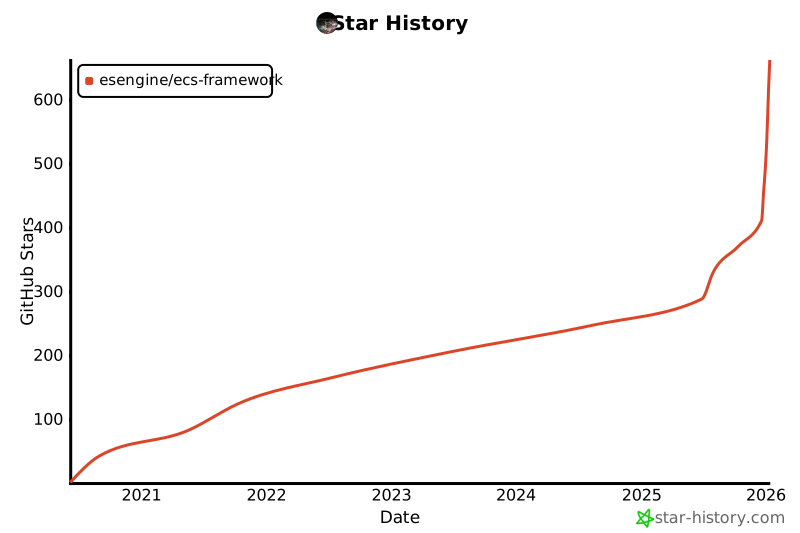](https://star-history.com/#esengine/ecs-framework&Date)
|
||||
|
||||
</div>
|
||||
|
||||
<div align="center">
|
||||
|
||||
<a href="https://github.com/esengine/ecs-framework/graphs/contributors">
|
||||
<img src="https://contrib.rocks/image?repo=esengine/ecs-framework" />
|
||||
</a>
|
||||
|
||||
</div>
|
||||
|
||||
### 📈 下载趋势 / Download Trends
|
||||
|
||||
<div align="center">
|
||||
|
||||
[](https://www.npmjs.com/package/@esengine/ecs-framework)
|
||||
|
||||
[](https://npmtrends.com/@esengine/ecs-framework)
|
||||
|
||||
</div>
|
||||
|
||||
---
|
||||
|
||||
## 特性
|
||||
|
||||
- 🔧 **完整的 TypeScript 支持** - 强类型检查和代码提示
|
||||
- 📡 **[类型安全事件系统](docs/concepts-explained.md#事件系统)** - 事件装饰器和异步事件处理
|
||||
- 🔍 **[查询系统](docs/concepts-explained.md#实体管理)** - 流式 API 和智能缓存
|
||||
- ⚡ **[性能优化](docs/concepts-explained.md#性能优化技术)** - 组件索引、Archetype 系统、脏标记
|
||||
- 🚀 **[SoA 存储优化](docs/soa-storage-guide.md)** - 大规模实体的向量化批量操作和内存优化
|
||||
- 🎯 **[实体管理器](docs/concepts-explained.md#实体管理)** - 统一的实体生命周期管理
|
||||
- 🧰 **调试工具** - 内置性能监控和调试信息
|
||||
|
||||
> 📖 **不熟悉这些概念?** 查看我们的 [技术概念详解](docs/concepts-explained.md) 了解它们的作用和应用场景
|
||||
- **高性能** - 针对大规模实体优化,支持SoA存储和批量处理
|
||||
- **多线程计算** - Worker系统支持真正的并行处理,充分利用多核CPU性能
|
||||
- **类型安全** - 完整的TypeScript支持,编译时类型检查
|
||||
- **现代架构** - 支持多World、多Scene的分层架构设计
|
||||
- **开发友好** - 内置调试工具和性能监控
|
||||
- **跨平台** - 支持Cocos Creator、Laya引擎和Web平台
|
||||
|
||||
## 安装
|
||||
|
||||
@@ -28,438 +66,209 @@ npm install @esengine/ecs-framework
|
||||
|
||||
## 快速开始
|
||||
|
||||
### 基础设置
|
||||
|
||||
```typescript
|
||||
import { Core, Scene, Entity, Component, EntitySystem } from '@esengine/ecs-framework';
|
||||
import { Core, Scene, Component, EntitySystem, ECSComponent, ECSSystem, Matcher, Time } from '@esengine/ecs-framework';
|
||||
|
||||
// 创建核心实例 - 使用配置对象(推荐)
|
||||
const core = Core.create({
|
||||
debug: true, // 启用调试模式
|
||||
enableEntitySystems: true, // 启用实体系统
|
||||
debugConfig: { // 可选:调试配置
|
||||
enabled: true,
|
||||
websocketUrl: 'ws://localhost:8080',
|
||||
autoReconnect: true,
|
||||
updateInterval: 1000,
|
||||
channels: {
|
||||
entities: true,
|
||||
systems: true,
|
||||
performance: true,
|
||||
components: true,
|
||||
scenes: true
|
||||
}
|
||||
}
|
||||
});
|
||||
|
||||
// 简化创建 - 向后兼容(仍然支持)
|
||||
const core2 = Core.create(true); // 等同于 { debug: true, enableEntitySystems: true }
|
||||
|
||||
// 创建场景
|
||||
const scene = new Scene();
|
||||
Core.scene = scene;
|
||||
```
|
||||
|
||||
### 定义组件
|
||||
|
||||
```typescript
|
||||
class PositionComponent extends Component {
|
||||
constructor(public x: number = 0, public y: number = 0) {
|
||||
// 定义组件
|
||||
@ECSComponent('Position')
|
||||
class Position extends Component {
|
||||
constructor(public x = 0, public y = 0) {
|
||||
super();
|
||||
}
|
||||
}
|
||||
|
||||
class VelocityComponent extends Component {
|
||||
constructor(public dx: number = 0, public dy: number = 0) {
|
||||
@ECSComponent('Velocity')
|
||||
class Velocity extends Component {
|
||||
constructor(public dx = 0, public dy = 0) {
|
||||
super();
|
||||
}
|
||||
}
|
||||
|
||||
class HealthComponent extends Component {
|
||||
constructor(
|
||||
public maxHealth: number = 100,
|
||||
public currentHealth: number = 100
|
||||
) {
|
||||
super();
|
||||
}
|
||||
}
|
||||
```
|
||||
|
||||
### SoA 高性能组件 (大规模场景推荐)
|
||||
|
||||
对于需要处理大量实体的场景,可以使用 SoA 存储优化获得显著性能提升:
|
||||
|
||||
```typescript
|
||||
import { Component, EnableSoA, Float32, Int32 } from '@esengine/ecs-framework';
|
||||
|
||||
// 启用 SoA 优化的高性能组件
|
||||
@EnableSoA
|
||||
class OptimizedTransformComponent extends Component {
|
||||
@Float32 public x: number = 0;
|
||||
@Float32 public y: number = 0;
|
||||
@Float32 public rotation: number = 0;
|
||||
}
|
||||
|
||||
@EnableSoA
|
||||
class ParticleComponent extends Component {
|
||||
@Float32 public velocityX: number = 0;
|
||||
@Float32 public velocityY: number = 0;
|
||||
@Int32 public lifeTime: number = 1000;
|
||||
}
|
||||
```
|
||||
|
||||
> ⚠️ **使用建议**: SoA 优化适用于大规模场景和批量操作。小规模应用请使用普通组件以避免不必要的复杂度。详见 [SoA 存储优化指南](docs/soa-storage-guide.md)。
|
||||
|
||||
### 创建实体
|
||||
|
||||
```typescript
|
||||
// 基础实体创建
|
||||
const player = scene.createEntity("Player");
|
||||
player.addComponent(new PositionComponent(100, 100));
|
||||
player.addComponent(new VelocityComponent(5, 0));
|
||||
player.addComponent(new HealthComponent(100, 100));
|
||||
|
||||
// 批量创建实体
|
||||
const enemies = scene.createEntities(50, "Enemy");
|
||||
```
|
||||
|
||||
### 创建系统
|
||||
|
||||
```typescript
|
||||
// 创建系统
|
||||
@ECSSystem('Movement')
|
||||
class MovementSystem extends EntitySystem {
|
||||
constructor() {
|
||||
super();
|
||||
super(Matcher.all(Position, Velocity));
|
||||
}
|
||||
|
||||
public process(entities: Entity[]) {
|
||||
protected process(entities: readonly Entity[]): void {
|
||||
for (const entity of entities) {
|
||||
const position = entity.getComponent(PositionComponent);
|
||||
const velocity = entity.getComponent(VelocityComponent);
|
||||
|
||||
if (position && velocity) {
|
||||
position.x += velocity.dx;
|
||||
position.y += velocity.dy;
|
||||
}
|
||||
const position = entity.getComponent(Position)!;
|
||||
const velocity = entity.getComponent(Velocity)!;
|
||||
|
||||
position.x += velocity.dx * Time.deltaTime;
|
||||
position.y += velocity.dy * Time.deltaTime;
|
||||
}
|
||||
}
|
||||
}
|
||||
|
||||
// 添加系统到场景
|
||||
scene.addEntityProcessor(new MovementSystem());
|
||||
```
|
||||
// 创建场景并启动
|
||||
class GameScene extends Scene {
|
||||
protected initialize(): void {
|
||||
this.addSystem(new MovementSystem());
|
||||
|
||||
### 游戏循环
|
||||
|
||||
ECS框架需要在游戏引擎的更新循环中调用:
|
||||
|
||||
```typescript
|
||||
// 统一的API:传入deltaTime
|
||||
Core.update(deltaTime);
|
||||
```
|
||||
|
||||
**不同平台的集成示例:**
|
||||
|
||||
```typescript
|
||||
// Laya引擎
|
||||
Laya.timer.frameLoop(1, this, () => {
|
||||
const deltaTime = Laya.timer.delta / 1000; // 转换为秒
|
||||
Core.update(deltaTime);
|
||||
});
|
||||
|
||||
// Cocos Creator
|
||||
update(deltaTime: number) {
|
||||
Core.update(deltaTime);
|
||||
}
|
||||
|
||||
// 原生浏览器环境
|
||||
let lastTime = 0;
|
||||
function gameLoop(currentTime: number) {
|
||||
const deltaTime = lastTime > 0 ? (currentTime - lastTime) / 1000 : 0.016;
|
||||
lastTime = currentTime;
|
||||
Core.update(deltaTime);
|
||||
requestAnimationFrame(gameLoop);
|
||||
}
|
||||
requestAnimationFrame(gameLoop);
|
||||
```
|
||||
|
||||
## 实体管理器
|
||||
|
||||
EntityManager 提供了统一的实体管理接口:
|
||||
|
||||
```typescript
|
||||
import { EntityManager } from '@esengine/ecs-framework';
|
||||
|
||||
const entityManager = new EntityManager();
|
||||
|
||||
// 流式查询 API
|
||||
const results = entityManager
|
||||
.query()
|
||||
.withAll(PositionComponent, VelocityComponent)
|
||||
.withNone(HealthComponent)
|
||||
.withTag(1)
|
||||
.execute();
|
||||
|
||||
// 批量操作(使用Scene的方法)
|
||||
const bullets = scene.createEntities(100, "bullet");
|
||||
|
||||
// 按标签查询
|
||||
const enemies = entityManager.getEntitiesByTag(2);
|
||||
```
|
||||
|
||||
## 事件系统
|
||||
|
||||
### [基础事件](docs/concepts-explained.md#类型安全事件)
|
||||
|
||||
类型安全的事件系统,编译时检查事件名和数据类型。
|
||||
|
||||
```typescript
|
||||
import { EventBus, ECSEventType } from '@esengine/ecs-framework';
|
||||
|
||||
const eventBus = entityManager.eventBus;
|
||||
|
||||
// 监听预定义事件
|
||||
eventBus.onEntityCreated((data) => {
|
||||
console.log(`实体创建: ${data.entityName}`);
|
||||
});
|
||||
|
||||
eventBus.onComponentAdded((data) => {
|
||||
console.log(`组件添加: ${data.componentType}`);
|
||||
});
|
||||
|
||||
// 自定义事件
|
||||
eventBus.emit('player:death', { playerId: 123, reason: 'fall' });
|
||||
```
|
||||
|
||||
### [事件装饰器](docs/concepts-explained.md#事件装饰器)
|
||||
|
||||
使用装饰器语法自动注册事件监听器,减少样板代码。
|
||||
|
||||
```typescript
|
||||
import { EventHandler, ECSEventType } from '@esengine/ecs-framework';
|
||||
|
||||
class GameSystem {
|
||||
@EventHandler(ECSEventType.ENTITY_DESTROYED)
|
||||
onEntityDestroyed(data: EntityDestroyedEventData) {
|
||||
console.log('实体销毁:', data.entityName);
|
||||
}
|
||||
|
||||
@EventHandler('player:levelup')
|
||||
onPlayerLevelUp(data: { playerId: number; newLevel: number }) {
|
||||
console.log(`玩家 ${data.playerId} 升级到 ${data.newLevel} 级`);
|
||||
const player = this.createEntity("Player");
|
||||
player.addComponent(new Position(100, 100));
|
||||
player.addComponent(new Velocity(50, 0));
|
||||
}
|
||||
}
|
||||
```
|
||||
|
||||
## 性能优化
|
||||
// 启动游戏
|
||||
Core.create();
|
||||
Core.setScene(new GameScene());
|
||||
|
||||
### [组件索引](docs/concepts-explained.md#组件索引系统)
|
||||
|
||||
通过建立索引避免线性搜索,将查询复杂度从 O(n) 降低到 O(1)。
|
||||
|
||||
```typescript
|
||||
// 使用Scene的查询系统进行组件索引
|
||||
const querySystem = scene.querySystem;
|
||||
|
||||
// 查询具有特定组件的实体
|
||||
const entitiesWithPosition = querySystem.queryAll(PositionComponent).entities;
|
||||
const entitiesWithVelocity = querySystem.queryAll(VelocityComponent).entities;
|
||||
|
||||
// 性能统计
|
||||
const stats = querySystem.getStats();
|
||||
console.log('查询效率:', stats.hitRate);
|
||||
```
|
||||
|
||||
**索引类型选择:**
|
||||
- **哈希索引** - 适合稳定的、大量的组件(如位置、生命值)
|
||||
- **位图索引** - 适合频繁变化的组件(如Buff、状态)
|
||||
|
||||
> 📋 详细选择指南参见 [索引类型选择指南](docs/concepts-explained.md#索引类型选择指南)
|
||||
|
||||
### [Archetype 系统](docs/concepts-explained.md#archetype-系统)
|
||||
|
||||
将具有相同组件组合的实体分组,减少查询时的组件检查开销。
|
||||
|
||||
```typescript
|
||||
// 使用查询系统的Archetype功能
|
||||
const querySystem = scene.querySystem;
|
||||
|
||||
// 查询统计
|
||||
const stats = querySystem.getStats();
|
||||
console.log('缓存命中率:', stats.hitRate);
|
||||
```
|
||||
|
||||
### [脏标记系统](docs/concepts-explained.md#脏标记系统)
|
||||
|
||||
追踪数据变化,只处理发生改变的实体,避免不必要的计算。
|
||||
|
||||
```typescript
|
||||
// 脏标记通过组件系统自动管理
|
||||
// 组件变化时会自动标记为脏数据
|
||||
|
||||
// 查询系统会自动处理脏标记优化
|
||||
const movingEntities = scene.querySystem.queryAll(PositionComponent, VelocityComponent);
|
||||
```
|
||||
|
||||
> 💡 **不确定何时使用这些优化?** 查看 [性能优化建议](docs/concepts-explained.md#性能建议) 了解适用场景
|
||||
|
||||
## API 参考
|
||||
|
||||
### 核心类
|
||||
|
||||
| 类 | 描述 |
|
||||
|---|---|
|
||||
| `Core` | 框架核心管理类 |
|
||||
| `Scene` | 场景容器,管理实体和系统 |
|
||||
| `Entity` | 实体对象,包含组件集合 |
|
||||
| `Component` | 组件基类 |
|
||||
| `EntitySystem` | 系统基类 |
|
||||
| `EntityManager` | 实体管理器 |
|
||||
|
||||
### 查询 API
|
||||
|
||||
```typescript
|
||||
entityManager
|
||||
.query()
|
||||
.withAll(...components) // 包含所有指定组件
|
||||
.withAny(...components) // 包含任意指定组件
|
||||
.withNone(...components) // 不包含指定组件
|
||||
.withTag(tag) // 包含指定标签
|
||||
.withoutTag(tag) // 不包含指定标签
|
||||
.execute() // 执行查询
|
||||
```
|
||||
|
||||
### 事件类型
|
||||
|
||||
```typescript
|
||||
enum ECSEventType {
|
||||
ENTITY_CREATED = 'entity:created',
|
||||
ENTITY_DESTROYED = 'entity:destroyed',
|
||||
COMPONENT_ADDED = 'component:added',
|
||||
COMPONENT_REMOVED = 'component:removed',
|
||||
SYSTEM_ADDED = 'system:added',
|
||||
SYSTEM_REMOVED = 'system:removed'
|
||||
// 游戏循环中更新
|
||||
function gameLoop(deltaTime: number) {
|
||||
Core.update(deltaTime);
|
||||
}
|
||||
```
|
||||
|
||||
## 与其他框架对比
|
||||
## 核心特性
|
||||
|
||||
| 特性 | @esengine/ecs-framework | bitECS | Miniplex |
|
||||
|------|-------------------------|--------|----------|
|
||||
| TypeScript 支持 | ✅ 原生支持 | ✅ 完整支持 | ✅ 原生支持 |
|
||||
| 事件系统 | ✅ 内置+装饰器 | ❌ 需自己实现 | ✅ 响应式 |
|
||||
| 查询系统 | ✅ 流式 API | ✅ 函数式 | ✅ 响应式 |
|
||||
| 实体管理器 | ✅ 统一接口 | ❌ 低级 API | ✅ 高级接口 |
|
||||
| 性能优化 | ✅ 多重优化 | ✅ 极致性能 | ✅ React 优化 |
|
||||
| JavaScript引擎集成 | ✅ 专为JS引擎设计 | ✅ 通用设计 | ⚠️ 主要 React |
|
||||
| 可视化调试工具 | ✅ [Cocos插件](https://store.cocos.com/app/detail/7823) | ❌ 无官方工具 | ✅ React DevTools |
|
||||
- **实体查询** - 使用 Matcher API 进行高效的实体过滤
|
||||
- **事件系统** - 类型安全的事件发布/订阅机制
|
||||
- **性能优化** - SoA 存储优化,支持大规模实体处理
|
||||
- **多线程支持** - Worker系统实现真正的并行计算,充分利用多核CPU
|
||||
- **多场景** - 支持 World/Scene 分层架构
|
||||
- **时间管理** - 内置定时器和时间控制系统
|
||||
|
||||
**选择指南:**
|
||||
- 选择本框架:需要完整的游戏开发工具链和中文社区支持
|
||||
- 选择 bitECS:需要极致性能和最小化设计
|
||||
- 选择 Miniplex:主要用于 React 应用开发
|
||||
## 🏗️ 架构设计 / Architecture
|
||||
|
||||
## 项目结构
|
||||
```mermaid
|
||||
graph TB
|
||||
A[Core 核心] --> B[World 世界]
|
||||
B --> C[Scene 场景]
|
||||
C --> D[EntityManager 实体管理器]
|
||||
C --> E[SystemManager 系统管理器]
|
||||
D --> F[Entity 实体]
|
||||
F --> G[Component 组件]
|
||||
E --> H[EntitySystem 实体系统]
|
||||
E --> I[WorkerSystem 工作线程系统]
|
||||
|
||||
style A fill:#e1f5ff
|
||||
style B fill:#fff3e0
|
||||
style C fill:#f3e5f5
|
||||
style D fill:#e8f5e9
|
||||
style E fill:#fff9c4
|
||||
style F fill:#ffebee
|
||||
style G fill:#e0f2f1
|
||||
style H fill:#fce4ec
|
||||
style I fill:#f1f8e9
|
||||
```
|
||||
ecs-framework/
|
||||
├── src/
|
||||
│ ├── ECS/ # ECS 核心系统
|
||||
│ │ ├── Core/ # 核心管理器
|
||||
│ │ ├── Systems/ # 系统类型
|
||||
│ │ └── Utils/ # ECS 工具
|
||||
│ ├── Types/ # TypeScript接口定义
|
||||
│ └── Utils/ # 通用工具
|
||||
├── docs/ # 文档
|
||||
└── scripts/ # 构建脚本
|
||||
```
|
||||
|
||||
## 平台支持
|
||||
|
||||
支持主流游戏引擎和 Web 平台:
|
||||
|
||||
- **Cocos Creator**
|
||||
- **Laya 引擎**
|
||||
- **原生 Web** - 浏览器环境直接运行
|
||||
- **小游戏平台** - 微信、支付宝等小游戏
|
||||
|
||||
## ECS Framework Editor
|
||||
|
||||
跨平台桌面编辑器,提供可视化开发和调试工具。
|
||||
|
||||
### 主要功能
|
||||
|
||||
- **场景管理** - 可视化场景层级和实体管理
|
||||
- **组件检视** - 实时查看和编辑实体组件
|
||||
- **性能分析** - 内置 Profiler 监控系统性能
|
||||
- **插件系统** - 可扩展的插件架构
|
||||
- **远程调试** - 连接运行中的游戏进行实时调试
|
||||
- **自动更新** - 支持热更新,自动获取最新版本
|
||||
|
||||
### 下载
|
||||
|
||||
[](https://github.com/esengine/ecs-framework/releases/latest)
|
||||
|
||||
支持 Windows、macOS (Intel & Apple Silicon)
|
||||
|
||||
### 截图
|
||||
|
||||
<img src="screenshots/main_screetshot.png" alt="ECS Framework Editor" width="800">
|
||||
|
||||
<details>
|
||||
<summary>查看更多截图</summary>
|
||||
|
||||
**性能分析器**
|
||||
<img src="screenshots/performance_profiler.png" alt="Performance Profiler" width="600">
|
||||
|
||||
**插件管理**
|
||||
<img src="screenshots/plugin_manager.png" alt="Plugin Manager" width="600">
|
||||
|
||||
**设置界面**
|
||||
<img src="screenshots/settings.png" alt="Settings" width="600">
|
||||
|
||||
</details>
|
||||
|
||||
## 示例项目
|
||||
|
||||
- [Worker系统演示](https://esengine.github.io/ecs-framework/demos/worker-system/) - 多线程物理系统演示,展示高性能并行计算
|
||||
- [割草机演示](https://github.com/esengine/lawn-mower-demo) - 完整的游戏示例
|
||||
|
||||
## 文档
|
||||
|
||||
### 🎯 新手入门
|
||||
- **[📖 新手教程完整指南](docs/beginner-tutorials.md)** - 完整学习路径,从零开始 ⭐ **强烈推荐**
|
||||
- **[🚀 快速入门](docs/getting-started.md)** - 详细的入门教程,包含Laya/Cocos/Node.js集成指南 ⭐ **平台集成必读**
|
||||
- 💡 **Cocos Creator用户特别提示**:我们提供[专用调试插件](https://store.cocos.com/app/detail/7823),支持可视化ECS调试
|
||||
- [🧠 技术概念详解](docs/concepts-explained.md) - 通俗易懂的技术概念解释 ⭐ **推荐新手阅读**
|
||||
- [🎯 位掩码使用指南](docs/bitmask-guide.md) - 位掩码概念、原理和高级使用技巧
|
||||
- [💡 使用场景示例](docs/use-cases.md) - 不同类型游戏的具体应用案例
|
||||
- [🔧 框架类型系统](docs/concepts-explained.md#框架类型系统) - TypeScript接口设计和使用指南
|
||||
- [📚 AI智能文档](https://deepwiki.com/esengine/ecs-framework) - AI助手随时解答你的问题
|
||||
- [快速入门](https://esengine.github.io/ecs-framework/guide/getting-started.html) - 详细教程和平台集成
|
||||
- [完整指南](https://esengine.github.io/ecs-framework/guide/) - ECS 概念和使用指南
|
||||
- [API 参考](https://esengine.github.io/ecs-framework/api/) - 完整 API 文档
|
||||
|
||||
### 📚 核心功能
|
||||
- [🎭 实体管理指南](docs/entity-guide.md) - 实体的创建和使用方法
|
||||
- [🧩 组件设计指南](docs/component-design-guide.md) - 如何设计高质量组件 ⭐ **设计必读**
|
||||
- [⚙️ 系统详解指南](docs/system-guide.md) - 四种系统类型的详细使用
|
||||
- [🎬 场景管理指南](docs/scene-management-guide.md) - 场景切换和数据管理
|
||||
- [⏰ 定时器系统指南](docs/timer-guide.md) - 定时器的完整使用方法
|
||||
## 生态系统
|
||||
|
||||
### API 参考
|
||||
- [核心 API 参考](docs/core-concepts.md) - 完整的 API 使用说明
|
||||
- [实体基础指南](docs/entity-guide.md) - 实体的基本概念和操作
|
||||
- [EntityManager 指南](docs/entity-manager-example.md) - 高性能查询和批量操作
|
||||
- [事件系统指南](docs/event-system-example.md) - 事件系统完整用法
|
||||
- [查询系统指南](docs/query-system-usage.md) - 查询系统使用方法
|
||||
|
||||
### 性能相关
|
||||
- [性能优化指南](docs/performance-optimization.md) - 性能优化技术和策略
|
||||
- [SoA 存储优化指南](docs/soa-storage-guide.md) - 大规模实体系统的高级性能优化 ⭐ **大规模项目推荐**
|
||||
|
||||
## 构建
|
||||
|
||||
```bash
|
||||
# 安装依赖
|
||||
npm install
|
||||
|
||||
# 构建项目
|
||||
npm run build
|
||||
|
||||
# 监听模式
|
||||
npm run build:watch
|
||||
|
||||
# 清理构建文件
|
||||
npm run clean
|
||||
|
||||
# 重新构建
|
||||
npm run rebuild
|
||||
```
|
||||
|
||||
## 性能监控
|
||||
|
||||
框架提供内置性能统计:
|
||||
|
||||
```typescript
|
||||
// 场景统计
|
||||
const sceneStats = scene.getStats();
|
||||
console.log('性能统计:', {
|
||||
实体数量: sceneStats.entityCount,
|
||||
系统数量: sceneStats.processorCount
|
||||
});
|
||||
|
||||
// 查询系统统计
|
||||
const queryStats = scene.querySystem.getStats();
|
||||
console.log('查询统计:', {
|
||||
缓存命中率: queryStats.hitRate + '%',
|
||||
查询次数: queryStats.queryCount
|
||||
});
|
||||
```
|
||||
|
||||
## 扩展库
|
||||
|
||||
- [路径寻找库](https://github.com/esengine/ecs-astar) - A*、BFS、Dijkstra 算法
|
||||
- [路径寻找](https://github.com/esengine/ecs-astar) - A*、BFS、Dijkstra 算法
|
||||
- [AI 系统](https://github.com/esengine/BehaviourTree-ai) - 行为树、效用 AI
|
||||
|
||||
## 社区
|
||||
## 💪 支持项目 / Support the Project
|
||||
|
||||
- QQ 群:[ecs游戏框架交流](https://jq.qq.com/?_wv=1027&k=29w1Nud6)
|
||||
- GitHub:[提交 Issue](https://github.com/esengine/ecs-framework/issues)
|
||||
如果这个项目对你有帮助,请考虑:
|
||||
|
||||
## 贡献
|
||||
If this project helps you, please consider:
|
||||
|
||||
欢迎提交 Pull Request 和 Issue!
|
||||
<div align="center">
|
||||
|
||||
### 开发要求
|
||||
[](https://github.com/sponsors/esengine)
|
||||
[](https://github.com/esengine/ecs-framework)
|
||||
|
||||
- Node.js >= 14.0.0
|
||||
- TypeScript >= 4.0.0
|
||||
</div>
|
||||
|
||||
- ⭐ 给项目点个 Star
|
||||
- 🐛 报告 Bug 或提出新功能
|
||||
- 📝 改进文档
|
||||
- 💖 成为赞助者
|
||||
|
||||
## 社区与支持
|
||||
|
||||
- [问题反馈](https://github.com/esengine/ecs-framework/issues) - Bug 报告和功能建议
|
||||
- [讨论区](https://github.com/esengine/ecs-framework/discussions) - 提问、分享想法
|
||||
- [QQ 交流群](https://jq.qq.com/?_wv=1027&k=29w1Nud6) - ecs游戏框架交流
|
||||
|
||||
## 贡献者 / Contributors
|
||||
|
||||
感谢所有为这个项目做出贡献的人!
|
||||
|
||||
Thanks goes to these wonderful people:
|
||||
|
||||
<!-- ALL-CONTRIBUTORS-LIST:START - Do not remove or modify this section -->
|
||||
<!-- prettier-ignore-start -->
|
||||
<!-- markdownlint-disable -->
|
||||
<table>
|
||||
<tbody>
|
||||
<tr>
|
||||
<td align="center" valign="top" width="14.28%"><a href="https://github.com/esengine"><img src="https://avatars.githubusercontent.com/esengine?s=100" width="100px;" alt="esengine"/><br /><sub><b>esengine</b></sub></a><br /><a href="#maintenance-esengine" title="Maintenance">🚧</a> <a href="https://github.com/esengine/ecs-framework/commits?author=esengine" title="Code">💻</a> <a href="#design-esengine" title="Design">🎨</a></td>
|
||||
<td align="center" valign="top" width="14.28%"><a href="https://github.com/foxling"><img src="https://avatars.githubusercontent.com/foxling?s=100" width="100px;" alt="LING YE"/><br /><sub><b>LING YE</b></sub></a><br /><a href="https://github.com/esengine/ecs-framework/commits?author=foxling" title="Code">💻</a></td>
|
||||
<td align="center" valign="top" width="14.28%"><a href="https://github.com/MirageTank"><img src="https://avatars.githubusercontent.com/MirageTank?s=100" width="100px;" alt="MirageTank"/><br /><sub><b>MirageTank</b></sub></a><br /><a href="https://github.com/esengine/ecs-framework/commits?author=MirageTank" title="Code">💻</a></td>
|
||||
</tr>
|
||||
</tbody>
|
||||
</table>
|
||||
|
||||
<!-- markdownlint-restore -->
|
||||
<!-- prettier-ignore-end -->
|
||||
|
||||
<!-- ALL-CONTRIBUTORS-LIST:END -->
|
||||
|
||||
本项目遵循 [all-contributors](https://github.com/all-contributors/all-contributors) 规范。欢迎任何形式的贡献!
|
||||
|
||||
## 许可证
|
||||
|
||||
[MIT](LICENSE)
|
||||
[MIT](LICENSE) © 2025 ECS Framework
|
||||
|
||||
225
docs/.vitepress/config.mjs
Normal file
225
docs/.vitepress/config.mjs
Normal file
@@ -0,0 +1,225 @@
|
||||
import { defineConfig } from 'vitepress'
|
||||
import Icons from 'unplugin-icons/vite'
|
||||
import { readFileSync } from 'fs'
|
||||
import { join, dirname } from 'path'
|
||||
import { fileURLToPath } from 'url'
|
||||
|
||||
const __dirname = dirname(fileURLToPath(import.meta.url))
|
||||
const corePackageJson = JSON.parse(
|
||||
readFileSync(join(__dirname, '../../packages/core/package.json'), 'utf-8')
|
||||
)
|
||||
|
||||
export default defineConfig({
|
||||
vite: {
|
||||
plugins: [
|
||||
Icons({
|
||||
compiler: 'vue3',
|
||||
autoInstall: true
|
||||
})
|
||||
],
|
||||
server: {
|
||||
fs: {
|
||||
allow: ['..']
|
||||
},
|
||||
middlewareMode: false,
|
||||
headers: {
|
||||
'Cross-Origin-Embedder-Policy': 'require-corp',
|
||||
'Cross-Origin-Opener-Policy': 'same-origin'
|
||||
}
|
||||
}
|
||||
},
|
||||
title: 'ECS Framework',
|
||||
description: '高性能TypeScript ECS框架 - 为游戏开发而生',
|
||||
lang: 'zh-CN',
|
||||
|
||||
themeConfig: {
|
||||
nav: [
|
||||
{ text: '首页', link: '/' },
|
||||
{ text: '快速开始', link: '/guide/getting-started' },
|
||||
{ text: '指南', link: '/guide/' },
|
||||
{ text: 'API', link: '/api/README' },
|
||||
{
|
||||
text: '示例',
|
||||
items: [
|
||||
{ text: 'Worker系统演示', link: '/examples/worker-system-demo' },
|
||||
{ text: '割草机演示', link: 'https://github.com/esengine/lawn-mower-demo' }
|
||||
]
|
||||
},
|
||||
{
|
||||
text: `v${corePackageJson.version}`,
|
||||
link: 'https://github.com/esengine/ecs-framework/releases'
|
||||
}
|
||||
],
|
||||
|
||||
sidebar: {
|
||||
'/guide/': [
|
||||
{
|
||||
text: '开始使用',
|
||||
items: [
|
||||
{ text: '快速开始', link: '/guide/getting-started' },
|
||||
{ text: '指南概览', link: '/guide/' }
|
||||
]
|
||||
},
|
||||
{
|
||||
text: '核心概念',
|
||||
collapsed: false,
|
||||
items: [
|
||||
{ text: '实体类 (Entity)', link: '/guide/entity' },
|
||||
{ text: '组件系统 (Component)', link: '/guide/component' },
|
||||
{ text: '实体查询系统', link: '/guide/entity-query' },
|
||||
{
|
||||
text: '系统架构 (System)',
|
||||
link: '/guide/system',
|
||||
items: [
|
||||
{ text: 'Worker系统 (多线程)', link: '/guide/worker-system' }
|
||||
]
|
||||
},
|
||||
{
|
||||
text: '场景管理 (Scene)',
|
||||
link: '/guide/scene',
|
||||
items: [
|
||||
{ text: 'SceneManager', link: '/guide/scene-manager' },
|
||||
{ text: 'WorldManager', link: '/guide/world-manager' }
|
||||
]
|
||||
},
|
||||
{ text: '序列化系统 (Serialization)', link: '/guide/serialization' },
|
||||
{ text: '事件系统 (Event)', link: '/guide/event-system' },
|
||||
{ text: '时间和定时器 (Time)', link: '/guide/time-and-timers' },
|
||||
{ text: '日志系统 (Logger)', link: '/guide/logging' }
|
||||
]
|
||||
},
|
||||
{
|
||||
text: '高级特性',
|
||||
collapsed: false,
|
||||
items: [
|
||||
{ text: '服务容器 (Service Container)', link: '/guide/service-container' },
|
||||
{ text: '插件系统 (Plugin System)', link: '/guide/plugin-system' }
|
||||
]
|
||||
},
|
||||
{
|
||||
text: '平台适配器',
|
||||
link: '/guide/platform-adapter',
|
||||
collapsed: false,
|
||||
items: [
|
||||
{ text: '浏览器适配器', link: '/guide/platform-adapter/browser' },
|
||||
{ text: '微信小游戏适配器', link: '/guide/platform-adapter/wechat-minigame' },
|
||||
{ text: 'Node.js适配器', link: '/guide/platform-adapter/nodejs' }
|
||||
]
|
||||
}
|
||||
],
|
||||
'/examples/': [
|
||||
{
|
||||
text: '示例',
|
||||
items: [
|
||||
{ text: '示例概览', link: '/examples/' },
|
||||
{ text: 'Worker系统演示', link: '/examples/worker-system-demo' }
|
||||
]
|
||||
}
|
||||
],
|
||||
'/api/': [
|
||||
{
|
||||
text: 'API 参考',
|
||||
items: [
|
||||
{ text: '概述', link: '/api/README' },
|
||||
{
|
||||
text: '核心类',
|
||||
collapsed: false,
|
||||
items: [
|
||||
{ text: 'Core', link: '/api/classes/Core' },
|
||||
{ text: 'Scene', link: '/api/classes/Scene' },
|
||||
{ text: 'World', link: '/api/classes/World' },
|
||||
{ text: 'Entity', link: '/api/classes/Entity' },
|
||||
{ text: 'Component', link: '/api/classes/Component' },
|
||||
{ text: 'EntitySystem', link: '/api/classes/EntitySystem' }
|
||||
]
|
||||
},
|
||||
{
|
||||
text: '系统类',
|
||||
collapsed: true,
|
||||
items: [
|
||||
{ text: 'PassiveSystem', link: '/api/classes/PassiveSystem' },
|
||||
{ text: 'ProcessingSystem', link: '/api/classes/ProcessingSystem' },
|
||||
{ text: 'IntervalSystem', link: '/api/classes/IntervalSystem' }
|
||||
]
|
||||
},
|
||||
{
|
||||
text: '工具类',
|
||||
collapsed: true,
|
||||
items: [
|
||||
{ text: 'Matcher', link: '/api/classes/Matcher' },
|
||||
{ text: 'Time', link: '/api/classes/Time' },
|
||||
{ text: 'PerformanceMonitor', link: '/api/classes/PerformanceMonitor' },
|
||||
{ text: 'DebugManager', link: '/api/classes/DebugManager' }
|
||||
]
|
||||
},
|
||||
{
|
||||
text: '接口',
|
||||
collapsed: true,
|
||||
items: [
|
||||
{ text: 'IScene', link: '/api/interfaces/IScene' },
|
||||
{ text: 'IComponent', link: '/api/interfaces/IComponent' },
|
||||
{ text: 'ISystemBase', link: '/api/interfaces/ISystemBase' },
|
||||
{ text: 'ICoreConfig', link: '/api/interfaces/ICoreConfig' }
|
||||
]
|
||||
},
|
||||
{
|
||||
text: '装饰器',
|
||||
collapsed: true,
|
||||
items: [
|
||||
{ text: '@ECSComponent', link: '/api/functions/ECSComponent' },
|
||||
{ text: '@ECSSystem', link: '/api/functions/ECSSystem' }
|
||||
]
|
||||
},
|
||||
{
|
||||
text: '枚举',
|
||||
collapsed: true,
|
||||
items: [
|
||||
{ text: 'ECSEventType', link: '/api/enumerations/ECSEventType' },
|
||||
{ text: 'LogLevel', link: '/api/enumerations/LogLevel' }
|
||||
]
|
||||
}
|
||||
]
|
||||
}
|
||||
]
|
||||
},
|
||||
|
||||
socialLinks: [
|
||||
{ icon: 'github', link: 'https://github.com/esengine/ecs-framework' }
|
||||
],
|
||||
|
||||
footer: {
|
||||
message: 'Released under the MIT License.',
|
||||
copyright: 'Copyright © 2025 ECS Framework'
|
||||
},
|
||||
|
||||
editLink: {
|
||||
pattern: 'https://github.com/esengine/ecs-framework/edit/master/docs/:path',
|
||||
text: '在 GitHub 上编辑此页'
|
||||
},
|
||||
|
||||
search: {
|
||||
provider: 'local'
|
||||
},
|
||||
|
||||
outline: {
|
||||
level: [2, 3],
|
||||
label: '目录'
|
||||
}
|
||||
},
|
||||
|
||||
head: [
|
||||
['meta', { name: 'theme-color', content: '#646cff' }],
|
||||
['link', { rel: 'icon', href: '/favicon.ico' }]
|
||||
],
|
||||
|
||||
base: '/ecs-framework/',
|
||||
cleanUrls: true,
|
||||
|
||||
markdown: {
|
||||
lineNumbers: true,
|
||||
theme: {
|
||||
light: 'github-light',
|
||||
dark: 'github-dark'
|
||||
}
|
||||
}
|
||||
})
|
||||
@@ -1,187 +0,0 @@
|
||||
# 新手教程完整指南
|
||||
|
||||
欢迎使用ECS框架!本指南为新手提供了完整的学习路径,从基础概念到高级应用,帮你快速掌握ECS框架开发游戏。
|
||||
|
||||
## 📚 学习路径
|
||||
|
||||
### 第一阶段:基础入门(必读)
|
||||
|
||||
#### 1. [快速开始](getting-started.md)
|
||||
- **5分钟入门** - 创建你的第一个ECS游戏
|
||||
- 📦 **环境搭建** - 安装和配置框架
|
||||
- **第一个游戏** - 完整的示例游戏
|
||||
- **基础API** - 核心功能介绍
|
||||
|
||||
#### 2. [核心概念](core-concepts.md)
|
||||
- 🏗️ **ECS架构** - 实体、组件、系统的关系
|
||||
- **API参考** - 核心类和方法
|
||||
- **最佳实践** - 代码规范和设计模式
|
||||
- **查询系统** - 如何高效查找实体
|
||||
|
||||
#### 3. [概念详解](concepts-explained.md) ️**新手必读**
|
||||
- 🤔 **通俗解释** - 用简单语言解释复杂概念
|
||||
- **性能优化技术** - 组件索引、Archetype、脏标记
|
||||
- **索引选择指南** - 何时使用哈希索引vs位图索引
|
||||
- **应用场景** - 不同游戏类型的选择建议
|
||||
|
||||
### 第二阶段:核心功能掌握
|
||||
|
||||
#### 4. [实体管理指南](entity-guide.md)
|
||||
- 🎭 **实体基础** - 什么是实体,如何创建和使用
|
||||
- 🏷️ **标签系统** - 实体分类和查找
|
||||
- 🔄 **生命周期** - 实体的创建、更新、销毁
|
||||
- **简单示例** - 玩家、敌人、道具实体
|
||||
|
||||
#### 5. [组件设计最佳实践](component-design-guide.md) ️**设计必读**
|
||||
- 🧩 **组件设计原则** - 单一职责、数据为主
|
||||
- 📦 **组件类型** - 数据组件、标记组件、行为组件
|
||||
- 🔗 **组件通信** - 如何让组件协同工作
|
||||
- **性能优化** - 对象池和数据紧凑性
|
||||
- 🧪 **测试和调试** - 如何测试你的组件
|
||||
|
||||
#### 6. [系统详解指南](system-guide.md) ️**逻辑必读**
|
||||
- ⚙️ **四种系统类型** - EntitySystem、ProcessingSystem、IntervalSystem、PassiveSystem
|
||||
- **使用场景** - 什么时候用哪种系统
|
||||
- 📋 **执行顺序** - 系统间的依赖关系
|
||||
- 🔄 **系统通信** - 事件驱动的松耦合设计
|
||||
- **性能优化** - 批量处理和频率控制
|
||||
|
||||
### 第三阶段:高级功能应用
|
||||
|
||||
#### 7. [场景管理指南](scene-management-guide.md)
|
||||
- 🎬 **场景概念** - 什么是场景,如何组织游戏世界
|
||||
- 🔄 **场景切换** - 菜单、游戏、暂停场景的切换
|
||||
- 💾 **数据传递** - 场景间如何传递数据
|
||||
- **实际应用** - 完整的游戏场景设计
|
||||
- **性能优化** - 场景级别的性能监控
|
||||
|
||||
#### 8. [定时器系统指南](timer-guide.md)
|
||||
- ⏰ **定时器基础** - 延迟执行、重复执行
|
||||
- 🔗 **定时器链** - 顺序执行多个任务
|
||||
- **条件定时器** - 等待特定条件满足
|
||||
- ⏸️ **可暂停定时器** - 游戏暂停功能
|
||||
- **游戏应用** - Buff系统、技能冷却、关卡限时
|
||||
|
||||
#### 9. [查询系统使用](query-system-usage.md)
|
||||
- **基础查询** - 按组件查找实体
|
||||
- **复杂查询** - 组合条件和排除条件
|
||||
- **性能监控** - 查询性能统计
|
||||
- **优化技巧** - 提高查询效率
|
||||
|
||||
#### 10. [事件系统示例](event-system-example.md)
|
||||
- 📡 **事件基础** - 发送和监听事件
|
||||
- **游戏事件** - 玩家输入、碰撞、分数等
|
||||
- 🔄 **系统解耦** - 用事件实现系统间通信
|
||||
- **事件统计** - 监控事件系统性能
|
||||
|
||||
### 第四阶段:实战应用
|
||||
|
||||
#### 11. [实体管理器高级功能](entity-manager-example.md)
|
||||
- 🏭 **批量操作** - 高效创建和管理大量实体
|
||||
- **高级查询** - EntityQueryBuilder的使用
|
||||
- **性能监控** - 实体管理性能统计
|
||||
- **实际案例** - 弹幕游戏、RTS游戏的实体管理
|
||||
|
||||
#### 12. [应用案例集合](use-cases.md)
|
||||
- **不同游戏类型** - 休闲游戏、动作游戏、策略游戏
|
||||
- **具体实现** - 完整的代码示例
|
||||
- **性能分析** - 各种应用的性能特点
|
||||
- **设计思路** - 如何选择合适的架构
|
||||
|
||||
### 第五阶段:性能优化
|
||||
|
||||
#### 13. [性能基准测试](performance.md)
|
||||
- **基准数据** - 框架性能表现
|
||||
- **对比分析** - 与其他框架的比较
|
||||
- **优化建议** - 针对不同规模的优化策略
|
||||
- 📋 **性能检查清单** - 确保最佳性能的要点
|
||||
|
||||
#### 14. [性能优化技术](performance-optimization.md)
|
||||
- **核心优化** - 组件索引、Archetype、脏标记
|
||||
- 💾 **内存优化** - 对象池、数据紧凑性
|
||||
- 🔄 **批量处理** - 减少单次操作开销
|
||||
- **监控工具** - 性能分析和调试
|
||||
|
||||
## 推荐学习顺序
|
||||
|
||||
### 适合完全新手(第一次接触ECS)
|
||||
|
||||
```
|
||||
1. 快速开始 → 2. 概念详解 → 3. 核心概念 → 4. 实体管理指南
|
||||
→ 5. 组件设计指南 → 6. 系统详解指南 → 7. 应用案例
|
||||
```
|
||||
|
||||
### 适合有游戏开发经验的开发者
|
||||
|
||||
```
|
||||
1. 快速开始 → 2. 核心概念 → 3. 组件设计指南 → 4. 系统详解指南
|
||||
→ 5. 场景管理指南 → 6. 性能优化技术
|
||||
```
|
||||
|
||||
### 适合追求高性能的开发者
|
||||
|
||||
```
|
||||
1. 快速开始 → 2. 概念详解(重点看性能优化) → 3. 性能基准测试
|
||||
→ 4. 性能优化技术 → 5. 实体管理器高级功能
|
||||
```
|
||||
|
||||
## 🤔 常见学习问题
|
||||
|
||||
### Q: 我应该从哪里开始?
|
||||
|
||||
A: 建议先阅读[快速开始](getting-started.md),然后根据你的背景选择学习路径:
|
||||
- **新手**:重点看概念详解
|
||||
- **有经验**:直接看核心概念和设计指南
|
||||
- **追求性能**:重点看性能相关文档
|
||||
|
||||
### Q: ECS和传统OOP有什么区别?
|
||||
|
||||
A: 详见[概念详解](concepts-explained.md)的"ECS vs 传统架构"部分,用简单例子解释两者差异。
|
||||
|
||||
### Q: 如何选择组件索引类型?
|
||||
|
||||
A: [概念详解](concepts-explained.md)有详细的索引选择指南,包括决策流程图和具体示例。
|
||||
|
||||
### Q: 系统的执行顺序重要吗?
|
||||
|
||||
A: 非常重要详细解释了系统顺序的重要性和设置方法。
|
||||
|
||||
### Q: 如何调试性能问题?
|
||||
|
||||
A:
|
||||
1. 使用[性能基准测试](performance.md)中的工具
|
||||
2. 参考[性能优化技术](performance-optimization.md)的监控方法
|
||||
3. 查看[实体管理器示例](entity-manager-example.md)的统计功能
|
||||
|
||||
## 📖 扩展阅读
|
||||
|
||||
### 设计模式和架构
|
||||
- [组件设计最佳实践](component-design-guide.md) - 如何设计可维护的组件
|
||||
- [系统详解指南](system-guide.md) - 系统间的协作模式
|
||||
|
||||
### 性能和优化
|
||||
- [概念详解](concepts-explained.md) - 性能优化技术原理
|
||||
- [性能优化技术](performance-optimization.md) - 具体优化实现
|
||||
|
||||
### 实际应用
|
||||
- [应用案例集合](use-cases.md) - 不同类型游戏的实现
|
||||
- [场景管理指南](scene-management-guide.md) - 复杂游戏的场景组织
|
||||
|
||||
## 学习建议
|
||||
|
||||
### 实践为主
|
||||
- **边学边做** - 每学一个概念都尝试写代码实现
|
||||
- **从小做起** - 先做简单的游戏,再逐步增加复杂度
|
||||
- **多做实验** - 尝试不同的设计方案,体会优劣
|
||||
|
||||
### 理解原理
|
||||
- 🤔 **思考为什么** - 不只学怎么做,更要理解为什么这样做
|
||||
- **关注性能** - 了解各种操作的性能影响
|
||||
- **深入源码** - 有疑问时查看框架源码
|
||||
|
||||
### 循序渐进
|
||||
- 📚 **按顺序学习** - 先掌握基础,再学高级功能
|
||||
- **专注重点** - 每次只专注一个主题,不要贪多
|
||||
- 🔄 **反复练习** - 重要概念要多练习才能熟练
|
||||
|
||||
开始你的ECS学习之旅吧!
|
||||
@@ -1,431 +0,0 @@
|
||||
# 位掩码使用指南
|
||||
|
||||
本文档详细解释ECS框架中位掩码的概念、原理和使用方法。
|
||||
|
||||
## 目录
|
||||
|
||||
1. [什么是位掩码](#什么是位掩码)
|
||||
2. [位掩码的优势](#位掩码的优势)
|
||||
3. [基础使用方法](#基础使用方法)
|
||||
4. [高级位掩码操作](#高级位掩码操作)
|
||||
5. [实际应用场景](#实际应用场景)
|
||||
6. [性能优化技巧](#性能优化技巧)
|
||||
|
||||
## 什么是位掩码
|
||||
|
||||
### 基本概念
|
||||
|
||||
位掩码(BitMask)是一种使用二进制位来表示状态或属性的技术。在ECS框架中,每个组件类型对应一个二进制位,实体的组件组合可以用一个数字来表示。
|
||||
|
||||
### 简单例子
|
||||
|
||||
假设我们有以下组件:
|
||||
- PositionComponent → 位置 0 (二进制: 001)
|
||||
- VelocityComponent → 位置 1 (二进制: 010)
|
||||
- HealthComponent → 位置 2 (二进制: 100)
|
||||
|
||||
那么一个同时拥有Position和Health组件的实体,其位掩码就是:
|
||||
```
|
||||
001 (Position) + 100 (Health) = 101 (二进制) = 5 (十进制)
|
||||
```
|
||||
|
||||
### 可视化理解
|
||||
|
||||
```typescript
|
||||
// 组件类型对应的位位置
|
||||
PositionComponent → 位置0 → 2^0 = 1 → 二进制: 001
|
||||
VelocityComponent → 位置1 → 2^1 = 2 → 二进制: 010
|
||||
HealthComponent → 位置2 → 2^2 = 4 → 二进制: 100
|
||||
RenderComponent → 位置3 → 2^3 = 8 → 二进制: 1000
|
||||
|
||||
// 实体的组件组合示例
|
||||
实体A: Position + Velocity → 001 + 010 = 011 (二进制) = 3 (十进制)
|
||||
实体B: Position + Health → 001 + 100 = 101 (二进制) = 5 (十进制)
|
||||
实体C: Position + Velocity + Health → 001 + 010 + 100 = 111 (二进制) = 7 (十进制)
|
||||
```
|
||||
|
||||
## 位掩码的优势
|
||||
|
||||
### 1. 极快的查询速度
|
||||
|
||||
```typescript
|
||||
// 传统方式:需要遍历组件列表
|
||||
function hasComponents(entity, componentTypes) {
|
||||
for (const type of componentTypes) {
|
||||
if (!entity.hasComponent(type)) {
|
||||
return false;
|
||||
}
|
||||
}
|
||||
return true;
|
||||
}
|
||||
|
||||
// 位掩码方式:一次位运算即可
|
||||
function hasComponentsMask(entityMask, requiredMask) {
|
||||
return (entityMask & requiredMask) === requiredMask;
|
||||
}
|
||||
```
|
||||
|
||||
### 2. 内存效率
|
||||
|
||||
```typescript
|
||||
// 一个bigint可以表示64个组件的组合状态
|
||||
// 相比存储组件列表,内存使用量大大减少
|
||||
|
||||
const entity = scene.createEntity("Player");
|
||||
entity.addComponent(new PositionComponent());
|
||||
entity.addComponent(new HealthComponent());
|
||||
|
||||
// 获取位掩码(只是一个数字)
|
||||
const mask = entity.componentMask; // bigint类型
|
||||
console.log(`位掩码: ${mask}`); // 输出: 5 (二进制: 101)
|
||||
```
|
||||
|
||||
### 3. 批量操作优化
|
||||
|
||||
```typescript
|
||||
// 可以快速筛选大量实体
|
||||
const entities = scene.getAllEntities();
|
||||
const requiredMask = BigInt(0b101); // Position + Health
|
||||
|
||||
const filteredEntities = entities.filter(entity =>
|
||||
(entity.componentMask & requiredMask) === requiredMask
|
||||
);
|
||||
```
|
||||
|
||||
## 基础使用方法
|
||||
|
||||
### 获取实体的位掩码
|
||||
|
||||
```typescript
|
||||
import { Scene, Entity, Component } from '@esengine/ecs-framework';
|
||||
|
||||
// 创建组件
|
||||
class PositionComponent extends Component {
|
||||
constructor(public x: number = 0, public y: number = 0) {
|
||||
super();
|
||||
}
|
||||
}
|
||||
|
||||
class HealthComponent extends Component {
|
||||
constructor(public maxHealth: number = 100) {
|
||||
super();
|
||||
}
|
||||
}
|
||||
|
||||
// 创建实体并添加组件
|
||||
const scene = new Scene();
|
||||
const entity = scene.createEntity("Player");
|
||||
|
||||
console.log(`初始位掩码: ${entity.componentMask}`); // 0
|
||||
|
||||
entity.addComponent(new PositionComponent(100, 200));
|
||||
console.log(`添加Position后: ${entity.componentMask}`); // 可能是 1
|
||||
|
||||
entity.addComponent(new HealthComponent(100));
|
||||
console.log(`添加Health后: ${entity.componentMask}`); // 可能是 5
|
||||
|
||||
// 查看二进制表示
|
||||
console.log(`二进制表示: ${entity.componentMask.toString(2)}`);
|
||||
```
|
||||
|
||||
### 手动检查位掩码
|
||||
|
||||
```typescript
|
||||
// 检查实体是否拥有特定组件组合
|
||||
function checkEntityComponents(entity: Entity) {
|
||||
const mask = entity.componentMask;
|
||||
|
||||
// 将位掩码转换为二进制字符串查看
|
||||
const binaryString = mask.toString(2).padStart(8, '0');
|
||||
console.log(`实体组件状态: ${binaryString}`);
|
||||
|
||||
// 分析每一位
|
||||
console.log(`位0 (Position): ${(mask & 1n) !== 0n ? '有' : '无'}`);
|
||||
console.log(`位1 (Velocity): ${(mask & 2n) !== 0n ? '有' : '无'}`);
|
||||
console.log(`位2 (Health): ${(mask & 4n) !== 0n ? '有' : '无'}`);
|
||||
console.log(`位3 (Render): ${(mask & 8n) !== 0n ? '有' : '无'}`);
|
||||
}
|
||||
```
|
||||
|
||||
## 高级位掩码操作
|
||||
|
||||
### 使用BitMaskOptimizer
|
||||
|
||||
框架提供了BitMaskOptimizer类来简化位掩码操作:
|
||||
|
||||
```typescript
|
||||
import { BitMaskOptimizer } from '@esengine/ecs-framework';
|
||||
|
||||
// 获取优化器实例
|
||||
const optimizer = BitMaskOptimizer.getInstance();
|
||||
|
||||
// 注册组件类型(建议在游戏初始化时进行)
|
||||
optimizer.registerComponentType('PositionComponent');
|
||||
optimizer.registerComponentType('VelocityComponent');
|
||||
optimizer.registerComponentType('HealthComponent');
|
||||
optimizer.registerComponentType('RenderComponent');
|
||||
|
||||
// 创建单个组件的掩码
|
||||
const positionMask = optimizer.createSingleComponentMask('PositionComponent');
|
||||
console.log(`Position掩码: ${positionMask} (二进制: ${positionMask.toString(2)})`);
|
||||
|
||||
// 创建组合掩码
|
||||
const movementMask = optimizer.createCombinedMask(['PositionComponent', 'VelocityComponent']);
|
||||
console.log(`Movement掩码: ${movementMask} (二进制: ${movementMask.toString(2)})`);
|
||||
|
||||
// 检查实体是否匹配掩码
|
||||
const entity = scene.createEntity("TestEntity");
|
||||
entity.addComponent(new PositionComponent());
|
||||
entity.addComponent(new VelocityComponent());
|
||||
|
||||
const hasMovementComponents = optimizer.maskContainsAllComponents(
|
||||
entity.componentMask,
|
||||
['PositionComponent', 'VelocityComponent']
|
||||
);
|
||||
console.log(`实体拥有移动组件: ${hasMovementComponents}`);
|
||||
```
|
||||
|
||||
### 位掩码分析工具
|
||||
|
||||
```typescript
|
||||
// 分析位掩码的实用函数
|
||||
class MaskAnalyzer {
|
||||
private optimizer = BitMaskOptimizer.getInstance();
|
||||
|
||||
// 分析实体的组件组合
|
||||
analyzeEntity(entity: Entity): void {
|
||||
const mask = entity.componentMask;
|
||||
const componentNames = this.optimizer.maskToComponentNames(mask);
|
||||
const componentCount = this.optimizer.getComponentCount(mask);
|
||||
|
||||
console.log(`实体 ${entity.name} 分析:`);
|
||||
console.log(`- 位掩码: ${mask} (二进制: ${mask.toString(2)})`);
|
||||
console.log(`- 组件数量: ${componentCount}`);
|
||||
console.log(`- 组件列表: ${componentNames.join(', ')}`);
|
||||
}
|
||||
|
||||
// 比较两个实体的组件差异
|
||||
compareEntities(entityA: Entity, entityB: Entity): void {
|
||||
const maskA = entityA.componentMask;
|
||||
const maskB = entityB.componentMask;
|
||||
|
||||
const commonMask = maskA & maskB;
|
||||
const onlyInA = maskA & ~maskB;
|
||||
const onlyInB = maskB & ~maskA;
|
||||
|
||||
console.log(`实体比较:`);
|
||||
console.log(`- 共同组件: ${this.optimizer.maskToComponentNames(commonMask).join(', ')}`);
|
||||
console.log(`- 仅在A中: ${this.optimizer.maskToComponentNames(onlyInA).join(', ')}`);
|
||||
console.log(`- 仅在B中: ${this.optimizer.maskToComponentNames(onlyInB).join(', ')}`);
|
||||
}
|
||||
|
||||
// 查找具有特定组件组合的实体
|
||||
findEntitiesWithMask(entities: Entity[], requiredComponents: string[]): Entity[] {
|
||||
const requiredMask = this.optimizer.createCombinedMask(requiredComponents);
|
||||
|
||||
return entities.filter(entity =>
|
||||
(entity.componentMask & requiredMask) === requiredMask
|
||||
);
|
||||
}
|
||||
}
|
||||
|
||||
// 使用示例
|
||||
const analyzer = new MaskAnalyzer();
|
||||
analyzer.analyzeEntity(entity);
|
||||
```
|
||||
|
||||
## 实际应用场景
|
||||
|
||||
### 1. 高性能实体查询
|
||||
|
||||
```typescript
|
||||
class GameSystem {
|
||||
private optimizer = BitMaskOptimizer.getInstance();
|
||||
private movementMask: bigint;
|
||||
private combatMask: bigint;
|
||||
|
||||
constructor() {
|
||||
// 预计算常用掩码
|
||||
this.movementMask = this.optimizer.createCombinedMask([
|
||||
'PositionComponent', 'VelocityComponent'
|
||||
]);
|
||||
|
||||
this.combatMask = this.optimizer.createCombinedMask([
|
||||
'PositionComponent', 'HealthComponent', 'WeaponComponent'
|
||||
]);
|
||||
}
|
||||
|
||||
// 快速查找移动实体
|
||||
findMovingEntities(entities: Entity[]): Entity[] {
|
||||
return entities.filter(entity =>
|
||||
(entity.componentMask & this.movementMask) === this.movementMask
|
||||
);
|
||||
}
|
||||
|
||||
// 快速查找战斗单位
|
||||
findCombatUnits(entities: Entity[]): Entity[] {
|
||||
return entities.filter(entity =>
|
||||
(entity.componentMask & this.combatMask) === this.combatMask
|
||||
);
|
||||
}
|
||||
}
|
||||
```
|
||||
|
||||
### 2. 实体分类和管理
|
||||
|
||||
```typescript
|
||||
class EntityClassifier {
|
||||
private optimizer = BitMaskOptimizer.getInstance();
|
||||
|
||||
// 定义实体类型掩码
|
||||
private readonly ENTITY_TYPES = {
|
||||
PLAYER: this.optimizer.createCombinedMask([
|
||||
'PositionComponent', 'HealthComponent', 'InputComponent'
|
||||
]),
|
||||
ENEMY: this.optimizer.createCombinedMask([
|
||||
'PositionComponent', 'HealthComponent', 'AIComponent'
|
||||
]),
|
||||
PROJECTILE: this.optimizer.createCombinedMask([
|
||||
'PositionComponent', 'VelocityComponent', 'DamageComponent'
|
||||
]),
|
||||
PICKUP: this.optimizer.createCombinedMask([
|
||||
'PositionComponent', 'PickupComponent'
|
||||
])
|
||||
};
|
||||
|
||||
// 根据组件组合判断实体类型
|
||||
classifyEntity(entity: Entity): string {
|
||||
const mask = entity.componentMask;
|
||||
|
||||
for (const [type, typeMask] of Object.entries(this.ENTITY_TYPES)) {
|
||||
if ((mask & typeMask) === typeMask) {
|
||||
return type;
|
||||
}
|
||||
}
|
||||
|
||||
return 'UNKNOWN';
|
||||
}
|
||||
|
||||
// 批量分类实体
|
||||
classifyEntities(entities: Entity[]): Map<string, Entity[]> {
|
||||
const classified = new Map<string, Entity[]>();
|
||||
|
||||
for (const entity of entities) {
|
||||
const type = this.classifyEntity(entity);
|
||||
if (!classified.has(type)) {
|
||||
classified.set(type, []);
|
||||
}
|
||||
classified.get(type)!.push(entity);
|
||||
}
|
||||
|
||||
return classified;
|
||||
}
|
||||
}
|
||||
```
|
||||
|
||||
## 性能优化技巧
|
||||
|
||||
### 1. 预计算常用掩码
|
||||
|
||||
```typescript
|
||||
class MaskCache {
|
||||
private optimizer = BitMaskOptimizer.getInstance();
|
||||
|
||||
// 预计算游戏中常用的组件组合
|
||||
public readonly COMMON_MASKS = {
|
||||
RENDERABLE: this.optimizer.createCombinedMask([
|
||||
'PositionComponent', 'RenderComponent'
|
||||
]),
|
||||
MOVABLE: this.optimizer.createCombinedMask([
|
||||
'PositionComponent', 'VelocityComponent'
|
||||
]),
|
||||
LIVING: this.optimizer.createCombinedMask([
|
||||
'HealthComponent'
|
||||
]),
|
||||
INTERACTIVE: this.optimizer.createCombinedMask([
|
||||
'PositionComponent', 'ColliderComponent'
|
||||
])
|
||||
};
|
||||
|
||||
constructor() {
|
||||
// 预计算常用组合以提升性能
|
||||
this.optimizer.precomputeCommonMasks([
|
||||
['PositionComponent', 'RenderComponent'],
|
||||
['PositionComponent', 'VelocityComponent'],
|
||||
['PositionComponent', 'HealthComponent', 'WeaponComponent']
|
||||
]);
|
||||
}
|
||||
}
|
||||
```
|
||||
|
||||
### 2. 位掩码调试工具
|
||||
|
||||
```typescript
|
||||
// 位掩码调试工具
|
||||
class MaskDebugger {
|
||||
private optimizer = BitMaskOptimizer.getInstance();
|
||||
|
||||
// 可视化位掩码
|
||||
visualizeMask(mask: bigint, maxBits: number = 16): string {
|
||||
const binary = mask.toString(2).padStart(maxBits, '0');
|
||||
const components = this.optimizer.maskToComponentNames(mask);
|
||||
|
||||
let visualization = `位掩码: ${mask} (二进制: ${binary})\n`;
|
||||
visualization += `组件: ${components.join(', ')}\n`;
|
||||
visualization += `可视化: `;
|
||||
|
||||
for (let i = maxBits - 1; i >= 0; i--) {
|
||||
const bit = (mask & (1n << BigInt(i))) !== 0n ? '1' : '0';
|
||||
visualization += bit;
|
||||
if (i % 4 === 0 && i > 0) visualization += ' ';
|
||||
}
|
||||
|
||||
return visualization;
|
||||
}
|
||||
}
|
||||
```
|
||||
|
||||
## 最佳实践
|
||||
|
||||
### 1. 组件注册
|
||||
|
||||
```typescript
|
||||
// 在游戏初始化时注册所有组件类型
|
||||
function initializeComponentTypes() {
|
||||
const optimizer = BitMaskOptimizer.getInstance();
|
||||
|
||||
// 按使用频率注册(常用的组件分配较小的位位置)
|
||||
optimizer.registerComponentType('PositionComponent'); // 位置0
|
||||
optimizer.registerComponentType('VelocityComponent'); // 位置1
|
||||
optimizer.registerComponentType('HealthComponent'); // 位置2
|
||||
optimizer.registerComponentType('RenderComponent'); // 位置3
|
||||
// ... 其他组件
|
||||
}
|
||||
```
|
||||
|
||||
### 2. 掩码缓存管理
|
||||
|
||||
```typescript
|
||||
// 定期清理掩码缓存以避免内存泄漏
|
||||
setInterval(() => {
|
||||
const optimizer = BitMaskOptimizer.getInstance();
|
||||
const stats = optimizer.getCacheStats();
|
||||
|
||||
// 如果缓存过大,清理一部分
|
||||
if (stats.size > 1000) {
|
||||
optimizer.clearCache();
|
||||
console.log('位掩码缓存已清理');
|
||||
}
|
||||
}, 60000); // 每分钟检查一次
|
||||
```
|
||||
|
||||
## 总结
|
||||
|
||||
位掩码是ECS框架中的核心优化技术,它提供了:
|
||||
|
||||
1. **极快的查询速度** - 位运算比遍历快数百倍
|
||||
2. **内存效率** - 用一个数字表示复杂的组件组合
|
||||
3. **批量操作优化** - 可以快速处理大量实体
|
||||
4. **灵活的查询构建** - 支持复杂的组件组合查询
|
||||
|
||||
通过理解和正确使用位掩码,可以显著提升游戏的性能表现。记住要在游戏初始化时注册组件类型,预计算常用掩码,并合理管理缓存。
|
||||
@@ -1,704 +0,0 @@
|
||||
# 组件设计最佳实践指南
|
||||
|
||||
组件是ECS架构的核心,设计良好的组件是构建高质量游戏的基础。本指南将教你如何设计出清晰、高效、可维护的组件。
|
||||
|
||||
## 组件设计原则
|
||||
|
||||
### 1. 数据为主,逻辑为辅
|
||||
|
||||
**核心理念:** 组件主要存储数据,复杂逻辑放在系统中处理。
|
||||
|
||||
```typescript
|
||||
// ✅ 好的设计:主要是数据
|
||||
class HealthComponent extends Component {
|
||||
public maxHealth: number;
|
||||
public currentHealth: number;
|
||||
public regenRate: number = 0;
|
||||
public lastDamageTime: number = 0;
|
||||
|
||||
constructor(maxHealth: number = 100) {
|
||||
super();
|
||||
this.maxHealth = maxHealth;
|
||||
this.currentHealth = maxHealth;
|
||||
}
|
||||
|
||||
// 简单的辅助方法是可以的
|
||||
isDead(): boolean {
|
||||
return this.currentHealth <= 0;
|
||||
}
|
||||
|
||||
getHealthPercentage(): number {
|
||||
return this.currentHealth / this.maxHealth;
|
||||
}
|
||||
}
|
||||
|
||||
// ❌ 不好的设计:包含太多逻辑
|
||||
class BadHealthComponent extends Component {
|
||||
public maxHealth: number;
|
||||
public currentHealth: number;
|
||||
|
||||
takeDamage(damage: number) {
|
||||
this.currentHealth -= damage;
|
||||
|
||||
// 这些逻辑应该在系统中处理
|
||||
if (this.currentHealth <= 0) {
|
||||
this.entity.destroy(); // 销毁逻辑
|
||||
this.playDeathSound(); // 音效逻辑
|
||||
this.createDeathEffect(); // 特效逻辑
|
||||
this.updatePlayerScore(100); // 分数逻辑
|
||||
}
|
||||
}
|
||||
}
|
||||
```
|
||||
|
||||
### 2. 单一职责原则
|
||||
|
||||
每个组件只负责一个方面的数据。
|
||||
|
||||
```typescript
|
||||
// ✅ 好的设计:单一职责
|
||||
class PositionComponent extends Component {
|
||||
public x: number = 0;
|
||||
public y: number = 0;
|
||||
|
||||
constructor(x: number = 0, y: number = 0) {
|
||||
super();
|
||||
this.x = x;
|
||||
this.y = y;
|
||||
}
|
||||
}
|
||||
|
||||
class VelocityComponent extends Component {
|
||||
public x: number = 0;
|
||||
public y: number = 0;
|
||||
public maxSpeed: number = 100;
|
||||
|
||||
constructor(x: number = 0, y: number = 0) {
|
||||
super();
|
||||
this.x = x;
|
||||
this.y = y;
|
||||
}
|
||||
}
|
||||
|
||||
class RotationComponent extends Component {
|
||||
public angle: number = 0;
|
||||
public angularVelocity: number = 0;
|
||||
|
||||
constructor(angle: number = 0) {
|
||||
super();
|
||||
this.angle = angle;
|
||||
}
|
||||
}
|
||||
|
||||
// ❌ 不好的设计:职责混乱
|
||||
class TransformComponent extends Component {
|
||||
public x: number = 0;
|
||||
public y: number = 0;
|
||||
public velocityX: number = 0;
|
||||
public velocityY: number = 0;
|
||||
public angle: number = 0;
|
||||
public scale: number = 1;
|
||||
public health: number = 100; // 和变换无关
|
||||
public ammo: number = 30; // 和变换无关
|
||||
}
|
||||
```
|
||||
|
||||
### 3. 组合优于继承
|
||||
|
||||
使用多个小组件组合,而不是大而全的组件继承。
|
||||
|
||||
```typescript
|
||||
// ✅ 好的设计:组合方式
|
||||
class Player {
|
||||
constructor(scene: Scene) {
|
||||
const player = scene.createEntity("Player");
|
||||
|
||||
// 通过组合不同组件实现功能
|
||||
player.addComponent(new PositionComponent(100, 100));
|
||||
player.addComponent(new VelocityComponent());
|
||||
player.addComponent(new HealthComponent(100));
|
||||
player.addComponent(new PlayerInputComponent());
|
||||
player.addComponent(new WeaponComponent());
|
||||
player.addComponent(new InventoryComponent());
|
||||
|
||||
return player;
|
||||
}
|
||||
}
|
||||
|
||||
// 创建不同类型的实体很容易
|
||||
class Enemy {
|
||||
constructor(scene: Scene) {
|
||||
const enemy = scene.createEntity("Enemy");
|
||||
|
||||
// 复用相同的组件,但组合不同
|
||||
enemy.addComponent(new PositionComponent(200, 200));
|
||||
enemy.addComponent(new VelocityComponent());
|
||||
enemy.addComponent(new HealthComponent(50));
|
||||
enemy.addComponent(new AIComponent()); // 不同:AI而不是玩家输入
|
||||
enemy.addComponent(new WeaponComponent()); // 相同:都有武器
|
||||
// 没有库存组件
|
||||
|
||||
return enemy;
|
||||
}
|
||||
}
|
||||
|
||||
// ❌ 不好的设计:继承方式
|
||||
class GameObject {
|
||||
public x: number;
|
||||
public y: number;
|
||||
public health: number;
|
||||
// ... 很多属性
|
||||
}
|
||||
|
||||
class PlayerGameObject extends GameObject {
|
||||
public input: InputData;
|
||||
public inventory: Item[];
|
||||
// 强制继承了不需要的属性
|
||||
}
|
||||
|
||||
class EnemyGameObject extends GameObject {
|
||||
public ai: AIData;
|
||||
// 继承了不需要的库存等属性
|
||||
}
|
||||
```
|
||||
|
||||
## 常见组件类型和设计
|
||||
|
||||
### 1. 数据组件(Data Components)
|
||||
|
||||
纯数据存储,没有或很少有方法。
|
||||
|
||||
```typescript
|
||||
// 位置信息
|
||||
class PositionComponent extends Component {
|
||||
public x: number;
|
||||
public y: number;
|
||||
|
||||
constructor(x: number = 0, y: number = 0) {
|
||||
super();
|
||||
this.x = x;
|
||||
this.y = y;
|
||||
}
|
||||
|
||||
// 简单的辅助方法
|
||||
distanceTo(other: PositionComponent): number {
|
||||
const dx = this.x - other.x;
|
||||
const dy = this.y - other.y;
|
||||
return Math.sqrt(dx * dx + dy * dy);
|
||||
}
|
||||
|
||||
set(x: number, y: number) {
|
||||
this.x = x;
|
||||
this.y = y;
|
||||
}
|
||||
}
|
||||
|
||||
// 统计信息
|
||||
class StatsComponent extends Component {
|
||||
public strength: number = 10;
|
||||
public agility: number = 10;
|
||||
public intelligence: number = 10;
|
||||
public vitality: number = 10;
|
||||
|
||||
// 计算派生属性
|
||||
getMaxHealth(): number {
|
||||
return this.vitality * 10;
|
||||
}
|
||||
|
||||
getDamage(): number {
|
||||
return this.strength * 2;
|
||||
}
|
||||
|
||||
getMoveSpeed(): number {
|
||||
return this.agility * 5;
|
||||
}
|
||||
}
|
||||
|
||||
// 渲染信息
|
||||
class SpriteComponent extends Component {
|
||||
public textureName: string;
|
||||
public width: number;
|
||||
public height: number;
|
||||
public tint: number = 0xFFFFFF;
|
||||
public alpha: number = 1.0;
|
||||
public visible: boolean = true;
|
||||
|
||||
constructor(textureName: string, width: number = 0, height: number = 0) {
|
||||
super();
|
||||
this.textureName = textureName;
|
||||
this.width = width;
|
||||
this.height = height;
|
||||
}
|
||||
}
|
||||
```
|
||||
|
||||
### 2. 标记组件(Tag Components)
|
||||
|
||||
用于标识实体状态或类型的空组件。
|
||||
|
||||
```typescript
|
||||
// 标记组件通常不包含数据
|
||||
class PlayerComponent extends Component {
|
||||
// 空组件,仅用于标记这是玩家实体
|
||||
}
|
||||
|
||||
class EnemyComponent extends Component {
|
||||
// 空组件,仅用于标记这是敌人实体
|
||||
}
|
||||
|
||||
class DeadComponent extends Component {
|
||||
// 标记实体已死亡
|
||||
public deathTime: number;
|
||||
|
||||
constructor() {
|
||||
super();
|
||||
this.deathTime = Time.totalTime;
|
||||
}
|
||||
}
|
||||
|
||||
class InvincibleComponent extends Component {
|
||||
// 标记实体无敌状态
|
||||
public duration: number;
|
||||
|
||||
constructor(duration: number = 2.0) {
|
||||
super();
|
||||
this.duration = duration;
|
||||
}
|
||||
}
|
||||
|
||||
// 使用标记组件进行查询
|
||||
class PlayerSystem extends EntitySystem {
|
||||
constructor() {
|
||||
super(Matcher.all(PlayerComponent));
|
||||
}
|
||||
|
||||
protected process(entities: Entity[]): void {
|
||||
// entities已经是玩家实体
|
||||
for (const entity of entities) {
|
||||
// 处理玩家逻辑
|
||||
}
|
||||
}
|
||||
}
|
||||
|
||||
class EnemySystem extends EntitySystem {
|
||||
constructor() {
|
||||
super(Matcher.all(EnemyComponent));
|
||||
}
|
||||
|
||||
protected process(entities: Entity[]): void {
|
||||
// entities已经是敌人实体
|
||||
for (const entity of entities) {
|
||||
// 处理敌人逻辑
|
||||
}
|
||||
}
|
||||
}
|
||||
```
|
||||
|
||||
### 3. 行为组件(Behavior Components)
|
||||
|
||||
包含简单行为逻辑的组件。
|
||||
|
||||
```typescript
|
||||
class WeaponComponent extends Component {
|
||||
public damage: number;
|
||||
public fireRate: number;
|
||||
public ammo: number;
|
||||
public maxAmmo: number;
|
||||
public lastFireTime: number = 0;
|
||||
|
||||
constructor(damage: number = 10, fireRate: number = 0.5) {
|
||||
super();
|
||||
this.damage = damage;
|
||||
this.fireRate = fireRate;
|
||||
this.maxAmmo = 30;
|
||||
this.ammo = this.maxAmmo;
|
||||
}
|
||||
|
||||
canFire(): boolean {
|
||||
return this.ammo > 0 &&
|
||||
Time.totalTime - this.lastFireTime >= this.fireRate;
|
||||
}
|
||||
|
||||
fire(): boolean {
|
||||
if (this.canFire()) {
|
||||
this.ammo--;
|
||||
this.lastFireTime = Time.totalTime;
|
||||
return true;
|
||||
}
|
||||
return false;
|
||||
}
|
||||
|
||||
reload() {
|
||||
this.ammo = this.maxAmmo;
|
||||
}
|
||||
|
||||
getAmmoPercentage(): number {
|
||||
return this.ammo / this.maxAmmo;
|
||||
}
|
||||
}
|
||||
|
||||
class InventoryComponent extends Component {
|
||||
private items: Map<string, number> = new Map();
|
||||
public maxCapacity: number = 20;
|
||||
|
||||
addItem(itemType: string, quantity: number = 1): boolean {
|
||||
if (this.getTotalItems() + quantity > this.maxCapacity) {
|
||||
return false;
|
||||
}
|
||||
|
||||
const current = this.items.get(itemType) || 0;
|
||||
this.items.set(itemType, current + quantity);
|
||||
return true;
|
||||
}
|
||||
|
||||
removeItem(itemType: string, quantity: number = 1): boolean {
|
||||
const current = this.items.get(itemType) || 0;
|
||||
if (current < quantity) {
|
||||
return false;
|
||||
}
|
||||
|
||||
const newAmount = current - quantity;
|
||||
if (newAmount === 0) {
|
||||
this.items.delete(itemType);
|
||||
} else {
|
||||
this.items.set(itemType, newAmount);
|
||||
}
|
||||
return true;
|
||||
}
|
||||
|
||||
hasItem(itemType: string, quantity: number = 1): boolean {
|
||||
const current = this.items.get(itemType) || 0;
|
||||
return current >= quantity;
|
||||
}
|
||||
|
||||
getTotalItems(): number {
|
||||
let total = 0;
|
||||
this.items.forEach(quantity => total += quantity);
|
||||
return total;
|
||||
}
|
||||
|
||||
getItems(): Map<string, number> {
|
||||
return new Map(this.items); // 返回副本
|
||||
}
|
||||
}
|
||||
```
|
||||
|
||||
## 组件通信和依赖
|
||||
|
||||
### 1. 组件间通信
|
||||
|
||||
组件间不应直接通信,通过系统或事件系统进行通信。
|
||||
|
||||
```typescript
|
||||
// ✅ 好的设计:通过事件通信
|
||||
class HealthComponent extends Component {
|
||||
public currentHealth: number;
|
||||
public maxHealth: number;
|
||||
|
||||
takeDamage(damage: number) {
|
||||
this.currentHealth -= damage;
|
||||
|
||||
// 发送事件,让其他系统响应
|
||||
// 注意:需要在实际使用中获取EntityManager实例
|
||||
// 示例:entityManager.eventBus.emit('health:damaged', {...});
|
||||
|
||||
if (this.currentHealth <= 0) {
|
||||
// 示例:entityManager.eventBus.emit('health:died', {...});
|
||||
console.log('实体死亡');
|
||||
}
|
||||
}
|
||||
}
|
||||
|
||||
// 其他组件响应事件
|
||||
class AnimationComponent extends Component {
|
||||
onAddedToEntity() {
|
||||
super.onAddedToEntity();
|
||||
|
||||
// 监听受伤事件(需要在实际使用中获取EntityManager实例)
|
||||
// 示例:entityManager.eventBus.on('health:damaged', this.onDamaged, { context: this });
|
||||
}
|
||||
|
||||
onRemovedFromEntity() {
|
||||
// 事件监听会在组件移除时自动清理
|
||||
// 如需手动清理,保存listenerId并调用eventBus.off()
|
||||
super.onRemovedFromEntity();
|
||||
}
|
||||
|
||||
private onDamaged(data: any) {
|
||||
if (data.entity === this.entity) {
|
||||
this.playHurtAnimation();
|
||||
}
|
||||
}
|
||||
}
|
||||
|
||||
// ❌ 不好的设计:直接依赖其他组件
|
||||
class BadHealthComponent extends Component {
|
||||
takeDamage(damage: number) {
|
||||
this.currentHealth -= damage;
|
||||
|
||||
// 直接操作其他组件
|
||||
const animation = this.entity.getComponent(AnimationComponent);
|
||||
if (animation) {
|
||||
animation.playHurtAnimation(); // 紧耦合
|
||||
}
|
||||
|
||||
const sound = this.entity.getComponent(SoundComponent);
|
||||
if (sound) {
|
||||
sound.playHurtSound(); // 紧耦合
|
||||
}
|
||||
}
|
||||
}
|
||||
```
|
||||
|
||||
### 2. 可选依赖
|
||||
|
||||
有时组件需要其他组件配合工作,但应该优雅处理缺失的情况。
|
||||
|
||||
```typescript
|
||||
class MovementComponent extends Component {
|
||||
public speed: number = 100;
|
||||
|
||||
update() {
|
||||
// 可选依赖:输入组件
|
||||
const input = this.entity.getComponent(InputComponent);
|
||||
const velocity = this.entity.getComponent(VelocityComponent);
|
||||
|
||||
if (input && velocity) {
|
||||
// 根据输入设置速度
|
||||
velocity.x = input.horizontal * this.speed;
|
||||
velocity.y = input.vertical * this.speed;
|
||||
}
|
||||
|
||||
// 可选依赖:AI组件
|
||||
const ai = this.entity.getComponent(AIComponent);
|
||||
if (ai && velocity && !input) {
|
||||
// AI控制移动(如果没有输入)
|
||||
velocity.x = ai.moveDirection.x * this.speed;
|
||||
velocity.y = ai.moveDirection.y * this.speed;
|
||||
}
|
||||
}
|
||||
}
|
||||
```
|
||||
|
||||
## 组件性能优化
|
||||
|
||||
### 1. 对象池优化
|
||||
|
||||
对于频繁创建/销毁的组件,使用对象池。
|
||||
|
||||
```typescript
|
||||
class PooledBulletComponent extends Component {
|
||||
public damage: number = 10;
|
||||
public speed: number = 200;
|
||||
public direction: { x: number; y: number } = { x: 0, y: 0 };
|
||||
public lifetime: number = 5.0;
|
||||
private currentLifetime: number = 0;
|
||||
|
||||
// 重置组件状态,用于对象池
|
||||
reset() {
|
||||
this.damage = 10;
|
||||
this.speed = 200;
|
||||
this.direction.set(0, 0);
|
||||
this.lifetime = 5.0;
|
||||
this.currentLifetime = 0;
|
||||
}
|
||||
|
||||
// 配置子弹
|
||||
configure(damage: number, speed: number, direction: { x: number; y: number }) {
|
||||
this.damage = damage;
|
||||
this.speed = speed;
|
||||
this.direction = direction.copy();
|
||||
}
|
||||
|
||||
update() {
|
||||
this.currentLifetime += Time.deltaTime;
|
||||
|
||||
if (this.currentLifetime >= this.lifetime) {
|
||||
// 生命周期结束,回收到对象池
|
||||
BulletPool.release(this.entity);
|
||||
}
|
||||
}
|
||||
}
|
||||
|
||||
// 对象池管理
|
||||
class BulletPool {
|
||||
private static pool: Entity[] = [];
|
||||
|
||||
static get(): Entity {
|
||||
if (this.pool.length > 0) {
|
||||
const bullet = this.pool.pop()!;
|
||||
bullet.enabled = true;
|
||||
return bullet;
|
||||
} else {
|
||||
return this.createBullet();
|
||||
}
|
||||
}
|
||||
|
||||
static release(bullet: Entity) {
|
||||
bullet.enabled = false;
|
||||
bullet.getComponent(PooledBulletComponent)?.reset();
|
||||
this.pool.push(bullet);
|
||||
}
|
||||
|
||||
private static createBullet(): Entity {
|
||||
const bullet = Core.scene.createEntity("Bullet");
|
||||
bullet.addComponent(new PooledBulletComponent());
|
||||
bullet.addComponent(new PositionComponent());
|
||||
bullet.addComponent(new VelocityComponent());
|
||||
return bullet;
|
||||
}
|
||||
}
|
||||
```
|
||||
|
||||
### 2. 数据紧凑性
|
||||
|
||||
保持组件数据紧凑,避免不必要的对象分配。
|
||||
|
||||
```typescript
|
||||
// ✅ 好的设计:紧凑的数据结构
|
||||
class ParticleComponent extends Component {
|
||||
// 使用基本类型,避免对象分配
|
||||
public x: number = 0;
|
||||
public y: number = 0;
|
||||
public velocityX: number = 0;
|
||||
public velocityY: number = 0;
|
||||
public life: number = 1.0;
|
||||
public maxLife: number = 1.0;
|
||||
public size: number = 1.0;
|
||||
public color: number = 0xFFFFFF;
|
||||
|
||||
// 计算属性,避免存储冗余数据
|
||||
get alpha(): number {
|
||||
return this.life / this.maxLife;
|
||||
}
|
||||
}
|
||||
|
||||
// ❌ 不好的设计:过多对象分配
|
||||
class BadParticleComponent extends Component {
|
||||
public position: { x: number; y: number } = { x: 0, y: 0 }; // 对象分配
|
||||
public velocity: { x: number; y: number } = { x: 0, y: 0 }; // 对象分配
|
||||
public color: Color = new Color(); // 对象分配
|
||||
public transform: Transform = new Transform(); // 对象分配
|
||||
|
||||
// 冗余数据
|
||||
public alpha: number = 1.0;
|
||||
public life: number = 1.0;
|
||||
public maxLife: number = 1.0;
|
||||
}
|
||||
```
|
||||
|
||||
## 组件调试和测试
|
||||
|
||||
### 1. 调试友好的组件
|
||||
|
||||
```typescript
|
||||
class DebugFriendlyComponent extends Component {
|
||||
public someValue: number = 0;
|
||||
private debugName: string;
|
||||
|
||||
constructor(debugName: string = "Unknown") {
|
||||
super();
|
||||
this.debugName = debugName;
|
||||
}
|
||||
|
||||
// 提供有用的调试信息
|
||||
toString(): string {
|
||||
return `${this.constructor.name}(${this.debugName}): value=${this.someValue}`;
|
||||
}
|
||||
|
||||
// 验证组件状态
|
||||
validate(): boolean {
|
||||
if (this.someValue < 0) {
|
||||
console.warn(`${this} has invalid value: ${this.someValue}`);
|
||||
return false;
|
||||
}
|
||||
return true;
|
||||
}
|
||||
|
||||
// 获取调试信息
|
||||
getDebugInfo(): any {
|
||||
return {
|
||||
name: this.debugName,
|
||||
value: this.someValue,
|
||||
entityId: this.entity?.id,
|
||||
isValid: this.validate()
|
||||
};
|
||||
}
|
||||
}
|
||||
```
|
||||
|
||||
### 2. 单元测试
|
||||
|
||||
```typescript
|
||||
// 组件测试示例
|
||||
describe('HealthComponent', () => {
|
||||
let healthComponent: HealthComponent;
|
||||
|
||||
beforeEach(() => {
|
||||
healthComponent = new HealthComponent(100);
|
||||
});
|
||||
|
||||
test('初始状态正确', () => {
|
||||
expect(healthComponent.currentHealth).toBe(100);
|
||||
expect(healthComponent.maxHealth).toBe(100);
|
||||
expect(healthComponent.isDead()).toBe(false);
|
||||
});
|
||||
|
||||
test('受伤功能正确', () => {
|
||||
healthComponent.takeDamage(30);
|
||||
expect(healthComponent.currentHealth).toBe(70);
|
||||
expect(healthComponent.getHealthPercentage()).toBe(0.7);
|
||||
});
|
||||
|
||||
test('死亡检测正确', () => {
|
||||
healthComponent.takeDamage(100);
|
||||
expect(healthComponent.isDead()).toBe(true);
|
||||
});
|
||||
});
|
||||
```
|
||||
|
||||
## 常见问题和最佳实践
|
||||
|
||||
### Q: 组件应该有多大?
|
||||
|
||||
A: 组件应该尽可能小和专注。如果一个组件有超过10个字段,考虑拆分。
|
||||
|
||||
### Q: 组件可以包含方法吗?
|
||||
|
||||
A: 可以,但应该是简单的辅助方法。复杂逻辑应该在系统中处理。
|
||||
|
||||
### Q: 如何处理组件之间的依赖?
|
||||
|
||||
A:
|
||||
1. 优先使用组合而不是依赖
|
||||
2. 通过事件系统通信
|
||||
3. 在系统中处理组件间的协调
|
||||
|
||||
### Q: 什么时候使用继承?
|
||||
|
||||
A: 很少使用。只在有明确的"是一个"关系时使用,如:
|
||||
|
||||
```typescript
|
||||
abstract class ColliderComponent extends Component {
|
||||
abstract checkCollision(other: ColliderComponent): boolean;
|
||||
}
|
||||
|
||||
class CircleColliderComponent extends ColliderComponent {
|
||||
public radius: number;
|
||||
|
||||
checkCollision(other: ColliderComponent): boolean {
|
||||
// 圆形碰撞检测
|
||||
}
|
||||
}
|
||||
|
||||
class BoxColliderComponent extends ColliderComponent {
|
||||
public width: number;
|
||||
public height: number;
|
||||
|
||||
checkCollision(other: ColliderComponent): boolean {
|
||||
// 方形碰撞检测
|
||||
}
|
||||
}
|
||||
```
|
||||
|
||||
遵循这些原则,你就能设计出高质量、易维护的组件系统!
|
||||
@@ -1,665 +0,0 @@
|
||||
# 技术概念详解
|
||||
|
||||
本文档用通俗易懂的语言解释ECS框架中的关键技术概念,帮助开发者理解这些技术的作用和应用场景。
|
||||
|
||||
## 目录
|
||||
|
||||
- [ECS 架构基础](#ecs-架构基础)
|
||||
- [性能优化技术](#性能优化技术)
|
||||
- [事件系统](#事件系统)
|
||||
- [实体管理](#实体管理)
|
||||
|
||||
## ECS 架构基础
|
||||
|
||||
### 什么是 ECS?
|
||||
|
||||
ECS (Entity-Component-System) 是一种编程架构模式,将游戏对象分解为三个独立的部分:
|
||||
|
||||
**传统面向对象方式:**
|
||||
```typescript
|
||||
// 传统继承方式 - 问题很多
|
||||
class GameObject {
|
||||
x: number; y: number;
|
||||
render() { ... }
|
||||
update() { ... }
|
||||
}
|
||||
|
||||
class Player extends GameObject {
|
||||
health: number;
|
||||
shoot() { ... }
|
||||
}
|
||||
|
||||
class Enemy extends Player { // 敌人需要射击但不需要玩家控制?
|
||||
ai() { ... }
|
||||
}
|
||||
```
|
||||
|
||||
**ECS 方式:**
|
||||
```typescript
|
||||
// 数据和逻辑分离,灵活组合
|
||||
const player = createEntity()
|
||||
.add(PositionComponent) // 位置数据
|
||||
.add(HealthComponent) // 生命值数据
|
||||
.add(PlayerInputComponent) // 玩家输入标记
|
||||
|
||||
const enemy = createEntity()
|
||||
.add(PositionComponent) // 复用位置数据
|
||||
.add(HealthComponent) // 复用生命值数据
|
||||
.add(AIComponent) // AI标记
|
||||
|
||||
// 系统处理具有特定组件的实体
|
||||
MovementSystem.process([PositionComponent, VelocityComponent]);
|
||||
```
|
||||
|
||||
### ECS 的优势
|
||||
|
||||
1. **灵活组合** - 像搭积木一样组装功能
|
||||
2. **代码复用** - 组件可以在不同实体间复用
|
||||
3. **性能优化** - 数据连续存储,缓存友好
|
||||
4. **并行处理** - 系统间相互独立,可以并行执行
|
||||
5. **易于测试** - 组件和系统可以独立测试
|
||||
|
||||
### 实际应用场景
|
||||
|
||||
**游戏开发中的例子:**
|
||||
- **RPG游戏**:玩家、NPC、怪物都有位置和生命值,但只有玩家有输入组件
|
||||
- **射击游戏**:子弹、玩家、敌人都有位置和碰撞体,但行为完全不同
|
||||
- **策略游戏**:建筑、单位、资源都是实体,通过不同组件组合实现功能
|
||||
|
||||
## 性能优化技术
|
||||
|
||||
### 组件索引系统
|
||||
|
||||
**问题:** 没有索引时,查找组件需要遍历所有实体
|
||||
```typescript
|
||||
// 慢的方式:线性搜索 O(n)
|
||||
function findEntitiesWithHealth() {
|
||||
const result = [];
|
||||
for (const entity of allEntities) { // 遍历10万个实体
|
||||
if (entity.hasComponent(HealthComponent)) {
|
||||
result.push(entity);
|
||||
}
|
||||
}
|
||||
return result;
|
||||
}
|
||||
```
|
||||
|
||||
**解决方案:** 建立索引,直接访问
|
||||
```typescript
|
||||
// 快的方式:索引查找 O(1)
|
||||
const healthIndex = componentIndex.get(HealthComponent);
|
||||
const entitiesWithHealth = healthIndex.getEntities(); // 直接获取
|
||||
```
|
||||
|
||||
**应用场景:**
|
||||
- 频繁查询特定组件的实体
|
||||
- 大规模实体场景(数千到数万个实体)
|
||||
- 实时游戏中的系统更新
|
||||
|
||||
### 索引类型选择指南
|
||||
|
||||
框架提供两种索引类型,选择合适的类型对性能至关重要:
|
||||
|
||||
#### 🔸 哈希索引 (Hash Index)
|
||||
|
||||
**适用场景:**
|
||||
- 实体数量较多(> 1000个)
|
||||
- 组件数据变化不频繁
|
||||
- 需要快速查找特定实体
|
||||
|
||||
**优势:**
|
||||
- 查询速度极快 O(1)
|
||||
- 内存使用相对较少
|
||||
- 适合大量实体
|
||||
|
||||
**缺点:**
|
||||
- 添加/删除组件时有额外开销
|
||||
- 不适合频繁变化的组件
|
||||
|
||||
```typescript
|
||||
// 适合哈希索引的组件
|
||||
componentIndex.setIndexType(PositionComponent, 'hash'); // 位置变化不频繁
|
||||
componentIndex.setIndexType(HealthComponent, 'hash'); // 生命值组件稳定
|
||||
componentIndex.setIndexType(PlayerComponent, 'hash'); // 玩家标记组件
|
||||
```
|
||||
|
||||
#### 🔹 位图索引 (Bitmap Index)
|
||||
|
||||
**适用场景:**
|
||||
- 组件频繁添加/删除
|
||||
- 实体数量适中(< 10000个)
|
||||
- 需要批量操作
|
||||
|
||||
**优势:**
|
||||
- 添加/删除组件极快
|
||||
- 批量查询效率高
|
||||
- 内存访问模式好
|
||||
|
||||
**缺点:**
|
||||
- 随实体数量增长,内存占用增加
|
||||
- 稀疏数据时效率降低
|
||||
|
||||
```typescript
|
||||
// 适合位图索引的组件
|
||||
componentIndex.setIndexType(BuffComponent, 'bitmap'); // Buff经常添加删除
|
||||
componentIndex.setIndexType(TemporaryComponent, 'bitmap'); // 临时组件
|
||||
componentIndex.setIndexType(StateComponent, 'bitmap'); // 状态组件变化频繁
|
||||
```
|
||||
|
||||
#### 选择决策表
|
||||
|
||||
| 考虑因素 | 哈希索引 (Hash) | 位图索引 (Bitmap) |
|
||||
|---------|----------------|-------------------|
|
||||
| **实体数量** | > 1,000 | < 10,000 |
|
||||
| **组件变化频率** | 低频变化 | 高频变化 |
|
||||
| **查询频率** | 高频查询 | 中等查询 |
|
||||
| **内存使用** | 较少 | 随实体数增加 |
|
||||
| **批量操作** | 一般 | 优秀 |
|
||||
|
||||
#### 🤔 快速决策流程
|
||||
|
||||
**第一步:判断组件变化频率**
|
||||
- 组件经常添加/删除? → 选择 **位图索引**
|
||||
- 组件相对稳定? → 继续第二步
|
||||
|
||||
**第二步:判断实体数量**
|
||||
- 实体数量 > 1000? → 选择 **哈希索引**
|
||||
- 实体数量 < 1000? → 选择 **位图索引**
|
||||
|
||||
**第三步:特殊情况**
|
||||
- 需要频繁批量操作? → 选择 **位图索引**
|
||||
- 内存使用很重要? → 选择 **哈希索引**
|
||||
|
||||
#### 实际游戏中的选择示例
|
||||
|
||||
**射击游戏:**
|
||||
```typescript
|
||||
// 稳定组件用哈希索引
|
||||
componentIndex.setIndexType(PositionComponent, 'hash'); // 实体位置稳定存在
|
||||
componentIndex.setIndexType(HealthComponent, 'hash'); // 生命值组件持续存在
|
||||
componentIndex.setIndexType(WeaponComponent, 'hash'); // 武器组件不常变化
|
||||
|
||||
// 变化组件用位图索引
|
||||
componentIndex.setIndexType(BuffComponent, 'bitmap'); // Buff频繁添加删除
|
||||
componentIndex.setIndexType(ReloadingComponent, 'bitmap'); // 装弹状态临时组件
|
||||
```
|
||||
|
||||
**策略游戏:**
|
||||
```typescript
|
||||
// 大量单位,核心组件用哈希
|
||||
componentIndex.setIndexType(UnitComponent, 'hash'); // 单位类型稳定
|
||||
componentIndex.setIndexType(OwnerComponent, 'hash'); // 所属玩家稳定
|
||||
|
||||
// 状态组件用位图
|
||||
componentIndex.setIndexType(SelectedComponent, 'bitmap'); // 选中状态常变化
|
||||
componentIndex.setIndexType(MovingComponent, 'bitmap'); // 移动状态变化
|
||||
componentIndex.setIndexType(AttackingComponent, 'bitmap'); // 攻击状态临时
|
||||
```
|
||||
|
||||
**RPG游戏:**
|
||||
```typescript
|
||||
// 角色核心属性用哈希
|
||||
componentIndex.setIndexType(StatsComponent, 'hash'); // 属性组件稳定
|
||||
componentIndex.setIndexType(InventoryComponent, 'hash'); // 背包组件稳定
|
||||
componentIndex.setIndexType(LevelComponent, 'hash'); // 等级组件稳定
|
||||
|
||||
// 临时状态用位图
|
||||
componentIndex.setIndexType(StatusEffectComponent, 'bitmap'); // 状态效果变化
|
||||
componentIndex.setIndexType(QuestComponent, 'bitmap'); // 任务状态变化
|
||||
componentIndex.setIndexType(CombatComponent, 'bitmap'); // 战斗状态临时
|
||||
```
|
||||
|
||||
#### ❌ 常见选择错误
|
||||
|
||||
**错误示例1:大量实体使用位图索引**
|
||||
```typescript
|
||||
// ❌ 错误:10万个单位用位图索引,内存爆炸
|
||||
const entityCount = 100000;
|
||||
componentIndex.setIndexType(UnitComponent, 'bitmap'); // 内存占用过大!
|
||||
|
||||
// ✅ 正确:大量实体用哈希索引
|
||||
componentIndex.setIndexType(UnitComponent, 'hash');
|
||||
```
|
||||
|
||||
**错误示例2:频繁变化组件用哈希索引**
|
||||
```typescript
|
||||
// ❌ 错误:Buff频繁添加删除,哈希索引效率低
|
||||
componentIndex.setIndexType(BuffComponent, 'hash'); // 添加删除慢!
|
||||
|
||||
// ✅ 正确:变化频繁的组件用位图索引
|
||||
componentIndex.setIndexType(BuffComponent, 'bitmap');
|
||||
```
|
||||
|
||||
**错误示例3:不考虑实际使用场景**
|
||||
```typescript
|
||||
// ❌ 错误:所有组件都用同一种索引
|
||||
componentIndex.setIndexType(PositionComponent, 'hash');
|
||||
componentIndex.setIndexType(BuffComponent, 'hash'); // 应该用bitmap
|
||||
componentIndex.setIndexType(TemporaryComponent, 'hash'); // 应该用bitmap
|
||||
|
||||
// ✅ 正确:根据组件特性选择
|
||||
componentIndex.setIndexType(PositionComponent, 'hash'); // 稳定组件
|
||||
componentIndex.setIndexType(BuffComponent, 'bitmap'); // 变化组件
|
||||
componentIndex.setIndexType(TemporaryComponent, 'bitmap'); // 临时组件
|
||||
```
|
||||
|
||||
### Archetype 系统
|
||||
|
||||
**什么是 Archetype?**
|
||||
Archetype(原型)是具有相同组件组合的实体分组。
|
||||
|
||||
**没有 Archetype 的问题:**
|
||||
```typescript
|
||||
// 每次都要检查每个实体的组件组合
|
||||
for (const entity of allEntities) {
|
||||
if (entity.has(Position) && entity.has(Velocity) && !entity.has(Frozen)) {
|
||||
// 处理移动
|
||||
}
|
||||
}
|
||||
```
|
||||
|
||||
**Archetype 的解决方案:**
|
||||
```typescript
|
||||
// 实体按组件组合自动分组
|
||||
const movableArchetype = [Position, Velocity, !Frozen];
|
||||
const movableEntities = archetypeSystem.getEntities(movableArchetype);
|
||||
// 直接处理,无需逐个检查
|
||||
```
|
||||
|
||||
**应用场景:**
|
||||
- 大量实体的游戏(RTS、MMO)
|
||||
- 频繁的实体查询操作
|
||||
- 批量处理相同类型的实体
|
||||
|
||||
### 脏标记系统
|
||||
|
||||
**什么是脏标记?**
|
||||
脏标记(Dirty Tracking)追踪哪些数据发生了变化,避免处理未变化的数据。
|
||||
|
||||
**没有脏标记的问题:**
|
||||
```typescript
|
||||
// 每帧都重新计算所有实体,即使它们没有移动
|
||||
function renderSystem() {
|
||||
for (const entity of entities) {
|
||||
updateRenderPosition(entity); // 浪费计算
|
||||
updateRenderRotation(entity); // 浪费计算
|
||||
updateRenderScale(entity); // 浪费计算
|
||||
}
|
||||
}
|
||||
```
|
||||
|
||||
**脏标记的解决方案:**
|
||||
```typescript
|
||||
// 只处理发生变化的实体
|
||||
function renderSystem() {
|
||||
const dirtyEntities = dirtyTracking.getDirtyEntities();
|
||||
for (const entity of dirtyEntities) {
|
||||
if (dirtyTracking.isDirty(entity, PositionComponent)) {
|
||||
updateRenderPosition(entity); // 只在需要时计算
|
||||
}
|
||||
if (dirtyTracking.isDirty(entity, RotationComponent)) {
|
||||
updateRenderRotation(entity);
|
||||
}
|
||||
}
|
||||
dirtyTracking.clearDirtyFlags();
|
||||
}
|
||||
```
|
||||
|
||||
**应用场景:**
|
||||
- 渲染系统优化(只更新变化的物体)
|
||||
- 物理系统优化(只计算移动的物体)
|
||||
- UI更新优化(只刷新变化的界面元素)
|
||||
- 网络同步优化(只发送变化的数据)
|
||||
|
||||
**实际例子:**
|
||||
```typescript
|
||||
// 游戏中的应用
|
||||
class MovementSystem {
|
||||
process() {
|
||||
// 玩家移动时标记为脏
|
||||
if (playerInput.moved) {
|
||||
dirtyTracking.markDirty(player, PositionComponent);
|
||||
}
|
||||
|
||||
// 静止的敌人不会被标记为脏,渲染系统会跳过它们
|
||||
}
|
||||
}
|
||||
```
|
||||
|
||||
## 事件系统
|
||||
|
||||
### 类型安全事件
|
||||
|
||||
**传统事件的问题:**
|
||||
```typescript
|
||||
// 类型不安全,容易出错
|
||||
eventEmitter.emit('player_died', playerData);
|
||||
eventEmitter.on('player_dead', handler); // 事件名拼写错误!
|
||||
```
|
||||
|
||||
**类型安全事件的解决方案:**
|
||||
```typescript
|
||||
// 编译时检查,避免错误
|
||||
enum GameEvents {
|
||||
PLAYER_DIED = 'player:died',
|
||||
LEVEL_COMPLETED = 'level:completed'
|
||||
}
|
||||
|
||||
eventBus.emit(GameEvents.PLAYER_DIED, { playerId: 123 });
|
||||
eventBus.on(GameEvents.PLAYER_DIED, (data) => {
|
||||
// data 类型自动推断
|
||||
});
|
||||
```
|
||||
|
||||
### 事件装饰器
|
||||
|
||||
**什么是装饰器?**
|
||||
装饰器让你用简单的语法自动注册事件监听器。
|
||||
|
||||
**传统方式:**
|
||||
```typescript
|
||||
class GameManager {
|
||||
constructor() {
|
||||
// 手动注册事件
|
||||
eventBus.on('entity:created', this.onEntityCreated.bind(this));
|
||||
eventBus.on('entity:destroyed', this.onEntityDestroyed.bind(this));
|
||||
eventBus.on('component:added', this.onComponentAdded.bind(this));
|
||||
}
|
||||
|
||||
onEntityCreated(data) { ... }
|
||||
onEntityDestroyed(data) { ... }
|
||||
onComponentAdded(data) { ... }
|
||||
}
|
||||
```
|
||||
|
||||
**装饰器方式:**
|
||||
```typescript
|
||||
class GameManager {
|
||||
@EventHandler('entity:created')
|
||||
onEntityCreated(data) { ... } // 自动注册
|
||||
|
||||
@EventHandler('entity:destroyed')
|
||||
onEntityDestroyed(data) { ... } // 自动注册
|
||||
|
||||
@EventHandler('component:added')
|
||||
onComponentAdded(data) { ... } // 自动注册
|
||||
}
|
||||
```
|
||||
|
||||
**应用场景:**
|
||||
- 游戏状态管理
|
||||
- UI更新响应
|
||||
- 音效播放触发
|
||||
- 成就系统检查
|
||||
|
||||
## 实体管理
|
||||
|
||||
### 实体生命周期
|
||||
|
||||
**创建实体的不同方式:**
|
||||
```typescript
|
||||
// 单个创建 - 适用于重要实体
|
||||
const player = scene.createEntity("Player");
|
||||
|
||||
// 批量创建 - 适用于大量相似实体
|
||||
const bullets = scene.createEntities(100, "Bullet");
|
||||
|
||||
// 延迟创建 - 避免性能峰值
|
||||
// 分批创建大量实体以避免单帧卡顿
|
||||
for (let i = 0; i < 100; i++) {
|
||||
setTimeout(() => {
|
||||
const batch = scene.createEntities(10, "Enemy");
|
||||
// 配置批次实体...
|
||||
}, i * 16); // 每16ms创建一批
|
||||
}
|
||||
```
|
||||
|
||||
### 查询系统
|
||||
|
||||
**流式API的优势:**
|
||||
```typescript
|
||||
// 传统方式:复杂的条件判断
|
||||
const result = [];
|
||||
for (const entity of entities) {
|
||||
if (entity.has(Position) &&
|
||||
entity.has(Velocity) &&
|
||||
!entity.has(Frozen) &&
|
||||
entity.tag === EntityTag.ENEMY) {
|
||||
result.push(entity);
|
||||
}
|
||||
}
|
||||
|
||||
// 流式API:清晰表达意图
|
||||
const result = entityManager
|
||||
.query()
|
||||
.withAll(Position, Velocity)
|
||||
.withNone(Frozen)
|
||||
.withTag(EntityTag.ENEMY)
|
||||
.execute();
|
||||
```
|
||||
|
||||
### 批量操作
|
||||
|
||||
**为什么需要批量操作?**
|
||||
```typescript
|
||||
// 慢的方式:逐个处理
|
||||
for (let i = 0; i < 1000; i++) {
|
||||
const bullet = createEntity();
|
||||
bullet.addComponent(new PositionComponent());
|
||||
bullet.addComponent(new VelocityComponent());
|
||||
}
|
||||
|
||||
// 快的方式:批量处理
|
||||
const bullets = scene.createEntities(1000, "Bullet");
|
||||
bullets.forEach(bullet => {
|
||||
bullet.addComponent(new PositionComponent());
|
||||
bullet.addComponent(new VelocityComponent());
|
||||
});
|
||||
```
|
||||
|
||||
**应用场景:**
|
||||
- 生成大量子弹/粒子
|
||||
- 加载关卡时创建大量实体
|
||||
- 清理场景时删除大量实体
|
||||
|
||||
## 性能建议
|
||||
|
||||
### 什么时候使用这些优化?
|
||||
|
||||
| 实体数量 | 推荐配置 | 说明 |
|
||||
|---------|---------|------|
|
||||
| < 1,000 | 默认配置 | 简单场景,不需要特殊优化 |
|
||||
| 1,000 - 10,000 | 启用组件索引 | 中等规模,索引提升查询速度 |
|
||||
| 10,000 - 50,000 | 启用Archetype | 大规模场景,分组优化 |
|
||||
| > 50,000 | 全部优化 | 超大规模,需要所有优化技术 |
|
||||
|
||||
### 常见使用误区
|
||||
|
||||
**错误:过度优化**
|
||||
```typescript
|
||||
// 不要在小项目中使用所有优化
|
||||
const entityManager = new EntityManager();
|
||||
entityManager.enableAllOptimizations(); // 小项目不需要
|
||||
```
|
||||
|
||||
**正确:按需优化**
|
||||
```typescript
|
||||
// 根据实际需求选择优化
|
||||
if (entityCount > 10000) {
|
||||
entityManager.enableArchetypeSystem();
|
||||
}
|
||||
if (hasFrequentQueries) {
|
||||
entityManager.enableComponentIndex();
|
||||
}
|
||||
```
|
||||
|
||||
## 总结
|
||||
|
||||
这些技术概念可能看起来复杂,但它们解决的都是实际开发中的具体问题:
|
||||
|
||||
1. **ECS架构** - 让代码更灵活、可维护
|
||||
2. **组件索引** - 让查询更快速
|
||||
3. **Archetype系统** - 让批量操作更高效
|
||||
4. **脏标记系统** - 让更新更智能
|
||||
5. **事件系统** - 让组件间通信更安全
|
||||
6. **实体管理** - 让大规模场景成为可能
|
||||
|
||||
从简单的场景开始,随着项目复杂度增加,逐步引入这些优化技术。
|
||||
|
||||
## 框架类型系统
|
||||
|
||||
### TypeScript接口设计
|
||||
|
||||
ECS框架采用了精简的TypeScript接口设计,提供类型安全保障的同时保持实现的灵活性。
|
||||
|
||||
#### 核心接口
|
||||
|
||||
**IComponent接口**
|
||||
```typescript
|
||||
interface IComponent {
|
||||
readonly id: number;
|
||||
enabled: boolean;
|
||||
updateOrder: number;
|
||||
|
||||
onAddedToEntity(): void;
|
||||
onRemovedFromEntity(): void;
|
||||
onEnabled(): void;
|
||||
onDisabled(): void;
|
||||
update(): void;
|
||||
}
|
||||
```
|
||||
- 定义所有组件的基本契约
|
||||
- Component基类实现此接口
|
||||
- 确保组件生命周期方法的一致性
|
||||
|
||||
**ISystemBase接口**
|
||||
```typescript
|
||||
interface ISystemBase {
|
||||
readonly systemName: string;
|
||||
readonly entities: readonly any[];
|
||||
updateOrder: number;
|
||||
enabled: boolean;
|
||||
|
||||
initialize(): void;
|
||||
update(): void;
|
||||
lateUpdate?(): void;
|
||||
}
|
||||
```
|
||||
- 为EntitySystem类提供类型约束
|
||||
- 定义系统的核心执行方法
|
||||
- 支持可选的延迟更新
|
||||
|
||||
**IEventBus接口**
|
||||
```typescript
|
||||
interface IEventBus {
|
||||
emit<T>(eventType: string, data: T): void;
|
||||
emitAsync<T>(eventType: string, data: T): Promise<void>;
|
||||
on<T>(eventType: string, handler: (data: T) => void, config?: IEventListenerConfig): string;
|
||||
// ... 其他事件方法
|
||||
}
|
||||
```
|
||||
- 提供类型安全的事件系统契约
|
||||
- 支持同步和异步事件处理
|
||||
- EventBus类完整实现此接口
|
||||
|
||||
#### 事件数据接口
|
||||
|
||||
**事件数据层次结构**
|
||||
```typescript
|
||||
// 基础事件数据
|
||||
interface IEventData {
|
||||
timestamp: number;
|
||||
source?: string;
|
||||
eventId?: string;
|
||||
}
|
||||
|
||||
// 实体相关事件
|
||||
interface IEntityEventData extends IEventData {
|
||||
entityId: number;
|
||||
entityName?: string;
|
||||
entityTag?: string;
|
||||
}
|
||||
|
||||
// 组件相关事件
|
||||
interface IComponentEventData extends IEntityEventData {
|
||||
componentType: string;
|
||||
component?: IComponent;
|
||||
}
|
||||
```
|
||||
- 清晰的继承层次
|
||||
- 类型安全的事件数据传递
|
||||
- 便于事件处理器的实现
|
||||
|
||||
#### 类型别名
|
||||
|
||||
**ComponentType<T>**
|
||||
```typescript
|
||||
type ComponentType<T extends IComponent = IComponent> = new (...args: any[]) => T;
|
||||
```
|
||||
- 用于类型安全的组件操作
|
||||
- 支持泛型约束
|
||||
- 广泛用于实体和查询系统
|
||||
|
||||
### 设计原则
|
||||
|
||||
#### 1. 接口简化原则
|
||||
- 只保留实际使用的接口
|
||||
- 移除了未使用的复杂接口(如IEntityManager、IEntityQueryBuilder等)
|
||||
- 减少认知负担,提高开发效率
|
||||
|
||||
#### 2. 实现灵活性原则
|
||||
- 接口作为类型约束而非强制实现
|
||||
- 允许具体类有更丰富的实现
|
||||
- 保持向后兼容性
|
||||
|
||||
#### 3. 类型安全原则
|
||||
- 编译时类型检查
|
||||
- 泛型支持提供精确的类型推断
|
||||
- 事件系统的完整类型安全
|
||||
|
||||
### 使用指南
|
||||
|
||||
#### 在项目中使用接口
|
||||
```typescript
|
||||
// 作为类型约束
|
||||
function processComponent<T extends IComponent>(component: T) {
|
||||
if (component.enabled) {
|
||||
component.update();
|
||||
}
|
||||
}
|
||||
|
||||
// 作为参数类型
|
||||
function registerSystem(system: ISystemBase) {
|
||||
scene.addEntityProcessor(system);
|
||||
}
|
||||
|
||||
// 作为泛型约束
|
||||
function getComponent<T extends IComponent>(type: ComponentType<T>): T | null {
|
||||
return entity.getComponent(type);
|
||||
}
|
||||
```
|
||||
|
||||
#### 扩展框架接口
|
||||
```typescript
|
||||
// 如果需要扩展组件接口
|
||||
interface IAdvancedComponent extends IComponent {
|
||||
priority: number;
|
||||
category: string;
|
||||
}
|
||||
|
||||
class AdvancedComponent extends Component implements IAdvancedComponent {
|
||||
public priority: number = 0;
|
||||
public category: string = "default";
|
||||
|
||||
// 实现基础接口方法
|
||||
}
|
||||
```
|
||||
|
||||
### 接口维护
|
||||
|
||||
当前的接口设计已经过精心清理,包含:
|
||||
- **12个核心接口** - 涵盖组件、系统、事件等核心概念
|
||||
- **0个冗余接口** - 移除了所有未使用的接口定义
|
||||
- **完整的类型覆盖** - 为所有主要功能提供类型支持
|
||||
|
||||
这种设计确保了框架的类型安全性,同时保持了代码的简洁性和可维护性。
|
||||
@@ -1,656 +0,0 @@
|
||||
# 核心 API 参考
|
||||
|
||||
本文档详细介绍 ECS Framework 的核心 API 和使用方法。
|
||||
|
||||
> 🤔 **不熟悉ECS概念?** 建议先阅读 [技术概念详解](concepts-explained.md) 了解ECS架构基础和性能优化原理
|
||||
|
||||
## ECS 架构概述
|
||||
|
||||
ECS 架构将传统的面向对象设计分解为三个核心部分:
|
||||
|
||||
- **Entity(实体)** - 游戏世界中的对象,包含基本属性如位置、旋转、缩放
|
||||
- **Component(组件)** - 包含数据和行为的功能模块
|
||||
- **System(系统)** - 处理实体集合的逻辑处理单元
|
||||
|
||||
## Core(核心)
|
||||
|
||||
Core 是框架的核心管理类,负责游戏的生命周期管理。
|
||||
|
||||
### 创建和配置
|
||||
|
||||
```typescript
|
||||
import { Core, ICoreConfig } from '@esengine/ecs-framework';
|
||||
|
||||
// 创建核心实例(使用配置对象 - 推荐)
|
||||
const config: ICoreConfig = {
|
||||
debug: true, // 启用调试模式
|
||||
enableEntitySystems: true, // 启用实体系统
|
||||
debugConfig: { // 可选:远程调试配置
|
||||
enabled: true,
|
||||
websocketUrl: 'ws://localhost:8080',
|
||||
autoReconnect: true,
|
||||
updateInterval: 1000,
|
||||
channels: {
|
||||
entities: true,
|
||||
systems: true,
|
||||
performance: true,
|
||||
components: true,
|
||||
scenes: true
|
||||
}
|
||||
}
|
||||
};
|
||||
const core = Core.create(config);
|
||||
|
||||
// 简化创建(向后兼容)
|
||||
const core1 = Core.create(true); // 调试模式
|
||||
const core2 = Core.create(false); // 发布模式
|
||||
const core3 = Core.create(); // 默认调试模式
|
||||
```
|
||||
|
||||
### 事件系统
|
||||
|
||||
```typescript
|
||||
import { EntityManager, ECSEventType } from '@esengine/ecs-framework';
|
||||
|
||||
// 获取EntityManager的事件系统
|
||||
const entityManager = new EntityManager();
|
||||
const eventBus = entityManager.eventBus;
|
||||
|
||||
// 监听实体事件
|
||||
eventBus.onEntityCreated((data) => {
|
||||
console.log(`实体创建: ${data.entityName}`);
|
||||
});
|
||||
|
||||
eventBus.onComponentAdded((data) => {
|
||||
console.log(`组件添加: ${data.componentType}`);
|
||||
});
|
||||
|
||||
// 发送自定义事件
|
||||
eventBus.emit("customEvent", { data: "value" });
|
||||
|
||||
// 使用事件装饰器(推荐)
|
||||
import { EventHandler } from '@esengine/ecs-framework';
|
||||
|
||||
class GameSystem {
|
||||
@EventHandler('entity:died')
|
||||
onEntityDied(data: any) {
|
||||
console.log('实体死亡:', data);
|
||||
}
|
||||
}
|
||||
```
|
||||
|
||||
### 定时器系统
|
||||
|
||||
```typescript
|
||||
// 延迟执行
|
||||
Core.schedule(2.0, false, this, (timer) => {
|
||||
console.log("2秒后执行");
|
||||
});
|
||||
|
||||
// 重复执行
|
||||
Core.schedule(1.0, true, this, (timer) => {
|
||||
console.log("每秒执行一次");
|
||||
});
|
||||
```
|
||||
|
||||
## Scene(场景)
|
||||
|
||||
场景是游戏世界的容器,管理实体和系统的生命周期。
|
||||
|
||||
### 创建和使用场景
|
||||
|
||||
```typescript
|
||||
import { Scene } from '@esengine/ecs-framework';
|
||||
|
||||
// 创建场景
|
||||
const scene = new Scene();
|
||||
scene.name = "GameScene";
|
||||
|
||||
// 设置为当前场景
|
||||
Core.scene = scene;
|
||||
|
||||
// 场景生命周期
|
||||
scene.begin(); // 开始场景
|
||||
scene.update(); // 更新场景
|
||||
scene.end(); // 结束场景
|
||||
```
|
||||
|
||||
### 批量实体管理
|
||||
|
||||
```typescript
|
||||
// 批量创建实体 - 高性能
|
||||
const entities = scene.createEntities(1000, "Enemy");
|
||||
|
||||
// 批量添加实体(延迟缓存清理)
|
||||
entities.forEach(entity => {
|
||||
scene.addEntity(entity, false); // 延迟清理
|
||||
});
|
||||
scene.querySystem.clearCache(); // 手动清理缓存
|
||||
|
||||
// 获取性能统计
|
||||
const stats = scene.getStats();
|
||||
console.log(`实体数量: ${stats.entityCount}`);
|
||||
```
|
||||
|
||||
## Entity(实体)
|
||||
|
||||
实体是游戏世界中的基本对象,包含位置、旋转、缩放等基本属性。
|
||||
|
||||
### 实体的基本属性
|
||||
|
||||
```typescript
|
||||
const entity = scene.createEntity("MyEntity");
|
||||
|
||||
// 标签(用于分类)
|
||||
entity.tag = 1;
|
||||
|
||||
// 启用状态
|
||||
entity.enabled = true;
|
||||
|
||||
// 活跃状态
|
||||
entity.active = true;
|
||||
|
||||
// 更新顺序
|
||||
entity.updateOrder = 10;
|
||||
|
||||
// 注意:框架专注于ECS架构,不提供Transform相关功能
|
||||
// 位置、旋转、缩放等Transform功能需要通过组件实现
|
||||
class TransformComponent extends Component {
|
||||
public x: number = 0;
|
||||
public y: number = 0;
|
||||
public rotation: number = 0;
|
||||
public scaleX: number = 1;
|
||||
public scaleY: number = 1;
|
||||
}
|
||||
|
||||
// 使用Transform组件
|
||||
const transform = entity.addComponent(new TransformComponent());
|
||||
transform.x = 100;
|
||||
transform.y = 200;
|
||||
transform.rotation = Math.PI / 4;
|
||||
```
|
||||
|
||||
### 实体层级关系
|
||||
|
||||
```typescript
|
||||
// 添加子实体
|
||||
const parent = scene.createEntity("Parent");
|
||||
const child = scene.createEntity("Child");
|
||||
parent.addChild(child);
|
||||
|
||||
// 获取父实体
|
||||
const parentEntity = child.parent;
|
||||
|
||||
// 获取所有子实体
|
||||
const children = parent.children;
|
||||
|
||||
// 查找子实体
|
||||
const foundChild = parent.findChild("Child");
|
||||
|
||||
// 按标签查找子实体
|
||||
const taggedChildren = parent.findChildrenByTag(1);
|
||||
|
||||
// 移除子实体
|
||||
parent.removeChild(child);
|
||||
|
||||
// 移除所有子实体
|
||||
parent.removeAllChildren();
|
||||
```
|
||||
|
||||
### 实体生命周期
|
||||
|
||||
```typescript
|
||||
// 检查实体是否被销毁
|
||||
if (!entity.isDestroyed) {
|
||||
// 实体仍然有效
|
||||
}
|
||||
|
||||
// 销毁实体
|
||||
entity.destroy();
|
||||
|
||||
// 获取实体调试信息
|
||||
const debugInfo = entity.getDebugInfo();
|
||||
console.log(debugInfo);
|
||||
```
|
||||
|
||||
## Component(组件)
|
||||
|
||||
组件包含数据和行为,定义了实体的特性和能力。
|
||||
|
||||
### 创建组件
|
||||
|
||||
```typescript
|
||||
import { Component } from '@esengine/ecs-framework';
|
||||
|
||||
class HealthComponent extends Component {
|
||||
public maxHealth: number = 100;
|
||||
public currentHealth: number = 100;
|
||||
|
||||
public takeDamage(damage: number) {
|
||||
this.currentHealth -= damage;
|
||||
if (this.currentHealth <= 0) {
|
||||
this.entity.destroy();
|
||||
}
|
||||
}
|
||||
|
||||
public heal(amount: number) {
|
||||
this.currentHealth = Math.min(this.maxHealth, this.currentHealth + amount);
|
||||
}
|
||||
}
|
||||
```
|
||||
|
||||
### 组件生命周期
|
||||
|
||||
```typescript
|
||||
class MyComponent extends Component {
|
||||
public onAddedToEntity() {
|
||||
// 组件被添加到实体时调用
|
||||
console.log("组件已添加到实体:", this.entity.name);
|
||||
}
|
||||
|
||||
public onRemovedFromEntity() {
|
||||
// 组件从实体移除时调用
|
||||
console.log("组件已从实体移除");
|
||||
}
|
||||
|
||||
public onEnabled() {
|
||||
// 组件启用时调用
|
||||
console.log("组件已启用");
|
||||
}
|
||||
|
||||
public onDisabled() {
|
||||
// 组件禁用时调用
|
||||
console.log("组件已禁用");
|
||||
}
|
||||
|
||||
public update() {
|
||||
// 每帧更新(如果组件启用)
|
||||
console.log("组件更新");
|
||||
}
|
||||
}
|
||||
```
|
||||
|
||||
### 组件管理
|
||||
|
||||
```typescript
|
||||
// 添加组件
|
||||
const health = entity.addComponent(new HealthComponent());
|
||||
|
||||
// 创建并添加组件
|
||||
const movement = entity.createComponent(MovementComponent, 200); // 传递构造参数
|
||||
|
||||
// 获取组件
|
||||
const healthComp = entity.getComponent(HealthComponent);
|
||||
|
||||
// 检查组件是否存在
|
||||
if (entity.hasComponent(HealthComponent)) {
|
||||
// 处理逻辑
|
||||
}
|
||||
|
||||
// 获取或创建组件
|
||||
const weapon = entity.getOrCreateComponent(WeaponComponent);
|
||||
|
||||
// 获取多个同类型组件
|
||||
const allHealthComps = entity.getComponents(HealthComponent);
|
||||
|
||||
// 移除组件
|
||||
entity.removeComponent(healthComp);
|
||||
|
||||
// 按类型移除组件
|
||||
entity.removeComponentByType(HealthComponent);
|
||||
|
||||
// 移除所有组件
|
||||
entity.removeAllComponents();
|
||||
```
|
||||
|
||||
### 组件对象池优化
|
||||
|
||||
```typescript
|
||||
import { Component, ComponentPoolManager } from '@esengine/ecs-framework';
|
||||
|
||||
class BulletComponent extends Component {
|
||||
public damage: number = 10;
|
||||
public speed: number = 300;
|
||||
|
||||
// 对象池重置方法
|
||||
public reset() {
|
||||
this.damage = 10;
|
||||
this.speed = 300;
|
||||
}
|
||||
}
|
||||
|
||||
// 注册组件池
|
||||
ComponentPoolManager.getInstance().registerPool(
|
||||
'BulletComponent',
|
||||
() => new BulletComponent(),
|
||||
(bullet) => bullet.reset(),
|
||||
1000
|
||||
);
|
||||
|
||||
// 使用对象池获取组件
|
||||
const bullet = ComponentPoolManager.getInstance().acquireComponent('BulletComponent');
|
||||
if (bullet) {
|
||||
entity.addComponent(bullet);
|
||||
}
|
||||
|
||||
// 释放组件回对象池
|
||||
ComponentPoolManager.getInstance().releaseComponent('BulletComponent', bullet);
|
||||
|
||||
// 预热所有组件池
|
||||
ComponentPoolManager.getInstance().prewarmAll(100);
|
||||
|
||||
// 获取池统计
|
||||
const stats = ComponentPoolManager.getInstance().getPoolStats();
|
||||
console.log('组件池统计:', stats);
|
||||
```
|
||||
|
||||
## Scene(场景)
|
||||
|
||||
场景是实体和系统的容器,管理游戏世界的状态。
|
||||
|
||||
### 场景生命周期
|
||||
|
||||
```typescript
|
||||
import { Scene } from '@esengine/ecs-framework';
|
||||
|
||||
class GameScene extends Scene {
|
||||
public initialize() {
|
||||
// 场景初始化,创建实体和系统
|
||||
this.setupEntities();
|
||||
this.setupSystems();
|
||||
}
|
||||
|
||||
public onStart() {
|
||||
// 场景开始运行时调用
|
||||
console.log("场景开始");
|
||||
}
|
||||
|
||||
public unload() {
|
||||
// 场景卸载时调用
|
||||
console.log("场景卸载");
|
||||
}
|
||||
|
||||
private setupEntities() {
|
||||
const player = this.createEntity("Player");
|
||||
player.addComponent(new PlayerComponent());
|
||||
}
|
||||
|
||||
private setupSystems() {
|
||||
this.addEntityProcessor(new MovementSystem());
|
||||
}
|
||||
}
|
||||
```
|
||||
|
||||
### 实体管理
|
||||
|
||||
```typescript
|
||||
// 创建实体
|
||||
const entity = scene.createEntity("MyEntity");
|
||||
|
||||
// 添加现有实体
|
||||
scene.addEntity(entity);
|
||||
|
||||
// 查找实体
|
||||
const player = scene.findEntity("Player");
|
||||
const entityById = scene.findEntityById(123);
|
||||
const entitiesByTag = scene.findEntitiesByTag(1);
|
||||
|
||||
// 销毁所有实体
|
||||
scene.destroyAllEntities();
|
||||
|
||||
// 获取场景统计信息
|
||||
const stats = scene.getStats();
|
||||
console.log("实体数量:", stats.entityCount);
|
||||
console.log("系统数量:", stats.processorCount);
|
||||
```
|
||||
|
||||
## System(系统)
|
||||
|
||||
系统处理实体集合,实现游戏的核心逻辑。
|
||||
|
||||
### EntitySystem
|
||||
|
||||
最常用的系统类型,处理实体集合:
|
||||
|
||||
```typescript
|
||||
import { EntitySystem, Entity, Matcher } from '@esengine/ecs-framework';
|
||||
|
||||
class MovementSystem extends EntitySystem {
|
||||
constructor() {
|
||||
super(Matcher.empty().all(MovementComponent));
|
||||
}
|
||||
|
||||
protected process(entities: Entity[]) {
|
||||
for (const entity of entities) {
|
||||
const movement = entity.getComponent(MovementComponent);
|
||||
if (movement) {
|
||||
movement.update();
|
||||
}
|
||||
}
|
||||
}
|
||||
}
|
||||
```
|
||||
|
||||
### ProcessingSystem
|
||||
|
||||
定期处理的系统:
|
||||
|
||||
```typescript
|
||||
import { ProcessingSystem, Time, Matcher } from '@esengine/ecs-framework';
|
||||
|
||||
class HealthRegenerationSystem extends ProcessingSystem {
|
||||
constructor() {
|
||||
super(Matcher.empty().all(HealthComponent));
|
||||
}
|
||||
|
||||
public processSystem() {
|
||||
// ProcessingSystem不处理具体实体,而是执行全局逻辑
|
||||
// 如果需要处理实体,应该使用EntitySystem
|
||||
this.regenerateAllPlayerHealth();
|
||||
}
|
||||
|
||||
private regenerateAllPlayerHealth() {
|
||||
// 通过场景查找所有玩家实体并恢复生命值
|
||||
const players = this.scene.findEntitiesByTag(PlayerTag);
|
||||
for (const player of players) {
|
||||
const health = player.getComponent(HealthComponent);
|
||||
if (health && health.currentHealth < health.maxHealth) {
|
||||
health.currentHealth += 10 * Time.deltaTime;
|
||||
}
|
||||
}
|
||||
}
|
||||
}
|
||||
```
|
||||
|
||||
### IntervalSystem
|
||||
|
||||
按时间间隔执行的系统:
|
||||
|
||||
```typescript
|
||||
import { IntervalSystem, Matcher } from '@esengine/ecs-framework';
|
||||
|
||||
class SpawnSystem extends IntervalSystem {
|
||||
constructor() {
|
||||
// IntervalSystem需要Matcher和间隔时间
|
||||
super(Matcher.empty(), 3.0); // 每3秒执行一次
|
||||
}
|
||||
|
||||
protected process(entities: Entity[]) {
|
||||
// 生成敌人
|
||||
const enemy = this.scene.createEntity("Enemy");
|
||||
enemy.addComponent(new EnemyComponent());
|
||||
}
|
||||
}
|
||||
```
|
||||
|
||||
### PassiveSystem
|
||||
|
||||
被动系统,不自动处理实体:
|
||||
|
||||
```typescript
|
||||
import { PassiveSystem, Matcher } from '@esengine/ecs-framework';
|
||||
|
||||
class CollisionSystem extends PassiveSystem {
|
||||
constructor() {
|
||||
super(Matcher.empty());
|
||||
}
|
||||
|
||||
public checkCollisions() {
|
||||
// 手动调用的碰撞检测逻辑
|
||||
}
|
||||
}
|
||||
```
|
||||
|
||||
## Time(时间)
|
||||
|
||||
时间管理工具类,提供游戏时间相关功能:
|
||||
|
||||
```typescript
|
||||
import { Time } from '@esengine/ecs-framework';
|
||||
|
||||
// 获取时间信息
|
||||
console.log("帧时间:", Time.deltaTime);
|
||||
console.log("总时间:", Time.totalTime);
|
||||
console.log("帧数:", Time.frameCount);
|
||||
console.log("时间缩放:", Time.timeScale);
|
||||
|
||||
// 设置时间缩放(慢动作效果)
|
||||
Time.timeScale = 0.5;
|
||||
|
||||
// 检查时间间隔
|
||||
if (Time.checkEvery(1.0, lastCheckTime)) {
|
||||
// 每秒执行一次
|
||||
}
|
||||
```
|
||||
|
||||
## 性能监控
|
||||
|
||||
框架内置性能监控工具:
|
||||
|
||||
```typescript
|
||||
import { PerformanceMonitor } from '@esengine/ecs-framework';
|
||||
|
||||
// 获取性能监控实例
|
||||
const monitor = PerformanceMonitor.instance;
|
||||
|
||||
// 查看性能数据
|
||||
console.log("平均FPS:", monitor.averageFPS);
|
||||
console.log("最小FPS:", monitor.minFPS);
|
||||
console.log("最大FPS:", monitor.maxFPS);
|
||||
console.log("内存使用:", monitor.memoryUsage);
|
||||
|
||||
// 重置性能数据
|
||||
monitor.reset();
|
||||
```
|
||||
|
||||
## 对象池
|
||||
|
||||
内存管理优化工具:
|
||||
|
||||
```typescript
|
||||
import { Pool, IPoolable } from '@esengine/ecs-framework';
|
||||
|
||||
// 定义可池化的对象(需要实现IPoolable接口)
|
||||
class Bullet implements IPoolable {
|
||||
public x: number = 0;
|
||||
public y: number = 0;
|
||||
public speed: number = 0;
|
||||
|
||||
// 重置对象状态,准备重用
|
||||
public reset(): void {
|
||||
this.x = 0;
|
||||
this.y = 0;
|
||||
this.speed = 0;
|
||||
}
|
||||
}
|
||||
|
||||
// 创建对象池
|
||||
const bulletPool = new Pool<Bullet>(() => new Bullet(), 100);
|
||||
|
||||
// 预热对象池
|
||||
bulletPool.warmUp(20);
|
||||
|
||||
// 使用对象池
|
||||
const bullet = bulletPool.obtain();
|
||||
bullet.x = 100;
|
||||
bullet.y = 200;
|
||||
bullet.speed = 500;
|
||||
|
||||
// 使用完后归还到池中
|
||||
bulletPool.free(bullet);
|
||||
|
||||
// 查看池统计信息
|
||||
console.log(bulletPool.getStats());
|
||||
|
||||
// 清空对象池
|
||||
bulletPool.clear();
|
||||
|
||||
// 使用静态方法(自动管理池)
|
||||
const bullet2 = Pool.obtain(Bullet);
|
||||
Pool.free(Bullet, bullet2);
|
||||
```
|
||||
|
||||
## 最佳实践
|
||||
|
||||
### 1. 实体设计
|
||||
|
||||
- 实体只包含基本属性,功能通过组件实现
|
||||
- 合理使用实体层级关系
|
||||
- 及时销毁不需要的实体
|
||||
|
||||
### 2. 组件设计
|
||||
|
||||
- 组件保持单一职责
|
||||
- 使用生命周期方法进行初始化和清理
|
||||
- 避免组件间直接依赖
|
||||
|
||||
### 3. 系统设计
|
||||
|
||||
- 系统专注于特定逻辑处理
|
||||
- 合理设置系统更新顺序
|
||||
- 使用被动系统处理特殊逻辑
|
||||
|
||||
### 4. 性能优化
|
||||
|
||||
- 使用对象池减少内存分配
|
||||
- 监控性能数据
|
||||
- 合理使用时间缩放
|
||||
|
||||
## 高级性能优化功能
|
||||
|
||||
### 查询系统优化
|
||||
|
||||
框架内部已集成查询优化,无需手动配置。查询系统会自动使用最优的算法:
|
||||
|
||||
```typescript
|
||||
// 查询系统会自动优化这些操作
|
||||
const movingEntities = scene.querySystem.queryAll(PositionComponent, VelocityComponent);
|
||||
const renderableEntities = scene.querySystem.queryAll(PositionComponent, RenderComponent);
|
||||
|
||||
// 获取查询统计信息
|
||||
const queryStats = scene.querySystem.getStats();
|
||||
console.log('查询统计:', queryStats);
|
||||
```
|
||||
|
||||
### 批量操作API
|
||||
|
||||
```typescript
|
||||
// 批量创建实体 - 最高性能
|
||||
const entities = scene.createEntities(10000, "Bullets");
|
||||
|
||||
// 批量查询优化
|
||||
const movingEntities = scene.querySystem.queryAll(PositionComponent, VelocityComponent).entities;
|
||||
```
|
||||
|
||||
## 总结
|
||||
|
||||
ECS Framework 提供了完整的实体组件系统架构:
|
||||
|
||||
- **Core** 管理游戏生命周期和全局功能
|
||||
- **Entity** 作为游戏对象的基础容器
|
||||
- **Component** 实现具体的功能模块,支持对象池优化
|
||||
- **System** 处理游戏逻辑
|
||||
- **Scene** 管理游戏世界状态,支持批量操作
|
||||
- **高级优化** 位掩码优化器、组件对象池、批量操作等
|
||||
|
||||
通过合理使用这些核心概念和优化功能,可以构建出高性能、结构清晰、易于维护的游戏代码。
|
||||
@@ -1,370 +0,0 @@
|
||||
# 实体基础指南
|
||||
|
||||
本指南介绍实体(Entity)的基本概念和基础使用方法。
|
||||
|
||||
> 📖 **需要高级实体管理?** 请参考 [EntityManager 指南](entity-manager-example.md) 了解高性能查询和批量操作
|
||||
|
||||
## 实体概述
|
||||
|
||||
实体(Entity)是 ECS 架构中的核心概念之一,它作为组件的容器存在。实体本身不包含游戏逻辑,所有功能都通过添加不同的组件来实现。
|
||||
|
||||
### 实体的特点
|
||||
|
||||
- **轻量级容器**:实体只是组件的载体,不包含具体的游戏逻辑
|
||||
- **唯一标识**:每个实体都有唯一的ID和名称
|
||||
- **层次结构**:支持父子关系,可以构建复杂的实体层次
|
||||
- **高性能查询**:基于位掩码的组件查询系统
|
||||
- **生命周期管理**:完整的创建、更新、销毁流程
|
||||
|
||||
## 创建实体
|
||||
|
||||
### 基本创建方式
|
||||
|
||||
```typescript
|
||||
import { Scene } from '@esengine/ecs-framework';
|
||||
|
||||
// 通过场景创建实体
|
||||
const scene = new Scene();
|
||||
const entity = scene.createEntity("Player");
|
||||
|
||||
console.log(entity.name); // "Player"
|
||||
console.log(entity.id); // 唯一的数字ID
|
||||
```
|
||||
|
||||
### 批量创建实体(推荐)
|
||||
|
||||
```typescript
|
||||
import { Scene } from '@esengine/ecs-framework';
|
||||
|
||||
const scene = new Scene();
|
||||
|
||||
// 批量创建1000个实体 - 高性能
|
||||
const entities = scene.createEntities(1000, "Enemy");
|
||||
|
||||
// 批量配置
|
||||
entities.forEach((entity, index) => {
|
||||
entity.tag = 2; // 敌人标签
|
||||
// 添加组件...
|
||||
});
|
||||
```
|
||||
|
||||
### 使用流式API创建
|
||||
|
||||
```typescript
|
||||
import { Core } from '@esengine/ecs-framework';
|
||||
|
||||
// 使用ECS流式API
|
||||
const entity = Core.ecsAPI
|
||||
?.entity("Enemy")
|
||||
.withComponent(new PositionComponent(100, 200))
|
||||
.withComponent(new HealthComponent(50))
|
||||
.withTag(2)
|
||||
.build();
|
||||
```
|
||||
|
||||
## 实体属性
|
||||
|
||||
### 基本属性
|
||||
|
||||
```typescript
|
||||
// 实体名称 - 用于调试和标识
|
||||
entity.name = "Player";
|
||||
|
||||
// 实体ID - 只读,场景内唯一
|
||||
console.log(entity.id); // 例如: 1
|
||||
|
||||
// 标签 - 用于分类和快速查询
|
||||
entity.tag = 1; // 玩家标签
|
||||
entity.tag = 2; // 敌人标签
|
||||
|
||||
// 更新顺序 - 控制实体在系统中的处理优先级
|
||||
entity.updateOrder = 0; // 数值越小优先级越高
|
||||
```
|
||||
|
||||
### 状态控制
|
||||
|
||||
```typescript
|
||||
// 启用状态 - 控制实体是否参与更新和处理
|
||||
entity.enabled = true; // 启用实体
|
||||
entity.enabled = false; // 禁用实体
|
||||
|
||||
// 激活状态 - 控制实体及其子实体的活跃状态
|
||||
entity.active = true; // 激活实体
|
||||
entity.active = false; // 停用实体
|
||||
|
||||
// 检查层次结构中的激活状态
|
||||
if (entity.activeInHierarchy) {
|
||||
// 实体在整个层次结构中都是激活的
|
||||
}
|
||||
|
||||
// 检查销毁状态
|
||||
if (entity.isDestroyed) {
|
||||
// 实体已被销毁
|
||||
}
|
||||
```
|
||||
|
||||
### 更新间隔
|
||||
|
||||
```typescript
|
||||
// 控制实体更新频率
|
||||
entity.updateInterval = 1; // 每帧更新
|
||||
entity.updateInterval = 2; // 每2帧更新一次
|
||||
entity.updateInterval = 5; // 每5帧更新一次
|
||||
```
|
||||
|
||||
## 组件管理
|
||||
|
||||
### 添加组件
|
||||
|
||||
```typescript
|
||||
// 创建并添加组件
|
||||
const healthComponent = entity.addComponent(new HealthComponent(100));
|
||||
|
||||
// 使用工厂方法创建组件
|
||||
const positionComponent = entity.createComponent(PositionComponent, 100, 200);
|
||||
|
||||
// 批量添加组件
|
||||
const components = entity.addComponents([
|
||||
new PositionComponent(0, 0),
|
||||
new VelocityComponent(50, 0),
|
||||
new HealthComponent(100)
|
||||
]);
|
||||
```
|
||||
|
||||
### 获取组件
|
||||
|
||||
```typescript
|
||||
// 获取单个组件
|
||||
const health = entity.getComponent(HealthComponent);
|
||||
if (health) {
|
||||
console.log(`当前生命值: ${health.currentHealth}`);
|
||||
}
|
||||
|
||||
// 获取或创建组件(如果不存在则创建)
|
||||
const position = entity.getOrCreateComponent(PositionComponent, 0, 0);
|
||||
|
||||
// 获取多个同类型组件(如果组件可以重复添加)
|
||||
const allHealthComponents = entity.getComponents(HealthComponent);
|
||||
```
|
||||
|
||||
### 检查组件
|
||||
|
||||
```typescript
|
||||
// 检查是否拥有指定组件
|
||||
if (entity.hasComponent(HealthComponent)) {
|
||||
// 实体拥有生命值组件
|
||||
}
|
||||
|
||||
// 检查组件掩码(高性能)
|
||||
const mask = entity.componentMask;
|
||||
console.log(`组件掩码: ${mask.toString(2)}`); // 二进制表示
|
||||
```
|
||||
|
||||
### 移除组件
|
||||
|
||||
```typescript
|
||||
// 移除指定组件实例
|
||||
const healthComponent = entity.getComponent(HealthComponent);
|
||||
if (healthComponent) {
|
||||
entity.removeComponent(healthComponent);
|
||||
}
|
||||
|
||||
// 按类型移除组件
|
||||
const removedHealth = entity.removeComponentByType(HealthComponent);
|
||||
|
||||
// 批量移除组件
|
||||
const removedComponents = entity.removeComponentsByTypes([
|
||||
HealthComponent,
|
||||
VelocityComponent
|
||||
]);
|
||||
|
||||
// 移除所有组件
|
||||
entity.removeAllComponents();
|
||||
```
|
||||
|
||||
## 层次结构管理
|
||||
|
||||
### 父子关系
|
||||
|
||||
```typescript
|
||||
// 创建父子实体
|
||||
const player = scene.createEntity("Player");
|
||||
const weapon = scene.createEntity("Weapon");
|
||||
const shield = scene.createEntity("Shield");
|
||||
|
||||
// 添加子实体
|
||||
player.addChild(weapon);
|
||||
player.addChild(shield);
|
||||
|
||||
// 获取父实体
|
||||
console.log(weapon.parent === player); // true
|
||||
|
||||
// 获取所有子实体
|
||||
const children = player.children;
|
||||
console.log(children.length); // 2
|
||||
|
||||
// 获取子实体数量
|
||||
console.log(player.childCount); // 2
|
||||
```
|
||||
|
||||
### 查找子实体
|
||||
|
||||
```typescript
|
||||
// 按名称查找子实体
|
||||
const weapon = player.findChild("Weapon");
|
||||
|
||||
// 递归查找子实体
|
||||
const deepChild = player.findChild("DeepChild", true);
|
||||
|
||||
// 按标签查找子实体
|
||||
const enemies = player.findChildrenByTag(2); // 查找所有敌人标签的子实体
|
||||
|
||||
// 递归按标签查找
|
||||
const allEnemies = player.findChildrenByTag(2, true);
|
||||
```
|
||||
|
||||
### 层次结构操作
|
||||
|
||||
```typescript
|
||||
// 移除子实体
|
||||
const removed = player.removeChild(weapon);
|
||||
|
||||
// 移除所有子实体
|
||||
player.removeAllChildren();
|
||||
|
||||
// 获取根实体
|
||||
const root = weapon.getRoot();
|
||||
|
||||
// 检查祖先关系
|
||||
if (player.isAncestorOf(weapon)) {
|
||||
// player 是 weapon 的祖先
|
||||
}
|
||||
|
||||
// 检查后代关系
|
||||
if (weapon.isDescendantOf(player)) {
|
||||
// weapon 是 player 的后代
|
||||
}
|
||||
|
||||
// 获取实体在层次结构中的深度
|
||||
const depth = weapon.getDepth(); // 从根实体开始计算的深度
|
||||
```
|
||||
|
||||
### 遍历子实体
|
||||
|
||||
```typescript
|
||||
// 遍历直接子实体
|
||||
player.forEachChild((child, index) => {
|
||||
console.log(`子实体 ${index}: ${child.name}`);
|
||||
});
|
||||
|
||||
// 递归遍历所有子实体
|
||||
player.forEachChild((child, index) => {
|
||||
console.log(`子实体 ${index}: ${child.name} (深度: ${child.getDepth()})`);
|
||||
}, true);
|
||||
```
|
||||
|
||||
## 实体生命周期
|
||||
|
||||
### 更新循环
|
||||
|
||||
```typescript
|
||||
// 手动更新实体(通常由场景自动调用)
|
||||
entity.update();
|
||||
|
||||
// 实体会自动调用所有组件的update方法
|
||||
class MyComponent extends Component {
|
||||
public update(): void {
|
||||
// 组件更新逻辑
|
||||
}
|
||||
}
|
||||
```
|
||||
|
||||
### 销毁实体
|
||||
|
||||
```typescript
|
||||
// 销毁实体
|
||||
entity.destroy();
|
||||
|
||||
// 检查是否已销毁
|
||||
if (entity.isDestroyed) {
|
||||
console.log("实体已被销毁");
|
||||
}
|
||||
|
||||
// 销毁实体时会自动:
|
||||
// 1. 移除所有组件
|
||||
// 2. 从父实体中移除
|
||||
// 3. 销毁所有子实体
|
||||
// 4. 从场景中移除
|
||||
```
|
||||
|
||||
# 高级特性请参考其他指南
|
||||
|
||||
> 📚 **更多功能:**
|
||||
> - **高性能查询和批量操作** → [EntityManager 指南](entity-manager-example.md)
|
||||
> - **性能优化技术** → [性能优化指南](performance-optimization.md)
|
||||
> - **组件索引和缓存** → [技术概念详解](concepts-explained.md)
|
||||
|
||||
## 基础最佳实践
|
||||
|
||||
### 1. 合理使用标签
|
||||
|
||||
```typescript
|
||||
// 定义标签常量
|
||||
const EntityTags = {
|
||||
PLAYER: 1,
|
||||
ENEMY: 2,
|
||||
PROJECTILE: 3,
|
||||
PICKUP: 4
|
||||
} as const;
|
||||
|
||||
// 使用标签进行分类
|
||||
player.tag = EntityTags.PLAYER;
|
||||
enemy.tag = EntityTags.ENEMY;
|
||||
```
|
||||
|
||||
### 2. 正确的销毁处理
|
||||
|
||||
```typescript
|
||||
// 确保正确销毁实体
|
||||
if (!entity.isDestroyed) {
|
||||
entity.destroy(); // 自动移除组件和层次关系
|
||||
}
|
||||
|
||||
// 检查实体状态
|
||||
if (entity.isDestroyed) {
|
||||
return; // 避免操作已销毁的实体
|
||||
}
|
||||
```
|
||||
|
||||
### 3. 组件生命周期
|
||||
|
||||
```typescript
|
||||
// 正确添加组件
|
||||
const health = entity.addComponent(new HealthComponent(100));
|
||||
|
||||
// 安全获取组件
|
||||
const healthComp = entity.getComponent(HealthComponent);
|
||||
if (healthComp && healthComp.currentHealth <= 0) {
|
||||
entity.destroy();
|
||||
}
|
||||
```
|
||||
|
||||
## 常见问题
|
||||
|
||||
### Q: 实体如何实现位置、旋转等变换?
|
||||
|
||||
A: 通过添加相应的组件:
|
||||
|
||||
```typescript
|
||||
class TransformComponent extends Component {
|
||||
public position = { x: 0, y: 0 };
|
||||
public rotation = 0;
|
||||
public scale = { x: 1, y: 1 };
|
||||
}
|
||||
|
||||
entity.addComponent(new TransformComponent());
|
||||
```
|
||||
|
||||
### Q: 实体可以在场景间移动吗?
|
||||
|
||||
A: 不可以。实体与场景绑定,需要在新场景中重新创建。
|
||||
@@ -1,370 +0,0 @@
|
||||
# EntityManager 使用指南
|
||||
|
||||
本文档详细介绍 EntityManager 的使用方法和最佳实践。
|
||||
|
||||
## 目录
|
||||
|
||||
1. [基础用法](#基础用法)
|
||||
2. [查询系统](#查询系统)
|
||||
3. [实体管理](#实体管理)
|
||||
4. [性能监控](#性能监控)
|
||||
5. [最佳实践](#最佳实践)
|
||||
|
||||
## 基础用法
|
||||
|
||||
### 创建 EntityManager
|
||||
|
||||
```typescript
|
||||
import { EntityManager, Scene } from '@esengine/ecs-framework';
|
||||
|
||||
// 创建场景和实体管理器
|
||||
const scene = new Scene();
|
||||
const entityManager = new EntityManager();
|
||||
|
||||
// 批量创建实体(使用Scene方法)
|
||||
const enemies = scene.createEntities(50, "Enemy");
|
||||
|
||||
// 为实体添加组件
|
||||
enemies.forEach((enemy, index) => {
|
||||
enemy.addComponent(new PositionComponent(
|
||||
Math.random() * 800,
|
||||
Math.random() * 600
|
||||
));
|
||||
enemy.addComponent(new HealthComponent(100));
|
||||
enemy.addComponent(new VelocityComponent(
|
||||
(Math.random() - 0.5) * 100,
|
||||
(Math.random() - 0.5) * 100
|
||||
));
|
||||
enemy.tag = 2; // 敌人标签
|
||||
});
|
||||
```
|
||||
|
||||
## 查询系统
|
||||
|
||||
### 基础查询
|
||||
|
||||
```typescript
|
||||
// 按组件类型查询
|
||||
const healthEntities = entityManager.getEntitiesWithComponent(HealthComponent);
|
||||
|
||||
// 按标签查询
|
||||
const enemies = entityManager.getEntitiesByTag(2);
|
||||
const players = entityManager.getEntitiesByTag(1);
|
||||
|
||||
// 按名称查询
|
||||
const boss = entityManager.getEntityByName("BossEnemy");
|
||||
|
||||
// 获取所有实体
|
||||
const allEntities = entityManager.getAllEntities();
|
||||
```
|
||||
|
||||
### 流式查询 API
|
||||
|
||||
```typescript
|
||||
// 复杂查询条件
|
||||
const movingEnemies = entityManager
|
||||
.query()
|
||||
.withAll(PositionComponent, VelocityComponent, HealthComponent)
|
||||
.withTag(2) // 敌人标签
|
||||
.execute();
|
||||
|
||||
// 查询活跃的玩家
|
||||
const activePlayers = entityManager
|
||||
.query()
|
||||
.withAll(PositionComponent)
|
||||
.withTag(1) // 玩家标签
|
||||
.active() // 只查询活跃实体
|
||||
.execute();
|
||||
|
||||
// 排除特定组件的实体
|
||||
const nonCombatEntities = entityManager
|
||||
.query()
|
||||
.withAll(PositionComponent)
|
||||
.without(WeaponComponent, HealthComponent)
|
||||
.execute();
|
||||
|
||||
// 自定义条件查询
|
||||
const nearbyEnemies = entityManager
|
||||
.query()
|
||||
.withAll(PositionComponent)
|
||||
.withTag(2)
|
||||
.where(entity => {
|
||||
const pos = entity.getComponent(PositionComponent);
|
||||
return pos && Math.abs(pos.x - playerX) < 100;
|
||||
})
|
||||
.execute();
|
||||
```
|
||||
|
||||
## 实体管理
|
||||
|
||||
### 创建和销毁实体
|
||||
|
||||
```typescript
|
||||
// 创建单个实体
|
||||
const player = entityManager.createEntity("Player");
|
||||
player.addComponent(new PositionComponent(400, 300));
|
||||
player.addComponent(new HealthComponent(100));
|
||||
player.tag = 1;
|
||||
|
||||
// 销毁实体
|
||||
entityManager.destroyEntity(player);
|
||||
|
||||
// 按名称销毁
|
||||
entityManager.destroyEntity("Enemy_1");
|
||||
|
||||
// 按ID销毁
|
||||
entityManager.destroyEntity(123);
|
||||
```
|
||||
|
||||
### 实体查找
|
||||
|
||||
```typescript
|
||||
// 按ID查找
|
||||
const entity = entityManager.getEntity(123);
|
||||
|
||||
// 按名称查找
|
||||
const player = entityManager.getEntityByName("Player");
|
||||
|
||||
// 检查实体是否存在
|
||||
if (entity && !entity.isDestroyed) {
|
||||
// 实体有效
|
||||
}
|
||||
```
|
||||
|
||||
## 性能监控
|
||||
|
||||
### 基础统计
|
||||
|
||||
```typescript
|
||||
// 获取实体数量
|
||||
console.log('总实体数:', entityManager.entityCount);
|
||||
console.log('活跃实体数:', entityManager.activeEntityCount);
|
||||
|
||||
// 获取场景统计
|
||||
const sceneStats = scene.getStats();
|
||||
console.log('场景统计:', {
|
||||
实体数量: sceneStats.entityCount,
|
||||
系统数量: sceneStats.processorCount
|
||||
});
|
||||
|
||||
// 获取查询系统统计
|
||||
const queryStats = scene.querySystem.getStats();
|
||||
console.log('查询统计:', queryStats);
|
||||
```
|
||||
|
||||
## 最佳实践
|
||||
|
||||
### 1. 高效查询
|
||||
|
||||
```typescript
|
||||
// ✅ 好的做法:缓存查询结果
|
||||
class CombatSystem extends EntitySystem {
|
||||
private cachedEnemies: Entity[] = [];
|
||||
private lastUpdateFrame = 0;
|
||||
|
||||
protected process(entities: Entity[]): void {
|
||||
// 每5帧更新一次缓存
|
||||
if (Time.frameCount - this.lastUpdateFrame > 5) {
|
||||
this.cachedEnemies = this.entityManager
|
||||
.query()
|
||||
.withAll(PositionComponent, HealthComponent)
|
||||
.withTag(2)
|
||||
.execute();
|
||||
this.lastUpdateFrame = Time.frameCount;
|
||||
}
|
||||
|
||||
// 使用缓存的结果
|
||||
this.cachedEnemies.forEach(enemy => {
|
||||
// 处理敌人逻辑
|
||||
});
|
||||
}
|
||||
}
|
||||
```
|
||||
|
||||
### 2. 批量操作
|
||||
|
||||
```typescript
|
||||
// ✅ 好的做法:批量创建和配置
|
||||
function createBulletWave(count: number): Entity[] {
|
||||
// 使用Scene的批量创建
|
||||
const bullets = scene.createEntities(count, "Bullet");
|
||||
|
||||
// 批量配置组件
|
||||
bullets.forEach((bullet, index) => {
|
||||
const angle = (index / count) * Math.PI * 2;
|
||||
bullet.addComponent(new PositionComponent(400, 300));
|
||||
bullet.addComponent(new VelocityComponent(
|
||||
Math.cos(angle) * 200,
|
||||
Math.sin(angle) * 200
|
||||
));
|
||||
bullet.addComponent(new BulletComponent());
|
||||
bullet.tag = 3; // 子弹标签
|
||||
});
|
||||
|
||||
return bullets;
|
||||
}
|
||||
```
|
||||
|
||||
### 3. 内存管理
|
||||
|
||||
```typescript
|
||||
// ✅ 好的做法:及时清理无用实体
|
||||
class CleanupSystem extends EntitySystem {
|
||||
protected process(entities: Entity[]): void {
|
||||
// 清理超出边界的子弹
|
||||
const bullets = this.entityManager.getEntitiesByTag(3);
|
||||
bullets.forEach(bullet => {
|
||||
const pos = bullet.getComponent(PositionComponent);
|
||||
if (pos && (pos.x < -100 || pos.x > 900 || pos.y < -100 || pos.y > 700)) {
|
||||
this.entityManager.destroyEntity(bullet);
|
||||
}
|
||||
});
|
||||
|
||||
// 清理死亡的敌人
|
||||
const deadEnemies = this.entityManager
|
||||
.query()
|
||||
.withAll(HealthComponent)
|
||||
.withTag(2)
|
||||
.where(entity => {
|
||||
const health = entity.getComponent(HealthComponent);
|
||||
return health && health.currentHealth <= 0;
|
||||
})
|
||||
.execute();
|
||||
|
||||
deadEnemies.forEach(enemy => {
|
||||
this.entityManager.destroyEntity(enemy);
|
||||
});
|
||||
}
|
||||
}
|
||||
```
|
||||
|
||||
### 4. 查询优化
|
||||
|
||||
```typescript
|
||||
// ✅ 好的做法:使用合适的查询方法
|
||||
class GameSystem extends EntitySystem {
|
||||
findTargetsInRange(attacker: Entity, range: number): Entity[] {
|
||||
const attackerPos = attacker.getComponent(PositionComponent);
|
||||
if (!attackerPos) return [];
|
||||
|
||||
// 先按标签快速筛选,再按距离过滤
|
||||
return this.entityManager
|
||||
.getEntitiesByTag(2) // 敌人标签
|
||||
.filter(enemy => {
|
||||
const enemyPos = enemy.getComponent(PositionComponent);
|
||||
if (!enemyPos) return false;
|
||||
|
||||
const distance = Math.sqrt(
|
||||
Math.pow(attackerPos.x - enemyPos.x, 2) +
|
||||
Math.pow(attackerPos.y - enemyPos.y, 2)
|
||||
);
|
||||
return distance <= range;
|
||||
});
|
||||
}
|
||||
}
|
||||
```
|
||||
|
||||
## 完整示例
|
||||
|
||||
```typescript
|
||||
import {
|
||||
EntityManager,
|
||||
Scene,
|
||||
Entity,
|
||||
Component,
|
||||
EntitySystem,
|
||||
Matcher
|
||||
} from '@esengine/ecs-framework';
|
||||
|
||||
// 组件定义
|
||||
class PositionComponent extends Component {
|
||||
constructor(public x: number = 0, public y: number = 0) {
|
||||
super();
|
||||
}
|
||||
}
|
||||
|
||||
class HealthComponent extends Component {
|
||||
constructor(
|
||||
public maxHealth: number = 100,
|
||||
public currentHealth: number = 100
|
||||
) {
|
||||
super();
|
||||
}
|
||||
}
|
||||
|
||||
// 游戏管理器
|
||||
class GameManager {
|
||||
private scene: Scene;
|
||||
private entityManager: EntityManager;
|
||||
|
||||
constructor() {
|
||||
this.scene = new Scene();
|
||||
this.entityManager = new EntityManager();
|
||||
this.setupGame();
|
||||
}
|
||||
|
||||
private setupGame(): void {
|
||||
// 创建玩家
|
||||
const player = this.entityManager.createEntity("Player");
|
||||
player.addComponent(new PositionComponent(400, 300));
|
||||
player.addComponent(new HealthComponent(100));
|
||||
player.tag = 1;
|
||||
|
||||
// 创建敌人
|
||||
const enemies = this.scene.createEntities(10, "Enemy");
|
||||
enemies.forEach(enemy => {
|
||||
enemy.addComponent(new PositionComponent(
|
||||
Math.random() * 800,
|
||||
Math.random() * 600
|
||||
));
|
||||
enemy.addComponent(new HealthComponent(50));
|
||||
enemy.tag = 2;
|
||||
});
|
||||
|
||||
// 添加系统
|
||||
this.scene.addEntityProcessor(new HealthSystem());
|
||||
}
|
||||
|
||||
public update(): void {
|
||||
this.scene.update();
|
||||
|
||||
// 输出统计信息
|
||||
console.log('实体数量:', this.entityManager.entityCount);
|
||||
console.log('活跃实体数:', this.entityManager.activeEntityCount);
|
||||
}
|
||||
}
|
||||
|
||||
// 生命值系统
|
||||
class HealthSystem extends EntitySystem {
|
||||
constructor() {
|
||||
super(Matcher.empty().all(HealthComponent));
|
||||
}
|
||||
|
||||
protected process(entities: Entity[]): void {
|
||||
const healthEntities = this.scene.querySystem.queryAll(HealthComponent);
|
||||
|
||||
healthEntities.entities.forEach(entity => {
|
||||
const health = entity.getComponent(HealthComponent);
|
||||
if (health && health.currentHealth <= 0) {
|
||||
console.log(`实体 ${entity.name} 死亡`);
|
||||
entity.destroy();
|
||||
}
|
||||
});
|
||||
}
|
||||
}
|
||||
|
||||
// 启动游戏
|
||||
const game = new GameManager();
|
||||
setInterval(() => game.update(), 16); // 60 FPS
|
||||
```
|
||||
|
||||
## 总结
|
||||
|
||||
EntityManager 提供了强大的实体管理功能:
|
||||
|
||||
- **创建管理**:`createEntity()`, `destroyEntity()`
|
||||
- **查询功能**:`getEntitiesWithComponent()`, `getEntitiesByTag()`, `query()`
|
||||
- **实体查找**:`getEntity()`, `getEntityByName()`
|
||||
- **统计信息**:`entityCount`, `activeEntityCount`
|
||||
|
||||
通过合理使用这些API,可以构建高性能的游戏系统。记住要及时清理无用实体,缓存频繁查询的结果,并使用合适的查询方法来优化性能。
|
||||
@@ -1,496 +0,0 @@
|
||||
# ECS事件系统使用指南
|
||||
|
||||
本文档介绍如何使用ECS框架的增强事件系统,包括类型安全的事件发布订阅、预定义的ECS事件类型和高级功能。
|
||||
|
||||
## 目录
|
||||
|
||||
1. [基础用法](#基础用法)
|
||||
2. [预定义ECS事件](#预定义ecs事件)
|
||||
3. [事件装饰器](#事件装饰器)
|
||||
4. [高级功能](#高级功能)
|
||||
5. [性能优化](#性能优化)
|
||||
6. [最佳实践](#最佳实践)
|
||||
|
||||
## 基础用法
|
||||
|
||||
### 创建事件总线
|
||||
|
||||
```typescript
|
||||
import { EventBus, GlobalEventBus } from './ECS';
|
||||
|
||||
// 方式1:创建独立的事件总线
|
||||
const eventBus = new EventBus(true); // true启用调试模式
|
||||
|
||||
// 方式2:使用全局事件总线
|
||||
const globalEventBus = GlobalEventBus.getInstance(true);
|
||||
```
|
||||
|
||||
### 基本事件发布订阅
|
||||
|
||||
```typescript
|
||||
// 定义事件数据类型
|
||||
interface PlayerDiedEvent {
|
||||
playerId: number;
|
||||
cause: string;
|
||||
position: { x: number; y: number };
|
||||
}
|
||||
|
||||
// 监听事件
|
||||
const listenerId = eventBus.on<PlayerDiedEvent>('player:died', (data) => {
|
||||
console.log(`Player ${data.playerId} died at (${data.position.x}, ${data.position.y})`);
|
||||
console.log(`Cause: ${data.cause}`);
|
||||
});
|
||||
|
||||
// 发射事件
|
||||
eventBus.emit('player:died', {
|
||||
playerId: 123,
|
||||
cause: 'enemy_attack',
|
||||
position: { x: 100, y: 200 }
|
||||
});
|
||||
|
||||
// 移除监听器
|
||||
eventBus.off('player:died', listenerId);
|
||||
```
|
||||
|
||||
### 一次性事件监听
|
||||
|
||||
```typescript
|
||||
// 只监听一次
|
||||
eventBus.once<PlayerDiedEvent>('player:died', (data) => {
|
||||
console.log('This will only be called once');
|
||||
});
|
||||
```
|
||||
|
||||
### 异步事件处理
|
||||
|
||||
```typescript
|
||||
// 异步事件监听
|
||||
eventBus.onAsync<PlayerDiedEvent>('player:died', async (data) => {
|
||||
await savePlayerDeathToDatabase(data);
|
||||
await updateLeaderboard(data.playerId);
|
||||
});
|
||||
|
||||
// 异步事件发射
|
||||
await eventBus.emitAsync('player:died', playerData);
|
||||
```
|
||||
|
||||
## 预定义ECS事件
|
||||
|
||||
框架提供了完整的ECS事件类型定义,支持实体、组件、系统等核心概念的事件。
|
||||
|
||||
### 实体事件
|
||||
|
||||
```typescript
|
||||
import { ECSEventType, IEntityEventData } from './ECS';
|
||||
|
||||
// 监听实体创建事件
|
||||
eventBus.onEntityCreated((data: IEntityEventData) => {
|
||||
console.log(`Entity created: ${data.entityName} (ID: ${data.entityId})`);
|
||||
});
|
||||
|
||||
// 监听实体销毁事件
|
||||
eventBus.on<IEntityEventData>(ECSEventType.ENTITY_DESTROYED, (data) => {
|
||||
console.log(`Entity destroyed: ${data.entityName}`);
|
||||
});
|
||||
|
||||
// 手动发射实体事件
|
||||
eventBus.emitEntityCreated({
|
||||
timestamp: Date.now(),
|
||||
source: 'GameManager',
|
||||
entityId: 123,
|
||||
entityName: 'Player',
|
||||
entityTag: 'player'
|
||||
});
|
||||
```
|
||||
|
||||
### 组件事件
|
||||
|
||||
```typescript
|
||||
import { IComponentEventData } from './ECS';
|
||||
|
||||
// 监听组件添加事件
|
||||
eventBus.onComponentAdded((data: IComponentEventData) => {
|
||||
console.log(`Component ${data.componentType} added to entity ${data.entityId}`);
|
||||
});
|
||||
|
||||
// 监听组件移除事件
|
||||
eventBus.on<IComponentEventData>(ECSEventType.COMPONENT_REMOVED, (data) => {
|
||||
console.log(`Component ${data.componentType} removed from entity ${data.entityId}`);
|
||||
});
|
||||
```
|
||||
|
||||
### 系统事件
|
||||
|
||||
```typescript
|
||||
import { ISystemEventData } from './ECS';
|
||||
|
||||
// 监听系统错误
|
||||
eventBus.onSystemError((data: ISystemEventData) => {
|
||||
console.error(`System error in ${data.systemName}: ${data.systemType}`);
|
||||
});
|
||||
|
||||
// 监听系统处理开始/结束
|
||||
eventBus.on<ISystemEventData>(ECSEventType.SYSTEM_PROCESSING_START, (data) => {
|
||||
console.log(`System ${data.systemName} started processing`);
|
||||
});
|
||||
```
|
||||
|
||||
### 性能事件
|
||||
|
||||
```typescript
|
||||
import { IPerformanceEventData } from './ECS';
|
||||
|
||||
// 监听性能警告
|
||||
eventBus.onPerformanceWarning((data: IPerformanceEventData) => {
|
||||
console.warn(`Performance warning: ${data.operation} took ${data.executionTime}ms`);
|
||||
});
|
||||
|
||||
// 监听内存使用过高
|
||||
eventBus.on<IPerformanceEventData>(ECSEventType.MEMORY_USAGE_HIGH, (data) => {
|
||||
console.warn(`High memory usage: ${data.memoryUsage}MB`);
|
||||
});
|
||||
```
|
||||
|
||||
## 事件装饰器
|
||||
|
||||
使用装饰器可以自动注册事件监听器,简化代码编写。
|
||||
|
||||
### 基础装饰器
|
||||
|
||||
```typescript
|
||||
import { EventHandler, AsyncEventHandler, EventPriority } from './ECS';
|
||||
|
||||
class GameManager {
|
||||
@EventHandler(ECSEventType.ENTITY_CREATED, { priority: EventPriority.HIGH })
|
||||
onEntityCreated(data: IEntityEventData) {
|
||||
console.log(`New entity: ${data.entityName}`);
|
||||
}
|
||||
|
||||
@AsyncEventHandler(ECSEventType.ENTITY_DESTROYED)
|
||||
async onEntityDestroyed(data: IEntityEventData) {
|
||||
await this.cleanupEntityResources(data.entityId);
|
||||
}
|
||||
|
||||
@EventHandler('custom:game:event', { once: true })
|
||||
onGameStart(data: any) {
|
||||
console.log('Game started!');
|
||||
}
|
||||
|
||||
// 需要手动调用初始化方法
|
||||
constructor() {
|
||||
// 如果类有initEventListeners方法,会自动注册装饰器定义的监听器
|
||||
if (this.initEventListeners) {
|
||||
this.initEventListeners();
|
||||
}
|
||||
}
|
||||
|
||||
private async cleanupEntityResources(entityId: number) {
|
||||
// 清理实体相关资源
|
||||
}
|
||||
}
|
||||
```
|
||||
|
||||
### 优先级和配置
|
||||
|
||||
```typescript
|
||||
class SystemManager {
|
||||
@EventHandler(ECSEventType.SYSTEM_ERROR, {
|
||||
priority: EventPriority.CRITICAL,
|
||||
context: this
|
||||
})
|
||||
handleSystemError(data: ISystemEventData) {
|
||||
this.logError(data);
|
||||
this.restartSystem(data.systemName);
|
||||
}
|
||||
|
||||
@AsyncEventHandler(ECSEventType.PERFORMANCE_WARNING, {
|
||||
priority: EventPriority.LOW,
|
||||
async: true
|
||||
})
|
||||
async handlePerformanceWarning(data: IPerformanceEventData) {
|
||||
await this.optimizePerformance(data);
|
||||
}
|
||||
|
||||
private logError(data: ISystemEventData) {
|
||||
// 错误日志记录
|
||||
}
|
||||
|
||||
private restartSystem(systemName: string) {
|
||||
// 重启系统
|
||||
}
|
||||
|
||||
private async optimizePerformance(data: IPerformanceEventData) {
|
||||
// 性能优化逻辑
|
||||
}
|
||||
}
|
||||
```
|
||||
|
||||
## 高级功能
|
||||
|
||||
### 事件批处理
|
||||
|
||||
```typescript
|
||||
// 设置批处理配置
|
||||
eventBus.setBatchConfig('entity:update', 100, 16); // 批量100个,延迟16ms
|
||||
|
||||
// 发射事件(会被批处理)
|
||||
for (let i = 0; i < 1000; i++) {
|
||||
eventBus.emit('entity:update', { entityId: i, data: 'update' });
|
||||
}
|
||||
|
||||
// 手动刷新批处理队列
|
||||
eventBus.flushBatch('entity:update');
|
||||
```
|
||||
|
||||
### 事件统计和监控
|
||||
|
||||
```typescript
|
||||
// 获取单个事件统计
|
||||
const stats = eventBus.getStats('entity:created');
|
||||
console.log(`Event triggered ${stats.triggerCount} times`);
|
||||
console.log(`Average execution time: ${stats.averageExecutionTime}ms`);
|
||||
|
||||
// 获取所有事件统计
|
||||
const allStats = eventBus.getStats();
|
||||
if (allStats instanceof Map) {
|
||||
allStats.forEach((stat, eventType) => {
|
||||
console.log(`${eventType}: ${stat.triggerCount} triggers`);
|
||||
});
|
||||
}
|
||||
|
||||
// 重置统计
|
||||
eventBus.resetStats('entity:created');
|
||||
```
|
||||
|
||||
### 事件类型验证
|
||||
|
||||
```typescript
|
||||
import { EventTypeValidator } from './ECS';
|
||||
|
||||
// 检查事件类型是否有效
|
||||
if (EventTypeValidator.isValid('entity:created')) {
|
||||
eventBus.emit('entity:created', data);
|
||||
}
|
||||
|
||||
// 添加自定义事件类型
|
||||
EventTypeValidator.addCustomType('game:custom:event');
|
||||
|
||||
// 获取所有有效事件类型
|
||||
const validTypes = EventTypeValidator.getAllValidTypes();
|
||||
console.log('Valid event types:', validTypes);
|
||||
```
|
||||
|
||||
### 调试和日志
|
||||
|
||||
```typescript
|
||||
// 启用调试模式
|
||||
eventBus.setDebugMode(true);
|
||||
|
||||
// 设置最大监听器数量
|
||||
eventBus.setMaxListeners(50);
|
||||
|
||||
// 检查是否有监听器
|
||||
if (eventBus.hasListeners('entity:created')) {
|
||||
console.log('Has listeners for entity:created');
|
||||
}
|
||||
|
||||
// 获取监听器数量
|
||||
const count = eventBus.getListenerCount('entity:created');
|
||||
console.log(`${count} listeners for entity:created`);
|
||||
```
|
||||
|
||||
## 性能优化
|
||||
|
||||
### 事件过滤和条件监听
|
||||
|
||||
```typescript
|
||||
// 使用条件过滤减少不必要的事件处理
|
||||
eventBus.on<IEntityEventData>(ECSEventType.ENTITY_CREATED, (data) => {
|
||||
// 只处理玩家实体
|
||||
if (data.entityTag === 'player') {
|
||||
handlePlayerCreated(data);
|
||||
}
|
||||
});
|
||||
|
||||
// 更好的方式:使用具体的事件类型
|
||||
eventBus.on<IEntityEventData>('entity:player:created', handlePlayerCreated);
|
||||
```
|
||||
|
||||
### 内存管理
|
||||
|
||||
```typescript
|
||||
class EventManager {
|
||||
private listeners: string[] = [];
|
||||
|
||||
public setupListeners() {
|
||||
// 保存监听器ID以便清理
|
||||
this.listeners.push(
|
||||
eventBus.on('event1', this.handler1.bind(this)),
|
||||
eventBus.on('event2', this.handler2.bind(this))
|
||||
);
|
||||
}
|
||||
|
||||
public cleanup() {
|
||||
// 清理所有监听器
|
||||
this.listeners.forEach(id => {
|
||||
eventBus.off('event1', id);
|
||||
eventBus.off('event2', id);
|
||||
});
|
||||
this.listeners.length = 0;
|
||||
}
|
||||
|
||||
private handler1(data: any) { /* ... */ }
|
||||
private handler2(data: any) { /* ... */ }
|
||||
}
|
||||
```
|
||||
|
||||
### 异步事件优化
|
||||
|
||||
```typescript
|
||||
// 使用Promise.all并行处理多个异步事件
|
||||
const promises = [
|
||||
eventBus.emitAsync('save:player', playerData),
|
||||
eventBus.emitAsync('update:leaderboard', scoreData),
|
||||
eventBus.emitAsync('notify:friends', notificationData)
|
||||
];
|
||||
|
||||
await Promise.all(promises);
|
||||
```
|
||||
|
||||
## 最佳实践
|
||||
|
||||
### 1. 事件命名规范
|
||||
|
||||
```typescript
|
||||
// 推荐的事件命名格式:模块:对象:动作
|
||||
const EVENT_NAMES = {
|
||||
// 实体相关
|
||||
ENTITY_PLAYER_CREATED: 'entity:player:created',
|
||||
ENTITY_ENEMY_DESTROYED: 'entity:enemy:destroyed',
|
||||
|
||||
// 游戏逻辑相关
|
||||
GAME_LEVEL_COMPLETED: 'game:level:completed',
|
||||
GAME_SCORE_UPDATED: 'game:score:updated',
|
||||
|
||||
// UI相关
|
||||
UI_MENU_OPENED: 'ui:menu:opened',
|
||||
UI_BUTTON_CLICKED: 'ui:button:clicked'
|
||||
};
|
||||
```
|
||||
|
||||
### 2. 类型安全
|
||||
|
||||
```typescript
|
||||
// 定义强类型的事件数据接口
|
||||
interface GameEvents {
|
||||
'player:levelup': { playerId: number; newLevel: number; experience: number };
|
||||
'inventory:item:added': { itemId: string; quantity: number; playerId: number };
|
||||
'combat:damage:dealt': { attackerId: number; targetId: number; damage: number };
|
||||
}
|
||||
|
||||
// 创建类型安全的事件发射器
|
||||
class TypedEventBus {
|
||||
private eventBus = new EventBus();
|
||||
|
||||
emit<K extends keyof GameEvents>(eventType: K, data: GameEvents[K]) {
|
||||
this.eventBus.emit(eventType, data);
|
||||
}
|
||||
|
||||
on<K extends keyof GameEvents>(
|
||||
eventType: K,
|
||||
handler: (data: GameEvents[K]) => void
|
||||
) {
|
||||
return this.eventBus.on(eventType, handler);
|
||||
}
|
||||
}
|
||||
```
|
||||
|
||||
### 3. 错误处理
|
||||
|
||||
```typescript
|
||||
// 在事件处理器中添加错误处理
|
||||
eventBus.on<IEntityEventData>(ECSEventType.ENTITY_CREATED, (data) => {
|
||||
try {
|
||||
processEntityCreation(data);
|
||||
} catch (error) {
|
||||
console.error('Error processing entity creation:', error);
|
||||
// 发射错误事件
|
||||
eventBus.emit(ECSEventType.ERROR_OCCURRED, {
|
||||
timestamp: Date.now(),
|
||||
source: 'EntityCreationHandler',
|
||||
error: error.message,
|
||||
context: data
|
||||
});
|
||||
}
|
||||
});
|
||||
```
|
||||
|
||||
### 4. 模块化事件管理
|
||||
|
||||
```typescript
|
||||
// 为不同模块创建专门的事件管理器
|
||||
class PlayerEventManager {
|
||||
constructor(private eventBus: EventBus) {
|
||||
this.setupListeners();
|
||||
}
|
||||
|
||||
private setupListeners() {
|
||||
this.eventBus.onEntityCreated(this.onPlayerCreated.bind(this));
|
||||
this.eventBus.on('player:levelup', this.onPlayerLevelUp.bind(this));
|
||||
this.eventBus.on('player:died', this.onPlayerDied.bind(this));
|
||||
}
|
||||
|
||||
private onPlayerCreated(data: IEntityEventData) {
|
||||
if (data.entityTag === 'player') {
|
||||
// 处理玩家创建逻辑
|
||||
}
|
||||
}
|
||||
|
||||
private onPlayerLevelUp(data: any) {
|
||||
// 处理玩家升级逻辑
|
||||
}
|
||||
|
||||
private onPlayerDied(data: any) {
|
||||
// 处理玩家死亡逻辑
|
||||
}
|
||||
}
|
||||
```
|
||||
|
||||
### 5. 与EntityManager集成
|
||||
|
||||
```typescript
|
||||
import { EntityManager } from './ECS';
|
||||
|
||||
// EntityManager会自动设置事件总线
|
||||
const entityManager = new EntityManager();
|
||||
|
||||
// 获取事件总线实例
|
||||
const eventBus = entityManager.eventBus;
|
||||
|
||||
// 监听自动发射的ECS事件
|
||||
eventBus.onEntityCreated((data) => {
|
||||
console.log('Entity created automatically:', data);
|
||||
});
|
||||
|
||||
eventBus.onComponentAdded((data) => {
|
||||
console.log('Component added automatically:', data);
|
||||
});
|
||||
|
||||
// 创建实体时会自动发射事件
|
||||
const entity = entityManager.createEntity('Player');
|
||||
|
||||
// 添加组件时会自动发射事件
|
||||
entity.addComponent(new HealthComponent(100));
|
||||
```
|
||||
|
||||
## 总结
|
||||
|
||||
ECS框架的事件系统提供了:
|
||||
|
||||
- **类型安全**:完整的TypeScript类型支持
|
||||
- **高性能**:批处理、缓存和优化机制
|
||||
- **易用性**:装饰器、预定义事件类型
|
||||
- **可扩展**:自定义事件类型和验证
|
||||
- **调试友好**:详细的统计信息和调试模式
|
||||
|
||||
通过合理使用事件系统,可以实现松耦合的模块化架构,提高代码的可维护性和扩展性。
|
||||
23
docs/examples/index.md
Normal file
23
docs/examples/index.md
Normal file
@@ -0,0 +1,23 @@
|
||||
# 示例
|
||||
|
||||
这里展示了ECS Framework的各种使用示例,通过实际的演示帮助您理解框架的功能和最佳实践。
|
||||
|
||||
## 🎮 互动演示
|
||||
|
||||
### [Worker系统演示](./worker-system-demo)
|
||||
- **功能**: 展示Worker多线程物理计算和渲染优化
|
||||
- **特性**: 1000+粒子实时物理模拟、碰撞检测、性能对比
|
||||
- **技术点**: SharedArrayBuffer、Canvas 2D优化、实体生命周期管理
|
||||
|
||||
## 🔗 外部示例
|
||||
|
||||
### [割草机演示](https://github.com/esengine/lawn-mower-demo)
|
||||
- **平台**: Cocos Creator 3.x
|
||||
- **功能**: 完整的游戏演示项目
|
||||
- **特性**: 展示ECS架构在实际游戏项目中的应用
|
||||
|
||||
## 📚 更多资源
|
||||
|
||||
- [快速开始指南](/guide/getting-started)
|
||||
- [核心概念](/guide/)
|
||||
- [API文档](/api/README)
|
||||
13
docs/examples/worker-system-demo.md
Normal file
13
docs/examples/worker-system-demo.md
Normal file
@@ -0,0 +1,13 @@
|
||||
# Worker系统演示
|
||||
|
||||
这是一个展示ECS框架Worker系统功能的交互式演示。
|
||||
|
||||
## 在线演示
|
||||
|
||||
<div style="text-align: center; margin: 30px 0;">
|
||||
<a href="/ecs-framework/demos/worker-system/index.html" target="_blank" style="display: inline-block; padding: 15px 30px; background: #4a9eff; color: white; text-decoration: none; border-radius: 8px; font-weight: bold; font-size: 16px; box-shadow: 0 4px 8px rgba(74, 158, 255, 0.3); transition: all 0.3s ease;">
|
||||
🚀 打开Worker系统演示
|
||||
</a>
|
||||
</div>
|
||||
|
||||
> **注意**: 演示将在新窗口中打开,展示完整的Worker系统功能,包括实体管理、物理模拟和性能监控。
|
||||
@@ -1,699 +0,0 @@
|
||||
# 快速入门
|
||||
|
||||
本指南将帮助您快速上手 ECS Framework,这是一个专业级的实体组件系统框架,采用现代化架构设计,专为高性能游戏开发打造。
|
||||
|
||||
## 安装
|
||||
|
||||
```bash
|
||||
npm install @esengine/ecs-framework
|
||||
```
|
||||
|
||||
## 更新机制说明
|
||||
|
||||
ECS框架需要在游戏引擎的更新循环中调用,并传入deltaTime:
|
||||
|
||||
```typescript
|
||||
// 统一的更新方式:让外部引擎传入deltaTime
|
||||
Core.update(deltaTime);
|
||||
```
|
||||
|
||||
**不同平台的集成方式:**
|
||||
- **Laya引擎**:使用 `Laya.timer.delta / 1000`
|
||||
- **Cocos Creator**:使用组件的 `update(deltaTime)` 参数
|
||||
- **原生浏览器**:自己计算deltaTime
|
||||
- **Node.js服务器**:自己计算deltaTime
|
||||
|
||||
**优势:**
|
||||
- 与引擎时间系统完全同步
|
||||
- 支持引擎的时间缩放和暂停功能
|
||||
- 更精确的时间控制
|
||||
- 统一的API,简化集成
|
||||
|
||||
## Core配置
|
||||
|
||||
### 基础配置
|
||||
|
||||
ECS框架提供了灵活的配置选项来满足不同项目需求:
|
||||
|
||||
```typescript
|
||||
import { Core, ICoreConfig } from '@esengine/ecs-framework';
|
||||
|
||||
// 方式1:简化配置(向后兼容)
|
||||
Core.create(true); // 启用调试模式
|
||||
Core.create(false); // 发布模式
|
||||
Core.create(); // 默认调试模式
|
||||
|
||||
// 方式2:详细配置(推荐)
|
||||
const config: ICoreConfig = {
|
||||
debug: true, // 启用调试模式
|
||||
enableEntitySystems: true, // 启用实体系统(默认true)
|
||||
debugConfig: { // 可选:远程调试配置
|
||||
enabled: true,
|
||||
websocketUrl: 'ws://localhost:8080',
|
||||
autoReconnect: true,
|
||||
updateInterval: 1000, // 调试数据更新间隔(毫秒)
|
||||
channels: { // 调试数据通道
|
||||
entities: true, // 实体信息
|
||||
systems: true, // 系统信息
|
||||
performance: true, // 性能数据
|
||||
components: true, // 组件信息
|
||||
scenes: true // 场景信息
|
||||
}
|
||||
}
|
||||
};
|
||||
|
||||
const core = Core.create(config);
|
||||
```
|
||||
|
||||
### 调试功能
|
||||
|
||||
ECS框架内置了强大的调试功能,支持运行时监控和远程调试:
|
||||
|
||||
#### Cocos Creator专用调试插件
|
||||
|
||||
** 对于Cocos Creator用户,我们提供了专门的可视化调试插件:**
|
||||
|
||||
- **插件地址**:[cocos-ecs-framework 调试插件](https://store.cocos.com/app/detail/7823)
|
||||
- **插件版本**:v1.0.0
|
||||
- **支持版本**:Cocos Creator v3.0.0+
|
||||
- **支持平台**:Android | iOS | HTML5
|
||||
|
||||
这个插件提供了完整的ECS可视化调试界面,包括实体查看器、组件编辑器、系统监控、性能分析等功能。
|
||||
|
||||
#### 通用调试配置
|
||||
|
||||
```typescript
|
||||
// 运行时启用调试
|
||||
Core.enableDebug({
|
||||
enabled: true,
|
||||
websocketUrl: 'ws://localhost:8080',
|
||||
autoReconnect: true,
|
||||
updateInterval: 500,
|
||||
channels: {
|
||||
entities: true,
|
||||
systems: true,
|
||||
performance: true,
|
||||
components: false, // 可以选择性禁用某些通道
|
||||
scenes: true
|
||||
}
|
||||
});
|
||||
|
||||
// 获取调试数据
|
||||
const debugData = Core.getDebugData();
|
||||
console.log('当前实体数量:', debugData?.entities?.totalEntities);
|
||||
|
||||
// 禁用调试
|
||||
Core.disableDebug();
|
||||
|
||||
// 检查调试状态
|
||||
if (Core.isDebugEnabled) {
|
||||
console.log('调试模式已启用');
|
||||
}
|
||||
```
|
||||
|
||||
### 生产环境配置建议
|
||||
|
||||
```typescript
|
||||
// 开发环境 - Cocos Creator
|
||||
const devConfigForCocos: ICoreConfig = {
|
||||
debug: true,
|
||||
enableEntitySystems: true,
|
||||
debugConfig: {
|
||||
enabled: true,
|
||||
websocketUrl: 'ws://localhost:8080', // 连接Cocos插件
|
||||
autoReconnect: true,
|
||||
updateInterval: 1000,
|
||||
channels: {
|
||||
entities: true,
|
||||
systems: true,
|
||||
performance: true,
|
||||
components: true,
|
||||
scenes: true
|
||||
}
|
||||
}
|
||||
};
|
||||
|
||||
// 开发环境 - 其他平台
|
||||
const devConfig: ICoreConfig = {
|
||||
debug: true,
|
||||
enableEntitySystems: true,
|
||||
debugConfig: {
|
||||
enabled: true,
|
||||
websocketUrl: 'ws://localhost:8080',
|
||||
autoReconnect: true,
|
||||
updateInterval: 1000,
|
||||
channels: {
|
||||
entities: true,
|
||||
systems: true,
|
||||
performance: true,
|
||||
components: true,
|
||||
scenes: true
|
||||
}
|
||||
}
|
||||
};
|
||||
|
||||
// 生产环境
|
||||
const prodConfig: ICoreConfig = {
|
||||
debug: false, // 关闭调试以提升性能
|
||||
enableEntitySystems: true,
|
||||
// debugConfig 可以省略或设为 undefined
|
||||
};
|
||||
|
||||
const isDevelopment = process.env.NODE_ENV === 'development';
|
||||
Core.create(isDevelopment ? devConfig : prodConfig);
|
||||
```
|
||||
|
||||
** 调试功能说明:**
|
||||
- **Cocos Creator**:推荐使用[官方调试插件](https://store.cocos.com/app/detail/7823)获得最佳调试体验
|
||||
- **其他平台**:可以通过WebSocket连接自定义调试工具
|
||||
- **生产环境**:建议关闭调试功能以获得最佳性能
|
||||
|
||||
## 平台集成
|
||||
|
||||
### Laya引擎
|
||||
|
||||
```typescript
|
||||
import { Scene as LayaScene } from "laya/display/Scene";
|
||||
import { Core, Scene as ECSScene, EntityManager, EntitySystem } from '@esengine/ecs-framework';
|
||||
|
||||
class LayaECSGame extends LayaScene {
|
||||
private ecsScene: ECSScene;
|
||||
private entityManager: EntityManager;
|
||||
|
||||
constructor() {
|
||||
super();
|
||||
|
||||
// 初始化ECS框架(简化方式)
|
||||
Core.create(true); // 启用调试模式
|
||||
// 完整配置示例: Core.create({ debug: true, enableEntitySystems: true, debugConfig: {...} })
|
||||
|
||||
this.ecsScene = new ECSScene();
|
||||
this.ecsScene.name = "LayaGameScene";
|
||||
Core.scene = this.ecsScene;
|
||||
|
||||
this.entityManager = new EntityManager();
|
||||
this.setupSystems();
|
||||
}
|
||||
|
||||
onAwake(): void {
|
||||
super.onAwake();
|
||||
// 使用Laya的帧循环更新ECS
|
||||
Laya.timer.frameLoop(1, this, this.updateECS);
|
||||
}
|
||||
|
||||
onDestroy(): void {
|
||||
Laya.timer.clear(this, this.updateECS);
|
||||
super.onDestroy();
|
||||
}
|
||||
|
||||
private updateECS(): void {
|
||||
// 使用Laya的deltaTime更新ECS
|
||||
const deltaTime = Laya.timer.delta / 1000; // 转换为秒
|
||||
Core.update(deltaTime);
|
||||
}
|
||||
|
||||
private setupSystems(): void {
|
||||
this.ecsScene.addEntityProcessor(new LayaRenderSystem(this));
|
||||
this.ecsScene.addEntityProcessor(new MovementSystem());
|
||||
}
|
||||
}
|
||||
|
||||
// Laya渲染系统
|
||||
class LayaRenderSystem extends EntitySystem {
|
||||
private layaScene: LayaScene;
|
||||
private renderMatcher: Matcher;
|
||||
|
||||
constructor(layaScene: LayaScene) {
|
||||
super();
|
||||
this.layaScene = layaScene;
|
||||
}
|
||||
|
||||
public initialize(): void {
|
||||
super.initialize();
|
||||
// 创建Matcher来查询需要渲染的实体
|
||||
if (this.scene) {
|
||||
this.renderMatcher = Matcher.create(this.scene.querySystem)
|
||||
.all(PositionComponent, SpriteComponent);
|
||||
}
|
||||
}
|
||||
|
||||
protected process(entities: Entity[]): void {
|
||||
// 获取需要渲染的实体
|
||||
const renderableEntities = this.renderMatcher.query();
|
||||
|
||||
renderableEntities.forEach(entity => {
|
||||
const pos = entity.getComponent(PositionComponent)!;
|
||||
const sprite = entity.getComponent(SpriteComponent)!;
|
||||
|
||||
if (pos && sprite && sprite.layaSprite) {
|
||||
sprite.layaSprite.x = pos.x;
|
||||
sprite.layaSprite.y = pos.y;
|
||||
}
|
||||
});
|
||||
}
|
||||
}
|
||||
|
||||
// 使用方法
|
||||
Laya.Scene.open("GameScene.scene", false, null, null, LayaECSGame);
|
||||
```
|
||||
|
||||
### Cocos Creator
|
||||
|
||||
```typescript
|
||||
import { Component as CocosComponent, _decorator } from 'cc';
|
||||
import { Core, Scene as ECSScene, EntityManager, EntitySystem } from '@esengine/ecs-framework';
|
||||
|
||||
const { ccclass, property } = _decorator;
|
||||
|
||||
@ccclass('ECSGameManager')
|
||||
export class ECSGameManager extends CocosComponent {
|
||||
private ecsScene: ECSScene;
|
||||
private entityManager: EntityManager;
|
||||
|
||||
start() {
|
||||
// 初始化ECS框架(简化方式)
|
||||
Core.create(true); // 启用调试模式
|
||||
// 完整配置示例: Core.create({ debug: true, enableEntitySystems: true, debugConfig: {...} })
|
||||
|
||||
this.ecsScene = new ECSScene();
|
||||
this.ecsScene.name = "CocosGameScene";
|
||||
Core.scene = this.ecsScene;
|
||||
|
||||
this.entityManager = new EntityManager();
|
||||
this.setupSystems();
|
||||
}
|
||||
|
||||
update(deltaTime: number) {
|
||||
// 使用Cocos Creator的deltaTime更新ECS
|
||||
Core.update(deltaTime);
|
||||
}
|
||||
|
||||
onDestroy() {
|
||||
if (this.ecsScene) {
|
||||
this.ecsScene.onDestroy();
|
||||
}
|
||||
}
|
||||
|
||||
private setupSystems(): void {
|
||||
this.ecsScene.addEntityProcessor(new CocosRenderSystem(this.node));
|
||||
this.ecsScene.addEntityProcessor(new MovementSystem());
|
||||
}
|
||||
|
||||
public getEntityManager(): EntityManager {
|
||||
return this.entityManager;
|
||||
}
|
||||
}
|
||||
|
||||
// Cocos渲染系统
|
||||
class CocosRenderSystem extends EntitySystem {
|
||||
private rootNode: Node;
|
||||
private renderMatcher: Matcher;
|
||||
|
||||
constructor(rootNode: Node) {
|
||||
super();
|
||||
this.rootNode = rootNode;
|
||||
}
|
||||
|
||||
public initialize(): void {
|
||||
super.initialize();
|
||||
if (this.scene) {
|
||||
this.renderMatcher = Matcher.create(this.scene.querySystem)
|
||||
.all(PositionComponent, SpriteComponent);
|
||||
}
|
||||
}
|
||||
|
||||
protected process(entities: Entity[]): void {
|
||||
const renderableEntities = this.renderMatcher.query();
|
||||
|
||||
renderableEntities.forEach(entity => {
|
||||
const pos = entity.getComponent(PositionComponent)!;
|
||||
const sprite = entity.getComponent(SpriteComponent)!;
|
||||
|
||||
if (sprite.cocosNode) {
|
||||
sprite.cocosNode.setPosition(pos.x, pos.y);
|
||||
}
|
||||
});
|
||||
}
|
||||
}
|
||||
|
||||
// 将ECSGameManager脚本挂载到场景根节点
|
||||
```
|
||||
|
||||
** Cocos Creator调试提示:**
|
||||
为了获得最佳的ECS调试体验,建议安装我们的专用调试插件:
|
||||
- 插件地址:[https://store.cocos.com/app/detail/7823](https://store.cocos.com/app/detail/7823)
|
||||
- 支持Cocos Creator v3.0.0+
|
||||
- 提供实体查看器、组件编辑器、系统监控等功能
|
||||
|
||||
### Node.js后端
|
||||
|
||||
```typescript
|
||||
import { Core, Scene, EntityManager, EntitySystem, Time } from '@esengine/ecs-framework';
|
||||
|
||||
class ServerGameManager {
|
||||
private scene: Scene;
|
||||
private entityManager: EntityManager;
|
||||
private isRunning: boolean = false;
|
||||
private tickRate: number = 60; // 60 TPS
|
||||
private lastUpdate: number = Date.now();
|
||||
|
||||
constructor() {
|
||||
// 初始化ECS框架(简化方式)
|
||||
Core.create(true); // 启用调试模式
|
||||
// 完整配置示例: Core.create({ debug: true, enableEntitySystems: true, debugConfig: {...} })
|
||||
|
||||
this.scene = new Scene();
|
||||
this.scene.name = "ServerScene";
|
||||
Core.scene = this.scene;
|
||||
|
||||
this.entityManager = new EntityManager();
|
||||
this.setupSystems();
|
||||
}
|
||||
|
||||
public start(): void {
|
||||
this.isRunning = true;
|
||||
console.log(`游戏服务器启动,TPS: ${this.tickRate}`);
|
||||
this.gameLoop();
|
||||
}
|
||||
|
||||
public stop(): void {
|
||||
this.isRunning = false;
|
||||
}
|
||||
|
||||
private gameLoop(): void {
|
||||
if (!this.isRunning) return;
|
||||
|
||||
const now = Date.now();
|
||||
const deltaTime = (now - this.lastUpdate) / 1000;
|
||||
this.lastUpdate = now;
|
||||
|
||||
// 使用计算出的deltaTime更新ECS
|
||||
Core.update(deltaTime);
|
||||
|
||||
const frameTime = 1000 / this.tickRate;
|
||||
const processingTime = Date.now() - now;
|
||||
const delay = Math.max(0, frameTime - processingTime);
|
||||
|
||||
setTimeout(() => this.gameLoop(), delay);
|
||||
}
|
||||
|
||||
private setupSystems(): void {
|
||||
this.scene.addEntityProcessor(new ServerMovementSystem());
|
||||
this.scene.addEntityProcessor(new NetworkSyncSystem());
|
||||
this.scene.addEntityProcessor(new AISystem());
|
||||
}
|
||||
|
||||
public handlePlayerInput(playerId: string, input: any): void {
|
||||
const playerEntity = this.findPlayerEntity(playerId);
|
||||
if (playerEntity) {
|
||||
const inputComp = playerEntity.getComponent(InputComponent);
|
||||
if (inputComp) {
|
||||
inputComp.updateInput(input);
|
||||
}
|
||||
}
|
||||
}
|
||||
|
||||
public getWorldState(): any {
|
||||
const entities = this.entityManager
|
||||
.query()
|
||||
.withAll(PositionComponent, NetworkComponent)
|
||||
.execute();
|
||||
|
||||
return entities.map(entity => ({
|
||||
id: entity.id,
|
||||
position: entity.getComponent(PositionComponent),
|
||||
}));
|
||||
}
|
||||
|
||||
private findPlayerEntity(playerId: string): Entity | null {
|
||||
const players = this.entityManager
|
||||
.query()
|
||||
.withAll(PlayerComponent)
|
||||
.execute();
|
||||
|
||||
return players.find(player =>
|
||||
player.getComponent(PlayerComponent).playerId === playerId
|
||||
) || null;
|
||||
}
|
||||
}
|
||||
|
||||
// 启动服务器
|
||||
const server = new ServerGameManager();
|
||||
server.start();
|
||||
```
|
||||
|
||||
### 原生浏览器
|
||||
|
||||
```typescript
|
||||
import { Core, Scene, EntityManager, EntitySystem } from '@esengine/ecs-framework';
|
||||
|
||||
class BrowserGame {
|
||||
private scene: Scene;
|
||||
private entityManager: EntityManager;
|
||||
|
||||
constructor() {
|
||||
// 初始化ECS框架(简化方式)
|
||||
Core.create(true); // 启用调试模式
|
||||
// 完整配置示例: Core.create({ debug: true, enableEntitySystems: true, debugConfig: {...} })
|
||||
|
||||
this.scene = new Scene();
|
||||
this.scene.name = "BrowserScene";
|
||||
Core.scene = this.scene;
|
||||
|
||||
this.entityManager = new EntityManager();
|
||||
this.setupSystems();
|
||||
}
|
||||
|
||||
public start(): void {
|
||||
this.createEntities();
|
||||
this.gameLoop();
|
||||
}
|
||||
|
||||
private gameLoop(): void {
|
||||
let lastTime = 0;
|
||||
const update = (currentTime: number) => {
|
||||
// 计算deltaTime并更新ECS(原生浏览器环境)
|
||||
const deltaTime = lastTime > 0 ? (currentTime - lastTime) / 1000 : 0.016;
|
||||
lastTime = currentTime;
|
||||
Core.update(deltaTime);
|
||||
requestAnimationFrame(update);
|
||||
};
|
||||
requestAnimationFrame(update);
|
||||
}
|
||||
|
||||
private setupSystems(): void {
|
||||
this.scene.addEntityProcessor(new MovementSystem());
|
||||
this.scene.addEntityProcessor(new RenderSystem());
|
||||
}
|
||||
|
||||
private createEntities(): void {
|
||||
const player = this.entityManager.createEntity("Player");
|
||||
player.addComponent(new PositionComponent(400, 300));
|
||||
player.addComponent(new VelocityComponent(0, 0));
|
||||
}
|
||||
}
|
||||
|
||||
const game = new BrowserGame();
|
||||
game.start();
|
||||
```
|
||||
|
||||
## 基础组件定义
|
||||
|
||||
```typescript
|
||||
import { Component } from '@esengine/ecs-framework';
|
||||
|
||||
// 位置组件
|
||||
class PositionComponent extends Component {
|
||||
public x: number = 0;
|
||||
public y: number = 0;
|
||||
|
||||
constructor(x: number = 0, y: number = 0) {
|
||||
super();
|
||||
this.x = x;
|
||||
this.y = y;
|
||||
}
|
||||
|
||||
public reset() {
|
||||
this.x = 0;
|
||||
this.y = 0;
|
||||
}
|
||||
}
|
||||
|
||||
// 速度组件
|
||||
class VelocityComponent extends Component {
|
||||
public x: number = 0;
|
||||
public y: number = 0;
|
||||
|
||||
constructor(x: number = 0, y: number = 0) {
|
||||
super();
|
||||
this.x = x;
|
||||
this.y = y;
|
||||
}
|
||||
|
||||
public reset() {
|
||||
this.x = 0;
|
||||
this.y = 0;
|
||||
}
|
||||
}
|
||||
|
||||
// 生命值组件
|
||||
class HealthComponent extends Component {
|
||||
public maxHealth: number = 100;
|
||||
public currentHealth: number = 100;
|
||||
|
||||
constructor(maxHealth: number = 100) {
|
||||
super();
|
||||
this.maxHealth = maxHealth;
|
||||
this.currentHealth = maxHealth;
|
||||
}
|
||||
|
||||
public reset() {
|
||||
this.maxHealth = 100;
|
||||
this.currentHealth = 100;
|
||||
}
|
||||
|
||||
public takeDamage(damage: number): void {
|
||||
this.currentHealth = Math.max(0, this.currentHealth - damage);
|
||||
}
|
||||
|
||||
public heal(amount: number): void {
|
||||
this.currentHealth = Math.min(this.maxHealth, this.currentHealth + amount);
|
||||
}
|
||||
|
||||
public isDead(): boolean {
|
||||
return this.currentHealth <= 0;
|
||||
}
|
||||
}
|
||||
```
|
||||
|
||||
## 基础系统创建
|
||||
|
||||
```typescript
|
||||
import { EntitySystem, Entity, Matcher, Time } from '@esengine/ecs-framework';
|
||||
|
||||
class MovementSystem extends EntitySystem {
|
||||
constructor() {
|
||||
super(Matcher.all(PositionComponent, VelocityComponent));
|
||||
}
|
||||
|
||||
protected process(entities: Entity[]): void {
|
||||
const movingEntities = entities;
|
||||
|
||||
movingEntities.forEach(entity => {
|
||||
const position = entity.getComponent(PositionComponent);
|
||||
const velocity = entity.getComponent(VelocityComponent);
|
||||
|
||||
if (position && velocity) {
|
||||
position.x += velocity.x * Time.deltaTime;
|
||||
position.y += velocity.y * Time.deltaTime;
|
||||
}
|
||||
});
|
||||
}
|
||||
}
|
||||
|
||||
class HealthSystem extends EntitySystem {
|
||||
private healthMatcher: Matcher;
|
||||
|
||||
constructor() {
|
||||
super();
|
||||
}
|
||||
|
||||
public initialize(): void {
|
||||
super.initialize();
|
||||
if (this.scene) {
|
||||
this.healthMatcher = Matcher.create(this.scene.querySystem)
|
||||
.all(HealthComponent);
|
||||
}
|
||||
}
|
||||
|
||||
protected process(entities: Entity[]): void {
|
||||
if (!this.healthMatcher) return;
|
||||
|
||||
const healthEntities = this.healthMatcher.query();
|
||||
|
||||
healthEntities.forEach(entity => {
|
||||
const health = entity.getComponent(HealthComponent);
|
||||
if (health && health.currentHealth <= 0) {
|
||||
entity.destroy();
|
||||
}
|
||||
});
|
||||
}
|
||||
}
|
||||
```
|
||||
|
||||
## 实体管理
|
||||
|
||||
```typescript
|
||||
// 创建实体
|
||||
const player = entityManager.createEntity("Player");
|
||||
player.addComponent(new PositionComponent(100, 100));
|
||||
player.addComponent(new VelocityComponent(5, 0));
|
||||
player.addComponent(new HealthComponent(100));
|
||||
|
||||
// 批量创建实体
|
||||
const enemies = scene.createEntities(50, "Enemy");
|
||||
enemies.forEach(enemy => {
|
||||
enemy.addComponent(new PositionComponent(Math.random() * 800, Math.random() * 600));
|
||||
enemy.addComponent(new HealthComponent(50));
|
||||
});
|
||||
|
||||
// 查询实体
|
||||
const movingEntities = entityManager
|
||||
.query()
|
||||
.withAll(PositionComponent, VelocityComponent)
|
||||
.execute();
|
||||
|
||||
const healthEntities = entityManager.getEntitiesWithComponent(HealthComponent);
|
||||
const enemiesByTag = entityManager.getEntitiesByTag(2);
|
||||
```
|
||||
|
||||
## 事件系统
|
||||
|
||||
推荐使用Scene的事件系统或EntityManager的事件系统:
|
||||
|
||||
```typescript
|
||||
// 使用EntityManager的事件系统(推荐)
|
||||
const eventBus = entityManager.eventBus;
|
||||
|
||||
// 监听ECS事件
|
||||
eventBus.onEntityCreated((data) => {
|
||||
console.log(`实体创建: ${data.entityName}`);
|
||||
});
|
||||
|
||||
eventBus.onComponentAdded((data) => {
|
||||
console.log(`组件添加: ${data.componentType}`);
|
||||
});
|
||||
|
||||
// 发射自定义事件
|
||||
eventBus.emit('player:died', { player: entity, score: 1000 });
|
||||
|
||||
// 使用装饰器自动注册事件监听器
|
||||
import { EventHandler } from '@esengine/ecs-framework';
|
||||
|
||||
class GameSystem {
|
||||
@EventHandler('player:died')
|
||||
onPlayerDied(data: { player: Entity; score: number }) {
|
||||
console.log(`玩家死亡,得分: ${data.score}`);
|
||||
}
|
||||
}
|
||||
```
|
||||
|
||||
## 性能监控
|
||||
|
||||
```typescript
|
||||
// 获取场景统计
|
||||
const sceneStats = scene.getStats();
|
||||
console.log('实体数量:', sceneStats.entityCount);
|
||||
console.log('系统数量:', sceneStats.processorCount);
|
||||
|
||||
// 获取查询统计
|
||||
const queryStats = scene.querySystem.getStats();
|
||||
console.log('查询统计:', queryStats);
|
||||
```
|
||||
|
||||
## 下一步
|
||||
|
||||
- [EntityManager 使用指南](entity-manager-example.md) - 详细了解实体管理器的高级功能
|
||||
- [性能优化指南](performance-optimization.md) - 深入了解三大性能优化系统
|
||||
- [核心概念](core-concepts.md) - 深入了解 ECS 架构和设计原理
|
||||
- [查询系统使用指南](query-system-usage.md) - 学习高性能查询系统的详细用法
|
||||
658
docs/guide/component.md
Normal file
658
docs/guide/component.md
Normal file
@@ -0,0 +1,658 @@
|
||||
# 组件系统
|
||||
|
||||
在 ECS 架构中,组件(Component)是数据和行为的载体。组件定义了实体具有的属性和功能,是 ECS 架构的核心构建块。
|
||||
|
||||
## 基本概念
|
||||
|
||||
组件是继承自 `Component` 抽象基类的具体类,用于:
|
||||
- 存储实体的数据(如位置、速度、健康值等)
|
||||
- 定义与数据相关的行为方法
|
||||
- 提供生命周期回调钩子
|
||||
- 支持序列化和调试
|
||||
|
||||
## 创建组件
|
||||
|
||||
### 基础组件定义
|
||||
|
||||
```typescript
|
||||
import { Component, ECSComponent } from '@esengine/ecs-framework';
|
||||
|
||||
@ECSComponent('Position')
|
||||
class Position extends Component {
|
||||
x: number = 0;
|
||||
y: number = 0;
|
||||
|
||||
constructor(x: number = 0, y: number = 0) {
|
||||
super();
|
||||
this.x = x;
|
||||
this.y = y;
|
||||
}
|
||||
}
|
||||
|
||||
@ECSComponent('Health')
|
||||
class Health extends Component {
|
||||
current: number;
|
||||
max: number;
|
||||
|
||||
constructor(max: number = 100) {
|
||||
super();
|
||||
this.max = max;
|
||||
this.current = max;
|
||||
}
|
||||
|
||||
// 组件可以包含行为方法
|
||||
takeDamage(damage: number): void {
|
||||
this.current = Math.max(0, this.current - damage);
|
||||
}
|
||||
|
||||
heal(amount: number): void {
|
||||
this.current = Math.min(this.max, this.current + amount);
|
||||
}
|
||||
|
||||
isDead(): boolean {
|
||||
return this.current <= 0;
|
||||
}
|
||||
}
|
||||
```
|
||||
|
||||
### 组件装饰器
|
||||
|
||||
**必须使用 `@ECSComponent` 装饰器**,这确保了:
|
||||
- 组件在代码混淆后仍能正确识别
|
||||
- 提供稳定的类型名称用于序列化和调试
|
||||
- 框架能正确管理组件注册
|
||||
|
||||
```typescript
|
||||
// 正确的用法
|
||||
@ECSComponent('Velocity')
|
||||
class Velocity extends Component {
|
||||
dx: number = 0;
|
||||
dy: number = 0;
|
||||
}
|
||||
|
||||
// 错误的用法 - 没有装饰器
|
||||
class BadComponent extends Component {
|
||||
// 这样定义的组件可能在生产环境出现问题
|
||||
}
|
||||
```
|
||||
|
||||
## 组件生命周期
|
||||
|
||||
组件提供了生命周期钩子,可以重写来执行特定的逻辑:
|
||||
|
||||
```typescript
|
||||
@ECSComponent('ExampleComponent')
|
||||
class ExampleComponent extends Component {
|
||||
private resource: SomeResource | null = null;
|
||||
|
||||
/**
|
||||
* 组件被添加到实体时调用
|
||||
* 用于初始化资源、建立引用等
|
||||
*/
|
||||
onAddedToEntity(): void {
|
||||
console.log(`组件 ${this.constructor.name} 已添加,实体ID: ${this.entityId}`);
|
||||
this.resource = new SomeResource();
|
||||
}
|
||||
|
||||
/**
|
||||
* 组件从实体移除时调用
|
||||
* 用于清理资源、断开引用等
|
||||
*/
|
||||
onRemovedFromEntity(): void {
|
||||
console.log(`组件 ${this.constructor.name} 已移除`);
|
||||
if (this.resource) {
|
||||
this.resource.cleanup();
|
||||
this.resource = null;
|
||||
}
|
||||
}
|
||||
}
|
||||
```
|
||||
|
||||
## 组件与实体的关系
|
||||
|
||||
组件存储了所属实体的ID (`entityId`),而不是直接引用实体对象。这是ECS数据导向设计的体现,避免了循环引用。
|
||||
|
||||
在实际使用中,**应该在 System 中处理实体和组件的交互**,而不是在组件内部:
|
||||
|
||||
```typescript
|
||||
@ECSComponent('Health')
|
||||
class Health extends Component {
|
||||
current: number;
|
||||
max: number;
|
||||
|
||||
constructor(max: number = 100) {
|
||||
super();
|
||||
this.max = max;
|
||||
this.current = max;
|
||||
}
|
||||
|
||||
isDead(): boolean {
|
||||
return this.current <= 0;
|
||||
}
|
||||
}
|
||||
|
||||
@ECSComponent('Damage')
|
||||
class Damage extends Component {
|
||||
value: number;
|
||||
|
||||
constructor(value: number) {
|
||||
super();
|
||||
this.value = value;
|
||||
}
|
||||
}
|
||||
|
||||
// 推荐:在 System 中处理逻辑
|
||||
class DamageSystem extends EntitySystem {
|
||||
constructor() {
|
||||
super(new Matcher().all(Health, Damage));
|
||||
}
|
||||
|
||||
process(entities: readonly Entity[]): void {
|
||||
for (const entity of entities) {
|
||||
const health = entity.getComponent(Health)!;
|
||||
const damage = entity.getComponent(Damage)!;
|
||||
|
||||
health.current -= damage.value;
|
||||
|
||||
if (health.isDead()) {
|
||||
entity.destroy();
|
||||
}
|
||||
|
||||
// 应用伤害后移除 Damage 组件
|
||||
entity.removeComponent(damage);
|
||||
}
|
||||
}
|
||||
}
|
||||
```
|
||||
|
||||
## 组件属性
|
||||
|
||||
每个组件都有一些内置属性:
|
||||
|
||||
```typescript
|
||||
@ECSComponent('ExampleComponent')
|
||||
class ExampleComponent extends Component {
|
||||
someData: string = "example";
|
||||
|
||||
onAddedToEntity(): void {
|
||||
console.log(`组件ID: ${this.id}`); // 唯一的组件ID
|
||||
console.log(`所属实体ID: ${this.entityId}`); // 所属实体的ID
|
||||
}
|
||||
}
|
||||
```
|
||||
|
||||
如果需要访问实体对象,应该在 System 中进行:
|
||||
|
||||
```typescript
|
||||
class ExampleSystem extends EntitySystem {
|
||||
constructor() {
|
||||
super(new Matcher().all(ExampleComponent));
|
||||
}
|
||||
|
||||
process(entities: readonly Entity[]): void {
|
||||
for (const entity of entities) {
|
||||
const comp = entity.getComponent(ExampleComponent)!;
|
||||
console.log(`实体名称: ${entity.name}`);
|
||||
console.log(`组件数据: ${comp.someData}`);
|
||||
}
|
||||
}
|
||||
}
|
||||
```
|
||||
|
||||
|
||||
## 复杂组件示例
|
||||
|
||||
### 状态机组件
|
||||
|
||||
```typescript
|
||||
enum EntityState {
|
||||
Idle,
|
||||
Moving,
|
||||
Attacking,
|
||||
Dead
|
||||
}
|
||||
|
||||
@ECSComponent('StateMachine')
|
||||
class StateMachine extends Component {
|
||||
private _currentState: EntityState = EntityState.Idle;
|
||||
private _previousState: EntityState = EntityState.Idle;
|
||||
private _stateTimer: number = 0;
|
||||
|
||||
get currentState(): EntityState {
|
||||
return this._currentState;
|
||||
}
|
||||
|
||||
get previousState(): EntityState {
|
||||
return this._previousState;
|
||||
}
|
||||
|
||||
get stateTimer(): number {
|
||||
return this._stateTimer;
|
||||
}
|
||||
|
||||
changeState(newState: EntityState): void {
|
||||
if (this._currentState !== newState) {
|
||||
this._previousState = this._currentState;
|
||||
this._currentState = newState;
|
||||
this._stateTimer = 0;
|
||||
}
|
||||
}
|
||||
|
||||
updateTimer(deltaTime: number): void {
|
||||
this._stateTimer += deltaTime;
|
||||
}
|
||||
|
||||
isInState(state: EntityState): boolean {
|
||||
return this._currentState === state;
|
||||
}
|
||||
}
|
||||
```
|
||||
|
||||
### 配置数据组件
|
||||
|
||||
```typescript
|
||||
interface WeaponData {
|
||||
damage: number;
|
||||
range: number;
|
||||
fireRate: number;
|
||||
ammo: number;
|
||||
}
|
||||
|
||||
@ECSComponent('WeaponConfig')
|
||||
class WeaponConfig extends Component {
|
||||
data: WeaponData;
|
||||
|
||||
constructor(weaponData: WeaponData) {
|
||||
super();
|
||||
this.data = { ...weaponData }; // 深拷贝避免共享引用
|
||||
}
|
||||
|
||||
// 提供便捷的访问方法
|
||||
getDamage(): number {
|
||||
return this.data.damage;
|
||||
}
|
||||
|
||||
canFire(): boolean {
|
||||
return this.data.ammo > 0;
|
||||
}
|
||||
|
||||
consumeAmmo(): boolean {
|
||||
if (this.data.ammo > 0) {
|
||||
this.data.ammo--;
|
||||
return true;
|
||||
}
|
||||
return false;
|
||||
}
|
||||
}
|
||||
```
|
||||
|
||||
## 最佳实践
|
||||
|
||||
### 1. 保持组件简单
|
||||
|
||||
```typescript
|
||||
// 好的组件设计 - 单一职责
|
||||
@ECSComponent('Position')
|
||||
class Position extends Component {
|
||||
x: number = 0;
|
||||
y: number = 0;
|
||||
}
|
||||
|
||||
@ECSComponent('Velocity')
|
||||
class Velocity extends Component {
|
||||
dx: number = 0;
|
||||
dy: number = 0;
|
||||
}
|
||||
|
||||
// 避免的组件设计 - 职责过多
|
||||
@ECSComponent('GameObject')
|
||||
class GameObject extends Component {
|
||||
x: number;
|
||||
y: number;
|
||||
dx: number;
|
||||
dy: number;
|
||||
health: number;
|
||||
damage: number;
|
||||
sprite: string;
|
||||
// 太多不相关的属性
|
||||
}
|
||||
```
|
||||
|
||||
### 2. 使用构造函数初始化
|
||||
|
||||
```typescript
|
||||
@ECSComponent('Transform')
|
||||
class Transform extends Component {
|
||||
x: number;
|
||||
y: number;
|
||||
rotation: number;
|
||||
scale: number;
|
||||
|
||||
constructor(x = 0, y = 0, rotation = 0, scale = 1) {
|
||||
super();
|
||||
this.x = x;
|
||||
this.y = y;
|
||||
this.rotation = rotation;
|
||||
this.scale = scale;
|
||||
}
|
||||
}
|
||||
```
|
||||
|
||||
### 3. 明确的类型定义
|
||||
|
||||
```typescript
|
||||
interface InventoryItem {
|
||||
id: string;
|
||||
name: string;
|
||||
quantity: number;
|
||||
type: 'weapon' | 'consumable' | 'misc';
|
||||
}
|
||||
|
||||
@ECSComponent('Inventory')
|
||||
class Inventory extends Component {
|
||||
items: InventoryItem[] = [];
|
||||
maxSlots: number;
|
||||
|
||||
constructor(maxSlots: number = 20) {
|
||||
super();
|
||||
this.maxSlots = maxSlots;
|
||||
}
|
||||
|
||||
addItem(item: InventoryItem): boolean {
|
||||
if (this.items.length < this.maxSlots) {
|
||||
this.items.push(item);
|
||||
return true;
|
||||
}
|
||||
return false;
|
||||
}
|
||||
|
||||
removeItem(itemId: string): InventoryItem | null {
|
||||
const index = this.items.findIndex(item => item.id === itemId);
|
||||
if (index !== -1) {
|
||||
return this.items.splice(index, 1)[0];
|
||||
}
|
||||
return null;
|
||||
}
|
||||
}
|
||||
```
|
||||
|
||||
### 4. 引用其他实体
|
||||
|
||||
当组件需要关联其他实体时(如父子关系、跟随目标等),**推荐方式是存储实体ID**,然后在 System 中查找:
|
||||
|
||||
```typescript
|
||||
@ECSComponent('Follower')
|
||||
class Follower extends Component {
|
||||
targetId: number;
|
||||
followDistance: number = 50;
|
||||
|
||||
constructor(targetId: number) {
|
||||
super();
|
||||
this.targetId = targetId;
|
||||
}
|
||||
}
|
||||
|
||||
// 在 System 中查找目标实体并处理逻辑
|
||||
class FollowerSystem extends EntitySystem {
|
||||
constructor() {
|
||||
super(new Matcher().all(Follower, Position));
|
||||
}
|
||||
|
||||
process(entities: readonly Entity[]): void {
|
||||
for (const entity of entities) {
|
||||
const follower = entity.getComponent(Follower)!;
|
||||
const position = entity.getComponent(Position)!;
|
||||
|
||||
// 通过场景查找目标实体
|
||||
const target = entity.scene?.findEntityById(follower.targetId);
|
||||
if (target) {
|
||||
const targetPos = target.getComponent(Position);
|
||||
if (targetPos) {
|
||||
// 跟随逻辑
|
||||
const dx = targetPos.x - position.x;
|
||||
const dy = targetPos.y - position.y;
|
||||
const distance = Math.sqrt(dx * dx + dy * dy);
|
||||
|
||||
if (distance > follower.followDistance) {
|
||||
// 移动靠近目标
|
||||
}
|
||||
}
|
||||
}
|
||||
}
|
||||
}
|
||||
}
|
||||
```
|
||||
|
||||
这种方式的优势:
|
||||
- 组件保持简单,只存储基本数据类型
|
||||
- 符合数据导向设计
|
||||
- 在 System 中统一处理查找和逻辑
|
||||
- 易于理解和维护
|
||||
|
||||
**避免在组件中直接存储实体引用**:
|
||||
|
||||
```typescript
|
||||
// 错误示范:直接存储实体引用
|
||||
@ECSComponent('BadFollower')
|
||||
class BadFollower extends Component {
|
||||
target: Entity; // 实体销毁后仍持有引用,可能导致内存泄漏
|
||||
}
|
||||
```
|
||||
|
||||
## 高级特性
|
||||
|
||||
### EntityRef 装饰器 - 自动引用追踪
|
||||
|
||||
框架提供了 `@EntityRef` 装饰器用于**特殊场景**下安全地存储实体引用。这是一个高级特性,一般情况下推荐使用存储ID的方式。
|
||||
|
||||
#### 什么时候需要 EntityRef?
|
||||
|
||||
在以下场景中,`@EntityRef` 可以简化代码:
|
||||
|
||||
1. **父子关系**: 需要在组件中直接访问父实体或子实体
|
||||
2. **复杂关联**: 实体之间有多个引用关系
|
||||
3. **频繁访问**: 需要在多处访问引用的实体,使用ID查找会有性能开销
|
||||
|
||||
#### 核心特性
|
||||
|
||||
`@EntityRef` 装饰器通过 **ReferenceTracker** 自动追踪引用关系:
|
||||
|
||||
- 当被引用的实体销毁时,所有指向它的 `@EntityRef` 属性自动设为 `null`
|
||||
- 防止跨场景引用(会输出警告并拒绝设置)
|
||||
- 防止引用已销毁的实体(会输出警告并设为 `null`)
|
||||
- 使用 WeakRef 避免内存泄漏(自动GC支持)
|
||||
- 组件移除时自动清理引用注册
|
||||
|
||||
#### 基本用法
|
||||
|
||||
```typescript
|
||||
import { Component, ECSComponent, EntityRef, Entity } from '@esengine/ecs-framework';
|
||||
|
||||
@ECSComponent('Parent')
|
||||
class ParentComponent extends Component {
|
||||
@EntityRef()
|
||||
parent: Entity | null = null;
|
||||
}
|
||||
|
||||
// 使用示例
|
||||
const scene = new Scene();
|
||||
const parent = scene.createEntity('Parent');
|
||||
const child = scene.createEntity('Child');
|
||||
|
||||
const comp = child.addComponent(new ParentComponent());
|
||||
comp.parent = parent;
|
||||
|
||||
console.log(comp.parent); // Entity { name: 'Parent' }
|
||||
|
||||
// 当 parent 被销毁时,comp.parent 自动变为 null
|
||||
parent.destroy();
|
||||
console.log(comp.parent); // null
|
||||
```
|
||||
|
||||
#### 多个引用属性
|
||||
|
||||
一个组件可以有多个 `@EntityRef` 属性:
|
||||
|
||||
```typescript
|
||||
@ECSComponent('Combat')
|
||||
class CombatComponent extends Component {
|
||||
@EntityRef()
|
||||
target: Entity | null = null;
|
||||
|
||||
@EntityRef()
|
||||
ally: Entity | null = null;
|
||||
|
||||
@EntityRef()
|
||||
lastAttacker: Entity | null = null;
|
||||
}
|
||||
|
||||
// 使用示例
|
||||
const player = scene.createEntity('Player');
|
||||
const enemy = scene.createEntity('Enemy');
|
||||
const npc = scene.createEntity('NPC');
|
||||
|
||||
const combat = player.addComponent(new CombatComponent());
|
||||
combat.target = enemy;
|
||||
combat.ally = npc;
|
||||
|
||||
// enemy 销毁后,只有 target 变为 null,ally 仍然有效
|
||||
enemy.destroy();
|
||||
console.log(combat.target); // null
|
||||
console.log(combat.ally); // Entity { name: 'NPC' }
|
||||
```
|
||||
|
||||
#### 安全检查
|
||||
|
||||
`@EntityRef` 提供了多重安全检查:
|
||||
|
||||
```typescript
|
||||
const scene1 = new Scene();
|
||||
const scene2 = new Scene();
|
||||
|
||||
const entity1 = scene1.createEntity('Entity1');
|
||||
const entity2 = scene2.createEntity('Entity2');
|
||||
|
||||
const comp = entity1.addComponent(new ParentComponent());
|
||||
|
||||
// 跨场景引用会失败
|
||||
comp.parent = entity2; // 输出错误日志,comp.parent 为 null
|
||||
console.log(comp.parent); // null
|
||||
|
||||
// 引用已销毁的实体会失败
|
||||
const entity3 = scene1.createEntity('Entity3');
|
||||
entity3.destroy();
|
||||
comp.parent = entity3; // 输出警告日志,comp.parent 为 null
|
||||
console.log(comp.parent); // null
|
||||
```
|
||||
|
||||
#### 实现原理
|
||||
|
||||
`@EntityRef` 使用以下机制实现自动引用追踪:
|
||||
|
||||
1. **ReferenceTracker**: Scene 持有一个引用追踪器,记录所有实体引用关系
|
||||
2. **WeakRef**: 使用弱引用存储组件,避免循环引用导致内存泄漏
|
||||
3. **属性拦截**: 通过 `Object.defineProperty` 拦截 getter/setter
|
||||
4. **自动清理**: 实体销毁时,ReferenceTracker 遍历所有引用并设为 null
|
||||
|
||||
```typescript
|
||||
// 简化的实现原理
|
||||
class ReferenceTracker {
|
||||
// entityId -> 引用该实体的所有组件记录
|
||||
private _references: Map<number, Set<{ component: WeakRef<Component>, propertyKey: string }>>;
|
||||
|
||||
// 实体销毁时调用
|
||||
clearReferencesTo(entityId: number): void {
|
||||
const records = this._references.get(entityId);
|
||||
if (records) {
|
||||
for (const record of records) {
|
||||
const component = record.component.deref();
|
||||
if (component) {
|
||||
// 将组件的引用属性设为 null
|
||||
(component as any)[record.propertyKey] = null;
|
||||
}
|
||||
}
|
||||
this._references.delete(entityId);
|
||||
}
|
||||
}
|
||||
}
|
||||
```
|
||||
|
||||
#### 性能考虑
|
||||
|
||||
`@EntityRef` 会带来一些性能开销:
|
||||
|
||||
- **写入开销**: 每次设置引用时需要更新 ReferenceTracker
|
||||
- **内存开销**: ReferenceTracker 需要维护引用映射表
|
||||
- **销毁开销**: 实体销毁时需要遍历所有引用并清理
|
||||
|
||||
对于大多数场景,这些开销是可以接受的。但如果有**大量实体和频繁的引用变更**,存储ID可能更高效。
|
||||
|
||||
#### 最佳实践
|
||||
|
||||
```typescript
|
||||
// 推荐:适合使用 @EntityRef 的场景 - 父子关系
|
||||
@ECSComponent('Transform')
|
||||
class Transform extends Component {
|
||||
@EntityRef()
|
||||
parent: Entity | null = null;
|
||||
|
||||
position: { x: number, y: number } = { x: 0, y: 0 };
|
||||
|
||||
// 可以直接访问父实体的组件
|
||||
getWorldPosition(): { x: number, y: number } {
|
||||
if (!this.parent) {
|
||||
return { ...this.position };
|
||||
}
|
||||
|
||||
const parentTransform = this.parent.getComponent(Transform);
|
||||
if (parentTransform) {
|
||||
const parentPos = parentTransform.getWorldPosition();
|
||||
return {
|
||||
x: parentPos.x + this.position.x,
|
||||
y: parentPos.y + this.position.y
|
||||
};
|
||||
}
|
||||
|
||||
return { ...this.position };
|
||||
}
|
||||
}
|
||||
|
||||
// 不推荐:不适合使用 @EntityRef 的场景 - 大量动态目标
|
||||
@ECSComponent('AITarget')
|
||||
class AITarget extends Component {
|
||||
@EntityRef()
|
||||
target: Entity | null = null; // 如果目标频繁变化,用ID更好
|
||||
|
||||
updateCooldown: number = 0;
|
||||
}
|
||||
|
||||
// 推荐:这种场景用ID更好
|
||||
@ECSComponent('AITarget')
|
||||
class AITargetBetter extends Component {
|
||||
targetId: number | null = null; // 存储ID
|
||||
updateCooldown: number = 0;
|
||||
}
|
||||
```
|
||||
|
||||
#### 调试支持
|
||||
|
||||
ReferenceTracker 提供了调试接口:
|
||||
|
||||
```typescript
|
||||
// 查看某个实体被哪些组件引用
|
||||
const references = scene.referenceTracker.getReferencesTo(entity.id);
|
||||
console.log(`实体 ${entity.name} 被 ${references.length} 个组件引用`);
|
||||
|
||||
// 获取完整的调试信息
|
||||
const debugInfo = scene.referenceTracker.getDebugInfo();
|
||||
console.log(debugInfo);
|
||||
```
|
||||
|
||||
#### 总结
|
||||
|
||||
- **推荐做法**: 大部分情况使用存储ID + System查找的方式
|
||||
- **EntityRef 适用场景**: 父子关系、复杂关联、组件内需要直接访问引用实体的场景
|
||||
- **核心优势**: 自动清理、防止悬空引用、代码更简洁
|
||||
- **注意事项**: 有性能开销,不适合大量动态引用的场景
|
||||
|
||||
组件是 ECS 架构的数据载体,正确设计组件能让你的游戏代码更模块化、可维护和高性能。
|
||||
501
docs/guide/entity-query.md
Normal file
501
docs/guide/entity-query.md
Normal file
@@ -0,0 +1,501 @@
|
||||
# 实体查询系统
|
||||
|
||||
实体查询是 ECS 架构的核心功能之一。本指南将介绍如何使用 Matcher 和 QuerySystem 来查询和筛选实体。
|
||||
|
||||
## 核心概念
|
||||
|
||||
### Matcher - 查询条件描述符
|
||||
|
||||
Matcher 是一个链式 API,用于描述实体查询条件。它本身不执行查询,而是作为条件传递给 EntitySystem 或 QuerySystem。
|
||||
|
||||
### QuerySystem - 查询执行引擎
|
||||
|
||||
QuerySystem 负责实际执行查询,内部使用响应式查询机制自动优化性能。
|
||||
|
||||
## 在 EntitySystem 中使用 Matcher
|
||||
|
||||
这是最常见的使用方式。EntitySystem 通过 Matcher 自动筛选和处理符合条件的实体。
|
||||
|
||||
### 基础用法
|
||||
|
||||
```typescript
|
||||
import { EntitySystem, Matcher, Entity, Component } from '@esengine/ecs-framework';
|
||||
|
||||
class PositionComponent extends Component {
|
||||
public x: number = 0;
|
||||
public y: number = 0;
|
||||
}
|
||||
|
||||
class VelocityComponent extends Component {
|
||||
public vx: number = 0;
|
||||
public vy: number = 0;
|
||||
}
|
||||
|
||||
class MovementSystem extends EntitySystem {
|
||||
constructor() {
|
||||
// 方式1: 使用 Matcher.empty().all()
|
||||
super(Matcher.empty().all(PositionComponent, VelocityComponent));
|
||||
|
||||
// 方式2: 直接使用 Matcher.all() (等价)
|
||||
// super(Matcher.all(PositionComponent, VelocityComponent));
|
||||
}
|
||||
|
||||
protected process(entities: readonly Entity[]): void {
|
||||
for (const entity of entities) {
|
||||
const pos = entity.getComponent(PositionComponent)!;
|
||||
const vel = entity.getComponent(VelocityComponent)!;
|
||||
|
||||
pos.x += vel.vx;
|
||||
pos.y += vel.vy;
|
||||
}
|
||||
}
|
||||
}
|
||||
|
||||
// 添加到场景
|
||||
scene.addEntityProcessor(new MovementSystem());
|
||||
```
|
||||
|
||||
### Matcher 链式 API
|
||||
|
||||
#### all() - 必须包含所有组件
|
||||
|
||||
```typescript
|
||||
class HealthSystem extends EntitySystem {
|
||||
constructor() {
|
||||
// 实体必须同时拥有 Health 和 Position 组件
|
||||
super(Matcher.empty().all(HealthComponent, PositionComponent));
|
||||
}
|
||||
|
||||
protected process(entities: readonly Entity[]): void {
|
||||
// 只处理同时拥有两个组件的实体
|
||||
}
|
||||
}
|
||||
```
|
||||
|
||||
#### any() - 至少包含一个组件
|
||||
|
||||
```typescript
|
||||
class DamageableSystem extends EntitySystem {
|
||||
constructor() {
|
||||
// 实体至少拥有 Health 或 Shield 其中之一
|
||||
super(Matcher.any(HealthComponent, ShieldComponent));
|
||||
}
|
||||
|
||||
protected process(entities: readonly Entity[]): void {
|
||||
// 处理拥有生命值或护盾的实体
|
||||
}
|
||||
}
|
||||
```
|
||||
|
||||
#### none() - 不能包含指定组件
|
||||
|
||||
```typescript
|
||||
class AliveEntitySystem extends EntitySystem {
|
||||
constructor() {
|
||||
// 实体不能拥有 DeadTag 组件
|
||||
super(Matcher.all(HealthComponent).none(DeadTag));
|
||||
}
|
||||
|
||||
protected process(entities: readonly Entity[]): void {
|
||||
// 只处理活着的实体
|
||||
}
|
||||
}
|
||||
```
|
||||
|
||||
#### 组合条件
|
||||
|
||||
```typescript
|
||||
class CombatSystem extends EntitySystem {
|
||||
constructor() {
|
||||
super(
|
||||
Matcher.empty()
|
||||
.all(PositionComponent, HealthComponent) // 必须有位置和生命
|
||||
.any(WeaponComponent, MagicComponent) // 至少有武器或魔法
|
||||
.none(DeadTag, FrozenTag) // 不能是死亡或冰冻状态
|
||||
);
|
||||
}
|
||||
|
||||
protected process(entities: readonly Entity[]): void {
|
||||
// 处理可以战斗的活着的实体
|
||||
}
|
||||
}
|
||||
```
|
||||
|
||||
### 按标签查询
|
||||
|
||||
```typescript
|
||||
class PlayerSystem extends EntitySystem {
|
||||
constructor() {
|
||||
// 查询特定标签的实体
|
||||
super(Matcher.empty().withTag(Tags.PLAYER));
|
||||
}
|
||||
|
||||
protected process(entities: readonly Entity[]): void {
|
||||
// 只处理玩家实体
|
||||
}
|
||||
}
|
||||
```
|
||||
|
||||
### 按名称查询
|
||||
|
||||
```typescript
|
||||
class BossSystem extends EntitySystem {
|
||||
constructor() {
|
||||
// 查询特定名称的实体
|
||||
super(Matcher.empty().withName('Boss'));
|
||||
}
|
||||
|
||||
protected process(entities: readonly Entity[]): void {
|
||||
// 只处理名为 'Boss' 的实体
|
||||
}
|
||||
}
|
||||
```
|
||||
|
||||
## 直接使用 QuerySystem
|
||||
|
||||
如果不需要创建系统,可以直接使用 Scene 的 querySystem 进行查询。
|
||||
|
||||
### 基础查询方法
|
||||
|
||||
```typescript
|
||||
// 获取场景的查询系统
|
||||
const querySystem = scene.querySystem;
|
||||
|
||||
// 查询拥有所有指定组件的实体
|
||||
const result1 = querySystem.queryAll(PositionComponent, VelocityComponent);
|
||||
console.log(`找到 ${result1.count} 个移动实体`);
|
||||
console.log(`查询耗时: ${result1.executionTime.toFixed(2)}ms`);
|
||||
|
||||
// 查询拥有任意指定组件的实体
|
||||
const result2 = querySystem.queryAny(WeaponComponent, MagicComponent);
|
||||
console.log(`找到 ${result2.count} 个战斗单位`);
|
||||
|
||||
// 查询不包含指定组件的实体
|
||||
const result3 = querySystem.queryNone(DeadTag);
|
||||
console.log(`找到 ${result3.count} 个活着的实体`);
|
||||
```
|
||||
|
||||
### 按标签查询
|
||||
|
||||
```typescript
|
||||
const playerResult = querySystem.queryByTag(Tags.PLAYER);
|
||||
for (const player of playerResult.entities) {
|
||||
console.log('玩家:', player.name);
|
||||
}
|
||||
```
|
||||
|
||||
### 按名称查询
|
||||
|
||||
```typescript
|
||||
const bossResult = querySystem.queryByName('Boss');
|
||||
if (bossResult.count > 0) {
|
||||
const boss = bossResult.entities[0];
|
||||
console.log('找到Boss:', boss);
|
||||
}
|
||||
```
|
||||
|
||||
### 按单个组件查询
|
||||
|
||||
```typescript
|
||||
const healthResult = querySystem.queryByComponent(HealthComponent);
|
||||
console.log(`有 ${healthResult.count} 个实体拥有生命值`);
|
||||
```
|
||||
|
||||
## 性能优化
|
||||
|
||||
### 自动缓存
|
||||
|
||||
QuerySystem 内部使用响应式查询自动缓存结果,相同的查询条件会直接使用缓存:
|
||||
|
||||
```typescript
|
||||
// 第一次查询,执行实际查询
|
||||
const result1 = querySystem.queryAll(PositionComponent);
|
||||
console.log('fromCache:', result1.fromCache); // false
|
||||
|
||||
// 第二次相同查询,使用缓存
|
||||
const result2 = querySystem.queryAll(PositionComponent);
|
||||
console.log('fromCache:', result2.fromCache); // true
|
||||
```
|
||||
|
||||
### 实体变化自动更新
|
||||
|
||||
当实体添加/移除组件时,查询缓存会自动更新:
|
||||
|
||||
```typescript
|
||||
// 查询拥有武器的实体
|
||||
const before = querySystem.queryAll(WeaponComponent);
|
||||
console.log('之前:', before.count); // 假设为 5
|
||||
|
||||
// 给实体添加武器
|
||||
const enemy = scene.createEntity('Enemy');
|
||||
enemy.addComponent(new WeaponComponent());
|
||||
|
||||
// 再次查询,自动包含新实体
|
||||
const after = querySystem.queryAll(WeaponComponent);
|
||||
console.log('之后:', after.count); // 现在是 6
|
||||
```
|
||||
|
||||
### 查询性能统计
|
||||
|
||||
```typescript
|
||||
const stats = querySystem.getStats();
|
||||
console.log('总查询次数:', stats.queryStats.totalQueries);
|
||||
console.log('缓存命中率:', stats.queryStats.cacheHitRate);
|
||||
console.log('缓存大小:', stats.cacheStats.size);
|
||||
```
|
||||
|
||||
## 实际应用场景
|
||||
|
||||
### 场景1: 物理系统
|
||||
|
||||
```typescript
|
||||
class PhysicsSystem extends EntitySystem {
|
||||
constructor() {
|
||||
super(Matcher.empty().all(TransformComponent, RigidbodyComponent));
|
||||
}
|
||||
|
||||
protected process(entities: readonly Entity[]): void {
|
||||
for (const entity of entities) {
|
||||
const transform = entity.getComponent(TransformComponent)!;
|
||||
const rigidbody = entity.getComponent(RigidbodyComponent)!;
|
||||
|
||||
// 应用重力
|
||||
rigidbody.velocity.y -= 9.8 * Time.deltaTime;
|
||||
|
||||
// 更新位置
|
||||
transform.position.x += rigidbody.velocity.x * Time.deltaTime;
|
||||
transform.position.y += rigidbody.velocity.y * Time.deltaTime;
|
||||
}
|
||||
}
|
||||
}
|
||||
```
|
||||
|
||||
### 场景2: 渲染系统
|
||||
|
||||
```typescript
|
||||
class RenderSystem extends EntitySystem {
|
||||
constructor() {
|
||||
super(
|
||||
Matcher.empty()
|
||||
.all(TransformComponent, SpriteComponent)
|
||||
.none(InvisibleTag) // 排除不可见实体
|
||||
);
|
||||
}
|
||||
|
||||
protected process(entities: readonly Entity[]): void {
|
||||
// 按 z-order 排序
|
||||
const sorted = entities.slice().sort((a, b) => {
|
||||
const zA = a.getComponent(TransformComponent)!.z;
|
||||
const zB = b.getComponent(TransformComponent)!.z;
|
||||
return zA - zB;
|
||||
});
|
||||
|
||||
// 渲染实体
|
||||
for (const entity of sorted) {
|
||||
const transform = entity.getComponent(TransformComponent)!;
|
||||
const sprite = entity.getComponent(SpriteComponent)!;
|
||||
|
||||
renderer.drawSprite(sprite.texture, transform.position);
|
||||
}
|
||||
}
|
||||
}
|
||||
```
|
||||
|
||||
### 场景3: 碰撞检测
|
||||
|
||||
```typescript
|
||||
class CollisionSystem extends EntitySystem {
|
||||
constructor() {
|
||||
super(Matcher.empty().all(TransformComponent, ColliderComponent));
|
||||
}
|
||||
|
||||
protected process(entities: readonly Entity[]): void {
|
||||
// 简单的 O(n²) 碰撞检测
|
||||
for (let i = 0; i < entities.length; i++) {
|
||||
for (let j = i + 1; j < entities.length; j++) {
|
||||
this.checkCollision(entities[i], entities[j]);
|
||||
}
|
||||
}
|
||||
}
|
||||
|
||||
private checkCollision(a: Entity, b: Entity): void {
|
||||
const transA = a.getComponent(TransformComponent)!;
|
||||
const transB = b.getComponent(TransformComponent)!;
|
||||
const colliderA = a.getComponent(ColliderComponent)!;
|
||||
const colliderB = b.getComponent(ColliderComponent)!;
|
||||
|
||||
if (this.isOverlapping(transA, colliderA, transB, colliderB)) {
|
||||
// 触发碰撞事件
|
||||
scene.eventSystem.emit('collision', { entityA: a, entityB: b });
|
||||
}
|
||||
}
|
||||
|
||||
private isOverlapping(...args: any[]): boolean {
|
||||
// 碰撞检测逻辑
|
||||
return false;
|
||||
}
|
||||
}
|
||||
```
|
||||
|
||||
### 场景4: 一次性查询
|
||||
|
||||
```typescript
|
||||
// 在系统外部执行一次性查询
|
||||
class GameManager {
|
||||
private scene: Scene;
|
||||
|
||||
public countEnemies(): number {
|
||||
const result = this.scene.querySystem.queryByTag(Tags.ENEMY);
|
||||
return result.count;
|
||||
}
|
||||
|
||||
public findNearestEnemy(playerPos: Vector2): Entity | null {
|
||||
const enemies = this.scene.querySystem.queryByTag(Tags.ENEMY);
|
||||
|
||||
let nearest: Entity | null = null;
|
||||
let minDistance = Infinity;
|
||||
|
||||
for (const enemy of enemies.entities) {
|
||||
const transform = enemy.getComponent(TransformComponent);
|
||||
if (!transform) continue;
|
||||
|
||||
const distance = Vector2.distance(playerPos, transform.position);
|
||||
if (distance < minDistance) {
|
||||
minDistance = distance;
|
||||
nearest = enemy;
|
||||
}
|
||||
}
|
||||
|
||||
return nearest;
|
||||
}
|
||||
}
|
||||
```
|
||||
|
||||
## 最佳实践
|
||||
|
||||
### 1. 优先使用 EntitySystem
|
||||
|
||||
```typescript
|
||||
// 推荐: 使用 EntitySystem
|
||||
class GoodSystem extends EntitySystem {
|
||||
constructor() {
|
||||
super(Matcher.empty().all(HealthComponent));
|
||||
}
|
||||
|
||||
protected process(entities: readonly Entity[]): void {
|
||||
// 自动获得符合条件的实体,每帧自动更新
|
||||
}
|
||||
}
|
||||
|
||||
// 不推荐: 在 update 中手动查询
|
||||
class BadSystem extends EntitySystem {
|
||||
constructor() {
|
||||
super(Matcher.empty());
|
||||
}
|
||||
|
||||
protected process(entities: readonly Entity[]): void {
|
||||
// 每帧手动查询,浪费性能
|
||||
const result = this.scene!.querySystem.queryAll(HealthComponent);
|
||||
for (const entity of result.entities) {
|
||||
// ...
|
||||
}
|
||||
}
|
||||
}
|
||||
```
|
||||
|
||||
### 2. 合理使用 none() 排除条件
|
||||
|
||||
```typescript
|
||||
// 排除已死亡的敌人
|
||||
class EnemyAISystem extends EntitySystem {
|
||||
constructor() {
|
||||
super(
|
||||
Matcher.empty()
|
||||
.all(EnemyTag, AIComponent)
|
||||
.none(DeadTag) // 不处理死亡的敌人
|
||||
);
|
||||
}
|
||||
}
|
||||
```
|
||||
|
||||
### 3. 使用标签优化查询
|
||||
|
||||
```typescript
|
||||
// 不好: 查询所有实体再过滤
|
||||
const allEntities = scene.querySystem.getAllEntities();
|
||||
const players = allEntities.filter(e => e.hasComponent(PlayerTag));
|
||||
|
||||
// 好: 直接按标签查询
|
||||
const players = scene.querySystem.queryByTag(Tags.PLAYER).entities;
|
||||
```
|
||||
|
||||
### 4. 避免过于复杂的查询条件
|
||||
|
||||
```typescript
|
||||
// 不推荐: 过于复杂
|
||||
super(
|
||||
Matcher.empty()
|
||||
.all(A, B, C, D)
|
||||
.any(E, F, G)
|
||||
.none(H, I, J)
|
||||
);
|
||||
|
||||
// 推荐: 拆分成多个简单系统
|
||||
class SystemAB extends EntitySystem {
|
||||
constructor() {
|
||||
super(Matcher.empty().all(A, B));
|
||||
}
|
||||
}
|
||||
|
||||
class SystemCD extends EntitySystem {
|
||||
constructor() {
|
||||
super(Matcher.empty().all(C, D));
|
||||
}
|
||||
}
|
||||
```
|
||||
|
||||
## 注意事项
|
||||
|
||||
### 1. 查询结果是只读的
|
||||
|
||||
```typescript
|
||||
const result = querySystem.queryAll(PositionComponent);
|
||||
|
||||
// 不要修改返回的数组
|
||||
result.entities.push(someEntity); // 错误!
|
||||
|
||||
// 如果需要修改,先复制
|
||||
const mutableArray = [...result.entities];
|
||||
mutableArray.push(someEntity); // 正确
|
||||
```
|
||||
|
||||
### 2. 组件添加/移除后的查询时机
|
||||
|
||||
```typescript
|
||||
// 创建实体并添加组件
|
||||
const entity = scene.createEntity('Player');
|
||||
entity.addComponent(new PositionComponent());
|
||||
|
||||
// 立即查询可能获取到新实体
|
||||
const result = scene.querySystem.queryAll(PositionComponent);
|
||||
// result.entities 包含新创建的实体
|
||||
```
|
||||
|
||||
### 3. Matcher 是不可变的
|
||||
|
||||
```typescript
|
||||
const matcher = Matcher.empty().all(PositionComponent);
|
||||
|
||||
// 链式调用返回新的 Matcher 实例
|
||||
const matcher2 = matcher.any(VelocityComponent);
|
||||
|
||||
// matcher 本身不变
|
||||
console.log(matcher === matcher2); // false
|
||||
```
|
||||
|
||||
## 相关 API
|
||||
|
||||
- [Matcher](../api/classes/Matcher.md) - 查询条件描述符 API 参考
|
||||
- [QuerySystem](../api/classes/QuerySystem.md) - 查询系统 API 参考
|
||||
- [EntitySystem](../api/classes/EntitySystem.md) - 实体系统 API 参考
|
||||
- [Entity](../api/classes/Entity.md) - 实体 API 参考
|
||||
288
docs/guide/entity.md
Normal file
288
docs/guide/entity.md
Normal file
@@ -0,0 +1,288 @@
|
||||
# 实体类
|
||||
|
||||
在 ECS 架构中,实体(Entity)是游戏世界中的基本对象。实体本身不包含游戏逻辑或数据,它只是一个容器,用来组合不同的组件来实现各种功能。
|
||||
|
||||
## 基本概念
|
||||
|
||||
实体是一个轻量级的对象,主要用于:
|
||||
- 作为组件的容器
|
||||
- 提供唯一标识(ID)
|
||||
- 管理组件的生命周期
|
||||
|
||||
## 创建实体
|
||||
|
||||
**重要提示:实体必须通过场景创建,不支持手动创建!**
|
||||
|
||||
实体必须通过场景的 `createEntity()` 方法来创建,这样才能确保:
|
||||
- 实体被正确添加到场景的实体管理系统中
|
||||
- 实体被添加到查询系统中,供系统使用
|
||||
- 实体获得正确的场景引用
|
||||
- 触发相关的生命周期事件
|
||||
|
||||
```typescript
|
||||
// 正确的方式:通过场景创建实体
|
||||
const player = scene.createEntity("Player");
|
||||
|
||||
// ❌ 错误的方式:手动创建实体
|
||||
// const entity = new Entity("MyEntity", 1); // 这样创建的实体系统无法管理
|
||||
```
|
||||
|
||||
## 添加组件
|
||||
|
||||
实体通过添加组件来获得功能:
|
||||
|
||||
```typescript
|
||||
import { Component, ECSComponent } from '@esengine/ecs-framework';
|
||||
|
||||
// 定义位置组件
|
||||
@ECSComponent('Position')
|
||||
class Position extends Component {
|
||||
x: number = 0;
|
||||
y: number = 0;
|
||||
|
||||
constructor(x: number = 0, y: number = 0) {
|
||||
super();
|
||||
this.x = x;
|
||||
this.y = y;
|
||||
}
|
||||
}
|
||||
|
||||
// 定义健康组件
|
||||
@ECSComponent('Health')
|
||||
class Health extends Component {
|
||||
current: number = 100;
|
||||
max: number = 100;
|
||||
|
||||
constructor(max: number = 100) {
|
||||
super();
|
||||
this.max = max;
|
||||
this.current = max;
|
||||
}
|
||||
}
|
||||
|
||||
// 给实体添加组件
|
||||
const player = scene.createEntity("Player");
|
||||
player.addComponent(new Position(100, 200));
|
||||
player.addComponent(new Health(150));
|
||||
```
|
||||
|
||||
## 获取组件
|
||||
|
||||
```typescript
|
||||
// 获取组件(传入组件类,不是实例)
|
||||
const position = player.getComponent(Position); // 返回 Position | null
|
||||
const health = player.getComponent(Health); // 返回 Health | null
|
||||
|
||||
// 检查组件是否存在
|
||||
if (position) {
|
||||
console.log(`玩家位置: x=${position.x}, y=${position.y}`);
|
||||
}
|
||||
|
||||
// 检查是否有某个组件
|
||||
if (player.hasComponent(Position)) {
|
||||
console.log("玩家有位置组件");
|
||||
}
|
||||
|
||||
// 获取所有组件实例(只读属性)
|
||||
const allComponents = player.components; // readonly Component[]
|
||||
|
||||
// 获取指定类型的所有组件(支持同类型多组件)
|
||||
const allHealthComponents = player.getComponents(Health); // Health[]
|
||||
|
||||
// 获取或创建组件(如果不存在则自动创建)
|
||||
const position = player.getOrCreateComponent(Position, 0, 0); // 传入构造参数
|
||||
const health = player.getOrCreateComponent(Health, 100); // 如果存在则返回现有的,不存在则创建新的
|
||||
```
|
||||
|
||||
## 移除组件
|
||||
|
||||
```typescript
|
||||
// 方式1:通过组件类型移除
|
||||
const removedHealth = player.removeComponentByType(Health);
|
||||
if (removedHealth) {
|
||||
console.log("健康组件已被移除");
|
||||
}
|
||||
|
||||
// 方式2:通过组件实例移除
|
||||
const healthComponent = player.getComponent(Health);
|
||||
if (healthComponent) {
|
||||
player.removeComponent(healthComponent);
|
||||
}
|
||||
|
||||
// 批量移除多种组件类型
|
||||
const removedComponents = player.removeComponentsByTypes([Position, Health]);
|
||||
|
||||
// 检查组件是否被移除
|
||||
if (!player.hasComponent(Health)) {
|
||||
console.log("健康组件已被移除");
|
||||
}
|
||||
```
|
||||
|
||||
## 实体查找
|
||||
|
||||
场景提供了多种方式来查找实体:
|
||||
|
||||
### 通过名称查找
|
||||
|
||||
```typescript
|
||||
// 查找单个实体
|
||||
const player = scene.findEntity("Player");
|
||||
// 或使用别名方法
|
||||
const player2 = scene.getEntityByName("Player");
|
||||
|
||||
if (player) {
|
||||
console.log("找到玩家实体");
|
||||
}
|
||||
```
|
||||
|
||||
### 通过 ID 查找
|
||||
|
||||
```typescript
|
||||
// 通过实体 ID 查找
|
||||
const entity = scene.findEntityById(123);
|
||||
```
|
||||
|
||||
### 通过标签查找
|
||||
|
||||
实体支持标签系统,用于快速分类和查找:
|
||||
|
||||
```typescript
|
||||
// 设置标签
|
||||
player.tag = 1; // 玩家标签
|
||||
enemy.tag = 2; // 敌人标签
|
||||
|
||||
// 通过标签查找所有相关实体
|
||||
const players = scene.findEntitiesByTag(1);
|
||||
const enemies = scene.findEntitiesByTag(2);
|
||||
// 或使用别名方法
|
||||
const allPlayers = scene.getEntitiesByTag(1);
|
||||
```
|
||||
|
||||
|
||||
## 实体生命周期
|
||||
|
||||
```typescript
|
||||
// 销毁实体
|
||||
player.destroy();
|
||||
|
||||
// 检查实体是否已销毁
|
||||
if (player.isDestroyed) {
|
||||
console.log("实体已被销毁");
|
||||
}
|
||||
```
|
||||
|
||||
## 实体事件
|
||||
|
||||
实体的组件变化会触发事件:
|
||||
|
||||
```typescript
|
||||
// 监听组件添加事件
|
||||
scene.eventSystem.on('component:added', (data) => {
|
||||
console.log('组件已添加:', data);
|
||||
});
|
||||
|
||||
// 监听实体创建事件
|
||||
scene.eventSystem.on('entity:created', (data) => {
|
||||
console.log('实体已创建:', data.entityName);
|
||||
});
|
||||
```
|
||||
|
||||
## 性能优化
|
||||
|
||||
|
||||
### 批量创建实体
|
||||
|
||||
框架提供了高性能的批量创建方法:
|
||||
|
||||
```typescript
|
||||
// 批量创建 100 个子弹实体(高性能版本)
|
||||
const bullets = scene.createEntities(100, "Bullet");
|
||||
|
||||
// 为每个子弹添加组件
|
||||
bullets.forEach((bullet, index) => {
|
||||
bullet.addComponent(new Position(Math.random() * 800, Math.random() * 600));
|
||||
bullet.addComponent(new Velocity(Math.random() * 100 - 50, Math.random() * 100 - 50));
|
||||
});
|
||||
```
|
||||
|
||||
`createEntities()` 方法会:
|
||||
- 批量分配实体 ID
|
||||
- 批量添加到实体列表
|
||||
- 优化查询系统更新
|
||||
- 减少系统缓存清理次数
|
||||
|
||||
## 最佳实践
|
||||
|
||||
### 1. 合理的组件粒度
|
||||
|
||||
```typescript
|
||||
// 好的做法:功能单一的组件
|
||||
@ECSComponent('Position')
|
||||
class Position extends Component {
|
||||
x: number = 0;
|
||||
y: number = 0;
|
||||
}
|
||||
|
||||
@ECSComponent('Velocity')
|
||||
class Velocity extends Component {
|
||||
dx: number = 0;
|
||||
dy: number = 0;
|
||||
}
|
||||
|
||||
// 避免:功能过于复杂的组件
|
||||
@ECSComponent('Player')
|
||||
class Player extends Component {
|
||||
// 避免在一个组件中包含太多不相关的属性
|
||||
x: number;
|
||||
y: number;
|
||||
health: number;
|
||||
inventory: Item[];
|
||||
skills: Skill[];
|
||||
}
|
||||
```
|
||||
|
||||
### 2. 使用装饰器
|
||||
|
||||
始终使用 `@ECSComponent` 装饰器:
|
||||
|
||||
```typescript
|
||||
@ECSComponent('Transform')
|
||||
class Transform extends Component {
|
||||
// 组件实现
|
||||
}
|
||||
```
|
||||
|
||||
### 3. 合理命名
|
||||
|
||||
```typescript
|
||||
// 清晰的实体命名
|
||||
const mainCharacter = scene.createEntity("MainCharacter");
|
||||
const enemy1 = scene.createEntity("Goblin_001");
|
||||
const collectible = scene.createEntity("HealthPotion");
|
||||
```
|
||||
|
||||
### 4. 及时清理
|
||||
|
||||
```typescript
|
||||
// 不再需要的实体应该及时销毁
|
||||
if (enemy.getComponent(Health).current <= 0) {
|
||||
enemy.destroy();
|
||||
}
|
||||
```
|
||||
|
||||
## 调试实体
|
||||
|
||||
框架提供了调试功能来帮助开发:
|
||||
|
||||
```typescript
|
||||
// 获取实体调试信息
|
||||
const debugInfo = entity.getDebugInfo();
|
||||
console.log('实体信息:', debugInfo);
|
||||
|
||||
// 列出实体的所有组件
|
||||
entity.components.forEach(component => {
|
||||
console.log('组件:', component.constructor.name);
|
||||
});
|
||||
```
|
||||
|
||||
实体是 ECS 架构的核心概念之一,理解如何正确使用实体将帮助你构建高效、可维护的游戏代码。
|
||||
551
docs/guide/event-system.md
Normal file
551
docs/guide/event-system.md
Normal file
@@ -0,0 +1,551 @@
|
||||
# 事件系统
|
||||
|
||||
ECS 框架内置了强大的类型安全事件系统,支持同步/异步事件、优先级、批处理等高级功能。事件系统是实现组件间通信、系统间协作的核心机制。
|
||||
|
||||
## 基本概念
|
||||
|
||||
事件系统提供了发布-订阅模式的实现,包含以下核心概念:
|
||||
- **事件发布者**:发射事件的对象
|
||||
- **事件监听者**:监听并处理特定事件的对象
|
||||
- **事件类型**:字符串标识,用于区分不同类型的事件
|
||||
- **事件数据**:事件携带的相关信息
|
||||
|
||||
## 事件系统架构
|
||||
|
||||
框架提供了两层事件系统:
|
||||
|
||||
1. **TypeSafeEventSystem** - 底层高性能事件系统
|
||||
2. **EventBus** - 上层增强事件总线,提供更多便利功能
|
||||
|
||||
## 基本使用
|
||||
|
||||
### 在场景中使用事件系统
|
||||
|
||||
每个场景都有内置的事件系统:
|
||||
|
||||
```typescript
|
||||
class GameScene extends Scene {
|
||||
protected initialize(): void {
|
||||
// 监听事件
|
||||
this.eventSystem.on('player_died', this.onPlayerDied.bind(this));
|
||||
this.eventSystem.on('enemy_spawned', this.onEnemySpawned.bind(this));
|
||||
this.eventSystem.on('score_changed', this.onScoreChanged.bind(this));
|
||||
}
|
||||
|
||||
private onPlayerDied(data: { player: Entity, cause: string }): void {
|
||||
console.log(`玩家死亡,原因: ${data.cause}`);
|
||||
// 处理玩家死亡逻辑
|
||||
}
|
||||
|
||||
private onEnemySpawned(data: { enemy: Entity, position: { x: number, y: number } }): void {
|
||||
console.log('敌人生成于:', data.position);
|
||||
// 处理敌人生成逻辑
|
||||
}
|
||||
|
||||
private onScoreChanged(data: { newScore: number, oldScore: number }): void {
|
||||
console.log(`分数变化: ${data.oldScore} -> ${data.newScore}`);
|
||||
// 更新UI显示
|
||||
}
|
||||
|
||||
// 在系统中发射事件
|
||||
someGameLogic(): void {
|
||||
// 发射同步事件
|
||||
this.eventSystem.emitSync('score_changed', {
|
||||
newScore: 1000,
|
||||
oldScore: 800
|
||||
});
|
||||
}
|
||||
}
|
||||
```
|
||||
|
||||
### 在系统中使用事件
|
||||
|
||||
系统可以方便地监听和发送事件:
|
||||
|
||||
```typescript
|
||||
@ECSSystem('Combat')
|
||||
class CombatSystem extends EntitySystem {
|
||||
constructor() {
|
||||
super(Matcher.all(Health, Combat));
|
||||
}
|
||||
|
||||
protected onInitialize(): void {
|
||||
// 使用系统提供的事件监听方法(自动清理)
|
||||
this.addEventListener('player_attack', this.onPlayerAttack.bind(this));
|
||||
this.addEventListener('enemy_death', this.onEnemyDeath.bind(this));
|
||||
}
|
||||
|
||||
private onPlayerAttack(data: { damage: number, target: Entity }): void {
|
||||
// 处理玩家攻击事件
|
||||
const health = data.target.getComponent(Health);
|
||||
if (health) {
|
||||
health.current -= data.damage;
|
||||
|
||||
if (health.current <= 0) {
|
||||
// 发送敌人死亡事件
|
||||
this.scene?.eventSystem.emitSync('enemy_death', {
|
||||
enemy: data.target,
|
||||
killer: 'player'
|
||||
});
|
||||
}
|
||||
}
|
||||
}
|
||||
|
||||
private onEnemyDeath(data: { enemy: Entity, killer: string }): void {
|
||||
// 处理敌人死亡
|
||||
data.enemy.destroy();
|
||||
|
||||
// 发送经验奖励事件
|
||||
this.scene?.eventSystem.emitSync('experience_gained', {
|
||||
amount: 100,
|
||||
source: 'enemy_kill'
|
||||
});
|
||||
}
|
||||
|
||||
protected process(entities: readonly Entity[]): void {
|
||||
for (const entity of entities) {
|
||||
const combat = entity.getComponent(Combat);
|
||||
if (combat && combat.shouldAttack()) {
|
||||
// 发射攻击事件
|
||||
this.scene?.eventSystem.emitSync('player_attack', {
|
||||
damage: combat.damage,
|
||||
target: combat.target
|
||||
});
|
||||
}
|
||||
}
|
||||
}
|
||||
}
|
||||
```
|
||||
|
||||
## 高级功能
|
||||
|
||||
### 一次性监听器
|
||||
|
||||
```typescript
|
||||
class GameScene extends Scene {
|
||||
protected initialize(): void {
|
||||
// 只监听一次的事件
|
||||
this.eventSystem.once('game_start', this.onGameStart.bind(this));
|
||||
|
||||
// 或者使用配置对象
|
||||
this.eventSystem.on('level_complete', this.onLevelComplete.bind(this), {
|
||||
once: true // 只执行一次
|
||||
});
|
||||
}
|
||||
|
||||
private onGameStart(): void {
|
||||
console.log('游戏开始!');
|
||||
// 这个方法只会被调用一次
|
||||
}
|
||||
|
||||
private onLevelComplete(): void {
|
||||
console.log('关卡完成!');
|
||||
// 这个方法也只会被调用一次
|
||||
}
|
||||
}
|
||||
```
|
||||
|
||||
### 优先级控制
|
||||
|
||||
```typescript
|
||||
class GameScene extends Scene {
|
||||
protected initialize(): void {
|
||||
// 高优先级监听器先执行
|
||||
this.eventSystem.on('damage_dealt', this.onDamageDealt.bind(this), {
|
||||
priority: 100 // 高优先级
|
||||
});
|
||||
|
||||
// 普通优先级
|
||||
this.eventSystem.on('damage_dealt', this.updateUI.bind(this), {
|
||||
priority: 0 // 默认优先级
|
||||
});
|
||||
|
||||
// 低优先级最后执行
|
||||
this.eventSystem.on('damage_dealt', this.logDamage.bind(this), {
|
||||
priority: -100 // 低优先级
|
||||
});
|
||||
}
|
||||
|
||||
private onDamageDealt(data: any): void {
|
||||
// 最先执行 - 处理核心游戏逻辑
|
||||
}
|
||||
|
||||
private updateUI(data: any): void {
|
||||
// 中等优先级 - 更新界面
|
||||
}
|
||||
|
||||
private logDamage(data: any): void {
|
||||
// 最后执行 - 记录日志
|
||||
}
|
||||
}
|
||||
```
|
||||
|
||||
### 异步事件处理
|
||||
|
||||
```typescript
|
||||
class GameScene extends Scene {
|
||||
protected initialize(): void {
|
||||
// 监听异步事件
|
||||
this.eventSystem.onAsync('save_game', this.onSaveGame.bind(this));
|
||||
this.eventSystem.onAsync('load_data', this.onLoadData.bind(this));
|
||||
}
|
||||
|
||||
private async onSaveGame(data: { saveSlot: number }): Promise<void> {
|
||||
console.log(`开始保存游戏到槽位 ${data.saveSlot}`);
|
||||
|
||||
// 模拟异步保存操作
|
||||
await this.saveGameData(data.saveSlot);
|
||||
|
||||
console.log('游戏保存完成');
|
||||
}
|
||||
|
||||
private async onLoadData(data: { url: string }): Promise<void> {
|
||||
try {
|
||||
const response = await fetch(data.url);
|
||||
const gameData = await response.json();
|
||||
// 处理加载的数据
|
||||
} catch (error) {
|
||||
console.error('数据加载失败:', error);
|
||||
}
|
||||
}
|
||||
|
||||
private async saveGameData(slot: number): Promise<void> {
|
||||
// 模拟保存操作
|
||||
return new Promise(resolve => setTimeout(resolve, 1000));
|
||||
}
|
||||
|
||||
// 发射异步事件
|
||||
public async triggerSave(): Promise<void> {
|
||||
// 使用 emit 而不是 emitSync 来触发异步监听器
|
||||
await this.eventSystem.emit('save_game', { saveSlot: 1 });
|
||||
console.log('所有异步保存操作完成');
|
||||
}
|
||||
}
|
||||
```
|
||||
|
||||
### 事件统计和调试
|
||||
|
||||
```typescript
|
||||
class GameScene extends Scene {
|
||||
protected initialize(): void {
|
||||
this.eventSystem.on('debug_event', this.onDebugEvent.bind(this));
|
||||
}
|
||||
|
||||
private onDebugEvent(): void {
|
||||
// 处理调试事件
|
||||
}
|
||||
|
||||
public showEventStats(): void {
|
||||
// 获取特定事件的统计信息
|
||||
const stats = this.eventSystem.getStats('debug_event') as any;
|
||||
if (stats) {
|
||||
console.log('事件统计:');
|
||||
console.log(`- 事件类型: ${stats.eventType}`);
|
||||
console.log(`- 监听器数量: ${stats.listenerCount}`);
|
||||
console.log(`- 触发次数: ${stats.triggerCount}`);
|
||||
console.log(`- 平均执行时间: ${stats.averageExecutionTime.toFixed(2)}ms`);
|
||||
}
|
||||
|
||||
// 获取所有事件统计
|
||||
const allStats = this.eventSystem.getStats() as Map<string, any>;
|
||||
console.log(`总共有 ${allStats.size} 种事件类型`);
|
||||
}
|
||||
|
||||
public resetEventStats(): void {
|
||||
// 重置特定事件的统计
|
||||
this.eventSystem.resetStats('debug_event');
|
||||
|
||||
// 或重置所有统计
|
||||
this.eventSystem.resetStats();
|
||||
}
|
||||
}
|
||||
```
|
||||
|
||||
## 全局事件总线
|
||||
|
||||
对于跨场景的事件通信,可以使用全局事件总线:
|
||||
|
||||
```typescript
|
||||
import { GlobalEventBus } from '@esengine/ecs-framework';
|
||||
|
||||
class GameManager {
|
||||
private eventBus = GlobalEventBus.getInstance();
|
||||
|
||||
constructor() {
|
||||
this.setupGlobalEvents();
|
||||
}
|
||||
|
||||
private setupGlobalEvents(): void {
|
||||
// 监听全局事件
|
||||
this.eventBus.on('player_level_up', this.onPlayerLevelUp.bind(this));
|
||||
this.eventBus.on('achievement_unlocked', this.onAchievementUnlocked.bind(this));
|
||||
this.eventBus.onAsync('upload_score', this.onUploadScore.bind(this));
|
||||
}
|
||||
|
||||
private onPlayerLevelUp(data: { level: number, experience: number }): void {
|
||||
console.log(`玩家升级到 ${data.level} 级!`);
|
||||
// 处理全局升级逻辑
|
||||
}
|
||||
|
||||
private onAchievementUnlocked(data: { achievementId: string, name: string }): void {
|
||||
console.log(`解锁成就: ${data.name}`);
|
||||
// 显示成就通知
|
||||
}
|
||||
|
||||
private async onUploadScore(data: { score: number, playerName: string }): Promise<void> {
|
||||
// 异步上传分数到服务器
|
||||
try {
|
||||
await this.uploadToServer(data);
|
||||
console.log('分数上传成功');
|
||||
} catch (error) {
|
||||
console.error('分数上传失败:', error);
|
||||
}
|
||||
}
|
||||
|
||||
public triggerGlobalEvent(): void {
|
||||
// 发射全局事件
|
||||
this.eventBus.emit('player_level_up', {
|
||||
level: 10,
|
||||
experience: 2500
|
||||
});
|
||||
}
|
||||
|
||||
private async uploadToServer(data: any): Promise<void> {
|
||||
// 模拟服务器上传
|
||||
return new Promise(resolve => setTimeout(resolve, 2000));
|
||||
}
|
||||
}
|
||||
```
|
||||
|
||||
|
||||
## 批处理事件
|
||||
|
||||
对于高频事件,可以使用批处理来提升性能:
|
||||
|
||||
```typescript
|
||||
class MovementSystem extends EntitySystem {
|
||||
protected onInitialize(): void {
|
||||
// 设置位置更新事件的批处理
|
||||
this.scene?.eventSystem.setBatchConfig('position_updated', {
|
||||
batchSize: 50, // 批处理大小
|
||||
delay: 16, // 延迟时间(毫秒)
|
||||
enabled: true
|
||||
});
|
||||
|
||||
// 监听批处理事件
|
||||
this.addEventListener('position_updated:batch', this.onPositionBatch.bind(this));
|
||||
}
|
||||
|
||||
private onPositionBatch(batchData: any): void {
|
||||
console.log(`批处理位置更新,共 ${batchData.count} 个事件`);
|
||||
|
||||
// 批量处理所有位置更新
|
||||
for (const event of batchData.events) {
|
||||
this.updateMinimap(event.entityId, event.position);
|
||||
}
|
||||
}
|
||||
|
||||
protected process(entities: readonly Entity[]): void {
|
||||
for (const entity of entities) {
|
||||
const position = entity.getComponent(Position);
|
||||
if (position && position.hasChanged) {
|
||||
// 发射高频位置更新事件(会被批处理)
|
||||
this.scene?.eventSystem.emitSync('position_updated', {
|
||||
entityId: entity.id,
|
||||
position: { x: position.x, y: position.y }
|
||||
});
|
||||
}
|
||||
}
|
||||
}
|
||||
|
||||
private updateMinimap(entityId: number, position: { x: number, y: number }): void {
|
||||
// 更新小地图显示
|
||||
}
|
||||
|
||||
public flushPositionUpdates(): void {
|
||||
// 立即处理所有待处理的位置更新
|
||||
this.scene?.eventSystem.flushBatch('position_updated');
|
||||
}
|
||||
}
|
||||
```
|
||||
|
||||
## 预定义的 ECS 事件
|
||||
|
||||
框架提供了一些预定义的 ECS 生命周期事件:
|
||||
|
||||
```typescript
|
||||
import { ECSEventType } from '@esengine/ecs-framework';
|
||||
|
||||
class ECSMonitor {
|
||||
private eventBus = GlobalEventBus.getInstance();
|
||||
|
||||
constructor() {
|
||||
this.setupECSEvents();
|
||||
}
|
||||
|
||||
private setupECSEvents(): void {
|
||||
// 监听实体生命周期事件
|
||||
this.eventBus.onEntityCreated(this.onEntityCreated.bind(this));
|
||||
this.eventBus.on(ECSEventType.ENTITY_DESTROYED, this.onEntityDestroyed.bind(this));
|
||||
|
||||
// 监听组件生命周期事件
|
||||
this.eventBus.onComponentAdded(this.onComponentAdded.bind(this));
|
||||
this.eventBus.on(ECSEventType.COMPONENT_REMOVED, this.onComponentRemoved.bind(this));
|
||||
|
||||
// 监听系统事件
|
||||
this.eventBus.on(ECSEventType.SYSTEM_ADDED, this.onSystemAdded.bind(this));
|
||||
this.eventBus.onSystemError(this.onSystemError.bind(this));
|
||||
|
||||
// 监听性能警告
|
||||
this.eventBus.onPerformanceWarning(this.onPerformanceWarning.bind(this));
|
||||
}
|
||||
|
||||
private onEntityCreated(data: any): void {
|
||||
console.log(`实体创建: ${data.entityName} (ID: ${data.entity.id})`);
|
||||
}
|
||||
|
||||
private onEntityDestroyed(data: any): void {
|
||||
console.log(`实体销毁: ${data.entity.name} (ID: ${data.entity.id})`);
|
||||
}
|
||||
|
||||
private onComponentAdded(data: any): void {
|
||||
console.log(`组件添加: ${data.componentType} 到实体 ${data.entity.name}`);
|
||||
}
|
||||
|
||||
private onComponentRemoved(data: any): void {
|
||||
console.log(`组件移除: ${data.componentType} 从实体 ${data.entity.name}`);
|
||||
}
|
||||
|
||||
private onSystemAdded(data: any): void {
|
||||
console.log(`系统添加: ${data.systemName}`);
|
||||
}
|
||||
|
||||
private onSystemError(data: any): void {
|
||||
console.error(`系统错误: ${data.systemName}`, data.error);
|
||||
}
|
||||
|
||||
private onPerformanceWarning(data: any): void {
|
||||
console.warn(`性能警告: ${data.systemName} 执行时间过长 (${data.executionTime}ms)`);
|
||||
}
|
||||
}
|
||||
```
|
||||
|
||||
## 最佳实践
|
||||
|
||||
### 1. 事件命名规范
|
||||
|
||||
```typescript
|
||||
// ✅ 好的事件命名
|
||||
this.eventSystem.emitSync('player:health_changed', data);
|
||||
this.eventSystem.emitSync('enemy:spawned', data);
|
||||
this.eventSystem.emitSync('ui:score_updated', data);
|
||||
this.eventSystem.emitSync('game:paused', data);
|
||||
|
||||
// ❌ 避免的事件命名
|
||||
this.eventSystem.emitSync('event1', data);
|
||||
this.eventSystem.emitSync('update', data);
|
||||
this.eventSystem.emitSync('change', data);
|
||||
```
|
||||
|
||||
### 2. 类型安全的事件数据
|
||||
|
||||
```typescript
|
||||
// 定义事件数据接口
|
||||
interface PlayerHealthChangedEvent {
|
||||
entityId: number;
|
||||
oldHealth: number;
|
||||
newHealth: number;
|
||||
cause: 'damage' | 'healing';
|
||||
}
|
||||
|
||||
interface EnemySpawnedEvent {
|
||||
enemyType: string;
|
||||
position: { x: number, y: number };
|
||||
level: number;
|
||||
}
|
||||
|
||||
// 使用类型安全的事件
|
||||
class HealthSystem extends EntitySystem {
|
||||
private onHealthChanged(data: PlayerHealthChangedEvent): void {
|
||||
// TypeScript 会提供完整的类型检查
|
||||
console.log(`生命值变化: ${data.oldHealth} -> ${data.newHealth}`);
|
||||
}
|
||||
}
|
||||
```
|
||||
|
||||
### 3. 避免事件循环
|
||||
|
||||
```typescript
|
||||
// ❌ 避免:可能导致无限循环
|
||||
class BadEventHandler {
|
||||
private onScoreChanged(data: any): void {
|
||||
// 在处理分数变化时又触发分数变化事件
|
||||
this.scene?.eventSystem.emitSync('score_changed', newData); // 危险!
|
||||
}
|
||||
}
|
||||
|
||||
// ✅ 正确:使用不同的事件类型或条件判断
|
||||
class GoodEventHandler {
|
||||
private isProcessingScore = false;
|
||||
|
||||
private onScoreChanged(data: any): void {
|
||||
if (this.isProcessingScore) return; // 防止循环
|
||||
|
||||
this.isProcessingScore = true;
|
||||
// 处理分数变化
|
||||
this.updateUI(data);
|
||||
this.isProcessingScore = false;
|
||||
}
|
||||
}
|
||||
```
|
||||
|
||||
### 4. 及时清理事件监听器
|
||||
|
||||
```typescript
|
||||
class TemporaryUI {
|
||||
private listenerId: string;
|
||||
|
||||
constructor(scene: Scene) {
|
||||
// 保存监听器ID用于后续清理
|
||||
this.listenerId = scene.eventSystem.on('ui_update', this.onUpdate.bind(this));
|
||||
}
|
||||
|
||||
private onUpdate(data: any): void {
|
||||
// 处理UI更新
|
||||
}
|
||||
|
||||
public destroy(): void {
|
||||
// 清理事件监听器
|
||||
if (this.listenerId) {
|
||||
scene.eventSystem.off('ui_update', this.listenerId);
|
||||
}
|
||||
}
|
||||
}
|
||||
```
|
||||
|
||||
### 5. 性能考虑
|
||||
|
||||
```typescript
|
||||
class OptimizedEventHandler {
|
||||
protected onInitialize(): void {
|
||||
// 对于高频事件,使用批处理
|
||||
this.scene?.eventSystem.setBatchConfig('movement_update', {
|
||||
batchSize: 100,
|
||||
delay: 16,
|
||||
enabled: true
|
||||
});
|
||||
|
||||
// 对于低频但重要的事件,使用高优先级
|
||||
this.addEventListener('game_over', this.onGameOver.bind(this), {
|
||||
priority: 1000
|
||||
});
|
||||
|
||||
// 对于一次性事件,使用 once
|
||||
this.addEventListener('level_start', this.onLevelStart.bind(this), {
|
||||
once: true
|
||||
});
|
||||
}
|
||||
}
|
||||
```
|
||||
|
||||
事件系统是 ECS 框架中实现松耦合架构的重要工具,正确使用事件系统能让你的游戏代码更加模块化、可维护和可扩展。
|
||||
417
docs/guide/getting-started.md
Normal file
417
docs/guide/getting-started.md
Normal file
@@ -0,0 +1,417 @@
|
||||
# 快速开始
|
||||
|
||||
本指南将帮助你快速上手 ECS Framework,从安装到创建第一个 ECS 应用。
|
||||
|
||||
## 安装
|
||||
|
||||
### NPM 安装
|
||||
|
||||
```bash
|
||||
# 使用 npm
|
||||
npm install @esengine/ecs-framework
|
||||
```
|
||||
|
||||
## 初始化 Core
|
||||
|
||||
### 基础初始化
|
||||
|
||||
ECS Framework 的核心是 `Core` 类,它是一个单例模式,负责管理整个框架的生命周期。
|
||||
|
||||
```typescript
|
||||
import { Core } from '@esengine/ecs-framework'
|
||||
|
||||
// 方式1:使用配置对象(推荐)
|
||||
const core = Core.create({
|
||||
debug: true, // 启用调试模式,提供详细的日志和性能监控
|
||||
enableEntitySystems: true, // 启用实体系统,这是ECS的核心功能
|
||||
debugConfig: { // 可选:高级调试配置
|
||||
enabled: false, // 是否启用WebSocket调试服务器
|
||||
websocketUrl: 'ws://localhost:8080',
|
||||
debugFrameRate: 30, // 调试数据发送帧率
|
||||
channels: {
|
||||
entities: true,
|
||||
systems: true,
|
||||
performance: true,
|
||||
components: true,
|
||||
scenes: true
|
||||
}
|
||||
}
|
||||
});
|
||||
|
||||
// 方式2:简化创建(向后兼容)
|
||||
const core = Core.create(true); // 等同于 { debug: true, enableEntitySystems: true }
|
||||
|
||||
// 方式3:生产环境配置
|
||||
const core = Core.create({
|
||||
debug: false, // 生产环境关闭调试
|
||||
enableEntitySystems: true
|
||||
});
|
||||
```
|
||||
|
||||
### Core 配置详解
|
||||
|
||||
```typescript
|
||||
interface ICoreConfig {
|
||||
/** 是否启用调试模式 - 影响日志级别和性能监控 */
|
||||
debug?: boolean;
|
||||
|
||||
/** 是否启用实体系统 - 核心ECS功能开关 */
|
||||
enableEntitySystems?: boolean;
|
||||
|
||||
/** 高级调试配置 - 用于开发工具集成 */
|
||||
debugConfig?: {
|
||||
enabled: boolean; // 是否启用调试服务器
|
||||
websocketUrl: string; // WebSocket服务器地址
|
||||
autoReconnect?: boolean; // 是否自动重连
|
||||
debugFrameRate?: 60 | 30 | 15; // 调试数据发送帧率
|
||||
channels: { // 数据通道配置
|
||||
entities: boolean; // 实体数据
|
||||
systems: boolean; // 系统数据
|
||||
performance: boolean; // 性能数据
|
||||
components: boolean; // 组件数据
|
||||
scenes: boolean; // 场景数据
|
||||
};
|
||||
};
|
||||
}
|
||||
```
|
||||
|
||||
### Core 实例管理
|
||||
|
||||
Core 采用单例模式,创建后可以通过静态属性获取:
|
||||
|
||||
```typescript
|
||||
// 创建实例
|
||||
const core = Core.create(true);
|
||||
|
||||
// 获取已创建的实例
|
||||
const instance = Core.Instance; // 获取当前实例,如果未创建则为 null
|
||||
```
|
||||
|
||||
### 游戏循环集成
|
||||
|
||||
**重要**: 在创建实体和系统之前,你需要先了解如何将 ECS Framework 集成到你的游戏引擎中。
|
||||
|
||||
`Core.update(deltaTime)` 是整个框架的心跳,必须在游戏引擎的每一帧中调用。它负责:
|
||||
- 更新框架内置的 Time 类
|
||||
- 更新所有全局管理器(定时器、对象池等)
|
||||
- 更新所有场景中的实体系统
|
||||
- 处理实体的创建和销毁
|
||||
- 收集性能数据(调试模式下)
|
||||
|
||||
各引擎集成示例请参考:[与游戏引擎集成](#与游戏引擎集成)
|
||||
|
||||
## 创建第一个 ECS 应用
|
||||
|
||||
### 1. 定义组件
|
||||
|
||||
组件是纯数据容器,用于存储实体的状态:
|
||||
|
||||
```typescript
|
||||
import { Component, ECSComponent } from '@esengine/ecs-framework'
|
||||
|
||||
// 位置组件
|
||||
@ECSComponent('Position')
|
||||
class Position extends Component {
|
||||
x: number = 0
|
||||
y: number = 0
|
||||
|
||||
constructor(x: number = 0, y: number = 0) {
|
||||
super()
|
||||
this.x = x
|
||||
this.y = y
|
||||
}
|
||||
}
|
||||
|
||||
// 速度组件
|
||||
@ECSComponent('Velocity')
|
||||
class Velocity extends Component {
|
||||
dx: number = 0
|
||||
dy: number = 0
|
||||
|
||||
constructor(dx: number = 0, dy: number = 0) {
|
||||
super()
|
||||
this.dx = dx
|
||||
this.dy = dy
|
||||
}
|
||||
}
|
||||
|
||||
// 渲染组件
|
||||
@ECSComponent('Sprite')
|
||||
class Sprite extends Component {
|
||||
texture: string = ''
|
||||
width: number = 32
|
||||
height: number = 32
|
||||
|
||||
constructor(texture: string, width: number = 32, height: number = 32) {
|
||||
super()
|
||||
this.texture = texture
|
||||
this.width = width
|
||||
this.height = height
|
||||
}
|
||||
}
|
||||
```
|
||||
|
||||
### 2. 创建实体系统
|
||||
|
||||
系统包含游戏逻辑,处理具有特定组件的实体。ECS Framework 提供了基于 Matcher 的实体过滤机制:
|
||||
|
||||
```typescript
|
||||
import { EntitySystem, Matcher, Time, ECSSystem } from '@esengine/ecs-framework'
|
||||
|
||||
// 移动系统 - 处理位置和速度
|
||||
@ECSSystem('MovementSystem')
|
||||
class MovementSystem extends EntitySystem {
|
||||
|
||||
constructor() {
|
||||
// 使用 Matcher 定义要处理的实体:必须同时拥有 Position 和 Velocity 组件
|
||||
super(Matcher.empty().all(Position, Velocity))
|
||||
}
|
||||
|
||||
protected process(entities: readonly Entity[]): void {
|
||||
// process 方法接收所有匹配的实体
|
||||
for (const entity of entities) {
|
||||
const position = entity.getComponent(Position)!
|
||||
const velocity = entity.getComponent(Velocity)!
|
||||
|
||||
// 更新位置(使用框架的Time类)
|
||||
position.x += velocity.dx * Time.deltaTime
|
||||
position.y += velocity.dy * Time.deltaTime
|
||||
|
||||
// 边界检查示例
|
||||
if (position.x < 0) position.x = 0
|
||||
if (position.y < 0) position.y = 0
|
||||
}
|
||||
}
|
||||
}
|
||||
|
||||
// 渲染系统 - 处理可见对象
|
||||
@ECSSystem('RenderSystem')
|
||||
class RenderSystem extends EntitySystem {
|
||||
|
||||
constructor() {
|
||||
// 必须有 Position 和 Sprite,可选 Velocity(用于方向判断)
|
||||
super(Matcher.empty().all(Position, Sprite).any(Velocity))
|
||||
}
|
||||
|
||||
protected process(entities: readonly Entity[]): void {
|
||||
for (const entity of entities) {
|
||||
const position = entity.getComponent(Position)!
|
||||
const sprite = entity.getComponent(Sprite)!
|
||||
const velocity = entity.getComponent(Velocity) // 可能为 null
|
||||
|
||||
// 根据速度方向翻转精灵(可选逻辑)
|
||||
let flipX = false
|
||||
if (velocity && velocity.dx < 0) {
|
||||
flipX = true
|
||||
}
|
||||
|
||||
// 渲染逻辑(这里是伪代码)
|
||||
this.drawSprite(sprite.texture, position.x, position.y, sprite.width, sprite.height, flipX)
|
||||
}
|
||||
}
|
||||
|
||||
private drawSprite(texture: string, x: number, y: number, width: number, height: number, flipX: boolean = false) {
|
||||
// 实际的渲染实现将取决于你使用的游戏引擎
|
||||
const direction = flipX ? '←' : '→'
|
||||
console.log(`渲染 ${texture} 在位置 (${x.toFixed(1)}, ${y.toFixed(1)}) 方向: ${direction}`)
|
||||
}
|
||||
}
|
||||
```
|
||||
|
||||
|
||||
### 3. 创建场景
|
||||
|
||||
推荐继承 Scene 类来创建自定义场景:
|
||||
|
||||
```typescript
|
||||
import { Scene } from '@esengine/ecs-framework'
|
||||
|
||||
// 推荐:继承Scene创建自定义场景
|
||||
class GameScene extends Scene {
|
||||
|
||||
initialize(): void {
|
||||
// 场景初始化逻辑
|
||||
this.name = "MainScene";
|
||||
|
||||
// 添加系统到场景
|
||||
this.addSystem(new MovementSystem());
|
||||
this.addSystem(new RenderSystem());
|
||||
}
|
||||
|
||||
onStart(): void {
|
||||
// 场景开始运行时的逻辑
|
||||
console.log("游戏场景已启动");
|
||||
}
|
||||
|
||||
unload(): void {
|
||||
// 场景卸载时的清理逻辑
|
||||
console.log("游戏场景已卸载");
|
||||
}
|
||||
}
|
||||
|
||||
// 创建并设置场景
|
||||
const gameScene = new GameScene();
|
||||
Core.setScene(gameScene);
|
||||
```
|
||||
|
||||
### 4. 创建实体
|
||||
|
||||
```typescript
|
||||
// 创建玩家实体
|
||||
const player = gameScene.createEntity("Player");
|
||||
player.addComponent(new Position(100, 100));
|
||||
player.addComponent(new Velocity(50, 30)); // 每秒移动 50 像素(x方向),30 像素(y方向)
|
||||
player.addComponent(new Sprite("player.png", 64, 64));
|
||||
```
|
||||
|
||||
## 场景管理
|
||||
|
||||
Core 内置了场景管理功能,使用非常简单:
|
||||
|
||||
```typescript
|
||||
import { Core, Scene } from '@esengine/ecs-framework';
|
||||
|
||||
// 初始化Core
|
||||
Core.create({ debug: true });
|
||||
|
||||
// 创建并设置场景
|
||||
class GameScene extends Scene {
|
||||
initialize(): void {
|
||||
this.name = "GamePlay";
|
||||
this.addSystem(new MovementSystem());
|
||||
this.addSystem(new RenderSystem());
|
||||
}
|
||||
}
|
||||
|
||||
const gameScene = new GameScene();
|
||||
Core.setScene(gameScene);
|
||||
|
||||
// 游戏循环(自动更新场景)
|
||||
function gameLoop(deltaTime: number) {
|
||||
Core.update(deltaTime); // 自动更新全局服务和场景
|
||||
}
|
||||
|
||||
// 切换场景
|
||||
Core.loadScene(new MenuScene()); // 延迟切换(下一帧)
|
||||
Core.setScene(new GameScene()); // 立即切换
|
||||
|
||||
// 访问当前场景
|
||||
const currentScene = Core.scene;
|
||||
|
||||
// 使用流式API
|
||||
const player = Core.ecsAPI?.createEntity('Player')
|
||||
.addComponent(Position, 100, 100)
|
||||
.addComponent(Velocity, 50, 0);
|
||||
```
|
||||
|
||||
### 高级:使用 WorldManager 管理多世界
|
||||
|
||||
仅适用于复杂的服务器端应用(MMO游戏服务器、游戏房间系统等):
|
||||
|
||||
```typescript
|
||||
import { Core, WorldManager } from '@esengine/ecs-framework';
|
||||
|
||||
// 初始化Core
|
||||
Core.create({ debug: true });
|
||||
|
||||
// 从服务容器获取 WorldManager(Core 已自动创建并注册)
|
||||
const worldManager = Core.services.resolve(WorldManager);
|
||||
|
||||
// 创建多个独立的游戏世界
|
||||
const room1 = worldManager.createWorld('room_001');
|
||||
const room2 = worldManager.createWorld('room_002');
|
||||
|
||||
// 在每个世界中创建场景
|
||||
const gameScene1 = room1.createScene('game', new GameScene());
|
||||
const gameScene2 = room2.createScene('game', new GameScene());
|
||||
|
||||
// 激活场景
|
||||
room1.setSceneActive('game', true);
|
||||
room2.setSceneActive('game', true);
|
||||
|
||||
// 游戏循环(需要手动更新世界)
|
||||
function gameLoop(deltaTime: number) {
|
||||
Core.update(deltaTime); // 更新全局服务
|
||||
worldManager.updateAll(); // 手动更新所有世界
|
||||
}
|
||||
```
|
||||
|
||||
## 与游戏引擎集成
|
||||
|
||||
### Laya 引擎集成
|
||||
|
||||
```typescript
|
||||
import { Stage } from "laya/display/Stage";
|
||||
import { Laya } from "Laya";
|
||||
import { Core } from '@esengine/ecs-framework';
|
||||
|
||||
// 初始化 Laya
|
||||
Laya.init(800, 600).then(() => {
|
||||
// 初始化 ECS
|
||||
Core.create(true);
|
||||
Core.setScene(new GameScene());
|
||||
|
||||
// 启动游戏循环
|
||||
Laya.timer.frameLoop(1, this, () => {
|
||||
const deltaTime = Laya.timer.delta / 1000;
|
||||
Core.update(deltaTime); // 自动更新全局服务和场景
|
||||
});
|
||||
});
|
||||
```
|
||||
|
||||
### Cocos Creator 集成
|
||||
|
||||
```typescript
|
||||
import { Component, _decorator } from 'cc';
|
||||
import { Core } from '@esengine/ecs-framework';
|
||||
|
||||
const { ccclass } = _decorator;
|
||||
|
||||
@ccclass('ECSGameManager')
|
||||
export class ECSGameManager extends Component {
|
||||
onLoad() {
|
||||
// 初始化 ECS
|
||||
Core.create(true);
|
||||
Core.setScene(new GameScene());
|
||||
}
|
||||
|
||||
update(deltaTime: number) {
|
||||
// 自动更新全局服务和场景
|
||||
Core.update(deltaTime);
|
||||
}
|
||||
|
||||
onDestroy() {
|
||||
// 清理资源
|
||||
Core.destroy();
|
||||
}
|
||||
}
|
||||
```
|
||||
|
||||
|
||||
## 下一步
|
||||
|
||||
现在你已经成功创建了第一个 ECS 应用!接下来可以:
|
||||
|
||||
- 查看完整的 [API 文档](/api/README)
|
||||
- 探索更多[实际应用示例](/examples/)
|
||||
|
||||
## 常见问题
|
||||
|
||||
### 为什么我的系统没有执行?
|
||||
|
||||
确保:
|
||||
1. 系统已添加到场景:`this.addSystem(system)` (在 Scene 的 initialize 方法中)
|
||||
2. 场景已设置:`Core.setScene(scene)`
|
||||
3. 游戏循环在调用:`Core.update(deltaTime)`
|
||||
|
||||
### 如何调试 ECS 应用?
|
||||
|
||||
启用调试模式:
|
||||
|
||||
```typescript
|
||||
Core.create({ debug: true })
|
||||
|
||||
// 获取调试数据
|
||||
const debugData = Core.getDebugData()
|
||||
console.log(debugData)
|
||||
```
|
||||
40
docs/guide/index.md
Normal file
40
docs/guide/index.md
Normal file
@@ -0,0 +1,40 @@
|
||||
# 指南
|
||||
|
||||
欢迎使用 ECS Framework 指南。这里将详细介绍框架的各个核心概念和使用方法。
|
||||
|
||||
## 核心概念
|
||||
|
||||
### [实体类 (Entity)](./entity.md)
|
||||
了解 ECS 架构的基础 - 实体类的使用方法、生命周期管理和最佳实践。
|
||||
|
||||
### [组件系统 (Component)](./component.md)
|
||||
学习如何创建和使用组件,实现游戏功能的模块化设计。
|
||||
|
||||
### [系统架构 (System)](./system.md)
|
||||
掌握系统的编写方法,实现游戏逻辑的处理。
|
||||
|
||||
### [场景管理 (Scene)](./scene.md)
|
||||
了解场景的生命周期、系统管理和实体容器功能。
|
||||
|
||||
### [事件系统 (Event)](./event-system.md)
|
||||
掌握类型安全的事件系统,实现组件间通信和系统协作。
|
||||
|
||||
### [序列化系统 (Serialization)](./serialization.md)
|
||||
掌握场景、实体和组件的序列化方案,支持全量序列化和增量序列化,实现游戏存档、网络同步等功能。
|
||||
|
||||
### [时间和定时器 (Time)](./time-and-timers.md)
|
||||
学习时间管理和定时器系统,实现游戏逻辑的精确时间控制。
|
||||
|
||||
### [日志系统 (Logger)](./logging.md)
|
||||
掌握分级日志系统,用于调试、监控和错误追踪。
|
||||
|
||||
### [平台适配器 (Platform Adapter)](./platform-adapter.md)
|
||||
了解如何为不同平台实现和注册平台适配器,支持浏览器、小游戏、Node.js等环境。
|
||||
|
||||
## 高级特性
|
||||
|
||||
### [服务容器 (Service Container)](./service-container.md)
|
||||
掌握依赖注入和服务管理,实现松耦合的架构设计。
|
||||
|
||||
### [插件系统 (Plugin System)](./plugin-system.md)
|
||||
学习如何开发和使用插件,扩展框架功能,实现功能模块化。
|
||||
550
docs/guide/logging.md
Normal file
550
docs/guide/logging.md
Normal file
@@ -0,0 +1,550 @@
|
||||
# 日志系统
|
||||
|
||||
ECS 框架提供了功能强大的分级日志系统,支持多种日志级别、颜色输出、自定义前缀和灵活的配置选项。日志系统可以帮助开发者调试代码和监控应用运行状态。
|
||||
|
||||
## 基本概念
|
||||
|
||||
日志系统包含以下核心概念:
|
||||
- **日志级别**:Debug < Info < Warn < Error < Fatal < None
|
||||
- **日志器**:具名的日志输出器,每个模块可以有自己的日志器
|
||||
- **日志管理器**:全局管理所有日志器的单例
|
||||
- **颜色配置**:支持控制台颜色输出
|
||||
|
||||
## 日志级别
|
||||
|
||||
```typescript
|
||||
import { LogLevel } from '@esengine/ecs-framework';
|
||||
|
||||
// 日志级别从低到高
|
||||
LogLevel.Debug // 0 - 调试信息
|
||||
LogLevel.Info // 1 - 一般信息
|
||||
LogLevel.Warn // 2 - 警告信息
|
||||
LogLevel.Error // 3 - 错误信息
|
||||
LogLevel.Fatal // 4 - 致命错误
|
||||
LogLevel.None // 5 - 不输出任何日志
|
||||
```
|
||||
|
||||
## 基本使用
|
||||
|
||||
### 使用默认日志器
|
||||
|
||||
```typescript
|
||||
import { Logger } from '@esengine/ecs-framework';
|
||||
|
||||
class GameSystem extends EntitySystem {
|
||||
protected process(entities: readonly Entity[]): void {
|
||||
// 输出不同级别的日志
|
||||
Logger.debug('处理实体数量:', entities.length);
|
||||
Logger.info('系统正常运行');
|
||||
Logger.warn('检测到性能问题');
|
||||
Logger.error('处理过程中发生错误', new Error('示例错误'));
|
||||
Logger.fatal('致命错误,系统即将停止');
|
||||
}
|
||||
}
|
||||
```
|
||||
|
||||
### 创建命名日志器
|
||||
|
||||
```typescript
|
||||
import { createLogger } from '@esengine/ecs-framework';
|
||||
|
||||
class MovementSystem extends EntitySystem {
|
||||
private logger = createLogger('MovementSystem');
|
||||
|
||||
protected process(entities: readonly Entity[]): void {
|
||||
this.logger.info(`处理 ${entities.length} 个移动实体`);
|
||||
|
||||
for (const entity of entities) {
|
||||
const position = entity.getComponent(Position);
|
||||
const velocity = entity.getComponent(Velocity);
|
||||
|
||||
if (position && velocity) {
|
||||
position.x += velocity.dx * Time.deltaTime;
|
||||
position.y += velocity.dy * Time.deltaTime;
|
||||
|
||||
this.logger.debug(`实体 ${entity.id} 移动到位置 (${position.x}, ${position.y})`);
|
||||
}
|
||||
}
|
||||
}
|
||||
|
||||
protected onAdded(entity: Entity): void {
|
||||
this.logger.info(`实体 ${entity.name} 加入移动系统`);
|
||||
}
|
||||
|
||||
protected onRemoved(entity: Entity): void {
|
||||
this.logger.warn(`实体 ${entity.name} 离开移动系统`);
|
||||
}
|
||||
}
|
||||
```
|
||||
|
||||
### 系统内置日志器
|
||||
|
||||
框架的各个系统都有自己的日志器:
|
||||
|
||||
```typescript
|
||||
// 框架内部使用示例
|
||||
class Scene {
|
||||
private static readonly _logger = createLogger('Scene');
|
||||
|
||||
public addSystem(system: EntitySystem): void {
|
||||
Scene._logger.info(`添加系统: ${system.systemName}`);
|
||||
// 系统添加逻辑
|
||||
}
|
||||
|
||||
public removeSystem(system: EntitySystem): void {
|
||||
Scene._logger.warn(`移除系统: ${system.systemName}`);
|
||||
// 系统移除逻辑
|
||||
}
|
||||
}
|
||||
```
|
||||
|
||||
## 日志配置
|
||||
|
||||
### 设置全局日志级别
|
||||
|
||||
```typescript
|
||||
import { setGlobalLogLevel, LogLevel } from '@esengine/ecs-framework';
|
||||
|
||||
// 在开发环境显示所有日志
|
||||
setGlobalLogLevel(LogLevel.Debug);
|
||||
|
||||
// 在生产环境只显示警告及以上级别
|
||||
setGlobalLogLevel(LogLevel.Warn);
|
||||
|
||||
// 完全禁用日志输出
|
||||
setGlobalLogLevel(LogLevel.None);
|
||||
```
|
||||
|
||||
### 创建自定义配置的日志器
|
||||
|
||||
```typescript
|
||||
import { ConsoleLogger, LogLevel } from '@esengine/ecs-framework';
|
||||
|
||||
class CustomLoggerExample {
|
||||
private debugLogger: ConsoleLogger;
|
||||
private productionLogger: ConsoleLogger;
|
||||
|
||||
constructor() {
|
||||
// 开发环境日志器
|
||||
this.debugLogger = new ConsoleLogger({
|
||||
level: LogLevel.Debug,
|
||||
enableTimestamp: true,
|
||||
enableColors: true,
|
||||
prefix: 'DEV'
|
||||
});
|
||||
|
||||
// 生产环境日志器
|
||||
this.productionLogger = new ConsoleLogger({
|
||||
level: LogLevel.Error,
|
||||
enableTimestamp: true,
|
||||
enableColors: false,
|
||||
prefix: 'PROD'
|
||||
});
|
||||
}
|
||||
|
||||
public logDevelopmentInfo(): void {
|
||||
this.debugLogger.debug('这是调试信息');
|
||||
this.debugLogger.info('开发环境信息');
|
||||
}
|
||||
|
||||
public logProductionError(): void {
|
||||
this.productionLogger.error('生产环境错误');
|
||||
this.productionLogger.fatal('致命错误');
|
||||
}
|
||||
}
|
||||
```
|
||||
|
||||
## 颜色配置
|
||||
|
||||
### 使用预定义颜色
|
||||
|
||||
```typescript
|
||||
import { Colors, setLoggerColors } from '@esengine/ecs-framework';
|
||||
|
||||
// 自定义颜色方案
|
||||
setLoggerColors({
|
||||
debug: Colors.BRIGHT_BLACK,
|
||||
info: Colors.BLUE,
|
||||
warn: Colors.YELLOW,
|
||||
error: Colors.RED,
|
||||
fatal: Colors.BRIGHT_RED
|
||||
});
|
||||
```
|
||||
|
||||
### 完整颜色示例
|
||||
|
||||
```typescript
|
||||
import { LoggerManager, Colors, LogLevel } from '@esengine/ecs-framework';
|
||||
|
||||
class ColorLoggerDemo {
|
||||
private logger = createLogger('ColorDemo');
|
||||
|
||||
constructor() {
|
||||
// 设置自定义颜色
|
||||
const manager = LoggerManager.getInstance();
|
||||
manager.setGlobalColors({
|
||||
debug: Colors.CYAN,
|
||||
info: Colors.GREEN,
|
||||
warn: Colors.YELLOW,
|
||||
error: Colors.RED,
|
||||
fatal: `${Colors.BOLD}${Colors.BRIGHT_RED}`
|
||||
});
|
||||
}
|
||||
|
||||
public demonstrateColors(): void {
|
||||
this.logger.debug('这是蓝绿色的调试信息');
|
||||
this.logger.info('这是绿色的信息');
|
||||
this.logger.warn('这是黄色的警告');
|
||||
this.logger.error('这是红色的错误');
|
||||
this.logger.fatal('这是加粗的亮红色致命错误');
|
||||
}
|
||||
|
||||
public resetToDefaults(): void {
|
||||
// 重置为默认颜色
|
||||
LoggerManager.getInstance().resetColors();
|
||||
}
|
||||
}
|
||||
```
|
||||
|
||||
## 高级功能
|
||||
|
||||
### 分层日志器
|
||||
|
||||
```typescript
|
||||
import { LoggerManager } from '@esengine/ecs-framework';
|
||||
|
||||
class HierarchicalLoggingExample {
|
||||
private systemLogger = createLogger('GameSystems');
|
||||
private movementLogger: ILogger;
|
||||
private renderLogger: ILogger;
|
||||
|
||||
constructor() {
|
||||
const manager = LoggerManager.getInstance();
|
||||
|
||||
// 创建子日志器
|
||||
this.movementLogger = manager.createChildLogger('GameSystems', 'Movement');
|
||||
this.renderLogger = manager.createChildLogger('GameSystems', 'Render');
|
||||
}
|
||||
|
||||
public demonstrateHierarchy(): void {
|
||||
this.systemLogger.info('游戏系统启动');
|
||||
|
||||
// 子日志器会显示完整路径:[GameSystems.Movement]
|
||||
this.movementLogger.debug('移动系统初始化');
|
||||
|
||||
// 子日志器会显示完整路径:[GameSystems.Render]
|
||||
this.renderLogger.info('渲染系统启动');
|
||||
}
|
||||
}
|
||||
```
|
||||
|
||||
### 自定义输出
|
||||
|
||||
```typescript
|
||||
import { ConsoleLogger, LogLevel } from '@esengine/ecs-framework';
|
||||
|
||||
class CustomOutputLogger {
|
||||
private fileLogger: ConsoleLogger;
|
||||
private networkLogger: ConsoleLogger;
|
||||
|
||||
constructor() {
|
||||
// 输出到文件的日志器(模拟)
|
||||
this.fileLogger = new ConsoleLogger({
|
||||
level: LogLevel.Info,
|
||||
output: (level: LogLevel, message: string) => {
|
||||
this.writeToFile(LogLevel[level], message);
|
||||
}
|
||||
});
|
||||
|
||||
// 发送到网络的日志器(模拟)
|
||||
this.networkLogger = new ConsoleLogger({
|
||||
level: LogLevel.Error,
|
||||
output: (level: LogLevel, message: string) => {
|
||||
this.sendToServer(LogLevel[level], message);
|
||||
}
|
||||
});
|
||||
}
|
||||
|
||||
private writeToFile(level: string, message: string): void {
|
||||
// 模拟文件写入
|
||||
console.log(`[FILE] ${level}: ${message}`);
|
||||
}
|
||||
|
||||
private sendToServer(level: string, message: string): void {
|
||||
// 模拟网络发送
|
||||
console.log(`[NETWORK] ${level}: ${message}`);
|
||||
}
|
||||
|
||||
public logToFile(message: string): void {
|
||||
this.fileLogger.info(message);
|
||||
}
|
||||
|
||||
public logCriticalError(error: Error): void {
|
||||
this.networkLogger.error('Critical error occurred', error);
|
||||
}
|
||||
}
|
||||
```
|
||||
|
||||
## 实际应用示例
|
||||
|
||||
### 游戏系统日志
|
||||
|
||||
```typescript
|
||||
class GameWithLogging {
|
||||
private gameLogger = createLogger('Game');
|
||||
private performanceLogger = createLogger('Performance');
|
||||
private networkLogger = createLogger('Network');
|
||||
|
||||
constructor() {
|
||||
// 在开发环境启用详细日志
|
||||
if (process.env.NODE_ENV === 'development') {
|
||||
setGlobalLogLevel(LogLevel.Debug);
|
||||
} else {
|
||||
setGlobalLogLevel(LogLevel.Warn);
|
||||
}
|
||||
}
|
||||
|
||||
public startGame(): void {
|
||||
this.gameLogger.info('游戏开始启动');
|
||||
|
||||
try {
|
||||
this.initializeSystems();
|
||||
this.loadResources();
|
||||
this.startGameLoop();
|
||||
|
||||
this.gameLogger.info('游戏启动成功');
|
||||
} catch (error) {
|
||||
this.gameLogger.fatal('游戏启动失败', error);
|
||||
throw error;
|
||||
}
|
||||
}
|
||||
|
||||
private initializeSystems(): void {
|
||||
this.gameLogger.debug('初始化游戏系统');
|
||||
|
||||
const systems = [
|
||||
new MovementSystem(),
|
||||
new RenderSystem(),
|
||||
new PhysicsSystem()
|
||||
];
|
||||
|
||||
for (const system of systems) {
|
||||
const startTime = performance.now();
|
||||
|
||||
// 初始化系统
|
||||
system.initialize();
|
||||
|
||||
const endTime = performance.now();
|
||||
this.performanceLogger.debug(
|
||||
`系统 ${system.systemName} 初始化耗时: ${(endTime - startTime).toFixed(2)}ms`
|
||||
);
|
||||
}
|
||||
}
|
||||
|
||||
private loadResources(): void {
|
||||
this.gameLogger.info('开始加载资源');
|
||||
|
||||
const resources = ['textures', 'sounds', 'data'];
|
||||
for (const resource of resources) {
|
||||
try {
|
||||
this.loadResource(resource);
|
||||
this.gameLogger.debug(`资源 ${resource} 加载成功`);
|
||||
} catch (error) {
|
||||
this.gameLogger.error(`资源 ${resource} 加载失败`, error);
|
||||
}
|
||||
}
|
||||
}
|
||||
|
||||
private startGameLoop(): void {
|
||||
this.gameLogger.info('启动游戏循环');
|
||||
this.performanceLogger.debug('开始性能监控');
|
||||
}
|
||||
|
||||
private loadResource(name: string): void {
|
||||
// 模拟资源加载
|
||||
if (Math.random() < 0.1) {
|
||||
throw new Error(`Failed to load ${name}`);
|
||||
}
|
||||
}
|
||||
|
||||
public handleNetworkEvent(event: string, data: any): void {
|
||||
this.networkLogger.info(`网络事件: ${event}`, data);
|
||||
|
||||
if (event === 'connection_lost') {
|
||||
this.networkLogger.warn('网络连接丢失,尝试重连');
|
||||
} else if (event === 'sync_error') {
|
||||
this.networkLogger.error('数据同步错误', data);
|
||||
}
|
||||
}
|
||||
}
|
||||
```
|
||||
|
||||
### 错误追踪和调试
|
||||
|
||||
```typescript
|
||||
class ErrorTrackingSystem extends EntitySystem {
|
||||
private logger = createLogger('ErrorTracker');
|
||||
private errorCounts = new Map<string, number>();
|
||||
|
||||
protected process(entities: readonly Entity[]): void {
|
||||
for (const entity of entities) {
|
||||
try {
|
||||
this.processEntity(entity);
|
||||
} catch (error) {
|
||||
this.handleError(entity, error as Error);
|
||||
}
|
||||
}
|
||||
}
|
||||
|
||||
private processEntity(entity: Entity): void {
|
||||
// 模拟可能出错的实体处理
|
||||
if (Math.random() < 0.01) { // 1% 概率出错
|
||||
throw new Error(`Processing error for entity ${entity.id}`);
|
||||
}
|
||||
|
||||
this.logger.debug(`成功处理实体 ${entity.id}`);
|
||||
}
|
||||
|
||||
private handleError(entity: Entity, error: Error): void {
|
||||
const errorKey = error.message;
|
||||
const count = this.errorCounts.get(errorKey) || 0;
|
||||
this.errorCounts.set(errorKey, count + 1);
|
||||
|
||||
this.logger.error(
|
||||
`实体 ${entity.id} 处理失败 (第${count + 1}次): ${error.message}`,
|
||||
{
|
||||
entityId: entity.id,
|
||||
entityName: entity.name,
|
||||
componentCount: entity.components.length,
|
||||
errorStack: error.stack
|
||||
}
|
||||
);
|
||||
|
||||
// 如果同一类型错误发生太多次,升级为警告
|
||||
if (count >= 5) {
|
||||
this.logger.warn(`错误 "${errorKey}" 已发生 ${count + 1} 次,可能需要关注`);
|
||||
}
|
||||
|
||||
// 如果错误次数过多,升级为致命错误
|
||||
if (count >= 20) {
|
||||
this.logger.fatal(`错误 "${errorKey}" 发生次数过多,系统可能存在严重问题`);
|
||||
}
|
||||
}
|
||||
|
||||
public getErrorSummary(): void {
|
||||
this.logger.info('=== 错误统计 ===');
|
||||
for (const [error, count] of this.errorCounts) {
|
||||
this.logger.info(`${error}: ${count} 次`);
|
||||
}
|
||||
}
|
||||
}
|
||||
```
|
||||
|
||||
## 最佳实践
|
||||
|
||||
### 1. 合理的日志级别选择
|
||||
|
||||
```typescript
|
||||
class LoggingBestPractices {
|
||||
private logger = createLogger('BestPractices');
|
||||
|
||||
public demonstrateLogLevels(): void {
|
||||
// ✅ Debug - 详细的调试信息
|
||||
this.logger.debug('变量值', { x: 10, y: 20 });
|
||||
|
||||
// ✅ Info - 重要的状态变化
|
||||
this.logger.info('系统启动完成');
|
||||
|
||||
// ✅ Warn - 异常但不致命的情况
|
||||
this.logger.warn('资源未找到,使用默认值');
|
||||
|
||||
// ✅ Error - 错误但程序可以继续
|
||||
this.logger.error('保存失败,将重试', new Error('Network timeout'));
|
||||
|
||||
// ✅ Fatal - 致命错误,程序无法继续
|
||||
this.logger.fatal('内存不足,程序即将退出');
|
||||
}
|
||||
}
|
||||
```
|
||||
|
||||
### 2. 结构化日志数据
|
||||
|
||||
```typescript
|
||||
class StructuredLogging {
|
||||
private logger = createLogger('Structured');
|
||||
|
||||
public logWithStructuredData(): void {
|
||||
// ✅ 提供结构化的上下文信息
|
||||
this.logger.info('用户操作', {
|
||||
userId: 12345,
|
||||
action: 'move',
|
||||
position: { x: 100, y: 200 },
|
||||
timestamp: Date.now()
|
||||
});
|
||||
|
||||
// ✅ 包含相关的错误上下文
|
||||
this.logger.error('数据库查询失败', {
|
||||
query: 'SELECT * FROM users',
|
||||
parameters: { id: 123 },
|
||||
connectionId: 'conn_456',
|
||||
retryCount: 3
|
||||
});
|
||||
}
|
||||
}
|
||||
```
|
||||
|
||||
### 3. 避免日志性能问题
|
||||
|
||||
```typescript
|
||||
class PerformanceConsciousLogging {
|
||||
private logger = createLogger('Performance');
|
||||
|
||||
public efficientLogging(): void {
|
||||
// ✅ 检查日志级别避免不必要的计算
|
||||
if (this.logger.debug) {
|
||||
const expensiveData = this.calculateExpensiveDebugInfo();
|
||||
this.logger.debug('详细调试信息', expensiveData);
|
||||
}
|
||||
|
||||
// ❌ 避免:总是计算昂贵的日志数据
|
||||
// this.logger.debug('调试信息', this.calculateExpensiveDebugInfo());
|
||||
}
|
||||
|
||||
private calculateExpensiveDebugInfo(): any {
|
||||
// 模拟昂贵的计算
|
||||
return { /* 复杂的调试数据 */ };
|
||||
}
|
||||
}
|
||||
```
|
||||
|
||||
### 4. 日志配置管理
|
||||
|
||||
```typescript
|
||||
class LoggingConfiguration {
|
||||
public static setupLogging(): void {
|
||||
// 根据环境配置日志级别
|
||||
const isDevelopment = process.env.NODE_ENV === 'development';
|
||||
const isProduction = process.env.NODE_ENV === 'production';
|
||||
|
||||
if (isDevelopment) {
|
||||
setGlobalLogLevel(LogLevel.Debug);
|
||||
setLoggerColors({
|
||||
debug: Colors.CYAN,
|
||||
info: Colors.GREEN,
|
||||
warn: Colors.YELLOW,
|
||||
error: Colors.RED,
|
||||
fatal: Colors.BRIGHT_RED
|
||||
});
|
||||
} else if (isProduction) {
|
||||
setGlobalLogLevel(LogLevel.Warn);
|
||||
// 生产环境禁用颜色
|
||||
LoggerManager.getInstance().resetColors();
|
||||
}
|
||||
}
|
||||
}
|
||||
|
||||
// 在应用启动时配置日志
|
||||
LoggingConfiguration.setupLogging();
|
||||
```
|
||||
|
||||
日志系统是调试和监控应用的重要工具,正确使用日志系统能大大提高开发效率和问题排查能力。
|
||||
289
docs/guide/platform-adapter.md
Normal file
289
docs/guide/platform-adapter.md
Normal file
@@ -0,0 +1,289 @@
|
||||
# 平台适配器
|
||||
|
||||
## 概述
|
||||
|
||||
ECS框架提供了平台适配器接口,允许用户为不同的运行环境实现自定义的平台适配器。
|
||||
|
||||
**核心库只提供接口定义,平台适配器实现代码请从文档中复制使用。**
|
||||
|
||||
## 为什么不提供单独的适配器包?
|
||||
|
||||
1. **灵活性**: 不同项目对平台适配的需求可能不同,复制代码可以让用户根据需要自由修改
|
||||
2. **减少依赖**: 避免引入不必要的依赖包,保持核心框架的精简
|
||||
3. **定制化**: 用户可以根据具体的运行环境和需求进行定制
|
||||
|
||||
## 支持的平台
|
||||
|
||||
### 🌐 [浏览器适配器](./platform-adapter/browser.md)
|
||||
|
||||
支持所有现代浏览器环境,包括 Chrome、Firefox、Safari、Edge 等。
|
||||
|
||||
**特性支持**:
|
||||
- ✅ Worker (Web Worker)
|
||||
- ✅ SharedArrayBuffer (需要COOP/COEP)
|
||||
- ✅ Transferable Objects
|
||||
- ✅ Module Worker (现代浏览器)
|
||||
|
||||
**适用场景**: Web游戏、Web应用、PWA
|
||||
|
||||
---
|
||||
|
||||
### 📱 [微信小游戏适配器](./platform-adapter/wechat-minigame.md)
|
||||
|
||||
专为微信小游戏环境设计,处理微信小游戏的特殊限制和API。
|
||||
|
||||
**特性支持**:
|
||||
- ✅ Worker (最多1个,需配置game.json)
|
||||
- ❌ SharedArrayBuffer
|
||||
- ❌ Transferable Objects
|
||||
- ✅ 微信设备信息API
|
||||
|
||||
**适用场景**: 微信小游戏开发
|
||||
|
||||
---
|
||||
|
||||
### 🖥️ [Node.js适配器](./platform-adapter/nodejs.md)
|
||||
|
||||
为 Node.js 服务器环境提供支持,适用于游戏服务器和计算服务器。
|
||||
|
||||
**特性支持**:
|
||||
- ✅ Worker Threads
|
||||
- ✅ SharedArrayBuffer
|
||||
- ✅ Transferable Objects
|
||||
- ✅ 完整系统信息
|
||||
|
||||
**适用场景**: 游戏服务器、计算服务器、CLI工具
|
||||
|
||||
---
|
||||
|
||||
## 核心接口
|
||||
|
||||
### IPlatformAdapter
|
||||
|
||||
```typescript
|
||||
export interface IPlatformAdapter {
|
||||
readonly name: string;
|
||||
readonly version?: string;
|
||||
|
||||
isWorkerSupported(): boolean;
|
||||
isSharedArrayBufferSupported(): boolean;
|
||||
getHardwareConcurrency(): number;
|
||||
createWorker(script: string, options?: WorkerCreationOptions): PlatformWorker;
|
||||
createSharedArrayBuffer(length: number): SharedArrayBuffer | null;
|
||||
getHighResTimestamp(): number;
|
||||
getPlatformConfig(): PlatformConfig;
|
||||
getPlatformConfigAsync?(): Promise<PlatformConfig>;
|
||||
}
|
||||
```
|
||||
|
||||
### PlatformWorker 接口
|
||||
|
||||
```typescript
|
||||
export interface PlatformWorker {
|
||||
postMessage(message: any, transfer?: Transferable[]): void;
|
||||
onMessage(handler: (event: { data: any }) => void): void;
|
||||
onError(handler: (error: ErrorEvent) => void): void;
|
||||
terminate(): void;
|
||||
readonly state: 'running' | 'terminated';
|
||||
}
|
||||
```
|
||||
|
||||
## 使用方法
|
||||
|
||||
### 1. 选择合适的平台适配器
|
||||
|
||||
根据你的运行环境选择对应的适配器:
|
||||
|
||||
```typescript
|
||||
import { PlatformManager } from '@esengine/ecs-framework';
|
||||
|
||||
// 浏览器环境
|
||||
if (typeof window !== 'undefined') {
|
||||
const { BrowserAdapter } = await import('./platform/BrowserAdapter');
|
||||
PlatformManager.getInstance().registerAdapter(new BrowserAdapter());
|
||||
}
|
||||
|
||||
// 微信小游戏环境
|
||||
else if (typeof wx !== 'undefined') {
|
||||
const { WeChatMiniGameAdapter } = await import('./platform/WeChatMiniGameAdapter');
|
||||
PlatformManager.getInstance().registerAdapter(new WeChatMiniGameAdapter());
|
||||
}
|
||||
|
||||
// Node.js环境
|
||||
else if (typeof process !== 'undefined' && process.versions?.node) {
|
||||
const { NodeAdapter } = await import('./platform/NodeAdapter');
|
||||
PlatformManager.getInstance().registerAdapter(new NodeAdapter());
|
||||
}
|
||||
```
|
||||
|
||||
### 2. 检查适配器状态
|
||||
|
||||
```typescript
|
||||
const manager = PlatformManager.getInstance();
|
||||
|
||||
// 检查是否已注册适配器
|
||||
if (manager.hasAdapter()) {
|
||||
const adapter = manager.getAdapter();
|
||||
console.log('当前平台:', adapter.name);
|
||||
console.log('平台版本:', adapter.version);
|
||||
|
||||
// 检查功能支持
|
||||
console.log('Worker支持:', manager.supportsFeature('worker'));
|
||||
console.log('SharedArrayBuffer支持:', manager.supportsFeature('shared-array-buffer'));
|
||||
}
|
||||
```
|
||||
|
||||
## 创建自定义适配器
|
||||
|
||||
如果现有的平台适配器不能满足你的需求,你可以创建自定义适配器:
|
||||
|
||||
### 1. 实现接口
|
||||
|
||||
```typescript
|
||||
import type { IPlatformAdapter, PlatformWorker, WorkerCreationOptions, PlatformConfig } from '@esengine/ecs-framework';
|
||||
|
||||
export class CustomAdapter implements IPlatformAdapter {
|
||||
public readonly name = 'custom';
|
||||
public readonly version = '1.0.0';
|
||||
|
||||
public isWorkerSupported(): boolean {
|
||||
// 实现你的 Worker 支持检查逻辑
|
||||
return false;
|
||||
}
|
||||
|
||||
public isSharedArrayBufferSupported(): boolean {
|
||||
// 实现你的 SharedArrayBuffer 支持检查逻辑
|
||||
return false;
|
||||
}
|
||||
|
||||
public getHardwareConcurrency(): number {
|
||||
// 返回你的平台的并发数
|
||||
return 1;
|
||||
}
|
||||
|
||||
public createWorker(script: string, options?: WorkerCreationOptions): PlatformWorker {
|
||||
throw new Error('Worker not supported on this platform');
|
||||
}
|
||||
|
||||
public createSharedArrayBuffer(length: number): SharedArrayBuffer | null {
|
||||
return null;
|
||||
}
|
||||
|
||||
public getHighResTimestamp(): number {
|
||||
return Date.now();
|
||||
}
|
||||
|
||||
public getPlatformConfig(): PlatformConfig {
|
||||
return {
|
||||
maxWorkerCount: 1,
|
||||
supportsModuleWorker: false,
|
||||
supportsTransferableObjects: false,
|
||||
limitations: {
|
||||
workerNotSupported: true
|
||||
}
|
||||
};
|
||||
}
|
||||
}
|
||||
```
|
||||
|
||||
### 2. 注册自定义适配器
|
||||
|
||||
```typescript
|
||||
import { PlatformManager } from '@esengine/ecs-framework';
|
||||
import { CustomAdapter } from './CustomAdapter';
|
||||
|
||||
const customAdapter = new CustomAdapter();
|
||||
PlatformManager.getInstance().registerAdapter(customAdapter);
|
||||
```
|
||||
|
||||
## 最佳实践
|
||||
|
||||
### 1. 平台检测顺序
|
||||
|
||||
建议按照以下顺序检测和注册平台适配器:
|
||||
|
||||
```typescript
|
||||
async function initializePlatform() {
|
||||
const manager = PlatformManager.getInstance();
|
||||
|
||||
try {
|
||||
// 1. 微信小游戏 (优先级最高,环境特征最明显)
|
||||
if (typeof wx !== 'undefined' && wx.getSystemInfoSync) {
|
||||
const { WeChatMiniGameAdapter } = await import('./platform/WeChatMiniGameAdapter');
|
||||
manager.registerAdapter(new WeChatMiniGameAdapter());
|
||||
return;
|
||||
}
|
||||
|
||||
// 2. Node.js 环境
|
||||
if (typeof process !== 'undefined' && process.versions?.node) {
|
||||
const { NodeAdapter } = await import('./platform/NodeAdapter');
|
||||
manager.registerAdapter(new NodeAdapter());
|
||||
return;
|
||||
}
|
||||
|
||||
// 3. 浏览器环境 (最后检测,覆盖面最广)
|
||||
if (typeof window !== 'undefined' && typeof document !== 'undefined') {
|
||||
const { BrowserAdapter } = await import('./platform/BrowserAdapter');
|
||||
manager.registerAdapter(new BrowserAdapter());
|
||||
return;
|
||||
}
|
||||
|
||||
// 4. 未知环境,使用默认适配器
|
||||
console.warn('未识别的平台环境,使用默认适配器');
|
||||
manager.registerAdapter(new CustomAdapter());
|
||||
|
||||
} catch (error) {
|
||||
console.error('平台适配器初始化失败:', error);
|
||||
throw error;
|
||||
}
|
||||
}
|
||||
```
|
||||
|
||||
### 2. 功能降级处理
|
||||
|
||||
```typescript
|
||||
function createWorkerSystem() {
|
||||
const manager = PlatformManager.getInstance();
|
||||
|
||||
if (!manager.hasAdapter()) {
|
||||
throw new Error('未注册平台适配器');
|
||||
}
|
||||
|
||||
const config: WorkerSystemConfig = {
|
||||
enableWorker: manager.supportsFeature('worker'),
|
||||
workerCount: manager.supportsFeature('worker') ?
|
||||
manager.getAdapter().getHardwareConcurrency() : 1,
|
||||
useSharedArrayBuffer: manager.supportsFeature('shared-array-buffer')
|
||||
};
|
||||
|
||||
// 如果不支持Worker,自动降级到同步处理
|
||||
if (!config.enableWorker) {
|
||||
console.info('当前平台不支持Worker,使用同步处理模式');
|
||||
}
|
||||
|
||||
return new PhysicsSystem(config);
|
||||
}
|
||||
```
|
||||
|
||||
### 3. 错误处理
|
||||
|
||||
```typescript
|
||||
try {
|
||||
await initializePlatform();
|
||||
|
||||
// 验证适配器功能
|
||||
const manager = PlatformManager.getInstance();
|
||||
const adapter = manager.getAdapter();
|
||||
|
||||
console.log(`平台适配器初始化成功: ${adapter.name} v${adapter.version}`);
|
||||
|
||||
} catch (error) {
|
||||
console.error('平台初始化失败:', error);
|
||||
|
||||
// 提供降级方案
|
||||
const fallbackAdapter = new CustomAdapter();
|
||||
PlatformManager.getInstance().registerAdapter(fallbackAdapter);
|
||||
|
||||
console.warn('使用降级适配器继续运行');
|
||||
}
|
||||
```
|
||||
370
docs/guide/platform-adapter/browser.md
Normal file
370
docs/guide/platform-adapter/browser.md
Normal file
@@ -0,0 +1,370 @@
|
||||
# 浏览器适配器
|
||||
|
||||
## 概述
|
||||
|
||||
浏览器平台适配器为标准Web浏览器环境提供支持,包括 Chrome、Firefox、Safari、Edge 等现代浏览器。
|
||||
|
||||
## 特性支持
|
||||
|
||||
- ✅ **Worker**: 支持 Web Worker 和 Module Worker
|
||||
- ✅ **SharedArrayBuffer**: 支持(需要COOP/COEP头部)
|
||||
- ✅ **Transferable Objects**: 完全支持
|
||||
- ✅ **高精度时间**: 使用 `performance.now()`
|
||||
- ✅ **基础信息**: 浏览器版本和基本配置
|
||||
|
||||
## 完整实现
|
||||
|
||||
```typescript
|
||||
import type {
|
||||
IPlatformAdapter,
|
||||
PlatformWorker,
|
||||
WorkerCreationOptions,
|
||||
PlatformConfig
|
||||
} from '@esengine/ecs-framework';
|
||||
|
||||
/**
|
||||
* 浏览器平台适配器
|
||||
* 支持标准Web浏览器环境
|
||||
*/
|
||||
export class BrowserAdapter implements IPlatformAdapter {
|
||||
public readonly name = 'browser';
|
||||
public readonly version: string;
|
||||
|
||||
constructor() {
|
||||
this.version = this.getBrowserInfo();
|
||||
}
|
||||
|
||||
/**
|
||||
* 检查是否支持Worker
|
||||
*/
|
||||
public isWorkerSupported(): boolean {
|
||||
return typeof Worker !== 'undefined';
|
||||
}
|
||||
|
||||
/**
|
||||
* 检查是否支持SharedArrayBuffer
|
||||
*/
|
||||
public isSharedArrayBufferSupported(): boolean {
|
||||
return typeof SharedArrayBuffer !== 'undefined' && this.checkSharedArrayBufferEnabled();
|
||||
}
|
||||
|
||||
/**
|
||||
* 获取硬件并发数(CPU核心数)
|
||||
*/
|
||||
public getHardwareConcurrency(): number {
|
||||
return navigator.hardwareConcurrency || 4;
|
||||
}
|
||||
|
||||
/**
|
||||
* 创建Worker
|
||||
*/
|
||||
public createWorker(script: string, options: WorkerCreationOptions = {}): PlatformWorker {
|
||||
if (!this.isWorkerSupported()) {
|
||||
throw new Error('浏览器不支持Worker');
|
||||
}
|
||||
|
||||
try {
|
||||
return new BrowserWorker(script, options);
|
||||
} catch (error) {
|
||||
throw new Error(`创建浏览器Worker失败: ${(error as Error).message}`);
|
||||
}
|
||||
}
|
||||
|
||||
/**
|
||||
* 创建SharedArrayBuffer
|
||||
*/
|
||||
public createSharedArrayBuffer(length: number): SharedArrayBuffer | null {
|
||||
if (!this.isSharedArrayBufferSupported()) {
|
||||
return null;
|
||||
}
|
||||
|
||||
try {
|
||||
return new SharedArrayBuffer(length);
|
||||
} catch (error) {
|
||||
console.warn('SharedArrayBuffer创建失败:', error);
|
||||
return null;
|
||||
}
|
||||
}
|
||||
|
||||
/**
|
||||
* 获取高精度时间戳
|
||||
*/
|
||||
public getHighResTimestamp(): number {
|
||||
return performance.now();
|
||||
}
|
||||
|
||||
/**
|
||||
* 获取平台配置
|
||||
*/
|
||||
public getPlatformConfig(): PlatformConfig {
|
||||
return {
|
||||
maxWorkerCount: this.getHardwareConcurrency(),
|
||||
supportsModuleWorker: false,
|
||||
supportsTransferableObjects: true,
|
||||
maxSharedArrayBufferSize: 1024 * 1024 * 1024, // 1GB
|
||||
workerScriptPrefix: '',
|
||||
limitations: {
|
||||
noEval: false,
|
||||
requiresWorkerInit: false
|
||||
}
|
||||
};
|
||||
}
|
||||
|
||||
/**
|
||||
* 获取浏览器信息
|
||||
*/
|
||||
private getBrowserInfo(): string {
|
||||
const userAgent = navigator.userAgent;
|
||||
if (userAgent.includes('Chrome')) {
|
||||
const match = userAgent.match(/Chrome\/([0-9.]+)/);
|
||||
return match ? `Chrome ${match[1]}` : 'Chrome';
|
||||
} else if (userAgent.includes('Firefox')) {
|
||||
const match = userAgent.match(/Firefox\/([0-9.]+)/);
|
||||
if (match) return `Firefox ${match[1]}`;
|
||||
} else if (userAgent.includes('Safari')) {
|
||||
const match = userAgent.match(/Version\/([0-9.]+)/);
|
||||
if (match) return `Safari ${match[1]}`;
|
||||
}
|
||||
return 'Unknown Browser';
|
||||
}
|
||||
|
||||
/**
|
||||
* 检查SharedArrayBuffer是否真正可用
|
||||
*/
|
||||
private checkSharedArrayBufferEnabled(): boolean {
|
||||
try {
|
||||
new SharedArrayBuffer(8);
|
||||
return true;
|
||||
} catch {
|
||||
return false;
|
||||
}
|
||||
}
|
||||
}
|
||||
|
||||
/**
|
||||
* 浏览器Worker封装
|
||||
*/
|
||||
class BrowserWorker implements PlatformWorker {
|
||||
private _state: 'running' | 'terminated' = 'running';
|
||||
private worker: Worker;
|
||||
|
||||
constructor(script: string, options: WorkerCreationOptions = {}) {
|
||||
this.worker = this.createBrowserWorker(script, options);
|
||||
}
|
||||
|
||||
public get state(): 'running' | 'terminated' {
|
||||
return this._state;
|
||||
}
|
||||
|
||||
public postMessage(message: any, transfer?: Transferable[]): void {
|
||||
if (this._state === 'terminated') {
|
||||
throw new Error('Worker已被终止');
|
||||
}
|
||||
|
||||
try {
|
||||
if (transfer && transfer.length > 0) {
|
||||
this.worker.postMessage(message, transfer);
|
||||
} else {
|
||||
this.worker.postMessage(message);
|
||||
}
|
||||
} catch (error) {
|
||||
throw new Error(`发送消息到Worker失败: ${(error as Error).message}`);
|
||||
}
|
||||
}
|
||||
|
||||
public onMessage(handler: (event: { data: any }) => void): void {
|
||||
this.worker.onmessage = (event: MessageEvent) => {
|
||||
handler({ data: event.data });
|
||||
};
|
||||
}
|
||||
|
||||
public onError(handler: (error: ErrorEvent) => void): void {
|
||||
this.worker.onerror = handler;
|
||||
}
|
||||
|
||||
public terminate(): void {
|
||||
if (this._state === 'running') {
|
||||
try {
|
||||
this.worker.terminate();
|
||||
this._state = 'terminated';
|
||||
} catch (error) {
|
||||
console.error('终止Worker失败:', error);
|
||||
}
|
||||
}
|
||||
}
|
||||
|
||||
/**
|
||||
* 创建浏览器Worker
|
||||
*/
|
||||
private createBrowserWorker(script: string, options: WorkerCreationOptions): Worker {
|
||||
try {
|
||||
// 创建Blob URL
|
||||
const blob = new Blob([script], { type: 'application/javascript' });
|
||||
const url = URL.createObjectURL(blob);
|
||||
|
||||
// 创建Worker
|
||||
const worker = new Worker(url, {
|
||||
type: options.type || 'classic',
|
||||
credentials: options.credentials,
|
||||
name: options.name
|
||||
});
|
||||
|
||||
// 清理Blob URL(延迟清理,确保Worker已加载)
|
||||
setTimeout(() => {
|
||||
URL.revokeObjectURL(url);
|
||||
}, 1000);
|
||||
|
||||
return worker;
|
||||
} catch (error) {
|
||||
throw new Error(`无法创建浏览器Worker: ${(error as Error).message}`);
|
||||
}
|
||||
}
|
||||
}
|
||||
```
|
||||
|
||||
## 使用方法
|
||||
|
||||
### 1. 复制代码
|
||||
|
||||
将上述代码复制到你的项目中,例如 `src/platform/BrowserAdapter.ts`。
|
||||
|
||||
### 2. 注册适配器
|
||||
|
||||
```typescript
|
||||
import { PlatformManager } from '@esengine/ecs-framework';
|
||||
import { BrowserAdapter } from './platform/BrowserAdapter';
|
||||
|
||||
// 创建并注册浏览器适配器
|
||||
const browserAdapter = new BrowserAdapter();
|
||||
PlatformManager.registerAdapter(browserAdapter);
|
||||
|
||||
// 框架会自动检测和使用合适的适配器
|
||||
```
|
||||
|
||||
### 3. 使用 WorkerEntitySystem
|
||||
|
||||
浏览器适配器与 WorkerEntitySystem 配合使用,框架会自动处理 Worker 脚本的创建:
|
||||
|
||||
```typescript
|
||||
import { WorkerEntitySystem, Matcher } from '@esengine/ecs-framework';
|
||||
|
||||
class PhysicsSystem extends WorkerEntitySystem {
|
||||
constructor() {
|
||||
super(Matcher.all(Transform, Velocity), {
|
||||
enableWorker: true,
|
||||
workerCount: navigator.hardwareConcurrency || 4,
|
||||
useSharedArrayBuffer: true,
|
||||
systemConfig: { gravity: 9.8 }
|
||||
});
|
||||
}
|
||||
|
||||
protected getDefaultEntityDataSize(): number {
|
||||
return 6; // x, y, vx, vy, mass, radius
|
||||
}
|
||||
|
||||
protected extractEntityData(entity: Entity): PhysicsData {
|
||||
const transform = entity.getComponent(Transform);
|
||||
const velocity = entity.getComponent(Velocity);
|
||||
return {
|
||||
x: transform.x,
|
||||
y: transform.y,
|
||||
vx: velocity.x,
|
||||
vy: velocity.y,
|
||||
mass: 1,
|
||||
radius: 10
|
||||
};
|
||||
}
|
||||
|
||||
// 这个函数会被自动序列化并在Worker中执行
|
||||
protected workerProcess(entities, deltaTime, config) {
|
||||
return entities.map(entity => {
|
||||
// 应用重力
|
||||
entity.vy += config.gravity * deltaTime;
|
||||
|
||||
// 更新位置
|
||||
entity.x += entity.vx * deltaTime;
|
||||
entity.y += entity.vy * deltaTime;
|
||||
|
||||
return entity;
|
||||
});
|
||||
}
|
||||
|
||||
protected applyResult(entity: Entity, result: PhysicsData): void {
|
||||
const transform = entity.getComponent(Transform);
|
||||
const velocity = entity.getComponent(Velocity);
|
||||
|
||||
transform.x = result.x;
|
||||
transform.y = result.y;
|
||||
velocity.x = result.vx;
|
||||
velocity.y = result.vy;
|
||||
}
|
||||
}
|
||||
|
||||
interface PhysicsData {
|
||||
x: number;
|
||||
y: number;
|
||||
vx: number;
|
||||
vy: number;
|
||||
mass: number;
|
||||
radius: number;
|
||||
}
|
||||
```
|
||||
|
||||
### 4. 验证适配器工作状态
|
||||
|
||||
```typescript
|
||||
// 验证适配器是否正常工作
|
||||
const adapter = new BrowserAdapter();
|
||||
console.log('适配器名称:', adapter.name);
|
||||
console.log('浏览器版本:', adapter.version);
|
||||
console.log('Worker支持:', adapter.isWorkerSupported());
|
||||
console.log('SharedArrayBuffer支持:', adapter.isSharedArrayBufferSupported());
|
||||
console.log('CPU核心数:', adapter.getHardwareConcurrency());
|
||||
```
|
||||
|
||||
## 重要注意事项
|
||||
|
||||
### SharedArrayBuffer 支持
|
||||
|
||||
SharedArrayBuffer 需要特殊的安全配置:
|
||||
|
||||
1. **HTTPS**: 必须在安全上下文中使用
|
||||
2. **COOP/COEP 头部**: 需要设置正确的跨域隔离头部
|
||||
|
||||
```html
|
||||
<!-- 在 HTML 中设置 -->
|
||||
<meta http-equiv="Cross-Origin-Opener-Policy" content="same-origin">
|
||||
<meta http-equiv="Cross-Origin-Embedder-Policy" content="require-corp">
|
||||
```
|
||||
|
||||
或在服务器配置中设置:
|
||||
|
||||
```
|
||||
Cross-Origin-Opener-Policy: same-origin
|
||||
Cross-Origin-Embedder-Policy: require-corp
|
||||
```
|
||||
|
||||
### 浏览器兼容性
|
||||
|
||||
- **Worker**: 所有现代浏览器支持
|
||||
- **Module Worker**: Chrome 80+, Firefox 114+
|
||||
- **SharedArrayBuffer**: Chrome 68+, Firefox 79+(需要COOP/COEP)
|
||||
- **Transferable Objects**: 所有现代浏览器支持
|
||||
|
||||
## 性能优化建议
|
||||
|
||||
1. **Worker 池**: 复用 Worker 实例,避免频繁创建和销毁
|
||||
2. **数据传输**: 使用 Transferable Objects 减少数据拷贝
|
||||
3. **SharedArrayBuffer**: 对于大量数据共享,使用 SharedArrayBuffer
|
||||
4. **模块 Worker**: 在支持的浏览器中使用模块 Worker 来更好地组织代码
|
||||
|
||||
## 调试技巧
|
||||
|
||||
```typescript
|
||||
// 检查浏览器支持情况
|
||||
const adapter = new BrowserAdapter();
|
||||
console.log('Worker支持:', adapter.isWorkerSupported());
|
||||
console.log('SharedArrayBuffer支持:', adapter.isSharedArrayBufferSupported());
|
||||
console.log('硬件并发数:', adapter.getHardwareConcurrency());
|
||||
console.log('平台配置:', adapter.getPlatformConfig());
|
||||
```
|
||||
558
docs/guide/platform-adapter/nodejs.md
Normal file
558
docs/guide/platform-adapter/nodejs.md
Normal file
@@ -0,0 +1,558 @@
|
||||
# Node.js 适配器
|
||||
|
||||
## 概述
|
||||
|
||||
Node.js 平台适配器为 Node.js 服务器环境提供支持,适用于游戏服务器、计算服务器或其他需要 ECS 架构的服务器应用。
|
||||
|
||||
## 特性支持
|
||||
|
||||
- ✅ **Worker**: 支持(通过 `worker_threads` 模块)
|
||||
- ❌ **SharedArrayBuffer**: 支持(Node.js 16.17.0+)
|
||||
- ✅ **Transferable Objects**: 完全支持
|
||||
- ✅ **高精度时间**: 使用 `process.hrtime.bigint()`
|
||||
- ✅ **设备信息**: 完整的系统和进程信息
|
||||
|
||||
## 完整实现
|
||||
|
||||
```typescript
|
||||
import { worker_threads, Worker, isMainThread, parentPort } from 'worker_threads';
|
||||
import * as os from 'os';
|
||||
import * as process from 'process';
|
||||
import * as fs from 'fs';
|
||||
import * as path from 'path';
|
||||
import type {
|
||||
IPlatformAdapter,
|
||||
PlatformWorker,
|
||||
WorkerCreationOptions,
|
||||
PlatformConfig,
|
||||
NodeDeviceInfo
|
||||
} from '@esengine/ecs-framework';
|
||||
|
||||
/**
|
||||
* Node.js 平台适配器
|
||||
* 支持 Node.js 服务器环境
|
||||
*/
|
||||
export class NodeAdapter implements IPlatformAdapter {
|
||||
public readonly name = 'nodejs';
|
||||
public readonly version: string;
|
||||
|
||||
constructor() {
|
||||
this.version = process.version;
|
||||
}
|
||||
|
||||
/**
|
||||
* 检查是否支持Worker
|
||||
*/
|
||||
public isWorkerSupported(): boolean {
|
||||
try {
|
||||
// 检查 worker_threads 模块是否可用
|
||||
return typeof worker_threads !== 'undefined' && typeof Worker !== 'undefined';
|
||||
} catch {
|
||||
return false;
|
||||
}
|
||||
}
|
||||
|
||||
/**
|
||||
* 检查是否支持SharedArrayBuffer
|
||||
*/
|
||||
public isSharedArrayBufferSupported(): boolean {
|
||||
// Node.js 支持 SharedArrayBuffer
|
||||
return typeof SharedArrayBuffer !== 'undefined';
|
||||
}
|
||||
|
||||
/**
|
||||
* 获取硬件并发数(CPU核心数)
|
||||
*/
|
||||
public getHardwareConcurrency(): number {
|
||||
return os.cpus().length;
|
||||
}
|
||||
|
||||
/**
|
||||
* 创建Worker
|
||||
*/
|
||||
public createWorker(script: string, options: WorkerCreationOptions = {}): PlatformWorker {
|
||||
if (!this.isWorkerSupported()) {
|
||||
throw new Error('Node.js环境不支持Worker Threads');
|
||||
}
|
||||
|
||||
try {
|
||||
return new NodeWorker(script, options);
|
||||
} catch (error) {
|
||||
throw new Error(`创建Node.js Worker失败: ${(error as Error).message}`);
|
||||
}
|
||||
}
|
||||
|
||||
/**
|
||||
* 创建SharedArrayBuffer
|
||||
*/
|
||||
public createSharedArrayBuffer(length: number): SharedArrayBuffer | null {
|
||||
if (!this.isSharedArrayBufferSupported()) {
|
||||
return null;
|
||||
}
|
||||
|
||||
try {
|
||||
return new SharedArrayBuffer(length);
|
||||
} catch (error) {
|
||||
console.warn('SharedArrayBuffer创建失败:', error);
|
||||
return null;
|
||||
}
|
||||
}
|
||||
|
||||
/**
|
||||
* 获取高精度时间戳(纳秒)
|
||||
*/
|
||||
public getHighResTimestamp(): number {
|
||||
// 返回毫秒,与浏览器 performance.now() 保持一致
|
||||
return Number(process.hrtime.bigint()) / 1000000;
|
||||
}
|
||||
|
||||
/**
|
||||
* 获取平台配置
|
||||
*/
|
||||
public getPlatformConfig(): PlatformConfig {
|
||||
return {
|
||||
maxWorkerCount: this.getHardwareConcurrency(),
|
||||
supportsModuleWorker: true, // Node.js 支持 ES 模块
|
||||
supportsTransferableObjects: true,
|
||||
maxSharedArrayBufferSize: this.getMaxSharedArrayBufferSize(),
|
||||
workerScriptPrefix: '',
|
||||
limitations: {
|
||||
noEval: false, // Node.js 支持 eval
|
||||
requiresWorkerInit: false
|
||||
},
|
||||
extensions: {
|
||||
platform: 'nodejs',
|
||||
nodeVersion: process.version,
|
||||
v8Version: process.versions.v8,
|
||||
uvVersion: process.versions.uv,
|
||||
zlibVersion: process.versions.zlib,
|
||||
opensslVersion: process.versions.openssl,
|
||||
architecture: process.arch,
|
||||
endianness: os.endianness(),
|
||||
pid: process.pid,
|
||||
ppid: process.ppid
|
||||
}
|
||||
};
|
||||
}
|
||||
|
||||
/**
|
||||
* 获取Node.js设备信息
|
||||
*/
|
||||
public getDeviceInfo(): NodeDeviceInfo {
|
||||
const cpus = os.cpus();
|
||||
const networkInterfaces = os.networkInterfaces();
|
||||
const userInfo = os.userInfo();
|
||||
|
||||
return {
|
||||
// 系统信息
|
||||
platform: os.platform(),
|
||||
arch: os.arch(),
|
||||
type: os.type(),
|
||||
release: os.release(),
|
||||
version: os.version(),
|
||||
hostname: os.hostname(),
|
||||
|
||||
// CPU信息
|
||||
cpus: cpus.map(cpu => ({
|
||||
model: cpu.model,
|
||||
speed: cpu.speed,
|
||||
times: cpu.times
|
||||
})),
|
||||
|
||||
// 内存信息
|
||||
totalMemory: os.totalmem(),
|
||||
freeMemory: os.freemem(),
|
||||
usedMemory: os.totalmem() - os.freemem(),
|
||||
|
||||
// 负载信息
|
||||
loadAverage: os.loadavg(),
|
||||
|
||||
// 网络接口
|
||||
networkInterfaces: Object.fromEntries(
|
||||
Object.entries(networkInterfaces).map(([name, interfaces]) => [
|
||||
name,
|
||||
(interfaces || []).map(iface => ({
|
||||
address: iface.address,
|
||||
netmask: iface.netmask,
|
||||
family: iface.family as 'IPv4' | 'IPv6',
|
||||
mac: iface.mac,
|
||||
internal: iface.internal,
|
||||
cidr: iface.cidr,
|
||||
scopeid: iface.scopeid
|
||||
}))
|
||||
])
|
||||
),
|
||||
|
||||
// 进程信息
|
||||
process: {
|
||||
pid: process.pid,
|
||||
ppid: process.ppid,
|
||||
version: process.version,
|
||||
versions: process.versions,
|
||||
uptime: process.uptime()
|
||||
},
|
||||
|
||||
// 用户信息
|
||||
userInfo: {
|
||||
uid: userInfo.uid,
|
||||
gid: userInfo.gid,
|
||||
username: userInfo.username,
|
||||
homedir: userInfo.homedir,
|
||||
shell: userInfo.shell
|
||||
}
|
||||
};
|
||||
}
|
||||
|
||||
/**
|
||||
* 获取SharedArrayBuffer最大大小限制
|
||||
*/
|
||||
private getMaxSharedArrayBufferSize(): number {
|
||||
const totalMemory = os.totalmem();
|
||||
// 限制为系统总内存的50%
|
||||
return Math.floor(totalMemory * 0.5);
|
||||
}
|
||||
}
|
||||
|
||||
/**
|
||||
* Node.js Worker封装
|
||||
*/
|
||||
class NodeWorker implements PlatformWorker {
|
||||
private _state: 'running' | 'terminated' = 'running';
|
||||
private worker: Worker;
|
||||
private isTemporaryFile: boolean = false;
|
||||
private scriptPath: string;
|
||||
|
||||
constructor(script: string, options: WorkerCreationOptions = {}) {
|
||||
try {
|
||||
// 判断 script 是文件路径还是脚本内容
|
||||
if (this.isFilePath(script)) {
|
||||
// 直接使用文件路径
|
||||
this.scriptPath = script;
|
||||
this.isTemporaryFile = false;
|
||||
} else {
|
||||
// 将脚本内容写入临时文件
|
||||
this.scriptPath = this.writeScriptToFile(script, options.name);
|
||||
this.isTemporaryFile = true;
|
||||
}
|
||||
|
||||
// 创建Worker
|
||||
this.worker = new Worker(this.scriptPath, {
|
||||
// Node.js Worker options
|
||||
workerData: options.name ? { name: options.name } : undefined
|
||||
});
|
||||
|
||||
} catch (error) {
|
||||
throw new Error(`创建Node.js Worker失败: ${(error as Error).message}`);
|
||||
}
|
||||
}
|
||||
|
||||
/**
|
||||
* 判断是否为文件路径
|
||||
*/
|
||||
private isFilePath(script: string): boolean {
|
||||
// 检查是否看起来像文件路径
|
||||
return (script.endsWith('.js') || script.endsWith('.mjs') || script.endsWith('.ts')) &&
|
||||
!script.includes('\n') &&
|
||||
!script.includes(';') &&
|
||||
script.length < 500; // 文件路径通常不会太长
|
||||
}
|
||||
|
||||
/**
|
||||
* 将脚本内容写入临时文件
|
||||
*/
|
||||
private writeScriptToFile(script: string, name?: string): string {
|
||||
const tmpDir = os.tmpdir();
|
||||
const fileName = name ? `worker-${name}-${Date.now()}.js` : `worker-${Date.now()}.js`;
|
||||
const filePath = path.join(tmpDir, fileName);
|
||||
|
||||
try {
|
||||
fs.writeFileSync(filePath, script, 'utf8');
|
||||
return filePath;
|
||||
} catch (error) {
|
||||
throw new Error(`写入Worker脚本文件失败: ${(error as Error).message}`);
|
||||
}
|
||||
}
|
||||
|
||||
public get state(): 'running' | 'terminated' {
|
||||
return this._state;
|
||||
}
|
||||
|
||||
public postMessage(message: any, transfer?: Transferable[]): void {
|
||||
if (this._state === 'terminated') {
|
||||
throw new Error('Worker已被终止');
|
||||
}
|
||||
|
||||
try {
|
||||
if (transfer && transfer.length > 0) {
|
||||
// Node.js Worker 支持 Transferable Objects
|
||||
this.worker.postMessage(message, transfer);
|
||||
} else {
|
||||
this.worker.postMessage(message);
|
||||
}
|
||||
} catch (error) {
|
||||
throw new Error(`发送消息到Node.js Worker失败: ${(error as Error).message}`);
|
||||
}
|
||||
}
|
||||
|
||||
public onMessage(handler: (event: { data: any }) => void): void {
|
||||
this.worker.on('message', (data: any) => {
|
||||
handler({ data });
|
||||
});
|
||||
}
|
||||
|
||||
public onError(handler: (error: ErrorEvent) => void): void {
|
||||
this.worker.on('error', (error: Error) => {
|
||||
// 将 Error 转换为 ErrorEvent 格式
|
||||
const errorEvent = {
|
||||
message: error.message,
|
||||
filename: '',
|
||||
lineno: 0,
|
||||
colno: 0,
|
||||
error: error
|
||||
} as ErrorEvent;
|
||||
handler(errorEvent);
|
||||
});
|
||||
}
|
||||
|
||||
public terminate(): void {
|
||||
if (this._state === 'running') {
|
||||
try {
|
||||
this.worker.terminate();
|
||||
this._state = 'terminated';
|
||||
|
||||
// 清理临时脚本文件
|
||||
this.cleanupScriptFile();
|
||||
} catch (error) {
|
||||
console.error('终止Node.js Worker失败:', error);
|
||||
}
|
||||
}
|
||||
}
|
||||
|
||||
/**
|
||||
* 清理临时脚本文件
|
||||
*/
|
||||
private cleanupScriptFile(): void {
|
||||
// 只清理临时创建的文件,不清理用户提供的文件路径
|
||||
if (this.scriptPath && this.isTemporaryFile) {
|
||||
try {
|
||||
fs.unlinkSync(this.scriptPath);
|
||||
} catch (error) {
|
||||
console.warn('清理Worker脚本文件失败:', error);
|
||||
}
|
||||
}
|
||||
}
|
||||
}
|
||||
```
|
||||
|
||||
## 使用方法
|
||||
|
||||
### 1. 复制代码
|
||||
|
||||
将上述代码复制到你的项目中,例如 `src/platform/NodeAdapter.ts`。
|
||||
|
||||
### 2. 注册适配器
|
||||
|
||||
```typescript
|
||||
import { PlatformManager } from '@esengine/ecs-framework';
|
||||
import { NodeAdapter } from './platform/NodeAdapter';
|
||||
|
||||
// 检查是否在Node.js环境
|
||||
if (typeof process !== 'undefined' && process.versions && process.versions.node) {
|
||||
const nodeAdapter = new NodeAdapter();
|
||||
PlatformManager.getInstance().registerAdapter(nodeAdapter);
|
||||
}
|
||||
```
|
||||
|
||||
### 3. 使用 WorkerEntitySystem
|
||||
|
||||
Node.js 适配器与 WorkerEntitySystem 配合使用,框架会自动处理 Worker 脚本的创建:
|
||||
|
||||
```typescript
|
||||
import { WorkerEntitySystem, Matcher } from '@esengine/ecs-framework';
|
||||
import * as os from 'os';
|
||||
|
||||
class PhysicsSystem extends WorkerEntitySystem {
|
||||
constructor() {
|
||||
super(Matcher.all(Transform, Velocity), {
|
||||
enableWorker: true,
|
||||
workerCount: os.cpus().length, // 使用所有CPU核心
|
||||
useSharedArrayBuffer: true,
|
||||
systemConfig: { gravity: 9.8 }
|
||||
});
|
||||
}
|
||||
|
||||
protected getDefaultEntityDataSize(): number {
|
||||
return 6; // x, y, vx, vy, mass, radius
|
||||
}
|
||||
|
||||
protected extractEntityData(entity: Entity): PhysicsData {
|
||||
const transform = entity.getComponent(Transform);
|
||||
const velocity = entity.getComponent(Velocity);
|
||||
return {
|
||||
x: transform.x,
|
||||
y: transform.y,
|
||||
vx: velocity.x,
|
||||
vy: velocity.y,
|
||||
mass: 1,
|
||||
radius: 10
|
||||
};
|
||||
}
|
||||
|
||||
// 这个函数会被自动序列化并在Worker中执行
|
||||
protected workerProcess(entities, deltaTime, config) {
|
||||
return entities.map(entity => {
|
||||
// 应用重力
|
||||
entity.vy += config.gravity * deltaTime;
|
||||
|
||||
// 更新位置
|
||||
entity.x += entity.vx * deltaTime;
|
||||
entity.y += entity.vy * deltaTime;
|
||||
|
||||
return entity;
|
||||
});
|
||||
}
|
||||
|
||||
protected applyResult(entity: Entity, result: PhysicsData): void {
|
||||
const transform = entity.getComponent(Transform);
|
||||
const velocity = entity.getComponent(Velocity);
|
||||
|
||||
transform.x = result.x;
|
||||
transform.y = result.y;
|
||||
velocity.x = result.vx;
|
||||
velocity.y = result.vy;
|
||||
}
|
||||
}
|
||||
|
||||
interface PhysicsData {
|
||||
x: number;
|
||||
y: number;
|
||||
vx: number;
|
||||
vy: number;
|
||||
mass: number;
|
||||
radius: number;
|
||||
}
|
||||
```
|
||||
|
||||
### 4. 获取系统信息
|
||||
|
||||
```typescript
|
||||
const manager = PlatformManager.getInstance();
|
||||
if (manager.hasAdapter()) {
|
||||
const adapter = manager.getAdapter();
|
||||
const deviceInfo = adapter.getDeviceInfo();
|
||||
|
||||
console.log('Node.js版本:', deviceInfo.process?.version);
|
||||
console.log('CPU核心数:', deviceInfo.cpus?.length);
|
||||
console.log('总内存:', Math.round(deviceInfo.totalMemory! / 1024 / 1024), 'MB');
|
||||
console.log('可用内存:', Math.round(deviceInfo.freeMemory! / 1024 / 1024), 'MB');
|
||||
}
|
||||
```
|
||||
|
||||
## 官方文档参考
|
||||
|
||||
Node.js Worker Threads 相关官方文档:
|
||||
|
||||
- [Worker Threads 官方文档](https://nodejs.org/api/worker_threads.html)
|
||||
- [SharedArrayBuffer 支持](https://nodejs.org/api/globals.html#class-sharedarraybuffer)
|
||||
- [OS 模块文档](https://nodejs.org/api/os.html)
|
||||
- [Process 模块文档](https://nodejs.org/api/process.html)
|
||||
|
||||
## 重要注意事项
|
||||
|
||||
### Worker Threads 要求
|
||||
|
||||
- **Node.js版本**: 需要 Node.js 10.5.0+ (建议 12+)
|
||||
- **模块类型**: 支持 CommonJS 和 ES 模块
|
||||
- **线程限制**: 理论上无限制,但建议不超过 CPU 核心数的 2 倍
|
||||
|
||||
### 性能优化建议
|
||||
|
||||
#### 1. Worker 池管理
|
||||
|
||||
```typescript
|
||||
class ServerPhysicsSystem extends WorkerEntitySystem {
|
||||
constructor() {
|
||||
const cpuCount = os.cpus().length;
|
||||
super(Matcher.all(Transform, Velocity), {
|
||||
enableWorker: true,
|
||||
workerCount: Math.min(cpuCount * 2, 16), // 最多16个Worker
|
||||
entitiesPerWorker: 1000, // 每个Worker处理1000个实体
|
||||
useSharedArrayBuffer: true,
|
||||
systemConfig: {
|
||||
gravity: 9.8,
|
||||
timeStep: 1/60
|
||||
}
|
||||
});
|
||||
}
|
||||
}
|
||||
```
|
||||
|
||||
#### 2. 内存管理
|
||||
|
||||
```typescript
|
||||
class MemoryMonitor {
|
||||
public static checkMemoryUsage(): void {
|
||||
const used = process.memoryUsage();
|
||||
|
||||
console.log('内存使用情况:');
|
||||
console.log(` RSS: ${Math.round(used.rss / 1024 / 1024)} MB`);
|
||||
console.log(` Heap Used: ${Math.round(used.heapUsed / 1024 / 1024)} MB`);
|
||||
console.log(` Heap Total: ${Math.round(used.heapTotal / 1024 / 1024)} MB`);
|
||||
console.log(` External: ${Math.round(used.external / 1024 / 1024)} MB`);
|
||||
|
||||
// 内存使用率过高时触发警告
|
||||
if (used.heapUsed > used.heapTotal * 0.9) {
|
||||
console.warn('内存使用率过高,建议优化或重启');
|
||||
}
|
||||
}
|
||||
}
|
||||
|
||||
// 定期检查内存使用
|
||||
setInterval(() => {
|
||||
MemoryMonitor.checkMemoryUsage();
|
||||
}, 30000); // 每30秒检查一次
|
||||
```
|
||||
|
||||
#### 3. 服务器环境优化
|
||||
|
||||
```typescript
|
||||
// 设置进程标题
|
||||
process.title = 'ecs-game-server';
|
||||
|
||||
// 处理未捕获异常
|
||||
process.on('uncaughtException', (error) => {
|
||||
console.error('未捕获异常:', error);
|
||||
process.exit(1);
|
||||
});
|
||||
|
||||
process.on('unhandledRejection', (reason, promise) => {
|
||||
console.error('未处理的Promise拒绝:', reason);
|
||||
});
|
||||
|
||||
// 优雅关闭
|
||||
process.on('SIGTERM', () => {
|
||||
console.log('收到SIGTERM信号,正在关闭服务器...');
|
||||
// 清理资源
|
||||
process.exit(0);
|
||||
});
|
||||
```
|
||||
|
||||
## 调试技巧
|
||||
|
||||
```typescript
|
||||
// 检查Node.js环境支持情况
|
||||
const adapter = new NodeAdapter();
|
||||
console.log('Node.js版本:', adapter.version);
|
||||
console.log('Worker支持:', adapter.isWorkerSupported());
|
||||
console.log('SharedArrayBuffer支持:', adapter.isSharedArrayBufferSupported());
|
||||
console.log('CPU核心数:', adapter.getHardwareConcurrency());
|
||||
|
||||
// 获取详细配置
|
||||
const config = adapter.getPlatformConfig();
|
||||
console.log('平台配置:', JSON.stringify(config, null, 2));
|
||||
|
||||
// 系统资源监控
|
||||
const deviceInfo = adapter.getDeviceInfo();
|
||||
console.log('系统负载:', deviceInfo.loadAverage);
|
||||
console.log('网络接口:', Object.keys(deviceInfo.networkInterfaces!));
|
||||
```
|
||||
677
docs/guide/platform-adapter/wechat-minigame.md
Normal file
677
docs/guide/platform-adapter/wechat-minigame.md
Normal file
@@ -0,0 +1,677 @@
|
||||
# 微信小游戏适配器
|
||||
|
||||
## 概述
|
||||
|
||||
微信小游戏平台适配器专为微信小游戏环境设计,处理微信小游戏的特殊限制和API。
|
||||
|
||||
## 特性支持
|
||||
|
||||
- ✅ **Worker**: 支持(通过 `wx.createWorker` 创建,需要配置 game.json)
|
||||
- ❌ **SharedArrayBuffer**: 不支持
|
||||
- ❌ **Transferable Objects**: 不支持(只支持可序列化对象)
|
||||
- ✅ **高精度时间**: 使用 `Date.now()` 或 `wx.getPerformance()`
|
||||
- ✅ **设备信息**: 完整的微信小游戏设备信息
|
||||
|
||||
## 完整实现
|
||||
|
||||
```typescript
|
||||
import type {
|
||||
IPlatformAdapter,
|
||||
PlatformWorker,
|
||||
WorkerCreationOptions,
|
||||
PlatformConfig,
|
||||
WeChatDeviceInfo
|
||||
} from '@esengine/ecs-framework';
|
||||
|
||||
/**
|
||||
* 微信小游戏平台适配器
|
||||
* 支持微信小游戏环境
|
||||
*/
|
||||
export class WeChatMiniGameAdapter implements IPlatformAdapter {
|
||||
public readonly name = 'wechat-minigame';
|
||||
public readonly version: string;
|
||||
private systemInfo: any;
|
||||
|
||||
constructor() {
|
||||
// 获取微信小游戏版本信息
|
||||
this.systemInfo = this.getSystemInfo();
|
||||
this.version = this.systemInfo.version || 'unknown';
|
||||
}
|
||||
|
||||
/**
|
||||
* 检查是否支持Worker
|
||||
*/
|
||||
public isWorkerSupported(): boolean {
|
||||
// 微信小游戏支持Worker,通过wx.createWorker创建
|
||||
return typeof wx !== 'undefined' && typeof wx.createWorker === 'function';
|
||||
}
|
||||
|
||||
/**
|
||||
* 检查是否支持SharedArrayBuffer(不支持)
|
||||
*/
|
||||
public isSharedArrayBufferSupported(): boolean {
|
||||
return false; // 微信小游戏不支持SharedArrayBuffer
|
||||
}
|
||||
|
||||
/**
|
||||
* 获取硬件并发数
|
||||
*/
|
||||
public getHardwareConcurrency(): number {
|
||||
// 微信小游戏官方限制:最多只能创建 1 个 Worker
|
||||
return 1;
|
||||
}
|
||||
|
||||
/**
|
||||
* 创建Worker
|
||||
* @param script 脚本内容或文件路径
|
||||
* @param options Worker创建选项
|
||||
*/
|
||||
public createWorker(script: string, options: WorkerCreationOptions = {}): PlatformWorker {
|
||||
if (!this.isWorkerSupported()) {
|
||||
throw new Error('微信小游戏不支持Worker');
|
||||
}
|
||||
|
||||
try {
|
||||
return new WeChatWorker(script, options);
|
||||
} catch (error) {
|
||||
throw new Error(`创建微信Worker失败: ${(error as Error).message}`);
|
||||
}
|
||||
}
|
||||
|
||||
/**
|
||||
* 创建SharedArrayBuffer(不支持)
|
||||
*/
|
||||
public createSharedArrayBuffer(length: number): SharedArrayBuffer | null {
|
||||
return null; // 微信小游戏不支持SharedArrayBuffer
|
||||
}
|
||||
|
||||
/**
|
||||
* 获取高精度时间戳
|
||||
*/
|
||||
public getHighResTimestamp(): number {
|
||||
// 尝试使用微信的性能API,否则使用Date.now()
|
||||
if (typeof wx !== 'undefined' && wx.getPerformance) {
|
||||
const performance = wx.getPerformance();
|
||||
return performance.now();
|
||||
}
|
||||
return Date.now();
|
||||
}
|
||||
|
||||
/**
|
||||
* 获取平台配置
|
||||
*/
|
||||
public getPlatformConfig(): PlatformConfig {
|
||||
return {
|
||||
maxWorkerCount: 1, // 微信小游戏最多支持 1 个 Worker
|
||||
supportsModuleWorker: false, // 不支持模块Worker
|
||||
supportsTransferableObjects: this.checkTransferableObjectsSupport(),
|
||||
maxSharedArrayBufferSize: 0,
|
||||
workerScriptPrefix: '',
|
||||
limitations: {
|
||||
noEval: true, // 微信小游戏限制eval使用
|
||||
requiresWorkerInit: false,
|
||||
memoryLimit: this.getMemoryLimit(),
|
||||
workerNotSupported: false,
|
||||
workerLimitations: [
|
||||
'最多只能创建 1 个 Worker',
|
||||
'创建新Worker前必须先调用 Worker.terminate()',
|
||||
'Worker脚本必须为项目内相对路径',
|
||||
'需要在 game.json 中配置 workers 路径',
|
||||
'使用 worker.onMessage() 而不是 self.onmessage',
|
||||
'需要基础库 1.9.90 及以上版本'
|
||||
]
|
||||
},
|
||||
extensions: {
|
||||
platform: 'wechat-minigame',
|
||||
systemInfo: this.systemInfo,
|
||||
appId: this.systemInfo.host?.appId || 'unknown'
|
||||
}
|
||||
};
|
||||
}
|
||||
|
||||
/**
|
||||
* 获取微信小游戏设备信息
|
||||
*/
|
||||
public getDeviceInfo(): WeChatDeviceInfo {
|
||||
return {
|
||||
// 设备基础信息
|
||||
brand: this.systemInfo.brand,
|
||||
model: this.systemInfo.model,
|
||||
platform: this.systemInfo.platform,
|
||||
system: this.systemInfo.system,
|
||||
benchmarkLevel: this.systemInfo.benchmarkLevel,
|
||||
cpuType: this.systemInfo.cpuType,
|
||||
memorySize: this.systemInfo.memorySize,
|
||||
deviceAbi: this.systemInfo.deviceAbi,
|
||||
abi: this.systemInfo.abi,
|
||||
|
||||
// 窗口信息
|
||||
screenWidth: this.systemInfo.screenWidth,
|
||||
screenHeight: this.systemInfo.screenHeight,
|
||||
screenTop: this.systemInfo.screenTop,
|
||||
windowWidth: this.systemInfo.windowWidth,
|
||||
windowHeight: this.systemInfo.windowHeight,
|
||||
pixelRatio: this.systemInfo.pixelRatio,
|
||||
statusBarHeight: this.systemInfo.statusBarHeight,
|
||||
safeArea: this.systemInfo.safeArea,
|
||||
|
||||
// 应用信息
|
||||
version: this.systemInfo.version,
|
||||
language: this.systemInfo.language,
|
||||
theme: this.systemInfo.theme,
|
||||
SDKVersion: this.systemInfo.SDKVersion,
|
||||
enableDebug: this.systemInfo.enableDebug,
|
||||
fontSizeSetting: this.systemInfo.fontSizeSetting,
|
||||
host: this.systemInfo.host
|
||||
};
|
||||
}
|
||||
|
||||
/**
|
||||
* 异步获取完整的平台配置
|
||||
*/
|
||||
public async getPlatformConfigAsync(): Promise<PlatformConfig> {
|
||||
// 可以在这里添加异步获取设备性能信息的逻辑
|
||||
const baseConfig = this.getPlatformConfig();
|
||||
|
||||
// 尝试获取设备性能信息
|
||||
try {
|
||||
const benchmarkLevel = await this.getBenchmarkLevel();
|
||||
baseConfig.extensions = {
|
||||
...baseConfig.extensions,
|
||||
benchmarkLevel
|
||||
};
|
||||
} catch (error) {
|
||||
console.warn('获取性能基准失败:', error);
|
||||
}
|
||||
|
||||
return baseConfig;
|
||||
}
|
||||
|
||||
/**
|
||||
* 检查是否支持Transferable Objects
|
||||
*/
|
||||
private checkTransferableObjectsSupport(): boolean {
|
||||
// 微信小游戏不支持 Transferable Objects
|
||||
// 基础库 2.20.2 之前只支持可序列化的 key-value 对象
|
||||
// 2.20.2 之后支持任意类型数据,但仍然不支持 Transferable Objects
|
||||
return false;
|
||||
}
|
||||
|
||||
/**
|
||||
* 获取系统信息
|
||||
*/
|
||||
private getSystemInfo(): any {
|
||||
if (typeof wx !== 'undefined' && wx.getSystemInfoSync) {
|
||||
try {
|
||||
return wx.getSystemInfoSync();
|
||||
} catch (error) {
|
||||
console.warn('获取微信系统信息失败:', error);
|
||||
return {};
|
||||
}
|
||||
}
|
||||
return {};
|
||||
}
|
||||
|
||||
/**
|
||||
* 获取内存限制
|
||||
*/
|
||||
private getMemoryLimit(): number {
|
||||
// 微信小游戏通常有内存限制
|
||||
const memorySize = this.systemInfo.memorySize;
|
||||
if (memorySize) {
|
||||
// 解析内存大小字符串(如 "4GB")
|
||||
const match = memorySize.match(/(\d+)([GM]B)?/i);
|
||||
if (match) {
|
||||
const value = parseInt(match[1], 10);
|
||||
const unit = match[2]?.toUpperCase();
|
||||
|
||||
if (unit === 'GB') {
|
||||
return value * 1024 * 1024 * 1024;
|
||||
} else if (unit === 'MB') {
|
||||
return value * 1024 * 1024;
|
||||
}
|
||||
}
|
||||
}
|
||||
|
||||
// 默认限制为512MB
|
||||
return 512 * 1024 * 1024;
|
||||
}
|
||||
|
||||
/**
|
||||
* 异步获取设备性能基准
|
||||
*/
|
||||
private async getBenchmarkLevel(): Promise<number> {
|
||||
return new Promise((resolve) => {
|
||||
if (typeof wx !== 'undefined' && wx.getDeviceInfo) {
|
||||
wx.getDeviceInfo({
|
||||
success: (res: any) => {
|
||||
resolve(res.benchmarkLevel || 0);
|
||||
},
|
||||
fail: () => {
|
||||
resolve(0);
|
||||
}
|
||||
});
|
||||
} else {
|
||||
resolve(this.systemInfo.benchmarkLevel || 0);
|
||||
}
|
||||
});
|
||||
}
|
||||
}
|
||||
|
||||
/**
|
||||
* 微信Worker封装
|
||||
*/
|
||||
class WeChatWorker implements PlatformWorker {
|
||||
private _state: 'running' | 'terminated' = 'running';
|
||||
private worker: any;
|
||||
private scriptPath: string;
|
||||
private isTemporaryFile: boolean = false;
|
||||
|
||||
constructor(script: string, options: WorkerCreationOptions = {}) {
|
||||
if (typeof wx === 'undefined' || typeof wx.createWorker !== 'function') {
|
||||
throw new Error('微信小游戏不支持Worker');
|
||||
}
|
||||
|
||||
try {
|
||||
// 判断 script 是文件路径还是脚本内容
|
||||
if (this.isFilePath(script)) {
|
||||
// 直接使用文件路径
|
||||
this.scriptPath = script;
|
||||
this.isTemporaryFile = false;
|
||||
this.worker = wx.createWorker(this.scriptPath, {
|
||||
useExperimentalWorker: true // 启用实验性Worker获得更好性能
|
||||
});
|
||||
} else {
|
||||
// 微信小游戏不支持动态脚本内容,只能使用文件路径
|
||||
// 将脚本内容写入文件系统
|
||||
this.scriptPath = this.writeScriptToFile(script, options.name);
|
||||
this.isTemporaryFile = true;
|
||||
this.worker = wx.createWorker(this.scriptPath, {
|
||||
useExperimentalWorker: true
|
||||
});
|
||||
}
|
||||
} catch (error) {
|
||||
throw new Error(`创建微信Worker失败: ${(error as Error).message}`);
|
||||
}
|
||||
}
|
||||
|
||||
/**
|
||||
* 判断是否为文件路径
|
||||
*/
|
||||
private isFilePath(script: string): boolean {
|
||||
// 简单判断:如果包含 .js 后缀且不包含换行符或分号,认为是文件路径
|
||||
return script.endsWith('.js') &&
|
||||
!script.includes('\n') &&
|
||||
!script.includes(';') &&
|
||||
script.length < 200; // 文件路径通常不会太长
|
||||
}
|
||||
|
||||
/**
|
||||
* 将脚本内容写入文件系统
|
||||
* 注意:微信小游戏不支持blob URL,只能使用文件系统
|
||||
*/
|
||||
private writeScriptToFile(script: string, name?: string): string {
|
||||
const fs = wx.getFileSystemManager();
|
||||
const fileName = name ? `worker-${name}.js` : `worker-${Date.now()}.js`;
|
||||
const filePath = `${wx.env.USER_DATA_PATH}/${fileName}`;
|
||||
|
||||
try {
|
||||
fs.writeFileSync(filePath, script, 'utf8');
|
||||
return filePath;
|
||||
} catch (error) {
|
||||
throw new Error(`写入Worker脚本文件失败: ${(error as Error).message}`);
|
||||
}
|
||||
}
|
||||
|
||||
public get state(): 'running' | 'terminated' {
|
||||
return this._state;
|
||||
}
|
||||
|
||||
public postMessage(message: any, transfer?: Transferable[]): void {
|
||||
if (this._state === 'terminated') {
|
||||
throw new Error('Worker已被终止');
|
||||
}
|
||||
|
||||
try {
|
||||
// 微信小游戏 Worker 只支持可序列化对象,忽略 transfer 参数
|
||||
this.worker.postMessage(message);
|
||||
} catch (error) {
|
||||
throw new Error(`发送消息到微信Worker失败: ${(error as Error).message}`);
|
||||
}
|
||||
}
|
||||
|
||||
public onMessage(handler: (event: { data: any }) => void): void {
|
||||
// 微信小游戏使用 onMessage 方法,不是 onmessage 属性
|
||||
this.worker.onMessage((res: any) => {
|
||||
handler({ data: res });
|
||||
});
|
||||
}
|
||||
|
||||
public onError(handler: (error: ErrorEvent) => void): void {
|
||||
// 注意:微信小游戏 Worker 的错误处理可能与标准不同
|
||||
if (this.worker.onError) {
|
||||
this.worker.onError(handler);
|
||||
}
|
||||
}
|
||||
|
||||
public terminate(): void {
|
||||
if (this._state === 'running') {
|
||||
try {
|
||||
this.worker.terminate();
|
||||
this._state = 'terminated';
|
||||
|
||||
// 清理临时脚本文件
|
||||
this.cleanupScriptFile();
|
||||
} catch (error) {
|
||||
console.error('终止微信Worker失败:', error);
|
||||
}
|
||||
}
|
||||
}
|
||||
|
||||
/**
|
||||
* 清理临时脚本文件
|
||||
*/
|
||||
private cleanupScriptFile(): void {
|
||||
// 只清理临时创建的文件,不清理用户提供的文件路径
|
||||
if (this.scriptPath && this.isTemporaryFile) {
|
||||
try {
|
||||
const fs = wx.getFileSystemManager();
|
||||
fs.unlinkSync(this.scriptPath);
|
||||
} catch (error) {
|
||||
console.warn('清理Worker脚本文件失败:', error);
|
||||
}
|
||||
}
|
||||
}
|
||||
}
|
||||
```
|
||||
|
||||
## 使用方法
|
||||
|
||||
### 1. 复制代码
|
||||
|
||||
将上述代码复制到你的项目中,例如 `src/platform/WeChatMiniGameAdapter.ts`。
|
||||
|
||||
### 2. 注册适配器
|
||||
|
||||
```typescript
|
||||
import { PlatformManager } from '@esengine/ecs-framework';
|
||||
import { WeChatMiniGameAdapter } from './platform/WeChatMiniGameAdapter';
|
||||
|
||||
// 检查是否在微信小游戏环境
|
||||
if (typeof wx !== 'undefined') {
|
||||
const wechatAdapter = new WeChatMiniGameAdapter();
|
||||
PlatformManager.getInstance().registerAdapter(wechatAdapter);
|
||||
}
|
||||
```
|
||||
|
||||
### 3. WorkerEntitySystem 使用方式
|
||||
|
||||
微信小游戏适配器与 WorkerEntitySystem 配合使用,自动处理 Worker 脚本创建:
|
||||
|
||||
#### 基本使用方式(推荐)
|
||||
|
||||
```typescript
|
||||
import { WorkerEntitySystem, Matcher, Entity } from '@esengine/ecs-framework';
|
||||
|
||||
interface PhysicsData {
|
||||
id: number;
|
||||
x: number;
|
||||
y: number;
|
||||
vx: number;
|
||||
vy: number;
|
||||
mass: number;
|
||||
}
|
||||
|
||||
class PhysicsSystem extends WorkerEntitySystem<PhysicsData> {
|
||||
constructor() {
|
||||
super(Matcher.all(Transform, Velocity), {
|
||||
enableWorker: true,
|
||||
workerCount: 1, // 微信小游戏限制只能创建1个Worker
|
||||
systemConfig: { gravity: 100, friction: 0.95 }
|
||||
});
|
||||
}
|
||||
|
||||
protected getDefaultEntityDataSize(): number {
|
||||
return 6; // id, x, y, vx, vy, mass
|
||||
}
|
||||
|
||||
protected extractEntityData(entity: Entity): PhysicsData {
|
||||
const transform = entity.getComponent(Transform);
|
||||
const velocity = entity.getComponent(Velocity);
|
||||
const physics = entity.getComponent(Physics);
|
||||
|
||||
return {
|
||||
id: entity.id,
|
||||
x: transform.x,
|
||||
y: transform.y,
|
||||
vx: velocity.x,
|
||||
vy: velocity.y,
|
||||
mass: physics.mass
|
||||
};
|
||||
}
|
||||
|
||||
// WorkerEntitySystem 会自动将此函数序列化并写入临时文件
|
||||
protected workerProcess(entities: PhysicsData[], deltaTime: number, config: any): PhysicsData[] {
|
||||
return entities.map(entity => {
|
||||
// 应用重力
|
||||
entity.vy += config.gravity * deltaTime;
|
||||
|
||||
// 更新位置
|
||||
entity.x += entity.vx * deltaTime;
|
||||
entity.y += entity.vy * deltaTime;
|
||||
|
||||
// 应用摩擦力
|
||||
entity.vx *= config.friction;
|
||||
entity.vy *= config.friction;
|
||||
|
||||
return entity;
|
||||
});
|
||||
}
|
||||
|
||||
protected applyResult(entity: Entity, result: PhysicsData): void {
|
||||
const transform = entity.getComponent(Transform);
|
||||
const velocity = entity.getComponent(Velocity);
|
||||
|
||||
transform.x = result.x;
|
||||
transform.y = result.y;
|
||||
velocity.x = result.vx;
|
||||
velocity.y = result.vy;
|
||||
}
|
||||
}
|
||||
```
|
||||
|
||||
#### 使用预先创建的 Worker 文件(可选)
|
||||
|
||||
如果你希望使用预先创建的 Worker 文件:
|
||||
|
||||
```typescript
|
||||
// 1. 在 game.json 中配置 Worker 路径
|
||||
/*
|
||||
{
|
||||
"workers": "workers"
|
||||
}
|
||||
*/
|
||||
|
||||
// 2. 创建 workers/physics.js 文件
|
||||
// workers/physics.js 内容:
|
||||
/*
|
||||
// 微信小游戏 Worker 使用标准的 self.onmessage
|
||||
self.onmessage = function(e) {
|
||||
const { type, id, entities, deltaTime, systemConfig } = e.data;
|
||||
|
||||
if (entities) {
|
||||
// 处理物理计算
|
||||
const results = entities.map(entity => {
|
||||
entity.vy += systemConfig.gravity * deltaTime;
|
||||
entity.x += entity.vx * deltaTime;
|
||||
entity.y += entity.vy * deltaTime;
|
||||
return entity;
|
||||
});
|
||||
|
||||
self.postMessage({ id, result: results });
|
||||
}
|
||||
};
|
||||
*/
|
||||
|
||||
// 3. 通过平台适配器直接创建(不推荐,WorkerEntitySystem会自动处理)
|
||||
const adapter = PlatformManager.getInstance().getAdapter();
|
||||
const worker = adapter.createWorker('workers/physics.js');
|
||||
```
|
||||
|
||||
### 4. 获取设备信息
|
||||
|
||||
```typescript
|
||||
const manager = PlatformManager.getInstance();
|
||||
if (manager.hasAdapter()) {
|
||||
const adapter = manager.getAdapter();
|
||||
console.log('微信设备信息:', adapter.getDeviceInfo());
|
||||
}
|
||||
```
|
||||
|
||||
## 官方文档参考
|
||||
|
||||
在使用微信小游戏 Worker 之前,建议先阅读官方文档:
|
||||
|
||||
- [wx.createWorker API](https://developers.weixin.qq.com/minigame/dev/api/worker/wx.createWorker.html)
|
||||
- [Worker.postMessage API](https://developers.weixin.qq.com/minigame/dev/api/worker/Worker.postMessage.html)
|
||||
- [Worker.onMessage API](https://developers.weixin.qq.com/minigame/dev/api/worker/Worker.onMessage.html)
|
||||
- [Worker.terminate API](https://developers.weixin.qq.com/minigame/dev/api/worker/Worker.terminate.html)
|
||||
|
||||
## 重要注意事项
|
||||
|
||||
### Worker 限制和配置
|
||||
|
||||
微信小游戏的 Worker 有以下限制:
|
||||
|
||||
- **数量限制**: 最多只能创建 1 个 Worker
|
||||
- **版本要求**: 需要基础库 1.9.90 及以上版本
|
||||
- **脚本支持**: 不支持 blob URL,只能使用文件路径或写入文件系统
|
||||
- **文件路径**: Worker 脚本路径必须为绝对路径,但不能以 "/" 开头
|
||||
- **生命周期**: 创建新 Worker 前必须先调用 `Worker.terminate()` 终止当前 Worker
|
||||
- **消息处理**: Worker 内使用标准的 `self.onmessage`,主线程使用 `worker.onMessage()`
|
||||
- **实验性功能**: 支持 `useExperimentalWorker` 选项获得更好的 iOS 性能
|
||||
|
||||
#### Worker 配置(可选)
|
||||
|
||||
如果使用预先创建的 Worker 文件,需要在 `game.json` 中添加 workers 配置:
|
||||
|
||||
```json
|
||||
{
|
||||
"deviceOrientation": "portrait",
|
||||
"showStatusBar": false,
|
||||
"workers": "workers",
|
||||
"subpackages": []
|
||||
}
|
||||
```
|
||||
|
||||
**注意**: 使用 WorkerEntitySystem 时无需此配置,框架会自动将脚本写入临时文件。
|
||||
|
||||
### 内存限制
|
||||
|
||||
微信小游戏有严格的内存限制:
|
||||
|
||||
- 通常限制在 256MB - 512MB
|
||||
- 需要及时释放不用的资源
|
||||
- 避免内存泄漏
|
||||
|
||||
### API 限制
|
||||
|
||||
- 不支持 `eval()` 函数
|
||||
- 不支持 `Function` 构造器
|
||||
- DOM API 受限
|
||||
- 文件系统 API 受限
|
||||
|
||||
## 性能优化建议
|
||||
|
||||
### 1. 分帧处理
|
||||
|
||||
```typescript
|
||||
class FramedProcessor {
|
||||
private tasks: (() => void)[] = [];
|
||||
private isProcessing = false;
|
||||
|
||||
public addTask(task: () => void): void {
|
||||
this.tasks.push(task);
|
||||
if (!this.isProcessing) {
|
||||
this.processNextFrame();
|
||||
}
|
||||
}
|
||||
|
||||
private processNextFrame(): void {
|
||||
this.isProcessing = true;
|
||||
const startTime = Date.now();
|
||||
const frameTime = 16; // 16ms per frame
|
||||
|
||||
while (this.tasks.length > 0 && Date.now() - startTime < frameTime) {
|
||||
const task = this.tasks.shift();
|
||||
if (task) task();
|
||||
}
|
||||
|
||||
if (this.tasks.length > 0) {
|
||||
setTimeout(() => this.processNextFrame(), 0);
|
||||
} else {
|
||||
this.isProcessing = false;
|
||||
}
|
||||
}
|
||||
}
|
||||
```
|
||||
|
||||
### 2. 内存管理
|
||||
|
||||
```typescript
|
||||
class MemoryManager {
|
||||
private static readonly MAX_MEMORY = 256 * 1024 * 1024; // 256MB
|
||||
|
||||
public static checkMemoryUsage(): void {
|
||||
if (typeof wx !== 'undefined' && wx.getPerformance) {
|
||||
const performance = wx.getPerformance();
|
||||
const memoryInfo = performance.getEntries().find(
|
||||
(entry: any) => entry.entryType === 'memory'
|
||||
);
|
||||
|
||||
if (memoryInfo && memoryInfo.usedJSHeapSize > this.MAX_MEMORY * 0.8) {
|
||||
console.warn('内存使用率过高,建议清理资源');
|
||||
// 触发垃圾回收或资源清理
|
||||
}
|
||||
}
|
||||
}
|
||||
}
|
||||
```
|
||||
|
||||
## 调试技巧
|
||||
|
||||
```typescript
|
||||
// 检查微信小游戏环境
|
||||
if (typeof wx !== 'undefined') {
|
||||
const adapter = new WeChatMiniGameAdapter();
|
||||
|
||||
console.log('微信版本:', adapter.version);
|
||||
console.log('设备信息:', adapter.getDeviceInfo());
|
||||
console.log('平台配置:', adapter.getPlatformConfig());
|
||||
|
||||
// 检查功能支持
|
||||
console.log('Worker支持:', adapter.isWorkerSupported());
|
||||
console.log('SharedArrayBuffer支持:', adapter.isSharedArrayBufferSupported());
|
||||
}
|
||||
```
|
||||
|
||||
## 微信小游戏特殊API
|
||||
|
||||
```typescript
|
||||
// 获取设备性能等级
|
||||
if (typeof wx !== 'undefined' && wx.getDeviceInfo) {
|
||||
wx.getDeviceInfo({
|
||||
success: (res) => {
|
||||
console.log('设备性能等级:', res.benchmarkLevel);
|
||||
}
|
||||
});
|
||||
}
|
||||
|
||||
// 监听内存警告
|
||||
if (typeof wx !== 'undefined' && wx.onMemoryWarning) {
|
||||
wx.onMemoryWarning(() => {
|
||||
console.warn('收到内存警告,开始清理资源');
|
||||
// 清理不必要的资源
|
||||
});
|
||||
}
|
||||
```
|
||||
643
docs/guide/plugin-system.md
Normal file
643
docs/guide/plugin-system.md
Normal file
@@ -0,0 +1,643 @@
|
||||
# 插件系统
|
||||
|
||||
插件系统允许你以模块化的方式扩展 ECS Framework 的功能。通过插件,你可以封装特定功能(如网络同步、物理引擎、调试工具等),并在多个项目中复用。
|
||||
|
||||
## 概述
|
||||
|
||||
### 什么是插件
|
||||
|
||||
插件是实现了 `IPlugin` 接口的类,可以在运行时动态安装到框架中。插件可以:
|
||||
|
||||
- 注册自定义服务到服务容器
|
||||
- 添加系统到场景
|
||||
- 注册自定义组件
|
||||
- 扩展框架功能
|
||||
|
||||
### 插件的优势
|
||||
|
||||
- **模块化**: 将功能封装为独立模块,提高代码可维护性
|
||||
- **可复用**: 同一个插件可以在多个项目中使用
|
||||
- **解耦**: 核心框架与扩展功能分离
|
||||
- **热插拔**: 运行时动态安装和卸载插件
|
||||
|
||||
## 快速开始
|
||||
|
||||
### 创建第一个插件
|
||||
|
||||
创建一个简单的调试插件:
|
||||
|
||||
```typescript
|
||||
import { IPlugin, Core, ServiceContainer } from '@esengine/ecs-framework';
|
||||
|
||||
class DebugPlugin implements IPlugin {
|
||||
readonly name = 'debug-plugin';
|
||||
readonly version = '1.0.0';
|
||||
|
||||
install(core: Core, services: ServiceContainer): void {
|
||||
console.log('Debug plugin installed');
|
||||
|
||||
// 可以在这里注册服务、添加系统等
|
||||
}
|
||||
|
||||
uninstall(): void {
|
||||
console.log('Debug plugin uninstalled');
|
||||
// 清理资源
|
||||
}
|
||||
}
|
||||
```
|
||||
|
||||
### 安装插件
|
||||
|
||||
使用 `Core.installPlugin()` 安装插件:
|
||||
|
||||
```typescript
|
||||
import { Core } from '@esengine/ecs-framework';
|
||||
|
||||
// 初始化Core
|
||||
Core.create({ debug: true });
|
||||
|
||||
// 安装插件
|
||||
await Core.installPlugin(new DebugPlugin());
|
||||
|
||||
// 检查插件是否已安装
|
||||
if (Core.isPluginInstalled('debug-plugin')) {
|
||||
console.log('Debug plugin is running');
|
||||
}
|
||||
```
|
||||
|
||||
### 卸载插件
|
||||
|
||||
```typescript
|
||||
// 卸载插件
|
||||
await Core.uninstallPlugin('debug-plugin');
|
||||
```
|
||||
|
||||
### 获取插件实例
|
||||
|
||||
```typescript
|
||||
// 获取已安装的插件
|
||||
const plugin = Core.getPlugin('debug-plugin');
|
||||
if (plugin) {
|
||||
console.log(`Plugin version: ${plugin.version}`);
|
||||
}
|
||||
```
|
||||
|
||||
## 插件开发
|
||||
|
||||
### IPlugin 接口
|
||||
|
||||
所有插件必须实现 `IPlugin` 接口:
|
||||
|
||||
```typescript
|
||||
export interface IPlugin {
|
||||
// 插件唯一名称
|
||||
readonly name: string;
|
||||
|
||||
// 插件版本(建议遵循semver规范)
|
||||
readonly version: string;
|
||||
|
||||
// 依赖的其他插件(可选)
|
||||
readonly dependencies?: readonly string[];
|
||||
|
||||
// 安装插件时调用
|
||||
install(core: Core, services: ServiceContainer): void | Promise<void>;
|
||||
|
||||
// 卸载插件时调用
|
||||
uninstall(): void | Promise<void>;
|
||||
}
|
||||
```
|
||||
|
||||
### 插件生命周期
|
||||
|
||||
#### install 方法
|
||||
|
||||
在插件安装时调用,用于初始化插件:
|
||||
|
||||
```typescript
|
||||
class MyPlugin implements IPlugin {
|
||||
readonly name = 'my-plugin';
|
||||
readonly version = '1.0.0';
|
||||
|
||||
install(core: Core, services: ServiceContainer): void {
|
||||
// 1. 注册服务
|
||||
services.registerSingleton(MyService);
|
||||
|
||||
// 2. 访问当前场景
|
||||
const scene = core.scene;
|
||||
if (scene) {
|
||||
// 3. 添加系统
|
||||
scene.addSystem(new MySystem());
|
||||
}
|
||||
|
||||
// 4. 其他初始化逻辑
|
||||
console.log('Plugin initialized');
|
||||
}
|
||||
|
||||
uninstall(): void {
|
||||
// 清理逻辑
|
||||
}
|
||||
}
|
||||
```
|
||||
|
||||
#### uninstall 方法
|
||||
|
||||
在插件卸载时调用,用于清理资源:
|
||||
|
||||
```typescript
|
||||
class MyPlugin implements IPlugin {
|
||||
readonly name = 'my-plugin';
|
||||
readonly version = '1.0.0';
|
||||
private myService?: MyService;
|
||||
|
||||
install(core: Core, services: ServiceContainer): void {
|
||||
this.myService = new MyService();
|
||||
services.registerInstance(MyService, this.myService);
|
||||
}
|
||||
|
||||
uninstall(): void {
|
||||
// 清理服务
|
||||
if (this.myService) {
|
||||
this.myService.dispose();
|
||||
this.myService = undefined;
|
||||
}
|
||||
|
||||
// 移除事件监听器
|
||||
// 释放其他资源
|
||||
}
|
||||
}
|
||||
```
|
||||
|
||||
### 异步插件
|
||||
|
||||
插件的 `install` 和 `uninstall` 方法都支持异步:
|
||||
|
||||
```typescript
|
||||
class AsyncPlugin implements IPlugin {
|
||||
readonly name = 'async-plugin';
|
||||
readonly version = '1.0.0';
|
||||
|
||||
async install(core: Core, services: ServiceContainer): Promise<void> {
|
||||
// 异步加载资源
|
||||
const config = await fetch('/plugin-config.json').then(r => r.json());
|
||||
|
||||
// 使用加载的配置初始化服务
|
||||
const service = new MyService(config);
|
||||
services.registerInstance(MyService, service);
|
||||
}
|
||||
|
||||
async uninstall(): Promise<void> {
|
||||
// 异步清理
|
||||
await this.saveState();
|
||||
}
|
||||
|
||||
private async saveState() {
|
||||
// 保存插件状态
|
||||
}
|
||||
}
|
||||
|
||||
// 使用
|
||||
await Core.installPlugin(new AsyncPlugin());
|
||||
```
|
||||
|
||||
### 注册服务
|
||||
|
||||
插件可以向服务容器注册自己的服务:
|
||||
|
||||
```typescript
|
||||
import { IService } from '@esengine/ecs-framework';
|
||||
|
||||
class NetworkService implements IService {
|
||||
connect(url: string) {
|
||||
console.log(`Connecting to ${url}`);
|
||||
}
|
||||
|
||||
dispose(): void {
|
||||
console.log('Network service disposed');
|
||||
}
|
||||
}
|
||||
|
||||
class NetworkPlugin implements IPlugin {
|
||||
readonly name = 'network-plugin';
|
||||
readonly version = '1.0.0';
|
||||
|
||||
install(core: Core, services: ServiceContainer): void {
|
||||
// 注册网络服务
|
||||
services.registerSingleton(NetworkService);
|
||||
|
||||
// 解析并使用服务
|
||||
const network = services.resolve(NetworkService);
|
||||
network.connect('ws://localhost:8080');
|
||||
}
|
||||
|
||||
uninstall(): void {
|
||||
// 服务容器会自动调用服务的dispose方法
|
||||
}
|
||||
}
|
||||
```
|
||||
|
||||
### 添加系统
|
||||
|
||||
插件可以向场景添加自定义系统:
|
||||
|
||||
```typescript
|
||||
import { EntitySystem, Matcher } from '@esengine/ecs-framework';
|
||||
|
||||
class PhysicsSystem extends EntitySystem {
|
||||
constructor() {
|
||||
super(Matcher.empty().all(PhysicsBody));
|
||||
}
|
||||
|
||||
protected process(entities: readonly Entity[]): void {
|
||||
// 物理模拟逻辑
|
||||
}
|
||||
}
|
||||
|
||||
class PhysicsPlugin implements IPlugin {
|
||||
readonly name = 'physics-plugin';
|
||||
readonly version = '1.0.0';
|
||||
private physicsSystem?: PhysicsSystem;
|
||||
|
||||
install(core: Core, services: ServiceContainer): void {
|
||||
const scene = core.scene;
|
||||
if (scene) {
|
||||
this.physicsSystem = new PhysicsSystem();
|
||||
scene.addSystem(this.physicsSystem);
|
||||
}
|
||||
}
|
||||
|
||||
uninstall(): void {
|
||||
// 移除系统
|
||||
if (this.physicsSystem) {
|
||||
const scene = Core.scene;
|
||||
if (scene) {
|
||||
scene.removeSystem(this.physicsSystem);
|
||||
}
|
||||
this.physicsSystem = undefined;
|
||||
}
|
||||
}
|
||||
}
|
||||
```
|
||||
|
||||
## 依赖管理
|
||||
|
||||
### 声明依赖
|
||||
|
||||
插件可以声明对其他插件的依赖:
|
||||
|
||||
```typescript
|
||||
class AdvancedPhysicsPlugin implements IPlugin {
|
||||
readonly name = 'advanced-physics';
|
||||
readonly version = '2.0.0';
|
||||
|
||||
// 声明依赖基础物理插件
|
||||
readonly dependencies = ['physics-plugin'] as const;
|
||||
|
||||
install(core: Core, services: ServiceContainer): void {
|
||||
// 可以安全地使用physics-plugin提供的服务
|
||||
const physicsService = services.resolve(PhysicsService);
|
||||
// ...
|
||||
}
|
||||
|
||||
uninstall(): void {
|
||||
// 清理
|
||||
}
|
||||
}
|
||||
```
|
||||
|
||||
### 依赖检查
|
||||
|
||||
框架会自动检查依赖关系,如果依赖未满足会抛出错误:
|
||||
|
||||
```typescript
|
||||
// 错误:physics-plugin 未安装
|
||||
try {
|
||||
await Core.installPlugin(new AdvancedPhysicsPlugin());
|
||||
} catch (error) {
|
||||
console.error(error); // Plugin advanced-physics has unmet dependencies: physics-plugin
|
||||
}
|
||||
|
||||
// 正确:先安装依赖
|
||||
await Core.installPlugin(new PhysicsPlugin());
|
||||
await Core.installPlugin(new AdvancedPhysicsPlugin());
|
||||
```
|
||||
|
||||
### 卸载顺序
|
||||
|
||||
框架会检查依赖关系,防止卸载被其他插件依赖的插件:
|
||||
|
||||
```typescript
|
||||
await Core.installPlugin(new PhysicsPlugin());
|
||||
await Core.installPlugin(new AdvancedPhysicsPlugin());
|
||||
|
||||
// 错误:physics-plugin 被 advanced-physics 依赖
|
||||
try {
|
||||
await Core.uninstallPlugin('physics-plugin');
|
||||
} catch (error) {
|
||||
console.error(error); // Cannot uninstall plugin physics-plugin: it is required by advanced-physics
|
||||
}
|
||||
|
||||
// 正确:先卸载依赖它的插件
|
||||
await Core.uninstallPlugin('advanced-physics');
|
||||
await Core.uninstallPlugin('physics-plugin');
|
||||
```
|
||||
|
||||
## 插件管理
|
||||
|
||||
### 通过 Core 管理
|
||||
|
||||
Core 类提供了便捷的插件管理方法:
|
||||
|
||||
```typescript
|
||||
// 安装插件
|
||||
await Core.installPlugin(myPlugin);
|
||||
|
||||
// 卸载插件
|
||||
await Core.uninstallPlugin('plugin-name');
|
||||
|
||||
// 检查插件是否已安装
|
||||
if (Core.isPluginInstalled('plugin-name')) {
|
||||
// ...
|
||||
}
|
||||
|
||||
// 获取插件实例
|
||||
const plugin = Core.getPlugin('plugin-name');
|
||||
```
|
||||
|
||||
### 通过 PluginManager 管理
|
||||
|
||||
也可以直接使用 PluginManager 服务:
|
||||
|
||||
```typescript
|
||||
const pluginManager = Core.services.resolve(PluginManager);
|
||||
|
||||
// 获取所有插件
|
||||
const allPlugins = pluginManager.getAllPlugins();
|
||||
console.log(`Total plugins: ${allPlugins.length}`);
|
||||
|
||||
// 获取插件元数据
|
||||
const metadata = pluginManager.getMetadata('my-plugin');
|
||||
if (metadata) {
|
||||
console.log(`State: ${metadata.state}`);
|
||||
console.log(`Installed at: ${new Date(metadata.installedAt!)}`);
|
||||
}
|
||||
|
||||
// 获取所有插件元数据
|
||||
const allMetadata = pluginManager.getAllMetadata();
|
||||
for (const meta of allMetadata) {
|
||||
console.log(`${meta.name} v${meta.version} - ${meta.state}`);
|
||||
}
|
||||
```
|
||||
|
||||
## 实用插件示例
|
||||
|
||||
### 网络同步插件
|
||||
|
||||
```typescript
|
||||
import { IPlugin, IService, Core, ServiceContainer } from '@esengine/ecs-framework';
|
||||
|
||||
class NetworkSyncService implements IService {
|
||||
private ws?: WebSocket;
|
||||
|
||||
connect(url: string) {
|
||||
this.ws = new WebSocket(url);
|
||||
this.ws.onmessage = (event) => {
|
||||
const data = JSON.parse(event.data);
|
||||
this.handleMessage(data);
|
||||
};
|
||||
}
|
||||
|
||||
private handleMessage(data: any) {
|
||||
// 处理网络消息
|
||||
}
|
||||
|
||||
dispose(): void {
|
||||
if (this.ws) {
|
||||
this.ws.close();
|
||||
this.ws = undefined;
|
||||
}
|
||||
}
|
||||
}
|
||||
|
||||
class NetworkSyncPlugin implements IPlugin {
|
||||
readonly name = 'network-sync';
|
||||
readonly version = '1.0.0';
|
||||
|
||||
install(core: Core, services: ServiceContainer): void {
|
||||
// 注册网络服务
|
||||
services.registerSingleton(NetworkSyncService);
|
||||
|
||||
// 自动连接
|
||||
const network = services.resolve(NetworkSyncService);
|
||||
network.connect('ws://localhost:8080');
|
||||
}
|
||||
|
||||
uninstall(): void {
|
||||
// 服务会自动dispose
|
||||
}
|
||||
}
|
||||
```
|
||||
|
||||
### 性能分析插件
|
||||
|
||||
```typescript
|
||||
class PerformanceAnalysisPlugin implements IPlugin {
|
||||
readonly name = 'performance-analysis';
|
||||
readonly version = '1.0.0';
|
||||
private frameCount = 0;
|
||||
private totalTime = 0;
|
||||
|
||||
install(core: Core, services: ServiceContainer): void {
|
||||
const monitor = services.resolve(PerformanceMonitor);
|
||||
monitor.enable();
|
||||
|
||||
// 定期输出性能报告
|
||||
const timer = services.resolve(TimerManager);
|
||||
timer.schedule(5.0, true, null, () => {
|
||||
this.printReport(monitor);
|
||||
});
|
||||
}
|
||||
|
||||
uninstall(): void {
|
||||
// 清理
|
||||
}
|
||||
|
||||
private printReport(monitor: PerformanceMonitor) {
|
||||
console.log('=== Performance Report ===');
|
||||
console.log(`FPS: ${monitor.getFPS()}`);
|
||||
console.log(`Memory: ${monitor.getMemoryUsage()} MB`);
|
||||
}
|
||||
}
|
||||
```
|
||||
|
||||
## 最佳实践
|
||||
|
||||
### 命名规范
|
||||
|
||||
- 插件名称使用小写字母和连字符:`my-awesome-plugin`
|
||||
- 版本号遵循语义化版本规范:`1.0.0`
|
||||
|
||||
```typescript
|
||||
class MyPlugin implements IPlugin {
|
||||
readonly name = 'my-awesome-plugin'; // 好
|
||||
readonly version = '1.0.0'; // 好
|
||||
}
|
||||
```
|
||||
|
||||
### 清理资源
|
||||
|
||||
始终在 `uninstall` 中清理插件创建的所有资源:
|
||||
|
||||
```typescript
|
||||
class MyPlugin implements IPlugin {
|
||||
readonly name = 'my-plugin';
|
||||
readonly version = '1.0.0';
|
||||
private timerId?: number;
|
||||
private listener?: () => void;
|
||||
|
||||
install(core: Core, services: ServiceContainer): void {
|
||||
// 添加定时器
|
||||
this.timerId = setInterval(() => {
|
||||
// ...
|
||||
}, 1000);
|
||||
|
||||
// 添加事件监听
|
||||
this.listener = () => {};
|
||||
window.addEventListener('resize', this.listener);
|
||||
}
|
||||
|
||||
uninstall(): void {
|
||||
// 清理定时器
|
||||
if (this.timerId) {
|
||||
clearInterval(this.timerId);
|
||||
this.timerId = undefined;
|
||||
}
|
||||
|
||||
// 移除事件监听
|
||||
if (this.listener) {
|
||||
window.removeEventListener('resize', this.listener);
|
||||
this.listener = undefined;
|
||||
}
|
||||
}
|
||||
}
|
||||
```
|
||||
|
||||
### 错误处理
|
||||
|
||||
在插件中妥善处理错误,避免影响整个应用:
|
||||
|
||||
```typescript
|
||||
class MyPlugin implements IPlugin {
|
||||
readonly name = 'my-plugin';
|
||||
readonly version = '1.0.0';
|
||||
|
||||
async install(core: Core, services: ServiceContainer): Promise<void> {
|
||||
try {
|
||||
// 可能失败的操作
|
||||
await this.loadConfig();
|
||||
} catch (error) {
|
||||
console.error('Failed to load plugin config:', error);
|
||||
throw error; // 重新抛出,让框架知道安装失败
|
||||
}
|
||||
}
|
||||
|
||||
async uninstall(): Promise<void> {
|
||||
try {
|
||||
await this.cleanup();
|
||||
} catch (error) {
|
||||
console.error('Failed to cleanup plugin:', error);
|
||||
// 即使清理失败也不应该阻止卸载
|
||||
}
|
||||
}
|
||||
|
||||
private async loadConfig() {
|
||||
// 加载配置
|
||||
}
|
||||
|
||||
private async cleanup() {
|
||||
// 清理
|
||||
}
|
||||
}
|
||||
```
|
||||
|
||||
### 配置化
|
||||
|
||||
允许用户配置插件行为:
|
||||
|
||||
```typescript
|
||||
interface NetworkPluginConfig {
|
||||
serverUrl: string;
|
||||
autoReconnect: boolean;
|
||||
timeout: number;
|
||||
}
|
||||
|
||||
class NetworkPlugin implements IPlugin {
|
||||
readonly name = 'network-plugin';
|
||||
readonly version = '1.0.0';
|
||||
|
||||
constructor(private config: NetworkPluginConfig) {}
|
||||
|
||||
install(core: Core, services: ServiceContainer): void {
|
||||
const network = new NetworkService(this.config);
|
||||
services.registerInstance(NetworkService, network);
|
||||
}
|
||||
|
||||
uninstall(): void {
|
||||
// 清理
|
||||
}
|
||||
}
|
||||
|
||||
// 使用
|
||||
const plugin = new NetworkPlugin({
|
||||
serverUrl: 'ws://localhost:8080',
|
||||
autoReconnect: true,
|
||||
timeout: 5000
|
||||
});
|
||||
|
||||
await Core.installPlugin(plugin);
|
||||
```
|
||||
|
||||
## 常见问题
|
||||
|
||||
### 插件安装失败
|
||||
|
||||
**问题**: 插件安装时抛出错误
|
||||
|
||||
**原因**:
|
||||
- 依赖未满足
|
||||
- install 方法中有异常
|
||||
- 服务注册冲突
|
||||
|
||||
**解决**:
|
||||
1. 检查依赖是否已安装
|
||||
2. 查看错误日志
|
||||
3. 确保服务名称不冲突
|
||||
|
||||
### 插件卸载后仍有副作用
|
||||
|
||||
**问题**: 卸载插件后,插件的功能仍在运行
|
||||
|
||||
**原因**: uninstall 方法中未正确清理资源
|
||||
|
||||
**解决**: 确保在 uninstall 中清理:
|
||||
- 定时器
|
||||
- 事件监听器
|
||||
- WebSocket连接
|
||||
- 系统引用
|
||||
|
||||
### 何时使用插件
|
||||
|
||||
**适合使用插件**:
|
||||
- 可选功能(调试工具、性能分析)
|
||||
- 第三方集成(网络库、物理引擎)
|
||||
- 跨项目复用的功能模块
|
||||
|
||||
**不适合使用插件**:
|
||||
- 核心游戏逻辑
|
||||
- 简单的工具类
|
||||
- 项目特定的功能
|
||||
|
||||
## 相关链接
|
||||
|
||||
- [服务容器](./service-container.md) - 在插件中使用服务容器
|
||||
- [系统架构](./system.md) - 在插件中添加系统
|
||||
- [快速开始](./getting-started.md) - Core 初始化和基础使用
|
||||
675
docs/guide/scene-manager.md
Normal file
675
docs/guide/scene-manager.md
Normal file
@@ -0,0 +1,675 @@
|
||||
# SceneManager
|
||||
|
||||
SceneManager 是 ECS Framework 提供的轻量级场景管理器,适用于 95% 的游戏应用。它提供简单直观的 API,支持场景切换和延迟加载。
|
||||
|
||||
## 适用场景
|
||||
|
||||
SceneManager 适合以下场景:
|
||||
- 单人游戏
|
||||
- 简单多人游戏
|
||||
- 移动游戏
|
||||
- 需要场景切换的游戏(菜单、游戏、暂停等)
|
||||
- 不需要多 World 隔离的项目
|
||||
|
||||
## 特点
|
||||
|
||||
- 轻量级,零额外开销
|
||||
- 简单直观的 API
|
||||
- 支持延迟场景切换(避免在当前帧中途切换)
|
||||
- 自动管理 ECS 流式 API
|
||||
- 自动处理场景生命周期
|
||||
- 集成在 Core 中,自动更新
|
||||
|
||||
## 基本使用
|
||||
|
||||
### 推荐方式:使用 Core 的静态方法
|
||||
|
||||
这是最简单和推荐的方式,适合大多数应用:
|
||||
|
||||
```typescript
|
||||
import { Core, Scene } from '@esengine/ecs-framework';
|
||||
|
||||
// 1. 初始化 Core
|
||||
Core.create({ debug: true });
|
||||
|
||||
// 2. 创建并设置场景
|
||||
class GameScene extends Scene {
|
||||
protected initialize(): void {
|
||||
this.name = "GameScene";
|
||||
|
||||
// 添加系统
|
||||
this.addSystem(new MovementSystem());
|
||||
this.addSystem(new RenderSystem());
|
||||
|
||||
// 创建初始实体
|
||||
const player = this.createEntity("Player");
|
||||
player.addComponent(new Transform(400, 300));
|
||||
player.addComponent(new Health(100));
|
||||
}
|
||||
|
||||
public onStart(): void {
|
||||
console.log("游戏场景已启动");
|
||||
}
|
||||
}
|
||||
|
||||
// 3. 设置场景
|
||||
Core.setScene(new GameScene());
|
||||
|
||||
// 4. 游戏循环(Core.update 会自动更新场景)
|
||||
function gameLoop(deltaTime: number) {
|
||||
Core.update(deltaTime); // 自动更新所有服务和场景
|
||||
}
|
||||
|
||||
// Laya 引擎集成
|
||||
Laya.timer.frameLoop(1, this, () => {
|
||||
const deltaTime = Laya.timer.delta / 1000;
|
||||
Core.update(deltaTime);
|
||||
});
|
||||
|
||||
// Cocos Creator 集成
|
||||
update(deltaTime: number) {
|
||||
Core.update(deltaTime);
|
||||
}
|
||||
```
|
||||
|
||||
### 高级方式:直接使用 SceneManager
|
||||
|
||||
如果需要更多控制,可以直接使用 SceneManager:
|
||||
|
||||
```typescript
|
||||
import { Core, SceneManager, Scene } from '@esengine/ecs-framework';
|
||||
|
||||
// 初始化 Core
|
||||
Core.create({ debug: true });
|
||||
|
||||
// 获取 SceneManager(Core 已自动创建并注册)
|
||||
const sceneManager = Core.services.resolve(SceneManager);
|
||||
|
||||
// 设置场景
|
||||
const gameScene = new GameScene();
|
||||
sceneManager.setScene(gameScene);
|
||||
|
||||
// 游戏循环(仍然使用 Core.update)
|
||||
function gameLoop(deltaTime: number) {
|
||||
Core.update(deltaTime); // Core会自动调用sceneManager.update()
|
||||
}
|
||||
```
|
||||
|
||||
**重要**:无论使用哪种方式,游戏循环中都应该只调用 `Core.update()`,它会自动更新 SceneManager 和场景。不需要手动调用 `sceneManager.update()`。
|
||||
|
||||
## 场景切换
|
||||
|
||||
### 立即切换
|
||||
|
||||
使用 `Core.setScene()` 或 `sceneManager.setScene()` 立即切换场景:
|
||||
|
||||
```typescript
|
||||
// 方式1:使用 Core(推荐)
|
||||
Core.setScene(new MenuScene());
|
||||
|
||||
// 方式2:使用 SceneManager
|
||||
const sceneManager = Core.services.resolve(SceneManager);
|
||||
sceneManager.setScene(new MenuScene());
|
||||
```
|
||||
|
||||
### 延迟切换
|
||||
|
||||
使用 `Core.loadScene()` 或 `sceneManager.loadScene()` 延迟切换场景,场景会在下一帧切换:
|
||||
|
||||
```typescript
|
||||
// 方式1:使用 Core(推荐)
|
||||
Core.loadScene(new GameOverScene());
|
||||
|
||||
// 方式2:使用 SceneManager
|
||||
const sceneManager = Core.services.resolve(SceneManager);
|
||||
sceneManager.loadScene(new GameOverScene());
|
||||
```
|
||||
|
||||
在 System 中切换场景时,应该使用延迟切换:
|
||||
|
||||
```typescript
|
||||
class GameOverSystem extends EntitySystem {
|
||||
process(entities: readonly Entity[]): void {
|
||||
const player = entities.find(e => e.name === 'Player');
|
||||
const health = player?.getComponent(Health);
|
||||
|
||||
if (health && health.value <= 0) {
|
||||
// 延迟切换到游戏结束场景(下一帧生效)
|
||||
Core.loadScene(new GameOverScene());
|
||||
// 当前帧继续执行,不会中断当前系统的处理
|
||||
}
|
||||
}
|
||||
}
|
||||
```
|
||||
|
||||
### 完整的场景切换示例
|
||||
|
||||
```typescript
|
||||
import { Core, Scene } from '@esengine/ecs-framework';
|
||||
|
||||
// 初始化
|
||||
Core.create({ debug: true });
|
||||
|
||||
// 菜单场景
|
||||
class MenuScene extends Scene {
|
||||
protected initialize(): void {
|
||||
this.name = "MenuScene";
|
||||
|
||||
// 监听开始游戏事件
|
||||
this.eventSystem.on('start_game', () => {
|
||||
Core.loadScene(new GameScene());
|
||||
});
|
||||
}
|
||||
|
||||
public onStart(): void {
|
||||
console.log("显示菜单界面");
|
||||
}
|
||||
|
||||
public unload(): void {
|
||||
console.log("菜单场景卸载");
|
||||
}
|
||||
}
|
||||
|
||||
// 游戏场景
|
||||
class GameScene extends Scene {
|
||||
protected initialize(): void {
|
||||
this.name = "GameScene";
|
||||
|
||||
// 创建游戏实体
|
||||
const player = this.createEntity("Player");
|
||||
player.addComponent(new Transform(400, 300));
|
||||
player.addComponent(new Health(100));
|
||||
|
||||
// 监听游戏结束事件
|
||||
this.eventSystem.on('game_over', () => {
|
||||
Core.loadScene(new GameOverScene());
|
||||
});
|
||||
}
|
||||
|
||||
public onStart(): void {
|
||||
console.log("游戏开始");
|
||||
}
|
||||
|
||||
public unload(): void {
|
||||
console.log("游戏场景卸载");
|
||||
}
|
||||
}
|
||||
|
||||
// 游戏结束场景
|
||||
class GameOverScene extends Scene {
|
||||
protected initialize(): void {
|
||||
this.name = "GameOverScene";
|
||||
|
||||
// 监听返回菜单事件
|
||||
this.eventSystem.on('back_to_menu', () => {
|
||||
Core.loadScene(new MenuScene());
|
||||
});
|
||||
}
|
||||
|
||||
public onStart(): void {
|
||||
console.log("显示游戏结束界面");
|
||||
}
|
||||
}
|
||||
|
||||
// 开始游戏
|
||||
Core.setScene(new MenuScene());
|
||||
|
||||
// 游戏循环
|
||||
function gameLoop(deltaTime: number) {
|
||||
Core.update(deltaTime); // 自动更新场景
|
||||
}
|
||||
```
|
||||
|
||||
## API 参考
|
||||
|
||||
### Core 静态方法(推荐)
|
||||
|
||||
#### Core.setScene()
|
||||
|
||||
立即切换场景。
|
||||
|
||||
```typescript
|
||||
public static setScene<T extends IScene>(scene: T): T
|
||||
```
|
||||
|
||||
**参数**:
|
||||
- `scene` - 要设置的场景实例
|
||||
|
||||
**返回**:
|
||||
- 返回设置的场景实例
|
||||
|
||||
**示例**:
|
||||
```typescript
|
||||
const gameScene = Core.setScene(new GameScene());
|
||||
console.log(gameScene.name);
|
||||
```
|
||||
|
||||
#### Core.loadScene()
|
||||
|
||||
延迟加载场景(下一帧切换)。
|
||||
|
||||
```typescript
|
||||
public static loadScene<T extends IScene>(scene: T): void
|
||||
```
|
||||
|
||||
**参数**:
|
||||
- `scene` - 要加载的场景实例
|
||||
|
||||
**示例**:
|
||||
```typescript
|
||||
Core.loadScene(new GameOverScene());
|
||||
```
|
||||
|
||||
#### Core.scene
|
||||
|
||||
获取当前活跃的场景。
|
||||
|
||||
```typescript
|
||||
public static get scene(): IScene | null
|
||||
```
|
||||
|
||||
**返回**:
|
||||
- 当前场景实例,如果没有场景则返回 null
|
||||
|
||||
**示例**:
|
||||
```typescript
|
||||
const currentScene = Core.scene;
|
||||
if (currentScene) {
|
||||
console.log(`当前场景: ${currentScene.name}`);
|
||||
}
|
||||
```
|
||||
|
||||
#### Core.ecsAPI
|
||||
|
||||
获取 ECS 流式 API。
|
||||
|
||||
```typescript
|
||||
public static get ecsAPI(): ECSFluentAPI | null
|
||||
```
|
||||
|
||||
**返回**:
|
||||
- ECS API 实例,如果当前没有场景则返回 null
|
||||
|
||||
**示例**:
|
||||
```typescript
|
||||
const api = Core.ecsAPI;
|
||||
if (api) {
|
||||
// 查询实体
|
||||
const enemies = api.find(Enemy, Transform);
|
||||
|
||||
// 发射事件
|
||||
api.emit('game:start', { level: 1 });
|
||||
}
|
||||
```
|
||||
|
||||
### SceneManager 方法(高级)
|
||||
|
||||
如果需要直接使用 SceneManager,可以通过服务容器获取:
|
||||
|
||||
```typescript
|
||||
const sceneManager = Core.services.resolve(SceneManager);
|
||||
```
|
||||
|
||||
#### setScene()
|
||||
|
||||
立即切换场景。
|
||||
|
||||
```typescript
|
||||
public setScene<T extends IScene>(scene: T): T
|
||||
```
|
||||
|
||||
#### loadScene()
|
||||
|
||||
延迟加载场景。
|
||||
|
||||
```typescript
|
||||
public loadScene<T extends IScene>(scene: T): void
|
||||
```
|
||||
|
||||
#### currentScene
|
||||
|
||||
获取当前场景。
|
||||
|
||||
```typescript
|
||||
public get currentScene(): IScene | null
|
||||
```
|
||||
|
||||
#### api
|
||||
|
||||
获取 ECS 流式 API。
|
||||
|
||||
```typescript
|
||||
public get api(): ECSFluentAPI | null
|
||||
```
|
||||
|
||||
#### hasScene
|
||||
|
||||
检查是否有活跃场景。
|
||||
|
||||
```typescript
|
||||
public get hasScene(): boolean
|
||||
```
|
||||
|
||||
#### hasPendingScene
|
||||
|
||||
检查是否有待切换的场景。
|
||||
|
||||
```typescript
|
||||
public get hasPendingScene(): boolean
|
||||
```
|
||||
|
||||
## 使用 ECS 流式 API
|
||||
|
||||
通过 `Core.ecsAPI` 可以方便地访问场景的 ECS 功能:
|
||||
|
||||
```typescript
|
||||
const api = Core.ecsAPI;
|
||||
if (!api) {
|
||||
console.error('没有活跃场景');
|
||||
return;
|
||||
}
|
||||
|
||||
// 查询实体
|
||||
const players = api.find(Player, Transform);
|
||||
const enemies = api.find(Enemy, Health, Transform);
|
||||
|
||||
// 发射事件
|
||||
api.emit('player:scored', { points: 100 });
|
||||
|
||||
// 监听事件
|
||||
api.on('enemy:died', (data) => {
|
||||
console.log('敌人死亡:', data);
|
||||
});
|
||||
```
|
||||
|
||||
## 最佳实践
|
||||
|
||||
### 1. 使用 Core 的静态方法
|
||||
|
||||
```typescript
|
||||
// 推荐:使用 Core 的静态方法
|
||||
Core.setScene(new GameScene());
|
||||
Core.loadScene(new MenuScene());
|
||||
const currentScene = Core.scene;
|
||||
|
||||
// 不推荐:除非有特殊需求,否则不需要直接使用 SceneManager
|
||||
const sceneManager = Core.services.resolve(SceneManager);
|
||||
sceneManager.setScene(new GameScene());
|
||||
```
|
||||
|
||||
### 2. 只调用 Core.update()
|
||||
|
||||
```typescript
|
||||
// 正确:只调用 Core.update()
|
||||
function gameLoop(deltaTime: number) {
|
||||
Core.update(deltaTime); // 自动更新所有服务和场景
|
||||
}
|
||||
|
||||
// 错误:不要手动调用 sceneManager.update()
|
||||
function gameLoop(deltaTime: number) {
|
||||
Core.update(deltaTime);
|
||||
sceneManager.update(); // 重复更新,会导致问题!
|
||||
}
|
||||
```
|
||||
|
||||
### 3. 使用延迟切换避免问题
|
||||
|
||||
在 System 中切换场景时,应该使用 `loadScene()` 而不是 `setScene()`:
|
||||
|
||||
```typescript
|
||||
// 推荐:延迟切换
|
||||
class HealthSystem extends EntitySystem {
|
||||
process(entities: readonly Entity[]): void {
|
||||
for (const entity of entities) {
|
||||
const health = entity.getComponent(Health);
|
||||
if (health.value <= 0) {
|
||||
Core.loadScene(new GameOverScene());
|
||||
// 当前帧继续处理其他实体
|
||||
}
|
||||
}
|
||||
}
|
||||
}
|
||||
|
||||
// 不推荐:立即切换可能导致问题
|
||||
class HealthSystem extends EntitySystem {
|
||||
process(entities: readonly Entity[]): void {
|
||||
for (const entity of entities) {
|
||||
const health = entity.getComponent(Health);
|
||||
if (health.value <= 0) {
|
||||
Core.setScene(new GameOverScene());
|
||||
// 场景立即切换,当前帧的其他实体可能无法正常处理
|
||||
}
|
||||
}
|
||||
}
|
||||
}
|
||||
```
|
||||
|
||||
### 4. 场景职责分离
|
||||
|
||||
每个场景应该只负责一个特定的游戏状态:
|
||||
|
||||
```typescript
|
||||
// 好的设计 - 职责清晰
|
||||
class MenuScene extends Scene {
|
||||
// 只处理菜单相关逻辑
|
||||
}
|
||||
|
||||
class GameScene extends Scene {
|
||||
// 只处理游戏玩法逻辑
|
||||
}
|
||||
|
||||
class PauseScene extends Scene {
|
||||
// 只处理暂停界面逻辑
|
||||
}
|
||||
|
||||
// 避免的设计 - 职责混乱
|
||||
class MegaScene extends Scene {
|
||||
// 包含菜单、游戏、暂停等所有逻辑
|
||||
}
|
||||
```
|
||||
|
||||
### 5. 资源管理
|
||||
|
||||
在场景的 `unload()` 方法中清理资源:
|
||||
|
||||
```typescript
|
||||
class GameScene extends Scene {
|
||||
private textures: Map<string, any> = new Map();
|
||||
private sounds: Map<string, any> = new Map();
|
||||
|
||||
protected initialize(): void {
|
||||
this.loadResources();
|
||||
}
|
||||
|
||||
private loadResources(): void {
|
||||
this.textures.set('player', loadTexture('player.png'));
|
||||
this.sounds.set('bgm', loadSound('bgm.mp3'));
|
||||
}
|
||||
|
||||
public unload(): void {
|
||||
// 清理资源
|
||||
this.textures.clear();
|
||||
this.sounds.clear();
|
||||
console.log('场景资源已清理');
|
||||
}
|
||||
}
|
||||
```
|
||||
|
||||
### 6. 事件驱动的场景切换
|
||||
|
||||
使用事件系统来触发场景切换,保持代码解耦:
|
||||
|
||||
```typescript
|
||||
class GameScene extends Scene {
|
||||
protected initialize(): void {
|
||||
// 监听场景切换事件
|
||||
this.eventSystem.on('goto:menu', () => {
|
||||
Core.loadScene(new MenuScene());
|
||||
});
|
||||
|
||||
this.eventSystem.on('goto:gameover', (data) => {
|
||||
Core.loadScene(new GameOverScene());
|
||||
});
|
||||
}
|
||||
}
|
||||
|
||||
// 在 System 中触发事件
|
||||
class GameLogicSystem extends EntitySystem {
|
||||
process(entities: readonly Entity[]): void {
|
||||
if (levelComplete) {
|
||||
this.scene.eventSystem.emitSync('goto:gameover', {
|
||||
score: 1000,
|
||||
level: 5
|
||||
});
|
||||
}
|
||||
}
|
||||
}
|
||||
```
|
||||
|
||||
## 架构层次
|
||||
|
||||
SceneManager 在 ECS Framework 中的位置:
|
||||
|
||||
```
|
||||
Core (全局服务)
|
||||
└── SceneManager (场景管理,自动更新)
|
||||
└── Scene (当前场景)
|
||||
├── EntitySystem (系统)
|
||||
├── Entity (实体)
|
||||
└── Component (组件)
|
||||
```
|
||||
|
||||
## 与 WorldManager 的对比
|
||||
|
||||
| 特性 | SceneManager | WorldManager |
|
||||
|------|--------------|--------------|
|
||||
| 适用场景 | 95% 的游戏应用 | 高级多世界隔离场景 |
|
||||
| 复杂度 | 简单 | 复杂 |
|
||||
| 场景数量 | 单场景(可切换) | 多 World,每个 World 多场景 |
|
||||
| 性能开销 | 最小 | 较高 |
|
||||
| 使用方式 | `Core.setScene()` | `worldManager.createWorld()` |
|
||||
|
||||
**何时使用 SceneManager**:
|
||||
- 单人游戏
|
||||
- 简单的多人游戏
|
||||
- 移动游戏
|
||||
- 场景之间需要切换但不需要同时运行
|
||||
|
||||
**何时使用 WorldManager**:
|
||||
- MMO 游戏服务器(每个房间一个 World)
|
||||
- 游戏大厅系统(每个游戏房间完全隔离)
|
||||
- 需要运行多个完全独立的游戏实例
|
||||
|
||||
## 完整示例
|
||||
|
||||
```typescript
|
||||
import { Core, Scene, EntitySystem, Entity, Matcher } from '@esengine/ecs-framework';
|
||||
|
||||
// 定义组件
|
||||
class Transform {
|
||||
constructor(public x: number, public y: number) {}
|
||||
}
|
||||
|
||||
class Velocity {
|
||||
constructor(public vx: number, public vy: number) {}
|
||||
}
|
||||
|
||||
class Health {
|
||||
constructor(public value: number) {}
|
||||
}
|
||||
|
||||
// 定义系统
|
||||
class MovementSystem extends EntitySystem {
|
||||
constructor() {
|
||||
super(Matcher.all(Transform, Velocity));
|
||||
}
|
||||
|
||||
process(entities: readonly Entity[]): void {
|
||||
for (const entity of entities) {
|
||||
const transform = entity.getComponent(Transform);
|
||||
const velocity = entity.getComponent(Velocity);
|
||||
|
||||
if (transform && velocity) {
|
||||
transform.x += velocity.vx;
|
||||
transform.y += velocity.vy;
|
||||
}
|
||||
}
|
||||
}
|
||||
}
|
||||
|
||||
// 定义场景
|
||||
class MenuScene extends Scene {
|
||||
protected initialize(): void {
|
||||
this.name = "MenuScene";
|
||||
console.log("菜单场景初始化");
|
||||
}
|
||||
|
||||
public onStart(): void {
|
||||
console.log("菜单场景启动");
|
||||
}
|
||||
}
|
||||
|
||||
class GameScene extends Scene {
|
||||
protected initialize(): void {
|
||||
this.name = "GameScene";
|
||||
|
||||
// 添加系统
|
||||
this.addSystem(new MovementSystem());
|
||||
|
||||
// 创建玩家
|
||||
const player = this.createEntity("Player");
|
||||
player.addComponent(new Transform(400, 300));
|
||||
player.addComponent(new Velocity(0, 0));
|
||||
player.addComponent(new Health(100));
|
||||
|
||||
// 创建敌人
|
||||
for (let i = 0; i < 5; i++) {
|
||||
const enemy = this.createEntity(`Enemy_${i}`);
|
||||
enemy.addComponent(new Transform(
|
||||
Math.random() * 800,
|
||||
Math.random() * 600
|
||||
));
|
||||
enemy.addComponent(new Velocity(
|
||||
Math.random() * 100 - 50,
|
||||
Math.random() * 100 - 50
|
||||
));
|
||||
enemy.addComponent(new Health(50));
|
||||
}
|
||||
}
|
||||
|
||||
public onStart(): void {
|
||||
console.log('游戏场景启动');
|
||||
}
|
||||
|
||||
public unload(): void {
|
||||
console.log('游戏场景卸载');
|
||||
}
|
||||
}
|
||||
|
||||
// 初始化
|
||||
Core.create({ debug: true });
|
||||
|
||||
// 设置初始场景
|
||||
Core.setScene(new MenuScene());
|
||||
|
||||
// 游戏循环
|
||||
let lastTime = 0;
|
||||
function gameLoop(currentTime: number) {
|
||||
const deltaTime = (currentTime - lastTime) / 1000;
|
||||
lastTime = currentTime;
|
||||
|
||||
// 只需要调用 Core.update,它会自动更新场景
|
||||
Core.update(deltaTime);
|
||||
|
||||
requestAnimationFrame(gameLoop);
|
||||
}
|
||||
|
||||
requestAnimationFrame(gameLoop);
|
||||
|
||||
// 切换到游戏场景
|
||||
setTimeout(() => {
|
||||
Core.loadScene(new GameScene());
|
||||
}, 3000);
|
||||
```
|
||||
|
||||
SceneManager 为大多数游戏提供了简单而强大的场景管理能力。通过 Core 的静态方法,你可以轻松地管理场景切换。如果你需要更高级的多世界隔离功能,请参考 [WorldManager](./world-manager.md) 文档。
|
||||
661
docs/guide/scene.md
Normal file
661
docs/guide/scene.md
Normal file
@@ -0,0 +1,661 @@
|
||||
# 场景管理
|
||||
|
||||
在 ECS 架构中,场景(Scene)是游戏世界的容器,负责管理实体、系统和组件的生命周期。场景提供了完整的 ECS 运行环境。
|
||||
|
||||
## 基本概念
|
||||
|
||||
场景是 ECS 框架的核心容器,提供:
|
||||
- 实体的创建、管理和销毁
|
||||
- 系统的注册和执行调度
|
||||
- 组件的存储和查询
|
||||
- 事件系统支持
|
||||
- 性能监控和调试信息
|
||||
|
||||
## 场景管理方式
|
||||
|
||||
ECS Framework 提供了两种场景管理方式:
|
||||
|
||||
1. **[SceneManager](./scene-manager.md)** - 适用于 95% 的游戏应用
|
||||
- 单人游戏、简单多人游戏、移动游戏
|
||||
- 轻量级,简单直观的 API
|
||||
- 支持场景切换
|
||||
|
||||
2. **[WorldManager](./world-manager.md)** - 适用于高级多世界隔离场景
|
||||
- MMO 游戏服务器、游戏房间系统
|
||||
- 多 World 管理,每个 World 可包含多个场景
|
||||
- 完全隔离的独立环境
|
||||
|
||||
本文档重点介绍 Scene 类本身的使用方法。关于场景管理器的详细信息,请查看对应的文档。
|
||||
|
||||
## 创建场景
|
||||
|
||||
### 继承 Scene 类
|
||||
|
||||
**推荐做法:继承 Scene 类来创建自定义场景**
|
||||
|
||||
```typescript
|
||||
import { Scene, EntitySystem } from '@esengine/ecs-framework';
|
||||
|
||||
class GameScene extends Scene {
|
||||
protected initialize(): void {
|
||||
// 设置场景名称
|
||||
this.name = "GameScene";
|
||||
|
||||
// 添加系统
|
||||
this.addSystem(new MovementSystem());
|
||||
this.addSystem(new RenderSystem());
|
||||
this.addSystem(new PhysicsSystem());
|
||||
|
||||
// 创建初始实体
|
||||
this.createInitialEntities();
|
||||
}
|
||||
|
||||
private createInitialEntities(): void {
|
||||
// 创建玩家
|
||||
const player = this.createEntity("Player");
|
||||
player.addComponent(new Position(400, 300));
|
||||
player.addComponent(new Health(100));
|
||||
player.addComponent(new PlayerController());
|
||||
|
||||
// 创建敌人
|
||||
for (let i = 0; i < 5; i++) {
|
||||
const enemy = this.createEntity(`Enemy_${i}`);
|
||||
enemy.addComponent(new Position(Math.random() * 800, Math.random() * 600));
|
||||
enemy.addComponent(new Health(50));
|
||||
enemy.addComponent(new EnemyAI());
|
||||
}
|
||||
}
|
||||
|
||||
public onStart(): void {
|
||||
console.log("游戏场景已启动");
|
||||
// 场景启动时的逻辑
|
||||
}
|
||||
|
||||
public unload(): void {
|
||||
console.log("游戏场景已卸载");
|
||||
// 场景卸载时的清理逻辑
|
||||
}
|
||||
}
|
||||
```
|
||||
|
||||
### 使用场景配置
|
||||
|
||||
```typescript
|
||||
import { ISceneConfig } from '@esengine/ecs-framework';
|
||||
|
||||
const config: ISceneConfig = {
|
||||
name: "MainGame",
|
||||
enableEntityDirectUpdate: false
|
||||
};
|
||||
|
||||
class ConfiguredScene extends Scene {
|
||||
constructor() {
|
||||
super(config);
|
||||
}
|
||||
}
|
||||
```
|
||||
|
||||
## 场景生命周期
|
||||
|
||||
场景提供了完整的生命周期管理:
|
||||
|
||||
```typescript
|
||||
class ExampleScene extends Scene {
|
||||
protected initialize(): void {
|
||||
// 场景初始化:设置系统和初始实体
|
||||
console.log("场景初始化");
|
||||
}
|
||||
|
||||
public onStart(): void {
|
||||
// 场景开始运行:游戏逻辑开始执行
|
||||
console.log("场景开始运行");
|
||||
}
|
||||
|
||||
public unload(): void {
|
||||
// 场景卸载:清理资源
|
||||
console.log("场景卸载");
|
||||
}
|
||||
}
|
||||
|
||||
// 使用场景(由框架自动管理生命周期)
|
||||
const scene = new ExampleScene();
|
||||
// 场景的 initialize(), begin(), update(), end() 由框架自动调用
|
||||
```
|
||||
|
||||
**生命周期方法**:
|
||||
|
||||
1. `initialize()` - 场景初始化,设置系统和初始实体
|
||||
2. `begin()` / `onStart()` - 场景开始运行
|
||||
3. `update()` - 每帧更新(由场景管理器调用)
|
||||
4. `end()` / `unload()` - 场景卸载,清理资源
|
||||
|
||||
## 实体管理
|
||||
|
||||
### 创建实体
|
||||
|
||||
```typescript
|
||||
class EntityScene extends Scene {
|
||||
createGameEntities(): void {
|
||||
// 创建单个实体
|
||||
const player = this.createEntity("Player");
|
||||
|
||||
// 批量创建实体(高性能)
|
||||
const bullets = this.createEntities(100, "Bullet");
|
||||
|
||||
// 为批量创建的实体添加组件
|
||||
bullets.forEach((bullet, index) => {
|
||||
bullet.addComponent(new Position(index * 10, 100));
|
||||
bullet.addComponent(new Velocity(Math.random() * 200 - 100, -300));
|
||||
});
|
||||
}
|
||||
}
|
||||
```
|
||||
|
||||
### 查找实体
|
||||
|
||||
```typescript
|
||||
class SearchScene extends Scene {
|
||||
findEntities(): void {
|
||||
// 按名称查找
|
||||
const player = this.findEntity("Player");
|
||||
const player2 = this.getEntityByName("Player"); // 别名方法
|
||||
|
||||
// 按 ID 查找
|
||||
const entity = this.findEntityById(123);
|
||||
|
||||
// 按标签查找
|
||||
const enemies = this.findEntitiesByTag(2);
|
||||
const enemies2 = this.getEntitiesByTag(2); // 别名方法
|
||||
|
||||
if (player) {
|
||||
console.log(`找到玩家: ${player.name}`);
|
||||
}
|
||||
|
||||
console.log(`找到 ${enemies.length} 个敌人`);
|
||||
}
|
||||
}
|
||||
```
|
||||
|
||||
### 销毁实体
|
||||
|
||||
```typescript
|
||||
class DestroyScene extends Scene {
|
||||
cleanupEntities(): void {
|
||||
// 销毁所有实体
|
||||
this.destroyAllEntities();
|
||||
|
||||
// 单个实体的销毁通过实体本身
|
||||
const enemy = this.findEntity("Enemy_1");
|
||||
if (enemy) {
|
||||
enemy.destroy(); // 实体会自动从场景中移除
|
||||
}
|
||||
}
|
||||
}
|
||||
```
|
||||
|
||||
## 系统管理
|
||||
|
||||
### 添加和移除系统
|
||||
|
||||
```typescript
|
||||
class SystemScene extends Scene {
|
||||
protected initialize(): void {
|
||||
// 添加系统
|
||||
const movementSystem = new MovementSystem();
|
||||
this.addSystem(movementSystem);
|
||||
|
||||
// 设置系统更新顺序
|
||||
movementSystem.updateOrder = 1;
|
||||
|
||||
// 添加更多系统
|
||||
this.addSystem(new PhysicsSystem());
|
||||
this.addSystem(new RenderSystem());
|
||||
}
|
||||
|
||||
public removeUnnecessarySystems(): void {
|
||||
// 获取系统
|
||||
const physicsSystem = this.getEntityProcessor(PhysicsSystem);
|
||||
|
||||
// 移除系统
|
||||
if (physicsSystem) {
|
||||
this.removeSystem(physicsSystem);
|
||||
}
|
||||
}
|
||||
}
|
||||
```
|
||||
|
||||
### 系统访问
|
||||
|
||||
```typescript
|
||||
class SystemAccessScene extends Scene {
|
||||
public pausePhysics(): void {
|
||||
const physicsSystem = this.getEntityProcessor(PhysicsSystem);
|
||||
if (physicsSystem) {
|
||||
physicsSystem.enabled = false;
|
||||
}
|
||||
}
|
||||
|
||||
public getAllSystems(): EntitySystem[] {
|
||||
return this.systems; // 获取所有系统
|
||||
}
|
||||
}
|
||||
```
|
||||
|
||||
## 事件系统
|
||||
|
||||
场景内置了类型安全的事件系统:
|
||||
|
||||
```typescript
|
||||
class EventScene extends Scene {
|
||||
protected initialize(): void {
|
||||
// 监听事件
|
||||
this.eventSystem.on('player_died', this.onPlayerDied.bind(this));
|
||||
this.eventSystem.on('enemy_spawned', this.onEnemySpawned.bind(this));
|
||||
this.eventSystem.on('level_complete', this.onLevelComplete.bind(this));
|
||||
}
|
||||
|
||||
private onPlayerDied(data: any): void {
|
||||
console.log('玩家死亡事件');
|
||||
// 处理玩家死亡
|
||||
}
|
||||
|
||||
private onEnemySpawned(data: any): void {
|
||||
console.log('敌人生成事件');
|
||||
// 处理敌人生成
|
||||
}
|
||||
|
||||
private onLevelComplete(data: any): void {
|
||||
console.log('关卡完成事件');
|
||||
// 处理关卡完成
|
||||
}
|
||||
|
||||
public triggerGameEvent(): void {
|
||||
// 发送事件(同步)
|
||||
this.eventSystem.emitSync('custom_event', {
|
||||
message: "这是自定义事件",
|
||||
timestamp: Date.now()
|
||||
});
|
||||
|
||||
// 发送事件(异步)
|
||||
this.eventSystem.emit('async_event', {
|
||||
data: "异步事件数据"
|
||||
});
|
||||
}
|
||||
}
|
||||
```
|
||||
|
||||
### 事件系统 API
|
||||
|
||||
```typescript
|
||||
// 监听事件
|
||||
this.eventSystem.on('event_name', callback);
|
||||
|
||||
// 监听一次(自动取消订阅)
|
||||
this.eventSystem.once('event_name', callback);
|
||||
|
||||
// 取消监听
|
||||
this.eventSystem.off('event_name', callback);
|
||||
|
||||
// 同步发送事件
|
||||
this.eventSystem.emitSync('event_name', data);
|
||||
|
||||
// 异步发送事件
|
||||
this.eventSystem.emit('event_name', data);
|
||||
|
||||
// 清除所有事件监听
|
||||
this.eventSystem.clear();
|
||||
```
|
||||
|
||||
## 场景统计和调试
|
||||
|
||||
### 获取场景统计
|
||||
|
||||
```typescript
|
||||
class StatsScene extends Scene {
|
||||
public showStats(): void {
|
||||
const stats = this.getStats();
|
||||
console.log(`实体数量: ${stats.entityCount}`);
|
||||
console.log(`系统数量: ${stats.processorCount}`);
|
||||
console.log('组件存储统计:', stats.componentStorageStats);
|
||||
}
|
||||
|
||||
public showDebugInfo(): void {
|
||||
const debugInfo = this.getDebugInfo();
|
||||
console.log('场景调试信息:', debugInfo);
|
||||
|
||||
// 显示所有实体信息
|
||||
debugInfo.entities.forEach(entity => {
|
||||
console.log(`实体 ${entity.name}(${entity.id}): ${entity.componentCount} 个组件`);
|
||||
console.log('组件类型:', entity.componentTypes);
|
||||
});
|
||||
|
||||
// 显示所有系统信息
|
||||
debugInfo.processors.forEach(processor => {
|
||||
console.log(`系统 ${processor.name}: 处理 ${processor.entityCount} 个实体`);
|
||||
});
|
||||
}
|
||||
}
|
||||
```
|
||||
|
||||
## 组件查询
|
||||
|
||||
Scene 提供了强大的组件查询系统:
|
||||
|
||||
```typescript
|
||||
class QueryScene extends Scene {
|
||||
protected initialize(): void {
|
||||
// 创建一些实体
|
||||
for (let i = 0; i < 10; i++) {
|
||||
const entity = this.createEntity(`Entity_${i}`);
|
||||
entity.addComponent(new Transform(i * 10, 0));
|
||||
entity.addComponent(new Velocity(1, 0));
|
||||
if (i % 2 === 0) {
|
||||
entity.addComponent(new Renderer());
|
||||
}
|
||||
}
|
||||
}
|
||||
|
||||
public queryEntities(): void {
|
||||
// 通过 QuerySystem 查询
|
||||
const entities = this.querySystem.query([Transform, Velocity]);
|
||||
console.log(`找到 ${entities.length} 个有 Transform 和 Velocity 的实体`);
|
||||
|
||||
// 使用 ECS 流式 API(如果通过 SceneManager)
|
||||
// const api = sceneManager.api;
|
||||
// const entities = api?.find(Transform, Velocity);
|
||||
}
|
||||
}
|
||||
```
|
||||
|
||||
## 性能监控
|
||||
|
||||
Scene 内置了性能监控功能:
|
||||
|
||||
```typescript
|
||||
class PerformanceScene extends Scene {
|
||||
public showPerformance(): void {
|
||||
// 获取性能数据
|
||||
const perfData = this.performanceMonitor?.getPerformanceData();
|
||||
if (perfData) {
|
||||
console.log('FPS:', perfData.fps);
|
||||
console.log('帧时间:', perfData.frameTime);
|
||||
console.log('实体更新时间:', perfData.entityUpdateTime);
|
||||
console.log('系统更新时间:', perfData.systemUpdateTime);
|
||||
}
|
||||
|
||||
// 获取性能报告
|
||||
const report = this.performanceMonitor?.generateReport();
|
||||
if (report) {
|
||||
console.log('性能报告:', report);
|
||||
}
|
||||
}
|
||||
}
|
||||
```
|
||||
|
||||
## 最佳实践
|
||||
|
||||
### 1. 场景职责分离
|
||||
|
||||
```typescript
|
||||
// 好的场景设计 - 职责清晰
|
||||
class MenuScene extends Scene {
|
||||
// 只处理菜单相关逻辑
|
||||
}
|
||||
|
||||
class GameScene extends Scene {
|
||||
// 只处理游戏玩法逻辑
|
||||
}
|
||||
|
||||
class InventoryScene extends Scene {
|
||||
// 只处理物品栏逻辑
|
||||
}
|
||||
|
||||
// 避免的场景设计 - 职责混乱
|
||||
class MegaScene extends Scene {
|
||||
// 包含菜单、游戏、物品栏等所有逻辑
|
||||
}
|
||||
```
|
||||
|
||||
### 2. 合理的系统组织
|
||||
|
||||
```typescript
|
||||
class OrganizedScene extends Scene {
|
||||
protected initialize(): void {
|
||||
// 按功能和依赖关系添加系统
|
||||
this.addInputSystems();
|
||||
this.addLogicSystems();
|
||||
this.addRenderSystems();
|
||||
}
|
||||
|
||||
private addInputSystems(): void {
|
||||
this.addSystem(new InputSystem());
|
||||
}
|
||||
|
||||
private addLogicSystems(): void {
|
||||
this.addSystem(new MovementSystem());
|
||||
this.addSystem(new PhysicsSystem());
|
||||
this.addSystem(new CollisionSystem());
|
||||
}
|
||||
|
||||
private addRenderSystems(): void {
|
||||
this.addSystem(new RenderSystem());
|
||||
this.addSystem(new UISystem());
|
||||
}
|
||||
}
|
||||
```
|
||||
|
||||
### 3. 资源管理
|
||||
|
||||
```typescript
|
||||
class ResourceScene extends Scene {
|
||||
private textures: Map<string, any> = new Map();
|
||||
private sounds: Map<string, any> = new Map();
|
||||
|
||||
protected initialize(): void {
|
||||
this.loadResources();
|
||||
}
|
||||
|
||||
private loadResources(): void {
|
||||
// 加载场景所需资源
|
||||
this.textures.set('player', this.loadTexture('player.png'));
|
||||
this.sounds.set('bgm', this.loadSound('bgm.mp3'));
|
||||
}
|
||||
|
||||
public unload(): void {
|
||||
// 清理资源
|
||||
this.textures.clear();
|
||||
this.sounds.clear();
|
||||
console.log('场景资源已清理');
|
||||
}
|
||||
|
||||
private loadTexture(path: string): any {
|
||||
// 加载纹理
|
||||
return null;
|
||||
}
|
||||
|
||||
private loadSound(path: string): any {
|
||||
// 加载音效
|
||||
return null;
|
||||
}
|
||||
}
|
||||
```
|
||||
|
||||
### 4. 事件处理规范
|
||||
|
||||
```typescript
|
||||
class EventHandlingScene extends Scene {
|
||||
protected initialize(): void {
|
||||
// 集中管理事件监听
|
||||
this.setupEventListeners();
|
||||
}
|
||||
|
||||
private setupEventListeners(): void {
|
||||
this.eventSystem.on('game_pause', this.onGamePause.bind(this));
|
||||
this.eventSystem.on('game_resume', this.onGameResume.bind(this));
|
||||
this.eventSystem.on('player_input', this.onPlayerInput.bind(this));
|
||||
}
|
||||
|
||||
private onGamePause(): void {
|
||||
// 暂停游戏逻辑
|
||||
this.systems.forEach(system => {
|
||||
if (system instanceof GameLogicSystem) {
|
||||
system.enabled = false;
|
||||
}
|
||||
});
|
||||
}
|
||||
|
||||
private onGameResume(): void {
|
||||
// 恢复游戏逻辑
|
||||
this.systems.forEach(system => {
|
||||
if (system instanceof GameLogicSystem) {
|
||||
system.enabled = true;
|
||||
}
|
||||
});
|
||||
}
|
||||
|
||||
private onPlayerInput(data: any): void {
|
||||
// 处理玩家输入
|
||||
}
|
||||
|
||||
public unload(): void {
|
||||
// 清理事件监听
|
||||
this.eventSystem.clear();
|
||||
}
|
||||
}
|
||||
```
|
||||
|
||||
### 5. 初始化顺序
|
||||
|
||||
```typescript
|
||||
class ProperInitScene extends Scene {
|
||||
protected initialize(): void {
|
||||
// 1. 首先设置场景配置
|
||||
this.name = "GameScene";
|
||||
|
||||
// 2. 然后添加系统(按依赖顺序)
|
||||
this.addSystem(new InputSystem());
|
||||
this.addSystem(new MovementSystem());
|
||||
this.addSystem(new PhysicsSystem());
|
||||
this.addSystem(new RenderSystem());
|
||||
|
||||
// 3. 最后创建实体
|
||||
this.createEntities();
|
||||
|
||||
// 4. 设置事件监听
|
||||
this.setupEvents();
|
||||
}
|
||||
|
||||
private createEntities(): void {
|
||||
// 创建实体
|
||||
}
|
||||
|
||||
private setupEvents(): void {
|
||||
// 设置事件监听
|
||||
}
|
||||
}
|
||||
```
|
||||
|
||||
## 完整示例
|
||||
|
||||
```typescript
|
||||
import { Scene, EntitySystem, Entity, Matcher } from '@esengine/ecs-framework';
|
||||
|
||||
// 定义组件
|
||||
class Transform {
|
||||
constructor(public x: number, public y: number) {}
|
||||
}
|
||||
|
||||
class Velocity {
|
||||
constructor(public vx: number, public vy: number) {}
|
||||
}
|
||||
|
||||
class Health {
|
||||
constructor(public value: number) {}
|
||||
}
|
||||
|
||||
// 定义系统
|
||||
class MovementSystem extends EntitySystem {
|
||||
constructor() {
|
||||
super(Matcher.all(Transform, Velocity));
|
||||
}
|
||||
|
||||
process(entities: readonly Entity[]): void {
|
||||
for (const entity of entities) {
|
||||
const transform = entity.getComponent(Transform);
|
||||
const velocity = entity.getComponent(Velocity);
|
||||
|
||||
if (transform && velocity) {
|
||||
transform.x += velocity.vx;
|
||||
transform.y += velocity.vy;
|
||||
}
|
||||
}
|
||||
}
|
||||
}
|
||||
|
||||
// 定义场景
|
||||
class GameScene extends Scene {
|
||||
protected initialize(): void {
|
||||
this.name = "GameScene";
|
||||
|
||||
// 添加系统
|
||||
this.addSystem(new MovementSystem());
|
||||
|
||||
// 创建玩家
|
||||
const player = this.createEntity("Player");
|
||||
player.addComponent(new Transform(400, 300));
|
||||
player.addComponent(new Velocity(0, 0));
|
||||
player.addComponent(new Health(100));
|
||||
|
||||
// 创建敌人
|
||||
for (let i = 0; i < 5; i++) {
|
||||
const enemy = this.createEntity(`Enemy_${i}`);
|
||||
enemy.addComponent(new Transform(
|
||||
Math.random() * 800,
|
||||
Math.random() * 600
|
||||
));
|
||||
enemy.addComponent(new Velocity(
|
||||
Math.random() * 100 - 50,
|
||||
Math.random() * 100 - 50
|
||||
));
|
||||
enemy.addComponent(new Health(50));
|
||||
}
|
||||
|
||||
// 设置事件监听
|
||||
this.eventSystem.on('player_died', () => {
|
||||
console.log('玩家死亡!');
|
||||
});
|
||||
}
|
||||
|
||||
public onStart(): void {
|
||||
console.log('游戏场景启动');
|
||||
}
|
||||
|
||||
public unload(): void {
|
||||
console.log('游戏场景卸载');
|
||||
this.eventSystem.clear();
|
||||
}
|
||||
}
|
||||
|
||||
// 使用场景
|
||||
// 方式1:通过 SceneManager(推荐)
|
||||
import { Core, SceneManager } from '@esengine/ecs-framework';
|
||||
|
||||
Core.create({ debug: true });
|
||||
const sceneManager = Core.services.resolve(SceneManager);
|
||||
sceneManager.setScene(new GameScene());
|
||||
|
||||
// 方式2:通过 WorldManager(高级用例)
|
||||
import { WorldManager } from '@esengine/ecs-framework';
|
||||
|
||||
const worldManager = Core.services.resolve(WorldManager);
|
||||
const world = worldManager.createWorld('game');
|
||||
world.createScene('main', new GameScene());
|
||||
world.setSceneActive('main', true);
|
||||
```
|
||||
|
||||
## 下一步
|
||||
|
||||
- 了解 [SceneManager](./scene-manager.md) - 适用于大多数游戏的简单场景管理
|
||||
- 了解 [WorldManager](./world-manager.md) - 适用于需要多世界隔离的高级场景
|
||||
|
||||
场景是 ECS 框架的核心容器,正确使用场景管理能让你的游戏架构更加清晰、模块化和易于维护。
|
||||
823
docs/guide/serialization.md
Normal file
823
docs/guide/serialization.md
Normal file
@@ -0,0 +1,823 @@
|
||||
# 序列化系统
|
||||
|
||||
序列化系统提供了完整的场景、实体和组件数据持久化方案,支持全量序列化和增量序列化两种模式,适用于游戏存档、网络同步、场景编辑器、时间回溯等场景。
|
||||
|
||||
## 基本概念
|
||||
|
||||
序列化系统分为两个层次:
|
||||
|
||||
- **全量序列化**:序列化完整的场景状态,包括所有实体、组件和场景数据
|
||||
- **增量序列化**:只序列化相对于基础快照的变更部分,大幅减少数据量
|
||||
|
||||
### 支持的数据格式
|
||||
|
||||
- **JSON格式**:人类可读,便于调试和编辑
|
||||
- **Binary格式**:使用MessagePack,体积更小,性能更高
|
||||
|
||||
> **📢 v2.2.2 重要变更**
|
||||
>
|
||||
> 从 v2.2.2 开始,二进制序列化格式返回 `Uint8Array` 而非 Node.js 的 `Buffer`,以确保浏览器兼容性:
|
||||
> - `serialize({ format: 'binary' })` 返回 `string | Uint8Array`(原为 `string | Buffer`)
|
||||
> - `deserialize(data)` 接收 `string | Uint8Array`(原为 `string | Buffer`)
|
||||
> - `applyIncremental(data)` 接收 `IncrementalSnapshot | string | Uint8Array`(原为包含 `Buffer`)
|
||||
>
|
||||
> **迁移影响**:
|
||||
> - ✅ **运行时兼容**:Node.js 的 `Buffer` 继承自 `Uint8Array`,现有代码可直接运行
|
||||
> - ⚠️ **类型检查**:如果你的 TypeScript 代码中显式使用了 `Buffer` 类型,需要改为 `Uint8Array`
|
||||
> - ✅ **浏览器支持**:`Uint8Array` 是标准 JavaScript 类型,所有现代浏览器都支持
|
||||
|
||||
## 全量序列化
|
||||
|
||||
### 基础用法
|
||||
|
||||
#### 1. 标记可序列化组件
|
||||
|
||||
使用 `@Serializable` 和 `@Serialize` 装饰器标记需要序列化的组件和字段:
|
||||
|
||||
```typescript
|
||||
import { Component, ECSComponent, Serializable, Serialize } from '@esengine/ecs-framework';
|
||||
|
||||
@ECSComponent('Player')
|
||||
@Serializable({ version: 1 })
|
||||
class PlayerComponent extends Component {
|
||||
@Serialize()
|
||||
public name: string = '';
|
||||
|
||||
@Serialize()
|
||||
public level: number = 1;
|
||||
|
||||
@Serialize()
|
||||
public experience: number = 0;
|
||||
|
||||
@Serialize()
|
||||
public position: { x: number; y: number } = { x: 0, y: 0 };
|
||||
|
||||
// 不使用 @Serialize() 的字段不会被序列化
|
||||
private tempData: any = null;
|
||||
}
|
||||
```
|
||||
|
||||
#### 2. 序列化场景
|
||||
|
||||
```typescript
|
||||
// JSON格式序列化
|
||||
const jsonData = scene.serialize({
|
||||
format: 'json',
|
||||
pretty: true // 美化输出
|
||||
});
|
||||
|
||||
// 保存到本地存储
|
||||
localStorage.setItem('gameSave', jsonData);
|
||||
|
||||
// Binary格式序列化(更小的体积)
|
||||
const binaryData = scene.serialize({
|
||||
format: 'binary'
|
||||
});
|
||||
|
||||
// 保存为文件(Node.js环境)
|
||||
// 注意:binaryData 是 Uint8Array 类型,Node.js 的 fs 可以直接写入
|
||||
fs.writeFileSync('save.bin', binaryData);
|
||||
```
|
||||
|
||||
#### 3. 反序列化场景
|
||||
|
||||
```typescript
|
||||
// 从JSON恢复
|
||||
const saveData = localStorage.getItem('gameSave');
|
||||
if (saveData) {
|
||||
scene.deserialize(saveData, {
|
||||
strategy: 'replace' // 替换当前场景内容
|
||||
});
|
||||
}
|
||||
|
||||
// 从Binary恢复
|
||||
const binaryData = fs.readFileSync('save.bin');
|
||||
scene.deserialize(binaryData, {
|
||||
strategy: 'merge' // 合并到现有场景
|
||||
});
|
||||
```
|
||||
|
||||
### 序列化选项
|
||||
|
||||
#### SerializationOptions
|
||||
|
||||
```typescript
|
||||
interface SceneSerializationOptions {
|
||||
// 指定要序列化的组件类型(可选)
|
||||
components?: ComponentType[];
|
||||
|
||||
// 序列化格式:'json' 或 'binary'
|
||||
format?: 'json' | 'binary';
|
||||
|
||||
// JSON美化输出
|
||||
pretty?: boolean;
|
||||
|
||||
// 包含元数据
|
||||
includeMetadata?: boolean;
|
||||
}
|
||||
```
|
||||
|
||||
示例:
|
||||
|
||||
```typescript
|
||||
// 只序列化特定组件类型
|
||||
const saveData = scene.serialize({
|
||||
format: 'json',
|
||||
components: [PlayerComponent, InventoryComponent],
|
||||
pretty: true,
|
||||
includeMetadata: true
|
||||
});
|
||||
```
|
||||
|
||||
#### DeserializationOptions
|
||||
|
||||
```typescript
|
||||
interface SceneDeserializationOptions {
|
||||
// 反序列化策略
|
||||
strategy?: 'merge' | 'replace';
|
||||
|
||||
// 组件类型注册表(可选,默认使用全局注册表)
|
||||
componentRegistry?: Map<string, ComponentType>;
|
||||
}
|
||||
```
|
||||
|
||||
### 高级装饰器
|
||||
|
||||
#### 字段序列化选项
|
||||
|
||||
```typescript
|
||||
@ECSComponent('Advanced')
|
||||
@Serializable({ version: 1 })
|
||||
class AdvancedComponent extends Component {
|
||||
// 使用别名
|
||||
@Serialize({ alias: 'playerName' })
|
||||
public name: string = '';
|
||||
|
||||
// 自定义序列化器
|
||||
@Serialize({
|
||||
serializer: (value: Date) => value.toISOString(),
|
||||
deserializer: (value: string) => new Date(value)
|
||||
})
|
||||
public createdAt: Date = new Date();
|
||||
|
||||
// 忽略序列化
|
||||
@IgnoreSerialization()
|
||||
public cachedData: any = null;
|
||||
}
|
||||
```
|
||||
|
||||
#### 集合类型序列化
|
||||
|
||||
```typescript
|
||||
@ECSComponent('Collections')
|
||||
@Serializable({ version: 1 })
|
||||
class CollectionsComponent extends Component {
|
||||
// Map序列化
|
||||
@SerializeAsMap()
|
||||
public inventory: Map<string, number> = new Map();
|
||||
|
||||
// Set序列化
|
||||
@SerializeAsSet()
|
||||
public acquiredSkills: Set<string> = new Set();
|
||||
|
||||
constructor() {
|
||||
super();
|
||||
this.inventory.set('gold', 100);
|
||||
this.inventory.set('silver', 50);
|
||||
this.acquiredSkills.add('attack');
|
||||
this.acquiredSkills.add('defense');
|
||||
}
|
||||
}
|
||||
```
|
||||
|
||||
### 场景自定义数据
|
||||
|
||||
除了实体和组件,还可以序列化场景级别的配置数据:
|
||||
|
||||
```typescript
|
||||
// 设置场景数据
|
||||
scene.sceneData.set('weather', 'rainy');
|
||||
scene.sceneData.set('difficulty', 'hard');
|
||||
scene.sceneData.set('checkpoint', { x: 100, y: 200 });
|
||||
|
||||
// 序列化时会自动包含场景数据
|
||||
const saveData = scene.serialize({ format: 'json' });
|
||||
|
||||
// 反序列化后场景数据会恢复
|
||||
scene.deserialize(saveData);
|
||||
console.log(scene.sceneData.get('weather')); // 'rainy'
|
||||
```
|
||||
|
||||
## 增量序列化
|
||||
|
||||
增量序列化只保存场景的变更部分,适用于网络同步、撤销/重做、时间回溯等需要频繁保存状态的场景。
|
||||
|
||||
### 基础用法
|
||||
|
||||
#### 1. 创建基础快照
|
||||
|
||||
```typescript
|
||||
// 在需要开始记录变更前创建基础快照
|
||||
scene.createIncrementalSnapshot();
|
||||
```
|
||||
|
||||
#### 2. 修改场景
|
||||
|
||||
```typescript
|
||||
// 添加实体
|
||||
const enemy = scene.createEntity('Enemy');
|
||||
enemy.addComponent(new PositionComponent(100, 200));
|
||||
enemy.addComponent(new HealthComponent(50));
|
||||
|
||||
// 修改组件
|
||||
const player = scene.findEntity('Player');
|
||||
const pos = player.getComponent(PositionComponent);
|
||||
pos.x = 300;
|
||||
pos.y = 400;
|
||||
|
||||
// 删除组件
|
||||
player.removeComponentByType(BuffComponent);
|
||||
|
||||
// 删除实体
|
||||
const oldEntity = scene.findEntity('ToDelete');
|
||||
oldEntity.destroy();
|
||||
|
||||
// 修改场景数据
|
||||
scene.sceneData.set('score', 1000);
|
||||
```
|
||||
|
||||
#### 3. 获取增量变更
|
||||
|
||||
```typescript
|
||||
// 获取相对于基础快照的所有变更
|
||||
const incremental = scene.serializeIncremental();
|
||||
|
||||
// 查看变更统计
|
||||
const stats = IncrementalSerializer.getIncrementalStats(incremental);
|
||||
console.log('总变更数:', stats.totalChanges);
|
||||
console.log('新增实体:', stats.addedEntities);
|
||||
console.log('删除实体:', stats.removedEntities);
|
||||
console.log('新增组件:', stats.addedComponents);
|
||||
console.log('更新组件:', stats.updatedComponents);
|
||||
```
|
||||
|
||||
#### 4. 序列化增量数据
|
||||
|
||||
```typescript
|
||||
// JSON格式(默认)
|
||||
const jsonData = IncrementalSerializer.serializeIncremental(incremental, {
|
||||
format: 'json'
|
||||
});
|
||||
|
||||
// 二进制格式(更小的体积,更高性能)
|
||||
const binaryData = IncrementalSerializer.serializeIncremental(incremental, {
|
||||
format: 'binary'
|
||||
});
|
||||
|
||||
// 美化JSON输出(便于调试)
|
||||
const prettyJson = IncrementalSerializer.serializeIncremental(incremental, {
|
||||
format: 'json',
|
||||
pretty: true
|
||||
});
|
||||
|
||||
// 发送或保存
|
||||
socket.send(binaryData); // 网络传输使用二进制
|
||||
localStorage.setItem('changes', jsonData); // 本地存储可用JSON
|
||||
```
|
||||
|
||||
#### 5. 应用增量变更
|
||||
|
||||
```typescript
|
||||
// 在另一个场景应用变更
|
||||
const otherScene = new Scene();
|
||||
|
||||
// 直接应用增量对象
|
||||
otherScene.applyIncremental(incremental);
|
||||
|
||||
// 从JSON字符串应用
|
||||
const jsonData = IncrementalSerializer.serializeIncremental(incremental, { format: 'json' });
|
||||
otherScene.applyIncremental(jsonData);
|
||||
|
||||
// 从二进制Uint8Array应用
|
||||
const binaryData = IncrementalSerializer.serializeIncremental(incremental, { format: 'binary' });
|
||||
otherScene.applyIncremental(binaryData);
|
||||
```
|
||||
|
||||
### 增量快照管理
|
||||
|
||||
#### 更新快照基准
|
||||
|
||||
在应用增量变更后,可以更新快照基准:
|
||||
|
||||
```typescript
|
||||
// 创建初始快照
|
||||
scene.createIncrementalSnapshot();
|
||||
|
||||
// 第一次修改
|
||||
entity.addComponent(new VelocityComponent(5, 0));
|
||||
const incremental1 = scene.serializeIncremental();
|
||||
|
||||
// 更新基准(将当前状态设为新的基准)
|
||||
scene.updateIncrementalSnapshot();
|
||||
|
||||
// 第二次修改(增量将基于更新后的基准)
|
||||
entity.getComponent(VelocityComponent).dx = 10;
|
||||
const incremental2 = scene.serializeIncremental();
|
||||
```
|
||||
|
||||
#### 清除快照
|
||||
|
||||
```typescript
|
||||
// 释放快照占用的内存
|
||||
scene.clearIncrementalSnapshot();
|
||||
|
||||
// 检查是否有快照
|
||||
if (scene.hasIncrementalSnapshot()) {
|
||||
console.log('存在增量快照');
|
||||
}
|
||||
```
|
||||
|
||||
### 增量序列化选项
|
||||
|
||||
```typescript
|
||||
interface IncrementalSerializationOptions {
|
||||
// 是否进行组件数据的深度对比
|
||||
// 默认true,设为false可提升性能但可能漏掉组件内部字段变更
|
||||
deepComponentComparison?: boolean;
|
||||
|
||||
// 是否跟踪场景数据变更
|
||||
// 默认true
|
||||
trackSceneData?: boolean;
|
||||
|
||||
// 是否压缩快照(使用JSON序列化)
|
||||
// 默认false
|
||||
compressSnapshot?: boolean;
|
||||
|
||||
// 序列化格式
|
||||
// 'json': JSON格式(可读性好,方便调试)
|
||||
// 'binary': MessagePack二进制格式(体积小,性能高)
|
||||
// 默认 'json'
|
||||
format?: 'json' | 'binary';
|
||||
|
||||
// 是否美化JSON输出(仅在format='json'时有效)
|
||||
// 默认false
|
||||
pretty?: boolean;
|
||||
}
|
||||
|
||||
// 使用选项
|
||||
scene.createIncrementalSnapshot({
|
||||
deepComponentComparison: true,
|
||||
trackSceneData: true
|
||||
});
|
||||
```
|
||||
|
||||
### 增量数据结构
|
||||
|
||||
增量快照包含以下变更类型:
|
||||
|
||||
```typescript
|
||||
interface IncrementalSnapshot {
|
||||
version: number; // 快照版本号
|
||||
timestamp: number; // 时间戳
|
||||
sceneName: string; // 场景名称
|
||||
baseVersion: number; // 基础版本号
|
||||
entityChanges: EntityChange[]; // 实体变更
|
||||
componentChanges: ComponentChange[]; // 组件变更
|
||||
sceneDataChanges: SceneDataChange[]; // 场景数据变更
|
||||
}
|
||||
|
||||
// 变更操作类型
|
||||
enum ChangeOperation {
|
||||
EntityAdded = 'entity_added',
|
||||
EntityRemoved = 'entity_removed',
|
||||
EntityUpdated = 'entity_updated',
|
||||
ComponentAdded = 'component_added',
|
||||
ComponentRemoved = 'component_removed',
|
||||
ComponentUpdated = 'component_updated',
|
||||
SceneDataUpdated = 'scene_data_updated'
|
||||
}
|
||||
```
|
||||
|
||||
## 版本迁移
|
||||
|
||||
当组件结构发生变化时,版本迁移系统可以自动升级旧版本的存档数据。
|
||||
|
||||
### 注册迁移函数
|
||||
|
||||
```typescript
|
||||
import { VersionMigrationManager } from '@esengine/ecs-framework';
|
||||
|
||||
// 假设 PlayerComponent v1 有 hp 字段
|
||||
// v2 改为 health 和 maxHealth 字段
|
||||
|
||||
// 注册从版本1到版本2的迁移
|
||||
VersionMigrationManager.registerComponentMigration(
|
||||
'Player',
|
||||
1, // 从版本
|
||||
2, // 到版本
|
||||
(data) => {
|
||||
// 迁移逻辑
|
||||
const newData = {
|
||||
...data,
|
||||
health: data.hp,
|
||||
maxHealth: data.hp,
|
||||
};
|
||||
delete newData.hp;
|
||||
return newData;
|
||||
}
|
||||
);
|
||||
```
|
||||
|
||||
### 使用迁移构建器
|
||||
|
||||
```typescript
|
||||
import { MigrationBuilder } from '@esengine/ecs-framework';
|
||||
|
||||
new MigrationBuilder()
|
||||
.forComponent('Player')
|
||||
.fromVersionToVersion(2, 3)
|
||||
.migrate((data) => {
|
||||
// 从版本2迁移到版本3
|
||||
data.experience = data.exp || 0;
|
||||
delete data.exp;
|
||||
return data;
|
||||
});
|
||||
```
|
||||
|
||||
### 场景级迁移
|
||||
|
||||
```typescript
|
||||
// 注册场景级迁移
|
||||
VersionMigrationManager.registerSceneMigration(
|
||||
1, // 从版本
|
||||
2, // 到版本
|
||||
(scene) => {
|
||||
// 迁移场景结构
|
||||
scene.metadata = {
|
||||
...scene.metadata,
|
||||
migratedFrom: 1
|
||||
};
|
||||
return scene;
|
||||
}
|
||||
);
|
||||
```
|
||||
|
||||
### 检查迁移路径
|
||||
|
||||
```typescript
|
||||
// 检查是否可以迁移
|
||||
const canMigrate = VersionMigrationManager.canMigrateComponent(
|
||||
'Player',
|
||||
1, // 从版本
|
||||
3 // 到版本
|
||||
);
|
||||
|
||||
if (canMigrate) {
|
||||
// 可以安全迁移
|
||||
scene.deserialize(oldSaveData);
|
||||
}
|
||||
|
||||
// 获取迁移路径
|
||||
const path = VersionMigrationManager.getComponentMigrationPath('Player');
|
||||
console.log('可用迁移版本:', path); // [1, 2, 3]
|
||||
```
|
||||
|
||||
## 使用场景
|
||||
|
||||
### 游戏存档系统
|
||||
|
||||
```typescript
|
||||
class SaveSystem {
|
||||
private static SAVE_KEY = 'game_save';
|
||||
|
||||
// 保存游戏
|
||||
public static saveGame(scene: Scene): void {
|
||||
const saveData = scene.serialize({
|
||||
format: 'json',
|
||||
pretty: false
|
||||
});
|
||||
|
||||
localStorage.setItem(this.SAVE_KEY, saveData);
|
||||
console.log('游戏已保存');
|
||||
}
|
||||
|
||||
// 加载游戏
|
||||
public static loadGame(scene: Scene): boolean {
|
||||
const saveData = localStorage.getItem(this.SAVE_KEY);
|
||||
if (saveData) {
|
||||
scene.deserialize(saveData, {
|
||||
strategy: 'replace'
|
||||
});
|
||||
console.log('游戏已加载');
|
||||
return true;
|
||||
}
|
||||
return false;
|
||||
}
|
||||
|
||||
// 检查是否有存档
|
||||
public static hasSave(): boolean {
|
||||
return localStorage.getItem(this.SAVE_KEY) !== null;
|
||||
}
|
||||
}
|
||||
```
|
||||
|
||||
### 网络同步
|
||||
|
||||
```typescript
|
||||
class NetworkSync {
|
||||
private baseSnapshot?: any;
|
||||
private syncInterval: number = 100; // 100ms同步一次
|
||||
|
||||
constructor(private scene: Scene, private socket: WebSocket) {
|
||||
this.setupSync();
|
||||
}
|
||||
|
||||
private setupSync(): void {
|
||||
// 创建基础快照
|
||||
this.scene.createIncrementalSnapshot();
|
||||
|
||||
// 定期发送增量
|
||||
setInterval(() => {
|
||||
this.sendIncremental();
|
||||
}, this.syncInterval);
|
||||
|
||||
// 接收远程增量
|
||||
this.socket.onmessage = (event) => {
|
||||
this.receiveIncremental(event.data);
|
||||
};
|
||||
}
|
||||
|
||||
private sendIncremental(): void {
|
||||
const incremental = this.scene.serializeIncremental();
|
||||
const stats = IncrementalSerializer.getIncrementalStats(incremental);
|
||||
|
||||
// 只在有变更时发送
|
||||
if (stats.totalChanges > 0) {
|
||||
// 使用二进制格式减少网络传输量
|
||||
const binaryData = IncrementalSerializer.serializeIncremental(incremental, {
|
||||
format: 'binary'
|
||||
});
|
||||
this.socket.send(binaryData);
|
||||
|
||||
// 更新基准
|
||||
this.scene.updateIncrementalSnapshot();
|
||||
}
|
||||
}
|
||||
|
||||
private receiveIncremental(data: ArrayBuffer): void {
|
||||
// 直接应用二进制数据(ArrayBuffer 转 Uint8Array)
|
||||
const uint8Array = new Uint8Array(data);
|
||||
this.scene.applyIncremental(uint8Array);
|
||||
}
|
||||
}
|
||||
```
|
||||
|
||||
### 撤销/重做系统
|
||||
|
||||
```typescript
|
||||
class UndoRedoSystem {
|
||||
private history: IncrementalSnapshot[] = [];
|
||||
private currentIndex: number = -1;
|
||||
private maxHistory: number = 50;
|
||||
|
||||
constructor(private scene: Scene) {
|
||||
// 创建初始快照
|
||||
this.scene.createIncrementalSnapshot();
|
||||
this.saveState('Initial');
|
||||
}
|
||||
|
||||
// 保存当前状态
|
||||
public saveState(label: string): void {
|
||||
const incremental = this.scene.serializeIncremental();
|
||||
|
||||
// 删除当前位置之后的历史
|
||||
this.history = this.history.slice(0, this.currentIndex + 1);
|
||||
|
||||
// 添加新状态
|
||||
this.history.push(incremental);
|
||||
this.currentIndex++;
|
||||
|
||||
// 限制历史记录数量
|
||||
if (this.history.length > this.maxHistory) {
|
||||
this.history.shift();
|
||||
this.currentIndex--;
|
||||
}
|
||||
|
||||
// 更新快照基准
|
||||
this.scene.updateIncrementalSnapshot();
|
||||
}
|
||||
|
||||
// 撤销
|
||||
public undo(): boolean {
|
||||
if (this.currentIndex > 0) {
|
||||
this.currentIndex--;
|
||||
const incremental = this.history[this.currentIndex];
|
||||
this.scene.applyIncremental(incremental);
|
||||
return true;
|
||||
}
|
||||
return false;
|
||||
}
|
||||
|
||||
// 重做
|
||||
public redo(): boolean {
|
||||
if (this.currentIndex < this.history.length - 1) {
|
||||
this.currentIndex++;
|
||||
const incremental = this.history[this.currentIndex];
|
||||
this.scene.applyIncremental(incremental);
|
||||
return true;
|
||||
}
|
||||
return false;
|
||||
}
|
||||
|
||||
public canUndo(): boolean {
|
||||
return this.currentIndex > 0;
|
||||
}
|
||||
|
||||
public canRedo(): boolean {
|
||||
return this.currentIndex < this.history.length - 1;
|
||||
}
|
||||
}
|
||||
```
|
||||
|
||||
### 关卡编辑器
|
||||
|
||||
```typescript
|
||||
class LevelEditor {
|
||||
// 导出关卡
|
||||
public exportLevel(scene: Scene, filename: string): void {
|
||||
const levelData = scene.serialize({
|
||||
format: 'json',
|
||||
pretty: true,
|
||||
includeMetadata: true
|
||||
});
|
||||
|
||||
// 浏览器环境
|
||||
const blob = new Blob([levelData], { type: 'application/json' });
|
||||
const url = URL.createObjectURL(blob);
|
||||
const a = document.createElement('a');
|
||||
a.href = url;
|
||||
a.download = filename;
|
||||
a.click();
|
||||
URL.revokeObjectURL(url);
|
||||
}
|
||||
|
||||
// 导入关卡
|
||||
public importLevel(scene: Scene, fileContent: string): void {
|
||||
scene.deserialize(fileContent, {
|
||||
strategy: 'replace'
|
||||
});
|
||||
}
|
||||
|
||||
// 验证关卡数据
|
||||
public validateLevel(saveData: string): boolean {
|
||||
const validation = SceneSerializer.validate(saveData);
|
||||
if (!validation.valid) {
|
||||
console.error('关卡数据无效:', validation.errors);
|
||||
return false;
|
||||
}
|
||||
return true;
|
||||
}
|
||||
|
||||
// 获取关卡信息(不完全反序列化)
|
||||
public getLevelInfo(saveData: string): any {
|
||||
const info = SceneSerializer.getInfo(saveData);
|
||||
return info;
|
||||
}
|
||||
}
|
||||
```
|
||||
|
||||
## 性能优化建议
|
||||
|
||||
### 1. 选择合适的格式
|
||||
|
||||
- **开发阶段**:使用JSON格式,便于调试和查看
|
||||
- **生产环境**:使用Binary格式,减少30-50%的数据大小
|
||||
|
||||
### 2. 按需序列化
|
||||
|
||||
```typescript
|
||||
// 只序列化需要持久化的组件
|
||||
const saveData = scene.serialize({
|
||||
format: 'binary',
|
||||
components: [PlayerComponent, InventoryComponent, QuestComponent]
|
||||
});
|
||||
```
|
||||
|
||||
### 3. 增量序列化优化
|
||||
|
||||
```typescript
|
||||
// 对于高频同步,关闭深度对比以提升性能
|
||||
scene.createIncrementalSnapshot({
|
||||
deepComponentComparison: false // 只检测组件的添加/删除
|
||||
});
|
||||
```
|
||||
|
||||
### 4. 批量操作
|
||||
|
||||
```typescript
|
||||
// 批量修改后再序列化
|
||||
scene.entities.buffer.forEach(entity => {
|
||||
// 批量修改
|
||||
});
|
||||
|
||||
// 一次性序列化所有变更
|
||||
const incremental = scene.serializeIncremental();
|
||||
```
|
||||
|
||||
## 最佳实践
|
||||
|
||||
### 1. 明确序列化字段
|
||||
|
||||
```typescript
|
||||
// 明确标记需要序列化的字段
|
||||
@ECSComponent('Player')
|
||||
@Serializable({ version: 1 })
|
||||
class PlayerComponent extends Component {
|
||||
@Serialize()
|
||||
public name: string = '';
|
||||
|
||||
@Serialize()
|
||||
public level: number = 1;
|
||||
|
||||
// 运行时数据不序列化
|
||||
private _cachedSprite: any = null;
|
||||
}
|
||||
```
|
||||
|
||||
### 2. 使用版本控制
|
||||
|
||||
```typescript
|
||||
// 为组件指定版本
|
||||
@Serializable({ version: 2 })
|
||||
class PlayerComponent extends Component {
|
||||
// 版本2的字段
|
||||
}
|
||||
|
||||
// 注册迁移函数确保兼容性
|
||||
VersionMigrationManager.registerComponentMigration('Player', 1, 2, migrateV1ToV2);
|
||||
```
|
||||
|
||||
### 3. 避免循环引用
|
||||
|
||||
```typescript
|
||||
// 不要在组件中直接引用其他实体
|
||||
@ECSComponent('Follower')
|
||||
@Serializable({ version: 1 })
|
||||
class FollowerComponent extends Component {
|
||||
// 存储实体ID而不是实体引用
|
||||
@Serialize()
|
||||
public targetId: number = 0;
|
||||
|
||||
// 通过场景查找目标实体
|
||||
public getTarget(scene: Scene): Entity | null {
|
||||
return scene.entities.findEntityById(this.targetId);
|
||||
}
|
||||
}
|
||||
```
|
||||
|
||||
### 4. 压缩大数据
|
||||
|
||||
```typescript
|
||||
// 对于大型数据结构,使用自定义序列化
|
||||
@ECSComponent('LargeData')
|
||||
@Serializable({ version: 1 })
|
||||
class LargeDataComponent extends Component {
|
||||
@Serialize({
|
||||
serializer: (data: LargeObject) => compressData(data),
|
||||
deserializer: (data: CompressedData) => decompressData(data)
|
||||
})
|
||||
public data: LargeObject;
|
||||
}
|
||||
```
|
||||
|
||||
## API参考
|
||||
|
||||
### 全量序列化API
|
||||
|
||||
- [`Scene.serialize()`](/api/classes/Scene#serialize) - 序列化场景
|
||||
- [`Scene.deserialize()`](/api/classes/Scene#deserialize) - 反序列化场景
|
||||
- [`SceneSerializer`](/api/classes/SceneSerializer) - 场景序列化器
|
||||
- [`ComponentSerializer`](/api/classes/ComponentSerializer) - 组件序列化器
|
||||
|
||||
### 增量序列化API
|
||||
|
||||
- [`Scene.createIncrementalSnapshot()`](/api/classes/Scene#createincrementalsnapshot) - 创建基础快照
|
||||
- [`Scene.serializeIncremental()`](/api/classes/Scene#serializeincremental) - 获取增量变更
|
||||
- [`Scene.applyIncremental()`](/api/classes/Scene#applyincremental) - 应用增量变更(支持IncrementalSnapshot对象、JSON字符串或二进制Uint8Array)
|
||||
- [`Scene.updateIncrementalSnapshot()`](/api/classes/Scene#updateincrementalsnapshot) - 更新快照基准
|
||||
- [`Scene.clearIncrementalSnapshot()`](/api/classes/Scene#clearincrementalsnapshot) - 清除快照
|
||||
- [`Scene.hasIncrementalSnapshot()`](/api/classes/Scene#hasincrementalsnapshot) - 检查是否有快照
|
||||
- [`IncrementalSerializer`](/api/classes/IncrementalSerializer) - 增量序列化器
|
||||
- [`IncrementalSnapshot`](/api/interfaces/IncrementalSnapshot) - 增量快照接口
|
||||
- [`IncrementalSerializationOptions`](/api/interfaces/IncrementalSerializationOptions) - 增量序列化选项
|
||||
- [`IncrementalSerializationFormat`](/api/type-aliases/IncrementalSerializationFormat) - 序列化格式类型
|
||||
|
||||
### 版本迁移API
|
||||
|
||||
- [`VersionMigrationManager`](/api/classes/VersionMigrationManager) - 版本迁移管理器
|
||||
- `VersionMigrationManager.registerComponentMigration()` - 注册组件迁移
|
||||
- `VersionMigrationManager.registerSceneMigration()` - 注册场景迁移
|
||||
- `VersionMigrationManager.canMigrateComponent()` - 检查是否可以迁移
|
||||
- `VersionMigrationManager.getComponentMigrationPath()` - 获取迁移路径
|
||||
|
||||
序列化系统是构建完整游戏的重要基础设施,合理使用可以实现强大的功能,如存档系统、网络同步、关卡编辑器等。
|
||||
589
docs/guide/service-container.md
Normal file
589
docs/guide/service-container.md
Normal file
@@ -0,0 +1,589 @@
|
||||
# 服务容器
|
||||
|
||||
服务容器(ServiceContainer)是 ECS Framework 的依赖注入容器,负责管理框架中所有服务的注册、解析和生命周期。通过服务容器,你可以实现松耦合的架构设计,提高代码的可测试性和可维护性。
|
||||
|
||||
## 概述
|
||||
|
||||
### 什么是服务容器
|
||||
|
||||
服务容器是一个轻量级的依赖注入(DI)容器,它提供了:
|
||||
|
||||
- **服务注册**: 将服务类型注册到容器中
|
||||
- **服务解析**: 从容器中获取服务实例
|
||||
- **生命周期管理**: 自动管理服务实例的创建和销毁
|
||||
- **依赖注入**: 自动解析服务之间的依赖关系
|
||||
|
||||
### 核心概念
|
||||
|
||||
#### 服务(Service)
|
||||
|
||||
服务是实现了 `IService` 接口的类,必须提供 `dispose()` 方法用于资源清理:
|
||||
|
||||
```typescript
|
||||
import { IService } from '@esengine/ecs-framework';
|
||||
|
||||
class MyService implements IService {
|
||||
constructor() {
|
||||
// 初始化逻辑
|
||||
}
|
||||
|
||||
dispose(): void {
|
||||
// 清理资源
|
||||
}
|
||||
}
|
||||
```
|
||||
|
||||
#### 生命周期
|
||||
|
||||
服务容器支持两种生命周期:
|
||||
|
||||
- **Singleton(单例)**: 整个应用程序生命周期内只有一个实例,所有解析请求返回同一个实例
|
||||
- **Transient(瞬时)**: 每次解析都创建新的实例
|
||||
|
||||
## 基础使用
|
||||
|
||||
### 访问服务容器
|
||||
|
||||
Core 类内置了服务容器,可以通过 `Core.services` 访问:
|
||||
|
||||
```typescript
|
||||
import { Core } from '@esengine/ecs-framework';
|
||||
|
||||
// 初始化Core
|
||||
Core.create({ debug: true });
|
||||
|
||||
// 访问服务容器
|
||||
const container = Core.services;
|
||||
```
|
||||
|
||||
### 注册服务
|
||||
|
||||
#### 注册单例服务
|
||||
|
||||
单例服务在首次解析时创建,之后所有解析请求都返回同一个实例:
|
||||
|
||||
```typescript
|
||||
class DataService implements IService {
|
||||
private data: Map<string, any> = new Map();
|
||||
|
||||
getData(key: string) {
|
||||
return this.data.get(key);
|
||||
}
|
||||
|
||||
setData(key: string, value: any) {
|
||||
this.data.set(key, value);
|
||||
}
|
||||
|
||||
dispose(): void {
|
||||
this.data.clear();
|
||||
}
|
||||
}
|
||||
|
||||
// 注册单例服务
|
||||
Core.services.registerSingleton(DataService);
|
||||
```
|
||||
|
||||
#### 注册瞬时服务
|
||||
|
||||
瞬时服务每次解析都创建新实例,适用于无状态或短生命周期的服务:
|
||||
|
||||
```typescript
|
||||
class CommandService implements IService {
|
||||
execute(command: string) {
|
||||
console.log(`Executing: ${command}`);
|
||||
}
|
||||
|
||||
dispose(): void {
|
||||
// 清理资源
|
||||
}
|
||||
}
|
||||
|
||||
// 注册瞬时服务
|
||||
Core.services.registerTransient(CommandService);
|
||||
```
|
||||
|
||||
#### 注册服务实例
|
||||
|
||||
直接注册已创建的实例,自动视为单例:
|
||||
|
||||
```typescript
|
||||
const config = new ConfigService();
|
||||
config.load('./config.json');
|
||||
|
||||
// 注册实例
|
||||
Core.services.registerInstance(ConfigService, config);
|
||||
```
|
||||
|
||||
#### 使用工厂函数注册
|
||||
|
||||
工厂函数允许你在创建服务时执行自定义逻辑:
|
||||
|
||||
```typescript
|
||||
Core.services.registerSingleton(LoggerService, (container) => {
|
||||
const logger = new LoggerService();
|
||||
logger.setLevel('debug');
|
||||
return logger;
|
||||
});
|
||||
```
|
||||
|
||||
### 解析服务
|
||||
|
||||
#### resolve 方法
|
||||
|
||||
解析服务实例,如果服务未注册会抛出异常:
|
||||
|
||||
```typescript
|
||||
// 解析服务
|
||||
const dataService = Core.services.resolve(DataService);
|
||||
dataService.setData('player', { name: 'Alice', score: 100 });
|
||||
|
||||
// 单例服务,多次解析返回同一个实例
|
||||
const same = Core.services.resolve(DataService);
|
||||
console.log(same === dataService); // true
|
||||
```
|
||||
|
||||
#### tryResolve 方法
|
||||
|
||||
尝试解析服务,如果未注册返回 null 而不抛出异常:
|
||||
|
||||
```typescript
|
||||
const optional = Core.services.tryResolve(OptionalService);
|
||||
if (optional) {
|
||||
optional.doSomething();
|
||||
}
|
||||
```
|
||||
|
||||
#### isRegistered 方法
|
||||
|
||||
检查服务是否已注册:
|
||||
|
||||
```typescript
|
||||
if (Core.services.isRegistered(DataService)) {
|
||||
const service = Core.services.resolve(DataService);
|
||||
}
|
||||
```
|
||||
|
||||
## 内置服务
|
||||
|
||||
Core 在初始化时自动注册了以下内置服务:
|
||||
|
||||
### TimerManager
|
||||
|
||||
定时器管理器,负责管理所有游戏定时器:
|
||||
|
||||
```typescript
|
||||
const timerManager = Core.services.resolve(TimerManager);
|
||||
|
||||
// 创建定时器
|
||||
timerManager.schedule(1.0, false, null, (timer) => {
|
||||
console.log('1秒后执行');
|
||||
});
|
||||
```
|
||||
|
||||
### PerformanceMonitor
|
||||
|
||||
性能监控器,监控游戏性能并提供优化建议:
|
||||
|
||||
```typescript
|
||||
const monitor = Core.services.resolve(PerformanceMonitor);
|
||||
|
||||
// 启用性能监控
|
||||
monitor.enable();
|
||||
|
||||
// 获取性能数据
|
||||
const fps = monitor.getFPS();
|
||||
```
|
||||
|
||||
### SceneManager
|
||||
|
||||
场景管理器,管理单场景应用的场景生命周期:
|
||||
|
||||
```typescript
|
||||
const sceneManager = Core.services.resolve(SceneManager);
|
||||
|
||||
// 设置当前场景
|
||||
sceneManager.setScene(new GameScene());
|
||||
|
||||
// 获取当前场景
|
||||
const currentScene = sceneManager.currentScene;
|
||||
|
||||
// 延迟切换场景
|
||||
sceneManager.loadScene(new MenuScene());
|
||||
|
||||
// 更新场景
|
||||
sceneManager.update();
|
||||
```
|
||||
|
||||
### WorldManager
|
||||
|
||||
世界管理器,管理多个独立的 World 实例(高级用例):
|
||||
|
||||
```typescript
|
||||
const worldManager = Core.services.resolve(WorldManager);
|
||||
|
||||
// 创建独立的游戏世界
|
||||
const gameWorld = worldManager.createWorld('game_room_001', {
|
||||
name: 'GameRoom',
|
||||
maxScenes: 5
|
||||
});
|
||||
|
||||
// 在World中创建场景
|
||||
const scene = gameWorld.createScene('battle', new BattleScene());
|
||||
gameWorld.setSceneActive('battle', true);
|
||||
|
||||
// 更新所有World
|
||||
worldManager.updateAll();
|
||||
```
|
||||
|
||||
**适用场景**:
|
||||
- SceneManager: 适用于 95% 的游戏(单人游戏、简单多人游戏)
|
||||
- WorldManager: 适用于 MMO 服务器、游戏房间系统等需要完全隔离的多世界应用
|
||||
|
||||
### PoolManager
|
||||
|
||||
对象池管理器,管理所有对象池:
|
||||
|
||||
```typescript
|
||||
const poolManager = Core.services.resolve(PoolManager);
|
||||
|
||||
// 创建对象池
|
||||
const bulletPool = poolManager.createPool('bullets', () => new Bullet(), 100);
|
||||
```
|
||||
|
||||
### PluginManager
|
||||
|
||||
插件管理器,管理插件的安装和卸载:
|
||||
|
||||
```typescript
|
||||
const pluginManager = Core.services.resolve(PluginManager);
|
||||
|
||||
// 获取所有已安装的插件
|
||||
const plugins = pluginManager.getAllPlugins();
|
||||
```
|
||||
|
||||
## 依赖注入
|
||||
|
||||
ECS Framework 提供了装饰器来简化依赖注入。
|
||||
|
||||
### @Injectable 装饰器
|
||||
|
||||
标记类为可注入的服务:
|
||||
|
||||
```typescript
|
||||
import { Injectable, IService } from '@esengine/ecs-framework';
|
||||
|
||||
@Injectable()
|
||||
class GameService implements IService {
|
||||
constructor() {
|
||||
console.log('GameService created');
|
||||
}
|
||||
|
||||
dispose(): void {
|
||||
console.log('GameService disposed');
|
||||
}
|
||||
}
|
||||
```
|
||||
|
||||
### @Inject 装饰器
|
||||
|
||||
在构造函数中注入依赖:
|
||||
|
||||
```typescript
|
||||
import { Injectable, Inject, IService } from '@esengine/ecs-framework';
|
||||
|
||||
@Injectable()
|
||||
class PlayerService implements IService {
|
||||
constructor(
|
||||
@Inject(DataService) private data: DataService,
|
||||
@Inject(GameService) private game: GameService
|
||||
) {
|
||||
// data 和 game 会自动从容器中解析
|
||||
}
|
||||
|
||||
dispose(): void {
|
||||
// 清理资源
|
||||
}
|
||||
}
|
||||
```
|
||||
|
||||
### 注册可注入服务
|
||||
|
||||
使用 `registerInjectable` 自动处理依赖注入:
|
||||
|
||||
```typescript
|
||||
import { registerInjectable } from '@esengine/ecs-framework';
|
||||
|
||||
// 注册服务(会自动解析@Inject依赖)
|
||||
registerInjectable(Core.services, PlayerService);
|
||||
|
||||
// 解析时会自动注入依赖
|
||||
const player = Core.services.resolve(PlayerService);
|
||||
```
|
||||
|
||||
### @Updatable 装饰器
|
||||
|
||||
标记服务为可更新的,使其在每帧自动被调用:
|
||||
|
||||
```typescript
|
||||
import { Injectable, Updatable, IService, IUpdatable } from '@esengine/ecs-framework';
|
||||
|
||||
@Injectable()
|
||||
@Updatable() // 默认优先级为0
|
||||
class PhysicsService implements IService, IUpdatable {
|
||||
update(deltaTime?: number): void {
|
||||
// 每帧更新物理模拟
|
||||
}
|
||||
|
||||
dispose(): void {
|
||||
// 清理资源
|
||||
}
|
||||
}
|
||||
|
||||
// 指定更新优先级(数值越小越先执行)
|
||||
@Injectable()
|
||||
@Updatable(10)
|
||||
class RenderService implements IService, IUpdatable {
|
||||
update(deltaTime?: number): void {
|
||||
// 每帧渲染
|
||||
}
|
||||
|
||||
dispose(): void {
|
||||
// 清理资源
|
||||
}
|
||||
}
|
||||
```
|
||||
|
||||
使用 `@Updatable` 装饰器的服务会被 Core 自动调用,无需手动管理:
|
||||
|
||||
```typescript
|
||||
// Core.update() 会自动调用所有@Updatable服务的update方法
|
||||
function gameLoop(deltaTime: number) {
|
||||
Core.update(deltaTime); // 自动更新所有可更新服务
|
||||
}
|
||||
```
|
||||
|
||||
## 自定义服务
|
||||
|
||||
### 创建自定义服务
|
||||
|
||||
实现 `IService` 接口并注册到容器:
|
||||
|
||||
```typescript
|
||||
import { IService } from '@esengine/ecs-framework';
|
||||
|
||||
class AudioService implements IService {
|
||||
private sounds: Map<string, HTMLAudioElement> = new Map();
|
||||
|
||||
play(soundId: string) {
|
||||
const sound = this.sounds.get(soundId);
|
||||
if (sound) {
|
||||
sound.play();
|
||||
}
|
||||
}
|
||||
|
||||
load(soundId: string, url: string) {
|
||||
const audio = new Audio(url);
|
||||
this.sounds.set(soundId, audio);
|
||||
}
|
||||
|
||||
dispose(): void {
|
||||
// 停止所有音效并清理
|
||||
for (const sound of this.sounds.values()) {
|
||||
sound.pause();
|
||||
sound.src = '';
|
||||
}
|
||||
this.sounds.clear();
|
||||
}
|
||||
}
|
||||
|
||||
// 注册自定义服务
|
||||
Core.services.registerSingleton(AudioService);
|
||||
|
||||
// 使用服务
|
||||
const audio = Core.services.resolve(AudioService);
|
||||
audio.load('jump', '/sounds/jump.mp3');
|
||||
audio.play('jump');
|
||||
```
|
||||
|
||||
### 服务间依赖
|
||||
|
||||
服务可以依赖其他服务:
|
||||
|
||||
```typescript
|
||||
@Injectable()
|
||||
class ConfigService implements IService {
|
||||
private config: any = {};
|
||||
|
||||
get(key: string) {
|
||||
return this.config[key];
|
||||
}
|
||||
|
||||
dispose(): void {
|
||||
this.config = {};
|
||||
}
|
||||
}
|
||||
|
||||
@Injectable()
|
||||
class NetworkService implements IService {
|
||||
constructor(
|
||||
@Inject(ConfigService) private config: ConfigService
|
||||
) {
|
||||
// 使用配置服务
|
||||
const apiUrl = this.config.get('apiUrl');
|
||||
}
|
||||
|
||||
dispose(): void {
|
||||
// 清理网络连接
|
||||
}
|
||||
}
|
||||
|
||||
// 注册服务(按依赖顺序)
|
||||
registerInjectable(Core.services, ConfigService);
|
||||
registerInjectable(Core.services, NetworkService);
|
||||
```
|
||||
|
||||
## 高级用法
|
||||
|
||||
### 服务替换(测试)
|
||||
|
||||
在测试中替换真实服务为模拟服务:
|
||||
|
||||
```typescript
|
||||
// 测试代码
|
||||
class MockDataService implements IService {
|
||||
getData(key: string) {
|
||||
return 'mock data';
|
||||
}
|
||||
|
||||
dispose(): void {}
|
||||
}
|
||||
|
||||
// 注册模拟服务(用于测试)
|
||||
Core.services.registerInstance(DataService, new MockDataService());
|
||||
```
|
||||
|
||||
### 循环依赖检测
|
||||
|
||||
服务容器会自动检测循环依赖:
|
||||
|
||||
```typescript
|
||||
// A 依赖 B,B 依赖 A
|
||||
@Injectable()
|
||||
class ServiceA implements IService {
|
||||
constructor(@Inject(ServiceB) b: ServiceB) {}
|
||||
dispose(): void {}
|
||||
}
|
||||
|
||||
@Injectable()
|
||||
class ServiceB implements IService {
|
||||
constructor(@Inject(ServiceA) a: ServiceA) {}
|
||||
dispose(): void {}
|
||||
}
|
||||
|
||||
// 解析时会抛出错误: Circular dependency detected: ServiceA -> ServiceB -> ServiceA
|
||||
```
|
||||
|
||||
### 获取所有服务
|
||||
|
||||
```typescript
|
||||
// 获取所有已注册的服务类型
|
||||
const types = Core.services.getRegisteredServices();
|
||||
|
||||
// 获取所有已实例化的服务实例
|
||||
const instances = Core.services.getAll();
|
||||
```
|
||||
|
||||
### 服务清理
|
||||
|
||||
```typescript
|
||||
// 注销单个服务
|
||||
Core.services.unregister(MyService);
|
||||
|
||||
// 清空所有服务(会调用每个服务的dispose方法)
|
||||
Core.services.clear();
|
||||
```
|
||||
|
||||
## 最佳实践
|
||||
|
||||
### 服务命名
|
||||
|
||||
服务类名应该以 `Service` 或 `Manager` 结尾,清晰表达其职责:
|
||||
|
||||
```typescript
|
||||
class PlayerService implements IService {}
|
||||
class AudioManager implements IService {}
|
||||
class NetworkService implements IService {}
|
||||
```
|
||||
|
||||
### 资源清理
|
||||
|
||||
始终在 `dispose()` 方法中清理资源:
|
||||
|
||||
```typescript
|
||||
class ResourceService implements IService {
|
||||
private resources: Map<string, Resource> = new Map();
|
||||
|
||||
dispose(): void {
|
||||
// 释放所有资源
|
||||
for (const resource of this.resources.values()) {
|
||||
resource.release();
|
||||
}
|
||||
this.resources.clear();
|
||||
}
|
||||
}
|
||||
```
|
||||
|
||||
### 避免过度使用
|
||||
|
||||
不要把所有类都注册为服务,服务应该是:
|
||||
|
||||
- 全局单例或需要共享状态
|
||||
- 需要在多处使用
|
||||
- 生命周期需要管理
|
||||
- 需要依赖注入
|
||||
|
||||
对于简单的工具类或数据类,直接创建实例即可。
|
||||
|
||||
### 依赖方向
|
||||
|
||||
保持清晰的依赖方向,避免循环依赖:
|
||||
|
||||
```
|
||||
高层服务 -> 中层服务 -> 底层服务
|
||||
GameLogic -> DataService -> ConfigService
|
||||
```
|
||||
|
||||
## 常见问题
|
||||
|
||||
### 服务未注册错误
|
||||
|
||||
**问题**: `Error: Service MyService is not registered`
|
||||
|
||||
**解决**:
|
||||
```typescript
|
||||
// 确保服务已注册
|
||||
Core.services.registerSingleton(MyService);
|
||||
|
||||
// 或者使用tryResolve
|
||||
const service = Core.services.tryResolve(MyService);
|
||||
if (!service) {
|
||||
console.log('Service not found');
|
||||
}
|
||||
```
|
||||
|
||||
### 循环依赖错误
|
||||
|
||||
**问题**: `Circular dependency detected`
|
||||
|
||||
**解决**: 重新设计服务依赖关系,引入中间服务或使用事件系统解耦。
|
||||
|
||||
### 何时使用单例 vs 瞬时
|
||||
|
||||
- **单例**: 管理器类、配置、缓存、状态管理
|
||||
- **瞬时**: 命令对象、请求处理器、临时任务
|
||||
|
||||
## 相关链接
|
||||
|
||||
- [插件系统](./plugin-system.md) - 使用服务容器注册插件服务
|
||||
- [快速开始](./getting-started.md) - Core 初始化和基础使用
|
||||
- [系统架构](./system.md) - 在系统中使用服务
|
||||
650
docs/guide/system.md
Normal file
650
docs/guide/system.md
Normal file
@@ -0,0 +1,650 @@
|
||||
# 系统架构
|
||||
|
||||
在 ECS 架构中,系统(System)是处理业务逻辑的地方。系统负责对拥有特定组件组合的实体执行操作,是 ECS 架构的逻辑处理单元。
|
||||
|
||||
## 基本概念
|
||||
|
||||
系统是继承自 `EntitySystem` 抽象基类的具体类,用于:
|
||||
- 定义实体的处理逻辑(如移动、碰撞检测、渲染等)
|
||||
- 根据组件组合筛选需要处理的实体
|
||||
- 提供生命周期管理和性能监控
|
||||
- 管理实体的添加、移除事件
|
||||
|
||||
## 系统类型
|
||||
|
||||
框架提供了几种不同类型的系统基类:
|
||||
|
||||
### EntitySystem - 基础系统
|
||||
|
||||
最基础的系统类,所有其他系统都继承自它:
|
||||
|
||||
```typescript
|
||||
import { EntitySystem, ECSSystem, Matcher } from '@esengine/ecs-framework';
|
||||
|
||||
@ECSSystem('Movement')
|
||||
class MovementSystem extends EntitySystem {
|
||||
constructor() {
|
||||
// 使用 Matcher 定义需要处理的实体条件
|
||||
super(Matcher.all(Position, Velocity));
|
||||
}
|
||||
|
||||
protected process(entities: readonly Entity[]): void {
|
||||
for (const entity of entities) {
|
||||
const position = entity.getComponent(Position);
|
||||
const velocity = entity.getComponent(Velocity);
|
||||
|
||||
if (position && velocity) {
|
||||
position.x += velocity.dx * Time.deltaTime;
|
||||
position.y += velocity.dy * Time.deltaTime;
|
||||
}
|
||||
}
|
||||
}
|
||||
}
|
||||
```
|
||||
|
||||
### ProcessingSystem - 处理系统
|
||||
|
||||
适用于不需要逐个处理实体的系统:
|
||||
|
||||
```typescript
|
||||
@ECSSystem('Physics')
|
||||
class PhysicsSystem extends ProcessingSystem {
|
||||
constructor() {
|
||||
super(); // 不需要指定 Matcher
|
||||
}
|
||||
|
||||
public processSystem(): void {
|
||||
// 执行物理世界步进
|
||||
this.physicsWorld.step(Time.deltaTime);
|
||||
}
|
||||
}
|
||||
```
|
||||
|
||||
### PassiveSystem - 被动系统
|
||||
|
||||
被动系统不进行主动处理,主要用于监听实体的添加和移除事件:
|
||||
|
||||
```typescript
|
||||
@ECSSystem('EntityTracker')
|
||||
class EntityTrackerSystem extends PassiveSystem {
|
||||
constructor() {
|
||||
super(Matcher.all(Health));
|
||||
}
|
||||
|
||||
protected onAdded(entity: Entity): void {
|
||||
console.log(`生命值实体被添加: ${entity.name}`);
|
||||
}
|
||||
|
||||
protected onRemoved(entity: Entity): void {
|
||||
console.log(`生命值实体被移除: ${entity.name}`);
|
||||
}
|
||||
}
|
||||
```
|
||||
|
||||
### IntervalSystem - 间隔系统
|
||||
|
||||
按固定时间间隔执行的系统:
|
||||
|
||||
```typescript
|
||||
@ECSSystem('AutoSave')
|
||||
class AutoSaveSystem extends IntervalSystem {
|
||||
constructor() {
|
||||
// 每 5 秒执行一次
|
||||
super(5.0, Matcher.all(SaveData));
|
||||
}
|
||||
|
||||
protected process(entities: readonly Entity[]): void {
|
||||
console.log('执行自动保存...');
|
||||
// 保存游戏数据
|
||||
this.saveGameData(entities);
|
||||
}
|
||||
|
||||
private saveGameData(entities: readonly Entity[]): void {
|
||||
// 保存逻辑
|
||||
}
|
||||
}
|
||||
```
|
||||
|
||||
### WorkerEntitySystem - 多线程系统
|
||||
|
||||
基于Web Worker的多线程处理系统,适用于计算密集型任务,能够充分利用多核CPU性能。
|
||||
|
||||
Worker系统提供了真正的并行计算能力,支持SharedArrayBuffer优化,并具有自动降级支持。特别适合物理模拟、粒子系统、AI计算等场景。
|
||||
|
||||
**详细内容请参考:[Worker系统](/guide/worker-system)**
|
||||
|
||||
## 实体匹配器 (Matcher)
|
||||
|
||||
Matcher 用于定义系统需要处理哪些实体。它提供了灵活的条件组合:
|
||||
|
||||
### 基本匹配条件
|
||||
|
||||
```typescript
|
||||
// 必须同时拥有 Position 和 Velocity 组件
|
||||
const matcher1 = Matcher.all(Position, Velocity);
|
||||
|
||||
// 至少拥有 Health 或 Shield 组件之一
|
||||
const matcher2 = Matcher.any(Health, Shield);
|
||||
|
||||
// 不能拥有 Dead 组件
|
||||
const matcher3 = Matcher.none(Dead);
|
||||
```
|
||||
|
||||
### 复合匹配条件
|
||||
|
||||
```typescript
|
||||
// 复杂的组合条件
|
||||
const complexMatcher = Matcher.all(Position, Velocity)
|
||||
.any(Player, Enemy)
|
||||
.none(Dead, Disabled);
|
||||
|
||||
@ECSSystem('Combat')
|
||||
class CombatSystem extends EntitySystem {
|
||||
constructor() {
|
||||
super(complexMatcher);
|
||||
}
|
||||
}
|
||||
```
|
||||
|
||||
### 特殊匹配条件
|
||||
|
||||
```typescript
|
||||
// 按标签匹配
|
||||
const tagMatcher = Matcher.byTag(1); // 匹配标签为 1 的实体
|
||||
|
||||
// 按名称匹配
|
||||
const nameMatcher = Matcher.byName("Player"); // 匹配名称为 "Player" 的实体
|
||||
|
||||
// 单组件匹配
|
||||
const componentMatcher = Matcher.byComponent(Health); // 匹配拥有 Health 组件的实体
|
||||
```
|
||||
|
||||
## 系统生命周期
|
||||
|
||||
系统提供了完整的生命周期回调:
|
||||
|
||||
```typescript
|
||||
@ECSSystem('Example')
|
||||
class ExampleSystem extends EntitySystem {
|
||||
protected onInitialize(): void {
|
||||
console.log('系统初始化');
|
||||
// 系统被添加到场景时调用,用于初始化资源
|
||||
}
|
||||
|
||||
protected onBegin(): void {
|
||||
// 每帧处理开始前调用
|
||||
}
|
||||
|
||||
protected process(entities: readonly Entity[]): void {
|
||||
// 主要的处理逻辑
|
||||
for (const entity of entities) {
|
||||
// 处理每个实体
|
||||
}
|
||||
}
|
||||
|
||||
protected lateProcess(entities: readonly Entity[]): void {
|
||||
// 主处理之后的后期处理
|
||||
}
|
||||
|
||||
protected onEnd(): void {
|
||||
// 每帧处理结束后调用
|
||||
}
|
||||
|
||||
protected onDestroy(): void {
|
||||
console.log('系统销毁');
|
||||
// 系统从场景移除时调用,用于清理资源
|
||||
}
|
||||
}
|
||||
```
|
||||
|
||||
## 实体事件监听
|
||||
|
||||
系统可以监听实体的添加和移除事件:
|
||||
|
||||
```typescript
|
||||
@ECSSystem('EnemyManager')
|
||||
class EnemyManagerSystem extends EntitySystem {
|
||||
private enemyCount = 0;
|
||||
|
||||
constructor() {
|
||||
super(Matcher.all(Enemy, Health));
|
||||
}
|
||||
|
||||
protected onAdded(entity: Entity): void {
|
||||
this.enemyCount++;
|
||||
console.log(`敌人加入战斗,当前敌人数量: ${this.enemyCount}`);
|
||||
|
||||
// 可以在这里为新敌人设置初始状态
|
||||
const health = entity.getComponent(Health);
|
||||
if (health) {
|
||||
health.current = health.max;
|
||||
}
|
||||
}
|
||||
|
||||
protected onRemoved(entity: Entity): void {
|
||||
this.enemyCount--;
|
||||
console.log(`敌人被移除,剩余敌人数量: ${this.enemyCount}`);
|
||||
|
||||
// 检查是否所有敌人都被消灭
|
||||
if (this.enemyCount === 0) {
|
||||
this.scene?.eventSystem.emitSync('all_enemies_defeated');
|
||||
}
|
||||
}
|
||||
}
|
||||
```
|
||||
|
||||
## 系统属性和方法
|
||||
|
||||
### 重要属性
|
||||
|
||||
```typescript
|
||||
@ECSSystem('Example')
|
||||
class ExampleSystem extends EntitySystem {
|
||||
showSystemInfo(): void {
|
||||
console.log(`系统名称: ${this.systemName}`); // 系统名称
|
||||
console.log(`更新顺序: ${this.updateOrder}`); // 更新时序
|
||||
console.log(`是否启用: ${this.enabled}`); // 启用状态
|
||||
console.log(`实体数量: ${this.entities.length}`); // 匹配的实体数量
|
||||
console.log(`所属场景: ${this.scene?.name}`); // 所属场景
|
||||
}
|
||||
}
|
||||
```
|
||||
|
||||
### 实体访问
|
||||
|
||||
```typescript
|
||||
protected process(entities: readonly Entity[]): void {
|
||||
// 方式1:使用参数中的实体列表
|
||||
for (const entity of entities) {
|
||||
// 处理实体
|
||||
}
|
||||
|
||||
// 方式2:使用 this.entities 属性(与参数相同)
|
||||
for (const entity of this.entities) {
|
||||
// 处理实体
|
||||
}
|
||||
}
|
||||
```
|
||||
|
||||
### 控制系统执行
|
||||
|
||||
```typescript
|
||||
@ECSSystem('Conditional')
|
||||
class ConditionalSystem extends EntitySystem {
|
||||
private shouldProcess = true;
|
||||
|
||||
protected onCheckProcessing(): boolean {
|
||||
// 返回 false 时跳过本次处理
|
||||
return this.shouldProcess && this.entities.length > 0;
|
||||
}
|
||||
|
||||
public pause(): void {
|
||||
this.shouldProcess = false;
|
||||
}
|
||||
|
||||
public resume(): void {
|
||||
this.shouldProcess = true;
|
||||
}
|
||||
}
|
||||
```
|
||||
|
||||
## 事件系统集成
|
||||
|
||||
系统可以方便地监听和发送事件:
|
||||
|
||||
```typescript
|
||||
@ECSSystem('GameLogic')
|
||||
class GameLogicSystem extends EntitySystem {
|
||||
protected onInitialize(): void {
|
||||
// 添加事件监听器(系统销毁时自动清理)
|
||||
this.addEventListener('player_died', this.onPlayerDied.bind(this));
|
||||
this.addEventListener('level_complete', this.onLevelComplete.bind(this));
|
||||
}
|
||||
|
||||
private onPlayerDied(data: any): void {
|
||||
console.log('玩家死亡,重新开始游戏');
|
||||
// 处理玩家死亡逻辑
|
||||
}
|
||||
|
||||
private onLevelComplete(data: any): void {
|
||||
console.log('关卡完成,加载下一关');
|
||||
// 处理关卡完成逻辑
|
||||
}
|
||||
|
||||
protected process(entities: readonly Entity[]): void {
|
||||
// 在处理过程中发送事件
|
||||
for (const entity of entities) {
|
||||
const health = entity.getComponent(Health);
|
||||
if (health && health.current <= 0) {
|
||||
this.scene?.eventSystem.emitSync('entity_died', { entity });
|
||||
}
|
||||
}
|
||||
}
|
||||
}
|
||||
```
|
||||
|
||||
## 性能监控
|
||||
|
||||
系统内置了性能监控功能:
|
||||
|
||||
```typescript
|
||||
@ECSSystem('Performance')
|
||||
class PerformanceSystem extends EntitySystem {
|
||||
protected onEnd(): void {
|
||||
// 获取性能数据
|
||||
const perfData = this.getPerformanceData();
|
||||
if (perfData) {
|
||||
console.log(`执行时间: ${perfData.executionTime.toFixed(2)}ms`);
|
||||
}
|
||||
|
||||
// 获取性能统计
|
||||
const stats = this.getPerformanceStats();
|
||||
if (stats) {
|
||||
console.log(`平均执行时间: ${stats.averageTime.toFixed(2)}ms`);
|
||||
}
|
||||
}
|
||||
|
||||
public resetPerformance(): void {
|
||||
this.resetPerformanceData();
|
||||
}
|
||||
}
|
||||
```
|
||||
|
||||
## 系统管理
|
||||
|
||||
### 添加系统到场景
|
||||
|
||||
框架提供了两种方式添加系统:传入实例或传入类型(自动依赖注入)。
|
||||
|
||||
```typescript
|
||||
// 在场景子类中添加系统
|
||||
class GameScene extends Scene {
|
||||
protected initialize(): void {
|
||||
// 方式1:传入实例
|
||||
this.addSystem(new MovementSystem());
|
||||
this.addSystem(new RenderSystem());
|
||||
|
||||
// 方式2:传入类型(自动依赖注入)
|
||||
this.addEntityProcessor(PhysicsSystem);
|
||||
|
||||
// 设置系统更新顺序
|
||||
const movementSystem = this.getSystem(MovementSystem);
|
||||
if (movementSystem) {
|
||||
movementSystem.updateOrder = 1;
|
||||
}
|
||||
}
|
||||
}
|
||||
```
|
||||
|
||||
### 系统依赖注入
|
||||
|
||||
系统实现了 `IService` 接口,支持通过依赖注入获取其他服务或系统:
|
||||
|
||||
```typescript
|
||||
import { ECSSystem, Injectable, Inject } from '@esengine/ecs-framework';
|
||||
|
||||
@Injectable()
|
||||
@ECSSystem('Physics')
|
||||
class PhysicsSystem extends EntitySystem {
|
||||
constructor(
|
||||
@Inject(CollisionService) private collision: CollisionService
|
||||
) {
|
||||
super(Matcher.all(Transform, RigidBody));
|
||||
}
|
||||
|
||||
protected process(entities: readonly Entity[]): void {
|
||||
// 使用注入的服务
|
||||
this.collision.detectCollisions(entities);
|
||||
}
|
||||
|
||||
// 实现 IService 接口的 dispose 方法
|
||||
public dispose(): void {
|
||||
// 清理资源
|
||||
}
|
||||
}
|
||||
|
||||
// 使用时传入类型即可,框架会自动注入依赖
|
||||
class GameScene extends Scene {
|
||||
protected initialize(): void {
|
||||
// 自动依赖注入
|
||||
this.addEntityProcessor(PhysicsSystem);
|
||||
}
|
||||
}
|
||||
```
|
||||
|
||||
注意事项:
|
||||
- 使用 `@Injectable()` 装饰器标记需要依赖注入的系统
|
||||
- 在构造函数参数中使用 `@Inject()` 装饰器声明依赖
|
||||
- 系统必须实现 `dispose()` 方法(IService 接口要求)
|
||||
- 使用 `addEntityProcessor(类型)` 而不是 `addSystem(new 类型())` 来启用依赖注入
|
||||
|
||||
### 系统更新顺序
|
||||
|
||||
```typescript
|
||||
@ECSSystem('Input')
|
||||
class InputSystem extends EntitySystem {
|
||||
constructor() {
|
||||
super(Matcher.all(InputComponent));
|
||||
this.updateOrder = -100; // 输入系统优先执行
|
||||
}
|
||||
}
|
||||
|
||||
@ECSSystem('Physics')
|
||||
class PhysicsSystem extends EntitySystem {
|
||||
constructor() {
|
||||
super(Matcher.all(RigidBody));
|
||||
this.updateOrder = 0; // 默认顺序
|
||||
}
|
||||
}
|
||||
|
||||
@ECSSystem('Render')
|
||||
class RenderSystem extends EntitySystem {
|
||||
constructor() {
|
||||
super(Matcher.all(Sprite, Transform));
|
||||
this.updateOrder = 100; // 渲染系统最后执行
|
||||
}
|
||||
}
|
||||
```
|
||||
|
||||
## 复杂系统示例
|
||||
|
||||
### 碰撞检测系统
|
||||
|
||||
```typescript
|
||||
@ECSSystem('Collision')
|
||||
class CollisionSystem extends EntitySystem {
|
||||
constructor() {
|
||||
super(Matcher.all(Transform, Collider));
|
||||
}
|
||||
|
||||
protected process(entities: readonly Entity[]): void {
|
||||
// 简单的 n² 碰撞检测
|
||||
for (let i = 0; i < entities.length; i++) {
|
||||
for (let j = i + 1; j < entities.length; j++) {
|
||||
this.checkCollision(entities[i], entities[j]);
|
||||
}
|
||||
}
|
||||
}
|
||||
|
||||
private checkCollision(entityA: Entity, entityB: Entity): void {
|
||||
const transformA = entityA.getComponent(Transform);
|
||||
const transformB = entityB.getComponent(Transform);
|
||||
const colliderA = entityA.getComponent(Collider);
|
||||
const colliderB = entityB.getComponent(Collider);
|
||||
|
||||
if (this.isColliding(transformA, colliderA, transformB, colliderB)) {
|
||||
// 发送碰撞事件
|
||||
this.scene?.eventSystem.emitSync('collision', {
|
||||
entityA,
|
||||
entityB
|
||||
});
|
||||
}
|
||||
}
|
||||
|
||||
private isColliding(transformA: Transform, colliderA: Collider,
|
||||
transformB: Transform, colliderB: Collider): boolean {
|
||||
// 碰撞检测逻辑
|
||||
return false; // 简化示例
|
||||
}
|
||||
}
|
||||
```
|
||||
|
||||
### 状态机系统
|
||||
|
||||
```typescript
|
||||
@ECSSystem('StateMachine')
|
||||
class StateMachineSystem extends EntitySystem {
|
||||
constructor() {
|
||||
super(Matcher.all(StateMachine));
|
||||
}
|
||||
|
||||
protected process(entities: readonly Entity[]): void {
|
||||
for (const entity of entities) {
|
||||
const stateMachine = entity.getComponent(StateMachine);
|
||||
if (stateMachine) {
|
||||
stateMachine.updateTimer(Time.deltaTime);
|
||||
this.updateState(entity, stateMachine);
|
||||
}
|
||||
}
|
||||
}
|
||||
|
||||
private updateState(entity: Entity, stateMachine: StateMachine): void {
|
||||
switch (stateMachine.currentState) {
|
||||
case EntityState.Idle:
|
||||
this.handleIdleState(entity, stateMachine);
|
||||
break;
|
||||
case EntityState.Moving:
|
||||
this.handleMovingState(entity, stateMachine);
|
||||
break;
|
||||
case EntityState.Attacking:
|
||||
this.handleAttackingState(entity, stateMachine);
|
||||
break;
|
||||
}
|
||||
}
|
||||
|
||||
private handleIdleState(entity: Entity, stateMachine: StateMachine): void {
|
||||
// 空闲状态逻辑
|
||||
}
|
||||
|
||||
private handleMovingState(entity: Entity, stateMachine: StateMachine): void {
|
||||
// 移动状态逻辑
|
||||
}
|
||||
|
||||
private handleAttackingState(entity: Entity, stateMachine: StateMachine): void {
|
||||
// 攻击状态逻辑
|
||||
}
|
||||
}
|
||||
```
|
||||
|
||||
## 最佳实践
|
||||
|
||||
### 1. 系统单一职责
|
||||
|
||||
```typescript
|
||||
// ✅ 好的系统设计 - 职责单一
|
||||
@ECSSystem('Movement')
|
||||
class MovementSystem extends EntitySystem {
|
||||
constructor() {
|
||||
super(Matcher.all(Position, Velocity));
|
||||
}
|
||||
}
|
||||
|
||||
@ECSSystem('Rendering')
|
||||
class RenderingSystem extends EntitySystem {
|
||||
constructor() {
|
||||
super(Matcher.all(Sprite, Transform));
|
||||
}
|
||||
}
|
||||
|
||||
// ❌ 避免的系统设计 - 职责过多
|
||||
@ECSSystem('GameSystem')
|
||||
class GameSystem extends EntitySystem {
|
||||
// 一个系统处理移动、渲染、音效等多种逻辑
|
||||
}
|
||||
```
|
||||
|
||||
### 2. 使用装饰器
|
||||
|
||||
**必须使用 `@ECSSystem` 装饰器**:
|
||||
|
||||
```typescript
|
||||
// ✅ 正确的用法
|
||||
@ECSSystem('Physics')
|
||||
class PhysicsSystem extends EntitySystem {
|
||||
// 系统实现
|
||||
}
|
||||
|
||||
// ❌ 错误的用法 - 没有装饰器
|
||||
class BadSystem extends EntitySystem {
|
||||
// 这样定义的系统可能在生产环境出现问题
|
||||
}
|
||||
```
|
||||
|
||||
### 3. 合理的更新顺序
|
||||
|
||||
```typescript
|
||||
// 按逻辑顺序设置系统的更新时序
|
||||
@ECSSystem('Input')
|
||||
class InputSystem extends EntitySystem {
|
||||
constructor() {
|
||||
super();
|
||||
this.updateOrder = -100; // 最先处理输入
|
||||
}
|
||||
}
|
||||
|
||||
@ECSSystem('Logic')
|
||||
class GameLogicSystem extends EntitySystem {
|
||||
constructor() {
|
||||
super();
|
||||
this.updateOrder = 0; // 处理游戏逻辑
|
||||
}
|
||||
}
|
||||
|
||||
@ECSSystem('Render')
|
||||
class RenderSystem extends EntitySystem {
|
||||
constructor() {
|
||||
super();
|
||||
this.updateOrder = 100; // 最后进行渲染
|
||||
}
|
||||
}
|
||||
```
|
||||
|
||||
### 4. 避免在系统间直接引用
|
||||
|
||||
```typescript
|
||||
// ❌ 避免:系统间直接引用
|
||||
@ECSSystem('Bad')
|
||||
class BadSystem extends EntitySystem {
|
||||
private otherSystem: SomeOtherSystem; // 避免直接引用其他系统
|
||||
}
|
||||
|
||||
// ✅ 推荐:通过事件系统通信
|
||||
@ECSSystem('Good')
|
||||
class GoodSystem extends EntitySystem {
|
||||
protected process(entities: readonly Entity[]): void {
|
||||
// 通过事件系统与其他系统通信
|
||||
this.scene?.eventSystem.emitSync('data_updated', { entities });
|
||||
}
|
||||
}
|
||||
```
|
||||
|
||||
### 5. 及时清理资源
|
||||
|
||||
```typescript
|
||||
@ECSSystem('Resource')
|
||||
class ResourceSystem extends EntitySystem {
|
||||
private resources: Map<string, any> = new Map();
|
||||
|
||||
protected onDestroy(): void {
|
||||
// 清理资源
|
||||
for (const [key, resource] of this.resources) {
|
||||
if (resource.dispose) {
|
||||
resource.dispose();
|
||||
}
|
||||
}
|
||||
this.resources.clear();
|
||||
}
|
||||
}
|
||||
```
|
||||
|
||||
系统是 ECS 架构的逻辑处理核心,正确设计和使用系统能让你的游戏代码更加模块化、高效和易于维护。
|
||||
553
docs/guide/time-and-timers.md
Normal file
553
docs/guide/time-and-timers.md
Normal file
@@ -0,0 +1,553 @@
|
||||
# 时间和定时器系统
|
||||
|
||||
ECS 框架提供了完整的时间管理和定时器系统,包括时间缩放、帧时间计算和灵活的定时器调度功能。
|
||||
|
||||
## Time 类
|
||||
|
||||
Time 类是框架的时间管理核心,提供了游戏时间相关的所有功能。
|
||||
|
||||
### 基本时间属性
|
||||
|
||||
```typescript
|
||||
import { Time } from '@esengine/ecs-framework';
|
||||
|
||||
class GameSystem extends EntitySystem {
|
||||
protected process(entities: readonly Entity[]): void {
|
||||
// 获取帧时间(秒)
|
||||
const deltaTime = Time.deltaTime;
|
||||
|
||||
// 获取未缩放的帧时间
|
||||
const unscaledDelta = Time.unscaledDeltaTime;
|
||||
|
||||
// 获取游戏总时间
|
||||
const totalTime = Time.totalTime;
|
||||
|
||||
// 获取当前帧数
|
||||
const frameCount = Time.frameCount;
|
||||
|
||||
console.log(`第 ${frameCount} 帧,帧时间: ${deltaTime}s,总时间: ${totalTime}s`);
|
||||
}
|
||||
}
|
||||
```
|
||||
|
||||
### 时间缩放
|
||||
|
||||
Time 类支持时间缩放功能,可以实现慢动作、快进等效果:
|
||||
|
||||
```typescript
|
||||
class TimeControlSystem extends EntitySystem {
|
||||
public enableSlowMotion(): void {
|
||||
// 设置为慢动作(50%速度)
|
||||
Time.timeScale = 0.5;
|
||||
console.log('慢动作模式启用');
|
||||
}
|
||||
|
||||
public enableFastForward(): void {
|
||||
// 设置为快进(200%速度)
|
||||
Time.timeScale = 2.0;
|
||||
console.log('快进模式启用');
|
||||
}
|
||||
|
||||
public pauseGame(): void {
|
||||
// 暂停游戏(时间静止)
|
||||
Time.timeScale = 0;
|
||||
console.log('游戏暂停');
|
||||
}
|
||||
|
||||
public resumeNormalSpeed(): void {
|
||||
// 恢复正常速度
|
||||
Time.timeScale = 1.0;
|
||||
console.log('恢复正常速度');
|
||||
}
|
||||
|
||||
protected process(entities: readonly Entity[]): void {
|
||||
// deltaTime 会受到 timeScale 影响
|
||||
const scaledDelta = Time.deltaTime; // 受时间缩放影响
|
||||
const realDelta = Time.unscaledDeltaTime; // 不受时间缩放影响
|
||||
|
||||
for (const entity of entities) {
|
||||
const movement = entity.getComponent(Movement);
|
||||
if (movement) {
|
||||
// 使用缩放时间进行游戏逻辑更新
|
||||
movement.update(scaledDelta);
|
||||
}
|
||||
|
||||
const ui = entity.getComponent(UIComponent);
|
||||
if (ui) {
|
||||
// UI 动画使用真实时间,不受游戏时间缩放影响
|
||||
ui.update(realDelta);
|
||||
}
|
||||
}
|
||||
}
|
||||
}
|
||||
```
|
||||
|
||||
### 时间检查工具
|
||||
|
||||
```typescript
|
||||
class CooldownSystem extends EntitySystem {
|
||||
private lastAttackTime = 0;
|
||||
private lastSpawnTime = 0;
|
||||
|
||||
constructor() {
|
||||
super(Matcher.all(Weapon));
|
||||
}
|
||||
|
||||
protected process(entities: readonly Entity[]): void {
|
||||
// 检查攻击冷却
|
||||
if (Time.checkEvery(1.5, this.lastAttackTime)) {
|
||||
this.performAttack();
|
||||
this.lastAttackTime = Time.totalTime;
|
||||
}
|
||||
|
||||
// 检查生成间隔
|
||||
if (Time.checkEvery(3.0, this.lastSpawnTime)) {
|
||||
this.spawnEnemy();
|
||||
this.lastSpawnTime = Time.totalTime;
|
||||
}
|
||||
}
|
||||
|
||||
private performAttack(): void {
|
||||
console.log('执行攻击!');
|
||||
}
|
||||
|
||||
private spawnEnemy(): void {
|
||||
console.log('生成敌人!');
|
||||
}
|
||||
}
|
||||
```
|
||||
|
||||
## Core.schedule 定时器系统
|
||||
|
||||
Core 提供了强大的定时器调度功能,可以创建一次性或重复执行的定时器。
|
||||
|
||||
### 基本定时器使用
|
||||
|
||||
```typescript
|
||||
import { Core } from '@esengine/ecs-framework';
|
||||
|
||||
class GameScene extends Scene {
|
||||
protected initialize(): void {
|
||||
// 创建一次性定时器
|
||||
this.createOneTimeTimers();
|
||||
|
||||
// 创建重复定时器
|
||||
this.createRepeatingTimers();
|
||||
|
||||
// 创建带上下文的定时器
|
||||
this.createContextTimers();
|
||||
}
|
||||
|
||||
private createOneTimeTimers(): void {
|
||||
// 2秒后执行一次
|
||||
Core.schedule(2.0, false, null, (timer) => {
|
||||
console.log('2秒延迟执行');
|
||||
});
|
||||
|
||||
// 5秒后显示提示
|
||||
Core.schedule(5.0, false, this, (timer) => {
|
||||
const scene = timer.getContext<GameScene>();
|
||||
scene.showTip('游戏提示:5秒已过!');
|
||||
});
|
||||
}
|
||||
|
||||
private createRepeatingTimers(): void {
|
||||
// 每秒重复执行
|
||||
const heartbeatTimer = Core.schedule(1.0, true, null, (timer) => {
|
||||
console.log(`游戏心跳 - 总时间: ${Time.totalTime.toFixed(1)}s`);
|
||||
});
|
||||
|
||||
// 可以保存定时器引用用于后续控制
|
||||
this.saveTimerReference(heartbeatTimer);
|
||||
}
|
||||
|
||||
private createContextTimers(): void {
|
||||
const gameData = { score: 0, level: 1 };
|
||||
|
||||
// 每2秒增加分数
|
||||
Core.schedule(2.0, true, gameData, (timer) => {
|
||||
const data = timer.getContext<typeof gameData>();
|
||||
data.score += 10;
|
||||
console.log(`分数增加!当前分数: ${data.score}`);
|
||||
});
|
||||
}
|
||||
|
||||
private saveTimerReference(timer: any): void {
|
||||
// 可以稍后停止定时器
|
||||
setTimeout(() => {
|
||||
timer.stop();
|
||||
console.log('定时器已停止');
|
||||
}, 10000); // 10秒后停止
|
||||
}
|
||||
|
||||
private showTip(message: string): void {
|
||||
console.log('提示:', message);
|
||||
}
|
||||
}
|
||||
```
|
||||
|
||||
### 定时器控制
|
||||
|
||||
```typescript
|
||||
class TimerControlExample {
|
||||
private attackTimer: any;
|
||||
private spawnerTimer: any;
|
||||
|
||||
public startCombat(): void {
|
||||
// 启动攻击定时器
|
||||
this.attackTimer = Core.schedule(0.5, true, this, (timer) => {
|
||||
const self = timer.getContext<TimerControlExample>();
|
||||
self.performAttack();
|
||||
});
|
||||
|
||||
// 启动敌人生成定时器
|
||||
this.spawnerTimer = Core.schedule(3.0, true, null, (timer) => {
|
||||
this.spawnEnemy();
|
||||
});
|
||||
}
|
||||
|
||||
public stopCombat(): void {
|
||||
// 停止所有战斗相关定时器
|
||||
if (this.attackTimer) {
|
||||
this.attackTimer.stop();
|
||||
console.log('攻击定时器已停止');
|
||||
}
|
||||
|
||||
if (this.spawnerTimer) {
|
||||
this.spawnerTimer.stop();
|
||||
console.log('生成定时器已停止');
|
||||
}
|
||||
}
|
||||
|
||||
public resetAttackTimer(): void {
|
||||
// 重置攻击定时器
|
||||
if (this.attackTimer) {
|
||||
this.attackTimer.reset();
|
||||
console.log('攻击定时器已重置');
|
||||
}
|
||||
}
|
||||
|
||||
private performAttack(): void {
|
||||
console.log('执行攻击');
|
||||
}
|
||||
|
||||
private spawnEnemy(): void {
|
||||
console.log('生成敌人');
|
||||
}
|
||||
}
|
||||
```
|
||||
|
||||
### 复杂定时器场景
|
||||
|
||||
```typescript
|
||||
class AdvancedTimerUsage {
|
||||
private powerUpDuration = 0;
|
||||
private powerUpActive = false;
|
||||
|
||||
public activatePowerUp(): void {
|
||||
if (this.powerUpActive) {
|
||||
console.log('能力提升已激活');
|
||||
return;
|
||||
}
|
||||
|
||||
this.powerUpActive = true;
|
||||
this.powerUpDuration = 10; // 10秒持续时间
|
||||
|
||||
console.log('能力提升激活!');
|
||||
|
||||
// 每秒更新剩余时间
|
||||
const countdownTimer = Core.schedule(1.0, true, this, (timer) => {
|
||||
const self = timer.getContext<AdvancedTimerUsage>();
|
||||
self.powerUpDuration--;
|
||||
|
||||
console.log(`能力提升剩余时间: ${self.powerUpDuration}秒`);
|
||||
|
||||
if (self.powerUpDuration <= 0) {
|
||||
self.deactivatePowerUp();
|
||||
timer.stop(); // 停止倒计时
|
||||
}
|
||||
});
|
||||
|
||||
// 能力提升结束定时器(备用)
|
||||
Core.schedule(10.0, false, this, (timer) => {
|
||||
const self = timer.getContext<AdvancedTimerUsage>();
|
||||
if (self.powerUpActive) {
|
||||
self.deactivatePowerUp();
|
||||
}
|
||||
});
|
||||
}
|
||||
|
||||
private deactivatePowerUp(): void {
|
||||
this.powerUpActive = false;
|
||||
this.powerUpDuration = 0;
|
||||
console.log('能力提升结束');
|
||||
}
|
||||
|
||||
// 创建波次攻击定时器
|
||||
public startWaveAttack(): void {
|
||||
let waveCount = 0;
|
||||
const maxWaves = 5;
|
||||
|
||||
const waveTimer = Core.schedule(2.0, true, { waveCount, maxWaves }, (timer) => {
|
||||
const context = timer.getContext<{ waveCount: number, maxWaves: number }>();
|
||||
context.waveCount++;
|
||||
|
||||
console.log(`第 ${context.waveCount} 波攻击!`);
|
||||
|
||||
if (context.waveCount >= context.maxWaves) {
|
||||
console.log('所有波次攻击完成');
|
||||
timer.stop();
|
||||
}
|
||||
});
|
||||
}
|
||||
|
||||
// 创建条件定时器
|
||||
public startConditionalTimer(): void {
|
||||
Core.schedule(0.1, true, this, (timer) => {
|
||||
const self = timer.getContext<AdvancedTimerUsage>();
|
||||
|
||||
// 检查某个条件
|
||||
if (self.shouldStopTimer()) {
|
||||
console.log('条件满足,停止定时器');
|
||||
timer.stop();
|
||||
return;
|
||||
}
|
||||
|
||||
// 继续执行定时器逻辑
|
||||
self.performTimerAction();
|
||||
});
|
||||
}
|
||||
|
||||
private shouldStopTimer(): boolean {
|
||||
// 检查停止条件
|
||||
return Time.totalTime > 30; // 30秒后停止
|
||||
}
|
||||
|
||||
private performTimerAction(): void {
|
||||
console.log('执行定时器动作');
|
||||
}
|
||||
}
|
||||
```
|
||||
|
||||
## 实际应用示例
|
||||
|
||||
### 技能冷却系统
|
||||
|
||||
```typescript
|
||||
class SkillCooldownSystem extends EntitySystem {
|
||||
constructor() {
|
||||
super(Matcher.all(SkillComponent));
|
||||
}
|
||||
|
||||
protected process(entities: readonly Entity[]): void {
|
||||
for (const entity of entities) {
|
||||
const skill = entity.getComponent(SkillComponent);
|
||||
|
||||
// 更新技能冷却
|
||||
if (skill.isOnCooldown) {
|
||||
skill.cooldownRemaining -= Time.deltaTime;
|
||||
|
||||
if (skill.cooldownRemaining <= 0) {
|
||||
skill.cooldownRemaining = 0;
|
||||
skill.isOnCooldown = false;
|
||||
console.log(`技能 ${skill.name} 冷却完成`);
|
||||
}
|
||||
}
|
||||
}
|
||||
}
|
||||
|
||||
public useSkill(entity: Entity, skillName: string): boolean {
|
||||
const skill = entity.getComponent(SkillComponent);
|
||||
|
||||
if (skill.isOnCooldown) {
|
||||
console.log(`技能 ${skillName} 还在冷却中,剩余 ${skill.cooldownRemaining.toFixed(1)}秒`);
|
||||
return false;
|
||||
}
|
||||
|
||||
// 执行技能
|
||||
this.executeSkill(entity, skill);
|
||||
|
||||
// 开始冷却
|
||||
skill.isOnCooldown = true;
|
||||
skill.cooldownRemaining = skill.cooldownDuration;
|
||||
|
||||
return true;
|
||||
}
|
||||
|
||||
private executeSkill(entity: Entity, skill: SkillComponent): void {
|
||||
console.log(`执行技能: ${skill.name}`);
|
||||
// 技能效果逻辑
|
||||
}
|
||||
}
|
||||
```
|
||||
|
||||
### 游戏状态定时器
|
||||
|
||||
```typescript
|
||||
class GameStateManager {
|
||||
private gamePhase = 'preparation';
|
||||
private phaseTimer: any;
|
||||
|
||||
public startGame(): void {
|
||||
this.startPreparationPhase();
|
||||
}
|
||||
|
||||
private startPreparationPhase(): void {
|
||||
this.gamePhase = 'preparation';
|
||||
console.log('准备阶段开始 - 10秒准备时间');
|
||||
|
||||
this.phaseTimer = Core.schedule(10.0, false, this, (timer) => {
|
||||
const self = timer.getContext<GameStateManager>();
|
||||
self.startCombatPhase();
|
||||
});
|
||||
}
|
||||
|
||||
private startCombatPhase(): void {
|
||||
this.gamePhase = 'combat';
|
||||
console.log('战斗阶段开始 - 60秒战斗时间');
|
||||
|
||||
this.phaseTimer = Core.schedule(60.0, false, this, (timer) => {
|
||||
const self = timer.getContext<GameStateManager>();
|
||||
self.startResultPhase();
|
||||
});
|
||||
|
||||
// 每10秒刷新一波敌人
|
||||
Core.schedule(10.0, true, null, (timer) => {
|
||||
if (this.gamePhase === 'combat') {
|
||||
this.spawnEnemyWave();
|
||||
} else {
|
||||
timer.stop(); // 战斗阶段结束时停止刷新
|
||||
}
|
||||
});
|
||||
}
|
||||
|
||||
private startResultPhase(): void {
|
||||
this.gamePhase = 'result';
|
||||
console.log('结算阶段开始 - 5秒结算时间');
|
||||
|
||||
this.phaseTimer = Core.schedule(5.0, false, this, (timer) => {
|
||||
const self = timer.getContext<GameStateManager>();
|
||||
self.endGame();
|
||||
});
|
||||
}
|
||||
|
||||
private endGame(): void {
|
||||
console.log('游戏结束');
|
||||
this.gamePhase = 'ended';
|
||||
}
|
||||
|
||||
private spawnEnemyWave(): void {
|
||||
console.log('刷新敌人波次');
|
||||
}
|
||||
|
||||
public getCurrentPhase(): string {
|
||||
return this.gamePhase;
|
||||
}
|
||||
}
|
||||
```
|
||||
|
||||
## 最佳实践
|
||||
|
||||
### 1. 合理使用时间类型
|
||||
|
||||
```typescript
|
||||
class MovementSystem extends EntitySystem {
|
||||
protected process(entities: readonly Entity[]): void {
|
||||
for (const entity of entities) {
|
||||
const movement = entity.getComponent(Movement);
|
||||
|
||||
// ✅ 游戏逻辑使用缩放时间
|
||||
movement.position.x += movement.velocity.x * Time.deltaTime;
|
||||
|
||||
// ✅ UI动画使用真实时间(不受游戏暂停影响)
|
||||
const ui = entity.getComponent(UIAnimation);
|
||||
if (ui) {
|
||||
ui.update(Time.unscaledDeltaTime);
|
||||
}
|
||||
}
|
||||
}
|
||||
}
|
||||
```
|
||||
|
||||
### 2. 定时器管理
|
||||
|
||||
```typescript
|
||||
class TimerManager {
|
||||
private timers: any[] = [];
|
||||
|
||||
public createManagedTimer(duration: number, repeats: boolean, callback: () => void): any {
|
||||
const timer = Core.schedule(duration, repeats, null, callback);
|
||||
this.timers.push(timer);
|
||||
return timer;
|
||||
}
|
||||
|
||||
public stopAllTimers(): void {
|
||||
for (const timer of this.timers) {
|
||||
timer.stop();
|
||||
}
|
||||
this.timers = [];
|
||||
}
|
||||
|
||||
public cleanupCompletedTimers(): void {
|
||||
this.timers = this.timers.filter(timer => !timer.isDone);
|
||||
}
|
||||
}
|
||||
```
|
||||
|
||||
### 3. 避免过多的定时器
|
||||
|
||||
```typescript
|
||||
// ❌ 避免:为每个实体创建定时器
|
||||
class BadExample extends EntitySystem {
|
||||
protected onAdded(entity: Entity): void {
|
||||
Core.schedule(1.0, true, entity, (timer) => {
|
||||
// 每个实体一个定时器,性能差
|
||||
});
|
||||
}
|
||||
}
|
||||
|
||||
// ✅ 推荐:在系统中统一管理时间
|
||||
class GoodExample extends EntitySystem {
|
||||
private lastUpdateTime = 0;
|
||||
|
||||
protected process(entities: readonly Entity[]): void {
|
||||
// 每秒执行一次逻辑
|
||||
if (Time.checkEvery(1.0, this.lastUpdateTime)) {
|
||||
this.processAllEntities(entities);
|
||||
this.lastUpdateTime = Time.totalTime;
|
||||
}
|
||||
}
|
||||
|
||||
private processAllEntities(entities: readonly Entity[]): void {
|
||||
// 批量处理所有实体
|
||||
}
|
||||
}
|
||||
```
|
||||
|
||||
### 4. 定时器上下文使用
|
||||
|
||||
```typescript
|
||||
interface TimerContext {
|
||||
entityId: number;
|
||||
duration: number;
|
||||
onComplete: () => void;
|
||||
}
|
||||
|
||||
class ContextualTimerExample {
|
||||
public createEntityTimer(entityId: number, duration: number, onComplete: () => void): void {
|
||||
const context: TimerContext = {
|
||||
entityId,
|
||||
duration,
|
||||
onComplete
|
||||
};
|
||||
|
||||
Core.schedule(duration, false, context, (timer) => {
|
||||
const ctx = timer.getContext<TimerContext>();
|
||||
console.log(`实体 ${ctx.entityId} 的定时器完成`);
|
||||
ctx.onComplete();
|
||||
});
|
||||
}
|
||||
}
|
||||
```
|
||||
|
||||
时间和定时器系统是游戏开发中的重要工具,正确使用这些功能能让你的游戏逻辑更加精确和可控。
|
||||
608
docs/guide/worker-system.md
Normal file
608
docs/guide/worker-system.md
Normal file
@@ -0,0 +1,608 @@
|
||||
# Worker系统
|
||||
|
||||
Worker系统(WorkerEntitySystem)是ECS框架中基于Web Worker的多线程处理系统,专为计算密集型任务设计,能够充分利用多核CPU性能,实现真正的并行计算。
|
||||
|
||||
## 核心特性
|
||||
|
||||
- **真正的并行计算**:利用Web Worker在后台线程执行计算密集型任务
|
||||
- **自动负载均衡**:根据CPU核心数自动分配工作负载
|
||||
- **SharedArrayBuffer优化**:零拷贝数据共享,提升大规模计算性能
|
||||
- **降级支持**:不支持Worker时自动回退到主线程处理
|
||||
- **类型安全**:完整的TypeScript支持和类型检查
|
||||
|
||||
## 基本用法
|
||||
|
||||
### 简单的物理系统示例
|
||||
|
||||
```typescript
|
||||
interface PhysicsData {
|
||||
id: number;
|
||||
x: number;
|
||||
y: number;
|
||||
vx: number;
|
||||
vy: number;
|
||||
mass: number;
|
||||
radius: number;
|
||||
}
|
||||
|
||||
@ECSSystem('Physics')
|
||||
class PhysicsWorkerSystem extends WorkerEntitySystem<PhysicsData> {
|
||||
constructor() {
|
||||
super(Matcher.all(Position, Velocity, Physics), {
|
||||
enableWorker: true, // 启用Worker并行处理
|
||||
workerCount: 8, // Worker数量,系统会自动限制在硬件支持范围内
|
||||
entitiesPerWorker: 100, // 每个Worker处理的实体数量
|
||||
useSharedArrayBuffer: true, // 启用SharedArrayBuffer优化
|
||||
entityDataSize: 7, // 每个实体数据大小
|
||||
maxEntities: 10000, // 最大实体数量
|
||||
systemConfig: { // 传递给Worker的配置
|
||||
gravity: 100,
|
||||
friction: 0.95
|
||||
}
|
||||
});
|
||||
}
|
||||
|
||||
// 数据提取:将Entity转换为可序列化的数据
|
||||
protected extractEntityData(entity: Entity): PhysicsData {
|
||||
const position = entity.getComponent(Position);
|
||||
const velocity = entity.getComponent(Velocity);
|
||||
const physics = entity.getComponent(Physics);
|
||||
|
||||
return {
|
||||
id: entity.id,
|
||||
x: position.x,
|
||||
y: position.y,
|
||||
vx: velocity.x,
|
||||
vy: velocity.y,
|
||||
mass: physics.mass,
|
||||
radius: physics.radius
|
||||
};
|
||||
}
|
||||
|
||||
// Worker处理函数:纯函数,在Worker中执行
|
||||
protected workerProcess(
|
||||
entities: PhysicsData[],
|
||||
deltaTime: number,
|
||||
config: any
|
||||
): PhysicsData[] {
|
||||
return entities.map(entity => {
|
||||
// 应用重力
|
||||
entity.vy += config.gravity * deltaTime;
|
||||
|
||||
// 更新位置
|
||||
entity.x += entity.vx * deltaTime;
|
||||
entity.y += entity.vy * deltaTime;
|
||||
|
||||
// 应用摩擦力
|
||||
entity.vx *= config.friction;
|
||||
entity.vy *= config.friction;
|
||||
|
||||
return entity;
|
||||
});
|
||||
}
|
||||
|
||||
// 结果应用:将Worker处理结果应用回Entity
|
||||
protected applyResult(entity: Entity, result: PhysicsData): void {
|
||||
const position = entity.getComponent(Position);
|
||||
const velocity = entity.getComponent(Velocity);
|
||||
|
||||
position.x = result.x;
|
||||
position.y = result.y;
|
||||
velocity.x = result.vx;
|
||||
velocity.y = result.vy;
|
||||
}
|
||||
|
||||
// SharedArrayBuffer优化支持
|
||||
protected getDefaultEntityDataSize(): number {
|
||||
return 7; // id, x, y, vx, vy, mass, radius
|
||||
}
|
||||
|
||||
protected writeEntityToBuffer(entityData: PhysicsData, offset: number): void {
|
||||
if (!this.sharedFloatArray) return;
|
||||
|
||||
this.sharedFloatArray[offset + 0] = entityData.id;
|
||||
this.sharedFloatArray[offset + 1] = entityData.x;
|
||||
this.sharedFloatArray[offset + 2] = entityData.y;
|
||||
this.sharedFloatArray[offset + 3] = entityData.vx;
|
||||
this.sharedFloatArray[offset + 4] = entityData.vy;
|
||||
this.sharedFloatArray[offset + 5] = entityData.mass;
|
||||
this.sharedFloatArray[offset + 6] = entityData.radius;
|
||||
}
|
||||
|
||||
protected readEntityFromBuffer(offset: number): PhysicsData | null {
|
||||
if (!this.sharedFloatArray) return null;
|
||||
|
||||
return {
|
||||
id: this.sharedFloatArray[offset + 0],
|
||||
x: this.sharedFloatArray[offset + 1],
|
||||
y: this.sharedFloatArray[offset + 2],
|
||||
vx: this.sharedFloatArray[offset + 3],
|
||||
vy: this.sharedFloatArray[offset + 4],
|
||||
mass: this.sharedFloatArray[offset + 5],
|
||||
radius: this.sharedFloatArray[offset + 6]
|
||||
};
|
||||
}
|
||||
}
|
||||
```
|
||||
|
||||
## 配置选项
|
||||
|
||||
Worker系统支持丰富的配置选项:
|
||||
|
||||
```typescript
|
||||
interface WorkerSystemConfig {
|
||||
/** 是否启用Worker并行处理 */
|
||||
enableWorker?: boolean;
|
||||
/** Worker数量,默认为CPU核心数,自动限制在系统最大值内 */
|
||||
workerCount?: number;
|
||||
/** 每个Worker处理的实体数量,用于控制负载分布 */
|
||||
entitiesPerWorker?: number;
|
||||
/** 系统配置数据,会传递给Worker */
|
||||
systemConfig?: any;
|
||||
/** 是否使用SharedArrayBuffer优化 */
|
||||
useSharedArrayBuffer?: boolean;
|
||||
/** 每个实体在SharedArrayBuffer中占用的Float32数量 */
|
||||
entityDataSize?: number;
|
||||
/** 最大实体数量(用于预分配SharedArrayBuffer) */
|
||||
maxEntities?: number;
|
||||
}
|
||||
```
|
||||
|
||||
### 配置建议
|
||||
|
||||
```typescript
|
||||
constructor() {
|
||||
super(matcher, {
|
||||
// 根据任务复杂度决定是否启用
|
||||
enableWorker: this.shouldUseWorker(),
|
||||
|
||||
// Worker数量:系统会自动限制在硬件支持范围内
|
||||
workerCount: 8, // 请求8个Worker,实际数量受CPU核心数限制
|
||||
|
||||
// 每个Worker处理的实体数量(可选)
|
||||
entitiesPerWorker: 200, // 精确控制负载分布
|
||||
|
||||
// 大量简单计算时启用SharedArrayBuffer
|
||||
useSharedArrayBuffer: this.entityCount > 1000,
|
||||
|
||||
// 根据实际数据结构设置
|
||||
entityDataSize: 8, // 确保与数据结构匹配
|
||||
|
||||
// 预估最大实体数量
|
||||
maxEntities: 10000,
|
||||
|
||||
// 传递给Worker的全局配置
|
||||
systemConfig: {
|
||||
gravity: 9.8,
|
||||
friction: 0.95,
|
||||
worldBounds: { width: 1920, height: 1080 }
|
||||
}
|
||||
});
|
||||
}
|
||||
|
||||
private shouldUseWorker(): boolean {
|
||||
// 根据实体数量和计算复杂度决定
|
||||
return this.expectedEntityCount > 100;
|
||||
}
|
||||
|
||||
// 获取系统信息
|
||||
getSystemInfo() {
|
||||
const info = this.getWorkerInfo();
|
||||
console.log(`Worker数量: ${info.workerCount}/${info.maxSystemWorkerCount}`);
|
||||
console.log(`每Worker实体数: ${info.entitiesPerWorker || '自动分配'}`);
|
||||
console.log(`当前模式: ${info.currentMode}`);
|
||||
}
|
||||
```
|
||||
|
||||
## 处理模式
|
||||
|
||||
Worker系统支持两种处理模式:
|
||||
|
||||
### 1. 传统Worker模式
|
||||
|
||||
数据通过序列化在主线程和Worker间传递:
|
||||
|
||||
```typescript
|
||||
// 适用于:复杂计算逻辑,实体数量适中
|
||||
constructor() {
|
||||
super(matcher, {
|
||||
enableWorker: true,
|
||||
useSharedArrayBuffer: false, // 使用传统模式
|
||||
workerCount: 2
|
||||
});
|
||||
}
|
||||
|
||||
protected workerProcess(entities: EntityData[], deltaTime: number): EntityData[] {
|
||||
// 复杂的算法逻辑
|
||||
return entities.map(entity => {
|
||||
// AI决策、路径规划等复杂计算
|
||||
return this.complexAILogic(entity, deltaTime);
|
||||
});
|
||||
}
|
||||
```
|
||||
|
||||
### 2. SharedArrayBuffer模式
|
||||
|
||||
零拷贝数据共享,适合大量简单计算:
|
||||
|
||||
```typescript
|
||||
// 适用于:大量实体的简单计算
|
||||
constructor() {
|
||||
super(matcher, {
|
||||
enableWorker: true,
|
||||
useSharedArrayBuffer: true, // 启用共享内存
|
||||
entityDataSize: 6,
|
||||
maxEntities: 10000
|
||||
});
|
||||
}
|
||||
|
||||
protected getSharedArrayBufferProcessFunction(): SharedArrayBufferProcessFunction {
|
||||
return function(sharedFloatArray: Float32Array, startIndex: number, endIndex: number, deltaTime: number, config: any) {
|
||||
const entitySize = 6;
|
||||
for (let i = startIndex; i < endIndex; i++) {
|
||||
const offset = i * entitySize;
|
||||
|
||||
// 读取数据
|
||||
let x = sharedFloatArray[offset];
|
||||
let y = sharedFloatArray[offset + 1];
|
||||
let vx = sharedFloatArray[offset + 2];
|
||||
let vy = sharedFloatArray[offset + 3];
|
||||
|
||||
// 物理计算
|
||||
vy += config.gravity * deltaTime;
|
||||
x += vx * deltaTime;
|
||||
y += vy * deltaTime;
|
||||
|
||||
// 写回数据
|
||||
sharedFloatArray[offset] = x;
|
||||
sharedFloatArray[offset + 1] = y;
|
||||
sharedFloatArray[offset + 2] = vx;
|
||||
sharedFloatArray[offset + 3] = vy;
|
||||
}
|
||||
};
|
||||
}
|
||||
```
|
||||
|
||||
## 完整示例:粒子物理系统
|
||||
|
||||
一个包含碰撞检测的完整粒子物理系统:
|
||||
|
||||
```typescript
|
||||
interface ParticleData {
|
||||
id: number;
|
||||
x: number;
|
||||
y: number;
|
||||
dx: number;
|
||||
dy: number;
|
||||
mass: number;
|
||||
radius: number;
|
||||
bounce: number;
|
||||
friction: number;
|
||||
}
|
||||
|
||||
@ECSSystem('ParticlePhysics')
|
||||
class ParticlePhysicsWorkerSystem extends WorkerEntitySystem<ParticleData> {
|
||||
constructor() {
|
||||
super(Matcher.all(Position, Velocity, Physics, Renderable), {
|
||||
enableWorker: true,
|
||||
workerCount: 6, // 请求6个Worker,自动限制在CPU核心数内
|
||||
entitiesPerWorker: 150, // 每个Worker处理150个粒子
|
||||
useSharedArrayBuffer: true,
|
||||
entityDataSize: 9,
|
||||
maxEntities: 5000,
|
||||
systemConfig: {
|
||||
gravity: 100,
|
||||
canvasWidth: 800,
|
||||
canvasHeight: 600,
|
||||
groundFriction: 0.98
|
||||
}
|
||||
});
|
||||
}
|
||||
|
||||
protected extractEntityData(entity: Entity): ParticleData {
|
||||
const position = entity.getComponent(Position);
|
||||
const velocity = entity.getComponent(Velocity);
|
||||
const physics = entity.getComponent(Physics);
|
||||
const renderable = entity.getComponent(Renderable);
|
||||
|
||||
return {
|
||||
id: entity.id,
|
||||
x: position.x,
|
||||
y: position.y,
|
||||
dx: velocity.dx,
|
||||
dy: velocity.dy,
|
||||
mass: physics.mass,
|
||||
radius: renderable.size,
|
||||
bounce: physics.bounce,
|
||||
friction: physics.friction
|
||||
};
|
||||
}
|
||||
|
||||
protected workerProcess(
|
||||
entities: ParticleData[],
|
||||
deltaTime: number,
|
||||
config: any
|
||||
): ParticleData[] {
|
||||
const result = entities.map(e => ({ ...e }));
|
||||
|
||||
// 基础物理更新
|
||||
for (const particle of result) {
|
||||
// 应用重力
|
||||
particle.dy += config.gravity * deltaTime;
|
||||
|
||||
// 更新位置
|
||||
particle.x += particle.dx * deltaTime;
|
||||
particle.y += particle.dy * deltaTime;
|
||||
|
||||
// 边界碰撞
|
||||
if (particle.x <= particle.radius) {
|
||||
particle.x = particle.radius;
|
||||
particle.dx = -particle.dx * particle.bounce;
|
||||
} else if (particle.x >= config.canvasWidth - particle.radius) {
|
||||
particle.x = config.canvasWidth - particle.radius;
|
||||
particle.dx = -particle.dx * particle.bounce;
|
||||
}
|
||||
|
||||
if (particle.y <= particle.radius) {
|
||||
particle.y = particle.radius;
|
||||
particle.dy = -particle.dy * particle.bounce;
|
||||
} else if (particle.y >= config.canvasHeight - particle.radius) {
|
||||
particle.y = config.canvasHeight - particle.radius;
|
||||
particle.dy = -particle.dy * particle.bounce;
|
||||
particle.dx *= config.groundFriction;
|
||||
}
|
||||
|
||||
// 空气阻力
|
||||
particle.dx *= particle.friction;
|
||||
particle.dy *= particle.friction;
|
||||
}
|
||||
|
||||
// 粒子间碰撞检测(O(n²)算法)
|
||||
for (let i = 0; i < result.length; i++) {
|
||||
for (let j = i + 1; j < result.length; j++) {
|
||||
const p1 = result[i];
|
||||
const p2 = result[j];
|
||||
|
||||
const dx = p2.x - p1.x;
|
||||
const dy = p2.y - p1.y;
|
||||
const distance = Math.sqrt(dx * dx + dy * dy);
|
||||
const minDistance = p1.radius + p2.radius;
|
||||
|
||||
if (distance < minDistance && distance > 0) {
|
||||
// 分离粒子
|
||||
const nx = dx / distance;
|
||||
const ny = dy / distance;
|
||||
const overlap = minDistance - distance;
|
||||
|
||||
p1.x -= nx * overlap * 0.5;
|
||||
p1.y -= ny * overlap * 0.5;
|
||||
p2.x += nx * overlap * 0.5;
|
||||
p2.y += ny * overlap * 0.5;
|
||||
|
||||
// 弹性碰撞
|
||||
const relativeVelocityX = p2.dx - p1.dx;
|
||||
const relativeVelocityY = p2.dy - p1.dy;
|
||||
const velocityAlongNormal = relativeVelocityX * nx + relativeVelocityY * ny;
|
||||
|
||||
if (velocityAlongNormal > 0) continue;
|
||||
|
||||
const restitution = (p1.bounce + p2.bounce) * 0.5;
|
||||
const impulseScalar = -(1 + restitution) * velocityAlongNormal / (1/p1.mass + 1/p2.mass);
|
||||
|
||||
p1.dx -= impulseScalar * nx / p1.mass;
|
||||
p1.dy -= impulseScalar * ny / p1.mass;
|
||||
p2.dx += impulseScalar * nx / p2.mass;
|
||||
p2.dy += impulseScalar * ny / p2.mass;
|
||||
}
|
||||
}
|
||||
}
|
||||
|
||||
return result;
|
||||
}
|
||||
|
||||
protected applyResult(entity: Entity, result: ParticleData): void {
|
||||
if (!entity?.enabled) return;
|
||||
|
||||
const position = entity.getComponent(Position);
|
||||
const velocity = entity.getComponent(Velocity);
|
||||
|
||||
if (position && velocity) {
|
||||
position.set(result.x, result.y);
|
||||
velocity.set(result.dx, result.dy);
|
||||
}
|
||||
}
|
||||
|
||||
protected getDefaultEntityDataSize(): number {
|
||||
return 9;
|
||||
}
|
||||
|
||||
protected writeEntityToBuffer(data: ParticleData, offset: number): void {
|
||||
if (!this.sharedFloatArray) return;
|
||||
|
||||
this.sharedFloatArray[offset + 0] = data.id;
|
||||
this.sharedFloatArray[offset + 1] = data.x;
|
||||
this.sharedFloatArray[offset + 2] = data.y;
|
||||
this.sharedFloatArray[offset + 3] = data.dx;
|
||||
this.sharedFloatArray[offset + 4] = data.dy;
|
||||
this.sharedFloatArray[offset + 5] = data.mass;
|
||||
this.sharedFloatArray[offset + 6] = data.radius;
|
||||
this.sharedFloatArray[offset + 7] = data.bounce;
|
||||
this.sharedFloatArray[offset + 8] = data.friction;
|
||||
}
|
||||
|
||||
protected readEntityFromBuffer(offset: number): ParticleData | null {
|
||||
if (!this.sharedFloatArray) return null;
|
||||
|
||||
return {
|
||||
id: this.sharedFloatArray[offset + 0],
|
||||
x: this.sharedFloatArray[offset + 1],
|
||||
y: this.sharedFloatArray[offset + 2],
|
||||
dx: this.sharedFloatArray[offset + 3],
|
||||
dy: this.sharedFloatArray[offset + 4],
|
||||
mass: this.sharedFloatArray[offset + 5],
|
||||
radius: this.sharedFloatArray[offset + 6],
|
||||
bounce: this.sharedFloatArray[offset + 7],
|
||||
friction: this.sharedFloatArray[offset + 8]
|
||||
};
|
||||
}
|
||||
|
||||
// 性能监控
|
||||
public getPerformanceInfo(): {
|
||||
enabled: boolean;
|
||||
workerCount: number;
|
||||
entitiesPerWorker?: number;
|
||||
maxSystemWorkerCount: number;
|
||||
entityCount: number;
|
||||
isProcessing: boolean;
|
||||
currentMode: string;
|
||||
} {
|
||||
const workerInfo = this.getWorkerInfo();
|
||||
return {
|
||||
...workerInfo,
|
||||
entityCount: this.entities.length
|
||||
};
|
||||
}
|
||||
}
|
||||
```
|
||||
|
||||
## 适用场景
|
||||
|
||||
Worker系统特别适合以下场景:
|
||||
|
||||
### 1. 物理模拟
|
||||
- **重力系统**:大量实体的重力计算
|
||||
- **碰撞检测**:复杂的碰撞算法
|
||||
- **流体模拟**:粒子流体系统
|
||||
- **布料模拟**:顶点物理计算
|
||||
|
||||
### 2. AI计算
|
||||
- **路径寻找**:A*、Dijkstra等算法
|
||||
- **行为树**:复杂的AI决策逻辑
|
||||
- **群体智能**:鸟群、鱼群算法
|
||||
- **神经网络**:简单的AI推理
|
||||
|
||||
### 3. 数据处理
|
||||
- **大量实体更新**:状态机、生命周期管理
|
||||
- **统计计算**:游戏数据分析
|
||||
- **图像处理**:纹理生成、效果计算
|
||||
- **音频处理**:音效合成、频谱分析
|
||||
|
||||
## 最佳实践
|
||||
|
||||
### 1. Worker函数要求
|
||||
|
||||
```typescript
|
||||
// ✅ 推荐:Worker处理函数是纯函数
|
||||
protected workerProcess(entities: PhysicsData[], deltaTime: number, config: any): PhysicsData[] {
|
||||
// 只使用参数和标准JavaScript API
|
||||
return entities.map(entity => {
|
||||
// 纯计算逻辑,不依赖外部状态
|
||||
entity.y += entity.velocity * deltaTime;
|
||||
return entity;
|
||||
});
|
||||
}
|
||||
|
||||
// ❌ 避免:在Worker函数中使用外部引用
|
||||
protected workerProcess(entities: PhysicsData[], deltaTime: number): PhysicsData[] {
|
||||
// this 和外部变量在Worker中不可用
|
||||
return entities.map(entity => {
|
||||
entity.y += this.someProperty; // ❌ 错误
|
||||
return entity;
|
||||
});
|
||||
}
|
||||
```
|
||||
|
||||
### 2. 数据设计
|
||||
|
||||
```typescript
|
||||
// ✅ 推荐:合理的数据设计
|
||||
interface SimplePhysicsData {
|
||||
x: number;
|
||||
y: number;
|
||||
vx: number;
|
||||
vy: number;
|
||||
// 保持数据结构简单,便于序列化
|
||||
}
|
||||
|
||||
// ❌ 避免:复杂的嵌套对象
|
||||
interface ComplexData {
|
||||
transform: {
|
||||
position: { x: number; y: number };
|
||||
rotation: { angle: number };
|
||||
};
|
||||
// 复杂嵌套结构增加序列化开销
|
||||
}
|
||||
```
|
||||
|
||||
### 3. Worker数量控制
|
||||
|
||||
```typescript
|
||||
// ✅ 推荐:灵活的Worker配置
|
||||
constructor() {
|
||||
super(matcher, {
|
||||
// 直接指定需要的Worker数量,系统会自动限制在硬件支持范围内
|
||||
workerCount: 8, // 请求8个Worker
|
||||
entitiesPerWorker: 100, // 每个Worker处理100个实体
|
||||
enableWorker: this.shouldUseWorker(), // 条件启用
|
||||
});
|
||||
}
|
||||
|
||||
private shouldUseWorker(): boolean {
|
||||
// 根据实体数量和复杂度决定是否使用Worker
|
||||
return this.expectedEntityCount > 100;
|
||||
}
|
||||
|
||||
// 获取实际使用的Worker信息
|
||||
checkWorkerConfiguration() {
|
||||
const info = this.getWorkerInfo();
|
||||
console.log(`请求Worker数量: 8`);
|
||||
console.log(`实际Worker数量: ${info.workerCount}`);
|
||||
console.log(`系统最大支持: ${info.maxSystemWorkerCount}`);
|
||||
console.log(`每Worker实体数: ${info.entitiesPerWorker || '自动分配'}`);
|
||||
}
|
||||
```
|
||||
|
||||
### 4. 性能监控
|
||||
|
||||
```typescript
|
||||
// ✅ 推荐:性能监控
|
||||
public getPerformanceMetrics(): WorkerPerformanceMetrics {
|
||||
return {
|
||||
...this.getWorkerInfo(),
|
||||
entityCount: this.entities.length,
|
||||
averageProcessTime: this.getAverageProcessTime(),
|
||||
workerUtilization: this.getWorkerUtilization()
|
||||
};
|
||||
}
|
||||
```
|
||||
|
||||
## 性能优化建议
|
||||
|
||||
### 1. 计算密集度评估
|
||||
只对计算密集型任务使用Worker,避免在简单计算上增加线程开销。
|
||||
|
||||
### 2. 数据传输优化
|
||||
- 使用SharedArrayBuffer减少序列化开销
|
||||
- 保持数据结构简单和扁平
|
||||
- 避免频繁的大数据传输
|
||||
|
||||
### 3. 降级策略
|
||||
始终提供主线程回退方案,确保在不支持Worker的环境中正常运行。
|
||||
|
||||
### 4. 内存管理
|
||||
及时清理Worker池和共享缓冲区,避免内存泄漏。
|
||||
|
||||
### 5. 负载均衡
|
||||
使用 `entitiesPerWorker` 参数精确控制负载分布,避免某些Worker空闲而其他Worker过载。
|
||||
|
||||
## 在线演示
|
||||
|
||||
查看完整的Worker系统演示:[Worker系统演示](https://esengine.github.io/ecs-framework/demos/worker-system/)
|
||||
|
||||
该演示展示了:
|
||||
- 多线程物理计算
|
||||
- 实时性能对比
|
||||
- SharedArrayBuffer优化
|
||||
- 大量实体的并行处理
|
||||
|
||||
Worker系统为ECS框架提供了强大的并行计算能力,让你能够充分利用现代多核处理器的性能,为复杂的游戏逻辑和计算密集型任务提供了高效的解决方案。
|
||||
761
docs/guide/world-manager.md
Normal file
761
docs/guide/world-manager.md
Normal file
@@ -0,0 +1,761 @@
|
||||
# WorldManager
|
||||
|
||||
WorldManager 是 ECS Framework 提供的高级世界管理器,用于管理多个完全隔离的游戏世界(World)。每个 World 都是独立的 ECS 环境,可以包含多个场景。
|
||||
|
||||
## 适用场景
|
||||
|
||||
WorldManager 适合以下高级场景:
|
||||
- MMO 游戏服务器的多房间管理
|
||||
- 游戏大厅系统(每个游戏房间完全隔离)
|
||||
- 服务器端的多游戏实例
|
||||
- 需要完全隔离的多个游戏环境
|
||||
- 需要同时运行多个独立世界的应用
|
||||
|
||||
## 特点
|
||||
|
||||
- 多 World 管理,每个 World 完全独立
|
||||
- 每个 World 可以包含多个 Scene
|
||||
- 支持 World 的激活/停用
|
||||
- 自动清理空 World
|
||||
- World 级别的全局系统
|
||||
- 批量操作和查询
|
||||
|
||||
## 基本使用
|
||||
|
||||
### 初始化
|
||||
|
||||
WorldManager 是 Core 的内置服务,通过服务容器获取:
|
||||
|
||||
```typescript
|
||||
import { Core, WorldManager } from '@esengine/ecs-framework';
|
||||
|
||||
// 初始化 Core
|
||||
Core.create({ debug: true });
|
||||
|
||||
// 从服务容器获取 WorldManager(Core 已自动创建并注册)
|
||||
const worldManager = Core.services.resolve(WorldManager);
|
||||
```
|
||||
|
||||
### 创建 World
|
||||
|
||||
```typescript
|
||||
// 创建游戏房间 World
|
||||
const room1 = worldManager.createWorld('room_001', {
|
||||
name: 'GameRoom_001',
|
||||
maxScenes: 5,
|
||||
debug: true
|
||||
});
|
||||
|
||||
// 激活 World
|
||||
worldManager.setWorldActive('room_001', true);
|
||||
|
||||
// 创建更多房间
|
||||
const room2 = worldManager.createWorld('room_002', {
|
||||
name: 'GameRoom_002',
|
||||
maxScenes: 5
|
||||
});
|
||||
|
||||
worldManager.setWorldActive('room_002', true);
|
||||
```
|
||||
|
||||
### 游戏循环
|
||||
|
||||
在游戏循环中更新所有活跃的 World:
|
||||
|
||||
```typescript
|
||||
function gameLoop(deltaTime: number) {
|
||||
Core.update(deltaTime); // 更新全局服务
|
||||
worldManager.updateAll(); // 更新所有活跃的 World
|
||||
}
|
||||
|
||||
// 启动游戏循环
|
||||
let lastTime = 0;
|
||||
setInterval(() => {
|
||||
const currentTime = Date.now();
|
||||
const deltaTime = (currentTime - lastTime) / 1000;
|
||||
lastTime = currentTime;
|
||||
|
||||
gameLoop(deltaTime);
|
||||
}, 16); // 60 FPS
|
||||
```
|
||||
|
||||
## World 管理
|
||||
|
||||
### 创建 World
|
||||
|
||||
```typescript
|
||||
// 基本创建
|
||||
const world = worldManager.createWorld('worldId');
|
||||
|
||||
// 带配置创建
|
||||
const world = worldManager.createWorld('worldId', {
|
||||
name: 'MyWorld',
|
||||
maxScenes: 10,
|
||||
autoCleanup: true,
|
||||
debug: true
|
||||
});
|
||||
```
|
||||
|
||||
**配置选项(IWorldConfig)**:
|
||||
- `name?: string` - World 名称
|
||||
- `maxScenes?: number` - 最大场景数量限制(默认 10)
|
||||
- `autoCleanup?: boolean` - 是否自动清理空场景(默认 true)
|
||||
- `debug?: boolean` - 是否启用调试模式(默认 false)
|
||||
|
||||
### 获取 World
|
||||
|
||||
```typescript
|
||||
// 通过 ID 获取
|
||||
const world = worldManager.getWorld('room_001');
|
||||
if (world) {
|
||||
console.log(`World: ${world.name}`);
|
||||
}
|
||||
|
||||
// 获取所有 World
|
||||
const allWorlds = worldManager.getAllWorlds();
|
||||
console.log(`共有 ${allWorlds.length} 个 World`);
|
||||
|
||||
// 获取所有 World ID
|
||||
const worldIds = worldManager.getWorldIds();
|
||||
console.log('World 列表:', worldIds);
|
||||
|
||||
// 通过名称查找
|
||||
const world = worldManager.findWorldByName('GameRoom_001');
|
||||
```
|
||||
|
||||
### 激活和停用 World
|
||||
|
||||
```typescript
|
||||
// 激活 World(开始运行和更新)
|
||||
worldManager.setWorldActive('room_001', true);
|
||||
|
||||
// 停用 World(停止更新但保留数据)
|
||||
worldManager.setWorldActive('room_001', false);
|
||||
|
||||
// 检查 World 是否激活
|
||||
if (worldManager.isWorldActive('room_001')) {
|
||||
console.log('房间正在运行');
|
||||
}
|
||||
|
||||
// 获取所有活跃的 World
|
||||
const activeWorlds = worldManager.getActiveWorlds();
|
||||
console.log(`当前有 ${activeWorlds.length} 个活跃 World`);
|
||||
```
|
||||
|
||||
### 移除 World
|
||||
|
||||
```typescript
|
||||
// 移除 World(会自动停用并销毁)
|
||||
const removed = worldManager.removeWorld('room_001');
|
||||
if (removed) {
|
||||
console.log('World 已移除');
|
||||
}
|
||||
```
|
||||
|
||||
## World 中的场景管理
|
||||
|
||||
每个 World 可以包含多个 Scene 并独立管理它们的生命周期。
|
||||
|
||||
### 创建场景
|
||||
|
||||
```typescript
|
||||
const world = worldManager.getWorld('room_001');
|
||||
if (!world) return;
|
||||
|
||||
// 创建场景
|
||||
const mainScene = world.createScene('main', new MainScene());
|
||||
const uiScene = world.createScene('ui', new UIScene());
|
||||
const hudScene = world.createScene('hud', new HUDScene());
|
||||
|
||||
// 激活场景
|
||||
world.setSceneActive('main', true);
|
||||
world.setSceneActive('ui', true);
|
||||
world.setSceneActive('hud', false);
|
||||
```
|
||||
|
||||
### 查询场景
|
||||
|
||||
```typescript
|
||||
// 获取特定场景
|
||||
const mainScene = world.getScene<MainScene>('main');
|
||||
if (mainScene) {
|
||||
console.log(`场景名称: ${mainScene.name}`);
|
||||
}
|
||||
|
||||
// 获取所有场景
|
||||
const allScenes = world.getAllScenes();
|
||||
console.log(`World 中共有 ${allScenes.length} 个场景`);
|
||||
|
||||
// 获取所有场景 ID
|
||||
const sceneIds = world.getSceneIds();
|
||||
console.log('场景列表:', sceneIds);
|
||||
|
||||
// 获取活跃场景数量
|
||||
const activeCount = world.getActiveSceneCount();
|
||||
console.log(`当前有 ${activeCount} 个活跃场景`);
|
||||
|
||||
// 检查场景是否激活
|
||||
if (world.isSceneActive('main')) {
|
||||
console.log('主场景正在运行');
|
||||
}
|
||||
```
|
||||
|
||||
### 场景切换
|
||||
|
||||
World 支持多场景同时运行,也支持场景切换:
|
||||
|
||||
```typescript
|
||||
class GameWorld {
|
||||
private world: World;
|
||||
|
||||
constructor(worldManager: WorldManager) {
|
||||
this.world = worldManager.createWorld('game', {
|
||||
name: 'GameWorld',
|
||||
maxScenes: 5
|
||||
});
|
||||
|
||||
// 创建所有场景
|
||||
this.world.createScene('menu', new MenuScene());
|
||||
this.world.createScene('game', new GameScene());
|
||||
this.world.createScene('pause', new PauseScene());
|
||||
this.world.createScene('gameover', new GameOverScene());
|
||||
|
||||
// 激活 World
|
||||
worldManager.setWorldActive('game', true);
|
||||
}
|
||||
|
||||
public showMenu(): void {
|
||||
this.deactivateAllScenes();
|
||||
this.world.setSceneActive('menu', true);
|
||||
}
|
||||
|
||||
public startGame(): void {
|
||||
this.deactivateAllScenes();
|
||||
this.world.setSceneActive('game', true);
|
||||
}
|
||||
|
||||
public pauseGame(): void {
|
||||
// 游戏场景继续存在但停止更新
|
||||
this.world.setSceneActive('game', false);
|
||||
// 显示暂停界面
|
||||
this.world.setSceneActive('pause', true);
|
||||
}
|
||||
|
||||
public resumeGame(): void {
|
||||
this.world.setSceneActive('pause', false);
|
||||
this.world.setSceneActive('game', true);
|
||||
}
|
||||
|
||||
public showGameOver(): void {
|
||||
this.deactivateAllScenes();
|
||||
this.world.setSceneActive('gameover', true);
|
||||
}
|
||||
|
||||
private deactivateAllScenes(): void {
|
||||
const sceneIds = this.world.getSceneIds();
|
||||
sceneIds.forEach(id => this.world.setSceneActive(id, false));
|
||||
}
|
||||
}
|
||||
```
|
||||
|
||||
### 移除场景
|
||||
|
||||
```typescript
|
||||
// 移除不再需要的场景
|
||||
const removed = world.removeScene('oldScene');
|
||||
if (removed) {
|
||||
console.log('场景已移除');
|
||||
}
|
||||
|
||||
// 场景会自动调用 end() 方法进行清理
|
||||
```
|
||||
|
||||
## 全局系统
|
||||
|
||||
World 支持全局系统,这些系统在 World 级别运行,不依赖特定 Scene。
|
||||
|
||||
### 定义全局系统
|
||||
|
||||
```typescript
|
||||
import { IGlobalSystem } from '@esengine/ecs-framework';
|
||||
|
||||
// 网络系统(World 级别)
|
||||
class NetworkSystem implements IGlobalSystem {
|
||||
readonly name = 'NetworkSystem';
|
||||
|
||||
private connectionId: string;
|
||||
|
||||
constructor(connectionId: string) {
|
||||
this.connectionId = connectionId;
|
||||
}
|
||||
|
||||
initialize(): void {
|
||||
console.log(`网络系统初始化: ${this.connectionId}`);
|
||||
// 建立网络连接
|
||||
}
|
||||
|
||||
update(deltaTime?: number): void {
|
||||
// 处理网络消息,不依赖任何 Scene
|
||||
// 接收和发送网络包
|
||||
}
|
||||
|
||||
destroy(): void {
|
||||
console.log(`网络系统销毁: ${this.connectionId}`);
|
||||
// 关闭网络连接
|
||||
}
|
||||
}
|
||||
|
||||
// 物理系统(World 级别)
|
||||
class PhysicsSystem implements IGlobalSystem {
|
||||
readonly name = 'PhysicsSystem';
|
||||
|
||||
initialize(): void {
|
||||
console.log('物理系统初始化');
|
||||
}
|
||||
|
||||
update(deltaTime?: number): void {
|
||||
// 物理模拟,作用于 World 中所有场景
|
||||
}
|
||||
|
||||
destroy(): void {
|
||||
console.log('物理系统销毁');
|
||||
}
|
||||
}
|
||||
```
|
||||
|
||||
### 使用全局系统
|
||||
|
||||
```typescript
|
||||
const world = worldManager.getWorld('room_001');
|
||||
if (!world) return;
|
||||
|
||||
// 添加全局系统
|
||||
const networkSystem = world.addGlobalSystem(new NetworkSystem('conn_001'));
|
||||
const physicsSystem = world.addGlobalSystem(new PhysicsSystem());
|
||||
|
||||
// 获取全局系统
|
||||
const network = world.getGlobalSystem(NetworkSystem);
|
||||
if (network) {
|
||||
console.log('找到网络系统');
|
||||
}
|
||||
|
||||
// 移除全局系统
|
||||
world.removeGlobalSystem(networkSystem);
|
||||
```
|
||||
|
||||
## 批量操作
|
||||
|
||||
### 更新所有 World
|
||||
|
||||
```typescript
|
||||
// 更新所有活跃的 World(应该在游戏循环中调用)
|
||||
worldManager.updateAll();
|
||||
|
||||
// 这会自动更新每个 World 的:
|
||||
// 1. 全局系统
|
||||
// 2. 所有活跃场景
|
||||
```
|
||||
|
||||
### 启动和停止
|
||||
|
||||
```typescript
|
||||
// 启动所有 World
|
||||
worldManager.startAll();
|
||||
|
||||
// 停止所有 World
|
||||
worldManager.stopAll();
|
||||
|
||||
// 检查是否正在运行
|
||||
if (worldManager.isRunning) {
|
||||
console.log('WorldManager 正在运行');
|
||||
}
|
||||
```
|
||||
|
||||
### 查找 World
|
||||
|
||||
```typescript
|
||||
// 使用条件查找
|
||||
const emptyWorlds = worldManager.findWorlds(world => {
|
||||
return world.sceneCount === 0;
|
||||
});
|
||||
|
||||
// 查找活跃的 World
|
||||
const activeWorlds = worldManager.findWorlds(world => {
|
||||
return world.isActive;
|
||||
});
|
||||
|
||||
// 查找特定名称的 World
|
||||
const world = worldManager.findWorldByName('GameRoom_001');
|
||||
```
|
||||
|
||||
## 统计和监控
|
||||
|
||||
### 获取统计信息
|
||||
|
||||
```typescript
|
||||
const stats = worldManager.getStats();
|
||||
|
||||
console.log(`总 World 数: ${stats.totalWorlds}`);
|
||||
console.log(`活跃 World 数: ${stats.activeWorlds}`);
|
||||
console.log(`总场景数: ${stats.totalScenes}`);
|
||||
console.log(`总实体数: ${stats.totalEntities}`);
|
||||
console.log(`总系统数: ${stats.totalSystems}`);
|
||||
|
||||
// 查看每个 World 的详细信息
|
||||
stats.worlds.forEach(worldInfo => {
|
||||
console.log(`World: ${worldInfo.name}`);
|
||||
console.log(` 场景数: ${worldInfo.sceneCount}`);
|
||||
console.log(` 是否活跃: ${worldInfo.isActive}`);
|
||||
});
|
||||
```
|
||||
|
||||
### 获取详细状态
|
||||
|
||||
```typescript
|
||||
const status = worldManager.getDetailedStatus();
|
||||
|
||||
// 包含所有 World 的详细状态
|
||||
status.worlds.forEach(worldStatus => {
|
||||
console.log(`World ID: ${worldStatus.id}`);
|
||||
console.log(`状态:`, worldStatus.status);
|
||||
});
|
||||
```
|
||||
|
||||
## 自动清理
|
||||
|
||||
WorldManager 支持自动清理空的 World。
|
||||
|
||||
### 配置清理
|
||||
|
||||
```typescript
|
||||
// 创建带清理配置的 WorldManager
|
||||
const worldManager = Core.services.resolve(WorldManager);
|
||||
|
||||
// WorldManager 的配置在 Core 中设置:
|
||||
// {
|
||||
// maxWorlds: 50,
|
||||
// autoCleanup: true,
|
||||
// cleanupInterval: 30000 // 30 秒
|
||||
// }
|
||||
```
|
||||
|
||||
### 手动清理
|
||||
|
||||
```typescript
|
||||
// 手动触发清理
|
||||
const cleanedCount = worldManager.cleanup();
|
||||
console.log(`清理了 ${cleanedCount} 个 World`);
|
||||
```
|
||||
|
||||
**清理条件**:
|
||||
- World 未激活
|
||||
- 没有 Scene 或所有 Scene 都是空的
|
||||
- 创建时间超过 10 分钟
|
||||
|
||||
## API 参考
|
||||
|
||||
### WorldManager API
|
||||
|
||||
| 方法 | 说明 |
|
||||
|------|------|
|
||||
| `createWorld(worldId, config?)` | 创建新 World |
|
||||
| `removeWorld(worldId)` | 移除 World |
|
||||
| `getWorld(worldId)` | 获取 World |
|
||||
| `getAllWorlds()` | 获取所有 World |
|
||||
| `getWorldIds()` | 获取所有 World ID |
|
||||
| `setWorldActive(worldId, active)` | 设置 World 激活状态 |
|
||||
| `isWorldActive(worldId)` | 检查 World 是否激活 |
|
||||
| `getActiveWorlds()` | 获取所有活跃的 World |
|
||||
| `updateAll()` | 更新所有活跃 World |
|
||||
| `startAll()` | 启动所有 World |
|
||||
| `stopAll()` | 停止所有 World |
|
||||
| `findWorlds(predicate)` | 查找满足条件的 World |
|
||||
| `findWorldByName(name)` | 根据名称查找 World |
|
||||
| `getStats()` | 获取统计信息 |
|
||||
| `getDetailedStatus()` | 获取详细状态信息 |
|
||||
| `cleanup()` | 清理空 World |
|
||||
| `destroy()` | 销毁 WorldManager |
|
||||
|
||||
### World API
|
||||
|
||||
| 方法 | 说明 |
|
||||
|------|------|
|
||||
| `createScene(sceneId, sceneInstance?)` | 创建并添加 Scene |
|
||||
| `removeScene(sceneId)` | 移除 Scene |
|
||||
| `getScene(sceneId)` | 获取 Scene |
|
||||
| `getAllScenes()` | 获取所有 Scene |
|
||||
| `getSceneIds()` | 获取所有 Scene ID |
|
||||
| `setSceneActive(sceneId, active)` | 设置 Scene 激活状态 |
|
||||
| `isSceneActive(sceneId)` | 检查 Scene 是否激活 |
|
||||
| `getActiveSceneCount()` | 获取活跃 Scene 数量 |
|
||||
| `addGlobalSystem(system)` | 添加全局系统 |
|
||||
| `removeGlobalSystem(system)` | 移除全局系统 |
|
||||
| `getGlobalSystem(type)` | 获取全局系统 |
|
||||
| `start()` | 启动 World |
|
||||
| `stop()` | 停止 World |
|
||||
| `updateGlobalSystems()` | 更新全局系统 |
|
||||
| `updateScenes()` | 更新所有激活 Scene |
|
||||
| `destroy()` | 销毁 World |
|
||||
| `getStatus()` | 获取 World 状态 |
|
||||
| `getStats()` | 获取统计信息 |
|
||||
|
||||
### 属性
|
||||
|
||||
| 属性 | 说明 |
|
||||
|------|------|
|
||||
| `worldCount` | World 总数 |
|
||||
| `activeWorldCount` | 活跃 World 数量 |
|
||||
| `isRunning` | 是否正在运行 |
|
||||
| `config` | 配置信息 |
|
||||
|
||||
## 完整示例
|
||||
|
||||
### MMO 游戏房间系统
|
||||
|
||||
```typescript
|
||||
import { Core, WorldManager, Scene, World } from '@esengine/ecs-framework';
|
||||
|
||||
// 初始化
|
||||
Core.create({ debug: true });
|
||||
const worldManager = Core.services.resolve(WorldManager);
|
||||
|
||||
// 房间管理器
|
||||
class RoomManager {
|
||||
private worldManager: WorldManager;
|
||||
private rooms: Map<string, World> = new Map();
|
||||
|
||||
constructor(worldManager: WorldManager) {
|
||||
this.worldManager = worldManager;
|
||||
}
|
||||
|
||||
// 创建游戏房间
|
||||
public createRoom(roomId: string, maxPlayers: number): World {
|
||||
const world = this.worldManager.createWorld(roomId, {
|
||||
name: `Room_${roomId}`,
|
||||
maxScenes: 3,
|
||||
debug: true
|
||||
});
|
||||
|
||||
// 创建房间场景
|
||||
world.createScene('lobby', new LobbyScene());
|
||||
world.createScene('game', new GameScene());
|
||||
world.createScene('result', new ResultScene());
|
||||
|
||||
// 添加房间级别的系统
|
||||
world.addGlobalSystem(new NetworkSystem(roomId));
|
||||
world.addGlobalSystem(new RoomLogicSystem(maxPlayers));
|
||||
|
||||
// 激活 World 和初始场景
|
||||
this.worldManager.setWorldActive(roomId, true);
|
||||
world.setSceneActive('lobby', true);
|
||||
|
||||
this.rooms.set(roomId, world);
|
||||
console.log(`房间 ${roomId} 已创建`);
|
||||
|
||||
return world;
|
||||
}
|
||||
|
||||
// 玩家加入房间
|
||||
public joinRoom(roomId: string, playerId: string): boolean {
|
||||
const world = this.rooms.get(roomId);
|
||||
if (!world) {
|
||||
console.log(`房间 ${roomId} 不存在`);
|
||||
return false;
|
||||
}
|
||||
|
||||
// 在大厅场景中创建玩家实体
|
||||
const lobbyScene = world.getScene('lobby');
|
||||
if (lobbyScene) {
|
||||
const player = lobbyScene.createEntity(`Player_${playerId}`);
|
||||
// 添加玩家组件...
|
||||
console.log(`玩家 ${playerId} 加入房间 ${roomId}`);
|
||||
return true;
|
||||
}
|
||||
|
||||
return false;
|
||||
}
|
||||
|
||||
// 开始游戏
|
||||
public startGame(roomId: string): void {
|
||||
const world = this.rooms.get(roomId);
|
||||
if (!world) return;
|
||||
|
||||
// 切换到游戏场景
|
||||
world.setSceneActive('lobby', false);
|
||||
world.setSceneActive('game', true);
|
||||
|
||||
console.log(`房间 ${roomId} 游戏开始`);
|
||||
}
|
||||
|
||||
// 结束游戏
|
||||
public endGame(roomId: string): void {
|
||||
const world = this.rooms.get(roomId);
|
||||
if (!world) return;
|
||||
|
||||
// 切换到结果场景
|
||||
world.setSceneActive('game', false);
|
||||
world.setSceneActive('result', true);
|
||||
|
||||
console.log(`房间 ${roomId} 游戏结束`);
|
||||
}
|
||||
|
||||
// 关闭房间
|
||||
public closeRoom(roomId: string): void {
|
||||
this.worldManager.removeWorld(roomId);
|
||||
this.rooms.delete(roomId);
|
||||
console.log(`房间 ${roomId} 已关闭`);
|
||||
}
|
||||
|
||||
// 获取房间列表
|
||||
public getRoomList(): string[] {
|
||||
return Array.from(this.rooms.keys());
|
||||
}
|
||||
|
||||
// 获取房间统计
|
||||
public getRoomStats(roomId: string) {
|
||||
const world = this.rooms.get(roomId);
|
||||
return world?.getStats();
|
||||
}
|
||||
}
|
||||
|
||||
// 使用房间管理器
|
||||
const roomManager = new RoomManager(worldManager);
|
||||
|
||||
// 创建多个游戏房间
|
||||
roomManager.createRoom('room_001', 4);
|
||||
roomManager.createRoom('room_002', 4);
|
||||
roomManager.createRoom('room_003', 2);
|
||||
|
||||
// 玩家加入
|
||||
roomManager.joinRoom('room_001', 'player_1');
|
||||
roomManager.joinRoom('room_001', 'player_2');
|
||||
|
||||
// 开始游戏
|
||||
roomManager.startGame('room_001');
|
||||
|
||||
// 游戏循环
|
||||
function gameLoop(deltaTime: number) {
|
||||
Core.update(deltaTime);
|
||||
worldManager.updateAll(); // 更新所有房间
|
||||
}
|
||||
|
||||
// 定期清理空房间
|
||||
setInterval(() => {
|
||||
const stats = worldManager.getStats();
|
||||
console.log(`当前房间数: ${stats.totalWorlds}`);
|
||||
console.log(`活跃房间数: ${stats.activeWorlds}`);
|
||||
|
||||
worldManager.cleanup();
|
||||
}, 60000); // 每分钟清理一次
|
||||
```
|
||||
|
||||
## 最佳实践
|
||||
|
||||
### 1. 合理的 World 粒度
|
||||
|
||||
```typescript
|
||||
// 推荐:每个独立环境一个 World
|
||||
const room1 = worldManager.createWorld('room_1'); // 游戏房间1
|
||||
const room2 = worldManager.createWorld('room_2'); // 游戏房间2
|
||||
|
||||
// 不推荐:过度使用 World
|
||||
const world1 = worldManager.createWorld('ui'); // UI 不需要独立 World
|
||||
const world2 = worldManager.createWorld('menu'); // 菜单不需要独立 World
|
||||
```
|
||||
|
||||
### 2. 使用全局系统处理跨场景逻辑
|
||||
|
||||
```typescript
|
||||
// 推荐:World 级别的系统
|
||||
class NetworkSystem implements IGlobalSystem {
|
||||
update() {
|
||||
// 网络处理不依赖场景
|
||||
}
|
||||
}
|
||||
|
||||
// 不推荐:在每个场景中重复创建
|
||||
class GameScene extends Scene {
|
||||
initialize() {
|
||||
this.addSystem(new NetworkSystem()); // 不应该在场景级别
|
||||
}
|
||||
}
|
||||
```
|
||||
|
||||
### 3. 及时清理不用的 World
|
||||
|
||||
```typescript
|
||||
// 推荐:玩家离开时清理房间
|
||||
function onPlayerLeave(roomId: string) {
|
||||
const world = worldManager.getWorld(roomId);
|
||||
if (world && world.sceneCount === 0) {
|
||||
worldManager.removeWorld(roomId);
|
||||
}
|
||||
}
|
||||
|
||||
// 或使用自动清理
|
||||
worldManager.cleanup();
|
||||
```
|
||||
|
||||
### 4. 监控资源使用
|
||||
|
||||
```typescript
|
||||
// 定期检查资源使用情况
|
||||
setInterval(() => {
|
||||
const stats = worldManager.getStats();
|
||||
|
||||
if (stats.totalWorlds > 100) {
|
||||
console.warn('World 数量过多,考虑清理');
|
||||
worldManager.cleanup();
|
||||
}
|
||||
|
||||
if (stats.totalEntities > 10000) {
|
||||
console.warn('实体数量过多,检查是否有泄漏');
|
||||
}
|
||||
}, 30000);
|
||||
```
|
||||
|
||||
## 与 SceneManager 的对比
|
||||
|
||||
| 特性 | SceneManager | WorldManager |
|
||||
|------|--------------|--------------|
|
||||
| 适用场景 | 95% 的游戏应用 | 高级多世界隔离场景 |
|
||||
| 复杂度 | 简单 | 复杂 |
|
||||
| 场景数量 | 单场景(可切换) | 多 World,每个 World 多场景 |
|
||||
| 场景隔离 | 无(场景切换) | 完全隔离(每个 World 独立) |
|
||||
| 性能开销 | 最小 | 较高 |
|
||||
| 全局系统 | 无 | 支持(World 级别) |
|
||||
| 使用示例 | 单人游戏、移动游戏 | MMO 服务器、游戏房间系统 |
|
||||
|
||||
**何时使用 WorldManager**:
|
||||
- MMO 游戏服务器(每个房间一个 World)
|
||||
- 游戏大厅系统(每个游戏房间完全隔离)
|
||||
- 需要运行多个完全独立的游戏实例
|
||||
- 服务器端模拟多个游戏世界
|
||||
|
||||
**何时使用 SceneManager**:
|
||||
- 单人游戏
|
||||
- 简单的多人游戏
|
||||
- 移动游戏
|
||||
- 场景之间需要切换但不需要同时运行
|
||||
|
||||
## 架构层次
|
||||
|
||||
WorldManager 在 ECS Framework 中的位置:
|
||||
|
||||
```
|
||||
Core (全局服务)
|
||||
└── WorldManager (世界管理)
|
||||
├── World 1 (游戏房间1)
|
||||
│ ├── GlobalSystem (全局系统)
|
||||
│ ├── Scene 1 (场景1)
|
||||
│ │ ├── EntitySystem
|
||||
│ │ ├── Entity
|
||||
│ │ └── Component
|
||||
│ └── Scene 2 (场景2)
|
||||
├── World 2 (游戏房间2)
|
||||
│ ├── GlobalSystem
|
||||
│ └── Scene 1
|
||||
└── World 3 (游戏房间3)
|
||||
```
|
||||
|
||||
WorldManager 为需要多世界隔离的高级应用提供了强大的管理能力。如果你的应用不需要多世界隔离,建议使用更简单的 [SceneManager](./scene-manager.md)。
|
||||
23
docs/index.md
Normal file
23
docs/index.md
Normal file
@@ -0,0 +1,23 @@
|
||||
---
|
||||
layout: home
|
||||
|
||||
hero:
|
||||
name: "ECS Framework"
|
||||
text: "高性能ECS框架"
|
||||
tagline: "为Javascript游戏开发而设计"
|
||||
actions:
|
||||
- theme: brand
|
||||
text: 快速开始
|
||||
link: /guide/getting-started
|
||||
- theme: alt
|
||||
text: 查看示例
|
||||
link: https://github.com/esengine/lawn-mower-demo
|
||||
|
||||
features:
|
||||
- title: 高性能
|
||||
details: 支持大规模实体处理
|
||||
- title: 类型安全
|
||||
details: 完整的TypeScript支持,编译时类型检查
|
||||
- title: 模块化设计
|
||||
details: 核心功能独立打包,支持多平台
|
||||
---
|
||||
@@ -1,425 +0,0 @@
|
||||
# 性能优化指南
|
||||
|
||||
本文档介绍ECS框架的性能优化技术和最佳实践。
|
||||
|
||||
## 目录
|
||||
|
||||
1. [查询系统优化](#查询系统优化)
|
||||
2. [实体管理优化](#实体管理优化)
|
||||
3. [组件设计优化](#组件设计优化)
|
||||
4. [系统设计优化](#系统设计优化)
|
||||
5. [内存管理](#内存管理)
|
||||
6. [性能监控](#性能监控)
|
||||
|
||||
## 查询系统优化
|
||||
|
||||
### 使用高效的查询方法
|
||||
|
||||
```typescript
|
||||
// ✅ 推荐:使用标签查询(快速)
|
||||
const enemies = entityManager.getEntitiesByTag(2);
|
||||
|
||||
// ✅ 推荐:使用组件查询
|
||||
const healthEntities = entityManager.getEntitiesWithComponent(HealthComponent);
|
||||
|
||||
// ✅ 推荐:使用Scene的查询系统
|
||||
const movingEntities = scene.querySystem.queryAll(PositionComponent, VelocityComponent);
|
||||
|
||||
// ⚠️ 谨慎:自定义条件查询(较慢)
|
||||
const nearbyEnemies = entityManager
|
||||
.query()
|
||||
.withAll(PositionComponent)
|
||||
.where(entity => {
|
||||
const pos = entity.getComponent(PositionComponent);
|
||||
return pos && Math.abs(pos.x - playerX) < 100;
|
||||
})
|
||||
.execute();
|
||||
```
|
||||
|
||||
### 查询结果缓存
|
||||
|
||||
```typescript
|
||||
class OptimizedCombatSystem extends EntitySystem {
|
||||
private cachedEnemies: Entity[] = [];
|
||||
private lastCacheUpdate = 0;
|
||||
private cacheInterval = 5; // 每5帧更新一次
|
||||
|
||||
protected process(entities: Entity[]): void {
|
||||
// 缓存查询结果
|
||||
if (Time.frameCount - this.lastCacheUpdate >= this.cacheInterval) {
|
||||
this.cachedEnemies = this.entityManager.getEntitiesByTag(2);
|
||||
this.lastCacheUpdate = Time.frameCount;
|
||||
}
|
||||
|
||||
// 使用缓存的结果
|
||||
this.cachedEnemies.forEach(enemy => {
|
||||
this.processEnemy(enemy);
|
||||
});
|
||||
}
|
||||
|
||||
private processEnemy(enemy: Entity): void {
|
||||
// 处理敌人逻辑
|
||||
}
|
||||
}
|
||||
```
|
||||
|
||||
## 实体管理优化
|
||||
|
||||
### 批量创建实体
|
||||
|
||||
```typescript
|
||||
// ✅ 推荐:使用Scene的批量创建
|
||||
function createEnemyWave(count: number): Entity[] {
|
||||
const enemies = scene.createEntities(count, "Enemy");
|
||||
|
||||
// 批量配置组件
|
||||
enemies.forEach((enemy, index) => {
|
||||
enemy.addComponent(new PositionComponent(
|
||||
Math.random() * 800,
|
||||
Math.random() * 600
|
||||
));
|
||||
enemy.addComponent(new HealthComponent(100));
|
||||
enemy.addComponent(new AIComponent());
|
||||
enemy.tag = 2; // 敌人标签
|
||||
});
|
||||
|
||||
return enemies;
|
||||
}
|
||||
|
||||
// ❌ 避免:循环单独创建
|
||||
function createEnemyWaveSlow(count: number): Entity[] {
|
||||
const enemies: Entity[] = [];
|
||||
for (let i = 0; i < count; i++) {
|
||||
const enemy = entityManager.createEntity(`Enemy_${i}`);
|
||||
enemy.addComponent(new PositionComponent());
|
||||
enemy.addComponent(new HealthComponent());
|
||||
enemies.push(enemy);
|
||||
}
|
||||
return enemies;
|
||||
}
|
||||
```
|
||||
|
||||
### 实体复用策略
|
||||
|
||||
```typescript
|
||||
// 使用简单的实体复用策略
|
||||
class EntityReusableManager {
|
||||
private inactiveEntities: Entity[] = [];
|
||||
private scene: Scene;
|
||||
|
||||
constructor(scene: Scene) {
|
||||
this.scene = scene;
|
||||
}
|
||||
|
||||
// 预创建实体
|
||||
preCreateEntities(count: number, entityName: string): void {
|
||||
const entities = this.scene.createEntities(count, entityName);
|
||||
entities.forEach(entity => {
|
||||
entity.enabled = false; // 禁用但不销毁
|
||||
this.inactiveEntities.push(entity);
|
||||
});
|
||||
}
|
||||
|
||||
// 获取可复用实体
|
||||
getReusableEntity(): Entity | null {
|
||||
if (this.inactiveEntities.length > 0) {
|
||||
const entity = this.inactiveEntities.pop()!;
|
||||
entity.enabled = true;
|
||||
return entity;
|
||||
}
|
||||
return null;
|
||||
}
|
||||
|
||||
// 回收实体
|
||||
recycleEntity(entity: Entity): void {
|
||||
entity.enabled = false;
|
||||
entity.removeAllComponents();
|
||||
this.inactiveEntities.push(entity);
|
||||
}
|
||||
}
|
||||
```
|
||||
|
||||
## 组件设计优化
|
||||
|
||||
### 数据局部性优化
|
||||
|
||||
```typescript
|
||||
// ✅ 推荐:紧凑的数据结构
|
||||
class OptimizedPositionComponent extends Component {
|
||||
public x: number = 0;
|
||||
public y: number = 0;
|
||||
public z: number = 0;
|
||||
|
||||
// 避免对象分配
|
||||
public setPosition(x: number, y: number, z: number = 0): void {
|
||||
this.x = x;
|
||||
this.y = y;
|
||||
this.z = z;
|
||||
}
|
||||
}
|
||||
|
||||
// ❌ 避免:过多对象分配
|
||||
class SlowPositionComponent extends Component {
|
||||
public position: { x: number; y: number; z: number } = { x: 0, y: 0, z: 0 };
|
||||
public velocity: { x: number; y: number; z: number } = { x: 0, y: 0, z: 0 };
|
||||
public acceleration: { x: number; y: number; z: number } = { x: 0, y: 0, z: 0 };
|
||||
}
|
||||
```
|
||||
|
||||
### 组件池化
|
||||
|
||||
```typescript
|
||||
// 使用框架内置的组件池
|
||||
ComponentPoolManager.getInstance().registerPool(
|
||||
'BulletComponent',
|
||||
() => new BulletComponent(),
|
||||
(bullet) => bullet.reset(),
|
||||
1000
|
||||
);
|
||||
|
||||
// 获取组件
|
||||
const bullet = ComponentPoolManager.getInstance().acquireComponent('BulletComponent');
|
||||
if (bullet) {
|
||||
entity.addComponent(bullet);
|
||||
}
|
||||
|
||||
// 释放组件
|
||||
ComponentPoolManager.getInstance().releaseComponent('BulletComponent', bullet);
|
||||
```
|
||||
|
||||
## 系统设计优化
|
||||
|
||||
### 系统更新顺序优化
|
||||
|
||||
```typescript
|
||||
class OptimizedGameManager {
|
||||
private scene: Scene;
|
||||
|
||||
constructor() {
|
||||
this.scene = new Scene();
|
||||
this.setupSystems();
|
||||
}
|
||||
|
||||
private setupSystems(): void {
|
||||
// 按依赖关系排序系统
|
||||
this.scene.addEntityProcessor(new InputSystem()).updateOrder = 10;
|
||||
this.scene.addEntityProcessor(new MovementSystem()).updateOrder = 20;
|
||||
this.scene.addEntityProcessor(new CollisionSystem()).updateOrder = 30;
|
||||
this.scene.addEntityProcessor(new RenderSystem()).updateOrder = 40;
|
||||
this.scene.addEntityProcessor(new CleanupSystem()).updateOrder = 50;
|
||||
}
|
||||
}
|
||||
```
|
||||
|
||||
### 时间分片处理
|
||||
|
||||
```typescript
|
||||
class TimeSlicedAISystem extends EntitySystem {
|
||||
private aiEntities: Entity[] = [];
|
||||
private currentIndex = 0;
|
||||
private entitiesPerFrame = 10;
|
||||
|
||||
protected process(entities: Entity[]): void {
|
||||
// 获取所有AI实体
|
||||
if (this.aiEntities.length === 0) {
|
||||
this.aiEntities = this.entityManager.getEntitiesByTag(3); // AI标签
|
||||
}
|
||||
|
||||
// 每帧只处理部分实体
|
||||
const endIndex = Math.min(
|
||||
this.currentIndex + this.entitiesPerFrame,
|
||||
this.aiEntities.length
|
||||
);
|
||||
|
||||
for (let i = this.currentIndex; i < endIndex; i++) {
|
||||
this.processAI(this.aiEntities[i]);
|
||||
}
|
||||
|
||||
// 更新索引
|
||||
this.currentIndex = endIndex;
|
||||
if (this.currentIndex >= this.aiEntities.length) {
|
||||
this.currentIndex = 0;
|
||||
this.aiEntities = []; // 重新获取实体列表
|
||||
}
|
||||
}
|
||||
|
||||
private processAI(entity: Entity): void {
|
||||
// AI处理逻辑
|
||||
}
|
||||
}
|
||||
```
|
||||
|
||||
## 内存管理
|
||||
|
||||
### 及时清理无用实体
|
||||
|
||||
```typescript
|
||||
class CleanupSystem extends EntitySystem {
|
||||
protected process(entities: Entity[]): void {
|
||||
// 清理超出边界的子弹
|
||||
const bullets = this.entityManager.getEntitiesByTag(4); // 子弹标签
|
||||
bullets.forEach(bullet => {
|
||||
const pos = bullet.getComponent(PositionComponent);
|
||||
if (pos && this.isOutOfBounds(pos)) {
|
||||
this.entityManager.destroyEntity(bullet);
|
||||
}
|
||||
});
|
||||
|
||||
// 清理死亡的实体
|
||||
const deadEntities = this.entityManager
|
||||
.query()
|
||||
.withAll(HealthComponent)
|
||||
.where(entity => {
|
||||
const health = entity.getComponent(HealthComponent);
|
||||
return health && health.currentHealth <= 0;
|
||||
})
|
||||
.execute();
|
||||
|
||||
deadEntities.forEach(entity => {
|
||||
this.entityManager.destroyEntity(entity);
|
||||
});
|
||||
}
|
||||
|
||||
private isOutOfBounds(pos: PositionComponent): boolean {
|
||||
return pos.x < -100 || pos.x > 900 || pos.y < -100 || pos.y > 700;
|
||||
}
|
||||
}
|
||||
```
|
||||
|
||||
### 实体复用管理
|
||||
|
||||
```typescript
|
||||
class GameEntityManager {
|
||||
private bulletManager: EntityReusableManager;
|
||||
private effectManager: EntityReusableManager;
|
||||
|
||||
constructor(scene: Scene) {
|
||||
this.bulletManager = new EntityReusableManager(scene);
|
||||
this.effectManager = new EntityReusableManager(scene);
|
||||
|
||||
// 预创建实体
|
||||
this.bulletManager.preCreateEntities(100, "Bullet");
|
||||
this.effectManager.preCreateEntities(50, "Effect");
|
||||
}
|
||||
|
||||
createBullet(): Entity | null {
|
||||
const bullet = this.bulletManager.getReusableEntity();
|
||||
if (bullet) {
|
||||
bullet.addComponent(new BulletComponent());
|
||||
bullet.addComponent(new PositionComponent());
|
||||
bullet.addComponent(new VelocityComponent());
|
||||
}
|
||||
return bullet;
|
||||
}
|
||||
|
||||
destroyBullet(bullet: Entity): void {
|
||||
this.bulletManager.recycleEntity(bullet);
|
||||
}
|
||||
}
|
||||
```
|
||||
|
||||
## 性能监控
|
||||
|
||||
### 基础性能统计
|
||||
|
||||
```typescript
|
||||
class PerformanceMonitor {
|
||||
private scene: Scene;
|
||||
private entityManager: EntityManager;
|
||||
|
||||
constructor(scene: Scene, entityManager: EntityManager) {
|
||||
this.scene = scene;
|
||||
this.entityManager = entityManager;
|
||||
}
|
||||
|
||||
public getPerformanceReport(): any {
|
||||
return {
|
||||
// 实体统计
|
||||
entities: {
|
||||
total: this.entityManager.entityCount,
|
||||
active: this.entityManager.activeEntityCount
|
||||
},
|
||||
|
||||
// 场景统计
|
||||
scene: this.scene.getStats(),
|
||||
|
||||
// 查询系统统计
|
||||
querySystem: this.scene.querySystem.getStats(),
|
||||
|
||||
// 内存使用
|
||||
memory: {
|
||||
used: (performance as any).memory?.usedJSHeapSize || 0,
|
||||
total: (performance as any).memory?.totalJSHeapSize || 0
|
||||
}
|
||||
};
|
||||
}
|
||||
|
||||
public logPerformance(): void {
|
||||
const report = this.getPerformanceReport();
|
||||
console.log('性能报告:', report);
|
||||
}
|
||||
}
|
||||
```
|
||||
|
||||
### 帧率监控
|
||||
|
||||
```typescript
|
||||
class FPSMonitor {
|
||||
private frameCount = 0;
|
||||
private lastTime = performance.now();
|
||||
private fps = 0;
|
||||
|
||||
public update(): void {
|
||||
this.frameCount++;
|
||||
const currentTime = performance.now();
|
||||
|
||||
if (currentTime - this.lastTime >= 1000) {
|
||||
this.fps = this.frameCount;
|
||||
this.frameCount = 0;
|
||||
this.lastTime = currentTime;
|
||||
|
||||
if (this.fps < 30) {
|
||||
console.warn(`低帧率警告: ${this.fps} FPS`);
|
||||
}
|
||||
}
|
||||
}
|
||||
|
||||
public getFPS(): number {
|
||||
return this.fps;
|
||||
}
|
||||
}
|
||||
```
|
||||
|
||||
## 最佳实践总结
|
||||
|
||||
### 查询优化
|
||||
1. 优先使用标签查询和组件查询
|
||||
2. 缓存频繁使用的查询结果
|
||||
3. 避免过度使用自定义条件查询
|
||||
4. 合理设置查询缓存更新频率
|
||||
|
||||
### 实体管理
|
||||
1. 使用批量创建方法
|
||||
2. 实现实体池化减少GC压力
|
||||
3. 及时清理无用实体
|
||||
4. 合理设置实体标签
|
||||
|
||||
### 组件设计
|
||||
1. 保持组件数据紧凑
|
||||
2. 避免在组件中分配大量对象
|
||||
3. 使用组件池化
|
||||
4. 分离数据和行为
|
||||
|
||||
### 系统设计
|
||||
1. 合理安排系统更新顺序
|
||||
2. 对重计算任务使用时间分片
|
||||
3. 避免在系统中进行复杂查询
|
||||
4. 缓存系统间的共享数据
|
||||
|
||||
### 内存管理
|
||||
1. 定期清理无用实体和组件
|
||||
2. 使用对象池减少GC
|
||||
3. 监控内存使用情况
|
||||
4. 避免内存泄漏
|
||||
|
||||
通过遵循这些最佳实践,可以显著提升ECS框架的性能表现。
|
||||
118
docs/public/coi-serviceworker.js
Normal file
118
docs/public/coi-serviceworker.js
Normal file
@@ -0,0 +1,118 @@
|
||||
/*! coi-serviceworker v0.1.7 - Guido Zuidhof and contributors, licensed under MIT */
|
||||
let coepCredentialless = false;
|
||||
if (typeof window === 'undefined') {
|
||||
self.addEventListener("install", () => self.skipWaiting());
|
||||
self.addEventListener("activate", (event) => event.waitUntil(self.clients.claim()));
|
||||
|
||||
self.addEventListener("message", (ev) => {
|
||||
if (!ev.data) {
|
||||
return;
|
||||
} else if (ev.data.type === "deregister") {
|
||||
self.registration
|
||||
.unregister()
|
||||
.then(() => {
|
||||
return self.clients.matchAll();
|
||||
})
|
||||
.then(clients => {
|
||||
clients.forEach((client) => client.navigate(client.url));
|
||||
});
|
||||
} else if (ev.data.type === "coepCredentialless") {
|
||||
coepCredentialless = ev.data.value;
|
||||
}
|
||||
});
|
||||
|
||||
self.addEventListener("fetch", function (event) {
|
||||
const r = event.request;
|
||||
if (r.cache === "only-if-cached" && r.mode !== "same-origin") {
|
||||
return;
|
||||
}
|
||||
|
||||
const request = (coepCredentialless && r.mode === "no-cors")
|
||||
? new Request(r, {
|
||||
credentials: "omit",
|
||||
})
|
||||
: r;
|
||||
event.respondWith(
|
||||
fetch(request)
|
||||
.then((response) => {
|
||||
if (response.status === 0) {
|
||||
return response;
|
||||
}
|
||||
|
||||
const newHeaders = new Headers(response.headers);
|
||||
newHeaders.set("Cross-Origin-Embedder-Policy",
|
||||
coepCredentialless ? "credentialless" : "require-corp"
|
||||
);
|
||||
if (!coepCredentialless) {
|
||||
newHeaders.set("Cross-Origin-Resource-Policy", "cross-origin");
|
||||
}
|
||||
newHeaders.set("Cross-Origin-Opener-Policy", "same-origin");
|
||||
|
||||
return new Response(response.body, {
|
||||
status: response.status,
|
||||
statusText: response.statusText,
|
||||
headers: newHeaders,
|
||||
});
|
||||
})
|
||||
.catch((e) => console.error(e))
|
||||
);
|
||||
});
|
||||
|
||||
} else {
|
||||
(() => {
|
||||
// You can customize the behavior of this script through a global `coi` variable.
|
||||
const coi = {
|
||||
shouldRegister: () => true,
|
||||
shouldDeregister: () => false,
|
||||
coepCredentialless: () => !(window.chrome || window.netscape),
|
||||
doReload: () => window.location.reload(),
|
||||
quiet: false,
|
||||
...window.coi
|
||||
};
|
||||
|
||||
const n = navigator;
|
||||
|
||||
if (n.serviceWorker && n.serviceWorker.controller) {
|
||||
n.serviceWorker.controller.postMessage({
|
||||
type: "coepCredentialless",
|
||||
value: coi.coepCredentialless(),
|
||||
});
|
||||
|
||||
if (coi.shouldDeregister()) {
|
||||
n.serviceWorker.controller.postMessage({ type: "deregister" });
|
||||
}
|
||||
}
|
||||
|
||||
// If we're already coi: do nothing. Perhaps it's due to this script doing its job, or COOP/COEP are
|
||||
// already set from the origin server. Also if the browser has no notion of crossOriginIsolated, just give up here.
|
||||
if (window.crossOriginIsolated !== false || !coi.shouldRegister()) return;
|
||||
|
||||
if (!window.isSecureContext) {
|
||||
!coi.quiet && console.log("COOP/COEP Service Worker not registered, a secure context is required.");
|
||||
return;
|
||||
}
|
||||
|
||||
// In some environments (e.g. Chrome incognito mode) this won't be available
|
||||
if (n.serviceWorker) {
|
||||
n.serviceWorker.register(window.document.currentScript.src).then(
|
||||
(registration) => {
|
||||
!coi.quiet && console.log("COOP/COEP Service Worker registered", registration.scope);
|
||||
|
||||
registration.addEventListener("updatefound", () => {
|
||||
!coi.quiet && console.log("Reloading page to make use of updated COOP/COEP Service Worker.");
|
||||
coi.doReload();
|
||||
});
|
||||
|
||||
// If the registration is active, but it's not controlling the page
|
||||
if (registration.active && !n.serviceWorker.controller) {
|
||||
!coi.quiet && console.log("Reloading page to make use of COOP/COEP Service Worker.");
|
||||
coi.doReload();
|
||||
}
|
||||
},
|
||||
(err) => {
|
||||
!coi.quiet && console.error("COOP/COEP Service Worker failed to register:", err);
|
||||
}
|
||||
);
|
||||
}
|
||||
})();
|
||||
}
|
||||
12849
docs/public/demos/worker-system/assets/index-CrID--xK.js
Normal file
12849
docs/public/demos/worker-system/assets/index-CrID--xK.js
Normal file
File diff suppressed because it is too large
Load Diff
210
docs/public/demos/worker-system/index.html
Normal file
210
docs/public/demos/worker-system/index.html
Normal file
@@ -0,0 +1,210 @@
|
||||
<!DOCTYPE html>
|
||||
<html lang="zh-CN">
|
||||
<head>
|
||||
<meta charset="UTF-8">
|
||||
<meta name="viewport" content="width=device-width, initial-scale=1.0">
|
||||
<title>ECS Framework Worker System Demo</title>
|
||||
<style>
|
||||
body {
|
||||
margin: 0;
|
||||
padding: 20px;
|
||||
font-family: Arial, sans-serif;
|
||||
background: #1a1a1a;
|
||||
color: white;
|
||||
}
|
||||
|
||||
.container {
|
||||
max-width: 1200px;
|
||||
margin: 0 auto;
|
||||
}
|
||||
|
||||
h1 {
|
||||
text-align: center;
|
||||
color: #4a9eff;
|
||||
}
|
||||
|
||||
.demo-area {
|
||||
display: flex;
|
||||
gap: 20px;
|
||||
margin-bottom: 20px;
|
||||
}
|
||||
|
||||
.canvas-container {
|
||||
flex: 1;
|
||||
}
|
||||
|
||||
#gameCanvas {
|
||||
border: 2px solid #4a9eff;
|
||||
background: #000;
|
||||
display: block;
|
||||
}
|
||||
|
||||
.controls {
|
||||
width: 300px;
|
||||
background: #2a2a2a;
|
||||
padding: 20px;
|
||||
border-radius: 8px;
|
||||
}
|
||||
|
||||
.control-group {
|
||||
margin-bottom: 15px;
|
||||
}
|
||||
|
||||
.control-group label {
|
||||
display: block;
|
||||
margin-bottom: 5px;
|
||||
color: #ccc;
|
||||
}
|
||||
|
||||
.control-group input, .control-group button {
|
||||
width: 100%;
|
||||
padding: 8px;
|
||||
margin-bottom: 5px;
|
||||
border: 1px solid #555;
|
||||
background: #3a3a3a;
|
||||
color: white;
|
||||
border-radius: 4px;
|
||||
}
|
||||
|
||||
.control-group button {
|
||||
background: #4a9eff;
|
||||
cursor: pointer;
|
||||
transition: background 0.3s;
|
||||
}
|
||||
|
||||
.control-group button:hover {
|
||||
background: #3a8eef;
|
||||
}
|
||||
|
||||
.control-group button:disabled {
|
||||
background: #555;
|
||||
cursor: not-allowed;
|
||||
}
|
||||
|
||||
.stats {
|
||||
background: #2a2a2a;
|
||||
padding: 15px;
|
||||
border-radius: 8px;
|
||||
font-family: monospace;
|
||||
font-size: 12px;
|
||||
}
|
||||
|
||||
.stats h3 {
|
||||
margin-top: 0;
|
||||
color: #4a9eff;
|
||||
}
|
||||
|
||||
.stat-line {
|
||||
margin: 5px 0;
|
||||
}
|
||||
|
||||
.worker-enabled {
|
||||
color: #4eff4a;
|
||||
}
|
||||
|
||||
.worker-disabled {
|
||||
color: #ff4a4a;
|
||||
}
|
||||
|
||||
.performance-high {
|
||||
color: #4eff4a;
|
||||
}
|
||||
|
||||
.performance-medium {
|
||||
color: #ffff4a;
|
||||
}
|
||||
|
||||
.performance-low {
|
||||
color: #ff4a4a;
|
||||
}
|
||||
</style>
|
||||
<script type="module" crossorigin src="/ecs-framework/demos/worker-system/assets/index-CrID--xK.js"></script>
|
||||
</head>
|
||||
<body>
|
||||
<div class="container">
|
||||
<h1>ECS Framework Worker System 演示</h1>
|
||||
|
||||
<div class="demo-area">
|
||||
<div class="canvas-container">
|
||||
<canvas id="gameCanvas" width="800" height="600"></canvas>
|
||||
</div>
|
||||
|
||||
<div class="controls">
|
||||
<div class="control-group">
|
||||
<label>实体数量:</label>
|
||||
<input type="range" id="entityCount" min="100" max="10000" value="1000" step="100">
|
||||
<span id="entityCountValue">1000</span>
|
||||
</div>
|
||||
|
||||
<div class="control-group">
|
||||
<label>Worker 设置:</label>
|
||||
<button id="toggleWorker">禁用 Worker</button>
|
||||
<button id="toggleSAB">禁用 SharedArrayBuffer</button>
|
||||
</div>
|
||||
|
||||
<div class="control-group">
|
||||
<button id="spawnParticles">生成粒子系统</button>
|
||||
<button id="clearEntities">清空所有实体</button>
|
||||
<button id="resetDemo">重置演示</button>
|
||||
</div>
|
||||
|
||||
<div class="control-group">
|
||||
<label>物理参数:</label>
|
||||
<input type="range" id="gravity" min="0" max="500" value="100" step="10">
|
||||
<label>重力: <span id="gravityValue">100</span></label>
|
||||
|
||||
<input type="range" id="friction" min="0" max="100" value="95" step="5">
|
||||
<label>摩擦力: <span id="frictionValue">95%</span></label>
|
||||
</div>
|
||||
</div>
|
||||
</div>
|
||||
|
||||
<div class="stats">
|
||||
<h3>性能统计</h3>
|
||||
<div class="stat-line">FPS: <span id="fps">0</span></div>
|
||||
<div class="stat-line">实体数量: <span id="entityCountStat">0</span></div>
|
||||
<div class="stat-line">Worker状态: <span id="workerStatus" class="worker-disabled">未启用</span></div>
|
||||
<div class="stat-line">Worker负载: <span id="workerLoad">N/A</span></div>
|
||||
<div class="stat-line">运行模式: <span id="sabStatus" class="worker-disabled">同步模式</span></div>
|
||||
<div class="stat-line">物理系统耗时: <span id="physicsTime">0</span>ms</div>
|
||||
<div class="stat-line">渲染系统耗时: <span id="renderTime">0</span>ms</div>
|
||||
<div class="stat-line">总帧时间: <span id="frameTime">0</span>ms</div>
|
||||
<div class="stat-line">内存使用: <span id="memoryUsage">0</span>MB</div>
|
||||
</div>
|
||||
</div>
|
||||
|
||||
<!-- 使用 coi-serviceworker 启用 SharedArrayBuffer 支持 -->
|
||||
<script src="/ecs-framework/coi-serviceworker.js"></script>
|
||||
|
||||
<script>
|
||||
// Check SharedArrayBuffer support and display info
|
||||
function checkSharedArrayBufferSupport() {
|
||||
const hasSharedArrayBuffer = typeof SharedArrayBuffer !== 'undefined';
|
||||
const isCrossOriginIsolated = self.crossOriginIsolated || false;
|
||||
const isLocalhost = location.hostname === 'localhost' || location.hostname === '127.0.0.1';
|
||||
const isGitHubPages = location.hostname === 'esengine.github.io';
|
||||
|
||||
console.log('=== SharedArrayBuffer 支持检测 ===');
|
||||
console.log('SharedArrayBuffer 存在:', hasSharedArrayBuffer);
|
||||
console.log('跨域隔离状态:', isCrossOriginIsolated);
|
||||
console.log('是否本地环境:', isLocalhost);
|
||||
console.log('是否 GitHub Pages:', isGitHubPages);
|
||||
|
||||
if (hasSharedArrayBuffer && isCrossOriginIsolated) {
|
||||
console.log('✅ SharedArrayBuffer 功能已启用!');
|
||||
console.log('系统将使用高性能的 SharedArrayBuffer 模式');
|
||||
} else if (isGitHubPages) {
|
||||
console.log('ℹ️ 如果页面刷新,可能是 coi-serviceworker 正在设置跨域隔离');
|
||||
console.log('刷新后 SharedArrayBuffer 应该可用');
|
||||
}
|
||||
|
||||
return hasSharedArrayBuffer && isCrossOriginIsolated;
|
||||
}
|
||||
|
||||
// Run check after page load
|
||||
window.addEventListener('load', () => {
|
||||
setTimeout(checkSharedArrayBufferSupport, 1000);
|
||||
});
|
||||
</script>
|
||||
</body>
|
||||
</html>
|
||||
@@ -1,646 +0,0 @@
|
||||
# QuerySystem 使用指南
|
||||
|
||||
QuerySystem 是 ECS Framework 中的高性能实体查询系统,支持多级索引、智能缓存和类型安全的查询操作。
|
||||
|
||||
## 基本用法
|
||||
|
||||
### 1. 获取查询系统
|
||||
|
||||
```typescript
|
||||
import { Scene, Entity } from '@esengine/ecs-framework';
|
||||
|
||||
// 创建场景,查询系统会自动创建
|
||||
const scene = new Scene();
|
||||
const querySystem = scene.querySystem;
|
||||
|
||||
// 或者从Core获取当前场景的查询系统
|
||||
import { Core } from '@esengine/ecs-framework';
|
||||
const currentQuerySystem = Core.scene?.querySystem;
|
||||
```
|
||||
|
||||
### 2. 基本查询操作
|
||||
|
||||
```typescript
|
||||
// 查询包含所有指定组件的实体
|
||||
const result = querySystem.queryAll(PositionComponent, VelocityComponent);
|
||||
console.log(`找到 ${result.count} 个实体`);
|
||||
|
||||
// 查询包含任意指定组件的实体
|
||||
const anyResult = querySystem.queryAny(HealthComponent, ManaComponent);
|
||||
|
||||
// 查询不包含指定组件的实体
|
||||
const noneResult = querySystem.queryNone(DeadComponent);
|
||||
```
|
||||
|
||||
### 3. 类型安全查询
|
||||
|
||||
```typescript
|
||||
// 类型安全的查询,返回实体和对应的组件
|
||||
const typedResult = querySystem.queryAll(PositionComponent, VelocityComponent);
|
||||
for (let i = 0; i < typedResult.entities.length; i++) {
|
||||
const entity = typedResult.entities[i];
|
||||
const [position, velocity] = typedResult.components[i];
|
||||
// position 和 velocity 都是类型安全的
|
||||
}
|
||||
|
||||
// 查询单个组件类型
|
||||
const healthResult = querySystem.queryAll(HealthComponent);
|
||||
for (const entity of healthResult.entities) {
|
||||
const health = entity.getComponent(HealthComponent);
|
||||
if (health) {
|
||||
console.log(`实体 ${entity.name} 的生命值: ${health.value}`);
|
||||
}
|
||||
}
|
||||
|
||||
// 查询两个组件类型
|
||||
const movableResult = querySystem.queryAll(PositionComponent, VelocityComponent);
|
||||
for (const entity of movableResult.entities) {
|
||||
const position = entity.getComponent(PositionComponent);
|
||||
const velocity = entity.getComponent(VelocityComponent);
|
||||
if (position && velocity) {
|
||||
// 更新位置
|
||||
position.x += velocity.x;
|
||||
position.y += velocity.y;
|
||||
}
|
||||
}
|
||||
```
|
||||
|
||||
### 4. 使用查询构建器
|
||||
|
||||
```typescript
|
||||
// QuerySystem不提供查询构建器,请使用Matcher进行复杂查询
|
||||
// 推荐使用Matcher配合EntitySystem
|
||||
|
||||
import { Matcher } from '@esengine/ecs-framework';
|
||||
|
||||
// 创建复杂查询条件
|
||||
const visibleMatcher = Matcher.all(PositionComponent, RenderComponent)
|
||||
.none(HiddenComponent);
|
||||
|
||||
// 通过QuerySystem执行查询
|
||||
const visibleEntities = querySystem.query(visibleMatcher.getCondition());
|
||||
|
||||
// 过滤和排序需要手动处理
|
||||
const sortedEntities = visibleEntities.entities
|
||||
.filter(entity => entity.name.startsWith('Boss'))
|
||||
.sort((a, b) => a.id - b.id)
|
||||
.slice(0, 10); // 限制数量
|
||||
|
||||
// 迭代结果
|
||||
sortedEntities.forEach((entity, index) => {
|
||||
console.log(`敌人 ${index}: ${entity.name}`);
|
||||
});
|
||||
```
|
||||
|
||||
### 5. 高级查询功能
|
||||
|
||||
```typescript
|
||||
// QuerySystem主要提供基础查询方法
|
||||
// 复杂查询推荐使用Matcher和EntitySystem
|
||||
|
||||
// 基本查询
|
||||
const positionResult = querySystem.queryAll(PositionComponent, VelocityComponent);
|
||||
const healthResult = querySystem.queryAll(HealthComponent);
|
||||
const manaResult = querySystem.queryAll(ManaComponent);
|
||||
|
||||
// 排除死亡实体的移动实体
|
||||
const aliveMovingEntities = positionResult.entities.filter(entity =>
|
||||
!entity.hasComponent(DeadComponent)
|
||||
);
|
||||
|
||||
// 如果需要复杂查询,推荐在EntitySystem中使用Matcher
|
||||
class ComplexQuerySystem extends EntitySystem {
|
||||
constructor() {
|
||||
super(Matcher.all(PositionComponent, VelocityComponent).none(DeadComponent));
|
||||
}
|
||||
|
||||
protected process(entities: Entity[]): void {
|
||||
// entities已经是过滤后的结果
|
||||
for (const entity of entities) {
|
||||
// 处理逻辑
|
||||
}
|
||||
}
|
||||
}
|
||||
```
|
||||
|
||||
## 场景级别的实体查询
|
||||
|
||||
除了使用QuerySystem,您还可以直接使用Scene提供的便捷查询方法:
|
||||
|
||||
### 基本场景查询
|
||||
|
||||
```typescript
|
||||
// 按名称查找实体
|
||||
const player = scene.findEntity("Player");
|
||||
const playerAlt = scene.getEntityByName("Player"); // 别名方法
|
||||
|
||||
// 按ID查找实体
|
||||
const entity = scene.findEntityById(123);
|
||||
|
||||
// 按标签查找实体
|
||||
const enemies = scene.findEntitiesByTag(2);
|
||||
const enemiesAlt = scene.getEntitiesByTag(2); // 别名方法
|
||||
|
||||
// 获取所有实体
|
||||
const allEntities = scene.entities.buffer;
|
||||
```
|
||||
|
||||
## 性能优化
|
||||
|
||||
### 1. 缓存管理
|
||||
|
||||
```typescript
|
||||
// 设置缓存配置
|
||||
querySystem.setCacheConfig(200, 2000); // 最大200个缓存项,2秒超时
|
||||
|
||||
// 清空缓存
|
||||
querySystem.clearCache();
|
||||
|
||||
// 预热常用查询(使用基础查询方法)
|
||||
querySystem.queryAll(PositionComponent); // 预热Position查询
|
||||
querySystem.queryAll(VelocityComponent); // 预热Velocity查询
|
||||
```
|
||||
|
||||
### 2. 索引优化
|
||||
|
||||
```typescript
|
||||
// 获取性能统计
|
||||
const stats = querySystem.getStats();
|
||||
console.log(`缓存命中率: ${(stats.hitRate * 100).toFixed(1)}%`);
|
||||
console.log(`实体数量: ${stats.entityCount}`);
|
||||
|
||||
// 获取详细性能报告
|
||||
const report = querySystem.getPerformanceReport();
|
||||
console.log(report);
|
||||
```
|
||||
|
||||
### 3. 查询监听和快照
|
||||
|
||||
```typescript
|
||||
// QuerySystem主要用于基础查询,高级功能请使用EntitySystem和事件系统
|
||||
|
||||
// 如需监听实体变化,使用事件系统
|
||||
scene.entityManager.eventBus.on('entity:added', (entity) => {
|
||||
if (entity.hasComponent(EnemyComponent)) {
|
||||
console.log('新增敌人实体');
|
||||
}
|
||||
});
|
||||
|
||||
scene.entityManager.eventBus.on('entity:removed', (entity) => {
|
||||
if (entity.hasComponent(EnemyComponent)) {
|
||||
console.log('移除敌人实体');
|
||||
}
|
||||
});
|
||||
|
||||
// 手动创建快照进行比较
|
||||
const snapshot1 = querySystem.queryAll(PlayerComponent).entities.map(e => e.id);
|
||||
// 稍后
|
||||
const snapshot2 = querySystem.queryAll(PlayerComponent).entities.map(e => e.id);
|
||||
|
||||
// 比较快照
|
||||
const added = snapshot2.filter(id => !snapshot1.includes(id));
|
||||
const removed = snapshot1.filter(id => !snapshot2.includes(id));
|
||||
console.log(`新增: ${added.length}, 移除: ${removed.length}`);
|
||||
```
|
||||
|
||||
## 使用Matcher进行高级查询
|
||||
|
||||
Matcher是一个优雅的查询封装器,提供流畅的API和强大的缓存机制。
|
||||
|
||||
### 基本Matcher用法
|
||||
|
||||
```typescript
|
||||
import { Matcher } from '@esengine/ecs-framework';
|
||||
|
||||
// 创建Matcher查询条件
|
||||
const movingMatcher = Matcher.all(PositionComponent, VelocityComponent);
|
||||
// 在QuerySystem中需要使用基础查询方法
|
||||
const movingEntities = scene.querySystem.queryAll(PositionComponent, VelocityComponent).entities;
|
||||
|
||||
// 复合查询需要使用EntitySystem或手动过滤
|
||||
const aliveEnemiesMatcher = Matcher.all(EnemyComponent, HealthComponent)
|
||||
.any(WeaponComponent, MagicComponent)
|
||||
.none(DeadComponent, StunnedComponent);
|
||||
|
||||
// 在EntitySystem中使用
|
||||
class AliveEnemySystem extends EntitySystem {
|
||||
constructor() {
|
||||
super(aliveEnemiesMatcher);
|
||||
}
|
||||
|
||||
protected process(entities: Entity[]): void {
|
||||
// entities已经是匹配的实体
|
||||
for (const entity of entities) {
|
||||
// 处理存活的敌人
|
||||
}
|
||||
}
|
||||
}
|
||||
|
||||
// 或者手动过滤
|
||||
const enemyResult = scene.querySystem.queryAll(EnemyComponent, HealthComponent);
|
||||
const aliveEnemies = enemyResult.entities.filter(entity => {
|
||||
const hasWeaponOrMagic = entity.hasComponent(WeaponComponent) || entity.hasComponent(MagicComponent);
|
||||
const isAlive = !entity.hasComponent(DeadComponent) && !entity.hasComponent(StunnedComponent);
|
||||
return hasWeaponOrMagic && isAlive;
|
||||
});
|
||||
|
||||
// 单个实体检查
|
||||
const playerResult = scene.querySystem.queryAll(PlayerComponent);
|
||||
if (playerResult.entities.includes(someEntity)) {
|
||||
console.log('这是玩家实体');
|
||||
}
|
||||
|
||||
// 统计信息
|
||||
console.log(`玩家数量: ${playerResult.count}`);
|
||||
console.log(`是否有玩家: ${playerResult.count > 0}`);
|
||||
```
|
||||
|
||||
### 系统中使用Matcher
|
||||
|
||||
```typescript
|
||||
import { EntitySystem, Entity, Matcher } from '@esengine/ecs-framework';
|
||||
|
||||
class MovementSystem extends EntitySystem {
|
||||
constructor() {
|
||||
// 在构造函数中直接传入Matcher
|
||||
super(Matcher.all(PositionComponent, VelocityComponent));
|
||||
}
|
||||
|
||||
protected process(entities: Entity[]): void {
|
||||
// entities参数已经是系统自动过滤后的实体
|
||||
for (const entity of entities) {
|
||||
const position = entity.getComponent(PositionComponent)!;
|
||||
const velocity = entity.getComponent(VelocityComponent)!;
|
||||
|
||||
// 更新位置
|
||||
position.x += velocity.x * Time.deltaTime;
|
||||
position.y += velocity.y * Time.deltaTime;
|
||||
|
||||
// 边界检查
|
||||
if (position.x < 0 || position.x > 800) {
|
||||
velocity.x = -velocity.x;
|
||||
}
|
||||
if (position.y < 0 || position.y > 600) {
|
||||
velocity.y = -velocity.y;
|
||||
}
|
||||
}
|
||||
}
|
||||
}
|
||||
```
|
||||
|
||||
### 碰撞检测示例
|
||||
|
||||
```typescript
|
||||
class CollisionSystem extends EntitySystem {
|
||||
constructor() {
|
||||
// 在构造函数中传入Matcher
|
||||
super(Matcher.all(PositionComponent, ColliderComponent));
|
||||
}
|
||||
|
||||
protected process(entities: Entity[]): void {
|
||||
// entities已经是匹配的实体
|
||||
const collidableEntities = entities;
|
||||
|
||||
// 检测碰撞
|
||||
for (let i = 0; i < collidableEntities.length; i++) {
|
||||
for (let j = i + 1; j < collidableEntities.length; j++) {
|
||||
const entityA = collidableEntities[i];
|
||||
const entityB = collidableEntities[j];
|
||||
|
||||
if (this.checkCollision(entityA, entityB)) {
|
||||
this.handleCollision(entityA, entityB);
|
||||
}
|
||||
}
|
||||
}
|
||||
}
|
||||
|
||||
private checkCollision(entityA: Entity, entityB: Entity): boolean {
|
||||
const posA = entityA.getComponent(PositionComponent)!;
|
||||
const posB = entityB.getComponent(PositionComponent)!;
|
||||
const distance = Math.sqrt(
|
||||
Math.pow(posA.x - posB.x, 2) + Math.pow(posA.y - posB.y, 2)
|
||||
);
|
||||
return distance < 50;
|
||||
}
|
||||
|
||||
private handleCollision(entityA: Entity, entityB: Entity): void {
|
||||
console.log(`碰撞检测: ${entityA.name} 与 ${entityB.name}`);
|
||||
}
|
||||
}
|
||||
```
|
||||
|
||||
### 生命值管理示例
|
||||
|
||||
```typescript
|
||||
class HealthSystem extends EntitySystem {
|
||||
constructor() {
|
||||
// 在构造函数中传入Matcher
|
||||
super(Matcher.all(HealthComponent));
|
||||
}
|
||||
|
||||
protected process(entities: Entity[]): void {
|
||||
// entities已经是匹配的实体
|
||||
const healthEntities = entities;
|
||||
const deadEntities: Entity[] = [];
|
||||
|
||||
for (const entity of healthEntities) {
|
||||
const health = entity.getComponent(HealthComponent)!;
|
||||
|
||||
// 检查死亡
|
||||
if (health.currentHealth <= 0) {
|
||||
deadEntities.push(entity);
|
||||
}
|
||||
}
|
||||
|
||||
// 移除死亡实体
|
||||
deadEntities.forEach(entity => {
|
||||
console.log(`实体 ${entity.name} 已死亡`);
|
||||
entity.destroy();
|
||||
});
|
||||
}
|
||||
}
|
||||
```
|
||||
|
||||
### Matcher完整API参考
|
||||
|
||||
#### 静态创建方法
|
||||
|
||||
```typescript
|
||||
// 基础静态方法
|
||||
const allMatcher = Matcher.all(PositionComponent, VelocityComponent); // 必须包含所有组件
|
||||
const anyMatcher = Matcher.any(WeaponComponent, MagicComponent); // 必须包含任意一个组件
|
||||
const noneMatcher = Matcher.none(DeadComponent, DisabledComponent); // 不能包含任何指定组件
|
||||
|
||||
// 特殊查询静态方法
|
||||
const tagMatcher = Matcher.byTag(1); // 按标签查询
|
||||
const nameMatcher = Matcher.byName("Player"); // 按名称查询
|
||||
const componentMatcher = Matcher.byComponent(HealthComponent); // 单组件查询
|
||||
|
||||
// 构建器方法
|
||||
const complexMatcher = Matcher.complex(); // 创建复杂查询构建器
|
||||
const emptyMatcher = Matcher.empty(); // 创建空匹配器
|
||||
```
|
||||
|
||||
#### 实例方法 - 条件构建
|
||||
|
||||
```typescript
|
||||
// 基础条件方法
|
||||
const matcher = Matcher.empty()
|
||||
.all(PositionComponent, VelocityComponent) // 必须包含所有组件
|
||||
.any(WeaponComponent, MagicComponent) // 必须包含任意一个组件
|
||||
.none(DeadComponent, StunnedComponent); // 不能包含任何指定组件
|
||||
|
||||
// 别名方法(提供更语义化的API)
|
||||
const semanticMatcher = Matcher.empty()
|
||||
.all(PositionComponent)
|
||||
.exclude(DeadComponent) // exclude() 等同于 none()
|
||||
.one(WeaponComponent, MagicComponent); // one() 等同于 any()
|
||||
|
||||
// 特殊条件方法
|
||||
const advancedMatcher = Matcher.empty()
|
||||
.all(EnemyComponent)
|
||||
.withTag(2) // 指定标签
|
||||
.withName("Boss") // 指定名称
|
||||
.withComponent(HealthComponent); // 单组件条件
|
||||
```
|
||||
|
||||
#### 条件移除方法
|
||||
|
||||
```typescript
|
||||
// 移除特殊条件
|
||||
const matcher = Matcher.byTag(1)
|
||||
.withName("Player")
|
||||
.withComponent(HealthComponent);
|
||||
|
||||
// 移除各种条件
|
||||
matcher.withoutTag(); // 移除标签条件
|
||||
matcher.withoutName(); // 移除名称条件
|
||||
matcher.withoutComponent(); // 移除单组件条件
|
||||
```
|
||||
|
||||
#### 实用工具方法
|
||||
|
||||
```typescript
|
||||
// 检查和调试
|
||||
const matcher = Matcher.all(PositionComponent, VelocityComponent)
|
||||
.none(DeadComponent);
|
||||
|
||||
// 检查是否为空条件
|
||||
if (matcher.isEmpty()) {
|
||||
console.log('匹配器没有设置任何条件');
|
||||
}
|
||||
|
||||
// 获取条件信息(只读)
|
||||
const condition = matcher.getCondition();
|
||||
console.log('必须组件:', condition.all.map(c => c.name));
|
||||
console.log('任选组件:', condition.any.map(c => c.name));
|
||||
console.log('排除组件:', condition.none.map(c => c.name));
|
||||
console.log('标签:', condition.tag);
|
||||
console.log('名称:', condition.name);
|
||||
console.log('单组件:', condition.component?.name);
|
||||
|
||||
// 调试输出
|
||||
console.log('匹配器描述:', matcher.toString());
|
||||
// 输出: "Matcher[all(PositionComponent, VelocityComponent) & none(DeadComponent)]"
|
||||
```
|
||||
|
||||
#### 克隆和重置
|
||||
|
||||
```typescript
|
||||
// 克隆匹配器
|
||||
const baseMatcher = Matcher.all(PositionComponent);
|
||||
const livingMatcher = baseMatcher.clone().all(HealthComponent).none(DeadComponent);
|
||||
const deadMatcher = baseMatcher.clone().all(DeadComponent);
|
||||
|
||||
// 重置匹配器
|
||||
const reusableMatcher = Matcher.all(PositionComponent);
|
||||
console.log(reusableMatcher.toString()); // "Matcher[all(PositionComponent)]"
|
||||
|
||||
reusableMatcher.reset(); // 清空所有条件
|
||||
console.log(reusableMatcher.toString()); // "Matcher[]"
|
||||
|
||||
reusableMatcher.all(PlayerComponent); // 重新设置条件
|
||||
console.log(reusableMatcher.toString()); // "Matcher[all(PlayerComponent)]"
|
||||
```
|
||||
|
||||
#### 链式调用示例
|
||||
|
||||
```typescript
|
||||
// 复杂的链式调用
|
||||
const complexMatcher = Matcher.empty()
|
||||
.all(PositionComponent, RenderComponent) // 必须有位置和渲染组件
|
||||
.any(PlayerComponent, NPCComponent) // 必须是玩家或NPC
|
||||
.none(DeadComponent, HiddenComponent) // 不能死亡或隐藏
|
||||
.withTag(1) // 标签为1
|
||||
.exclude(DisabledComponent); // 不能被禁用
|
||||
|
||||
// 在EntitySystem中使用
|
||||
class VisibleCharacterSystem extends EntitySystem {
|
||||
constructor() {
|
||||
super(complexMatcher);
|
||||
}
|
||||
|
||||
protected process(entities: Entity[]): void {
|
||||
// entities已经是符合所有条件的实体
|
||||
for (const entity of entities) {
|
||||
// 处理可见角色的逻辑
|
||||
}
|
||||
}
|
||||
}
|
||||
```
|
||||
|
||||
## 最佳实践
|
||||
|
||||
### 1. Matcher使用建议
|
||||
|
||||
```typescript
|
||||
// 推荐的用法:
|
||||
const matcher = Matcher.all(Position, Velocity);
|
||||
|
||||
// 在系统中使用
|
||||
class MySystem extends EntitySystem {
|
||||
constructor() {
|
||||
super(Matcher.all(RequiredComponent));
|
||||
}
|
||||
|
||||
protected process(entities: Entity[]): void {
|
||||
// entities已经是系统自动过滤的结果
|
||||
for (const entity of entities) {
|
||||
// 处理逻辑...
|
||||
}
|
||||
}
|
||||
}
|
||||
|
||||
// 避免在process方法中重复查询
|
||||
class InefficientSystem extends EntitySystem {
|
||||
protected process(entities: Entity[]): void {
|
||||
// 不必要的额外查询,性能差
|
||||
const condition = Matcher.all(RequiredComponent).getCondition();
|
||||
const result = this.scene.querySystem.query(condition);
|
||||
}
|
||||
}
|
||||
```
|
||||
|
||||
### 2. Matcher API最佳实践
|
||||
|
||||
#### 选择合适的创建方式
|
||||
|
||||
```typescript
|
||||
// ✅ 推荐:单一条件使用静态方法
|
||||
const movingEntities = Matcher.all(PositionComponent, VelocityComponent);
|
||||
const playerEntities = Matcher.byTag(PLAYER_TAG);
|
||||
const specificEntity = Matcher.byName("Boss");
|
||||
|
||||
// ✅ 推荐:复杂条件使用链式调用
|
||||
const complexMatcher = Matcher.empty()
|
||||
.all(PositionComponent, HealthComponent)
|
||||
.any(WeaponComponent, MagicComponent)
|
||||
.none(DeadComponent);
|
||||
|
||||
// ❌ 不推荐:简单条件使用复杂语法
|
||||
const simpleButBad = Matcher.empty().all(PositionComponent);
|
||||
// 应该用: Matcher.all(PositionComponent)
|
||||
```
|
||||
|
||||
#### 合理使用别名方法
|
||||
|
||||
```typescript
|
||||
// 使用语义化的别名提高可读性
|
||||
const combatUnits = Matcher.all(PositionComponent, HealthComponent)
|
||||
.one(WeaponComponent, MagicComponent) // one() 比 any() 更语义化
|
||||
.exclude(DeadComponent, PacifistComponent); // exclude() 比 none() 更直观
|
||||
```
|
||||
|
||||
#### 合理的克隆和重用
|
||||
|
||||
```typescript
|
||||
// ✅ 推荐:基础匹配器重用
|
||||
const livingEntityMatcher = Matcher.all(HealthComponent).none(DeadComponent);
|
||||
const livingPlayerMatcher = livingEntityMatcher.clone().all(PlayerComponent);
|
||||
const livingEnemyMatcher = livingEntityMatcher.clone().all(EnemyComponent);
|
||||
|
||||
// ✅ 推荐:重置匹配器重用
|
||||
const reusableMatcher = Matcher.empty();
|
||||
|
||||
// 用于玩家系统
|
||||
reusableMatcher.reset().all(PlayerComponent);
|
||||
const playerSystem = new PlayerSystem(reusableMatcher.clone());
|
||||
|
||||
// 用于敌人系统
|
||||
reusableMatcher.reset().all(EnemyComponent);
|
||||
const enemySystem = new EnemySystem(reusableMatcher.clone());
|
||||
```
|
||||
|
||||
#### 调试和维护
|
||||
|
||||
```typescript
|
||||
// 在开发阶段添加调试信息
|
||||
const debugMatcher = Matcher.all(ComplexComponent)
|
||||
.any(VariantA, VariantB)
|
||||
.none(DisabledComponent);
|
||||
|
||||
if (DEBUG_MODE) {
|
||||
console.log('系统匹配条件:', debugMatcher.toString());
|
||||
const condition = debugMatcher.getCondition();
|
||||
console.log('预期匹配实体数:',
|
||||
scene.querySystem.queryAll(...condition.all).count);
|
||||
}
|
||||
```
|
||||
|
||||
### 3. 查询优化
|
||||
|
||||
- **使用Matcher封装复杂查询**:提供更好的可读性和缓存
|
||||
- **避免频繁创建查询**:在系统初始化时创建,重复使用
|
||||
- **合理使用any()和none()条件**:减少不必要的实体遍历
|
||||
- **利用Matcher的缓存机制**:自动优化重复查询性能
|
||||
- **使用克隆方法复用基础条件**:避免重复定义相似的匹配条件
|
||||
- **选择合适的静态方法**:单一条件优先使用对应的静态方法
|
||||
|
||||
### 3. 性能监控
|
||||
|
||||
- 定期检查查询性能报告
|
||||
- 监控缓存命中率
|
||||
- 优化频繁使用的查询
|
||||
- 使用性能测试验证优化效果
|
||||
|
||||
### 4. 内存管理
|
||||
|
||||
- 及时清理不需要的查询监听器
|
||||
- 合理设置缓存大小
|
||||
- 避免创建过多的查询快照
|
||||
- 适当使用Matcher的clone()和reset()方法
|
||||
|
||||
### 5. 代码组织
|
||||
|
||||
- **系统级别的Matcher**:在系统中创建和管理Matcher
|
||||
- **查询逻辑封装**:将复杂查询封装到专门的方法中
|
||||
- **条件复用**:使用clone()方法复用基础查询条件
|
||||
- **清晰的命名**:给Matcher变量使用描述性的名称
|
||||
|
||||
### 6. 迁移指南
|
||||
|
||||
系统中Matcher的推荐用法:
|
||||
|
||||
```typescript
|
||||
// 在EntitySystem中使用Matcher
|
||||
class MySystem extends EntitySystem {
|
||||
constructor() {
|
||||
super(Matcher.all(ComponentA, ComponentB).none(ComponentC));
|
||||
}
|
||||
|
||||
protected process(entities: Entity[]): void {
|
||||
// entities已经是系统自动过滤的结果
|
||||
for (const entity of entities) {
|
||||
// 处理逻辑
|
||||
}
|
||||
}
|
||||
}
|
||||
```
|
||||
|
||||
## 使用最佳实践
|
||||
|
||||
- 在EntitySystem构造函数中传入Matcher
|
||||
- 使用`none()`来排除组件
|
||||
- 使用`any()`来匹配任意组件
|
||||
- 直接使用EntitySystem的entities参数,避免额外查询
|
||||
- 定期检查查询性能和缓存命中率
|
||||
@@ -1,734 +0,0 @@
|
||||
# 场景管理完整指南
|
||||
|
||||
场景(Scene)是ECS框架中管理游戏对象和系统的核心容器。本指南将详细介绍如何有效地使用场景来构建和管理你的游戏。
|
||||
|
||||
## 场景基础概念
|
||||
|
||||
### 什么是场景?
|
||||
|
||||
场景是一个完整的游戏世界容器,它包含:
|
||||
- **实体集合** - 所有游戏对象
|
||||
- ⚙️ **系统集合** - 处理游戏逻辑的系统
|
||||
- **事件系统** - 场景内的事件通信
|
||||
- **查询系统** - 高效的实体查询
|
||||
- **性能监控** - 场景级别的性能统计
|
||||
|
||||
```typescript
|
||||
import { Scene, Core } from '@esengine/ecs-framework';
|
||||
|
||||
// 创建场景
|
||||
const gameScene = new Scene();
|
||||
|
||||
// 设置为当前活动场景
|
||||
Core.scene = gameScene;
|
||||
```
|
||||
|
||||
### 场景的生命周期
|
||||
|
||||
```typescript
|
||||
class GameScene extends Scene {
|
||||
// 场景开始时调用
|
||||
onStart() {
|
||||
console.log("场景开始");
|
||||
this.initializeScene();
|
||||
}
|
||||
|
||||
// 场景更新时调用(每帧)
|
||||
update() {
|
||||
super.update(); // 调用父类更新
|
||||
|
||||
// 自定义更新逻辑
|
||||
this.updateGameLogic();
|
||||
}
|
||||
|
||||
// 场景结束时调用
|
||||
onDestroy() {
|
||||
console.log("场景结束");
|
||||
this.cleanup();
|
||||
super.onDestroy();
|
||||
}
|
||||
}
|
||||
```
|
||||
|
||||
## 基础场景操作
|
||||
|
||||
### 1. 创建和配置场景
|
||||
|
||||
```typescript
|
||||
class MenuScene extends Scene {
|
||||
private backgroundMusic: AudioClip;
|
||||
|
||||
onStart() {
|
||||
this.setupUI();
|
||||
this.setupSystems();
|
||||
this.setupInput();
|
||||
this.playBackgroundMusic();
|
||||
}
|
||||
|
||||
private setupUI() {
|
||||
// 创建菜单UI实体
|
||||
const titleEntity = this.createEntity("Title");
|
||||
titleEntity.addComponent(new TextComponent("我的游戏", 48));
|
||||
titleEntity.addComponent(new PositionComponent(400, 100));
|
||||
|
||||
const startButton = this.createEntity("StartButton");
|
||||
startButton.addComponent(new ButtonComponent("开始游戏"));
|
||||
startButton.addComponent(new PositionComponent(400, 300));
|
||||
|
||||
const settingsButton = this.createEntity("SettingsButton");
|
||||
settingsButton.addComponent(new ButtonComponent("设置"));
|
||||
settingsButton.addComponent(new PositionComponent(400, 400));
|
||||
|
||||
const exitButton = this.createEntity("ExitButton");
|
||||
exitButton.addComponent(new ButtonComponent("退出"));
|
||||
exitButton.addComponent(new PositionComponent(400, 500));
|
||||
}
|
||||
|
||||
private setupSystems() {
|
||||
// 添加UI相关系统
|
||||
this.addEntityProcessor(new UIRenderSystem());
|
||||
this.addEntityProcessor(new ButtonClickSystem());
|
||||
this.addEntityProcessor(new MenuTransitionSystem());
|
||||
}
|
||||
|
||||
private setupInput() {
|
||||
// 监听按钮点击事件
|
||||
this.eventBus.on('button:clicked', this.onButtonClicked, this);
|
||||
}
|
||||
|
||||
private onButtonClicked(data: { buttonName: string }) {
|
||||
switch (data.buttonName) {
|
||||
case "开始游戏":
|
||||
this.transitionToGame();
|
||||
break;
|
||||
case "设置":
|
||||
this.showSettings();
|
||||
break;
|
||||
case "退出":
|
||||
this.exitGame();
|
||||
break;
|
||||
}
|
||||
}
|
||||
|
||||
private transitionToGame() {
|
||||
// 切换到游戏场景
|
||||
const gameScene = new GameScene();
|
||||
Core.scene = gameScene;
|
||||
}
|
||||
}
|
||||
```
|
||||
|
||||
### 2. 游戏主场景
|
||||
|
||||
```typescript
|
||||
class GameScene extends Scene {
|
||||
private player: Entity;
|
||||
private enemySpawner: Entity;
|
||||
private ui: Entity;
|
||||
|
||||
onStart() {
|
||||
this.setupWorld();
|
||||
this.setupPlayer();
|
||||
this.setupEnemies();
|
||||
this.setupSystems();
|
||||
this.setupUI();
|
||||
}
|
||||
|
||||
private setupWorld() {
|
||||
// 创建背景
|
||||
const background = this.createEntity("Background");
|
||||
background.addComponent(new SpriteComponent("background.png"));
|
||||
background.addComponent(new PositionComponent(0, 0));
|
||||
|
||||
// 创建边界
|
||||
this.createWorldBounds();
|
||||
}
|
||||
|
||||
private setupPlayer() {
|
||||
this.player = this.createEntity("Player");
|
||||
this.player.addComponent(new PositionComponent(400, 300));
|
||||
this.player.addComponent(new VelocityComponent());
|
||||
this.player.addComponent(new HealthComponent(100));
|
||||
this.player.addComponent(new SpriteComponent("player.png"));
|
||||
this.player.addComponent(new PlayerInputComponent());
|
||||
this.player.addComponent(new WeaponComponent());
|
||||
this.player.tag = EntityTags.PLAYER;
|
||||
}
|
||||
|
||||
private setupEnemies() {
|
||||
this.enemySpawner = this.createEntity("EnemySpawner");
|
||||
this.enemySpawner.addComponent(new SpawnerComponent());
|
||||
this.enemySpawner.addComponent(new PositionComponent(0, 0));
|
||||
}
|
||||
|
||||
private setupSystems() {
|
||||
// 输入系统
|
||||
this.addEntityProcessor(new PlayerInputSystem()).updateOrder = 0;
|
||||
|
||||
// 游戏逻辑系统
|
||||
this.addEntityProcessor(new MovementSystem()).updateOrder = 10;
|
||||
this.addEntityProcessor(new AISystem()).updateOrder = 15;
|
||||
this.addEntityProcessor(new WeaponSystem()).updateOrder = 20;
|
||||
this.addEntityProcessor(new CollisionSystem()).updateOrder = 30;
|
||||
this.addEntityProcessor(new HealthSystem()).updateOrder = 40;
|
||||
|
||||
// 生成和清理系统
|
||||
this.addEntityProcessor(new EnemySpawnSystem()).updateOrder = 50;
|
||||
this.addEntityProcessor(new EntityCleanupSystem()).updateOrder = 60;
|
||||
|
||||
// 渲染系统
|
||||
this.addEntityProcessor(new RenderSystem()).updateOrder = 100;
|
||||
this.addEntityProcessor(new UIRenderSystem()).updateOrder = 110;
|
||||
|
||||
// 特效和音频系统
|
||||
this.addEntityProcessor(new ParticleSystem()).updateOrder = 120;
|
||||
this.addEntityProcessor(new AudioSystem()).updateOrder = 130;
|
||||
}
|
||||
|
||||
private setupUI() {
|
||||
this.ui = this.createEntity("GameUI");
|
||||
this.ui.addComponent(new HealthBarComponent());
|
||||
this.ui.addComponent(new ScoreDisplayComponent());
|
||||
this.ui.addComponent(new AmmoDisplayComponent());
|
||||
}
|
||||
|
||||
private createWorldBounds() {
|
||||
// 创建世界边界,防止实体跑出屏幕
|
||||
const bounds = [
|
||||
{ x: 0, y: 0, width: 10, height: 600 }, // 左边界
|
||||
{ x: 790, y: 0, width: 10, height: 600 }, // 右边界
|
||||
{ x: 0, y: 0, width: 800, height: 10 }, // 上边界
|
||||
{ x: 0, y: 590, width: 800, height: 10 } // 下边界
|
||||
];
|
||||
|
||||
bounds.forEach((bound, index) => {
|
||||
const wall = this.createEntity(`Wall_${index}`);
|
||||
wall.addComponent(new PositionComponent(bound.x, bound.y));
|
||||
wall.addComponent(new ColliderComponent(bound.width, bound.height));
|
||||
wall.addComponent(new WallComponent());
|
||||
wall.tag = EntityTags.WALL;
|
||||
});
|
||||
}
|
||||
}
|
||||
```
|
||||
|
||||
## 场景切换和管理
|
||||
|
||||
### 1. 场景管理器
|
||||
|
||||
> **注意:** 以下的 SceneManager、TransitionManager 等是自定义的场景管理类示例,不是ECS框架提供的内置API。你可以基于这些示例实现自己的场景管理系统。
|
||||
|
||||
```typescript
|
||||
enum SceneType {
|
||||
MENU = "menu",
|
||||
GAME = "game",
|
||||
PAUSE = "pause",
|
||||
GAME_OVER = "game_over",
|
||||
SETTINGS = "settings"
|
||||
}
|
||||
|
||||
// 自定义场景管理器(示例实现)
|
||||
class SceneManager {
|
||||
private static instance: SceneManager;
|
||||
private currentScene: Scene | null = null;
|
||||
private previousScene: Scene | null = null;
|
||||
private sceneHistory: Scene[] = [];
|
||||
|
||||
static getInstance(): SceneManager {
|
||||
if (!this.instance) {
|
||||
this.instance = new SceneManager();
|
||||
}
|
||||
return this.instance;
|
||||
}
|
||||
|
||||
switchToScene(sceneType: SceneType, data?: any) {
|
||||
// 保存当前场景到历史
|
||||
if (this.currentScene) {
|
||||
this.previousScene = this.currentScene;
|
||||
this.sceneHistory.push(this.currentScene);
|
||||
this.currentScene.onDestroy();
|
||||
}
|
||||
|
||||
// 创建新场景
|
||||
this.currentScene = this.createScene(sceneType, data);
|
||||
Core.scene = this.currentScene;
|
||||
|
||||
console.log(`切换到场景: ${sceneType}`);
|
||||
}
|
||||
|
||||
goBack(): boolean {
|
||||
if (this.sceneHistory.length > 0) {
|
||||
const previousScene = this.sceneHistory.pop()!;
|
||||
|
||||
if (this.currentScene) {
|
||||
this.currentScene.onDestroy();
|
||||
}
|
||||
|
||||
this.currentScene = previousScene;
|
||||
Core.scene = this.currentScene;
|
||||
return true;
|
||||
}
|
||||
return false;
|
||||
}
|
||||
|
||||
pushScene(sceneType: SceneType, data?: any) {
|
||||
// 暂停当前场景,不销毁
|
||||
if (this.currentScene) {
|
||||
this.previousScene = this.currentScene;
|
||||
this.sceneHistory.push(this.currentScene);
|
||||
this.pauseScene(this.currentScene);
|
||||
}
|
||||
|
||||
this.currentScene = this.createScene(sceneType, data);
|
||||
Core.scene = this.currentScene;
|
||||
}
|
||||
|
||||
popScene() {
|
||||
if (this.sceneHistory.length > 0) {
|
||||
if (this.currentScene) {
|
||||
this.currentScene.onDestroy();
|
||||
}
|
||||
|
||||
this.currentScene = this.sceneHistory.pop()!;
|
||||
this.resumeScene(this.currentScene);
|
||||
Core.scene = this.currentScene;
|
||||
}
|
||||
}
|
||||
|
||||
private createScene(sceneType: SceneType, data?: any): Scene {
|
||||
switch (sceneType) {
|
||||
case SceneType.MENU:
|
||||
return new MenuScene();
|
||||
case SceneType.GAME:
|
||||
return new GameScene(data);
|
||||
case SceneType.PAUSE:
|
||||
return new PauseScene();
|
||||
case SceneType.GAME_OVER:
|
||||
return new GameOverScene(data);
|
||||
case SceneType.SETTINGS:
|
||||
return new SettingsScene();
|
||||
default:
|
||||
throw new Error(`Unknown scene type: ${sceneType}`);
|
||||
}
|
||||
}
|
||||
|
||||
private pauseScene(scene: Scene) {
|
||||
// 暂停场景的所有系统
|
||||
scene.systems.forEach(system => {
|
||||
system.enabled = false;
|
||||
});
|
||||
}
|
||||
|
||||
private resumeScene(scene: Scene) {
|
||||
// 恢复场景的所有系统
|
||||
scene.systems.forEach(system => {
|
||||
system.enabled = true;
|
||||
});
|
||||
}
|
||||
}
|
||||
|
||||
// 使用场景管理器
|
||||
const sceneManager = SceneManager.getInstance();
|
||||
|
||||
// 切换场景
|
||||
sceneManager.switchToScene(SceneType.MENU);
|
||||
|
||||
// 推入场景(用于暂停菜单等)
|
||||
sceneManager.pushScene(SceneType.PAUSE);
|
||||
|
||||
// 弹出场景(返回游戏)
|
||||
sceneManager.popScene();
|
||||
```
|
||||
|
||||
### 2. 场景转场效果
|
||||
|
||||
```typescript
|
||||
class TransitionManager {
|
||||
private isTransitioning: boolean = false;
|
||||
|
||||
async fadeTransition(fromScene: Scene, toScene: Scene, duration: number = 1.0) {
|
||||
if (this.isTransitioning) return;
|
||||
|
||||
this.isTransitioning = true;
|
||||
|
||||
// 创建转场覆盖层
|
||||
const overlay = this.createFadeOverlay();
|
||||
|
||||
// 淡出当前场景
|
||||
await this.fadeOut(overlay, duration / 2);
|
||||
|
||||
// 切换场景
|
||||
fromScene.onDestroy();
|
||||
Core.scene = toScene;
|
||||
|
||||
// 淡入新场景
|
||||
await this.fadeIn(overlay, duration / 2);
|
||||
|
||||
// 清理覆盖层
|
||||
overlay.destroy();
|
||||
this.isTransitioning = false;
|
||||
}
|
||||
|
||||
async slideTransition(fromScene: Scene, toScene: Scene, direction: 'left' | 'right' | 'up' | 'down') {
|
||||
if (this.isTransitioning) return;
|
||||
|
||||
this.isTransitioning = true;
|
||||
|
||||
// 实现滑动转场效果
|
||||
const slideDistance = this.getSlideDistance(direction);
|
||||
|
||||
// 移动当前场景
|
||||
await this.slideScene(fromScene, slideDistance);
|
||||
|
||||
// 切换场景
|
||||
fromScene.onDestroy();
|
||||
Core.scene = toScene;
|
||||
|
||||
// 从相反方向滑入新场景
|
||||
await this.slideScene(toScene, -slideDistance);
|
||||
|
||||
this.isTransitioning = false;
|
||||
}
|
||||
|
||||
private createFadeOverlay(): Entity {
|
||||
const overlay = Core.scene.createEntity("TransitionOverlay");
|
||||
overlay.addComponent(new SpriteComponent("black_pixel.png"));
|
||||
overlay.addComponent(new PositionComponent(0, 0));
|
||||
|
||||
const sprite = overlay.getComponent(SpriteComponent);
|
||||
sprite.width = 800;
|
||||
sprite.height = 600;
|
||||
sprite.alpha = 0;
|
||||
|
||||
return overlay;
|
||||
}
|
||||
}
|
||||
```
|
||||
|
||||
## 场景数据管理
|
||||
|
||||
### 1. 场景间数据传递
|
||||
|
||||
```typescript
|
||||
interface GameData {
|
||||
score: number;
|
||||
level: number;
|
||||
playerName: string;
|
||||
difficulty: string;
|
||||
}
|
||||
|
||||
class GameScene extends Scene {
|
||||
private gameData: GameData;
|
||||
|
||||
constructor(data?: GameData) {
|
||||
super();
|
||||
this.gameData = data || {
|
||||
score: 0,
|
||||
level: 1,
|
||||
playerName: "Player",
|
||||
difficulty: "normal"
|
||||
};
|
||||
}
|
||||
|
||||
onStart() {
|
||||
super.onStart();
|
||||
|
||||
// 根据传入数据配置场景
|
||||
this.setupPlayerWithData();
|
||||
this.setupLevelWithDifficulty();
|
||||
}
|
||||
|
||||
private setupPlayerWithData() {
|
||||
const player = this.createEntity("Player");
|
||||
player.addComponent(new NameComponent(this.gameData.playerName));
|
||||
player.addComponent(new ScoreComponent(this.gameData.score));
|
||||
// ... 其他组件
|
||||
}
|
||||
|
||||
private setupLevelWithDifficulty() {
|
||||
const difficultySettings = {
|
||||
easy: { enemySpawnRate: 2.0, enemyHealth: 50 },
|
||||
normal: { enemySpawnRate: 1.5, enemyHealth: 75 },
|
||||
hard: { enemySpawnRate: 1.0, enemyHealth: 100 }
|
||||
};
|
||||
|
||||
const settings = difficultySettings[this.gameData.difficulty];
|
||||
|
||||
const spawner = this.createEntity("EnemySpawner");
|
||||
const spawnerComp = new SpawnerComponent();
|
||||
spawnerComp.spawnInterval = settings.enemySpawnRate;
|
||||
spawnerComp.enemyHealth = settings.enemyHealth;
|
||||
spawner.addComponent(spawnerComp);
|
||||
}
|
||||
|
||||
// 游戏结束时传递数据到下一个场景
|
||||
gameOver() {
|
||||
const finalScore = this.getPlayerScore();
|
||||
const sceneManager = SceneManager.getInstance();
|
||||
|
||||
sceneManager.switchToScene(SceneType.GAME_OVER, {
|
||||
score: finalScore,
|
||||
level: this.gameData.level,
|
||||
playerName: this.gameData.playerName
|
||||
});
|
||||
}
|
||||
}
|
||||
|
||||
class GameOverScene extends Scene {
|
||||
constructor(private gameData: GameData) {
|
||||
super();
|
||||
}
|
||||
|
||||
onStart() {
|
||||
this.displayResults();
|
||||
this.setupRestartButton();
|
||||
}
|
||||
|
||||
private displayResults() {
|
||||
const scoreText = this.createEntity("ScoreText");
|
||||
scoreText.addComponent(new TextComponent(`最终分数: ${this.gameData.score}`));
|
||||
scoreText.addComponent(new PositionComponent(400, 200));
|
||||
|
||||
const levelText = this.createEntity("LevelText");
|
||||
levelText.addComponent(new TextComponent(`到达关卡: ${this.gameData.level}`));
|
||||
levelText.addComponent(new PositionComponent(400, 250));
|
||||
}
|
||||
}
|
||||
```
|
||||
|
||||
### 2. 持久化数据管理
|
||||
|
||||
```typescript
|
||||
class SaveManager {
|
||||
private static SAVE_KEY = "game_save_data";
|
||||
|
||||
static saveScene(scene: Scene): void {
|
||||
const saveData = {
|
||||
playerData: this.extractPlayerData(scene),
|
||||
sceneState: this.extractSceneState(scene),
|
||||
timestamp: Date.now()
|
||||
};
|
||||
|
||||
localStorage.setItem(this.SAVE_KEY, JSON.stringify(saveData));
|
||||
console.log("游戏已保存");
|
||||
}
|
||||
|
||||
static loadScene(): Scene | null {
|
||||
const saveDataStr = localStorage.getItem(this.SAVE_KEY);
|
||||
if (!saveDataStr) return null;
|
||||
|
||||
try {
|
||||
const saveData = JSON.parse(saveDataStr);
|
||||
return this.recreateScene(saveData);
|
||||
} catch (error) {
|
||||
console.error("读取存档失败:", error);
|
||||
return null;
|
||||
}
|
||||
}
|
||||
|
||||
private static extractPlayerData(scene: Scene): any {
|
||||
const player = scene.findEntitiesWithTag(EntityTags.PLAYER)[0];
|
||||
if (!player) return null;
|
||||
|
||||
return {
|
||||
position: player.getComponent(PositionComponent),
|
||||
health: player.getComponent(HealthComponent),
|
||||
inventory: player.getComponent(InventoryComponent)?.getItems(),
|
||||
score: player.getComponent(ScoreComponent)?.score
|
||||
};
|
||||
}
|
||||
|
||||
private static extractSceneState(scene: Scene): any {
|
||||
return {
|
||||
enemies: this.extractEnemiesData(scene),
|
||||
items: this.extractItemsData(scene),
|
||||
level: this.getCurrentLevel(scene)
|
||||
};
|
||||
}
|
||||
|
||||
private static recreateScene(saveData: any): Scene {
|
||||
const scene = new GameScene();
|
||||
|
||||
// 重建玩家
|
||||
this.recreatePlayer(scene, saveData.playerData);
|
||||
|
||||
// 重建场景状态
|
||||
this.recreateSceneState(scene, saveData.sceneState);
|
||||
|
||||
return scene;
|
||||
}
|
||||
}
|
||||
|
||||
// 自动保存系统
|
||||
class AutoSaveSystem extends IntervalSystem {
|
||||
constructor() {
|
||||
super(30.0); // 每30秒自动保存
|
||||
}
|
||||
|
||||
processSystem() {
|
||||
SaveManager.saveScene(this.scene);
|
||||
}
|
||||
}
|
||||
```
|
||||
|
||||
## 场景性能优化
|
||||
|
||||
### 1. 实体管理优化
|
||||
|
||||
```typescript
|
||||
class OptimizedScene extends Scene {
|
||||
private activeEntities: Set<Entity> = new Set();
|
||||
private inactiveEntities: Set<Entity> = new Set();
|
||||
|
||||
createEntity(name?: string): Entity {
|
||||
const entity = super.createEntity(name);
|
||||
this.activeEntities.add(entity);
|
||||
return entity;
|
||||
}
|
||||
|
||||
destroyEntity(entity: Entity) {
|
||||
this.activeEntities.delete(entity);
|
||||
super.destroyEntity(entity);
|
||||
}
|
||||
|
||||
// 暂时禁用实体而不销毁
|
||||
deactivateEntity(entity: Entity) {
|
||||
if (this.activeEntities.has(entity)) {
|
||||
this.activeEntities.delete(entity);
|
||||
this.inactiveEntities.add(entity);
|
||||
entity.enabled = false;
|
||||
}
|
||||
}
|
||||
|
||||
// 重新激活实体
|
||||
activateEntity(entity: Entity) {
|
||||
if (this.inactiveEntities.has(entity)) {
|
||||
this.inactiveEntities.delete(entity);
|
||||
this.activeEntities.add(entity);
|
||||
entity.enabled = true;
|
||||
}
|
||||
}
|
||||
|
||||
// 只更新活跃实体
|
||||
update() {
|
||||
for (const entity of this.activeEntities) {
|
||||
if (entity.enabled) {
|
||||
entity.update();
|
||||
}
|
||||
}
|
||||
|
||||
this.updateEntitySystems();
|
||||
}
|
||||
|
||||
// 批量操作
|
||||
deactivateAllEnemies() {
|
||||
const enemies = this.findEntitiesWithTag(EntityTags.ENEMY);
|
||||
enemies.forEach(enemy => this.deactivateEntity(enemy));
|
||||
}
|
||||
|
||||
activateAllEnemies() {
|
||||
const enemies = Array.from(this.inactiveEntities)
|
||||
.filter(entity => entity.hasTag(EntityTags.ENEMY));
|
||||
enemies.forEach(enemy => this.activateEntity(enemy));
|
||||
}
|
||||
}
|
||||
```
|
||||
|
||||
### 2. 系统性能监控
|
||||
|
||||
```typescript
|
||||
class PerformanceMonitoredScene extends Scene {
|
||||
private systemPerformance: Map<string, number[]> = new Map();
|
||||
|
||||
addEntityProcessor<T extends EntitySystem>(system: T): T {
|
||||
const wrappedSystem = this.wrapSystemWithMonitoring(system);
|
||||
return super.addEntityProcessor(wrappedSystem);
|
||||
}
|
||||
|
||||
private wrapSystemWithMonitoring<T extends EntitySystem>(system: T): T {
|
||||
const originalUpdate = system.update.bind(system);
|
||||
const systemName = system.constructor.name;
|
||||
|
||||
system.update = () => {
|
||||
const startTime = performance.now();
|
||||
originalUpdate();
|
||||
const endTime = performance.now();
|
||||
|
||||
this.recordSystemPerformance(systemName, endTime - startTime);
|
||||
};
|
||||
|
||||
return system;
|
||||
}
|
||||
|
||||
private recordSystemPerformance(systemName: string, duration: number) {
|
||||
if (!this.systemPerformance.has(systemName)) {
|
||||
this.systemPerformance.set(systemName, []);
|
||||
}
|
||||
|
||||
const records = this.systemPerformance.get(systemName)!;
|
||||
records.push(duration);
|
||||
|
||||
// 只保留最近100次记录
|
||||
if (records.length > 100) {
|
||||
records.shift();
|
||||
}
|
||||
}
|
||||
|
||||
getPerformanceReport(): any {
|
||||
const report = {};
|
||||
|
||||
this.systemPerformance.forEach((durations, systemName) => {
|
||||
const avgDuration = durations.reduce((a, b) => a + b, 0) / durations.length;
|
||||
const maxDuration = Math.max(...durations);
|
||||
const minDuration = Math.min(...durations);
|
||||
|
||||
report[systemName] = {
|
||||
average: avgDuration.toFixed(2) + 'ms',
|
||||
max: maxDuration.toFixed(2) + 'ms',
|
||||
min: minDuration.toFixed(2) + 'ms',
|
||||
samples: durations.length
|
||||
};
|
||||
});
|
||||
|
||||
return report;
|
||||
}
|
||||
|
||||
// 定期输出性能报告
|
||||
private performanceReportTimer() {
|
||||
Core.schedule(5.0, true, this, () => {
|
||||
console.table(this.getPerformanceReport());
|
||||
});
|
||||
}
|
||||
}
|
||||
```
|
||||
|
||||
## 常见问题和最佳实践
|
||||
|
||||
### Q: 何时创建新场景?
|
||||
|
||||
A:
|
||||
- 游戏的不同阶段(菜单、游戏、设置)
|
||||
- 不同的关卡
|
||||
- 需要完全不同系统配置的情况
|
||||
- 需要清理大量实体时
|
||||
|
||||
### Q: 场景切换时如何保持数据?
|
||||
|
||||
A:
|
||||
1. 使用场景构造函数传递数据
|
||||
2. 使用全局数据管理器
|
||||
3. 使用本地存储进行持久化
|
||||
|
||||
### Q: 如何优化场景性能?
|
||||
|
||||
A:
|
||||
1. 合理使用实体的启用/禁用
|
||||
2. 监控系统性能
|
||||
3. 批量操作实体
|
||||
4. 使用对象池减少垃圾回收
|
||||
|
||||
### Q: 多个场景可以同时存在吗?
|
||||
|
||||
A: 框架同时只支持一个活跃场景,但可以通过场景栈实现多场景管理(如暂停菜单)。
|
||||
|
||||
通过合理使用场景系统,你可以构建出结构清晰、性能优良的游戏架构!
|
||||
@@ -1,343 +0,0 @@
|
||||
# SoA存储优化指南
|
||||
|
||||
SoA (Structure of Arrays) 存储模式是ECS框架中的高级性能优化特性,适用于大规模实体系统和批量操作场景。
|
||||
|
||||
## 目录
|
||||
|
||||
1. [什么是SoA存储](#什么是soa存储)
|
||||
2. [适用场景](#适用场景)
|
||||
3. [不适用场景](#不适用场景)
|
||||
4. [装饰器使用指南](#装饰器使用指南)
|
||||
5. [性能对比](#性能对比)
|
||||
6. [最佳实践](#最佳实践)
|
||||
7. [故障排除](#故障排除)
|
||||
|
||||
## 什么是SoA存储
|
||||
|
||||
### AoS vs SoA 对比
|
||||
|
||||
**传统AoS (Array of Structures):**
|
||||
```typescript
|
||||
// 数据在内存中的布局
|
||||
[{x:1, y:2, z:3}, {x:4, y:5, z:6}, {x:7, y:8, z:9}]
|
||||
// 内存布局: x1,y1,z1,x2,y2,z2,x3,y3,z3
|
||||
```
|
||||
|
||||
**SoA (Structure of Arrays):**
|
||||
```typescript
|
||||
// 数据在内存中的布局
|
||||
{
|
||||
x: [1, 4, 7], // Float32Array
|
||||
y: [2, 5, 8], // Float32Array
|
||||
z: [3, 6, 9] // Float32Array
|
||||
}
|
||||
// 内存布局: x1,x2,x3,y1,y2,y3,z1,z2,z3
|
||||
```
|
||||
|
||||
### SoA的优势
|
||||
|
||||
- **缓存友好**: 相同类型数据连续存储,提高缓存命中率
|
||||
- **向量化优化**: 支持SIMD指令并行处理
|
||||
- **内存局部性**: 批量操作时减少缓存miss
|
||||
- **类型优化**: 针对不同数据类型使用最优存储格式
|
||||
|
||||
## 适用场景
|
||||
|
||||
### ✅ 推荐使用SoA的场景
|
||||
|
||||
1. **大规模实体系统**
|
||||
```typescript
|
||||
// 大量相似实体的物理系统
|
||||
@EnableSoA
|
||||
class PhysicsComponent extends Component {
|
||||
@Float64 public x: number = 0;
|
||||
@Float64 public y: number = 0;
|
||||
@Float32 public velocityX: number = 0;
|
||||
@Float32 public velocityY: number = 0;
|
||||
}
|
||||
```
|
||||
|
||||
2. **频繁批量更新操作**
|
||||
```typescript
|
||||
// 每帧更新大量实体位置
|
||||
system.performVectorizedOperation((fields, indices) => {
|
||||
const x = fields.get('x') as Float32Array;
|
||||
const y = fields.get('y') as Float32Array;
|
||||
const vx = fields.get('velocityX') as Float32Array;
|
||||
const vy = fields.get('velocityY') as Float32Array;
|
||||
|
||||
// 向量化更新所有实体
|
||||
for (let i = 0; i < indices.length; i++) {
|
||||
const idx = indices[i];
|
||||
x[idx] += vx[idx] * deltaTime;
|
||||
y[idx] += vy[idx] * deltaTime;
|
||||
}
|
||||
});
|
||||
```
|
||||
|
||||
3. **数值密集计算**
|
||||
```typescript
|
||||
@EnableSoA
|
||||
class AIBrainComponent extends Component {
|
||||
@Float32 public neuron1: number = 0;
|
||||
@Float32 public neuron2: number = 0;
|
||||
@Float32 public output: number = 0;
|
||||
}
|
||||
```
|
||||
|
||||
## 不适用场景
|
||||
|
||||
### ❌ 不推荐使用SoA的场景
|
||||
|
||||
1. **小规模系统**
|
||||
- SoA的开销大于收益
|
||||
- 原始存储更简单高效
|
||||
|
||||
2. **随机访问为主**
|
||||
```typescript
|
||||
// 经常需要随机获取单个组件
|
||||
const component = entityManager.getComponent(randomId, SomeComponent);
|
||||
```
|
||||
|
||||
3. **复杂对象为主的组件**
|
||||
```typescript
|
||||
// 大量复杂对象,序列化开销大
|
||||
class UIComponent extends Component {
|
||||
public domElement: HTMLElement;
|
||||
public eventHandlers: Map<string, Function>;
|
||||
public children: UIComponent[];
|
||||
}
|
||||
```
|
||||
|
||||
4. **频繁增删实体**
|
||||
- SoA在频繁增删时性能不如AoS
|
||||
- 适合稳定的实体集合
|
||||
|
||||
## 装饰器使用指南
|
||||
|
||||
### 基础装饰器
|
||||
|
||||
```typescript
|
||||
import { Component, EnableSoA, HighPrecision, Float64, Int32, SerializeMap, SerializeSet, SerializeArray, DeepCopy } from '@esengine/ecs-framework';
|
||||
|
||||
@EnableSoA // 启用SoA优化
|
||||
class GameComponent extends Component {
|
||||
// 数值类型装饰器
|
||||
@HighPrecision // 高精度数值,保持完整精度
|
||||
public entityId: number = 0;
|
||||
|
||||
@Float64 // 64位浮点数 (8字节,高精度)
|
||||
public precisePosition: number = 0;
|
||||
|
||||
@Int32 // 32位整数 (4字节,整数优化)
|
||||
public health: number = 100;
|
||||
|
||||
// 普通数值 (默认Float32Array,4字节)
|
||||
public x: number = 0;
|
||||
public y: number = 0;
|
||||
|
||||
// 集合类型装饰器
|
||||
@SerializeMap
|
||||
public playerStats: Map<string, number> = new Map();
|
||||
|
||||
@SerializeSet
|
||||
public achievements: Set<string> = new Set();
|
||||
|
||||
@SerializeArray
|
||||
public inventory: any[] = [];
|
||||
|
||||
@DeepCopy
|
||||
public config: any = { settings: {} };
|
||||
|
||||
// 未装饰的字段自动选择最优存储
|
||||
public name: string = ''; // string[] 数组
|
||||
public active: boolean = true; // Float32Array (0/1)
|
||||
public metadata: any = null; // 复杂对象存储
|
||||
}
|
||||
```
|
||||
|
||||
### 装饰器选择指南
|
||||
|
||||
| 装饰器 | 用途 | 存储方式 | 开销 | 适用场景 |
|
||||
|--------|------|----------|------|----------|
|
||||
| `@HighPrecision` | 高精度数值 | 复杂对象 | 高 | ID、时间戳、大整数 |
|
||||
| `@Float64` | 双精度浮点 | Float64Array | 中 | 精密计算 |
|
||||
| `@Int32` | 32位整数 | Int32Array | 低 | 整数计数、枚举值 |
|
||||
| `@SerializeMap` | Map序列化 | JSON字符串 | 高 | 配置映射、属性集合 |
|
||||
| `@SerializeSet` | Set序列化 | JSON字符串 | 高 | 标签集合、ID集合 |
|
||||
| `@SerializeArray` | Array序列化 | JSON字符串 | 中 | 列表数据、队列 |
|
||||
| `@DeepCopy` | 深拷贝对象 | 复杂对象副本 | 高 | 嵌套配置、独立状态 |
|
||||
|
||||
## 性能对比
|
||||
|
||||
### 基准测试结果
|
||||
|
||||
```
|
||||
测试场景: 2000个实体,包含位置、速度、生命值组件
|
||||
|
||||
创建性能:
|
||||
- 原始存储: 12.45ms
|
||||
- SoA存储: 15.72ms (慢26%)
|
||||
|
||||
随机访问性能:
|
||||
- 原始存储: 8.33ms
|
||||
- SoA存储: 14.20ms (慢70%)
|
||||
|
||||
批量更新性能:
|
||||
- 原始存储: 25.67ms
|
||||
- SoA存储: 8.91ms (快188%)
|
||||
|
||||
内存使用:
|
||||
- 原始存储: ~45KB (对象开销)
|
||||
- SoA存储: ~28KB (TypedArray优化)
|
||||
```
|
||||
|
||||
### 性能权衡总结
|
||||
|
||||
- **SoA优势**: 批量操作、内存效率、向量化计算
|
||||
- **SoA劣势**: 随机访问、创建开销、复杂度增加
|
||||
- **建议**: 大规模批量操作场景使用,小规模随机访问避免使用
|
||||
|
||||
## 最佳实践
|
||||
|
||||
### 1. 合理的组件设计
|
||||
|
||||
```typescript
|
||||
// ✅ 好的设计:纯数值组件
|
||||
@EnableSoA
|
||||
class TransformComponent extends Component {
|
||||
@Float64 public x: number = 0;
|
||||
@Float64 public y: number = 0;
|
||||
@Float32 public rotation: number = 0;
|
||||
@Float32 public scaleX: number = 1;
|
||||
@Float32 public scaleY: number = 1;
|
||||
}
|
||||
|
||||
// ❌ 不好的设计:混合复杂对象
|
||||
@EnableSoA
|
||||
class MixedComponent extends Component {
|
||||
public x: number = 0;
|
||||
public domElement: HTMLElement = null; // 复杂对象开销大
|
||||
public callback: Function = null; // 无法序列化
|
||||
}
|
||||
```
|
||||
|
||||
### 2. 批量操作优化
|
||||
|
||||
```typescript
|
||||
// ✅ 使用向量化操作
|
||||
const storage = entityManager.getStorage(TransformComponent) as SoAStorage<TransformComponent>;
|
||||
storage.performVectorizedOperation((fields, indices) => {
|
||||
const x = fields.get('x') as Float64Array;
|
||||
const y = fields.get('y') as Float64Array;
|
||||
|
||||
// 批量处理,利用缓存局部性
|
||||
for (let i = 0; i < indices.length; i++) {
|
||||
const idx = indices[i];
|
||||
x[idx] += deltaX;
|
||||
y[idx] += deltaY;
|
||||
}
|
||||
});
|
||||
|
||||
// ❌ 避免逐个访问
|
||||
for (const entity of entities) {
|
||||
const transform = entity.getComponent(TransformComponent);
|
||||
transform.x += deltaX;
|
||||
transform.y += deltaY;
|
||||
}
|
||||
```
|
||||
|
||||
### 3. 组件分离策略
|
||||
|
||||
```typescript
|
||||
// ✅ 将频繁批量操作的数据分离
|
||||
@EnableSoA
|
||||
class PositionComponent extends Component {
|
||||
@Float32 public x: number = 0;
|
||||
@Float32 public y: number = 0;
|
||||
}
|
||||
|
||||
// 复杂数据使用普通组件
|
||||
class MetadataComponent extends Component {
|
||||
public name: string = '';
|
||||
public config: any = {};
|
||||
public references: any[] = [];
|
||||
}
|
||||
```
|
||||
|
||||
### 4. 性能监控
|
||||
|
||||
```typescript
|
||||
// 监控SoA存储使用情况
|
||||
const storage = entityManager.getStorage(MyComponent) as SoAStorage<MyComponent>;
|
||||
const stats = storage.getStats();
|
||||
|
||||
console.log('SoA存储统计:', {
|
||||
size: stats.size,
|
||||
capacity: stats.capacity,
|
||||
memoryUsage: stats.memoryUsage,
|
||||
fragmentation: stats.fragmentation,
|
||||
fieldStats: stats.fieldStats
|
||||
});
|
||||
```
|
||||
|
||||
## 故障排除
|
||||
|
||||
### 常见问题
|
||||
|
||||
1. **精度丢失**
|
||||
```typescript
|
||||
// 问题:大整数精度丢失
|
||||
public bigId: number = Number.MAX_SAFE_INTEGER;
|
||||
|
||||
// 解决:使用高精度装饰器
|
||||
@HighPrecision
|
||||
public bigId: number = Number.MAX_SAFE_INTEGER;
|
||||
```
|
||||
|
||||
2. **序列化失败**
|
||||
```typescript
|
||||
// 问题:循环引用导致序列化失败
|
||||
@SerializeMap
|
||||
public cyclicMap: Map<string, any> = new Map();
|
||||
|
||||
// 解决:避免循环引用或使用DeepCopy
|
||||
@DeepCopy
|
||||
public cyclicData: any = {};
|
||||
```
|
||||
|
||||
3. **性能反向优化**
|
||||
```typescript
|
||||
// 问题:小规模数据使用SoA
|
||||
@EnableSoA // 只有10个实体,不需要SoA
|
||||
class SmallComponent extends Component {}
|
||||
|
||||
// 解决:移除@EnableSoA装饰器
|
||||
class SmallComponent extends Component {}
|
||||
```
|
||||
|
||||
### 调试技巧
|
||||
|
||||
```typescript
|
||||
// 检查存储类型
|
||||
const storage = entityManager.getStorage(MyComponent);
|
||||
console.log('存储类型:', storage.constructor.name);
|
||||
// 输出: 'SoAStorage' 或 'ComponentStorage'
|
||||
|
||||
// 检查字段存储方式
|
||||
if (storage instanceof SoAStorage) {
|
||||
const fieldArray = storage.getFieldArray('myField');
|
||||
console.log('字段类型:', fieldArray?.constructor.name);
|
||||
// 输出: 'Float32Array', 'Float64Array', 'Int32Array', 或 null
|
||||
}
|
||||
```
|
||||
|
||||
## 总结
|
||||
|
||||
SoA存储是一个强大的性能优化工具,但需要在合适的场景下使用:
|
||||
|
||||
- **适合**: 大规模、批量操作、数值密集的场景
|
||||
- **不适合**: 小规模、随机访问、复杂对象为主的场景
|
||||
- **关键**: 通过性能测试验证优化效果,避免过度优化
|
||||
|
||||
正确使用SoA存储可以显著提升ECS系统性能,但滥用会带来相反的效果。建议在实际项目中先进行基准测试,确认优化效果后再应用到生产环境。
|
||||
@@ -1,662 +0,0 @@
|
||||
# 系统(System)详解指南
|
||||
|
||||
系统是ECS架构中的"S",负责处理拥有特定组件的实体。本指南详细介绍框架中的各种系统类型及其使用方法。
|
||||
|
||||
## 系统基础概念
|
||||
|
||||
### 什么是系统?
|
||||
|
||||
系统是处理游戏逻辑的地方,它们:
|
||||
- **专注单一职责** - 每个系统只处理一种类型的逻辑
|
||||
- **自动执行** - 系统会在每帧自动被调用
|
||||
- **基于组件过滤** - 只处理包含特定组件的实体
|
||||
- **高性能** - 利用ECS的数据局部性优势
|
||||
|
||||
### 系统的工作原理
|
||||
|
||||
```typescript
|
||||
// 系统的基本工作流程:
|
||||
// 1. 查询符合条件的实体
|
||||
// 2. 遍历这些实体
|
||||
// 3. 读取/修改实体的组件数据
|
||||
// 4. 执行游戏逻辑
|
||||
|
||||
class MovementSystem extends EntitySystem {
|
||||
process(entities: Entity[]) {
|
||||
for (const entity of entities) {
|
||||
const position = entity.getComponent(PositionComponent);
|
||||
const velocity = entity.getComponent(VelocityComponent);
|
||||
|
||||
// 更新位置 = 当前位置 + 速度 * 时间
|
||||
position.x += velocity.x * Time.deltaTime;
|
||||
position.y += velocity.y * Time.deltaTime;
|
||||
}
|
||||
}
|
||||
}
|
||||
```
|
||||
|
||||
## 系统类型详解
|
||||
|
||||
### 1. EntitySystem - 基础系统
|
||||
|
||||
最常用的系统类型,每帧处理所有符合条件的实体。
|
||||
|
||||
```typescript
|
||||
import { EntitySystem, Entity, Matcher } from '@esengine/ecs-framework';
|
||||
|
||||
class HealthSystem extends EntitySystem {
|
||||
constructor() {
|
||||
// 使用Matcher创建查询条件
|
||||
super(Matcher.all(HealthComponent));
|
||||
// 或者使用链式语法
|
||||
// super(Matcher.empty().all(HealthComponent));
|
||||
}
|
||||
|
||||
// 主要处理逻辑
|
||||
protected process(entities: Entity[]) {
|
||||
// 直接使用传入的entities参数,已经是匹配的实体
|
||||
for (const entity of entities) {
|
||||
const health = entity.getComponent(HealthComponent)!;
|
||||
|
||||
// 处理生命值逻辑
|
||||
if (health.currentHealth <= 0) {
|
||||
this.handleDeath(entity);
|
||||
} else if (health.currentHealth < health.maxHealth) {
|
||||
this.handleRegeneration(health);
|
||||
}
|
||||
}
|
||||
}
|
||||
|
||||
private handleDeath(entity: Entity) {
|
||||
// 添加死亡标记
|
||||
entity.addComponent(new DeadComponent());
|
||||
|
||||
// 触发死亡事件
|
||||
const eventBus = this.scene.entityManager.eventBus;
|
||||
eventBus.emit('entity:died', {
|
||||
entityId: entity.id,
|
||||
entityName: entity.name
|
||||
});
|
||||
}
|
||||
|
||||
private handleRegeneration(health: HealthComponent) {
|
||||
// 缓慢恢复生命值
|
||||
health.currentHealth += health.regenRate * Time.deltaTime;
|
||||
health.currentHealth = Math.min(health.currentHealth, health.maxHealth);
|
||||
}
|
||||
}
|
||||
```
|
||||
|
||||
**适用场景:**
|
||||
- 移动系统
|
||||
- 渲染系统
|
||||
- 碰撞检测系统
|
||||
- AI系统
|
||||
|
||||
### 2. ProcessingSystem - 简化处理系统
|
||||
|
||||
不需要处理具体实体,主要用于执行全局逻辑或不依赖特定实体的系统处理。
|
||||
|
||||
```typescript
|
||||
import { ProcessingSystem, Matcher } from '@esengine/ecs-framework';
|
||||
|
||||
class GameLogicSystem extends ProcessingSystem {
|
||||
constructor() {
|
||||
// ProcessingSystem可以不指定Matcher,或使用空Matcher
|
||||
super(Matcher.empty());
|
||||
}
|
||||
|
||||
// 处理系统逻辑(每帧执行)
|
||||
public processSystem() {
|
||||
// 执行全局游戏逻辑
|
||||
this.updateGameState();
|
||||
this.checkWinConditions();
|
||||
this.updateUI();
|
||||
}
|
||||
|
||||
private updateGameState() {
|
||||
// 更新游戏状态逻辑
|
||||
console.log("更新游戏状态");
|
||||
}
|
||||
|
||||
private checkWinConditions() {
|
||||
// 检查胜利条件
|
||||
const players = this.scene.findEntitiesByTag(EntityTags.PLAYER);
|
||||
const enemies = this.scene.findEntitiesByTag(EntityTags.ENEMY);
|
||||
|
||||
if (enemies.length === 0) {
|
||||
this.triggerVictory();
|
||||
} else if (players.length === 0) {
|
||||
this.triggerGameOver();
|
||||
}
|
||||
}
|
||||
|
||||
private updateUI() {
|
||||
// 更新UI显示
|
||||
const gameTime = Time.totalTime;
|
||||
console.log(`游戏时间: ${gameTime.toFixed(1)}秒`);
|
||||
}
|
||||
|
||||
private triggerVictory() {
|
||||
console.log("游戏胜利!");
|
||||
// 处理胜利逻辑
|
||||
}
|
||||
|
||||
private triggerGameOver() {
|
||||
console.log("游戏结束!");
|
||||
// 处理游戏结束逻辑
|
||||
}
|
||||
}
|
||||
```
|
||||
|
||||
**适用场景:**
|
||||
- 全局游戏逻辑系统
|
||||
- 胜负判断系统
|
||||
- UI更新系统
|
||||
- 不依赖特定实体的处理
|
||||
|
||||
## AI系统示例
|
||||
|
||||
下面是一个完整的AI系统示例,展示EntitySystem的典型用法:
|
||||
|
||||
```typescript
|
||||
import { EntitySystem, Matcher, Entity } from '@esengine/ecs-framework';
|
||||
|
||||
enum AIState {
|
||||
IDLE,
|
||||
PATROL,
|
||||
CHASE,
|
||||
ATTACK
|
||||
}
|
||||
|
||||
class AISystem extends EntitySystem {
|
||||
constructor() {
|
||||
// 复杂匹配条件可以使用链式语法
|
||||
super(Matcher.empty().all(AIComponent, PositionComponent));
|
||||
// 或者使用简洁语法
|
||||
// super(Matcher.all(AIComponent, PositionComponent));
|
||||
}
|
||||
|
||||
// 处理所有匹配的实体
|
||||
protected process(entities: Entity[]) {
|
||||
for (const entity of entities) {
|
||||
this.processEntity(entity);
|
||||
}
|
||||
}
|
||||
|
||||
// 处理单个实体的逻辑(自定义方法)
|
||||
private processEntity(entity: Entity) {
|
||||
const ai = entity.getComponent(AIComponent);
|
||||
const position = entity.getComponent(PositionComponent);
|
||||
|
||||
switch (ai.state) {
|
||||
case AIState.IDLE:
|
||||
this.processIdle(entity, ai);
|
||||
break;
|
||||
case AIState.PATROL:
|
||||
this.processPatrol(entity, ai, position);
|
||||
break;
|
||||
case AIState.CHASE:
|
||||
this.processChase(entity, ai, position);
|
||||
break;
|
||||
case AIState.ATTACK:
|
||||
this.processAttack(entity, ai);
|
||||
break;
|
||||
}
|
||||
}
|
||||
|
||||
private processIdle(entity: Entity, ai: AIComponent) {
|
||||
ai.idleTimer += Time.deltaTime;
|
||||
|
||||
if (ai.idleTimer >= ai.idleTime) {
|
||||
ai.state = AIState.PATROL;
|
||||
ai.idleTimer = 0;
|
||||
}
|
||||
|
||||
// 检查附近是否有玩家
|
||||
const nearbyPlayer = this.findNearbyPlayer(entity, ai.detectionRange);
|
||||
if (nearbyPlayer) {
|
||||
ai.state = AIState.CHASE;
|
||||
ai.target = nearbyPlayer;
|
||||
}
|
||||
}
|
||||
|
||||
private processPatrol(entity: Entity, ai: AIComponent, position: PositionComponent) {
|
||||
// 简单的来回巡逻
|
||||
if (!ai.patrolTarget) {
|
||||
ai.patrolTarget = this.getNextPatrolPoint(ai);
|
||||
}
|
||||
|
||||
const direction = ai.patrolTarget.subtract(position);
|
||||
const distance = direction.length();
|
||||
|
||||
if (distance < 10) {
|
||||
ai.patrolTarget = this.getNextPatrolPoint(ai);
|
||||
} else {
|
||||
const normalized = direction.normalize();
|
||||
position.x += normalized.x * ai.moveSpeed * Time.deltaTime;
|
||||
position.y += normalized.y * ai.moveSpeed * Time.deltaTime;
|
||||
}
|
||||
}
|
||||
}
|
||||
```
|
||||
|
||||
**适用场景:**
|
||||
- 全局游戏逻辑系统
|
||||
- 胜负判断系统
|
||||
- UI更新系统
|
||||
- 不依赖特定实体的处理
|
||||
|
||||
### 3. IntervalSystem - 间隔执行系统
|
||||
|
||||
不是每帧都执行,而是按指定间隔执行的系统,适合不需要高频更新的逻辑。
|
||||
|
||||
```typescript
|
||||
import { IntervalSystem, Matcher } from '@esengine/ecs-framework';
|
||||
|
||||
class SpawnSystem extends IntervalSystem {
|
||||
private spawnPoints: { x: number; y: number }[] = [
|
||||
{ x: 100, y: 100 },
|
||||
{ x: 700, y: 100 },
|
||||
{ x: 400, y: 500 }
|
||||
];
|
||||
|
||||
// 每2秒执行一次
|
||||
constructor() {
|
||||
// IntervalSystem需要指定间隔时间和Matcher
|
||||
super(2.0, Matcher.all(SpawnerComponent));
|
||||
}
|
||||
|
||||
// 间隔执行的逻辑(重写process方法)
|
||||
protected process(entities: Entity[]) {
|
||||
// entities就是匹配的生成器实体
|
||||
|
||||
for (const spawner of entities) {
|
||||
const spawnerComp = spawner.getComponent(SpawnerComponent);
|
||||
|
||||
if (this.shouldSpawn(spawnerComp)) {
|
||||
this.spawnEnemy(spawner, spawnerComp);
|
||||
}
|
||||
}
|
||||
}
|
||||
|
||||
private shouldSpawn(spawner: SpawnerComponent): boolean {
|
||||
// 检查是否应该生成
|
||||
const currentEnemyCount = this.getCurrentEnemyCount();
|
||||
return currentEnemyCount < spawner.maxEnemies &&
|
||||
Math.random() < spawner.spawnChance;
|
||||
}
|
||||
|
||||
private spawnEnemy(spawnerEntity: Entity, spawner: SpawnerComponent) {
|
||||
// 随机选择生成点
|
||||
const spawnPoint = this.spawnPoints[
|
||||
Math.floor(Math.random() * this.spawnPoints.length)
|
||||
];
|
||||
|
||||
// 创建敌人实体
|
||||
const enemy = this.scene.createEntity("Enemy");
|
||||
enemy.addComponent(new PositionComponent(spawnPoint.x, spawnPoint.y));
|
||||
enemy.addComponent(new HealthComponent(50));
|
||||
enemy.addComponent(new AIComponent());
|
||||
enemy.addComponent(new VelocityComponent(0, 0));
|
||||
enemy.tag = EntityTags.ENEMY;
|
||||
|
||||
// 更新生成器统计
|
||||
spawner.spawnedCount++;
|
||||
spawner.lastSpawnTime = Time.totalTime;
|
||||
|
||||
// 发送生成事件
|
||||
const eventBus = this.scene.entityManager.eventBus;
|
||||
eventBus.emit('enemy:spawned', {
|
||||
enemyId: enemy.id,
|
||||
spawnPoint: spawnPoint,
|
||||
spawnerEntity: spawnerEntity.id
|
||||
});
|
||||
}
|
||||
}
|
||||
```
|
||||
|
||||
**适用场景:**
|
||||
- 敌人生成系统
|
||||
- 自动保存系统
|
||||
- 资源回收系统
|
||||
- 定期数据同步
|
||||
|
||||
### 4. PassiveSystem - 被动系统
|
||||
|
||||
不处理实体的系统,主要用于事件监听和响应。
|
||||
|
||||
```typescript
|
||||
import { PassiveSystem, Matcher, Core } from '@esengine/ecs-framework';
|
||||
|
||||
class ScoreSystem extends PassiveSystem {
|
||||
private score: number = 0;
|
||||
private multiplier: number = 1;
|
||||
private combo: number = 0;
|
||||
|
||||
constructor() {
|
||||
// PassiveSystem也需要Matcher,即使不使用
|
||||
super(Matcher.empty());
|
||||
}
|
||||
|
||||
initialize() {
|
||||
super.initialize();
|
||||
|
||||
// 监听游戏事件(使用EntityManager的事件系统)
|
||||
const eventBus = this.scene.entityManager.eventBus;
|
||||
eventBus.on('enemy:killed', this.onEnemyKilled, { context: this });
|
||||
eventBus.on('item:collected', this.onItemCollected, { context: this });
|
||||
eventBus.on('combo:broken', this.onComboBroken, { context: this });
|
||||
}
|
||||
|
||||
// PassiveSystem被移除时清理
|
||||
destroy() {
|
||||
// 事件监听会在系统销毁时自动清理
|
||||
// 如需手动清理,可以保存listenerId并调用eventBus.off()
|
||||
}
|
||||
|
||||
private onEnemyKilled(data: { enemyType: string; position: { x: number; y: number } }) {
|
||||
// 根据敌人类型给分
|
||||
let baseScore = this.getScoreForEnemyType(data.enemyType);
|
||||
|
||||
// 连击奖励
|
||||
this.combo++;
|
||||
if (this.combo > 3) {
|
||||
this.multiplier = Math.min(this.combo * 0.1, 3.0); // 最多3倍
|
||||
}
|
||||
|
||||
const finalScore = Math.floor(baseScore * this.multiplier);
|
||||
this.addScore(finalScore);
|
||||
|
||||
// 显示分数奖励
|
||||
this.showScorePopup(data.position, finalScore);
|
||||
}
|
||||
|
||||
private addScore(points: number) {
|
||||
this.score += points;
|
||||
|
||||
// 发送分数更新事件
|
||||
const eventBus = this.scene.entityManager.eventBus;
|
||||
eventBus.emit('score:updated', {
|
||||
score: this.score,
|
||||
points: points,
|
||||
multiplier: this.multiplier,
|
||||
combo: this.combo
|
||||
});
|
||||
}
|
||||
}
|
||||
```
|
||||
|
||||
**适用场景:**
|
||||
- 分数统计系统
|
||||
- 音效播放系统
|
||||
- UI更新系统
|
||||
- 成就系统
|
||||
|
||||
## 系统生命周期方法
|
||||
|
||||
系统提供了多个生命周期方法,可以根据需要重写:
|
||||
|
||||
### 重要的生命周期方法
|
||||
|
||||
```typescript
|
||||
class ExampleSystem extends EntitySystem {
|
||||
/**
|
||||
* 系统初始化回调 - 系统被添加到场景时调用
|
||||
* 用于设置事件监听器、初始化资源等
|
||||
* 注意:不要重写initialize()方法,而是重写onInitialize()
|
||||
*/
|
||||
protected onInitialize() {
|
||||
// 设置事件监听
|
||||
const eventBus = this.scene.entityManager.eventBus;
|
||||
eventBus.on('someEvent', this.handleEvent, { context: this });
|
||||
|
||||
console.log('系统已初始化');
|
||||
}
|
||||
|
||||
/**
|
||||
* 每帧处理开始前调用
|
||||
*/
|
||||
protected onBegin() {
|
||||
// 预处理逻辑,如重置计数器
|
||||
this.frameCounter++;
|
||||
}
|
||||
|
||||
/**
|
||||
* 主要处理逻辑 - 每帧调用
|
||||
* @param entities 符合条件的实体列表
|
||||
*/
|
||||
protected process(entities: Entity[]) {
|
||||
for (const entity of entities) {
|
||||
// 处理每个实体
|
||||
this.processEntity(entity);
|
||||
}
|
||||
}
|
||||
|
||||
/**
|
||||
* 后期处理 - 在process之后调用
|
||||
* @param entities 符合条件的实体列表
|
||||
*/
|
||||
protected lateProcess(entities: Entity[]) {
|
||||
// 后期处理逻辑,如碰撞检测后的响应
|
||||
this.handlePostProcessing();
|
||||
}
|
||||
|
||||
/**
|
||||
* 每帧处理结束后调用
|
||||
*/
|
||||
protected onEnd() {
|
||||
// 后处理逻辑,如统计数据更新
|
||||
this.updateStatistics();
|
||||
}
|
||||
}
|
||||
```
|
||||
|
||||
### 生命周期执行顺序
|
||||
|
||||
系统的生命周期方法按以下顺序执行:
|
||||
|
||||
1. **initialize()** - 系统被添加到场景时执行一次(框架调用)
|
||||
- **onInitialize()** - 用户可重写的初始化回调
|
||||
2. 每帧循环:
|
||||
- **onBegin()** - 帧开始前(用户可重写)
|
||||
- **process(entities)** - 主要处理逻辑(用户必须实现)
|
||||
- **lateProcess(entities)** - 后期处理(用户可重写)
|
||||
- **onEnd()** - 帧结束后(用户可重写)
|
||||
|
||||
## 系统管理和注册
|
||||
|
||||
### 在场景中添加系统
|
||||
|
||||
```typescript
|
||||
import { Scene, Core } from '@esengine/ecs-framework';
|
||||
|
||||
const scene = new Scene();
|
||||
|
||||
// 添加各种系统(使用addEntityProcessor方法)
|
||||
scene.addEntityProcessor(new MovementSystem());
|
||||
scene.addEntityProcessor(new GameLogicSystem());
|
||||
scene.addEntityProcessor(new SpawnSystem());
|
||||
scene.addEntityProcessor(new ScoreSystem());
|
||||
|
||||
// 设置系统的执行优先级
|
||||
const movementSystem = scene.getEntityProcessor(MovementSystem);
|
||||
if (movementSystem) {
|
||||
movementSystem.updateOrder = 10; // 数值越小越先执行
|
||||
}
|
||||
|
||||
const renderSystem = scene.getEntityProcessor(RenderSystem);
|
||||
if (renderSystem) {
|
||||
renderSystem.updateOrder = 100; // 渲染系统最后执行
|
||||
}
|
||||
|
||||
// 设置为当前场景
|
||||
Core.scene = scene;
|
||||
```
|
||||
|
||||
### 系统的启用和禁用
|
||||
|
||||
```typescript
|
||||
// 暂时禁用某个系统
|
||||
const gameLogicSystem = scene.getEntityProcessor(GameLogicSystem);
|
||||
if (gameLogicSystem) {
|
||||
gameLogicSystem.enabled = false;
|
||||
}
|
||||
|
||||
// 重新启用
|
||||
if (gameLogicSystem) {
|
||||
gameLogicSystem.enabled = true;
|
||||
}
|
||||
|
||||
// 移除系统
|
||||
scene.removeEntityProcessor(gameLogicSystem);
|
||||
```
|
||||
|
||||
## 系统设计最佳实践
|
||||
|
||||
### 1. 单一职责原则
|
||||
|
||||
```typescript
|
||||
// 好的设计:每个系统只负责一件事
|
||||
class MovementSystem extends EntitySystem {
|
||||
// 只负责移动
|
||||
}
|
||||
|
||||
class CollisionSystem extends EntitySystem {
|
||||
// 只负责碰撞检测
|
||||
}
|
||||
|
||||
class RenderSystem extends EntitySystem {
|
||||
// 只负责渲染
|
||||
}
|
||||
|
||||
// 不好的设计:一个系统做太多事情
|
||||
class GameplaySystem extends EntitySystem {
|
||||
// 既处理移动,又处理碰撞,还处理渲染...
|
||||
}
|
||||
```
|
||||
|
||||
### 2. 合理的系统执行顺序
|
||||
|
||||
```typescript
|
||||
// 设置合理的执行顺序
|
||||
scene.addEntityProcessor(new InputSystem()).updateOrder = 0; // 输入最先
|
||||
scene.addEntityProcessor(new GameLogicSystem()).updateOrder = 10; // 游戏逻辑
|
||||
scene.addEntityProcessor(new MovementSystem()).updateOrder = 20; // 移动计算
|
||||
scene.addEntityProcessor(new CollisionSystem()).updateOrder = 30; // 碰撞检测
|
||||
scene.addEntityProcessor(new HealthSystem()).updateOrder = 40; // 生命值处理
|
||||
scene.addEntityProcessor(new RenderSystem()).updateOrder = 100; // 渲染最后
|
||||
```
|
||||
|
||||
### 3. 系统间通信
|
||||
|
||||
```typescript
|
||||
// 使用事件进行系统间通信
|
||||
class CollisionSystem extends EntitySystem {
|
||||
process(entities: Entity[]) {
|
||||
// ... 碰撞检测逻辑
|
||||
|
||||
if (collision) {
|
||||
// 发送碰撞事件,让其他系统响应
|
||||
const eventBus = this.scene.entityManager.eventBus;
|
||||
eventBus.emit('collision:detected', {
|
||||
entity1: collider1,
|
||||
entity2: collider2,
|
||||
collisionPoint: point
|
||||
});
|
||||
}
|
||||
}
|
||||
}
|
||||
|
||||
class HealthSystem extends PassiveSystem {
|
||||
initialize() {
|
||||
super.initialize();
|
||||
|
||||
// 监听碰撞事件
|
||||
const eventBus = this.scene.entityManager.eventBus;
|
||||
eventBus.on('collision:detected', this.onCollision, { context: this });
|
||||
}
|
||||
|
||||
private onCollision(data: CollisionEventData) {
|
||||
// 处理碰撞伤害
|
||||
if (data.entity1.hasComponent(HealthComponent)) {
|
||||
const health = data.entity1.getComponent(HealthComponent);
|
||||
health.takeDamage(10);
|
||||
}
|
||||
}
|
||||
}
|
||||
```
|
||||
|
||||
### 4. 性能优化
|
||||
|
||||
```typescript
|
||||
class OptimizedMovementSystem extends EntitySystem {
|
||||
private lastUpdateTime: number = 0;
|
||||
private readonly UPDATE_INTERVAL = 16; // 60FPS
|
||||
|
||||
process(entities: Entity[]) {
|
||||
const currentTime = Time.totalTime;
|
||||
|
||||
// 限制更新频率
|
||||
if (currentTime - this.lastUpdateTime < this.UPDATE_INTERVAL) {
|
||||
return;
|
||||
}
|
||||
|
||||
// 批量处理
|
||||
this.processBatch(entities);
|
||||
|
||||
this.lastUpdateTime = currentTime;
|
||||
}
|
||||
|
||||
private processBatch(entities: Entity[]) {
|
||||
// 使用for循环而不是forEach,性能更好
|
||||
for (let i = 0; i < entities.length; i++) {
|
||||
const entity = entities[i];
|
||||
// 处理逻辑...
|
||||
}
|
||||
}
|
||||
}
|
||||
```
|
||||
|
||||
## 常见问题
|
||||
|
||||
### Q: 系统的执行顺序重要吗?
|
||||
|
||||
A: 非常重要!合理的执行顺序可以避免逻辑错误:
|
||||
|
||||
```typescript
|
||||
// 正确顺序:
|
||||
// 1. 输入系统(收集玩家输入)
|
||||
// 2. AI系统(敌人决策)
|
||||
// 3. 移动系统(更新位置)
|
||||
// 4. 碰撞系统(检测碰撞)
|
||||
// 5. 渲染系统(显示画面)
|
||||
```
|
||||
|
||||
### Q: 什么时候使用哪种系统类型?
|
||||
|
||||
A:
|
||||
- **EntitySystem** - 大部分游戏逻辑(移动、AI、碰撞等)
|
||||
- **ProcessingSystem** - 不依赖特定实体的全局处理(游戏状态管理、全局逻辑)
|
||||
- **IntervalSystem** - 不需要每帧执行的逻辑(生成器、自动保存)
|
||||
- **PassiveSystem** - 事件响应系统(分数、音效、UI更新)
|
||||
|
||||
### Q: 系统可以访问其他系统吗?
|
||||
|
||||
A: 不建议直接访问。推荐使用事件系统进行系统间通信,保持松耦合。
|
||||
|
||||
### Q: 如何调试系统性能?
|
||||
|
||||
A: 使用框架内置的性能监控:
|
||||
|
||||
```typescript
|
||||
const monitor = PerformanceMonitor.instance;
|
||||
monitor.startFrame('MovementSystem');
|
||||
// 系统逻辑...
|
||||
monitor.endFrame('MovementSystem');
|
||||
|
||||
// 查看性能报告
|
||||
console.log(monitor.getReport());
|
||||
```
|
||||
|
||||
通过合理使用这些系统类型,你可以构建出高性能、易维护的游戏逻辑!
|
||||
@@ -1,653 +0,0 @@
|
||||
# 定时器系统使用指南
|
||||
|
||||
定时器系统是游戏开发中的重要工具,用于处理延迟执行、重复任务、倒计时等功能。本指南详细介绍如何使用ECS框架的定时器系统。
|
||||
|
||||
## 定时器基础概念
|
||||
|
||||
### 什么是定时器?
|
||||
|
||||
定时器允许你:
|
||||
- ⏰ **延迟执行** - 在指定时间后执行某个操作
|
||||
- 🔄 **重复执行** - 定期重复执行某个操作
|
||||
- 🛑 **取消执行** - 在执行前取消定时器
|
||||
- **精确控制** - 精确控制执行时机
|
||||
|
||||
### 定时器的优势
|
||||
|
||||
相比直接在游戏循环中计时,定时器系统提供:
|
||||
- 🧹 **自动管理** - 自动处理定时器的生命周期
|
||||
- **游戏时间控制** - 支持游戏暂停、时间缩放
|
||||
- 💾 **内存优化** - 自动回收完成的定时器
|
||||
- **易于使用** - 简单的API调用
|
||||
|
||||
## 基础定时器使用
|
||||
|
||||
### 1. 简单延迟执行
|
||||
|
||||
```typescript
|
||||
import { Core, Timer } from '@esengine/ecs-framework';
|
||||
|
||||
// 3秒后执行一次
|
||||
Core.schedule(3.0, false, this, (timer) => {
|
||||
console.log("3秒钟到了!");
|
||||
});
|
||||
|
||||
// 实际游戏例子:延迟显示提示
|
||||
class GameTutorial {
|
||||
startTutorial() {
|
||||
// 2秒后显示第一个提示
|
||||
Core.schedule(2.0, false, this, () => {
|
||||
this.showTip("欢迎来到游戏世界!");
|
||||
});
|
||||
|
||||
// 5秒后显示移动提示
|
||||
Core.schedule(5.0, false, this, () => {
|
||||
this.showTip("使用WASD键移动角色");
|
||||
});
|
||||
|
||||
// 8秒后显示攻击提示
|
||||
Core.schedule(8.0, false, this, () => {
|
||||
this.showTip("按空格键攻击敌人");
|
||||
});
|
||||
}
|
||||
|
||||
private showTip(message: string) {
|
||||
// 显示提示的逻辑
|
||||
console.log(`提示: ${message}`);
|
||||
}
|
||||
}
|
||||
```
|
||||
|
||||
### 2. 重复执行
|
||||
|
||||
```typescript
|
||||
// 每1秒执行一次,持续执行
|
||||
const repeatTimer = Core.schedule(1.0, true, this, (timer) => {
|
||||
console.log("每秒执行一次");
|
||||
});
|
||||
|
||||
// 实际游戏例子:生命值恢复
|
||||
class HealthRegeneration {
|
||||
private regenTimer: ITimer;
|
||||
|
||||
startRegeneration(entity: Entity) {
|
||||
const health = entity.getComponent(HealthComponent);
|
||||
|
||||
// 每2秒恢复5点生命值
|
||||
this.regenTimer = Core.schedule(2.0, true, this, () => {
|
||||
if (health.currentHealth < health.maxHealth) {
|
||||
health.currentHealth += 5;
|
||||
health.currentHealth = Math.min(health.currentHealth, health.maxHealth);
|
||||
|
||||
console.log(`生命值恢复:${health.currentHealth}/${health.maxHealth}`);
|
||||
|
||||
// 满血时停止恢复
|
||||
if (health.currentHealth >= health.maxHealth) {
|
||||
this.stopRegeneration();
|
||||
}
|
||||
}
|
||||
});
|
||||
}
|
||||
|
||||
stopRegeneration() {
|
||||
if (this.regenTimer) {
|
||||
this.regenTimer.stop();
|
||||
this.regenTimer = null;
|
||||
}
|
||||
}
|
||||
}
|
||||
```
|
||||
|
||||
### 3. 获取定时器引用进行控制
|
||||
|
||||
```typescript
|
||||
import { ITimer } from '@esengine/ecs-framework';
|
||||
|
||||
class BombTimer {
|
||||
private bombTimer: ITimer;
|
||||
private explosionTime: number = 5.0;
|
||||
|
||||
startBomb(position: { x: number; y: number }) {
|
||||
console.log("炸弹已放置!5秒后爆炸...");
|
||||
|
||||
// 创建定时器并保存引用
|
||||
this.bombTimer = Core.schedule(this.explosionTime, false, this, () => {
|
||||
this.explode(position);
|
||||
});
|
||||
}
|
||||
|
||||
defuseBomb() {
|
||||
if (this.bombTimer && !this.bombTimer.isDone) {
|
||||
// 拆除炸弹
|
||||
this.bombTimer.stop();
|
||||
console.log("炸弹已被拆除!");
|
||||
}
|
||||
}
|
||||
|
||||
getRemainingTime(): number {
|
||||
if (this.bombTimer && !this.bombTimer.isDone) {
|
||||
return this.explosionTime - this.bombTimer.elapsedTime;
|
||||
}
|
||||
return 0;
|
||||
}
|
||||
|
||||
private explode(position: { x: number; y: number }) {
|
||||
console.log("💥 炸弹爆炸了!");
|
||||
// 爆炸效果逻辑...
|
||||
}
|
||||
}
|
||||
```
|
||||
|
||||
## 高级定时器功能
|
||||
|
||||
### 1. 定时器链 - 顺序执行多个任务
|
||||
|
||||
```typescript
|
||||
class CutsceneManager {
|
||||
playCutscene() {
|
||||
// 第一个镜头:2秒
|
||||
Core.schedule(2.0, false, this, () => {
|
||||
this.showScene("开场镜头");
|
||||
|
||||
// 第二个镜头:3秒后
|
||||
Core.schedule(3.0, false, this, () => {
|
||||
this.showScene("角色登场");
|
||||
|
||||
// 第三个镜头:2秒后
|
||||
Core.schedule(2.0, false, this, () => {
|
||||
this.showScene("背景介绍");
|
||||
|
||||
// 结束:1秒后
|
||||
Core.schedule(1.0, false, this, () => {
|
||||
this.endCutscene();
|
||||
});
|
||||
});
|
||||
});
|
||||
});
|
||||
}
|
||||
|
||||
private showScene(sceneName: string) {
|
||||
console.log(`播放场景: ${sceneName}`);
|
||||
}
|
||||
|
||||
private endCutscene() {
|
||||
console.log("过场动画结束,开始游戏!");
|
||||
}
|
||||
}
|
||||
|
||||
// 更优雅的链式写法
|
||||
class ImprovedCutsceneManager {
|
||||
playCutscene() {
|
||||
this.scheduleSequence([
|
||||
{ delay: 2.0, action: () => this.showScene("开场镜头") },
|
||||
{ delay: 3.0, action: () => this.showScene("角色登场") },
|
||||
{ delay: 2.0, action: () => this.showScene("背景介绍") },
|
||||
{ delay: 1.0, action: () => this.endCutscene() }
|
||||
]);
|
||||
}
|
||||
|
||||
private scheduleSequence(sequence: Array<{delay: number, action: () => void}>) {
|
||||
let currentDelay = 0;
|
||||
|
||||
sequence.forEach(step => {
|
||||
currentDelay += step.delay;
|
||||
Core.schedule(currentDelay, false, this, step.action);
|
||||
});
|
||||
}
|
||||
}
|
||||
```
|
||||
|
||||
### 2. 条件定时器 - 满足条件时执行
|
||||
|
||||
```typescript
|
||||
class ConditionalTimer {
|
||||
waitForCondition(
|
||||
condition: () => boolean,
|
||||
action: () => void,
|
||||
checkInterval: number = 0.1,
|
||||
timeout: number = 10.0
|
||||
) {
|
||||
let timeElapsed = 0;
|
||||
|
||||
const checkTimer = Core.schedule(checkInterval, true, this, () => {
|
||||
timeElapsed += checkInterval;
|
||||
|
||||
if (condition()) {
|
||||
// 条件满足,执行动作并停止检查
|
||||
checkTimer.stop();
|
||||
action();
|
||||
} else if (timeElapsed >= timeout) {
|
||||
// 超时,停止检查
|
||||
checkTimer.stop();
|
||||
console.log("等待条件超时");
|
||||
}
|
||||
});
|
||||
}
|
||||
}
|
||||
|
||||
// 使用例子
|
||||
class WaitForPlayerExample {
|
||||
waitForPlayerToReachGoal() {
|
||||
const player = this.getPlayer();
|
||||
const goalPosition = { x: 500, y: 300 };
|
||||
|
||||
this.waitForCondition(
|
||||
// 条件:玩家到达目标位置
|
||||
() => {
|
||||
const playerPos = player.getComponent(PositionComponent);
|
||||
return playerPos.distanceTo(goalPosition) < 50;
|
||||
},
|
||||
// 动作:触发下一关
|
||||
() => {
|
||||
console.log("玩家到达目标!开始下一关");
|
||||
this.loadNextLevel();
|
||||
},
|
||||
0.1, // 每0.1秒检查一次
|
||||
30.0 // 30秒后超时
|
||||
);
|
||||
}
|
||||
}
|
||||
```
|
||||
|
||||
### 3. 可暂停的定时器
|
||||
|
||||
```typescript
|
||||
class PausableTimer {
|
||||
private timers: ITimer[] = [];
|
||||
private isPaused: boolean = false;
|
||||
|
||||
schedule(delay: number, repeat: boolean, callback: () => void): ITimer {
|
||||
const timer = Core.schedule(delay, repeat, this, callback);
|
||||
this.timers.push(timer);
|
||||
return timer;
|
||||
}
|
||||
|
||||
pauseAll() {
|
||||
this.isPaused = true;
|
||||
this.timers.forEach(timer => {
|
||||
if (!timer.isDone) {
|
||||
timer.stop();
|
||||
}
|
||||
});
|
||||
}
|
||||
|
||||
resumeAll() {
|
||||
if (!this.isPaused) return;
|
||||
|
||||
this.isPaused = false;
|
||||
// 重新启动所有未完成的定时器
|
||||
// 注意:这是简化实现,实际需要保存剩余时间
|
||||
this.timers = this.timers.filter(timer => !timer.isDone);
|
||||
}
|
||||
|
||||
clearAll() {
|
||||
this.timers.forEach(timer => timer.stop());
|
||||
this.timers = [];
|
||||
}
|
||||
}
|
||||
|
||||
// 游戏暂停系统
|
||||
class GamePauseSystem {
|
||||
private gameTimers: PausableTimer = new PausableTimer();
|
||||
private isGamePaused: boolean = false;
|
||||
|
||||
pauseGame() {
|
||||
if (this.isGamePaused) return;
|
||||
|
||||
this.isGamePaused = true;
|
||||
this.gameTimers.pauseAll();
|
||||
|
||||
// 显示暂停菜单
|
||||
this.showPauseMenu();
|
||||
}
|
||||
|
||||
resumeGame() {
|
||||
if (!this.isGamePaused) return;
|
||||
|
||||
this.isGamePaused = false;
|
||||
this.gameTimers.resumeAll();
|
||||
|
||||
// 隐藏暂停菜单
|
||||
this.hidePauseMenu();
|
||||
}
|
||||
|
||||
scheduleGameTimer(delay: number, repeat: boolean, callback: () => void) {
|
||||
return this.gameTimers.schedule(delay, repeat, callback);
|
||||
}
|
||||
}
|
||||
```
|
||||
|
||||
## 实际游戏应用示例
|
||||
|
||||
### 1. Buff/Debuff 系统
|
||||
|
||||
```typescript
|
||||
class BuffSystem {
|
||||
applyBuff(entity: Entity, buffType: string, duration: number) {
|
||||
const buff = new BuffComponent(buffType, duration);
|
||||
entity.addComponent(buff);
|
||||
|
||||
// 应用Buff效果
|
||||
this.applyBuffEffect(entity, buffType);
|
||||
|
||||
// 设置定时器移除Buff
|
||||
Core.schedule(duration, false, this, () => {
|
||||
if (!entity.isDestroyed && entity.hasComponent(BuffComponent)) {
|
||||
this.removeBuff(entity, buffType);
|
||||
}
|
||||
});
|
||||
|
||||
console.log(`应用了 ${buffType} Buff,持续时间 ${duration} 秒`);
|
||||
}
|
||||
|
||||
private applyBuffEffect(entity: Entity, buffType: string) {
|
||||
const stats = entity.getComponent(StatsComponent);
|
||||
|
||||
switch (buffType) {
|
||||
case 'speed_boost':
|
||||
stats.moveSpeed *= 1.5;
|
||||
break;
|
||||
case 'damage_boost':
|
||||
stats.damage *= 2.0;
|
||||
break;
|
||||
case 'invincible':
|
||||
entity.addComponent(new InvincibleComponent());
|
||||
break;
|
||||
}
|
||||
}
|
||||
|
||||
private removeBuff(entity: Entity, buffType: string) {
|
||||
const buff = entity.getComponent(BuffComponent);
|
||||
if (buff && buff.buffType === buffType) {
|
||||
entity.removeComponent(buff);
|
||||
this.removeBuffEffect(entity, buffType);
|
||||
console.log(`${buffType} Buff 已过期`);
|
||||
}
|
||||
}
|
||||
}
|
||||
```
|
||||
|
||||
### 2. 技能冷却系统
|
||||
|
||||
```typescript
|
||||
class SkillSystem {
|
||||
private cooldowns: Map<string, number> = new Map();
|
||||
|
||||
useSkill(player: Entity, skillName: string): boolean {
|
||||
// 检查冷却
|
||||
if (this.isOnCooldown(skillName)) {
|
||||
const remainingTime = this.getCooldownRemaining(skillName);
|
||||
console.log(`技能冷却中,还需 ${remainingTime.toFixed(1)} 秒`);
|
||||
return false;
|
||||
}
|
||||
|
||||
// 执行技能
|
||||
this.executeSkill(player, skillName);
|
||||
|
||||
// 启动冷却
|
||||
const cooldownTime = this.getSkillCooldown(skillName);
|
||||
this.startCooldown(skillName, cooldownTime);
|
||||
|
||||
return true;
|
||||
}
|
||||
|
||||
private startCooldown(skillName: string, duration: number) {
|
||||
const endTime = Time.totalTime + duration;
|
||||
this.cooldowns.set(skillName, endTime);
|
||||
|
||||
// 设置定时器清理冷却
|
||||
Core.schedule(duration, false, this, () => {
|
||||
this.cooldowns.delete(skillName);
|
||||
console.log(`技能 ${skillName} 冷却完成!`);
|
||||
});
|
||||
}
|
||||
|
||||
private isOnCooldown(skillName: string): boolean {
|
||||
const endTime = this.cooldowns.get(skillName);
|
||||
return endTime !== undefined && Time.totalTime < endTime;
|
||||
}
|
||||
|
||||
private getCooldownRemaining(skillName: string): number {
|
||||
const endTime = this.cooldowns.get(skillName);
|
||||
return endTime ? Math.max(0, endTime - Time.totalTime) : 0;
|
||||
}
|
||||
|
||||
private executeSkill(player: Entity, skillName: string) {
|
||||
switch (skillName) {
|
||||
case 'fireball':
|
||||
this.castFireball(player);
|
||||
break;
|
||||
case 'heal':
|
||||
this.castHeal(player);
|
||||
break;
|
||||
case 'dash':
|
||||
this.performDash(player);
|
||||
break;
|
||||
}
|
||||
}
|
||||
|
||||
private getSkillCooldown(skillName: string): number {
|
||||
const cooldowns = {
|
||||
'fireball': 3.0,
|
||||
'heal': 10.0,
|
||||
'dash': 5.0
|
||||
};
|
||||
return cooldowns[skillName] || 1.0;
|
||||
}
|
||||
}
|
||||
```
|
||||
|
||||
### 3. 关卡时间限制
|
||||
|
||||
```typescript
|
||||
class LevelTimer {
|
||||
private timeLimit: number;
|
||||
private timeRemaining: number;
|
||||
private timerActive: boolean = false;
|
||||
private updateTimer: ITimer;
|
||||
|
||||
startLevel(timeLimitSeconds: number) {
|
||||
this.timeLimit = timeLimitSeconds;
|
||||
this.timeRemaining = timeLimitSeconds;
|
||||
this.timerActive = true;
|
||||
|
||||
// 每秒更新倒计时
|
||||
this.updateTimer = Core.schedule(1.0, true, this, () => {
|
||||
this.updateCountdown();
|
||||
});
|
||||
|
||||
console.log(`关卡开始!时间限制:${timeLimitSeconds} 秒`);
|
||||
}
|
||||
|
||||
private updateCountdown() {
|
||||
if (!this.timerActive) return;
|
||||
|
||||
this.timeRemaining--;
|
||||
|
||||
// 更新UI显示
|
||||
this.updateTimerUI(this.timeRemaining);
|
||||
|
||||
// 时间警告
|
||||
if (this.timeRemaining === 30) {
|
||||
console.log("⚠️ 警告:还剩30秒!");
|
||||
this.playWarningSound();
|
||||
} else if (this.timeRemaining === 10) {
|
||||
console.log("🚨 紧急:还剩10秒!");
|
||||
this.playUrgentSound();
|
||||
}
|
||||
|
||||
// 时间到
|
||||
if (this.timeRemaining <= 0) {
|
||||
this.timeUp();
|
||||
}
|
||||
}
|
||||
|
||||
private timeUp() {
|
||||
this.timerActive = false;
|
||||
this.updateTimer.stop();
|
||||
|
||||
console.log("⏰ 时间到!游戏结束");
|
||||
|
||||
// 触发游戏结束(需要在实际使用中获取EntityManager实例)
|
||||
// 示例:entityManager.eventBus.emit('level:timeout');
|
||||
console.log('触发关卡超时事件');
|
||||
}
|
||||
|
||||
completeLevel() {
|
||||
if (this.timerActive) {
|
||||
this.timerActive = false;
|
||||
this.updateTimer.stop();
|
||||
|
||||
const completionTime = this.timeLimit - this.timeRemaining;
|
||||
console.log(` 关卡完成!用时:${completionTime} 秒`);
|
||||
|
||||
// 根据剩余时间给予奖励
|
||||
this.calculateTimeBonus(this.timeRemaining);
|
||||
}
|
||||
}
|
||||
|
||||
private calculateTimeBonus(timeLeft: number) {
|
||||
const bonus = Math.floor(timeLeft * 10); // 每秒剩余10分
|
||||
if (bonus > 0) {
|
||||
console.log(`时间奖励:${bonus} 分`);
|
||||
// 触发时间奖励事件(需要在实际使用中获取EntityManager实例)
|
||||
// 示例:entityManager.eventBus.emit('score:time_bonus', { bonus });
|
||||
}
|
||||
}
|
||||
|
||||
getTimeRemaining(): number {
|
||||
return this.timeRemaining;
|
||||
}
|
||||
|
||||
getTimeRemainingFormatted(): string {
|
||||
const minutes = Math.floor(this.timeRemaining / 60);
|
||||
const seconds = this.timeRemaining % 60;
|
||||
return `${minutes}:${seconds.toString().padStart(2, '0')}`;
|
||||
}
|
||||
}
|
||||
```
|
||||
|
||||
## 定时器性能优化
|
||||
|
||||
### 1. 定时器池化
|
||||
|
||||
```typescript
|
||||
class TimerPool {
|
||||
private static instance: TimerPool;
|
||||
private timerPool: ITimer[] = [];
|
||||
|
||||
static getInstance(): TimerPool {
|
||||
if (!this.instance) {
|
||||
this.instance = new TimerPool();
|
||||
}
|
||||
return this.instance;
|
||||
}
|
||||
|
||||
getTimer(): ITimer {
|
||||
return this.timerPool.pop() || this.createTimer();
|
||||
}
|
||||
|
||||
releaseTimer(timer: ITimer) {
|
||||
timer.stop();
|
||||
this.timerPool.push(timer);
|
||||
}
|
||||
|
||||
private createTimer(): ITimer {
|
||||
// 创建新定时器的逻辑
|
||||
return new Timer();
|
||||
}
|
||||
}
|
||||
```
|
||||
|
||||
### 2. 批量定时器管理
|
||||
|
||||
```typescript
|
||||
class BatchTimerManager {
|
||||
private timers: Set<ITimer> = new Set();
|
||||
|
||||
scheduleMany(configs: Array<{delay: number, repeat: boolean, callback: () => void}>) {
|
||||
return configs.map(config => {
|
||||
const timer = Core.schedule(config.delay, config.repeat, this, config.callback);
|
||||
this.timers.add(timer);
|
||||
return timer;
|
||||
});
|
||||
}
|
||||
|
||||
stopAll() {
|
||||
this.timers.forEach(timer => timer.stop());
|
||||
this.timers.clear();
|
||||
}
|
||||
|
||||
cleanup() {
|
||||
// 清理已完成的定时器
|
||||
this.timers.forEach(timer => {
|
||||
if (timer.isDone) {
|
||||
this.timers.delete(timer);
|
||||
}
|
||||
});
|
||||
}
|
||||
}
|
||||
```
|
||||
|
||||
## 常见问题和最佳实践
|
||||
|
||||
### Q: 定时器会自动清理吗?
|
||||
|
||||
A: 是的,完成的定时器会自动清理。但如果需要提前停止,记得调用 `timer.stop()`。
|
||||
|
||||
### Q: 定时器会受到游戏暂停影响吗?
|
||||
|
||||
A: 定时器使用游戏时间,如果实现了时间缩放功能,定时器会相应调整。
|
||||
|
||||
### Q: 如何实现精确的帧同步定时器?
|
||||
|
||||
A: 使用帧计数而不是时间:
|
||||
|
||||
```typescript
|
||||
class FrameTimer {
|
||||
private frameCount: number = 0;
|
||||
private targetFrame: number;
|
||||
|
||||
scheduleFrames(frames: number, callback: () => void) {
|
||||
this.targetFrame = this.frameCount + frames;
|
||||
|
||||
const checkFrame = () => {
|
||||
this.frameCount++;
|
||||
if (this.frameCount >= this.targetFrame) {
|
||||
callback();
|
||||
} else {
|
||||
requestAnimationFrame(checkFrame);
|
||||
}
|
||||
};
|
||||
|
||||
requestAnimationFrame(checkFrame);
|
||||
}
|
||||
}
|
||||
```
|
||||
|
||||
### Q: 如何避免定时器内存泄漏?
|
||||
|
||||
A:
|
||||
1. 及时停止不需要的定时器
|
||||
2. 在对象销毁时清理所有定时器
|
||||
3. 使用弱引用避免循环引用
|
||||
|
||||
```typescript
|
||||
class SafeTimerUser {
|
||||
private timers: ITimer[] = [];
|
||||
|
||||
scheduleTimer(delay: number, callback: () => void) {
|
||||
const timer = Core.schedule(delay, false, this, callback);
|
||||
this.timers.push(timer);
|
||||
return timer;
|
||||
}
|
||||
|
||||
destroy() {
|
||||
// 清理所有定时器
|
||||
this.timers.forEach(timer => timer.stop());
|
||||
this.timers = [];
|
||||
}
|
||||
}
|
||||
```
|
||||
|
||||
定时器是游戏开发中非常有用的工具,合理使用可以让你的游戏逻辑更加优雅和高效!
|
||||
@@ -1,600 +0,0 @@
|
||||
# ECS框架使用场景示例
|
||||
|
||||
本文档展示ECS框架在不同类型游戏中的具体应用案例。
|
||||
|
||||
## 目录
|
||||
|
||||
1. [小型休闲游戏](#小型休闲游戏)
|
||||
2. [中型动作游戏](#中型动作游戏)
|
||||
3. [大型策略游戏](#大型策略游戏)
|
||||
4. [MMO游戏](#mmo游戏)
|
||||
|
||||
## 小型休闲游戏
|
||||
|
||||
### 场景:简单的飞机大战游戏
|
||||
|
||||
```typescript
|
||||
import {
|
||||
Scene,
|
||||
EntityManager,
|
||||
Entity,
|
||||
Component,
|
||||
EntitySystem,
|
||||
Matcher
|
||||
} from '@esengine/ecs-framework';
|
||||
|
||||
// 组件定义
|
||||
class PositionComponent extends Component {
|
||||
constructor(public x: number = 0, public y: number = 0) {
|
||||
super();
|
||||
}
|
||||
}
|
||||
|
||||
class VelocityComponent extends Component {
|
||||
constructor(public x: number = 0, public y: number = 0) {
|
||||
super();
|
||||
}
|
||||
}
|
||||
|
||||
class PlayerComponent extends Component {}
|
||||
class EnemyComponent extends Component {}
|
||||
class BulletComponent extends Component {}
|
||||
|
||||
// 游戏管理器
|
||||
class PlaneWarGame {
|
||||
private scene: Scene;
|
||||
private entityManager: EntityManager;
|
||||
|
||||
constructor() {
|
||||
this.scene = new Scene();
|
||||
this.entityManager = new EntityManager();
|
||||
this.setupGame();
|
||||
}
|
||||
|
||||
private setupGame(): void {
|
||||
// 创建玩家
|
||||
const player = this.entityManager.createEntity("Player");
|
||||
player.addComponent(new PositionComponent(400, 500));
|
||||
player.addComponent(new VelocityComponent(0, 0));
|
||||
player.addComponent(new PlayerComponent());
|
||||
player.tag = 1; // 玩家标签
|
||||
|
||||
// 创建敌人
|
||||
this.spawnEnemies(5);
|
||||
|
||||
// 添加系统
|
||||
this.scene.addEntityProcessor(new MovementSystem());
|
||||
this.scene.addEntityProcessor(new CollisionSystem());
|
||||
this.scene.addEntityProcessor(new CleanupSystem());
|
||||
}
|
||||
|
||||
private spawnEnemies(count: number): void {
|
||||
const enemies = this.scene.createEntities(count, "Enemy");
|
||||
enemies.forEach((enemy, index) => {
|
||||
enemy.addComponent(new PositionComponent(
|
||||
Math.random() * 800,
|
||||
-50
|
||||
));
|
||||
enemy.addComponent(new VelocityComponent(0, 100));
|
||||
enemy.addComponent(new EnemyComponent());
|
||||
enemy.tag = 2; // 敌人标签
|
||||
});
|
||||
}
|
||||
|
||||
public update(): void {
|
||||
this.scene.update();
|
||||
}
|
||||
}
|
||||
|
||||
// 移动系统
|
||||
class MovementSystem extends EntitySystem {
|
||||
constructor() {
|
||||
super(Matcher.empty().all(PositionComponent, VelocityComponent));
|
||||
}
|
||||
|
||||
protected process(entities: Entity[]): void {
|
||||
const movingEntities = this.scene.querySystem.queryAll(
|
||||
PositionComponent,
|
||||
VelocityComponent
|
||||
);
|
||||
|
||||
movingEntities.entities.forEach(entity => {
|
||||
const pos = entity.getComponent(PositionComponent);
|
||||
const vel = entity.getComponent(VelocityComponent);
|
||||
|
||||
pos.x += vel.x * Time.deltaTime;
|
||||
pos.y += vel.y * Time.deltaTime;
|
||||
});
|
||||
}
|
||||
}
|
||||
|
||||
## 中型动作游戏
|
||||
|
||||
### 场景:2D平台跳跃游戏
|
||||
|
||||
```typescript
|
||||
// 更复杂的组件
|
||||
class HealthComponent extends Component {
|
||||
constructor(
|
||||
public maxHealth: number = 100,
|
||||
public currentHealth: number = 100
|
||||
) {
|
||||
super();
|
||||
}
|
||||
}
|
||||
|
||||
class AnimationComponent extends Component {
|
||||
constructor(
|
||||
public currentAnimation: string = "idle",
|
||||
public frameIndex: number = 0,
|
||||
public frameTime: number = 0
|
||||
) {
|
||||
super();
|
||||
}
|
||||
}
|
||||
|
||||
class PhysicsComponent extends Component {
|
||||
constructor(
|
||||
public mass: number = 1,
|
||||
public friction: number = 0.8,
|
||||
public isGrounded: boolean = false
|
||||
) {
|
||||
super();
|
||||
}
|
||||
}
|
||||
|
||||
// 平台游戏管理器
|
||||
class PlatformGame {
|
||||
private scene: Scene;
|
||||
private entityManager: EntityManager;
|
||||
|
||||
constructor() {
|
||||
this.scene = new Scene();
|
||||
this.entityManager = new EntityManager();
|
||||
this.setupGame();
|
||||
}
|
||||
|
||||
private setupGame(): void {
|
||||
// 创建玩家
|
||||
this.createPlayer();
|
||||
|
||||
// 创建敌人
|
||||
this.createEnemies(10);
|
||||
|
||||
// 创建平台
|
||||
this.createPlatforms();
|
||||
|
||||
// 添加系统(按更新顺序)
|
||||
this.scene.addEntityProcessor(new InputSystem()).updateOrder = 10;
|
||||
this.scene.addEntityProcessor(new PhysicsSystem()).updateOrder = 20;
|
||||
this.scene.addEntityProcessor(new AnimationSystem()).updateOrder = 30;
|
||||
this.scene.addEntityProcessor(new CombatSystem()).updateOrder = 40;
|
||||
this.scene.addEntityProcessor(new RenderSystem()).updateOrder = 50;
|
||||
}
|
||||
|
||||
private createPlayer(): void {
|
||||
const player = this.entityManager.createEntity("Player");
|
||||
player.addComponent(new PositionComponent(100, 300));
|
||||
player.addComponent(new VelocityComponent(0, 0));
|
||||
player.addComponent(new HealthComponent(100));
|
||||
player.addComponent(new AnimationComponent("idle"));
|
||||
player.addComponent(new PhysicsComponent(1, 0.8));
|
||||
player.tag = 1;
|
||||
}
|
||||
|
||||
private createEnemies(count: number): void {
|
||||
const enemies = this.scene.createEntities(count, "Enemy");
|
||||
enemies.forEach((enemy, index) => {
|
||||
enemy.addComponent(new PositionComponent(
|
||||
200 + index * 100,
|
||||
300
|
||||
));
|
||||
enemy.addComponent(new VelocityComponent(0, 0));
|
||||
enemy.addComponent(new HealthComponent(50));
|
||||
enemy.addComponent(new AnimationComponent("patrol"));
|
||||
enemy.addComponent(new PhysicsComponent(0.8, 0.9));
|
||||
enemy.tag = 2;
|
||||
});
|
||||
}
|
||||
|
||||
private createPlatforms(): void {
|
||||
const platforms = this.scene.createEntities(5, "Platform");
|
||||
platforms.forEach((platform, index) => {
|
||||
platform.addComponent(new PositionComponent(
|
||||
index * 200,
|
||||
400 + Math.random() * 100
|
||||
));
|
||||
platform.tag = 3; // 平台标签
|
||||
});
|
||||
}
|
||||
}
|
||||
|
||||
## 大型策略游戏
|
||||
|
||||
### 场景:即时战略游戏
|
||||
|
||||
```typescript
|
||||
// 策略游戏组件
|
||||
class UnitComponent extends Component {
|
||||
constructor(
|
||||
public unitType: string,
|
||||
public playerId: number,
|
||||
public level: number = 1
|
||||
) {
|
||||
super();
|
||||
}
|
||||
}
|
||||
|
||||
class AIComponent extends Component {
|
||||
constructor(
|
||||
public state: string = "idle",
|
||||
public target: Entity | null = null,
|
||||
public lastDecisionTime: number = 0
|
||||
) {
|
||||
super();
|
||||
}
|
||||
}
|
||||
|
||||
class ResourceComponent extends Component {
|
||||
constructor(
|
||||
public gold: number = 0,
|
||||
public wood: number = 0,
|
||||
public food: number = 0
|
||||
) {
|
||||
super();
|
||||
}
|
||||
}
|
||||
|
||||
// 策略游戏管理器
|
||||
class StrategyGame {
|
||||
private scene: Scene;
|
||||
private entityManager: EntityManager;
|
||||
private players: Map<number, Entity> = new Map();
|
||||
|
||||
constructor() {
|
||||
this.scene = new Scene();
|
||||
this.entityManager = new EntityManager();
|
||||
this.setupGame();
|
||||
}
|
||||
|
||||
private setupGame(): void {
|
||||
// 创建玩家
|
||||
this.createPlayers(4);
|
||||
|
||||
// 为每个玩家创建初始单位
|
||||
this.players.forEach((player, playerId) => {
|
||||
this.createInitialUnits(playerId, 10);
|
||||
});
|
||||
|
||||
// 添加系统
|
||||
this.scene.addEntityProcessor(new AISystem()).updateOrder = 10;
|
||||
this.scene.addEntityProcessor(new CombatSystem()).updateOrder = 20;
|
||||
this.scene.addEntityProcessor(new ResourceSystem()).updateOrder = 30;
|
||||
this.scene.addEntityProcessor(new UnitManagementSystem()).updateOrder = 40;
|
||||
}
|
||||
|
||||
private createPlayers(count: number): void {
|
||||
for (let i = 0; i < count; i++) {
|
||||
const player = this.entityManager.createEntity(`Player_${i}`);
|
||||
player.addComponent(new ResourceComponent(1000, 500, 100));
|
||||
player.tag = 10 + i; // 玩家标签从10开始
|
||||
this.players.set(i, player);
|
||||
}
|
||||
}
|
||||
|
||||
private createInitialUnits(playerId: number, count: number): void {
|
||||
const units = this.scene.createEntities(count, `Unit_${playerId}`);
|
||||
|
||||
units.forEach((unit, index) => {
|
||||
unit.addComponent(new PositionComponent(
|
||||
playerId * 200 + Math.random() * 100,
|
||||
playerId * 200 + Math.random() * 100
|
||||
));
|
||||
unit.addComponent(new UnitComponent("warrior", playerId));
|
||||
unit.addComponent(new HealthComponent(100));
|
||||
unit.addComponent(new AIComponent());
|
||||
unit.tag = 20 + playerId; // 单位标签
|
||||
});
|
||||
}
|
||||
|
||||
// 批量单位操作
|
||||
public createArmy(playerId: number, unitType: string, count: number): Entity[] {
|
||||
const units = this.scene.createEntities(count, `${unitType}_${playerId}`);
|
||||
|
||||
// 批量配置组件
|
||||
units.forEach(unit => {
|
||||
unit.addComponent(new UnitComponent(unitType, playerId));
|
||||
unit.addComponent(new HealthComponent(100));
|
||||
unit.addComponent(new PositionComponent(
|
||||
Math.random() * 1000,
|
||||
Math.random() * 1000
|
||||
));
|
||||
unit.tag = 20 + playerId;
|
||||
});
|
||||
|
||||
return units;
|
||||
}
|
||||
|
||||
// 查询玩家的所有单位
|
||||
public getPlayerUnits(playerId: number): Entity[] {
|
||||
return this.entityManager
|
||||
.query()
|
||||
.withAll(UnitComponent)
|
||||
.withTag(20 + playerId)
|
||||
.execute();
|
||||
}
|
||||
|
||||
// 查询特定类型的单位
|
||||
public getUnitsByType(unitType: string): Entity[] {
|
||||
return this.entityManager
|
||||
.query()
|
||||
.withAll(UnitComponent)
|
||||
.where(entity => {
|
||||
const unit = entity.getComponent(UnitComponent);
|
||||
return unit && unit.unitType === unitType;
|
||||
})
|
||||
.execute();
|
||||
}
|
||||
}
|
||||
|
||||
// AI系统
|
||||
class AISystem extends EntitySystem {
|
||||
constructor() {
|
||||
super(Matcher.empty().all(AIComponent, UnitComponent));
|
||||
}
|
||||
|
||||
protected process(entities: Entity[]): void {
|
||||
const aiUnits = this.entityManager
|
||||
.query()
|
||||
.withAll(AIComponent, UnitComponent)
|
||||
.execute();
|
||||
|
||||
aiUnits.forEach(unit => {
|
||||
this.processAI(unit);
|
||||
});
|
||||
}
|
||||
|
||||
private processAI(unit: Entity): void {
|
||||
const ai = unit.getComponent(AIComponent);
|
||||
const unitComp = unit.getComponent(UnitComponent);
|
||||
|
||||
if (!ai || !unitComp) return;
|
||||
|
||||
// 简单AI逻辑
|
||||
switch (ai.state) {
|
||||
case "idle":
|
||||
this.findTarget(unit);
|
||||
break;
|
||||
case "attack":
|
||||
this.attackTarget(unit);
|
||||
break;
|
||||
case "move":
|
||||
this.moveToTarget(unit);
|
||||
break;
|
||||
}
|
||||
}
|
||||
|
||||
private findTarget(unit: Entity): void {
|
||||
const unitComp = unit.getComponent(UnitComponent);
|
||||
if (!unitComp) return;
|
||||
|
||||
// 查找敌方单位
|
||||
const enemies = this.entityManager
|
||||
.query()
|
||||
.withAll(UnitComponent)
|
||||
.where(entity => {
|
||||
const enemyUnit = entity.getComponent(UnitComponent);
|
||||
return enemyUnit && enemyUnit.playerId !== unitComp.playerId;
|
||||
})
|
||||
.execute();
|
||||
|
||||
if (enemies.length > 0) {
|
||||
const ai = unit.getComponent(AIComponent);
|
||||
if (ai) {
|
||||
ai.target = enemies[0];
|
||||
ai.state = "attack";
|
||||
}
|
||||
}
|
||||
}
|
||||
|
||||
private attackTarget(unit: Entity): void {
|
||||
// 攻击逻辑
|
||||
}
|
||||
|
||||
private moveToTarget(unit: Entity): void {
|
||||
// 移动逻辑
|
||||
}
|
||||
}
|
||||
|
||||
## MMO游戏
|
||||
|
||||
### 场景:大型多人在线游戏
|
||||
|
||||
```typescript
|
||||
// MMO特有组件
|
||||
class NetworkComponent extends Component {
|
||||
constructor(
|
||||
public playerId: string,
|
||||
public isLocal: boolean = false,
|
||||
public lastSyncTime: number = 0
|
||||
) {
|
||||
super();
|
||||
}
|
||||
}
|
||||
|
||||
class InventoryComponent extends Component {
|
||||
public items: Map<string, number> = new Map();
|
||||
|
||||
addItem(itemId: string, count: number): void {
|
||||
const current = this.items.get(itemId) || 0;
|
||||
this.items.set(itemId, current + count);
|
||||
}
|
||||
}
|
||||
|
||||
class GuildComponent extends Component {
|
||||
constructor(
|
||||
public guildId: string,
|
||||
public rank: string = "member"
|
||||
) {
|
||||
super();
|
||||
}
|
||||
}
|
||||
|
||||
// MMO游戏管理器
|
||||
class MMOGame {
|
||||
private scene: Scene;
|
||||
private entityManager: EntityManager;
|
||||
private localPlayerId: string;
|
||||
|
||||
constructor(localPlayerId: string) {
|
||||
this.scene = new Scene();
|
||||
this.entityManager = new EntityManager();
|
||||
this.localPlayerId = localPlayerId;
|
||||
this.setupGame();
|
||||
}
|
||||
|
||||
private setupGame(): void {
|
||||
// 添加MMO特有系统
|
||||
this.scene.addEntityProcessor(new NetworkSyncSystem()).updateOrder = 5;
|
||||
this.scene.addEntityProcessor(new PlayerSystem()).updateOrder = 10;
|
||||
this.scene.addEntityProcessor(new NPCSystem()).updateOrder = 15;
|
||||
this.scene.addEntityProcessor(new GuildSystem()).updateOrder = 20;
|
||||
this.scene.addEntityProcessor(new InventorySystem()).updateOrder = 25;
|
||||
}
|
||||
|
||||
// 创建玩家角色
|
||||
public createPlayer(playerId: string, isLocal: boolean = false): Entity {
|
||||
const player = this.entityManager.createEntity(`Player_${playerId}`);
|
||||
player.addComponent(new PositionComponent(0, 0));
|
||||
player.addComponent(new HealthComponent(1000));
|
||||
player.addComponent(new NetworkComponent(playerId, isLocal));
|
||||
player.addComponent(new InventoryComponent());
|
||||
player.tag = isLocal ? 1 : 2; // 本地玩家标签1,远程玩家标签2
|
||||
|
||||
return player;
|
||||
}
|
||||
|
||||
// 批量创建NPC
|
||||
public createNPCs(count: number): Entity[] {
|
||||
const npcs = this.scene.createEntities(count, "NPC");
|
||||
|
||||
npcs.forEach((npc, index) => {
|
||||
npc.addComponent(new PositionComponent(
|
||||
Math.random() * 2000,
|
||||
Math.random() * 2000
|
||||
));
|
||||
npc.addComponent(new HealthComponent(500));
|
||||
npc.addComponent(new AIComponent("patrol"));
|
||||
npc.tag = 3; // NPC标签
|
||||
});
|
||||
|
||||
return npcs;
|
||||
}
|
||||
|
||||
// 查询附近的玩家
|
||||
public getNearbyPlayers(centerX: number, centerY: number, radius: number): Entity[] {
|
||||
return this.entityManager
|
||||
.query()
|
||||
.withAll(PositionComponent, NetworkComponent)
|
||||
.where(entity => {
|
||||
const pos = entity.getComponent(PositionComponent);
|
||||
if (!pos) return false;
|
||||
|
||||
const distance = Math.sqrt(
|
||||
Math.pow(pos.x - centerX, 2) +
|
||||
Math.pow(pos.y - centerY, 2)
|
||||
);
|
||||
return distance <= radius;
|
||||
})
|
||||
.execute();
|
||||
}
|
||||
|
||||
// 查询公会成员
|
||||
public getGuildMembers(guildId: string): Entity[] {
|
||||
return this.entityManager
|
||||
.query()
|
||||
.withAll(GuildComponent, NetworkComponent)
|
||||
.where(entity => {
|
||||
const guild = entity.getComponent(GuildComponent);
|
||||
return guild && guild.guildId === guildId;
|
||||
})
|
||||
.execute();
|
||||
}
|
||||
|
||||
// 获取在线玩家统计
|
||||
public getOnlinePlayerStats(): any {
|
||||
const allPlayers = this.entityManager.getEntitiesWithComponent(NetworkComponent);
|
||||
const localPlayers = this.entityManager.getEntitiesByTag(1);
|
||||
const remotePlayers = this.entityManager.getEntitiesByTag(2);
|
||||
|
||||
return {
|
||||
total: allPlayers.length,
|
||||
local: localPlayers.length,
|
||||
remote: remotePlayers.length
|
||||
};
|
||||
}
|
||||
}
|
||||
|
||||
// 网络同步系统
|
||||
class NetworkSyncSystem extends EntitySystem {
|
||||
constructor() {
|
||||
super(Matcher.empty().all(NetworkComponent));
|
||||
}
|
||||
|
||||
protected process(entities: Entity[]): void {
|
||||
const networkEntities = this.entityManager.getEntitiesWithComponent(NetworkComponent);
|
||||
|
||||
networkEntities.forEach(entity => {
|
||||
const network = entity.getComponent(NetworkComponent);
|
||||
if (!network || network.isLocal) return;
|
||||
|
||||
// 同步远程实体数据
|
||||
this.syncRemoteEntity(entity);
|
||||
});
|
||||
}
|
||||
|
||||
private syncRemoteEntity(entity: Entity): void {
|
||||
// 网络同步逻辑
|
||||
const network = entity.getComponent(NetworkComponent);
|
||||
if (!network) return;
|
||||
|
||||
const currentTime = Date.now();
|
||||
if (currentTime - network.lastSyncTime > 100) { // 100ms同步一次
|
||||
// 发送同步数据
|
||||
network.lastSyncTime = currentTime;
|
||||
}
|
||||
}
|
||||
}
|
||||
|
||||
## 性能优化建议
|
||||
|
||||
### 小型游戏(< 1000实体)
|
||||
- 使用简单的查询方法
|
||||
- 不需要复杂的优化
|
||||
- 重点关注代码可读性
|
||||
|
||||
### 中型游戏(1000-10000实体)
|
||||
- 使用标签查询优化性能
|
||||
- 实现基础的对象池
|
||||
- 缓存频繁查询的结果
|
||||
|
||||
### 大型游戏(10000-100000实体)
|
||||
- 使用时间分片处理大量实体
|
||||
- 实现空间分区优化邻近查询
|
||||
- 使用批量操作减少单次调用开销
|
||||
|
||||
### MMO游戏(100000+实体)
|
||||
- 实现分区管理,只处理相关区域的实体
|
||||
- 使用异步处理避免阻塞主线程
|
||||
- 实现智能缓存和预加载机制
|
||||
|
||||
## 总结
|
||||
|
||||
ECS框架的灵活性使其能够适应各种规模的游戏开发需求:
|
||||
|
||||
1. **小型游戏**:简单直接,快速开发
|
||||
2. **中型游戏**:平衡性能和复杂度
|
||||
3. **大型游戏**:充分利用优化特性
|
||||
4. **MMO游戏**:处理海量实体和复杂交互
|
||||
|
||||
选择合适的架构模式和优化策略,可以让ECS框架在不同场景下都发挥最佳性能。
|
||||
483
examples/core-demos/index.html
Normal file
483
examples/core-demos/index.html
Normal file
@@ -0,0 +1,483 @@
|
||||
<!DOCTYPE html>
|
||||
<html lang="zh-CN">
|
||||
<head>
|
||||
<meta charset="UTF-8">
|
||||
<meta name="viewport" content="width=device-width, initial-scale=1.0">
|
||||
<title>ECS Framework Core Demos</title>
|
||||
<style>
|
||||
* {
|
||||
margin: 0;
|
||||
padding: 0;
|
||||
box-sizing: border-box;
|
||||
}
|
||||
|
||||
body {
|
||||
font-family: -apple-system, BlinkMacSystemFont, 'Segoe UI', Roboto, 'Helvetica Neue', Arial, sans-serif;
|
||||
background: #0f0f23;
|
||||
color: #e0e0e0;
|
||||
overflow: hidden;
|
||||
height: 100vh;
|
||||
}
|
||||
|
||||
.app-container {
|
||||
display: flex;
|
||||
height: 100vh;
|
||||
}
|
||||
|
||||
/* 侧边栏 */
|
||||
.sidebar {
|
||||
width: 280px;
|
||||
background: linear-gradient(180deg, #1a1a2e 0%, #16213e 100%);
|
||||
border-right: 2px solid #0a3d62;
|
||||
display: flex;
|
||||
flex-direction: column;
|
||||
box-shadow: 4px 0 20px rgba(0,0,0,0.5);
|
||||
}
|
||||
|
||||
.sidebar-header {
|
||||
padding: 30px 20px;
|
||||
background: linear-gradient(135deg, #667eea 0%, #764ba2 100%);
|
||||
text-align: center;
|
||||
}
|
||||
|
||||
.sidebar-header h1 {
|
||||
font-size: 1.5em;
|
||||
color: white;
|
||||
margin-bottom: 8px;
|
||||
text-shadow: 0 2px 4px rgba(0,0,0,0.3);
|
||||
}
|
||||
|
||||
.sidebar-header p {
|
||||
font-size: 0.85em;
|
||||
color: rgba(255,255,255,0.9);
|
||||
font-weight: 300;
|
||||
}
|
||||
|
||||
.demo-list {
|
||||
flex: 1;
|
||||
overflow-y: auto;
|
||||
padding: 15px 0;
|
||||
}
|
||||
|
||||
.demo-category {
|
||||
margin-bottom: 10px;
|
||||
}
|
||||
|
||||
.category-title {
|
||||
padding: 12px 20px;
|
||||
color: #8892b0;
|
||||
font-size: 11px;
|
||||
font-weight: 700;
|
||||
text-transform: uppercase;
|
||||
letter-spacing: 1px;
|
||||
}
|
||||
|
||||
.demo-item {
|
||||
padding: 14px 20px;
|
||||
cursor: pointer;
|
||||
transition: all 0.2s ease;
|
||||
border-left: 3px solid transparent;
|
||||
display: flex;
|
||||
align-items: center;
|
||||
gap: 12px;
|
||||
}
|
||||
|
||||
.demo-item:hover {
|
||||
background: rgba(102, 126, 234, 0.1);
|
||||
border-left-color: #667eea;
|
||||
}
|
||||
|
||||
.demo-item.active {
|
||||
background: rgba(102, 126, 234, 0.2);
|
||||
border-left-color: #667eea;
|
||||
}
|
||||
|
||||
.demo-icon {
|
||||
font-size: 20px;
|
||||
width: 24px;
|
||||
text-align: center;
|
||||
}
|
||||
|
||||
.demo-info {
|
||||
flex: 1;
|
||||
}
|
||||
|
||||
.demo-name {
|
||||
font-size: 14px;
|
||||
font-weight: 500;
|
||||
color: #ccd6f6;
|
||||
margin-bottom: 2px;
|
||||
}
|
||||
|
||||
.demo-item.active .demo-name {
|
||||
color: #667eea;
|
||||
font-weight: 600;
|
||||
}
|
||||
|
||||
.demo-desc {
|
||||
font-size: 11px;
|
||||
color: #8892b0;
|
||||
line-height: 1.3;
|
||||
}
|
||||
|
||||
.sidebar-footer {
|
||||
padding: 20px;
|
||||
border-top: 1px solid rgba(255,255,255,0.1);
|
||||
text-align: center;
|
||||
}
|
||||
|
||||
.github-link {
|
||||
display: inline-flex;
|
||||
align-items: center;
|
||||
gap: 8px;
|
||||
padding: 10px 20px;
|
||||
background: rgba(102, 126, 234, 0.2);
|
||||
color: #667eea;
|
||||
text-decoration: none;
|
||||
border-radius: 6px;
|
||||
font-size: 13px;
|
||||
font-weight: 500;
|
||||
transition: all 0.2s;
|
||||
}
|
||||
|
||||
.github-link:hover {
|
||||
background: rgba(102, 126, 234, 0.3);
|
||||
transform: translateY(-2px);
|
||||
}
|
||||
|
||||
/* 主内容区 */
|
||||
.main-content {
|
||||
flex: 1;
|
||||
display: flex;
|
||||
flex-direction: column;
|
||||
overflow: hidden;
|
||||
}
|
||||
|
||||
.content-header {
|
||||
padding: 25px 40px;
|
||||
background: #1a1a2e;
|
||||
border-bottom: 2px solid #0a3d62;
|
||||
}
|
||||
|
||||
.content-header h2 {
|
||||
font-size: 2em;
|
||||
color: #ccd6f6;
|
||||
margin-bottom: 8px;
|
||||
}
|
||||
|
||||
.content-header p {
|
||||
color: #8892b0;
|
||||
font-size: 14px;
|
||||
line-height: 1.6;
|
||||
}
|
||||
|
||||
.demo-canvas-container {
|
||||
flex: 1;
|
||||
position: relative;
|
||||
overflow: hidden;
|
||||
background: #0a0a15;
|
||||
}
|
||||
|
||||
#demoCanvas {
|
||||
position: absolute;
|
||||
top: 0;
|
||||
left: 0;
|
||||
width: 100%;
|
||||
height: 100%;
|
||||
}
|
||||
|
||||
/* 控制面板 */
|
||||
.control-panel {
|
||||
position: absolute;
|
||||
top: 20px;
|
||||
right: 20px;
|
||||
width: 320px;
|
||||
background: rgba(26, 26, 46, 0.95);
|
||||
border-radius: 12px;
|
||||
border: 1px solid rgba(102, 126, 234, 0.3);
|
||||
box-shadow: 0 8px 32px rgba(0,0,0,0.4);
|
||||
backdrop-filter: blur(10px);
|
||||
max-height: calc(100% - 40px);
|
||||
overflow-y: auto;
|
||||
}
|
||||
|
||||
.control-panel-header {
|
||||
padding: 15px 20px;
|
||||
background: linear-gradient(135deg, rgba(102, 126, 234, 0.2) 0%, rgba(118, 75, 162, 0.2) 100%);
|
||||
border-bottom: 1px solid rgba(102, 126, 234, 0.3);
|
||||
border-radius: 12px 12px 0 0;
|
||||
}
|
||||
|
||||
.control-panel-header h3 {
|
||||
color: #667eea;
|
||||
font-size: 16px;
|
||||
font-weight: 600;
|
||||
}
|
||||
|
||||
.control-panel-content {
|
||||
padding: 20px;
|
||||
}
|
||||
|
||||
.control-section {
|
||||
margin-bottom: 20px;
|
||||
}
|
||||
|
||||
.control-section:last-child {
|
||||
margin-bottom: 0;
|
||||
}
|
||||
|
||||
.control-section h4 {
|
||||
color: #8892b0;
|
||||
font-size: 12px;
|
||||
text-transform: uppercase;
|
||||
letter-spacing: 1px;
|
||||
margin-bottom: 12px;
|
||||
font-weight: 600;
|
||||
}
|
||||
|
||||
.button-group {
|
||||
display: flex;
|
||||
flex-direction: column;
|
||||
gap: 8px;
|
||||
}
|
||||
|
||||
button {
|
||||
padding: 10px 16px;
|
||||
border: none;
|
||||
border-radius: 6px;
|
||||
font-size: 13px;
|
||||
font-weight: 500;
|
||||
cursor: pointer;
|
||||
transition: all 0.2s;
|
||||
background: linear-gradient(135deg, #667eea 0%, #764ba2 100%);
|
||||
color: white;
|
||||
}
|
||||
|
||||
button:hover {
|
||||
transform: translateY(-1px);
|
||||
box-shadow: 0 4px 12px rgba(102, 126, 234, 0.4);
|
||||
}
|
||||
|
||||
button:active {
|
||||
transform: translateY(0);
|
||||
}
|
||||
|
||||
button.secondary {
|
||||
background: rgba(102, 126, 234, 0.2);
|
||||
color: #667eea;
|
||||
}
|
||||
|
||||
button.secondary:hover {
|
||||
background: rgba(102, 126, 234, 0.3);
|
||||
}
|
||||
|
||||
button.danger {
|
||||
background: linear-gradient(135deg, #f093fb 0%, #f5576c 100%);
|
||||
}
|
||||
|
||||
button.success {
|
||||
background: linear-gradient(135deg, #11998e 0%, #38ef7d 100%);
|
||||
}
|
||||
|
||||
.input-group {
|
||||
margin-bottom: 12px;
|
||||
}
|
||||
|
||||
.input-group label {
|
||||
display: block;
|
||||
color: #8892b0;
|
||||
font-size: 12px;
|
||||
margin-bottom: 6px;
|
||||
font-weight: 500;
|
||||
}
|
||||
|
||||
.input-group input {
|
||||
width: 100%;
|
||||
padding: 8px 12px;
|
||||
background: rgba(255,255,255,0.05);
|
||||
border: 1px solid rgba(255,255,255,0.1);
|
||||
border-radius: 6px;
|
||||
color: #ccd6f6;
|
||||
font-size: 13px;
|
||||
transition: all 0.2s;
|
||||
}
|
||||
|
||||
.input-group input:focus {
|
||||
outline: none;
|
||||
border-color: #667eea;
|
||||
background: rgba(255,255,255,0.08);
|
||||
}
|
||||
|
||||
/* 统计信息 */
|
||||
.stats-panel {
|
||||
display: grid;
|
||||
grid-template-columns: repeat(2, 1fr);
|
||||
gap: 10px;
|
||||
margin-top: 15px;
|
||||
}
|
||||
|
||||
.stat-item {
|
||||
background: rgba(255,255,255,0.03);
|
||||
padding: 12px;
|
||||
border-radius: 6px;
|
||||
border: 1px solid rgba(255,255,255,0.05);
|
||||
}
|
||||
|
||||
.stat-label {
|
||||
color: #8892b0;
|
||||
font-size: 11px;
|
||||
text-transform: uppercase;
|
||||
letter-spacing: 0.5px;
|
||||
margin-bottom: 4px;
|
||||
}
|
||||
|
||||
.stat-value {
|
||||
color: #667eea;
|
||||
font-size: 20px;
|
||||
font-weight: 700;
|
||||
}
|
||||
|
||||
/* Toast通知 */
|
||||
.toast {
|
||||
position: fixed;
|
||||
bottom: 30px;
|
||||
right: 30px;
|
||||
background: rgba(26, 26, 46, 0.98);
|
||||
border: 1px solid #667eea;
|
||||
border-radius: 8px;
|
||||
padding: 15px 20px;
|
||||
box-shadow: 0 8px 32px rgba(0,0,0,0.4);
|
||||
transform: translateY(150%);
|
||||
transition: transform 0.3s ease;
|
||||
z-index: 1000;
|
||||
min-width: 280px;
|
||||
}
|
||||
|
||||
.toast.show {
|
||||
transform: translateY(0);
|
||||
}
|
||||
|
||||
.toast-content {
|
||||
display: flex;
|
||||
align-items: center;
|
||||
gap: 12px;
|
||||
}
|
||||
|
||||
.toast-icon {
|
||||
font-size: 20px;
|
||||
}
|
||||
|
||||
.toast-message {
|
||||
color: #ccd6f6;
|
||||
font-size: 14px;
|
||||
}
|
||||
|
||||
/* 滚动条样式 */
|
||||
::-webkit-scrollbar {
|
||||
width: 8px;
|
||||
height: 8px;
|
||||
}
|
||||
|
||||
::-webkit-scrollbar-track {
|
||||
background: rgba(255,255,255,0.05);
|
||||
}
|
||||
|
||||
::-webkit-scrollbar-thumb {
|
||||
background: rgba(102, 126, 234, 0.5);
|
||||
border-radius: 4px;
|
||||
}
|
||||
|
||||
::-webkit-scrollbar-thumb:hover {
|
||||
background: rgba(102, 126, 234, 0.7);
|
||||
}
|
||||
|
||||
/* 加载动画 */
|
||||
.loading {
|
||||
position: absolute;
|
||||
top: 50%;
|
||||
left: 50%;
|
||||
transform: translate(-50%, -50%);
|
||||
text-align: center;
|
||||
}
|
||||
|
||||
.loading-spinner {
|
||||
width: 50px;
|
||||
height: 50px;
|
||||
border: 4px solid rgba(102, 126, 234, 0.2);
|
||||
border-top-color: #667eea;
|
||||
border-radius: 50%;
|
||||
animation: spin 1s linear infinite;
|
||||
}
|
||||
|
||||
@keyframes spin {
|
||||
to { transform: rotate(360deg); }
|
||||
}
|
||||
|
||||
.loading-text {
|
||||
margin-top: 15px;
|
||||
color: #8892b0;
|
||||
font-size: 14px;
|
||||
}
|
||||
</style>
|
||||
</head>
|
||||
<body>
|
||||
<div class="app-container">
|
||||
<!-- 侧边栏 -->
|
||||
<div class="sidebar">
|
||||
<div class="sidebar-header">
|
||||
<h1>🎮 ECS Core Demos</h1>
|
||||
<p>交互式演示集合</p>
|
||||
</div>
|
||||
|
||||
<div class="demo-list" id="demoList">
|
||||
<!-- Demo列表将通过JS动态生成 -->
|
||||
</div>
|
||||
|
||||
<div class="sidebar-footer">
|
||||
<a href="https://github.com/esengine/ecs-framework" target="_blank" class="github-link">
|
||||
<span>⭐</span>
|
||||
<span>GitHub</span>
|
||||
</a>
|
||||
</div>
|
||||
</div>
|
||||
|
||||
<!-- 主内容区 -->
|
||||
<div class="main-content">
|
||||
<div class="content-header">
|
||||
<h2 id="demoTitle">选择一个演示开始</h2>
|
||||
<p id="demoDescription">从左侧菜单选择一个演示查看效果</p>
|
||||
</div>
|
||||
|
||||
<div class="demo-canvas-container">
|
||||
<canvas id="demoCanvas"></canvas>
|
||||
|
||||
<!-- 控制面板 -->
|
||||
<div class="control-panel" id="controlPanel" style="display: none;">
|
||||
<div class="control-panel-header">
|
||||
<h3>控制面板</h3>
|
||||
</div>
|
||||
<div class="control-panel-content" id="controlPanelContent">
|
||||
<!-- 控制内容将由各个demo动态生成 -->
|
||||
</div>
|
||||
</div>
|
||||
|
||||
<!-- 加载动画 -->
|
||||
<div class="loading" id="loading" style="display: none;">
|
||||
<div class="loading-spinner"></div>
|
||||
<div class="loading-text">加载中...</div>
|
||||
</div>
|
||||
</div>
|
||||
</div>
|
||||
</div>
|
||||
|
||||
<!-- Toast通知 -->
|
||||
<div class="toast" id="toast">
|
||||
<div class="toast-content">
|
||||
<span class="toast-icon">✅</span>
|
||||
<span class="toast-message" id="toastMessage"></span>
|
||||
</div>
|
||||
</div>
|
||||
|
||||
<script type="module" src="src/main.ts"></script>
|
||||
</body>
|
||||
</html>
|
||||
630
examples/core-demos/package-lock.json
generated
Normal file
630
examples/core-demos/package-lock.json
generated
Normal file
@@ -0,0 +1,630 @@
|
||||
{
|
||||
"name": "ecs-core-demos",
|
||||
"version": "1.0.0",
|
||||
"lockfileVersion": 3,
|
||||
"requires": true,
|
||||
"packages": {
|
||||
"": {
|
||||
"name": "ecs-core-demos",
|
||||
"version": "1.0.0",
|
||||
"dependencies": {
|
||||
"@esengine/ecs-framework": "file:../../packages/core"
|
||||
},
|
||||
"devDependencies": {
|
||||
"typescript": "^5.0.0",
|
||||
"vite": "^4.0.0"
|
||||
}
|
||||
},
|
||||
"../../packages/core": {
|
||||
"name": "@esengine/ecs-framework",
|
||||
"version": "2.1.51",
|
||||
"license": "MIT",
|
||||
"dependencies": {
|
||||
"msgpack-lite": "^0.1.26"
|
||||
},
|
||||
"devDependencies": {
|
||||
"@babel/core": "^7.28.3",
|
||||
"@babel/plugin-transform-nullish-coalescing-operator": "^7.27.1",
|
||||
"@babel/plugin-transform-optional-chaining": "^7.27.1",
|
||||
"@babel/preset-env": "^7.28.3",
|
||||
"@rollup/plugin-babel": "^6.0.4",
|
||||
"@rollup/plugin-commonjs": "^28.0.3",
|
||||
"@rollup/plugin-node-resolve": "^16.0.1",
|
||||
"@rollup/plugin-terser": "^0.4.4",
|
||||
"@types/jest": "^29.5.14",
|
||||
"@types/msgpack-lite": "^0.1.11",
|
||||
"@types/node": "^20.19.17",
|
||||
"jest": "^29.7.0",
|
||||
"jest-environment-jsdom": "^29.7.0",
|
||||
"rimraf": "^5.0.0",
|
||||
"rollup": "^4.42.0",
|
||||
"rollup-plugin-dts": "^6.2.1",
|
||||
"ts-jest": "^29.4.0",
|
||||
"typescript": "^5.8.3"
|
||||
}
|
||||
},
|
||||
"node_modules/@esbuild/android-arm": {
|
||||
"version": "0.18.20",
|
||||
"resolved": "https://registry.npmjs.org/@esbuild/android-arm/-/android-arm-0.18.20.tgz",
|
||||
"integrity": "sha512-fyi7TDI/ijKKNZTUJAQqiG5T7YjJXgnzkURqmGj13C6dCqckZBLdl4h7bkhHt/t0WP+zO9/zwroDvANaOqO5Sw==",
|
||||
"cpu": [
|
||||
"arm"
|
||||
],
|
||||
"dev": true,
|
||||
"license": "MIT",
|
||||
"optional": true,
|
||||
"os": [
|
||||
"android"
|
||||
],
|
||||
"engines": {
|
||||
"node": ">=12"
|
||||
}
|
||||
},
|
||||
"node_modules/@esbuild/android-arm64": {
|
||||
"version": "0.18.20",
|
||||
"resolved": "https://registry.npmjs.org/@esbuild/android-arm64/-/android-arm64-0.18.20.tgz",
|
||||
"integrity": "sha512-Nz4rJcchGDtENV0eMKUNa6L12zz2zBDXuhj/Vjh18zGqB44Bi7MBMSXjgunJgjRhCmKOjnPuZp4Mb6OKqtMHLQ==",
|
||||
"cpu": [
|
||||
"arm64"
|
||||
],
|
||||
"dev": true,
|
||||
"license": "MIT",
|
||||
"optional": true,
|
||||
"os": [
|
||||
"android"
|
||||
],
|
||||
"engines": {
|
||||
"node": ">=12"
|
||||
}
|
||||
},
|
||||
"node_modules/@esbuild/android-x64": {
|
||||
"version": "0.18.20",
|
||||
"resolved": "https://registry.npmjs.org/@esbuild/android-x64/-/android-x64-0.18.20.tgz",
|
||||
"integrity": "sha512-8GDdlePJA8D6zlZYJV/jnrRAi6rOiNaCC/JclcXpB+KIuvfBN4owLtgzY2bsxnx666XjJx2kDPUmnTtR8qKQUg==",
|
||||
"cpu": [
|
||||
"x64"
|
||||
],
|
||||
"dev": true,
|
||||
"license": "MIT",
|
||||
"optional": true,
|
||||
"os": [
|
||||
"android"
|
||||
],
|
||||
"engines": {
|
||||
"node": ">=12"
|
||||
}
|
||||
},
|
||||
"node_modules/@esbuild/darwin-arm64": {
|
||||
"version": "0.18.20",
|
||||
"resolved": "https://registry.npmjs.org/@esbuild/darwin-arm64/-/darwin-arm64-0.18.20.tgz",
|
||||
"integrity": "sha512-bxRHW5kHU38zS2lPTPOyuyTm+S+eobPUnTNkdJEfAddYgEcll4xkT8DB9d2008DtTbl7uJag2HuE5NZAZgnNEA==",
|
||||
"cpu": [
|
||||
"arm64"
|
||||
],
|
||||
"dev": true,
|
||||
"license": "MIT",
|
||||
"optional": true,
|
||||
"os": [
|
||||
"darwin"
|
||||
],
|
||||
"engines": {
|
||||
"node": ">=12"
|
||||
}
|
||||
},
|
||||
"node_modules/@esbuild/darwin-x64": {
|
||||
"version": "0.18.20",
|
||||
"resolved": "https://registry.npmjs.org/@esbuild/darwin-x64/-/darwin-x64-0.18.20.tgz",
|
||||
"integrity": "sha512-pc5gxlMDxzm513qPGbCbDukOdsGtKhfxD1zJKXjCCcU7ju50O7MeAZ8c4krSJcOIJGFR+qx21yMMVYwiQvyTyQ==",
|
||||
"cpu": [
|
||||
"x64"
|
||||
],
|
||||
"dev": true,
|
||||
"license": "MIT",
|
||||
"optional": true,
|
||||
"os": [
|
||||
"darwin"
|
||||
],
|
||||
"engines": {
|
||||
"node": ">=12"
|
||||
}
|
||||
},
|
||||
"node_modules/@esbuild/freebsd-arm64": {
|
||||
"version": "0.18.20",
|
||||
"resolved": "https://registry.npmjs.org/@esbuild/freebsd-arm64/-/freebsd-arm64-0.18.20.tgz",
|
||||
"integrity": "sha512-yqDQHy4QHevpMAaxhhIwYPMv1NECwOvIpGCZkECn8w2WFHXjEwrBn3CeNIYsibZ/iZEUemj++M26W3cNR5h+Tw==",
|
||||
"cpu": [
|
||||
"arm64"
|
||||
],
|
||||
"dev": true,
|
||||
"license": "MIT",
|
||||
"optional": true,
|
||||
"os": [
|
||||
"freebsd"
|
||||
],
|
||||
"engines": {
|
||||
"node": ">=12"
|
||||
}
|
||||
},
|
||||
"node_modules/@esbuild/freebsd-x64": {
|
||||
"version": "0.18.20",
|
||||
"resolved": "https://registry.npmjs.org/@esbuild/freebsd-x64/-/freebsd-x64-0.18.20.tgz",
|
||||
"integrity": "sha512-tgWRPPuQsd3RmBZwarGVHZQvtzfEBOreNuxEMKFcd5DaDn2PbBxfwLcj4+aenoh7ctXcbXmOQIn8HI6mCSw5MQ==",
|
||||
"cpu": [
|
||||
"x64"
|
||||
],
|
||||
"dev": true,
|
||||
"license": "MIT",
|
||||
"optional": true,
|
||||
"os": [
|
||||
"freebsd"
|
||||
],
|
||||
"engines": {
|
||||
"node": ">=12"
|
||||
}
|
||||
},
|
||||
"node_modules/@esbuild/linux-arm": {
|
||||
"version": "0.18.20",
|
||||
"resolved": "https://registry.npmjs.org/@esbuild/linux-arm/-/linux-arm-0.18.20.tgz",
|
||||
"integrity": "sha512-/5bHkMWnq1EgKr1V+Ybz3s1hWXok7mDFUMQ4cG10AfW3wL02PSZi5kFpYKrptDsgb2WAJIvRcDm+qIvXf/apvg==",
|
||||
"cpu": [
|
||||
"arm"
|
||||
],
|
||||
"dev": true,
|
||||
"license": "MIT",
|
||||
"optional": true,
|
||||
"os": [
|
||||
"linux"
|
||||
],
|
||||
"engines": {
|
||||
"node": ">=12"
|
||||
}
|
||||
},
|
||||
"node_modules/@esbuild/linux-arm64": {
|
||||
"version": "0.18.20",
|
||||
"resolved": "https://registry.npmjs.org/@esbuild/linux-arm64/-/linux-arm64-0.18.20.tgz",
|
||||
"integrity": "sha512-2YbscF+UL7SQAVIpnWvYwM+3LskyDmPhe31pE7/aoTMFKKzIc9lLbyGUpmmb8a8AixOL61sQ/mFh3jEjHYFvdA==",
|
||||
"cpu": [
|
||||
"arm64"
|
||||
],
|
||||
"dev": true,
|
||||
"license": "MIT",
|
||||
"optional": true,
|
||||
"os": [
|
||||
"linux"
|
||||
],
|
||||
"engines": {
|
||||
"node": ">=12"
|
||||
}
|
||||
},
|
||||
"node_modules/@esbuild/linux-ia32": {
|
||||
"version": "0.18.20",
|
||||
"resolved": "https://registry.npmjs.org/@esbuild/linux-ia32/-/linux-ia32-0.18.20.tgz",
|
||||
"integrity": "sha512-P4etWwq6IsReT0E1KHU40bOnzMHoH73aXp96Fs8TIT6z9Hu8G6+0SHSw9i2isWrD2nbx2qo5yUqACgdfVGx7TA==",
|
||||
"cpu": [
|
||||
"ia32"
|
||||
],
|
||||
"dev": true,
|
||||
"license": "MIT",
|
||||
"optional": true,
|
||||
"os": [
|
||||
"linux"
|
||||
],
|
||||
"engines": {
|
||||
"node": ">=12"
|
||||
}
|
||||
},
|
||||
"node_modules/@esbuild/linux-loong64": {
|
||||
"version": "0.18.20",
|
||||
"resolved": "https://registry.npmjs.org/@esbuild/linux-loong64/-/linux-loong64-0.18.20.tgz",
|
||||
"integrity": "sha512-nXW8nqBTrOpDLPgPY9uV+/1DjxoQ7DoB2N8eocyq8I9XuqJ7BiAMDMf9n1xZM9TgW0J8zrquIb/A7s3BJv7rjg==",
|
||||
"cpu": [
|
||||
"loong64"
|
||||
],
|
||||
"dev": true,
|
||||
"license": "MIT",
|
||||
"optional": true,
|
||||
"os": [
|
||||
"linux"
|
||||
],
|
||||
"engines": {
|
||||
"node": ">=12"
|
||||
}
|
||||
},
|
||||
"node_modules/@esbuild/linux-mips64el": {
|
||||
"version": "0.18.20",
|
||||
"resolved": "https://registry.npmjs.org/@esbuild/linux-mips64el/-/linux-mips64el-0.18.20.tgz",
|
||||
"integrity": "sha512-d5NeaXZcHp8PzYy5VnXV3VSd2D328Zb+9dEq5HE6bw6+N86JVPExrA6O68OPwobntbNJ0pzCpUFZTo3w0GyetQ==",
|
||||
"cpu": [
|
||||
"mips64el"
|
||||
],
|
||||
"dev": true,
|
||||
"license": "MIT",
|
||||
"optional": true,
|
||||
"os": [
|
||||
"linux"
|
||||
],
|
||||
"engines": {
|
||||
"node": ">=12"
|
||||
}
|
||||
},
|
||||
"node_modules/@esbuild/linux-ppc64": {
|
||||
"version": "0.18.20",
|
||||
"resolved": "https://registry.npmjs.org/@esbuild/linux-ppc64/-/linux-ppc64-0.18.20.tgz",
|
||||
"integrity": "sha512-WHPyeScRNcmANnLQkq6AfyXRFr5D6N2sKgkFo2FqguP44Nw2eyDlbTdZwd9GYk98DZG9QItIiTlFLHJHjxP3FA==",
|
||||
"cpu": [
|
||||
"ppc64"
|
||||
],
|
||||
"dev": true,
|
||||
"license": "MIT",
|
||||
"optional": true,
|
||||
"os": [
|
||||
"linux"
|
||||
],
|
||||
"engines": {
|
||||
"node": ">=12"
|
||||
}
|
||||
},
|
||||
"node_modules/@esbuild/linux-riscv64": {
|
||||
"version": "0.18.20",
|
||||
"resolved": "https://registry.npmjs.org/@esbuild/linux-riscv64/-/linux-riscv64-0.18.20.tgz",
|
||||
"integrity": "sha512-WSxo6h5ecI5XH34KC7w5veNnKkju3zBRLEQNY7mv5mtBmrP/MjNBCAlsM2u5hDBlS3NGcTQpoBvRzqBcRtpq1A==",
|
||||
"cpu": [
|
||||
"riscv64"
|
||||
],
|
||||
"dev": true,
|
||||
"license": "MIT",
|
||||
"optional": true,
|
||||
"os": [
|
||||
"linux"
|
||||
],
|
||||
"engines": {
|
||||
"node": ">=12"
|
||||
}
|
||||
},
|
||||
"node_modules/@esbuild/linux-s390x": {
|
||||
"version": "0.18.20",
|
||||
"resolved": "https://registry.npmjs.org/@esbuild/linux-s390x/-/linux-s390x-0.18.20.tgz",
|
||||
"integrity": "sha512-+8231GMs3mAEth6Ja1iK0a1sQ3ohfcpzpRLH8uuc5/KVDFneH6jtAJLFGafpzpMRO6DzJ6AvXKze9LfFMrIHVQ==",
|
||||
"cpu": [
|
||||
"s390x"
|
||||
],
|
||||
"dev": true,
|
||||
"license": "MIT",
|
||||
"optional": true,
|
||||
"os": [
|
||||
"linux"
|
||||
],
|
||||
"engines": {
|
||||
"node": ">=12"
|
||||
}
|
||||
},
|
||||
"node_modules/@esbuild/linux-x64": {
|
||||
"version": "0.18.20",
|
||||
"resolved": "https://registry.npmjs.org/@esbuild/linux-x64/-/linux-x64-0.18.20.tgz",
|
||||
"integrity": "sha512-UYqiqemphJcNsFEskc73jQ7B9jgwjWrSayxawS6UVFZGWrAAtkzjxSqnoclCXxWtfwLdzU+vTpcNYhpn43uP1w==",
|
||||
"cpu": [
|
||||
"x64"
|
||||
],
|
||||
"dev": true,
|
||||
"license": "MIT",
|
||||
"optional": true,
|
||||
"os": [
|
||||
"linux"
|
||||
],
|
||||
"engines": {
|
||||
"node": ">=12"
|
||||
}
|
||||
},
|
||||
"node_modules/@esbuild/netbsd-x64": {
|
||||
"version": "0.18.20",
|
||||
"resolved": "https://registry.npmjs.org/@esbuild/netbsd-x64/-/netbsd-x64-0.18.20.tgz",
|
||||
"integrity": "sha512-iO1c++VP6xUBUmltHZoMtCUdPlnPGdBom6IrO4gyKPFFVBKioIImVooR5I83nTew5UOYrk3gIJhbZh8X44y06A==",
|
||||
"cpu": [
|
||||
"x64"
|
||||
],
|
||||
"dev": true,
|
||||
"license": "MIT",
|
||||
"optional": true,
|
||||
"os": [
|
||||
"netbsd"
|
||||
],
|
||||
"engines": {
|
||||
"node": ">=12"
|
||||
}
|
||||
},
|
||||
"node_modules/@esbuild/openbsd-x64": {
|
||||
"version": "0.18.20",
|
||||
"resolved": "https://registry.npmjs.org/@esbuild/openbsd-x64/-/openbsd-x64-0.18.20.tgz",
|
||||
"integrity": "sha512-e5e4YSsuQfX4cxcygw/UCPIEP6wbIL+se3sxPdCiMbFLBWu0eiZOJ7WoD+ptCLrmjZBK1Wk7I6D/I3NglUGOxg==",
|
||||
"cpu": [
|
||||
"x64"
|
||||
],
|
||||
"dev": true,
|
||||
"license": "MIT",
|
||||
"optional": true,
|
||||
"os": [
|
||||
"openbsd"
|
||||
],
|
||||
"engines": {
|
||||
"node": ">=12"
|
||||
}
|
||||
},
|
||||
"node_modules/@esbuild/sunos-x64": {
|
||||
"version": "0.18.20",
|
||||
"resolved": "https://registry.npmjs.org/@esbuild/sunos-x64/-/sunos-x64-0.18.20.tgz",
|
||||
"integrity": "sha512-kDbFRFp0YpTQVVrqUd5FTYmWo45zGaXe0X8E1G/LKFC0v8x0vWrhOWSLITcCn63lmZIxfOMXtCfti/RxN/0wnQ==",
|
||||
"cpu": [
|
||||
"x64"
|
||||
],
|
||||
"dev": true,
|
||||
"license": "MIT",
|
||||
"optional": true,
|
||||
"os": [
|
||||
"sunos"
|
||||
],
|
||||
"engines": {
|
||||
"node": ">=12"
|
||||
}
|
||||
},
|
||||
"node_modules/@esbuild/win32-arm64": {
|
||||
"version": "0.18.20",
|
||||
"resolved": "https://registry.npmjs.org/@esbuild/win32-arm64/-/win32-arm64-0.18.20.tgz",
|
||||
"integrity": "sha512-ddYFR6ItYgoaq4v4JmQQaAI5s7npztfV4Ag6NrhiaW0RrnOXqBkgwZLofVTlq1daVTQNhtI5oieTvkRPfZrePg==",
|
||||
"cpu": [
|
||||
"arm64"
|
||||
],
|
||||
"dev": true,
|
||||
"license": "MIT",
|
||||
"optional": true,
|
||||
"os": [
|
||||
"win32"
|
||||
],
|
||||
"engines": {
|
||||
"node": ">=12"
|
||||
}
|
||||
},
|
||||
"node_modules/@esbuild/win32-ia32": {
|
||||
"version": "0.18.20",
|
||||
"resolved": "https://registry.npmjs.org/@esbuild/win32-ia32/-/win32-ia32-0.18.20.tgz",
|
||||
"integrity": "sha512-Wv7QBi3ID/rROT08SABTS7eV4hX26sVduqDOTe1MvGMjNd3EjOz4b7zeexIR62GTIEKrfJXKL9LFxTYgkyeu7g==",
|
||||
"cpu": [
|
||||
"ia32"
|
||||
],
|
||||
"dev": true,
|
||||
"license": "MIT",
|
||||
"optional": true,
|
||||
"os": [
|
||||
"win32"
|
||||
],
|
||||
"engines": {
|
||||
"node": ">=12"
|
||||
}
|
||||
},
|
||||
"node_modules/@esbuild/win32-x64": {
|
||||
"version": "0.18.20",
|
||||
"resolved": "https://registry.npmjs.org/@esbuild/win32-x64/-/win32-x64-0.18.20.tgz",
|
||||
"integrity": "sha512-kTdfRcSiDfQca/y9QIkng02avJ+NCaQvrMejlsB3RRv5sE9rRoeBPISaZpKxHELzRxZyLvNts1P27W3wV+8geQ==",
|
||||
"cpu": [
|
||||
"x64"
|
||||
],
|
||||
"dev": true,
|
||||
"license": "MIT",
|
||||
"optional": true,
|
||||
"os": [
|
||||
"win32"
|
||||
],
|
||||
"engines": {
|
||||
"node": ">=12"
|
||||
}
|
||||
},
|
||||
"node_modules/@esengine/ecs-framework": {
|
||||
"resolved": "../../packages/core",
|
||||
"link": true
|
||||
},
|
||||
"node_modules/esbuild": {
|
||||
"version": "0.18.20",
|
||||
"resolved": "https://registry.npmjs.org/esbuild/-/esbuild-0.18.20.tgz",
|
||||
"integrity": "sha512-ceqxoedUrcayh7Y7ZX6NdbbDzGROiyVBgC4PriJThBKSVPWnnFHZAkfI1lJT8QFkOwH4qOS2SJkS4wvpGl8BpA==",
|
||||
"dev": true,
|
||||
"hasInstallScript": true,
|
||||
"license": "MIT",
|
||||
"bin": {
|
||||
"esbuild": "bin/esbuild"
|
||||
},
|
||||
"engines": {
|
||||
"node": ">=12"
|
||||
},
|
||||
"optionalDependencies": {
|
||||
"@esbuild/android-arm": "0.18.20",
|
||||
"@esbuild/android-arm64": "0.18.20",
|
||||
"@esbuild/android-x64": "0.18.20",
|
||||
"@esbuild/darwin-arm64": "0.18.20",
|
||||
"@esbuild/darwin-x64": "0.18.20",
|
||||
"@esbuild/freebsd-arm64": "0.18.20",
|
||||
"@esbuild/freebsd-x64": "0.18.20",
|
||||
"@esbuild/linux-arm": "0.18.20",
|
||||
"@esbuild/linux-arm64": "0.18.20",
|
||||
"@esbuild/linux-ia32": "0.18.20",
|
||||
"@esbuild/linux-loong64": "0.18.20",
|
||||
"@esbuild/linux-mips64el": "0.18.20",
|
||||
"@esbuild/linux-ppc64": "0.18.20",
|
||||
"@esbuild/linux-riscv64": "0.18.20",
|
||||
"@esbuild/linux-s390x": "0.18.20",
|
||||
"@esbuild/linux-x64": "0.18.20",
|
||||
"@esbuild/netbsd-x64": "0.18.20",
|
||||
"@esbuild/openbsd-x64": "0.18.20",
|
||||
"@esbuild/sunos-x64": "0.18.20",
|
||||
"@esbuild/win32-arm64": "0.18.20",
|
||||
"@esbuild/win32-ia32": "0.18.20",
|
||||
"@esbuild/win32-x64": "0.18.20"
|
||||
}
|
||||
},
|
||||
"node_modules/fsevents": {
|
||||
"version": "2.3.3",
|
||||
"resolved": "https://registry.npmjs.org/fsevents/-/fsevents-2.3.3.tgz",
|
||||
"integrity": "sha512-5xoDfX+fL7faATnagmWPpbFtwh/R77WmMMqqHGS65C3vvB0YHrgF+B1YmZ3441tMj5n63k0212XNoJwzlhffQw==",
|
||||
"dev": true,
|
||||
"hasInstallScript": true,
|
||||
"license": "MIT",
|
||||
"optional": true,
|
||||
"os": [
|
||||
"darwin"
|
||||
],
|
||||
"engines": {
|
||||
"node": "^8.16.0 || ^10.6.0 || >=11.0.0"
|
||||
}
|
||||
},
|
||||
"node_modules/nanoid": {
|
||||
"version": "3.3.11",
|
||||
"resolved": "https://registry.npmjs.org/nanoid/-/nanoid-3.3.11.tgz",
|
||||
"integrity": "sha512-N8SpfPUnUp1bK+PMYW8qSWdl9U+wwNWI4QKxOYDy9JAro3WMX7p2OeVRF9v+347pnakNevPmiHhNmZ2HbFA76w==",
|
||||
"dev": true,
|
||||
"funding": [
|
||||
{
|
||||
"type": "github",
|
||||
"url": "https://github.com/sponsors/ai"
|
||||
}
|
||||
],
|
||||
"license": "MIT",
|
||||
"bin": {
|
||||
"nanoid": "bin/nanoid.cjs"
|
||||
},
|
||||
"engines": {
|
||||
"node": "^10 || ^12 || ^13.7 || ^14 || >=15.0.1"
|
||||
}
|
||||
},
|
||||
"node_modules/picocolors": {
|
||||
"version": "1.1.1",
|
||||
"resolved": "https://registry.npmjs.org/picocolors/-/picocolors-1.1.1.tgz",
|
||||
"integrity": "sha512-xceH2snhtb5M9liqDsmEw56le376mTZkEX/jEb/RxNFyegNul7eNslCXP9FDj/Lcu0X8KEyMceP2ntpaHrDEVA==",
|
||||
"dev": true,
|
||||
"license": "ISC"
|
||||
},
|
||||
"node_modules/postcss": {
|
||||
"version": "8.5.6",
|
||||
"resolved": "https://registry.npmjs.org/postcss/-/postcss-8.5.6.tgz",
|
||||
"integrity": "sha512-3Ybi1tAuwAP9s0r1UQ2J4n5Y0G05bJkpUIO0/bI9MhwmD70S5aTWbXGBwxHrelT+XM1k6dM0pk+SwNkpTRN7Pg==",
|
||||
"dev": true,
|
||||
"funding": [
|
||||
{
|
||||
"type": "opencollective",
|
||||
"url": "https://opencollective.com/postcss/"
|
||||
},
|
||||
{
|
||||
"type": "tidelift",
|
||||
"url": "https://tidelift.com/funding/github/npm/postcss"
|
||||
},
|
||||
{
|
||||
"type": "github",
|
||||
"url": "https://github.com/sponsors/ai"
|
||||
}
|
||||
],
|
||||
"license": "MIT",
|
||||
"dependencies": {
|
||||
"nanoid": "^3.3.11",
|
||||
"picocolors": "^1.1.1",
|
||||
"source-map-js": "^1.2.1"
|
||||
},
|
||||
"engines": {
|
||||
"node": "^10 || ^12 || >=14"
|
||||
}
|
||||
},
|
||||
"node_modules/rollup": {
|
||||
"version": "3.29.5",
|
||||
"resolved": "https://registry.npmjs.org/rollup/-/rollup-3.29.5.tgz",
|
||||
"integrity": "sha512-GVsDdsbJzzy4S/v3dqWPJ7EfvZJfCHiDqe80IyrF59LYuP+e6U1LJoUqeuqRbwAWoMNoXivMNeNAOf5E22VA1w==",
|
||||
"dev": true,
|
||||
"license": "MIT",
|
||||
"bin": {
|
||||
"rollup": "dist/bin/rollup"
|
||||
},
|
||||
"engines": {
|
||||
"node": ">=14.18.0",
|
||||
"npm": ">=8.0.0"
|
||||
},
|
||||
"optionalDependencies": {
|
||||
"fsevents": "~2.3.2"
|
||||
}
|
||||
},
|
||||
"node_modules/source-map-js": {
|
||||
"version": "1.2.1",
|
||||
"resolved": "https://registry.npmjs.org/source-map-js/-/source-map-js-1.2.1.tgz",
|
||||
"integrity": "sha512-UXWMKhLOwVKb728IUtQPXxfYU+usdybtUrK/8uGE8CQMvrhOpwvzDBwj0QhSL7MQc7vIsISBG8VQ8+IDQxpfQA==",
|
||||
"dev": true,
|
||||
"license": "BSD-3-Clause",
|
||||
"engines": {
|
||||
"node": ">=0.10.0"
|
||||
}
|
||||
},
|
||||
"node_modules/typescript": {
|
||||
"version": "5.9.3",
|
||||
"resolved": "https://registry.npmjs.org/typescript/-/typescript-5.9.3.tgz",
|
||||
"integrity": "sha512-jl1vZzPDinLr9eUt3J/t7V6FgNEw9QjvBPdysz9KfQDD41fQrC2Y4vKQdiaUpFT4bXlb1RHhLpp8wtm6M5TgSw==",
|
||||
"dev": true,
|
||||
"license": "Apache-2.0",
|
||||
"bin": {
|
||||
"tsc": "bin/tsc",
|
||||
"tsserver": "bin/tsserver"
|
||||
},
|
||||
"engines": {
|
||||
"node": ">=14.17"
|
||||
}
|
||||
},
|
||||
"node_modules/vite": {
|
||||
"version": "4.5.14",
|
||||
"resolved": "https://registry.npmjs.org/vite/-/vite-4.5.14.tgz",
|
||||
"integrity": "sha512-+v57oAaoYNnO3hIu5Z/tJRZjq5aHM2zDve9YZ8HngVHbhk66RStobhb1sqPMIPEleV6cNKYK4eGrAbE9Ulbl2g==",
|
||||
"dev": true,
|
||||
"license": "MIT",
|
||||
"dependencies": {
|
||||
"esbuild": "^0.18.10",
|
||||
"postcss": "^8.4.27",
|
||||
"rollup": "^3.27.1"
|
||||
},
|
||||
"bin": {
|
||||
"vite": "bin/vite.js"
|
||||
},
|
||||
"engines": {
|
||||
"node": "^14.18.0 || >=16.0.0"
|
||||
},
|
||||
"funding": {
|
||||
"url": "https://github.com/vitejs/vite?sponsor=1"
|
||||
},
|
||||
"optionalDependencies": {
|
||||
"fsevents": "~2.3.2"
|
||||
},
|
||||
"peerDependencies": {
|
||||
"@types/node": ">= 14",
|
||||
"less": "*",
|
||||
"lightningcss": "^1.21.0",
|
||||
"sass": "*",
|
||||
"stylus": "*",
|
||||
"sugarss": "*",
|
||||
"terser": "^5.4.0"
|
||||
},
|
||||
"peerDependenciesMeta": {
|
||||
"@types/node": {
|
||||
"optional": true
|
||||
},
|
||||
"less": {
|
||||
"optional": true
|
||||
},
|
||||
"lightningcss": {
|
||||
"optional": true
|
||||
},
|
||||
"sass": {
|
||||
"optional": true
|
||||
},
|
||||
"stylus": {
|
||||
"optional": true
|
||||
},
|
||||
"sugarss": {
|
||||
"optional": true
|
||||
},
|
||||
"terser": {
|
||||
"optional": true
|
||||
}
|
||||
}
|
||||
}
|
||||
}
|
||||
}
|
||||
18
examples/core-demos/package.json
Normal file
18
examples/core-demos/package.json
Normal file
@@ -0,0 +1,18 @@
|
||||
{
|
||||
"name": "ecs-core-demos",
|
||||
"version": "1.0.0",
|
||||
"description": "ECS Framework Core Demos - Multiple Interactive Examples",
|
||||
"main": "src/main.ts",
|
||||
"scripts": {
|
||||
"dev": "vite",
|
||||
"build": "vite build",
|
||||
"preview": "vite preview"
|
||||
},
|
||||
"devDependencies": {
|
||||
"typescript": "^5.0.0",
|
||||
"vite": "^4.0.0"
|
||||
},
|
||||
"dependencies": {
|
||||
"@esengine/ecs-framework": "file:../../packages/core"
|
||||
}
|
||||
}
|
||||
99
examples/core-demos/src/demos/DemoBase.ts
Normal file
99
examples/core-demos/src/demos/DemoBase.ts
Normal file
@@ -0,0 +1,99 @@
|
||||
import { Scene, Core } from '@esengine/ecs-framework';
|
||||
|
||||
export interface DemoInfo {
|
||||
id: string;
|
||||
name: string;
|
||||
description: string;
|
||||
category: string;
|
||||
icon: string;
|
||||
}
|
||||
|
||||
export abstract class DemoBase {
|
||||
protected scene: Scene;
|
||||
protected canvas: HTMLCanvasElement;
|
||||
protected ctx: CanvasRenderingContext2D;
|
||||
protected controlPanel: HTMLElement;
|
||||
protected isRunning: boolean = false;
|
||||
protected animationFrameId: number | null = null;
|
||||
protected lastTime: number = 0;
|
||||
|
||||
constructor(canvas: HTMLCanvasElement, controlPanel: HTMLElement) {
|
||||
this.canvas = canvas;
|
||||
this.ctx = canvas.getContext('2d')!;
|
||||
this.controlPanel = controlPanel;
|
||||
this.scene = new Scene({ name: this.getInfo().name });
|
||||
|
||||
// 设置canvas大小
|
||||
this.resizeCanvas();
|
||||
window.addEventListener('resize', () => this.resizeCanvas());
|
||||
}
|
||||
|
||||
abstract getInfo(): DemoInfo;
|
||||
abstract setup(): void;
|
||||
abstract createControls(): void;
|
||||
|
||||
protected resizeCanvas() {
|
||||
const rect = this.canvas.getBoundingClientRect();
|
||||
this.canvas.width = rect.width;
|
||||
this.canvas.height = rect.height;
|
||||
}
|
||||
|
||||
public start() {
|
||||
if (this.isRunning) return;
|
||||
this.isRunning = true;
|
||||
this.lastTime = performance.now();
|
||||
|
||||
// 设置当前场景到Core
|
||||
Core.setScene(this.scene);
|
||||
|
||||
this.scene.begin();
|
||||
this.loop();
|
||||
}
|
||||
|
||||
public stop() {
|
||||
this.isRunning = false;
|
||||
if (this.animationFrameId !== null) {
|
||||
cancelAnimationFrame(this.animationFrameId);
|
||||
this.animationFrameId = null;
|
||||
}
|
||||
}
|
||||
|
||||
public destroy() {
|
||||
this.stop();
|
||||
this.scene.end();
|
||||
}
|
||||
|
||||
protected loop = () => {
|
||||
if (!this.isRunning) return;
|
||||
|
||||
// 计算deltaTime
|
||||
const currentTime = performance.now();
|
||||
const deltaTime = (currentTime - this.lastTime) / 1000; // 转换为秒
|
||||
this.lastTime = currentTime;
|
||||
|
||||
// 更新ECS框架
|
||||
Core.update(deltaTime);
|
||||
|
||||
// 渲染
|
||||
this.render();
|
||||
|
||||
// 继续循环
|
||||
this.animationFrameId = requestAnimationFrame(this.loop);
|
||||
}
|
||||
|
||||
protected abstract render(): void;
|
||||
|
||||
protected showToast(message: string, icon: string = '✅') {
|
||||
const toast = document.getElementById('toast')!;
|
||||
const toastMessage = document.getElementById('toastMessage')!;
|
||||
const toastIcon = toast.querySelector('.toast-icon')!;
|
||||
|
||||
toastIcon.textContent = icon;
|
||||
toastMessage.textContent = message;
|
||||
|
||||
toast.classList.add('show');
|
||||
setTimeout(() => {
|
||||
toast.classList.remove('show');
|
||||
}, 3000);
|
||||
}
|
||||
}
|
||||
468
examples/core-demos/src/demos/IncrementalSerializationDemo.ts
Normal file
468
examples/core-demos/src/demos/IncrementalSerializationDemo.ts
Normal file
@@ -0,0 +1,468 @@
|
||||
import { DemoBase, DemoInfo } from './DemoBase';
|
||||
import {
|
||||
Component,
|
||||
ECSComponent,
|
||||
Entity,
|
||||
EntitySystem,
|
||||
Matcher,
|
||||
Serializable,
|
||||
Serialize,
|
||||
IncrementalSerializer
|
||||
} from '@esengine/ecs-framework';
|
||||
|
||||
// ===== 组件定义 =====
|
||||
@ECSComponent('IncDemo_Position')
|
||||
@Serializable({ version: 1, typeId: 'IncDemo_Position' })
|
||||
class PositionComponent extends Component {
|
||||
@Serialize() x: number = 0;
|
||||
@Serialize() y: number = 0;
|
||||
constructor(x: number = 0, y: number = 0) {
|
||||
super();
|
||||
this.x = x;
|
||||
this.y = y;
|
||||
}
|
||||
}
|
||||
|
||||
@ECSComponent('IncDemo_Velocity')
|
||||
@Serializable({ version: 1, typeId: 'IncDemo_Velocity' })
|
||||
class VelocityComponent extends Component {
|
||||
@Serialize() vx: number = 0;
|
||||
@Serialize() vy: number = 0;
|
||||
constructor(vx: number = 0, vy: number = 0) {
|
||||
super();
|
||||
this.vx = vx;
|
||||
this.vy = vy;
|
||||
}
|
||||
}
|
||||
|
||||
@ECSComponent('IncDemo_Renderable')
|
||||
@Serializable({ version: 1, typeId: 'IncDemo_Renderable' })
|
||||
class RenderableComponent extends Component {
|
||||
@Serialize() color: string = '#ffffff';
|
||||
@Serialize() radius: number = 10;
|
||||
constructor(color: string = '#ffffff', radius: number = 10) {
|
||||
super();
|
||||
this.color = color;
|
||||
this.radius = radius;
|
||||
}
|
||||
}
|
||||
|
||||
// ===== 系统定义 =====
|
||||
class MovementSystem extends EntitySystem {
|
||||
constructor() {
|
||||
super(Matcher.all(PositionComponent, VelocityComponent));
|
||||
}
|
||||
|
||||
protected override process(entities: readonly Entity[]): void {
|
||||
for (const entity of entities) {
|
||||
const [pos, vel] = this.getComponents(entity, PositionComponent, VelocityComponent);
|
||||
|
||||
pos.x += vel.vx;
|
||||
pos.y += vel.vy;
|
||||
|
||||
if (pos.x < 0 || pos.x > 1200) vel.vx *= -1;
|
||||
if (pos.y < 0 || pos.y > 600) vel.vy *= -1;
|
||||
}
|
||||
}
|
||||
}
|
||||
|
||||
class RenderSystem extends EntitySystem {
|
||||
private canvas: HTMLCanvasElement;
|
||||
private ctx: CanvasRenderingContext2D;
|
||||
|
||||
constructor(canvas: HTMLCanvasElement) {
|
||||
super(Matcher.all(PositionComponent, RenderableComponent));
|
||||
this.canvas = canvas;
|
||||
const ctx = canvas.getContext('2d');
|
||||
if (!ctx) throw new Error('Failed to get canvas context');
|
||||
this.ctx = ctx;
|
||||
}
|
||||
|
||||
protected override process(entities: readonly Entity[]): void {
|
||||
this.ctx.fillStyle = '#0a0a15';
|
||||
this.ctx.fillRect(0, 0, this.canvas.width, this.canvas.height);
|
||||
|
||||
for (const entity of entities) {
|
||||
const [pos, render] = this.getComponents(entity, PositionComponent, RenderableComponent);
|
||||
|
||||
this.ctx.fillStyle = render.color;
|
||||
this.ctx.beginPath();
|
||||
this.ctx.arc(pos.x, pos.y, render.radius, 0, Math.PI * 2);
|
||||
this.ctx.fill();
|
||||
|
||||
this.ctx.fillStyle = 'white';
|
||||
this.ctx.font = '10px Arial';
|
||||
this.ctx.textAlign = 'center';
|
||||
this.ctx.fillText(entity.name, pos.x, pos.y - render.radius - 5);
|
||||
}
|
||||
}
|
||||
}
|
||||
|
||||
export class IncrementalSerializationDemo extends DemoBase {
|
||||
private renderSystem!: RenderSystem;
|
||||
private incrementalHistory: any[] = [];
|
||||
private autoSnapshotInterval: number | null = null;
|
||||
|
||||
getInfo(): DemoInfo {
|
||||
return {
|
||||
id: 'incremental-serialization',
|
||||
name: '增量序列化',
|
||||
description: '演示增量序列化功能,只保存场景变更而非完整状态,适用于网络同步和回放系统',
|
||||
category: '核心功能',
|
||||
icon: '🔄'
|
||||
};
|
||||
}
|
||||
|
||||
setup() {
|
||||
// 创建控制面板
|
||||
this.createControls();
|
||||
|
||||
// 添加系统
|
||||
this.renderSystem = new RenderSystem(this.canvas);
|
||||
this.scene.addEntityProcessor(new MovementSystem());
|
||||
this.scene.addEntityProcessor(this.renderSystem);
|
||||
|
||||
// 创建初始实体
|
||||
this.createInitialEntities();
|
||||
|
||||
// 创建基础快照
|
||||
this.scene.createIncrementalSnapshot();
|
||||
this.addToHistory('Initial State');
|
||||
}
|
||||
|
||||
private createInitialEntities() {
|
||||
// 创建玩家
|
||||
const player = this.scene.createEntity('Player');
|
||||
player.addComponent(new PositionComponent(600, 300));
|
||||
player.addComponent(new VelocityComponent(2, 1.5));
|
||||
player.addComponent(new RenderableComponent('#4a9eff', 15));
|
||||
|
||||
// 设置场景数据
|
||||
this.scene.sceneData.set('gameTime', 0);
|
||||
this.scene.sceneData.set('score', 0);
|
||||
}
|
||||
|
||||
private createRandomEntity() {
|
||||
const entity = this.scene.createEntity(`Entity_${Date.now()}`);
|
||||
entity.addComponent(new PositionComponent(
|
||||
Math.random() * this.canvas.width,
|
||||
Math.random() * this.canvas.height
|
||||
));
|
||||
entity.addComponent(new VelocityComponent(
|
||||
(Math.random() - 0.5) * 3,
|
||||
(Math.random() - 0.5) * 3
|
||||
));
|
||||
const colors = ['#ff6b6b', '#4ecdc4', '#ffe66d', '#a8dadc', '#f1faee'];
|
||||
entity.addComponent(new RenderableComponent(
|
||||
colors[Math.floor(Math.random() * colors.length)],
|
||||
5 + Math.random() * 10
|
||||
));
|
||||
}
|
||||
|
||||
private addToHistory(label: string) {
|
||||
const incremental = this.scene.serializeIncremental();
|
||||
const stats = IncrementalSerializer.getIncrementalStats(incremental);
|
||||
|
||||
// 计算JSON和二进制格式的大小
|
||||
const jsonSize = IncrementalSerializer.getIncrementalSize(incremental, 'json');
|
||||
const binarySize = IncrementalSerializer.getIncrementalSize(incremental, 'binary');
|
||||
|
||||
this.incrementalHistory.push({
|
||||
label,
|
||||
incremental,
|
||||
stats,
|
||||
timestamp: Date.now(),
|
||||
jsonSize,
|
||||
binarySize
|
||||
});
|
||||
|
||||
this.scene.updateIncrementalSnapshot();
|
||||
this.updateHistoryPanel();
|
||||
this.updateStats();
|
||||
}
|
||||
|
||||
createControls() {
|
||||
this.controlPanel.innerHTML = `
|
||||
<div class="control-section">
|
||||
<h4>实体控制</h4>
|
||||
<div class="button-group">
|
||||
<button id="addEntity" class="secondary">添加随机实体</button>
|
||||
<button id="removeEntity" class="danger">删除最后一个实体</button>
|
||||
<button id="modifyEntity" class="secondary">修改实体数据</button>
|
||||
</div>
|
||||
</div>
|
||||
|
||||
<div class="control-section">
|
||||
<h4>增量快照</h4>
|
||||
<div class="button-group">
|
||||
<button id="captureSnapshot" class="success">捕获当前状态</button>
|
||||
<button id="clearHistory" class="danger">清空历史</button>
|
||||
</div>
|
||||
<div style="margin-top: 10px;">
|
||||
<label>
|
||||
<input type="checkbox" id="autoSnapshot">
|
||||
自动快照(每2秒)
|
||||
</label>
|
||||
</div>
|
||||
</div>
|
||||
|
||||
<div class="control-section">
|
||||
<h4>场景数据控制</h4>
|
||||
<div class="input-group">
|
||||
<label>游戏时间</label>
|
||||
<input type="number" id="gameTime" value="0" step="1">
|
||||
</div>
|
||||
<div class="input-group">
|
||||
<label>分数</label>
|
||||
<input type="number" id="score" value="0" step="10">
|
||||
</div>
|
||||
<button id="updateSceneData" class="secondary">更新场景数据</button>
|
||||
</div>
|
||||
|
||||
<div class="stats-panel">
|
||||
<div class="stat-item">
|
||||
<div class="stat-label">实体数量</div>
|
||||
<div class="stat-value" id="entityCount">0</div>
|
||||
</div>
|
||||
<div class="stat-item">
|
||||
<div class="stat-label">历史记录</div>
|
||||
<div class="stat-value" id="historyCount">0</div>
|
||||
</div>
|
||||
<div class="stat-item">
|
||||
<div class="stat-label">JSON大小</div>
|
||||
<div class="stat-value" id="jsonSize">0B</div>
|
||||
</div>
|
||||
<div class="stat-item">
|
||||
<div class="stat-label">二进制大小</div>
|
||||
<div class="stat-value" id="binarySize">0B</div>
|
||||
</div>
|
||||
<div class="stat-item">
|
||||
<div class="stat-label">压缩率</div>
|
||||
<div class="stat-value" id="compressionRatio">0%</div>
|
||||
</div>
|
||||
<div class="stat-item">
|
||||
<div class="stat-label">总变更数</div>
|
||||
<div class="stat-value" id="totalChanges">0</div>
|
||||
</div>
|
||||
</div>
|
||||
|
||||
<div class="control-section">
|
||||
<h4>增量历史 <small style="color: #8892b0;">(点击快照查看详情)</small></h4>
|
||||
<div style="max-height: 300px; overflow-y: auto; background: rgba(0,0,0,0.3); padding: 10px; border-radius: 6px;" id="historyPanel">
|
||||
暂无历史记录
|
||||
</div>
|
||||
</div>
|
||||
|
||||
<div class="control-section">
|
||||
<h4>快照详情</h4>
|
||||
<div style="max-height: 200px; overflow-y: auto; background: rgba(0,0,0,0.3); padding: 10px; border-radius: 6px; font-family: monospace; font-size: 11px; color: #8892b0;" id="snapshotDetails">
|
||||
点击历史记录查看详情...
|
||||
</div>
|
||||
</div>
|
||||
`;
|
||||
|
||||
this.bindEvents();
|
||||
this.updateStats();
|
||||
}
|
||||
|
||||
private bindEvents() {
|
||||
document.getElementById('addEntity')!.addEventListener('click', () => {
|
||||
this.createRandomEntity();
|
||||
this.addToHistory('添加实体');
|
||||
this.showToast('添加了一个随机实体');
|
||||
});
|
||||
|
||||
document.getElementById('removeEntity')!.addEventListener('click', () => {
|
||||
const entities = this.scene.entities.buffer;
|
||||
if (entities.length > 1) {
|
||||
const lastEntity = entities[entities.length - 1];
|
||||
lastEntity.destroy();
|
||||
this.addToHistory('删除实体');
|
||||
this.showToast('删除了最后一个实体');
|
||||
} else {
|
||||
this.showToast('至少保留一个实体', '⚠️');
|
||||
}
|
||||
});
|
||||
|
||||
document.getElementById('modifyEntity')!.addEventListener('click', () => {
|
||||
const entities = this.scene.entities.buffer;
|
||||
if (entities.length > 0) {
|
||||
const randomEntity = entities[Math.floor(Math.random() * entities.length)];
|
||||
const pos = randomEntity.getComponent(PositionComponent);
|
||||
if (pos) {
|
||||
pos.x = Math.random() * this.canvas.width;
|
||||
pos.y = Math.random() * this.canvas.height;
|
||||
}
|
||||
this.addToHistory('修改实体位置');
|
||||
this.showToast(`修改了 ${randomEntity.name} 的位置`);
|
||||
}
|
||||
});
|
||||
|
||||
document.getElementById('captureSnapshot')!.addEventListener('click', () => {
|
||||
this.addToHistory('手动快照');
|
||||
this.showToast('已捕获当前状态', '📸');
|
||||
});
|
||||
|
||||
document.getElementById('clearHistory')!.addEventListener('click', () => {
|
||||
this.incrementalHistory = [];
|
||||
this.scene.createIncrementalSnapshot();
|
||||
this.addToHistory('清空后重新开始');
|
||||
this.showToast('历史记录已清空');
|
||||
});
|
||||
|
||||
document.getElementById('autoSnapshot')!.addEventListener('change', (e) => {
|
||||
const checkbox = e.target as HTMLInputElement;
|
||||
if (checkbox.checked) {
|
||||
this.autoSnapshotInterval = window.setInterval(() => {
|
||||
this.addToHistory('自动快照');
|
||||
}, 2000);
|
||||
this.showToast('自动快照已启用', '⏱️');
|
||||
} else {
|
||||
if (this.autoSnapshotInterval !== null) {
|
||||
clearInterval(this.autoSnapshotInterval);
|
||||
this.autoSnapshotInterval = null;
|
||||
}
|
||||
this.showToast('自动快照已禁用');
|
||||
}
|
||||
});
|
||||
|
||||
document.getElementById('updateSceneData')!.addEventListener('click', () => {
|
||||
const gameTime = parseInt((document.getElementById('gameTime') as HTMLInputElement).value);
|
||||
const score = parseInt((document.getElementById('score') as HTMLInputElement).value);
|
||||
|
||||
this.scene.sceneData.set('gameTime', gameTime);
|
||||
this.scene.sceneData.set('score', score);
|
||||
|
||||
this.addToHistory('更新场景数据');
|
||||
this.showToast('场景数据已更新');
|
||||
});
|
||||
}
|
||||
|
||||
private updateHistoryPanel() {
|
||||
const panel = document.getElementById('historyPanel')!;
|
||||
|
||||
if (this.incrementalHistory.length === 0) {
|
||||
panel.innerHTML = '暂无历史记录';
|
||||
return;
|
||||
}
|
||||
|
||||
panel.innerHTML = this.incrementalHistory.map((item, index) => {
|
||||
const isLatest = index === this.incrementalHistory.length - 1;
|
||||
const time = new Date(item.timestamp).toLocaleTimeString();
|
||||
|
||||
return `
|
||||
<div class="history-item" data-index="${index}" style="
|
||||
padding: 8px;
|
||||
margin: 4px 0;
|
||||
background: ${isLatest ? 'rgba(74, 158, 255, 0.2)' : 'rgba(136, 146, 176, 0.1)'};
|
||||
border-left: 3px solid ${isLatest ? '#4a9eff' : '#8892b0'};
|
||||
border-radius: 4px;
|
||||
cursor: pointer;
|
||||
transition: background 0.2s;
|
||||
">
|
||||
<div style="display: flex; justify-content: space-between; align-items: center;">
|
||||
<div>
|
||||
<strong>${item.label}</strong>
|
||||
${isLatest ? '<span style="color: #4a9eff; margin-left: 8px;">●</span>' : ''}
|
||||
</div>
|
||||
<small style="color: #8892b0;">${time}</small>
|
||||
</div>
|
||||
<div style="font-size: 11px; color: #8892b0; margin-top: 4px;">
|
||||
实体: +${item.stats.addedEntities} -${item.stats.removedEntities} ~${item.stats.updatedEntities} |
|
||||
组件: +${item.stats.addedComponents} -${item.stats.removedComponents} ~${item.stats.updatedComponents}
|
||||
</div>
|
||||
<div style="font-size: 11px; color: #8892b0; margin-top: 2px;">
|
||||
JSON: ${this.formatBytes(item.jsonSize)} |
|
||||
Binary: ${this.formatBytes(item.binarySize)} |
|
||||
<span style="color: #4ecdc4;">节省: ${((1 - item.binarySize / item.jsonSize) * 100).toFixed(1)}%</span>
|
||||
</div>
|
||||
</div>
|
||||
`;
|
||||
}).join('');
|
||||
|
||||
// 绑定点击事件
|
||||
panel.querySelectorAll('.history-item').forEach(item => {
|
||||
item.addEventListener('click', () => {
|
||||
const index = parseInt(item.getAttribute('data-index')!);
|
||||
this.showSnapshotDetails(index);
|
||||
});
|
||||
});
|
||||
|
||||
// 自动滚动到底部
|
||||
panel.scrollTop = panel.scrollHeight;
|
||||
}
|
||||
|
||||
private showSnapshotDetails(index: number) {
|
||||
const item = this.incrementalHistory[index];
|
||||
const detailsPanel = document.getElementById('snapshotDetails')!;
|
||||
|
||||
const compressionRatio = ((1 - item.binarySize / item.jsonSize) * 100).toFixed(1);
|
||||
|
||||
const details = {
|
||||
版本: item.incremental.version,
|
||||
基础版本: item.incremental.baseVersion,
|
||||
时间戳: new Date(item.incremental.timestamp).toLocaleString(),
|
||||
场景名称: item.incremental.sceneName,
|
||||
格式对比: {
|
||||
JSON大小: this.formatBytes(item.jsonSize),
|
||||
二进制大小: this.formatBytes(item.binarySize),
|
||||
压缩率: `${compressionRatio}%`,
|
||||
节省字节: this.formatBytes(item.jsonSize - item.binarySize)
|
||||
},
|
||||
统计: item.stats,
|
||||
实体变更: item.incremental.entityChanges.map((c: any) => ({
|
||||
操作: c.operation,
|
||||
实体ID: c.entityId,
|
||||
实体名称: c.entityName
|
||||
})),
|
||||
组件变更: item.incremental.componentChanges.map((c: any) => ({
|
||||
操作: c.operation,
|
||||
实体ID: c.entityId,
|
||||
组件类型: c.componentType
|
||||
})),
|
||||
场景数据变更: item.incremental.sceneDataChanges.map((c: any) => ({
|
||||
键: c.key,
|
||||
值: c.value,
|
||||
已删除: c.deleted
|
||||
}))
|
||||
};
|
||||
|
||||
detailsPanel.textContent = JSON.stringify(details, null, 2);
|
||||
}
|
||||
|
||||
private updateStats() {
|
||||
document.getElementById('entityCount')!.textContent = this.scene.entities.count.toString();
|
||||
document.getElementById('historyCount')!.textContent = this.incrementalHistory.length.toString();
|
||||
|
||||
if (this.incrementalHistory.length > 0) {
|
||||
const lastItem = this.incrementalHistory[this.incrementalHistory.length - 1];
|
||||
|
||||
document.getElementById('jsonSize')!.textContent = this.formatBytes(lastItem.jsonSize);
|
||||
document.getElementById('binarySize')!.textContent = this.formatBytes(lastItem.binarySize);
|
||||
|
||||
const compressionRatio = ((1 - lastItem.binarySize / lastItem.jsonSize) * 100).toFixed(1);
|
||||
const ratioElement = document.getElementById('compressionRatio')!;
|
||||
ratioElement.textContent = `${compressionRatio}%`;
|
||||
ratioElement.style.color = parseFloat(compressionRatio) > 30 ? '#4ecdc4' : '#ffe66d';
|
||||
|
||||
document.getElementById('totalChanges')!.textContent = lastItem.stats.totalChanges.toString();
|
||||
}
|
||||
}
|
||||
|
||||
private formatBytes(bytes: number): string {
|
||||
if (bytes < 1024) return `${bytes}B`;
|
||||
if (bytes < 1024 * 1024) return `${(bytes / 1024).toFixed(1)}KB`;
|
||||
return `${(bytes / (1024 * 1024)).toFixed(1)}MB`;
|
||||
}
|
||||
|
||||
protected render() {
|
||||
// RenderSystem会处理渲染
|
||||
}
|
||||
|
||||
public destroy() {
|
||||
if (this.autoSnapshotInterval !== null) {
|
||||
clearInterval(this.autoSnapshotInterval);
|
||||
}
|
||||
super.destroy();
|
||||
}
|
||||
}
|
||||
386
examples/core-demos/src/demos/SerializationDemo.ts
Normal file
386
examples/core-demos/src/demos/SerializationDemo.ts
Normal file
@@ -0,0 +1,386 @@
|
||||
import { DemoBase, DemoInfo } from './DemoBase';
|
||||
import {
|
||||
Component,
|
||||
ECSComponent,
|
||||
Entity,
|
||||
EntitySystem,
|
||||
Matcher,
|
||||
Serializable,
|
||||
Serialize,
|
||||
SerializeAsMap
|
||||
} from '@esengine/ecs-framework';
|
||||
|
||||
// ===== 组件定义 =====
|
||||
@ECSComponent('SerDemo_Position')
|
||||
@Serializable({ version: 1, typeId: 'SerDemo_Position' })
|
||||
class PositionComponent extends Component {
|
||||
@Serialize() x: number = 0;
|
||||
@Serialize() y: number = 0;
|
||||
constructor(x: number = 0, y: number = 0) {
|
||||
super();
|
||||
this.x = x;
|
||||
this.y = y;
|
||||
}
|
||||
}
|
||||
|
||||
@ECSComponent('SerDemo_Velocity')
|
||||
@Serializable({ version: 1, typeId: 'SerDemo_Velocity' })
|
||||
class VelocityComponent extends Component {
|
||||
@Serialize() vx: number = 0;
|
||||
@Serialize() vy: number = 0;
|
||||
constructor(vx: number = 0, vy: number = 0) {
|
||||
super();
|
||||
this.vx = vx;
|
||||
this.vy = vy;
|
||||
}
|
||||
}
|
||||
|
||||
@ECSComponent('SerDemo_Renderable')
|
||||
@Serializable({ version: 1, typeId: 'SerDemo_Renderable' })
|
||||
class RenderableComponent extends Component {
|
||||
@Serialize() color: string = '#ffffff';
|
||||
@Serialize() radius: number = 10;
|
||||
constructor(color: string = '#ffffff', radius: number = 10) {
|
||||
super();
|
||||
this.color = color;
|
||||
this.radius = radius;
|
||||
}
|
||||
}
|
||||
|
||||
@ECSComponent('SerDemo_Player')
|
||||
@Serializable({ version: 1, typeId: 'SerDemo_Player' })
|
||||
class PlayerComponent extends Component {
|
||||
@Serialize() name: string = 'Player';
|
||||
@Serialize() level: number = 1;
|
||||
@Serialize() health: number = 100;
|
||||
@SerializeAsMap() inventory: Map<string, number> = new Map();
|
||||
constructor(name: string = 'Player') {
|
||||
super();
|
||||
this.name = name;
|
||||
}
|
||||
}
|
||||
|
||||
// ===== 系统定义 =====
|
||||
class MovementSystem extends EntitySystem {
|
||||
constructor() {
|
||||
super(Matcher.all(PositionComponent, VelocityComponent));
|
||||
}
|
||||
|
||||
protected override process(entities: readonly Entity[]): void {
|
||||
for (const entity of entities) {
|
||||
const [pos, vel] = this.getComponents(entity, PositionComponent, VelocityComponent);
|
||||
|
||||
pos.x += vel.vx;
|
||||
pos.y += vel.vy;
|
||||
|
||||
// 边界反弹
|
||||
if (pos.x < 0 || pos.x > 1200) vel.vx *= -1;
|
||||
if (pos.y < 0 || pos.y > 600) vel.vy *= -1;
|
||||
}
|
||||
}
|
||||
}
|
||||
|
||||
class RenderSystem extends EntitySystem {
|
||||
private canvas: HTMLCanvasElement;
|
||||
private ctx: CanvasRenderingContext2D;
|
||||
|
||||
constructor(canvas: HTMLCanvasElement) {
|
||||
super(Matcher.all(PositionComponent, RenderableComponent));
|
||||
this.canvas = canvas;
|
||||
this.ctx = canvas.getContext('2d')!;
|
||||
}
|
||||
|
||||
protected override process(entities: readonly Entity[]): void {
|
||||
// 清空画布
|
||||
this.ctx.fillStyle = '#0a0a15';
|
||||
this.ctx.fillRect(0, 0, this.canvas.width, this.canvas.height);
|
||||
|
||||
// 渲染所有实体
|
||||
for (const entity of entities) {
|
||||
const [pos, render] = this.getComponents(entity, PositionComponent, RenderableComponent);
|
||||
|
||||
this.ctx.fillStyle = render.color;
|
||||
this.ctx.beginPath();
|
||||
this.ctx.arc(pos.x, pos.y, render.radius, 0, Math.PI * 2);
|
||||
this.ctx.fill();
|
||||
|
||||
// 如果是玩家,显示名字
|
||||
const player = entity.getComponent(PlayerComponent);
|
||||
if (player) {
|
||||
this.ctx.fillStyle = 'white';
|
||||
this.ctx.font = '12px Arial';
|
||||
this.ctx.textAlign = 'center';
|
||||
this.ctx.fillText(player.name, pos.x, pos.y - render.radius - 5);
|
||||
}
|
||||
}
|
||||
}
|
||||
}
|
||||
|
||||
export class SerializationDemo extends DemoBase {
|
||||
private renderSystem!: RenderSystem;
|
||||
private jsonData: string = '';
|
||||
private binaryData: Buffer | null = null;
|
||||
|
||||
getInfo(): DemoInfo {
|
||||
return {
|
||||
id: 'serialization',
|
||||
name: '场景序列化',
|
||||
description: '演示场景的序列化和反序列化功能,支持JSON和二进制格式',
|
||||
category: '核心功能',
|
||||
icon: '💾'
|
||||
};
|
||||
}
|
||||
|
||||
setup() {
|
||||
// @ECSComponent装饰器会自动注册组件到ComponentRegistry
|
||||
// ComponentRegistry会被序列化系统自动使用,无需手动注册
|
||||
|
||||
// 添加系统
|
||||
this.renderSystem = new RenderSystem(this.canvas);
|
||||
this.scene.addEntityProcessor(new MovementSystem());
|
||||
this.scene.addEntityProcessor(this.renderSystem);
|
||||
|
||||
// 创建初始实体
|
||||
this.createInitialEntities();
|
||||
|
||||
// 创建控制面板
|
||||
this.createControls();
|
||||
}
|
||||
|
||||
private createInitialEntities() {
|
||||
// 创建玩家
|
||||
const player = this.scene.createEntity('Player');
|
||||
player.addComponent(new PositionComponent(600, 300));
|
||||
player.addComponent(new VelocityComponent(2, 1.5));
|
||||
player.addComponent(new RenderableComponent('#4a9eff', 15));
|
||||
const playerComp = new PlayerComponent('Hero');
|
||||
playerComp.level = 5;
|
||||
playerComp.health = 100;
|
||||
playerComp.inventory.set('sword', 1);
|
||||
playerComp.inventory.set('potion', 5);
|
||||
player.addComponent(playerComp);
|
||||
|
||||
// 创建一些随机实体
|
||||
for (let i = 0; i < 5; i++) {
|
||||
this.createRandomEntity();
|
||||
}
|
||||
|
||||
// 设置场景数据
|
||||
this.scene.sceneData.set('weather', 'sunny');
|
||||
this.scene.sceneData.set('gameTime', 12.5);
|
||||
this.scene.sceneData.set('difficulty', 'normal');
|
||||
}
|
||||
|
||||
private createRandomEntity() {
|
||||
const entity = this.scene.createEntity(`Entity_${Date.now()}`);
|
||||
entity.addComponent(new PositionComponent(
|
||||
Math.random() * this.canvas.width,
|
||||
Math.random() * this.canvas.height
|
||||
));
|
||||
entity.addComponent(new VelocityComponent(
|
||||
(Math.random() - 0.5) * 3,
|
||||
(Math.random() - 0.5) * 3
|
||||
));
|
||||
const colors = ['#ff6b6b', '#4ecdc4', '#ffe66d', '#a8dadc', '#f1faee'];
|
||||
entity.addComponent(new RenderableComponent(
|
||||
colors[Math.floor(Math.random() * colors.length)],
|
||||
5 + Math.random() * 10
|
||||
));
|
||||
}
|
||||
|
||||
createControls() {
|
||||
this.controlPanel.innerHTML = `
|
||||
<div class="control-section">
|
||||
<h4>实体控制</h4>
|
||||
<div class="button-group">
|
||||
<button id="addEntity" class="secondary">添加随机实体</button>
|
||||
<button id="clearEntities" class="danger">清空所有实体</button>
|
||||
</div>
|
||||
</div>
|
||||
|
||||
<div class="control-section">
|
||||
<h4>序列化操作</h4>
|
||||
<div class="button-group">
|
||||
<button id="serializeJSON">序列化为JSON</button>
|
||||
<button id="serializeBinary" class="success">序列化为二进制</button>
|
||||
<button id="deserialize" class="secondary">反序列化恢复</button>
|
||||
</div>
|
||||
</div>
|
||||
|
||||
<div class="control-section">
|
||||
<h4>本地存储</h4>
|
||||
<div class="button-group">
|
||||
<button id="saveLocal" class="success">保存到LocalStorage</button>
|
||||
<button id="loadLocal" class="secondary">从LocalStorage加载</button>
|
||||
</div>
|
||||
</div>
|
||||
|
||||
<div class="control-section">
|
||||
<h4>场景数据</h4>
|
||||
<div class="input-group">
|
||||
<label>天气</label>
|
||||
<input type="text" id="weather" value="sunny" placeholder="sunny/rainy/snowy">
|
||||
</div>
|
||||
<div class="input-group">
|
||||
<label>游戏时间</label>
|
||||
<input type="number" id="gameTime" value="12.5" step="0.1" min="0" max="24">
|
||||
</div>
|
||||
<button id="updateSceneData" class="secondary">更新场景数据</button>
|
||||
</div>
|
||||
|
||||
<div class="stats-panel">
|
||||
<div class="stat-item">
|
||||
<div class="stat-label">实体数量</div>
|
||||
<div class="stat-value" id="entityCount">0</div>
|
||||
</div>
|
||||
<div class="stat-item">
|
||||
<div class="stat-label">JSON大小</div>
|
||||
<div class="stat-value" id="jsonSize">0B</div>
|
||||
</div>
|
||||
<div class="stat-item">
|
||||
<div class="stat-label">二进制大小</div>
|
||||
<div class="stat-value" id="binarySize">0B</div>
|
||||
</div>
|
||||
<div class="stat-item">
|
||||
<div class="stat-label">压缩率</div>
|
||||
<div class="stat-value" id="compressionRatio">0%</div>
|
||||
</div>
|
||||
</div>
|
||||
|
||||
<div class="control-section">
|
||||
<h4>序列化数据预览</h4>
|
||||
<div style="max-height: 200px; overflow-y: auto; background: rgba(0,0,0,0.3); padding: 10px; border-radius: 6px; font-family: monospace; font-size: 11px; color: #8892b0; word-break: break-all;" id="dataPreview">
|
||||
点击序列化按钮查看数据...
|
||||
</div>
|
||||
</div>
|
||||
`;
|
||||
|
||||
// 绑定事件
|
||||
this.bindEvents();
|
||||
}
|
||||
|
||||
private bindEvents() {
|
||||
document.getElementById('addEntity')!.addEventListener('click', () => {
|
||||
this.createRandomEntity();
|
||||
this.updateStats();
|
||||
this.showToast('添加了一个随机实体');
|
||||
});
|
||||
|
||||
document.getElementById('clearEntities')!.addEventListener('click', () => {
|
||||
this.scene.destroyAllEntities();
|
||||
this.createInitialEntities();
|
||||
this.updateStats();
|
||||
this.showToast('场景已重置');
|
||||
});
|
||||
|
||||
document.getElementById('serializeJSON')!.addEventListener('click', () => {
|
||||
this.jsonData = this.scene.serialize({ format: 'json', pretty: true }) as string;
|
||||
this.updateDataPreview(this.jsonData, 'json');
|
||||
this.updateStats();
|
||||
this.showToast('已序列化为JSON格式');
|
||||
});
|
||||
|
||||
document.getElementById('serializeBinary')!.addEventListener('click', () => {
|
||||
this.binaryData = this.scene.serialize({ format: 'binary' }) as Buffer;
|
||||
const base64 = this.binaryData.toString('base64');
|
||||
this.updateDataPreview(`Binary Data (Base64):\n${base64.substring(0, 500)}...`, 'binary');
|
||||
this.updateStats();
|
||||
this.showToast('已序列化为二进制格式', '🔐');
|
||||
});
|
||||
|
||||
document.getElementById('deserialize')!.addEventListener('click', () => {
|
||||
const data = this.binaryData || this.jsonData;
|
||||
if (!data) {
|
||||
this.showToast('请先执行序列化操作', '⚠️');
|
||||
return;
|
||||
}
|
||||
|
||||
this.scene.deserialize(data, {
|
||||
strategy: 'replace'
|
||||
// componentRegistry会自动从ComponentRegistry获取,无需手动传入
|
||||
});
|
||||
|
||||
this.updateStats();
|
||||
this.showToast('场景已恢复');
|
||||
});
|
||||
|
||||
document.getElementById('saveLocal')!.addEventListener('click', () => {
|
||||
const jsonData = this.scene.serialize({ format: 'json' }) as string;
|
||||
localStorage.setItem('ecs_demo_scene', jsonData);
|
||||
this.showToast('已保存到LocalStorage', '💾');
|
||||
});
|
||||
|
||||
document.getElementById('loadLocal')!.addEventListener('click', () => {
|
||||
const data = localStorage.getItem('ecs_demo_scene');
|
||||
if (!data) {
|
||||
this.showToast('LocalStorage中没有保存的场景', '⚠️');
|
||||
return;
|
||||
}
|
||||
|
||||
this.scene.deserialize(data, {
|
||||
strategy: 'replace'
|
||||
// componentRegistry会自动从ComponentRegistry获取,无需手动传入
|
||||
});
|
||||
|
||||
this.updateStats();
|
||||
this.showToast('已从LocalStorage加载', '📂');
|
||||
});
|
||||
|
||||
document.getElementById('updateSceneData')!.addEventListener('click', () => {
|
||||
const weather = (document.getElementById('weather') as HTMLInputElement).value;
|
||||
const gameTime = parseFloat((document.getElementById('gameTime') as HTMLInputElement).value);
|
||||
|
||||
this.scene.sceneData.set('weather', weather);
|
||||
this.scene.sceneData.set('gameTime', gameTime);
|
||||
|
||||
this.showToast('场景数据已更新');
|
||||
});
|
||||
|
||||
// 初始更新统计
|
||||
this.updateStats();
|
||||
}
|
||||
|
||||
private updateDataPreview(data: string, format: string) {
|
||||
const preview = document.getElementById('dataPreview')!;
|
||||
if (format === 'json') {
|
||||
const truncated = data.length > 1000 ? data.substring(0, 1000) + '\n...(truncated)' : data;
|
||||
preview.textContent = truncated;
|
||||
} else {
|
||||
preview.textContent = data;
|
||||
}
|
||||
}
|
||||
|
||||
private updateStats() {
|
||||
const entityCount = this.scene.entities.count;
|
||||
document.getElementById('entityCount')!.textContent = entityCount.toString();
|
||||
|
||||
// 计算JSON大小
|
||||
if (this.jsonData) {
|
||||
const jsonSize = new Blob([this.jsonData]).size;
|
||||
document.getElementById('jsonSize')!.textContent = this.formatBytes(jsonSize);
|
||||
}
|
||||
|
||||
// 计算二进制大小
|
||||
if (this.binaryData) {
|
||||
const binarySize = this.binaryData.length;
|
||||
document.getElementById('binarySize')!.textContent = this.formatBytes(binarySize);
|
||||
|
||||
// 计算压缩率
|
||||
if (this.jsonData) {
|
||||
const jsonSize = new Blob([this.jsonData]).size;
|
||||
const ratio = ((1 - binarySize / jsonSize) * 100).toFixed(1);
|
||||
document.getElementById('compressionRatio')!.textContent = `${ratio}%`;
|
||||
}
|
||||
}
|
||||
}
|
||||
|
||||
private formatBytes(bytes: number): string {
|
||||
if (bytes < 1024) return `${bytes}B`;
|
||||
if (bytes < 1024 * 1024) return `${(bytes / 1024).toFixed(1)}KB`;
|
||||
return `${(bytes / (1024 * 1024)).toFixed(1)}MB`;
|
||||
}
|
||||
|
||||
protected render() {
|
||||
// RenderSystem会处理渲染
|
||||
}
|
||||
}
|
||||
832
examples/core-demos/src/demos/WorkerSystemDemo.ts
Normal file
832
examples/core-demos/src/demos/WorkerSystemDemo.ts
Normal file
@@ -0,0 +1,832 @@
|
||||
import { DemoBase, DemoInfo } from './DemoBase';
|
||||
import { Component, ECSComponent, WorkerEntitySystem, EntitySystem, Matcher, Entity, ECSSystem, PlatformManager, Time } from '@esengine/ecs-framework';
|
||||
import { BrowserAdapter } from '../platform/BrowserAdapter';
|
||||
|
||||
// ============ 组件定义 ============
|
||||
|
||||
@ECSComponent('WorkerDemo_Position')
|
||||
class Position extends Component {
|
||||
x: number = 0;
|
||||
y: number = 0;
|
||||
|
||||
constructor(x: number = 0, y: number = 0) {
|
||||
super();
|
||||
this.x = x;
|
||||
this.y = y;
|
||||
}
|
||||
|
||||
set(x: number, y: number): void {
|
||||
this.x = x;
|
||||
this.y = y;
|
||||
}
|
||||
}
|
||||
|
||||
@ECSComponent('WorkerDemo_Velocity')
|
||||
class Velocity extends Component {
|
||||
dx: number = 0;
|
||||
dy: number = 0;
|
||||
|
||||
constructor(dx: number = 0, dy: number = 0) {
|
||||
super();
|
||||
this.dx = dx;
|
||||
this.dy = dy;
|
||||
}
|
||||
|
||||
set(dx: number, dy: number): void {
|
||||
this.dx = dx;
|
||||
this.dy = dy;
|
||||
}
|
||||
}
|
||||
|
||||
@ECSComponent('WorkerDemo_Physics')
|
||||
class Physics extends Component {
|
||||
mass: number = 1;
|
||||
bounce: number = 0.8;
|
||||
friction: number = 0.95;
|
||||
|
||||
constructor(mass: number = 1, bounce: number = 0.8, friction: number = 0.95) {
|
||||
super();
|
||||
this.mass = mass;
|
||||
this.bounce = bounce;
|
||||
this.friction = friction;
|
||||
}
|
||||
}
|
||||
|
||||
@ECSComponent('WorkerDemo_Renderable')
|
||||
class Renderable extends Component {
|
||||
color: string = '#ffffff';
|
||||
size: number = 5;
|
||||
shape: 'circle' | 'square' = 'circle';
|
||||
|
||||
constructor(color: string = '#ffffff', size: number = 5, shape: 'circle' | 'square' = 'circle') {
|
||||
super();
|
||||
this.color = color;
|
||||
this.size = size;
|
||||
this.shape = shape;
|
||||
}
|
||||
}
|
||||
|
||||
@ECSComponent('WorkerDemo_Lifetime')
|
||||
class Lifetime extends Component {
|
||||
maxAge: number = 5;
|
||||
currentAge: number = 0;
|
||||
|
||||
constructor(maxAge: number = 5) {
|
||||
super();
|
||||
this.maxAge = maxAge;
|
||||
this.currentAge = 0;
|
||||
}
|
||||
|
||||
isDead(): boolean {
|
||||
return this.currentAge >= this.maxAge;
|
||||
}
|
||||
}
|
||||
|
||||
// ============ 系统定义 ============
|
||||
|
||||
interface PhysicsEntityData {
|
||||
id: number;
|
||||
x: number;
|
||||
y: number;
|
||||
dx: number;
|
||||
dy: number;
|
||||
mass: number;
|
||||
bounce: number;
|
||||
friction: number;
|
||||
radius: number;
|
||||
}
|
||||
|
||||
interface PhysicsConfig {
|
||||
gravity: number;
|
||||
canvasWidth: number;
|
||||
canvasHeight: number;
|
||||
groundFriction: number;
|
||||
}
|
||||
|
||||
@ECSSystem('PhysicsWorkerSystem')
|
||||
class PhysicsWorkerSystem extends WorkerEntitySystem<PhysicsEntityData> {
|
||||
private physicsConfig: PhysicsConfig;
|
||||
|
||||
constructor(enableWorker: boolean, canvasWidth: number, canvasHeight: number) {
|
||||
const defaultConfig = {
|
||||
gravity: 100,
|
||||
canvasWidth,
|
||||
canvasHeight,
|
||||
groundFriction: 0.98
|
||||
};
|
||||
|
||||
const isSharedArrayBufferAvailable = typeof SharedArrayBuffer !== 'undefined' && self.crossOriginIsolated;
|
||||
|
||||
super(
|
||||
Matcher.empty().all(Position, Velocity, Physics),
|
||||
{
|
||||
enableWorker,
|
||||
workerCount: isSharedArrayBufferAvailable ? (navigator.hardwareConcurrency || 2) : 1,
|
||||
systemConfig: defaultConfig,
|
||||
useSharedArrayBuffer: true
|
||||
}
|
||||
);
|
||||
|
||||
this.physicsConfig = defaultConfig;
|
||||
}
|
||||
|
||||
protected extractEntityData(entity: Entity): PhysicsEntityData {
|
||||
const position = entity.getComponent(Position)!;
|
||||
const velocity = entity.getComponent(Velocity)!;
|
||||
const physics = entity.getComponent(Physics)!;
|
||||
const renderable = entity.getComponent(Renderable)!;
|
||||
|
||||
return {
|
||||
id: entity.id,
|
||||
x: position.x,
|
||||
y: position.y,
|
||||
dx: velocity.dx,
|
||||
dy: velocity.dy,
|
||||
mass: physics.mass,
|
||||
bounce: physics.bounce,
|
||||
friction: physics.friction,
|
||||
radius: renderable.size
|
||||
};
|
||||
}
|
||||
|
||||
protected workerProcess(
|
||||
entities: PhysicsEntityData[],
|
||||
deltaTime: number,
|
||||
systemConfig?: PhysicsConfig
|
||||
): PhysicsEntityData[] {
|
||||
const config = systemConfig || this.physicsConfig;
|
||||
const result = entities.map(e => ({ ...e }));
|
||||
|
||||
for (let i = 0; i < result.length; i++) {
|
||||
const entity = result[i];
|
||||
|
||||
entity.dy += config.gravity * deltaTime;
|
||||
entity.x += entity.dx * deltaTime;
|
||||
entity.y += entity.dy * deltaTime;
|
||||
|
||||
if (entity.x <= entity.radius) {
|
||||
entity.x = entity.radius;
|
||||
entity.dx = -entity.dx * entity.bounce;
|
||||
} else if (entity.x >= config.canvasWidth - entity.radius) {
|
||||
entity.x = config.canvasWidth - entity.radius;
|
||||
entity.dx = -entity.dx * entity.bounce;
|
||||
}
|
||||
|
||||
if (entity.y <= entity.radius) {
|
||||
entity.y = entity.radius;
|
||||
entity.dy = -entity.dy * entity.bounce;
|
||||
} else if (entity.y >= config.canvasHeight - entity.radius) {
|
||||
entity.y = config.canvasHeight - entity.radius;
|
||||
entity.dy = -entity.dy * entity.bounce;
|
||||
entity.dx *= config.groundFriction;
|
||||
}
|
||||
|
||||
entity.dx *= entity.friction;
|
||||
entity.dy *= entity.friction;
|
||||
}
|
||||
|
||||
for (let i = 0; i < result.length; i++) {
|
||||
for (let j = i + 1; j < result.length; j++) {
|
||||
const ball1 = result[i];
|
||||
const ball2 = result[j];
|
||||
|
||||
const dx = ball2.x - ball1.x;
|
||||
const dy = ball2.y - ball1.y;
|
||||
const distance = Math.sqrt(dx * dx + dy * dy);
|
||||
const minDistance = ball1.radius + ball2.radius;
|
||||
|
||||
if (distance < minDistance && distance > 0) {
|
||||
const nx = dx / distance;
|
||||
const ny = dy / distance;
|
||||
|
||||
const overlap = minDistance - distance;
|
||||
const separationX = nx * overlap * 0.5;
|
||||
const separationY = ny * overlap * 0.5;
|
||||
|
||||
ball1.x -= separationX;
|
||||
ball1.y -= separationY;
|
||||
ball2.x += separationX;
|
||||
ball2.y += separationY;
|
||||
|
||||
const relativeVelocityX = ball2.dx - ball1.dx;
|
||||
const relativeVelocityY = ball2.dy - ball1.dy;
|
||||
const velocityAlongNormal = relativeVelocityX * nx + relativeVelocityY * ny;
|
||||
|
||||
if (velocityAlongNormal > 0) continue;
|
||||
|
||||
const restitution = (ball1.bounce + ball2.bounce) * 0.5;
|
||||
const impulseScalar = -(1 + restitution) * velocityAlongNormal / (1/ball1.mass + 1/ball2.mass);
|
||||
|
||||
const impulseX = impulseScalar * nx;
|
||||
const impulseY = impulseScalar * ny;
|
||||
|
||||
ball1.dx -= impulseX / ball1.mass;
|
||||
ball1.dy -= impulseY / ball1.mass;
|
||||
ball2.dx += impulseX / ball2.mass;
|
||||
ball2.dy += impulseY / ball2.mass;
|
||||
|
||||
const energyLoss = 0.98;
|
||||
ball1.dx *= energyLoss;
|
||||
ball1.dy *= energyLoss;
|
||||
ball2.dx *= energyLoss;
|
||||
ball2.dy *= energyLoss;
|
||||
}
|
||||
}
|
||||
}
|
||||
|
||||
return result;
|
||||
}
|
||||
|
||||
protected applyResult(entity: Entity, result: PhysicsEntityData): void {
|
||||
if (!entity || !entity.enabled) return;
|
||||
|
||||
const position = entity.getComponent(Position);
|
||||
const velocity = entity.getComponent(Velocity);
|
||||
|
||||
if (!position || !velocity) return;
|
||||
|
||||
position.set(result.x, result.y);
|
||||
velocity.set(result.dx, result.dy);
|
||||
}
|
||||
|
||||
public updatePhysicsConfig(newConfig: Partial<PhysicsConfig>): void {
|
||||
Object.assign(this.physicsConfig, newConfig);
|
||||
this.updateConfig({ systemConfig: this.physicsConfig });
|
||||
}
|
||||
|
||||
public getPhysicsConfig(): PhysicsConfig {
|
||||
return { ...this.physicsConfig };
|
||||
}
|
||||
|
||||
protected getDefaultEntityDataSize(): number {
|
||||
return 9;
|
||||
}
|
||||
|
||||
protected writeEntityToBuffer(entityData: PhysicsEntityData, offset: number): void {
|
||||
const sharedArray = (this as any).sharedFloatArray as Float32Array;
|
||||
if (!sharedArray) return;
|
||||
|
||||
// 在第一个位置存储当前实体数量
|
||||
const currentEntityCount = Math.floor(offset / 9) + 1;
|
||||
sharedArray[0] = currentEntityCount;
|
||||
|
||||
// 数据从索引9开始存储(第一个9个位置用作元数据区域)
|
||||
const dataOffset = offset + 9;
|
||||
sharedArray[dataOffset + 0] = entityData.id;
|
||||
sharedArray[dataOffset + 1] = entityData.x;
|
||||
sharedArray[dataOffset + 2] = entityData.y;
|
||||
sharedArray[dataOffset + 3] = entityData.dx;
|
||||
sharedArray[dataOffset + 4] = entityData.dy;
|
||||
sharedArray[dataOffset + 5] = entityData.mass;
|
||||
sharedArray[dataOffset + 6] = entityData.bounce;
|
||||
sharedArray[dataOffset + 7] = entityData.friction;
|
||||
sharedArray[dataOffset + 8] = entityData.radius;
|
||||
}
|
||||
|
||||
protected readEntityFromBuffer(offset: number): PhysicsEntityData | null {
|
||||
const sharedArray = (this as any).sharedFloatArray as Float32Array;
|
||||
if (!sharedArray) return null;
|
||||
|
||||
// 数据从索引9开始存储
|
||||
const dataOffset = offset + 9;
|
||||
return {
|
||||
id: sharedArray[dataOffset + 0],
|
||||
x: sharedArray[dataOffset + 1],
|
||||
y: sharedArray[dataOffset + 2],
|
||||
dx: sharedArray[dataOffset + 3],
|
||||
dy: sharedArray[dataOffset + 4],
|
||||
mass: sharedArray[dataOffset + 5],
|
||||
bounce: sharedArray[dataOffset + 6],
|
||||
friction: sharedArray[dataOffset + 7],
|
||||
radius: sharedArray[dataOffset + 8]
|
||||
};
|
||||
}
|
||||
|
||||
protected getSharedArrayBufferProcessFunction(): any {
|
||||
return function(sharedFloatArray: Float32Array, startIndex: number, endIndex: number, deltaTime: number, systemConfig?: any) {
|
||||
const config = systemConfig || {
|
||||
gravity: 100,
|
||||
canvasWidth: 800,
|
||||
canvasHeight: 600,
|
||||
groundFriction: 0.98
|
||||
};
|
||||
|
||||
const actualEntityCount = sharedFloatArray[0];
|
||||
|
||||
// 基础物理更新
|
||||
for (let i = startIndex; i < endIndex && i < actualEntityCount; i++) {
|
||||
const offset = i * 9 + 9;
|
||||
|
||||
const id = sharedFloatArray[offset + 0];
|
||||
if (id === 0) continue;
|
||||
|
||||
let x = sharedFloatArray[offset + 1];
|
||||
let y = sharedFloatArray[offset + 2];
|
||||
let dx = sharedFloatArray[offset + 3];
|
||||
let dy = sharedFloatArray[offset + 4];
|
||||
const bounce = sharedFloatArray[offset + 6];
|
||||
const friction = sharedFloatArray[offset + 7];
|
||||
const radius = sharedFloatArray[offset + 8];
|
||||
|
||||
// 应用重力
|
||||
dy += config.gravity * deltaTime;
|
||||
|
||||
// 更新位置
|
||||
x += dx * deltaTime;
|
||||
y += dy * deltaTime;
|
||||
|
||||
// 边界碰撞
|
||||
if (x <= radius) {
|
||||
x = radius;
|
||||
dx = -dx * bounce;
|
||||
} else if (x >= config.canvasWidth - radius) {
|
||||
x = config.canvasWidth - radius;
|
||||
dx = -dx * bounce;
|
||||
}
|
||||
|
||||
if (y <= radius) {
|
||||
y = radius;
|
||||
dy = -dy * bounce;
|
||||
} else if (y >= config.canvasHeight - radius) {
|
||||
y = config.canvasHeight - radius;
|
||||
dy = -dy * bounce;
|
||||
dx *= config.groundFriction;
|
||||
}
|
||||
|
||||
// 空气阻力
|
||||
dx *= friction;
|
||||
dy *= friction;
|
||||
|
||||
// 写回数据
|
||||
sharedFloatArray[offset + 1] = x;
|
||||
sharedFloatArray[offset + 2] = y;
|
||||
sharedFloatArray[offset + 3] = dx;
|
||||
sharedFloatArray[offset + 4] = dy;
|
||||
}
|
||||
|
||||
// 碰撞检测
|
||||
for (let i = startIndex; i < endIndex && i < actualEntityCount; i++) {
|
||||
const offset1 = i * 9 + 9;
|
||||
const id1 = sharedFloatArray[offset1 + 0];
|
||||
if (id1 === 0) continue;
|
||||
|
||||
let x1 = sharedFloatArray[offset1 + 1];
|
||||
let y1 = sharedFloatArray[offset1 + 2];
|
||||
let dx1 = sharedFloatArray[offset1 + 3];
|
||||
let dy1 = sharedFloatArray[offset1 + 4];
|
||||
const mass1 = sharedFloatArray[offset1 + 5];
|
||||
const bounce1 = sharedFloatArray[offset1 + 6];
|
||||
const radius1 = sharedFloatArray[offset1 + 8];
|
||||
|
||||
for (let j = 0; j < actualEntityCount; j++) {
|
||||
if (i === j) continue;
|
||||
|
||||
const offset2 = j * 9 + 9;
|
||||
const id2 = sharedFloatArray[offset2 + 0];
|
||||
if (id2 === 0) continue;
|
||||
|
||||
const x2 = sharedFloatArray[offset2 + 1];
|
||||
const y2 = sharedFloatArray[offset2 + 2];
|
||||
const dx2 = sharedFloatArray[offset2 + 3];
|
||||
const dy2 = sharedFloatArray[offset2 + 4];
|
||||
const mass2 = sharedFloatArray[offset2 + 5];
|
||||
const bounce2 = sharedFloatArray[offset2 + 6];
|
||||
const radius2 = sharedFloatArray[offset2 + 8];
|
||||
|
||||
if (isNaN(x2) || isNaN(y2) || isNaN(radius2) || radius2 <= 0) continue;
|
||||
|
||||
const deltaX = x2 - x1;
|
||||
const deltaY = y2 - y1;
|
||||
const distance = Math.sqrt(deltaX * deltaX + deltaY * deltaY);
|
||||
const minDistance = radius1 + radius2;
|
||||
|
||||
if (distance < minDistance && distance > 0) {
|
||||
const nx = deltaX / distance;
|
||||
const ny = deltaY / distance;
|
||||
|
||||
const overlap = minDistance - distance;
|
||||
const separationX = nx * overlap * 0.5;
|
||||
const separationY = ny * overlap * 0.5;
|
||||
|
||||
x1 -= separationX;
|
||||
y1 -= separationY;
|
||||
|
||||
const relativeVelocityX = dx2 - dx1;
|
||||
const relativeVelocityY = dy2 - dy1;
|
||||
const velocityAlongNormal = relativeVelocityX * nx + relativeVelocityY * ny;
|
||||
|
||||
if (velocityAlongNormal > 0) continue;
|
||||
|
||||
const restitution = (bounce1 + bounce2) * 0.5;
|
||||
const impulseScalar = -(1 + restitution) * velocityAlongNormal / (1/mass1 + 1/mass2);
|
||||
|
||||
const impulseX = impulseScalar * nx;
|
||||
const impulseY = impulseScalar * ny;
|
||||
|
||||
dx1 -= impulseX / mass1;
|
||||
dy1 -= impulseY / mass1;
|
||||
|
||||
const energyLoss = 0.98;
|
||||
dx1 *= energyLoss;
|
||||
dy1 *= energyLoss;
|
||||
}
|
||||
}
|
||||
|
||||
sharedFloatArray[offset1 + 1] = x1;
|
||||
sharedFloatArray[offset1 + 2] = y1;
|
||||
sharedFloatArray[offset1 + 3] = dx1;
|
||||
sharedFloatArray[offset1 + 4] = dy1;
|
||||
}
|
||||
};
|
||||
}
|
||||
}
|
||||
|
||||
@ECSSystem('RenderSystem')
|
||||
class RenderSystem extends EntitySystem {
|
||||
private canvas: HTMLCanvasElement;
|
||||
private ctx: CanvasRenderingContext2D;
|
||||
|
||||
constructor(canvas: HTMLCanvasElement) {
|
||||
super(Matcher.all(Position, Renderable));
|
||||
this.canvas = canvas;
|
||||
this.ctx = canvas.getContext('2d')!;
|
||||
}
|
||||
|
||||
protected override process(entities: readonly Entity[]): void {
|
||||
this.ctx.fillStyle = '#000';
|
||||
this.ctx.fillRect(0, 0, this.canvas.width, this.canvas.height);
|
||||
|
||||
for (const entity of entities) {
|
||||
const position = this.requireComponent(entity, Position);
|
||||
const renderable = this.requireComponent(entity, Renderable);
|
||||
|
||||
this.ctx.fillStyle = renderable.color;
|
||||
this.ctx.beginPath();
|
||||
this.ctx.arc(position.x, position.y, renderable.size, 0, Math.PI * 2);
|
||||
this.ctx.fill();
|
||||
}
|
||||
}
|
||||
}
|
||||
|
||||
@ECSSystem('LifetimeSystem')
|
||||
class LifetimeSystem extends EntitySystem {
|
||||
constructor() {
|
||||
super(Matcher.all(Lifetime));
|
||||
}
|
||||
|
||||
protected override process(entities: readonly Entity[]): void {
|
||||
const deltaTime = Time.deltaTime;
|
||||
|
||||
for (const entity of entities) {
|
||||
const lifetime = this.requireComponent(entity, Lifetime);
|
||||
|
||||
lifetime.currentAge += deltaTime;
|
||||
if (lifetime.isDead()) {
|
||||
entity.destroy();
|
||||
}
|
||||
}
|
||||
}
|
||||
}
|
||||
|
||||
// ============ Demo类 ============
|
||||
|
||||
export class WorkerSystemDemo extends DemoBase {
|
||||
private physicsSystem!: PhysicsWorkerSystem;
|
||||
private renderSystem!: RenderSystem;
|
||||
private lifetimeSystem!: LifetimeSystem;
|
||||
private currentFPS = 0;
|
||||
private frameCount = 0;
|
||||
private fpsUpdateTime = 0;
|
||||
private elements: { [key: string]: HTMLElement } = {};
|
||||
|
||||
getInfo(): DemoInfo {
|
||||
return {
|
||||
id: 'worker-system',
|
||||
name: 'Worker System',
|
||||
description: '演示 ECS 框架中的多线程物理计算能力',
|
||||
category: '核心功能',
|
||||
icon: '⚙️'
|
||||
};
|
||||
}
|
||||
|
||||
setup(): void {
|
||||
// 注册浏览器平台适配器
|
||||
const browserAdapter = new BrowserAdapter();
|
||||
PlatformManager.getInstance().registerAdapter(browserAdapter);
|
||||
|
||||
// 初始化系统
|
||||
this.physicsSystem = new PhysicsWorkerSystem(true, this.canvas.width, this.canvas.height);
|
||||
this.renderSystem = new RenderSystem(this.canvas);
|
||||
this.lifetimeSystem = new LifetimeSystem();
|
||||
|
||||
this.physicsSystem.updateOrder = 1;
|
||||
this.lifetimeSystem.updateOrder = 2;
|
||||
this.renderSystem.updateOrder = 3;
|
||||
|
||||
this.scene.addSystem(this.physicsSystem);
|
||||
this.scene.addSystem(this.lifetimeSystem);
|
||||
this.scene.addSystem(this.renderSystem);
|
||||
|
||||
// 创建控制面板
|
||||
this.createControls();
|
||||
|
||||
// 初始化UI元素引用
|
||||
this.initializeUIElements();
|
||||
this.bindEvents();
|
||||
|
||||
// 生成初始实体
|
||||
this.spawnInitialEntities(1000);
|
||||
}
|
||||
|
||||
createControls(): void {
|
||||
this.controlPanel.innerHTML = `
|
||||
<div style="background: #2a2a2a; padding: 20px; border-radius: 8px; height: 100%; overflow-y: auto;">
|
||||
<div style="margin-bottom: 15px;">
|
||||
<label style="display: block; margin-bottom: 5px; color: #ccc;">实体数量:</label>
|
||||
<input type="range" id="entityCount" min="100" max="10000" value="1000" step="100"
|
||||
style="width: 100%; margin-bottom: 5px;">
|
||||
<span id="entityCountValue" style="color: #fff;">1000</span>
|
||||
</div>
|
||||
|
||||
<div style="margin-bottom: 15px;">
|
||||
<label style="display: block; margin-bottom: 5px; color: #ccc;">Worker 设置:</label>
|
||||
<button id="toggleWorker" style="width: 100%; padding: 8px; margin-bottom: 5px;
|
||||
background: #4a9eff; color: white; border: none; border-radius: 4px; cursor: pointer;">
|
||||
禁用 Worker
|
||||
</button>
|
||||
</div>
|
||||
|
||||
<div style="margin-bottom: 15px;">
|
||||
<button id="spawnParticles" style="width: 100%; padding: 8px; margin-bottom: 5px;
|
||||
background: #4a9eff; color: white; border: none; border-radius: 4px; cursor: pointer;">
|
||||
生成粒子爆炸
|
||||
</button>
|
||||
<button id="clearEntities" style="width: 100%; padding: 8px; margin-bottom: 5px;
|
||||
background: #4a9eff; color: white; border: none; border-radius: 4px; cursor: pointer;">
|
||||
清空所有实体
|
||||
</button>
|
||||
<button id="resetDemo" style="width: 100%; padding: 8px;
|
||||
background: #4a9eff; color: white; border: none; border-radius: 4px; cursor: pointer;">
|
||||
重置演示
|
||||
</button>
|
||||
</div>
|
||||
|
||||
<div style="margin-bottom: 15px;">
|
||||
<label style="display: block; margin-bottom: 5px; color: #ccc;">物理参数:</label>
|
||||
<input type="range" id="gravity" min="0" max="500" value="100" step="10"
|
||||
style="width: 100%; margin-bottom: 5px;">
|
||||
<label style="color: #ccc;">重力: <span id="gravityValue">100</span></label>
|
||||
|
||||
<input type="range" id="friction" min="0" max="100" value="95" step="5"
|
||||
style="width: 100%; margin-top: 10px; margin-bottom: 5px;">
|
||||
<label style="color: #ccc;">摩擦力: <span id="frictionValue">95%</span></label>
|
||||
</div>
|
||||
|
||||
<div style="background: #1a1a1a; padding: 15px; border-radius: 8px; font-family: monospace; font-size: 12px;">
|
||||
<h3 style="margin-top: 0; color: #4a9eff;">性能统计</h3>
|
||||
<div style="margin: 5px 0; color: #ccc;">FPS: <span id="fps" style="color: #4eff4a;">0</span></div>
|
||||
<div style="margin: 5px 0; color: #ccc;">实体数量: <span id="entityCountStat" style="color: #fff;">0</span></div>
|
||||
<div style="margin: 5px 0; color: #ccc;">Worker状态: <span id="workerStatus" style="color: #ff4a4a;">未启用</span></div>
|
||||
<div style="margin: 5px 0; color: #ccc;">Worker负载: <span id="workerLoad" style="color: #fff;">N/A</span></div>
|
||||
</div>
|
||||
</div>
|
||||
`;
|
||||
}
|
||||
|
||||
protected render(): void {
|
||||
this.frameCount++;
|
||||
const currentTime = performance.now();
|
||||
|
||||
if (currentTime - this.fpsUpdateTime >= 1000) {
|
||||
this.currentFPS = this.frameCount;
|
||||
this.frameCount = 0;
|
||||
this.fpsUpdateTime = currentTime;
|
||||
}
|
||||
|
||||
this.updateUI();
|
||||
}
|
||||
|
||||
private initializeUIElements(): void {
|
||||
const elementIds = [
|
||||
'entityCount', 'entityCountValue', 'toggleWorker',
|
||||
'gravity', 'gravityValue', 'friction', 'frictionValue', 'spawnParticles',
|
||||
'clearEntities', 'resetDemo', 'fps', 'entityCountStat', 'workerStatus', 'workerLoad'
|
||||
];
|
||||
|
||||
for (const id of elementIds) {
|
||||
const element = document.getElementById(id);
|
||||
if (element) {
|
||||
this.elements[id] = element;
|
||||
}
|
||||
}
|
||||
}
|
||||
|
||||
private bindEvents(): void {
|
||||
if (this.elements.entityCount && this.elements.entityCountValue) {
|
||||
const slider = this.elements.entityCount as HTMLInputElement;
|
||||
slider.addEventListener('input', () => {
|
||||
this.elements.entityCountValue.textContent = slider.value;
|
||||
});
|
||||
|
||||
slider.addEventListener('change', () => {
|
||||
const count = parseInt(slider.value);
|
||||
this.spawnInitialEntities(count);
|
||||
});
|
||||
}
|
||||
|
||||
if (this.elements.toggleWorker) {
|
||||
this.elements.toggleWorker.addEventListener('click', () => {
|
||||
const workerEnabled = this.toggleWorker();
|
||||
this.elements.toggleWorker.textContent = workerEnabled ? '禁用 Worker' : '启用 Worker';
|
||||
});
|
||||
}
|
||||
|
||||
if (this.elements.gravity && this.elements.gravityValue) {
|
||||
const slider = this.elements.gravity as HTMLInputElement;
|
||||
slider.addEventListener('input', () => {
|
||||
this.elements.gravityValue.textContent = slider.value;
|
||||
});
|
||||
|
||||
slider.addEventListener('change', () => {
|
||||
const gravity = parseInt(slider.value);
|
||||
this.updateWorkerConfig({ gravity });
|
||||
});
|
||||
}
|
||||
|
||||
if (this.elements.friction && this.elements.frictionValue) {
|
||||
const slider = this.elements.friction as HTMLInputElement;
|
||||
slider.addEventListener('input', () => {
|
||||
const value = parseInt(slider.value);
|
||||
this.elements.frictionValue.textContent = `${value}%`;
|
||||
});
|
||||
|
||||
slider.addEventListener('change', () => {
|
||||
const friction = parseInt(slider.value) / 100;
|
||||
this.updateWorkerConfig({ friction });
|
||||
});
|
||||
}
|
||||
|
||||
if (this.elements.spawnParticles) {
|
||||
this.elements.spawnParticles.addEventListener('click', () => {
|
||||
const centerX = this.canvas.width / 2;
|
||||
const centerY = this.canvas.height / 2;
|
||||
this.spawnParticleExplosion(centerX, centerY, 100);
|
||||
});
|
||||
}
|
||||
|
||||
if (this.elements.clearEntities) {
|
||||
this.elements.clearEntities.addEventListener('click', () => {
|
||||
this.clearAllEntities();
|
||||
});
|
||||
}
|
||||
|
||||
if (this.elements.resetDemo) {
|
||||
this.elements.resetDemo.addEventListener('click', () => {
|
||||
(this.elements.entityCount as HTMLInputElement).value = '1000';
|
||||
this.elements.entityCountValue.textContent = '1000';
|
||||
(this.elements.gravity as HTMLInputElement).value = '100';
|
||||
this.elements.gravityValue.textContent = '100';
|
||||
(this.elements.friction as HTMLInputElement).value = '95';
|
||||
this.elements.frictionValue.textContent = '95%';
|
||||
|
||||
this.spawnInitialEntities(1000);
|
||||
this.updateWorkerConfig({ gravity: 100, friction: 0.95 });
|
||||
});
|
||||
}
|
||||
|
||||
this.canvas.addEventListener('click', (event) => {
|
||||
const rect = this.canvas.getBoundingClientRect();
|
||||
const x = event.clientX - rect.left;
|
||||
const y = event.clientY - rect.top;
|
||||
this.spawnParticleExplosion(x, y, 30);
|
||||
});
|
||||
}
|
||||
|
||||
private updateUI(): void {
|
||||
const workerInfo = this.physicsSystem.getWorkerInfo();
|
||||
|
||||
if (this.elements.fps) {
|
||||
this.elements.fps.textContent = this.currentFPS.toString();
|
||||
}
|
||||
|
||||
if (this.elements.entityCountStat) {
|
||||
this.elements.entityCountStat.textContent = this.scene.entities.count.toString();
|
||||
}
|
||||
|
||||
if (this.elements.workerStatus) {
|
||||
if (workerInfo.enabled) {
|
||||
this.elements.workerStatus.textContent = `启用 (${workerInfo.workerCount} Workers)`;
|
||||
this.elements.workerStatus.style.color = '#4eff4a';
|
||||
} else {
|
||||
this.elements.workerStatus.textContent = '禁用';
|
||||
this.elements.workerStatus.style.color = '#ff4a4a';
|
||||
}
|
||||
}
|
||||
|
||||
if (this.elements.workerLoad) {
|
||||
const entityCount = this.scene.entities.count;
|
||||
if (workerInfo.enabled && entityCount > 0) {
|
||||
const entitiesPerWorker = Math.ceil(entityCount / workerInfo.workerCount);
|
||||
this.elements.workerLoad.textContent = `${entitiesPerWorker}/Worker (共${workerInfo.workerCount}个)`;
|
||||
} else {
|
||||
this.elements.workerLoad.textContent = 'N/A';
|
||||
}
|
||||
}
|
||||
}
|
||||
|
||||
private spawnInitialEntities(count: number = 1000): void {
|
||||
this.clearAllEntities();
|
||||
|
||||
for (let i = 0; i < count; i++) {
|
||||
this.createParticle();
|
||||
}
|
||||
}
|
||||
|
||||
private createParticle(): void {
|
||||
const entity = this.scene.createEntity(`Particle_${Date.now()}_${Math.random()}`);
|
||||
|
||||
const x = Math.random() * (this.canvas.width - 20) + 10;
|
||||
const y = Math.random() * (this.canvas.height - 20) + 10;
|
||||
const dx = (Math.random() - 0.5) * 200;
|
||||
const dy = (Math.random() - 0.5) * 200;
|
||||
const mass = Math.random() * 3 + 2;
|
||||
const bounce = 0.85 + Math.random() * 0.15;
|
||||
const friction = 0.998 + Math.random() * 0.002;
|
||||
|
||||
const colors = [
|
||||
'#ff4444', '#44ff44', '#4444ff', '#ffff44', '#ff44ff', '#44ffff', '#ffffff',
|
||||
'#ff8844', '#88ff44', '#4488ff', '#ff4488', '#88ff88', '#8888ff', '#ffaa44'
|
||||
];
|
||||
const color = colors[Math.floor(Math.random() * colors.length)];
|
||||
const size = Math.random() * 6 + 3;
|
||||
|
||||
entity.addComponent(new Position(x, y));
|
||||
entity.addComponent(new Velocity(dx, dy));
|
||||
entity.addComponent(new Physics(mass, bounce, friction));
|
||||
entity.addComponent(new Renderable(color, size, 'circle'));
|
||||
entity.addComponent(new Lifetime(5 + Math.random() * 10));
|
||||
}
|
||||
|
||||
private spawnParticleExplosion(centerX: number, centerY: number, count: number = 50): void {
|
||||
for (let i = 0; i < count; i++) {
|
||||
const entity = this.scene.createEntity(`Explosion_${Date.now()}_${i}`);
|
||||
|
||||
const angle = (Math.PI * 2 * i) / count + (Math.random() - 0.5) * 0.5;
|
||||
const distance = Math.random() * 30;
|
||||
const x = centerX + Math.cos(angle) * distance;
|
||||
const y = centerY + Math.sin(angle) * distance;
|
||||
|
||||
const speed = 100 + Math.random() * 150;
|
||||
const dx = Math.cos(angle) * speed;
|
||||
const dy = Math.sin(angle) * speed;
|
||||
const mass = 0.5 + Math.random() * 1;
|
||||
const bounce = 0.8 + Math.random() * 0.2;
|
||||
|
||||
const colors = ['#ffaa00', '#ff6600', '#ff0066', '#ff3300', '#ffff00'];
|
||||
const color = colors[Math.floor(Math.random() * colors.length)];
|
||||
const size = Math.random() * 4 + 2;
|
||||
|
||||
entity.addComponent(new Position(x, y));
|
||||
entity.addComponent(new Velocity(dx, dy));
|
||||
entity.addComponent(new Physics(mass, bounce, 0.999));
|
||||
entity.addComponent(new Renderable(color, size, 'circle'));
|
||||
entity.addComponent(new Lifetime(2 + Math.random() * 3));
|
||||
}
|
||||
}
|
||||
|
||||
private clearAllEntities(): void {
|
||||
const entities = [...this.scene.entities.buffer];
|
||||
for (const entity of entities) {
|
||||
entity.destroy();
|
||||
}
|
||||
}
|
||||
|
||||
private toggleWorker(): boolean {
|
||||
const workerInfo = this.physicsSystem.getWorkerInfo();
|
||||
const newWorkerEnabled = !workerInfo.enabled;
|
||||
|
||||
// 保存当前物理配置
|
||||
const currentConfig = this.physicsSystem.getPhysicsConfig();
|
||||
|
||||
this.scene.removeSystem(this.physicsSystem);
|
||||
this.physicsSystem = new PhysicsWorkerSystem(newWorkerEnabled, this.canvas.width, this.canvas.height);
|
||||
this.physicsSystem.updateOrder = 1;
|
||||
|
||||
// 恢复物理配置
|
||||
this.physicsSystem.updatePhysicsConfig(currentConfig);
|
||||
|
||||
this.scene.addSystem(this.physicsSystem);
|
||||
|
||||
return newWorkerEnabled;
|
||||
}
|
||||
|
||||
private updateWorkerConfig(config: { gravity?: number; friction?: number }): void {
|
||||
if (config.gravity !== undefined || config.friction !== undefined) {
|
||||
const physicsConfig = this.physicsSystem.getPhysicsConfig();
|
||||
this.physicsSystem.updatePhysicsConfig({
|
||||
gravity: config.gravity ?? physicsConfig.gravity,
|
||||
groundFriction: config.friction ?? physicsConfig.groundFriction
|
||||
});
|
||||
}
|
||||
}
|
||||
}
|
||||
13
examples/core-demos/src/demos/index.ts
Normal file
13
examples/core-demos/src/demos/index.ts
Normal file
@@ -0,0 +1,13 @@
|
||||
import { DemoBase } from './DemoBase';
|
||||
import { SerializationDemo } from './SerializationDemo';
|
||||
import { IncrementalSerializationDemo } from './IncrementalSerializationDemo';
|
||||
import { WorkerSystemDemo } from './WorkerSystemDemo';
|
||||
|
||||
export { DemoBase, SerializationDemo, IncrementalSerializationDemo, WorkerSystemDemo };
|
||||
|
||||
// Demo注册表
|
||||
export const DEMO_REGISTRY: typeof DemoBase[] = [
|
||||
SerializationDemo,
|
||||
IncrementalSerializationDemo,
|
||||
WorkerSystemDemo
|
||||
];
|
||||
171
examples/core-demos/src/main.ts
Normal file
171
examples/core-demos/src/main.ts
Normal file
@@ -0,0 +1,171 @@
|
||||
import { DEMO_REGISTRY, DemoBase } from './demos';
|
||||
import { Core } from '@esengine/ecs-framework';
|
||||
|
||||
class DemoManager {
|
||||
private demos: Map<string, typeof DemoBase> = new Map();
|
||||
private currentDemo: DemoBase | null = null;
|
||||
private canvas: HTMLCanvasElement;
|
||||
private controlPanel: HTMLElement;
|
||||
|
||||
constructor() {
|
||||
// 初始化ECS Core
|
||||
Core.create({
|
||||
debug: true,
|
||||
enableEntitySystems: true
|
||||
});
|
||||
|
||||
this.canvas = document.getElementById('demoCanvas') as HTMLCanvasElement;
|
||||
this.controlPanel = document.getElementById('controlPanel') as HTMLElement;
|
||||
|
||||
// 注册所有demos
|
||||
for (const DemoClass of DEMO_REGISTRY) {
|
||||
const tempInstance = new DemoClass(this.canvas, this.controlPanel);
|
||||
const info = tempInstance.getInfo();
|
||||
this.demos.set(info.id, DemoClass);
|
||||
tempInstance.destroy();
|
||||
}
|
||||
|
||||
// 渲染demo列表
|
||||
this.renderDemoList();
|
||||
|
||||
// 自动加载第一个demo
|
||||
const firstDemo = DEMO_REGISTRY[0];
|
||||
if (firstDemo) {
|
||||
const tempInstance = new firstDemo(this.canvas, this.controlPanel);
|
||||
const info = tempInstance.getInfo();
|
||||
tempInstance.destroy();
|
||||
this.loadDemo(info.id);
|
||||
}
|
||||
}
|
||||
|
||||
private renderDemoList() {
|
||||
const demoList = document.getElementById('demoList')!;
|
||||
|
||||
// 按分类组织demos
|
||||
const categories = new Map<string, typeof DemoBase[]>();
|
||||
|
||||
for (const DemoClass of DEMO_REGISTRY) {
|
||||
const tempInstance = new DemoClass(this.canvas, this.controlPanel);
|
||||
const info = tempInstance.getInfo();
|
||||
tempInstance.destroy();
|
||||
|
||||
if (!categories.has(info.category)) {
|
||||
categories.set(info.category, []);
|
||||
}
|
||||
categories.get(info.category)!.push(DemoClass);
|
||||
}
|
||||
|
||||
// 渲染分类和demos
|
||||
let html = '';
|
||||
for (const [category, demoClasses] of categories) {
|
||||
html += `<div class="demo-category">`;
|
||||
html += `<div class="category-title">${category}</div>`;
|
||||
|
||||
for (const DemoClass of demoClasses) {
|
||||
const tempInstance = new DemoClass(this.canvas, this.controlPanel);
|
||||
const info = tempInstance.getInfo();
|
||||
tempInstance.destroy();
|
||||
|
||||
html += `
|
||||
<div class="demo-item" data-demo-id="${info.id}">
|
||||
<div class="demo-icon">${info.icon}</div>
|
||||
<div class="demo-info">
|
||||
<div class="demo-name">${info.name}</div>
|
||||
<div class="demo-desc">${info.description}</div>
|
||||
</div>
|
||||
</div>
|
||||
`;
|
||||
}
|
||||
|
||||
html += `</div>`;
|
||||
}
|
||||
|
||||
demoList.innerHTML = html;
|
||||
|
||||
// 绑定点击事件
|
||||
demoList.querySelectorAll('.demo-item').forEach(item => {
|
||||
item.addEventListener('click', () => {
|
||||
const demoId = item.getAttribute('data-demo-id')!;
|
||||
this.loadDemo(demoId);
|
||||
});
|
||||
});
|
||||
}
|
||||
|
||||
private loadDemo(demoId: string) {
|
||||
// 停止并销毁当前demo
|
||||
if (this.currentDemo) {
|
||||
this.currentDemo.destroy();
|
||||
this.currentDemo = null;
|
||||
}
|
||||
|
||||
// 显示加载动画
|
||||
const loading = document.getElementById('loading')!;
|
||||
loading.style.display = 'block';
|
||||
|
||||
// 延迟加载,给用户反馈
|
||||
setTimeout(() => {
|
||||
const DemoClass = this.demos.get(demoId);
|
||||
if (!DemoClass) {
|
||||
console.error(`Demo ${demoId} not found`);
|
||||
loading.style.display = 'none';
|
||||
return;
|
||||
}
|
||||
|
||||
try {
|
||||
// 创建新demo
|
||||
this.currentDemo = new DemoClass(this.canvas, this.controlPanel);
|
||||
const info = this.currentDemo.getInfo();
|
||||
|
||||
// 更新页面标题和描述
|
||||
document.getElementById('demoTitle')!.textContent = info.name;
|
||||
document.getElementById('demoDescription')!.textContent = info.description;
|
||||
|
||||
// 设置demo
|
||||
this.currentDemo.setup();
|
||||
|
||||
// 显示控制面板
|
||||
this.controlPanel.style.display = 'block';
|
||||
|
||||
// 启动demo
|
||||
this.currentDemo.start();
|
||||
|
||||
// 更新菜单选中状态
|
||||
document.querySelectorAll('.demo-item').forEach(item => {
|
||||
item.classList.remove('active');
|
||||
if (item.getAttribute('data-demo-id') === demoId) {
|
||||
item.classList.add('active');
|
||||
}
|
||||
});
|
||||
|
||||
loading.style.display = 'none';
|
||||
|
||||
console.log(`✅ Demo "${info.name}" loaded successfully`);
|
||||
} catch (error) {
|
||||
console.error(`Failed to load demo ${demoId}:`, error);
|
||||
loading.style.display = 'none';
|
||||
this.showError('加载演示失败:' + (error as Error).message);
|
||||
}
|
||||
}, 300);
|
||||
}
|
||||
|
||||
private showError(message: string) {
|
||||
const toast = document.getElementById('toast')!;
|
||||
const toastMessage = document.getElementById('toastMessage')!;
|
||||
const toastIcon = toast.querySelector('.toast-icon')!;
|
||||
|
||||
toastIcon.textContent = '❌';
|
||||
toastMessage.textContent = message;
|
||||
toast.style.borderColor = '#f5576c';
|
||||
|
||||
toast.classList.add('show');
|
||||
setTimeout(() => {
|
||||
toast.classList.remove('show');
|
||||
toast.style.borderColor = '#667eea';
|
||||
}, 3000);
|
||||
}
|
||||
}
|
||||
|
||||
// 初始化
|
||||
window.addEventListener('DOMContentLoaded', () => {
|
||||
new DemoManager();
|
||||
});
|
||||
204
examples/core-demos/src/platform/BrowserAdapter.ts
Normal file
204
examples/core-demos/src/platform/BrowserAdapter.ts
Normal file
@@ -0,0 +1,204 @@
|
||||
import type {
|
||||
IPlatformAdapter,
|
||||
PlatformWorker,
|
||||
WorkerCreationOptions,
|
||||
PlatformConfig
|
||||
} from '@esengine/ecs-framework';
|
||||
|
||||
/**
|
||||
* 浏览器平台适配器
|
||||
*/
|
||||
export class BrowserAdapter implements IPlatformAdapter {
|
||||
public readonly name = 'browser';
|
||||
public readonly version: string;
|
||||
|
||||
constructor() {
|
||||
this.version = this.getBrowserInfo();
|
||||
}
|
||||
|
||||
/**
|
||||
* 检查是否支持Worker
|
||||
*/
|
||||
public isWorkerSupported(): boolean {
|
||||
return typeof Worker !== 'undefined';
|
||||
}
|
||||
|
||||
/**
|
||||
* 检查是否支持SharedArrayBuffer
|
||||
*/
|
||||
public isSharedArrayBufferSupported(): boolean {
|
||||
return typeof SharedArrayBuffer !== 'undefined' && this.checkSharedArrayBufferEnabled();
|
||||
}
|
||||
|
||||
/**
|
||||
* 获取硬件并发数(CPU核心数)
|
||||
*/
|
||||
public getHardwareConcurrency(): number {
|
||||
return navigator.hardwareConcurrency || 4;
|
||||
}
|
||||
|
||||
/**
|
||||
* 创建Worker
|
||||
*/
|
||||
public createWorker(script: string, options: WorkerCreationOptions = {}): PlatformWorker {
|
||||
if (!this.isWorkerSupported()) {
|
||||
throw new Error('浏览器不支持Worker');
|
||||
}
|
||||
|
||||
try {
|
||||
return new BrowserWorker(script, options);
|
||||
} catch (error) {
|
||||
throw new Error(`创建浏览器Worker失败: ${(error as Error).message}`);
|
||||
}
|
||||
}
|
||||
|
||||
/**
|
||||
* 创建SharedArrayBuffer
|
||||
*/
|
||||
public createSharedArrayBuffer(length: number): SharedArrayBuffer | null {
|
||||
if (!this.isSharedArrayBufferSupported()) {
|
||||
return null;
|
||||
}
|
||||
|
||||
try {
|
||||
return new SharedArrayBuffer(length);
|
||||
} catch (error) {
|
||||
console.warn('SharedArrayBuffer创建失败:', error);
|
||||
return null;
|
||||
}
|
||||
}
|
||||
|
||||
/**
|
||||
* 获取高精度时间戳
|
||||
*/
|
||||
public getHighResTimestamp(): number {
|
||||
return performance.now();
|
||||
}
|
||||
|
||||
/**
|
||||
* 获取平台配置
|
||||
*/
|
||||
public getPlatformConfig(): PlatformConfig {
|
||||
return {
|
||||
maxWorkerCount: this.getHardwareConcurrency(),
|
||||
supportsModuleWorker: false,
|
||||
supportsTransferableObjects: true,
|
||||
maxSharedArrayBufferSize: 1024 * 1024 * 1024, // 1GB
|
||||
workerScriptPrefix: '',
|
||||
limitations: {
|
||||
noEval: false,
|
||||
requiresWorkerInit: false
|
||||
}
|
||||
};
|
||||
}
|
||||
|
||||
/**
|
||||
* 获取浏览器信息
|
||||
*/
|
||||
private getBrowserInfo(): string {
|
||||
const userAgent = navigator.userAgent;
|
||||
if (userAgent.includes('Chrome')) {
|
||||
const match = userAgent.match(/Chrome\/([0-9.]+)/);
|
||||
return match ? `Chrome ${match[1]}` : 'Chrome';
|
||||
} else if (userAgent.includes('Firefox')) {
|
||||
const match = userAgent.match(/Firefox\/([0-9.]+)/);
|
||||
return match ? `Firefox ${match[1]}` : 'Firefox';
|
||||
} else if (userAgent.includes('Safari')) {
|
||||
const match = userAgent.match(/Version\/([0-9.]+)/);
|
||||
return match ? `Safari ${match[1]}` : 'Safari';
|
||||
}
|
||||
return 'Unknown Browser';
|
||||
}
|
||||
|
||||
/**
|
||||
* 检查SharedArrayBuffer是否真正可用
|
||||
*/
|
||||
private checkSharedArrayBufferEnabled(): boolean {
|
||||
try {
|
||||
new SharedArrayBuffer(8);
|
||||
return true;
|
||||
} catch {
|
||||
return false;
|
||||
}
|
||||
}
|
||||
}
|
||||
|
||||
/**
|
||||
* 浏览器Worker封装
|
||||
*/
|
||||
class BrowserWorker implements PlatformWorker {
|
||||
private _state: 'running' | 'terminated' = 'running';
|
||||
private worker: Worker;
|
||||
|
||||
constructor(script: string, options: WorkerCreationOptions = {}) {
|
||||
this.worker = this.createBrowserWorker(script, options);
|
||||
}
|
||||
|
||||
public get state(): 'running' | 'terminated' {
|
||||
return this._state;
|
||||
}
|
||||
|
||||
public postMessage(message: any, transfer?: Transferable[]): void {
|
||||
if (this._state === 'terminated') {
|
||||
throw new Error('Worker已被终止');
|
||||
}
|
||||
|
||||
try {
|
||||
if (transfer && transfer.length > 0) {
|
||||
this.worker.postMessage(message, transfer);
|
||||
} else {
|
||||
this.worker.postMessage(message);
|
||||
}
|
||||
} catch (error) {
|
||||
throw new Error(`发送消息到Worker失败: ${(error as Error).message}`);
|
||||
}
|
||||
}
|
||||
|
||||
public onMessage(handler: (event: { data: any }) => void): void {
|
||||
this.worker.onmessage = (event: MessageEvent) => {
|
||||
handler({ data: event.data });
|
||||
};
|
||||
}
|
||||
|
||||
public onError(handler: (error: ErrorEvent) => void): void {
|
||||
this.worker.onerror = handler;
|
||||
}
|
||||
|
||||
public terminate(): void {
|
||||
if (this._state === 'running') {
|
||||
try {
|
||||
this.worker.terminate();
|
||||
this._state = 'terminated';
|
||||
} catch (error) {
|
||||
console.error('终止Worker失败:', error);
|
||||
}
|
||||
}
|
||||
}
|
||||
|
||||
/**
|
||||
* 创建浏览器Worker
|
||||
*/
|
||||
private createBrowserWorker(script: string, options: WorkerCreationOptions): Worker {
|
||||
try {
|
||||
// 创建Blob URL
|
||||
const blob = new Blob([script], { type: 'application/javascript' });
|
||||
const url = URL.createObjectURL(blob);
|
||||
|
||||
// 创建Worker
|
||||
const worker = new Worker(url, {
|
||||
type: options.type || 'classic',
|
||||
credentials: options.credentials,
|
||||
name: options.name
|
||||
});
|
||||
|
||||
// 清理Blob URL(延迟清理,确保Worker已加载)
|
||||
setTimeout(() => {
|
||||
URL.revokeObjectURL(url);
|
||||
}, 1000);
|
||||
|
||||
return worker;
|
||||
} catch (error) {
|
||||
throw new Error(`无法创建浏览器Worker: ${(error as Error).message}`);
|
||||
}
|
||||
}
|
||||
}
|
||||
21
examples/core-demos/tsconfig.json
Normal file
21
examples/core-demos/tsconfig.json
Normal file
@@ -0,0 +1,21 @@
|
||||
{
|
||||
"compilerOptions": {
|
||||
"target": "ES2020",
|
||||
"useDefineForClassFields": true,
|
||||
"module": "ESNext",
|
||||
"lib": ["ES2020", "DOM", "DOM.Iterable"],
|
||||
"skipLibCheck": true,
|
||||
"moduleResolution": "bundler",
|
||||
"allowImportingTsExtensions": true,
|
||||
"resolveJsonModule": true,
|
||||
"isolatedModules": true,
|
||||
"noEmit": true,
|
||||
"strict": true,
|
||||
"noUnusedLocals": true,
|
||||
"noUnusedParameters": true,
|
||||
"noFallthroughCasesInSwitch": true,
|
||||
"experimentalDecorators": true,
|
||||
"emitDecoratorMetadata": true
|
||||
},
|
||||
"include": ["src"]
|
||||
}
|
||||
15
examples/core-demos/vite.config.ts
Normal file
15
examples/core-demos/vite.config.ts
Normal file
@@ -0,0 +1,15 @@
|
||||
import { defineConfig } from 'vite';
|
||||
|
||||
export default defineConfig({
|
||||
server: {
|
||||
port: 3003,
|
||||
headers: {
|
||||
'Cross-Origin-Opener-Policy': 'same-origin',
|
||||
'Cross-Origin-Embedder-Policy': 'require-corp'
|
||||
}
|
||||
},
|
||||
build: {
|
||||
target: 'es2020',
|
||||
outDir: 'dist'
|
||||
}
|
||||
});
|
||||
Submodule examples/lawn-mower-demo updated: 9802694229...5a4976b192
@@ -71,7 +71,7 @@ export class ECSManager extends Component {
|
||||
const gameScene = new GameScene();
|
||||
|
||||
// 3. 设置为当前场景(会自动调用scene.begin())
|
||||
Core.scene = gameScene;
|
||||
Core.setScene(gameScene);
|
||||
|
||||
this.isInitialized = true;
|
||||
// ECS框架初始化完成
|
||||
|
||||
26
lerna.json
Normal file
26
lerna.json
Normal file
@@ -0,0 +1,26 @@
|
||||
{
|
||||
"version": "independent",
|
||||
"npmClient": "npm",
|
||||
"command": {
|
||||
"publish": {
|
||||
"registry": "https://registry.npmjs.org/",
|
||||
"allowBranch": ["master", "main"],
|
||||
"conventionalCommits": true,
|
||||
"message": "chore(release): publish packages",
|
||||
"topologicalSort": true,
|
||||
"verifyAccess": true,
|
||||
"verifyRegistry": true
|
||||
},
|
||||
"version": {
|
||||
"allowBranch": ["master", "main"],
|
||||
"conventionalCommits": true,
|
||||
"message": "chore(release): version packages",
|
||||
"push": false
|
||||
}
|
||||
},
|
||||
"packages": [
|
||||
"packages/*",
|
||||
"!extensions/cocos/*/settings/**",
|
||||
"!examples/*/settings/**"
|
||||
]
|
||||
}
|
||||
21328
package-lock.json
generated
21328
package-lock.json
generated
File diff suppressed because it is too large
Load Diff
Some files were not shown because too many files have changed in this diff Show More
Reference in New Issue
Block a user