Compare commits
| Author | SHA1 | Date | |
|---|---|---|---|
  JianMiauandClaude Opus 4.6 JianMiauandClaude Opus 4.6
|
6faafabc9d | ||
|
JianMiau
|
cfc9671179 | ||
|
JianMiau
|
d8f205b349 | ||
|
JianMiau
|
6120a7bf73 | ||
|
JianMiau
|
c112c56676 | ||
|
JianMiau
|
ce8ba3cd5a | ||
|
JianMiau
|
b0cba06b0c | ||
|
JianMiau
|
61ce550871 | ||
|
JianMiau
|
573d83fd25 | ||
|
JianMiau
|
f7e94e4bd7 |
@@ -1,20 +1,22 @@
|
||||
# telegram-codex-bot
|
||||
# telegram-bot
|
||||
|
||||
用 Telegram 操控本機 [Codex CLI](https://github.com/openai/codex) 的 bot,**附 web 控制台**。
|
||||
在網頁上新增 bot(填 token、指定 Codex 可讀寫的目錄),訊息丟給 bot 就會在專案目錄裡動工。
|
||||
用 Telegram 操控本機 AI CLI 的 bot,**每個 bot 可選 [Codex CLI](https://github.com/openai/codex) 或 [Claude Code](https://docs.anthropic.com/en/docs/claude-code) 引擎**,附 web 控制台。
|
||||
在網頁上新增 bot(選引擎、填 token、指定 AI 可讀寫的目錄),訊息丟給 bot 就會在專案目錄裡動工。
|
||||
|
||||
- **雙引擎**:同一個控制台同時管 Codex bot 與 Claude bot,各自的模型/推理強度下拉選
|
||||
- **web 控制台**:新增/編輯/啟停 bot 都在網頁上,token 等設定不用碰檔案;PM2 檢視是另一個分頁
|
||||
- **零依賴**:不用裝任何 npm 套件,只吃 Node 內建模組
|
||||
- **pm2 託管**:控制台與每個 bot 都掛在 pm2,開機自啟、當機自動重啟
|
||||
- **多 bot**:一頁管理多個 bot,各自不同 token、不同專案目錄
|
||||
- **會話延續**:每個聊天室一個 Codex 會話,`/new` 開新會話;支援傳圖
|
||||
- **多 bot**:一頁管理多個 bot,各自不同引擎、token、專案目錄
|
||||
- **會話延續**:每個聊天室一個會話,`/new` 開新會話;支援傳圖與附件(PDF/文字/程式碼檔)、引用回覆;bot 之間可互相接力(引用另一隻 bot 的回覆再 tag)
|
||||
- **權限與規範**:可限定只有哪些 Telegram 帳號能讓 AI 改檔/跑指令(其他人自動唯讀);可設每則訊息前綴的回覆規範(專案守門、成員身分)
|
||||
|
||||
## 前置需求
|
||||
|
||||
| 需求 | 說明 |
|
||||
|---|---|
|
||||
| Node.js ≥ 18 | 內建 fetch |
|
||||
| Codex CLI | `npm i -g @openai/codex`,並先 `codex login` 完成登入 |
|
||||
| Codex CLI **或** Claude Code(至少一個) | Codex:`npm i -g @openai/codex` 並 `codex login`;Claude:`npm i -g @anthropic-ai/claude-code` 並執行一次 `claude` 完成登入 |
|
||||
| pm2 | `npm i -g pm2` |
|
||||
| Telegram Bot token | 跟 [@BotFather](https://t.me/BotFather) 申請 |
|
||||
|
||||
@@ -23,99 +25,148 @@
|
||||
套件不在官方 npmjs 上,安裝要指定 `--registry`(不用登入):
|
||||
|
||||
```bash
|
||||
npm install -g telegram-codex-bot --registry=https://jianmiau.ddns.net/api/packages/AI/npm/
|
||||
npm install -g telegram-bot --registry=https://jianmiau.ddns.net/api/packages/AI/npm/
|
||||
|
||||
telegram-codex-bot start # 先做環境檢查(codex/登入/pm2/git),再把控制台掛上 pm2
|
||||
telegram-bot start # 先做環境檢查(codex/claude/登入/pm2/git),再把控制台掛上 pm2
|
||||
```
|
||||
|
||||
之後升級同樣帶 `--registry`:
|
||||
|
||||
```bash
|
||||
npm update -g telegram-codex-bot --registry=https://jianmiau.ddns.net/api/packages/AI/npm/
|
||||
npm update -g telegram-bot --registry=https://jianmiau.ddns.net/api/packages/AI/npm/
|
||||
telegram-bot start # 重新 start 一次,bot 程序會自動切到新版
|
||||
```
|
||||
|
||||
打開 **http://localhost:3799** →「🤖 Bot 管理」→「➕ 新增 Bot」:
|
||||
|
||||
1. 填名稱、Telegram token(儲存時自動驗證)
|
||||
2. 工作目錄按「📂 瀏覽」用原生視窗選資料夾(Codex 可讀寫的專案路徑)
|
||||
3. 模型/推理強度/速度用下拉選(清單來自本機 codex 的模型快取,如 GPT-5.6 Sol/Terra/Luna、low~ultra、Fast 1.5x)
|
||||
1. 填名稱、**選 AI 引擎(Codex 或 Claude)**、Telegram token(儲存時自動驗證)
|
||||
2. 工作目錄按「📂 瀏覽」用原生視窗選資料夾(AI 可讀寫的專案路徑;Codex 讀裡面的 `AGENTS.md`、Claude 讀 `CLAUDE.md` 當專案規範)
|
||||
3. 模型/推理強度用下拉選,清單依引擎不同(Codex 來自本機 codex 的模型快取,如 GPT-5.6 Sol/Terra/Luna;Claude 為 Fable 5 / Opus 5 / Sonnet 5)
|
||||
4. 沙盒模式預設 `workspace-write` → 勾「建立後立即啟動」→ 儲存,完成
|
||||
|
||||
之後對 bot 私訊即可;群組中要 `@bot` 或回覆 bot 的訊息。
|
||||
再開第二、第三個 bot?再按一次「新增 Bot」,各用各的 token 和目錄。
|
||||
再開第二、第三個 bot?再按一次「新增 Bot」,各用各的引擎、token 和目錄。
|
||||
|
||||
> **要在群組使用的話,記得關閉 Group Privacy**,否則 bot 收不到群組訊息:
|
||||
> Telegram 開 @BotFather 迷你 APP → 選該機器人 → Bot Settings → 關閉 Group Privacy(改完把 bot 踢出群再拉回才生效)。
|
||||
|
||||
## 引擎差異
|
||||
|
||||
| | Codex | Claude |
|
||||
|---|---|---|
|
||||
| 底層指令 | `codex exec --json` | `claude -p --output-format stream-json` |
|
||||
| 專案規範檔 | `AGENTS.md` | `CLAUDE.md` |
|
||||
| 模型 | 本機 codex 模型快取(GPT-5.6 Sol/Terra/Luna…) | Fable 5 / Opus 5 / Sonnet 5(設定檔可手填其他模型 id) |
|
||||
| 推理強度 | low ~ ultra(依模型) | low / medium / high / max |
|
||||
| 速度 | 固定 Fast(priority 1.5x) | — |
|
||||
| `read-only` | codex 唯讀沙盒 | 禁用 Write/Edit/Bash 等工具 |
|
||||
| `workspace-write` | 可讀寫工作目錄、沙盒內執行指令(可另開連網) | 自動接受檔案編輯;**不執行指令**(非互動模式下會被拒,回覆會標示) |
|
||||
| `danger-full-access` | 不設限 | `--dangerously-skip-permissions`,不設限 |
|
||||
| 生圖 | 內建 imagegen 技能,產圖自動傳回 | 無(可自行在 CLAUDE.md 接其他工具) |
|
||||
| 傳圖給 bot | `-i` 直接餵給模型 | 存暫存檔後由 Read 工具讀取 |
|
||||
| 傳檔案給 bot(PDF / 文字 / 程式碼) | 路徑寫進 prompt,由 codex 讀取 | 存暫存檔後由 Read 工具讀取 |
|
||||
|
||||
兩種引擎的回覆尾端都會附 `— ✅ 時間 | ctx 用量% +本輪 token | 模型 / 強度`。
|
||||
AI 要傳檔案給你:寫進工作目錄的 `.tgbot-outbox/`,bot 回覆後自動傳到 Telegram 並清空。
|
||||
|
||||
## web 控制台
|
||||
|
||||
| 分頁 | 功能 |
|
||||
|---|---|
|
||||
| 🤖 Bot 管理 | 新增/編輯(token、目錄用原生視窗選、沙盒、模型/推理強度/速度下拉、逾時)、啟動/停止/重啟、log、刪除 |
|
||||
| 🤖 Bot 管理 | 新增/編輯(引擎、token、目錄用原生視窗選、沙盒、模型/推理強度下拉、會話模式、逾時)、啟動/停止/重啟、log、刪除 |
|
||||
| 📊 PM2 | 整台機器所有 pm2 程序:狀態、監聽 port(可點)、CPU、記憶體、out/err log、啟停/重啟/刪除 |
|
||||
|
||||
### 圖文使用說明
|
||||
|
||||
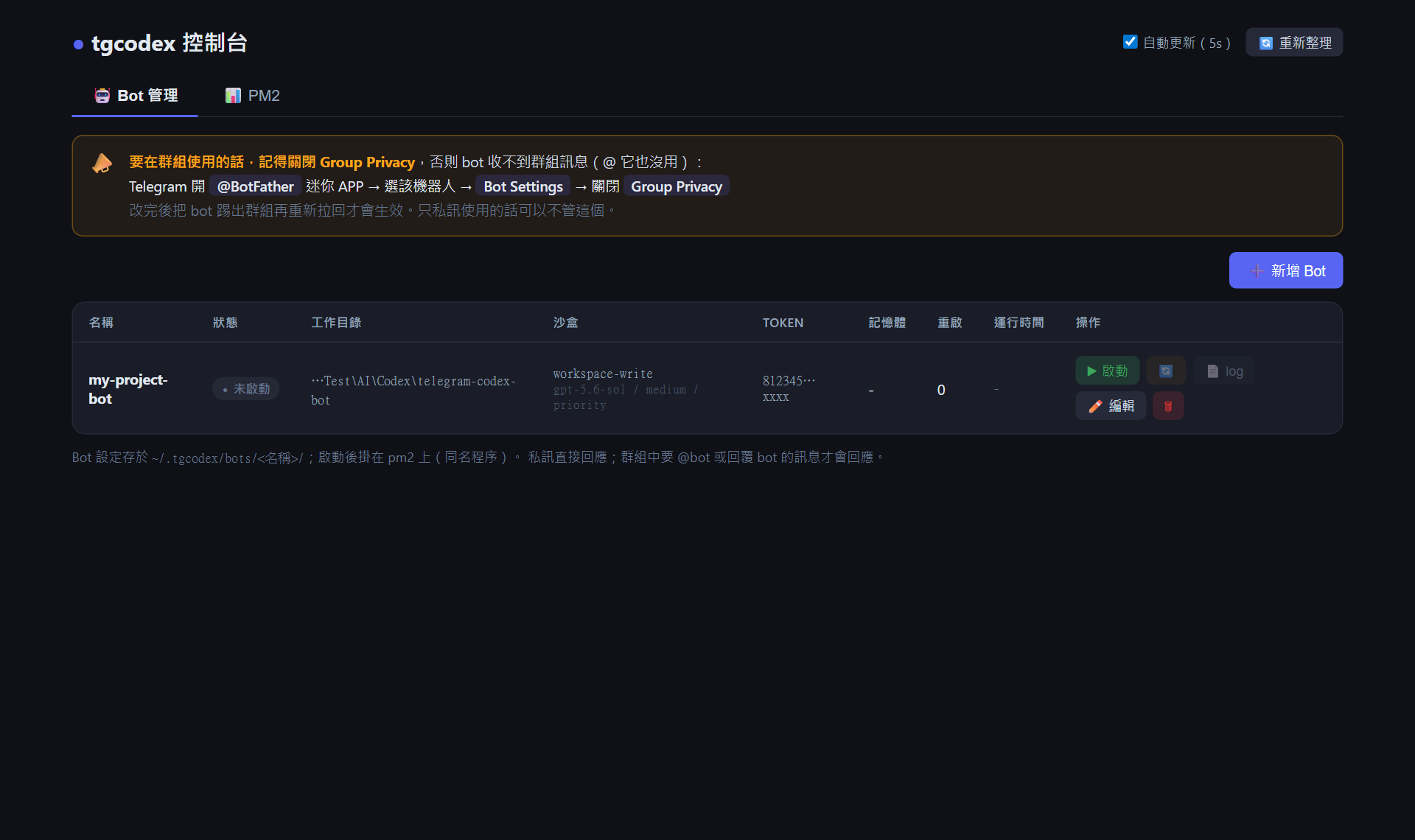
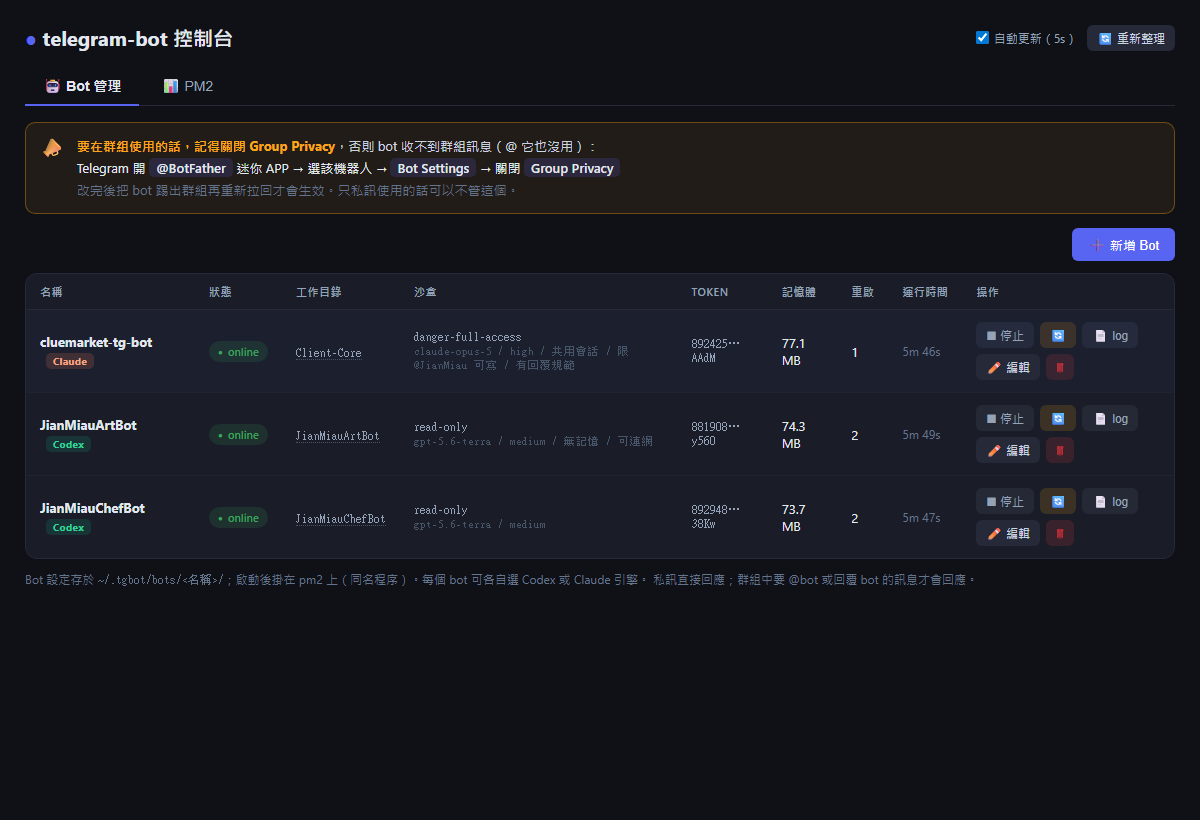
**① Bot 管理首頁** — 每個 bot 一列:狀態、工作目錄、沙盒與模型設定、遮罩後的 token。
|
||||
**① Bot 管理首頁** — 每個 bot 一列:名稱旁標示引擎、狀態、工作目錄、沙盒與模型設定、遮罩後的 token。
|
||||
右側按鈕:▶ 啟動 / ⏹ 停止、🔄 重啟、📄 log、✏️ 編輯、🗑 刪除。上方橫幅提醒群組使用要先關 Group Privacy。
|
||||
|
||||
|
||||
|
||||
|
||||
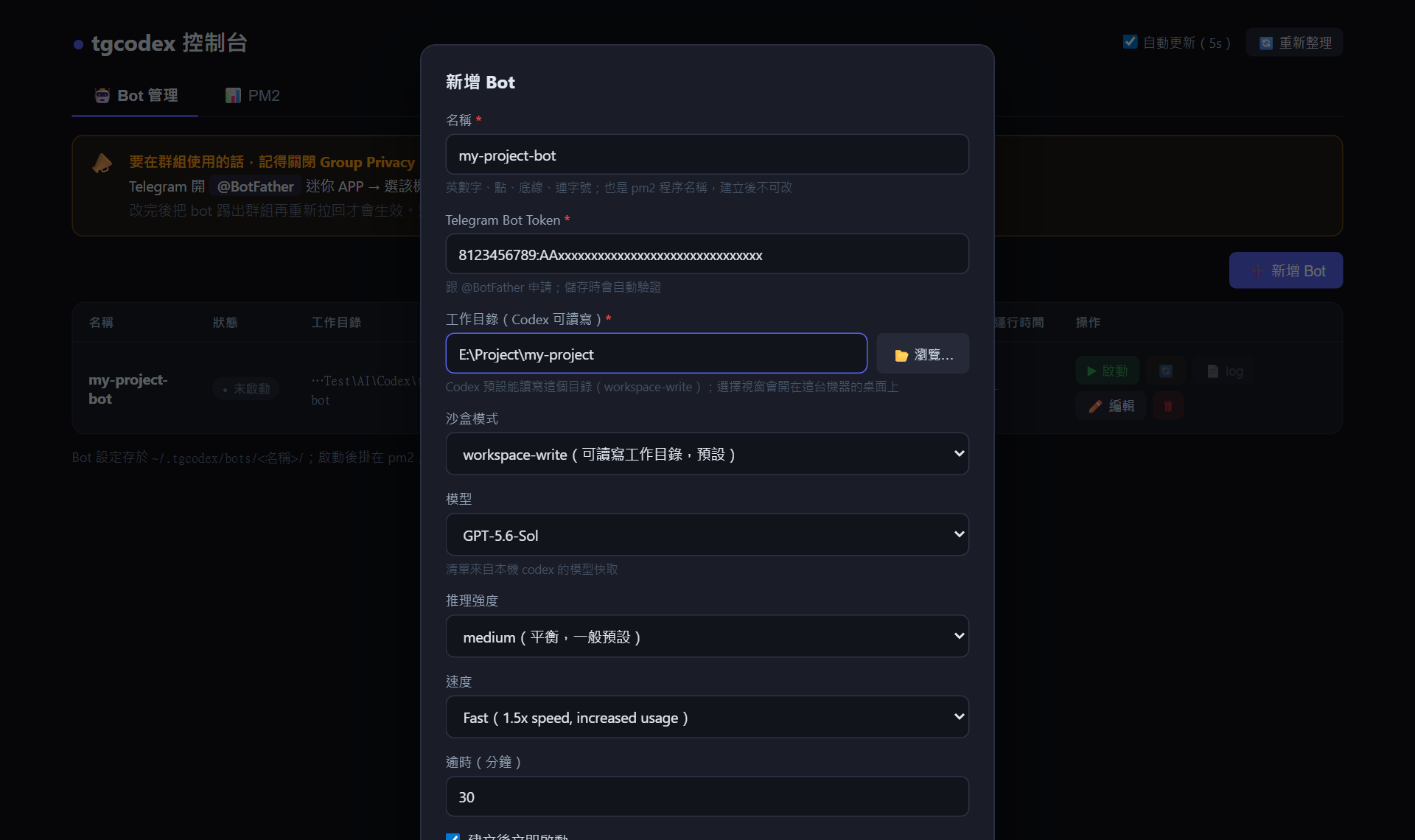
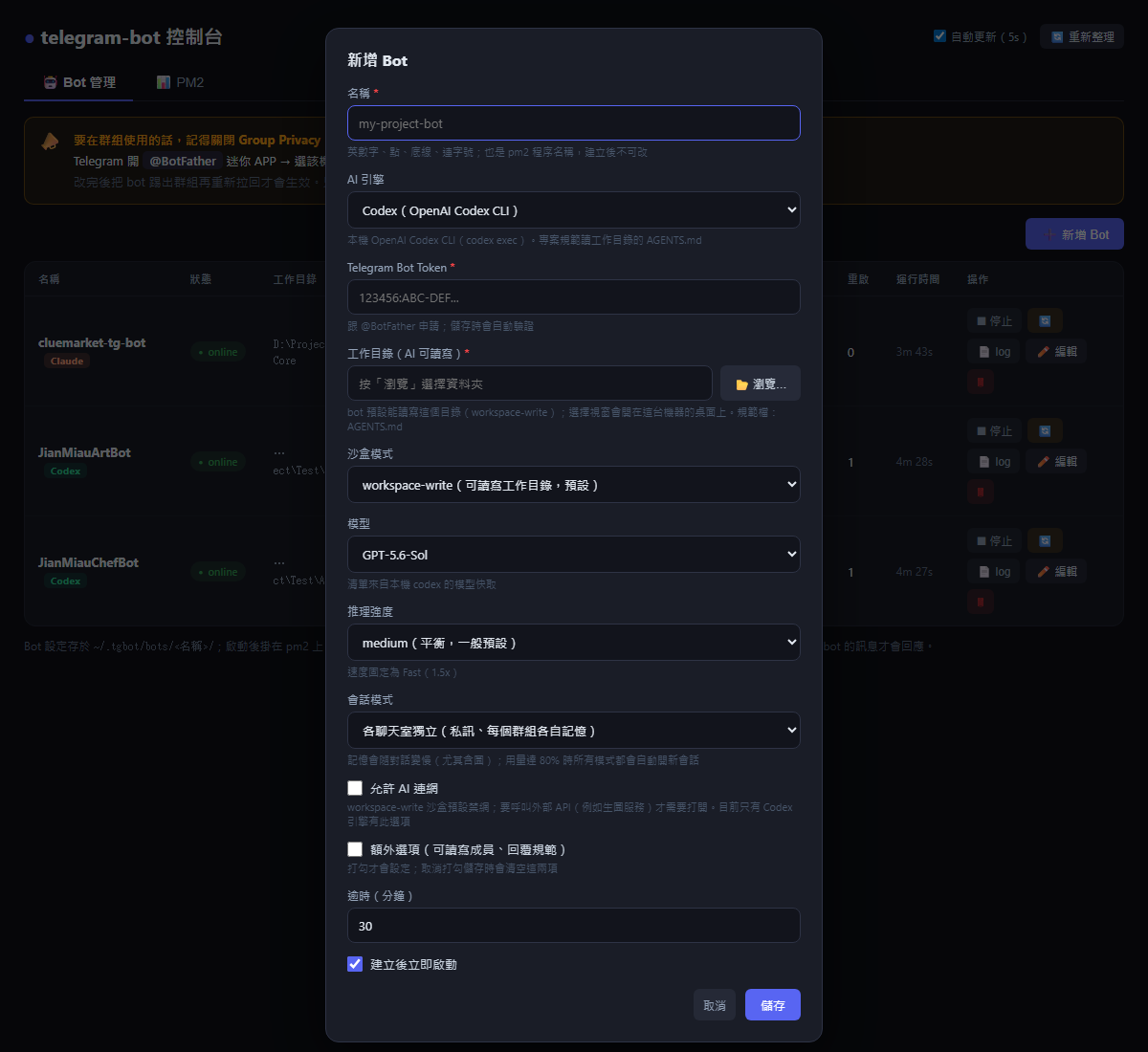
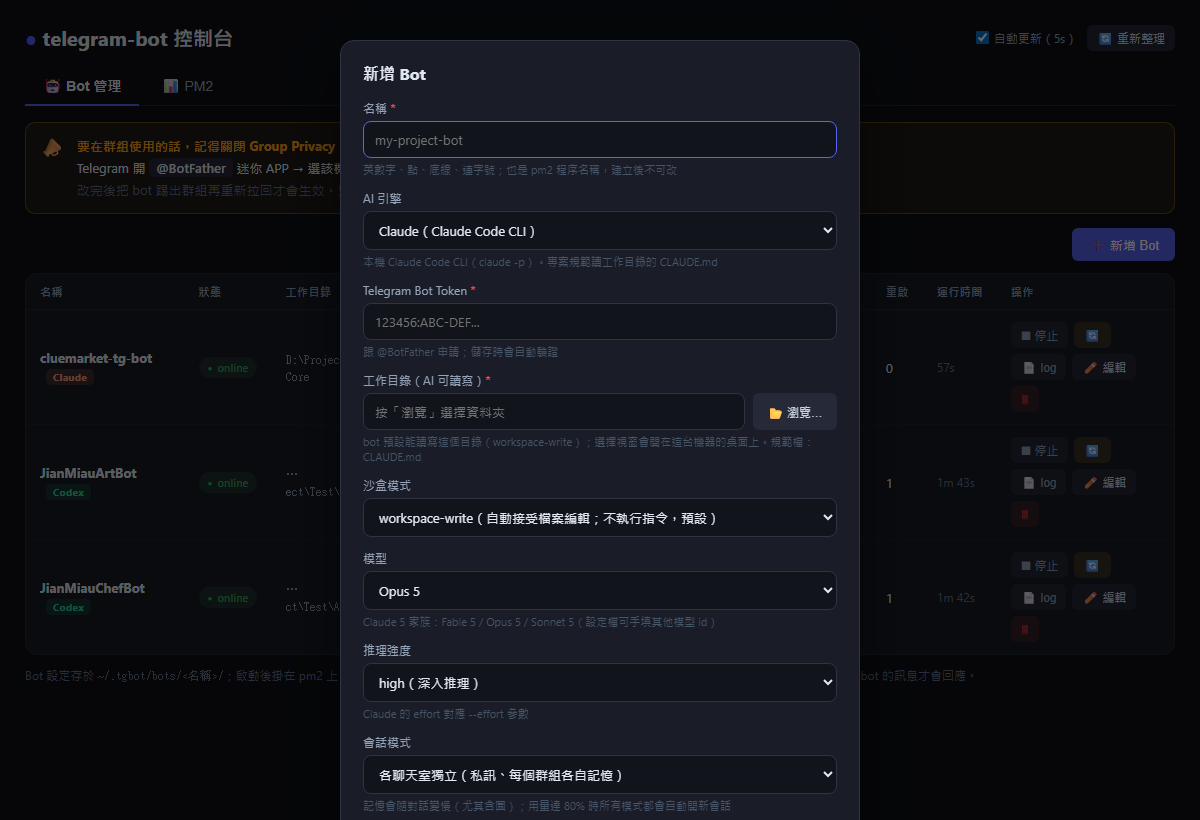
**② 新增 Bot** — 按右上「➕ 新增 Bot」:
|
||||
|
||||
1. **名稱**:也是 pm2 程序名,建立後不可改
|
||||
2. **Token**:貼上 BotFather 給的 token,儲存時自動打 Telegram 驗證,無效會警告
|
||||
3. **工作目錄**:按「📂 瀏覽…」會在這台機器桌面跳出原生資料夾視窗,選完自動帶入
|
||||
4. **模型 / 推理強度 / 速度**:下拉選單,預設值自動帶你機器上 codex 的全域設定;清單讀自本機 codex 模型快取,換模型時強度選項會連動(如 ultra 只有支援的模型才出現)
|
||||
5. 勾「建立後立即啟動」→ 儲存,bot 就上線了
|
||||
2. **AI 引擎**:Codex 或 Claude;沒裝的引擎會標「未安裝」。切換引擎時,下方的模型/強度/沙盒說明會跟著換
|
||||
3. **Token**:貼上 BotFather 給的 token,儲存時自動打 Telegram 驗證,無效會警告
|
||||
4. **工作目錄**:按「📂 瀏覽…」會在這台機器桌面跳出原生資料夾視窗,選完自動帶入
|
||||
5. **模型 / 推理強度**:下拉選單,預設值自動帶你機器上該引擎的全域設定;換模型時強度選項會連動
|
||||
6. **會話模式**:各聊天室獨立 / 所有聊天室共用 / 每則訊息獨立(不保留記憶,最快)
|
||||
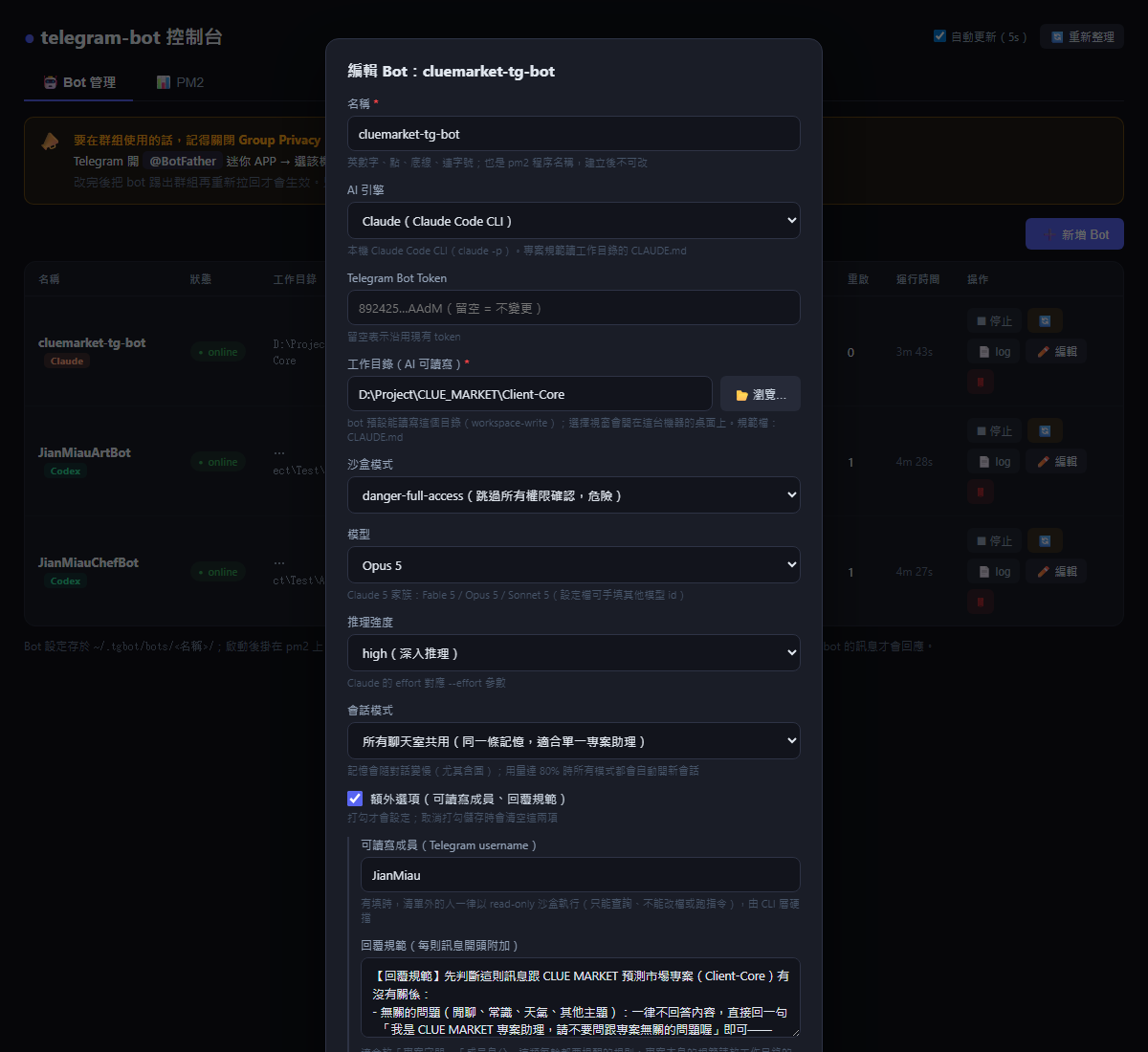
7. **額外選項**(打勾才展開;取消打勾儲存會清空):
|
||||
- **可讀寫成員**:填 Telegram username(逗號分隔),清單外的人一律以 read-only 沙盒執行,由 CLI 層硬擋;留空 = 所有人都依沙盒設定
|
||||
- **回覆規範**:每則訊息開頭附加的規則,例如「只回答本專案相關問題」「@xxx 是後端工程師,回覆用 API 契約視角」;專案本身的規範仍放工作目錄的 `AGENTS.md` / `CLAUDE.md`
|
||||
8. 勾「建立後立即啟動」→ 儲存,bot 就上線了
|
||||
|
||||
|
||||
|
||||
|
||||
引擎切到 Claude 時,模型/強度/沙盒說明會跟著換:
|
||||
|
||||
|
||||
|
||||
**編輯既有 bot** — 引擎、模型、可讀寫成員、回覆規範都可事後修改;執行中的 bot 儲存後會自動重啟套用。
|
||||
|
||||
|
||||
|
||||
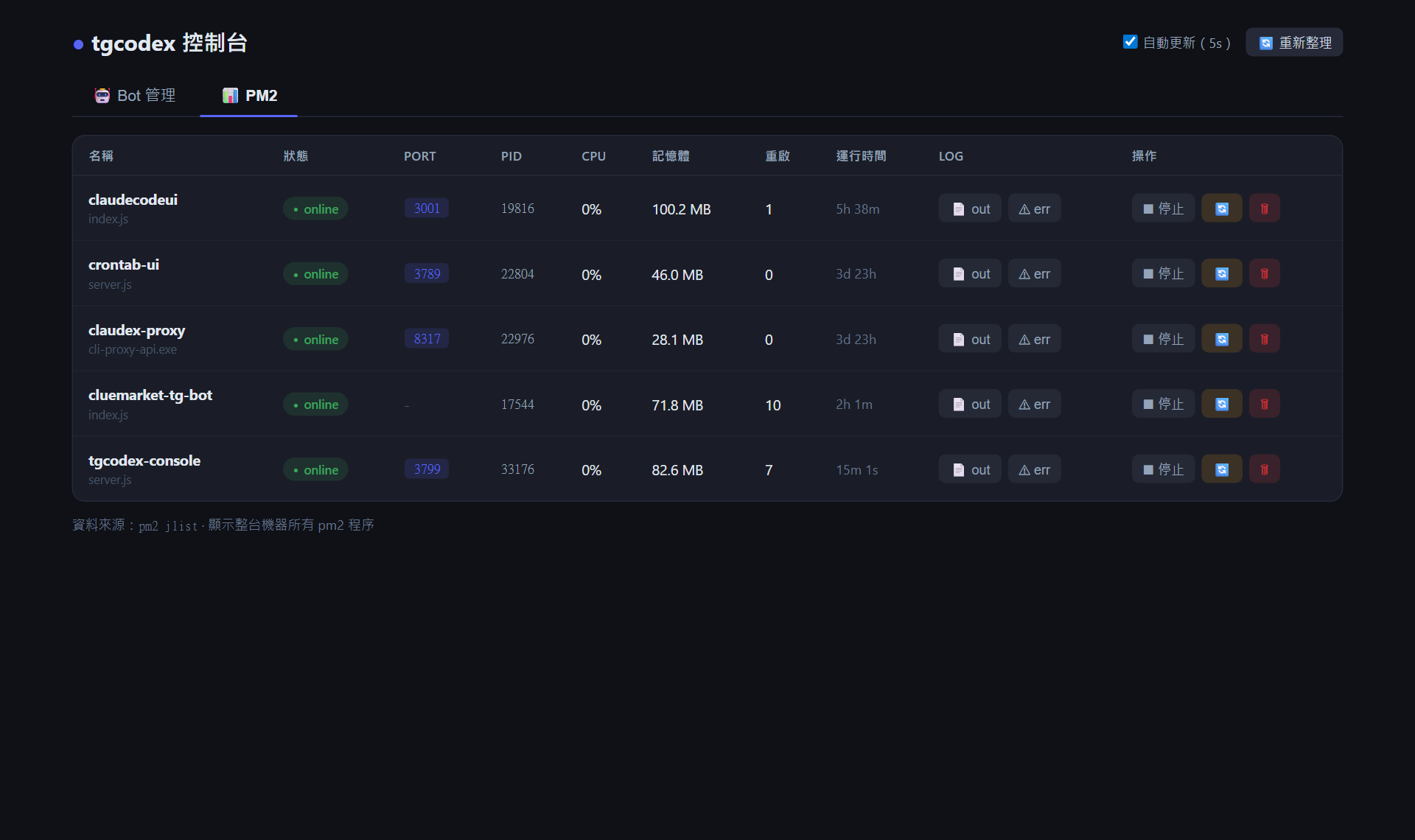
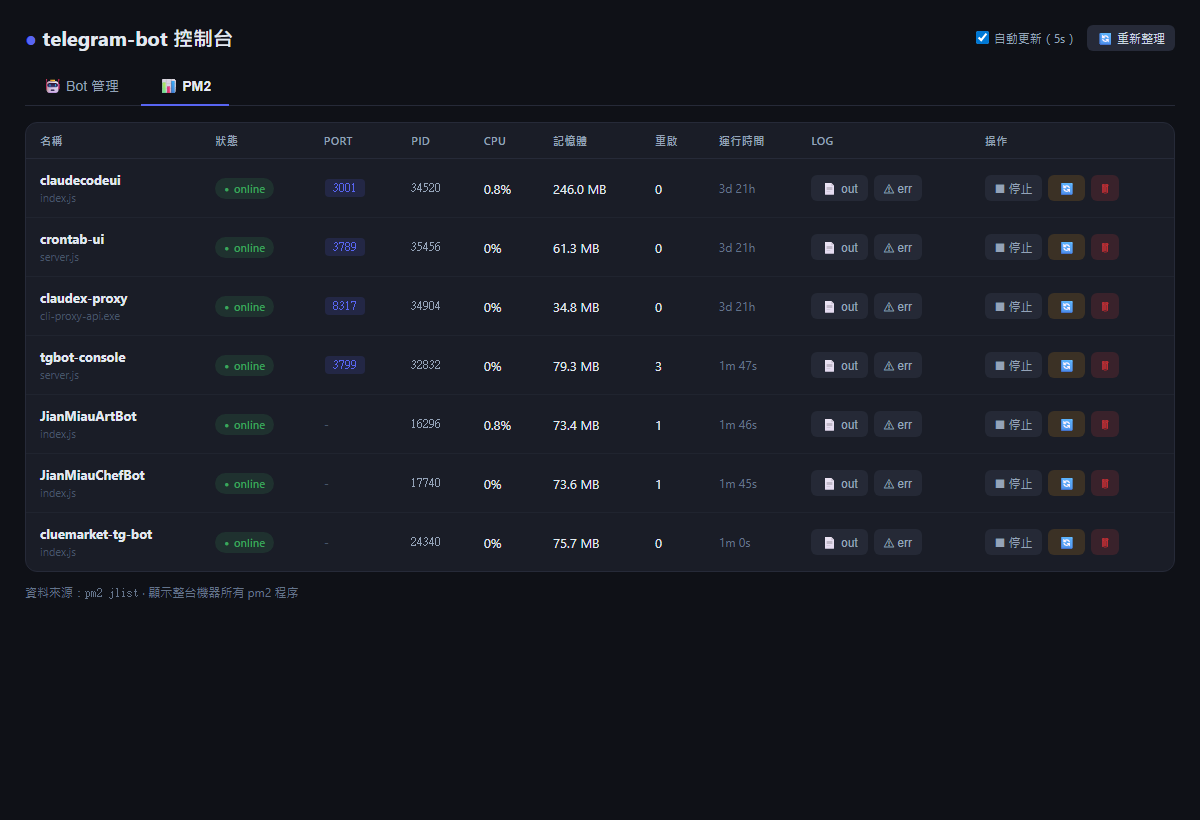
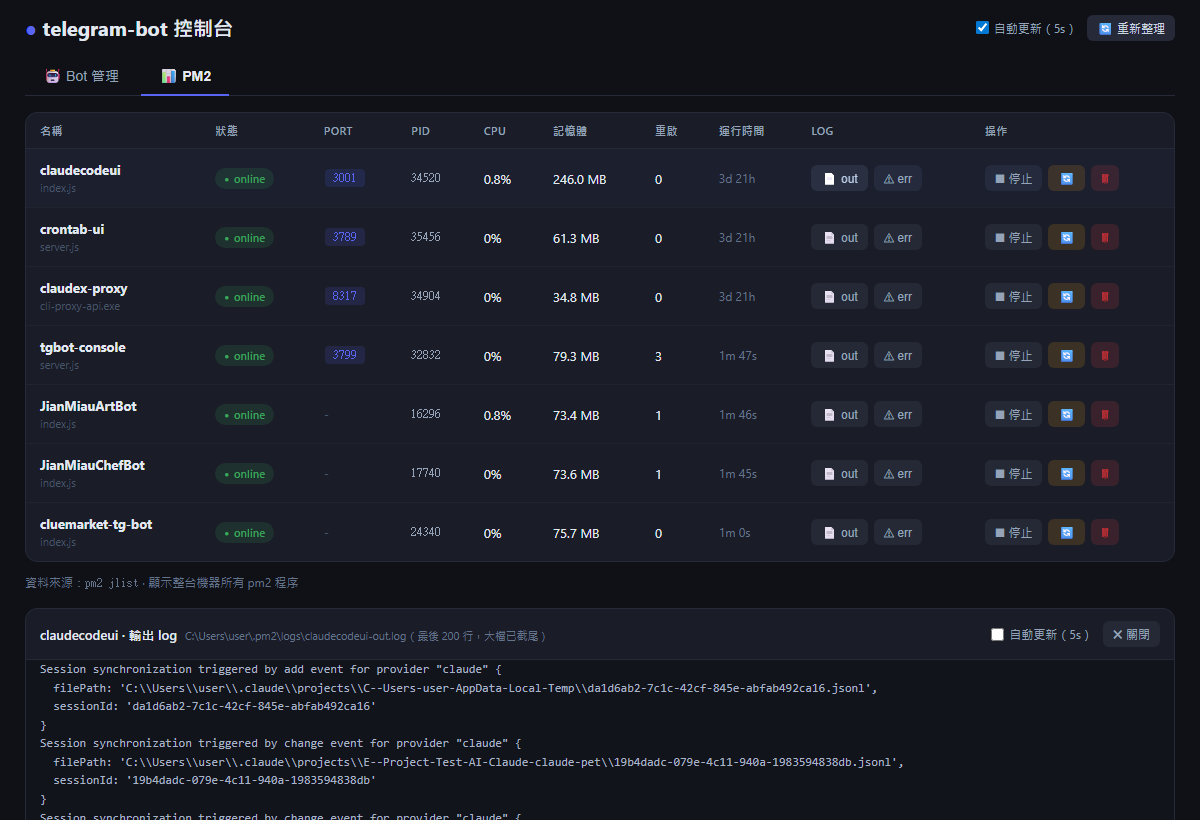
**③ PM2 分頁** — 整台機器所有 pm2 程序。Port 可直接點開對應網頁,右側可啟停/重啟/刪除任何程序。
|
||||
|
||||
|
||||
|
||||
|
||||
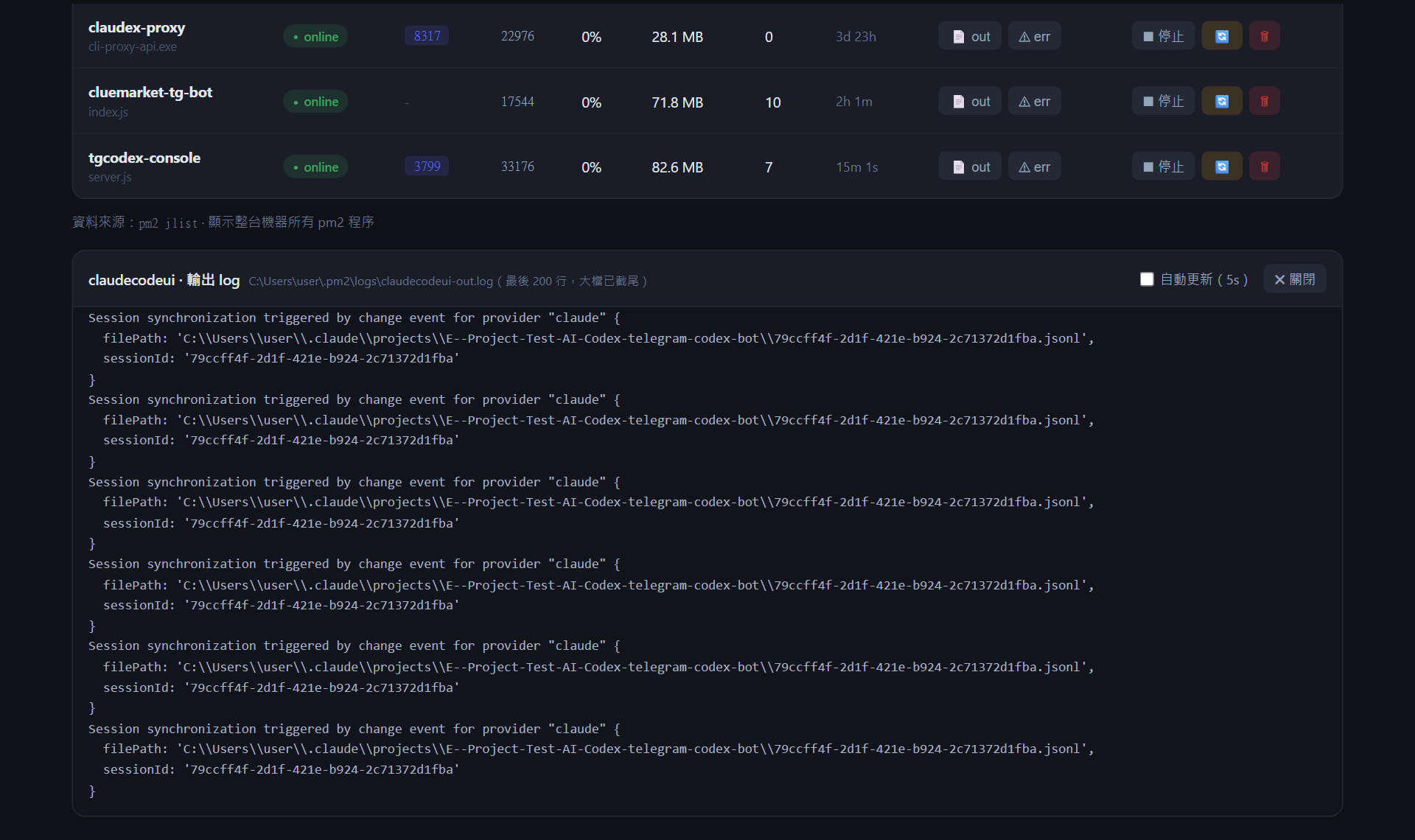
**④ Log 檢視** — 點任一程序的「📄 out」/「⚠ err」,下方展開尾端 200 行,可勾自動更新(5s)。
|
||||
|
||||
|
||||
|
||||
|
||||
- 兩個分頁每 5 秒自動更新
|
||||
- Bot 設定存於 `~/.tgcodex/bots/<名稱>/tgcodex.config.json`,bot 掛 pm2 的程序名 = bot 名稱
|
||||
- Bot 設定存於 `~/.tgbot/bots/<名稱>/tgbot.config.json`,bot 掛 pm2 的程序名 = bot 名稱
|
||||
- 預設只綁 `127.0.0.1`。這個介面能控制 pm2 且存有 token,**不要裸露到外網**;
|
||||
區網存取請自行評估(改 `~/.tgcodex/console.json` 的 `host`,無帳密保護)
|
||||
區網存取請自行評估(改 `~/.tgbot/console.json` 的 `host`,無帳密保護)
|
||||
|
||||
## CLI 指令
|
||||
|
||||
```
|
||||
telegram-codex-bot start 環境檢查 + 啟動 web 控制台(掛 pm2;--port 換 port 會記住;--skip-checks 跳過檢查)
|
||||
telegram-codex-bot doctor 只做環境檢查(codex CLI、codex 登入、pm2、git)
|
||||
telegram-codex-bot stop / restart 停止 / 重啟控制台(bot 不受影響)
|
||||
telegram-codex-bot delete 從 pm2 移除控制台
|
||||
telegram-codex-bot status 終端機看控制台與所有 bot 狀態
|
||||
telegram-codex-bot logs [--name <bot>] 跟看 log(不帶 --name 看控制台)
|
||||
telegram-codex-bot web 前景執行控制台(除錯用)
|
||||
telegram-bot start 環境檢查 + 啟動 web 控制台(掛 pm2;--port 換 port 會記住;--skip-checks 跳過檢查)
|
||||
telegram-bot doctor 只做環境檢查(codex / claude CLI 與登入、pm2、git)
|
||||
telegram-bot stop / restart 停止 / 重啟控制台(bot 不受影響)
|
||||
telegram-bot delete 從 pm2 移除控制台
|
||||
telegram-bot status 終端機看控制台與所有 bot 狀態
|
||||
telegram-bot logs [--name <bot>] 跟看 log(不帶 --name 看控制台)
|
||||
telegram-bot web 前景執行控制台(除錯用)
|
||||
```
|
||||
|
||||
短別名:`tgcodex`。CLI 只管控制台;bot 的一切(含啟停)都在網頁上操作。
|
||||
短別名:`tgbot`。CLI 只管控制台;bot 的一切(含啟停)都在網頁上操作。
|
||||
|
||||
## Telegram 指令
|
||||
## Telegram 指令與回應規則
|
||||
|
||||
| 指令 | 說明 |
|
||||
|---|---|
|
||||
| `/new`(或 `!clear`、`!重置`) | 開新會話,清除對話記憶 |
|
||||
| `/status` | 查看會話、工作目錄、沙盒模式 |
|
||||
| `/status` | 查看引擎、會話、工作目錄、沙盒模式 |
|
||||
| `/help` | 使用說明 |
|
||||
|
||||
## 回應規則與安全性
|
||||
- **私訊**:任何訊息都回應;**群組**:只回應 `@bot` 或回覆 bot 訊息的情況;訊息同時 tag 多個 bot 時只有第一個回應
|
||||
- **引用**:回覆/圈選引用某則訊息再 tag bot,引用內容會一起送給 AI;只引用不打字就直接把引用當輸入
|
||||
- **附件**:圖片、PDF、文字/程式碼檔都會下載給 AI 讀(Telegram Bot 下載上限 20MB;docx/xlsx/zip 等二進位不支援,bot 會回覆說明)
|
||||
- **bot 接力**:Telegram 不讓 bot 看到其他 bot 的訊息,所以「回覆 A bot 的回覆 + tag B bot(不打字)」時,B 會改拿同聊天室最近一則我們自家 bot 的發言當輸入(6 小時內)
|
||||
- 對話記憶用到 80% 上下文時自動開新會話(回覆會標示),避免越用越慢
|
||||
|
||||
- **私訊**:任何訊息都回應;**群組**:只回應 `@bot` 或回覆 bot 訊息的情況
|
||||
- 沒有使用者白名單:**任何找得到 bot 的人都能叫它在工作目錄跑 Codex**,請不要把 bot 加進不信任的群組、bot username 不要外流
|
||||
- 預設沙盒 `workspace-write`:Codex 只能寫工作目錄;`danger-full-access` 只在完全理解風險時使用
|
||||
- token 以明文存在 `~/.tgcodex/` 下的設定檔,請顧好這台機器的檔案權限
|
||||
## 安全性
|
||||
|
||||
- 沒有使用者白名單:**任何找得到 bot 的人都能叫它在工作目錄跑 AI**,請不要把 bot 加進不信任的群組、bot username 不要外流
|
||||
- 預設沙盒 `workspace-write`:AI 只能寫工作目錄;`danger-full-access` 只在完全理解風險時使用(Claude 引擎下等於 `--dangerously-skip-permissions`)
|
||||
- token 以明文存在 `~/.tgbot/` 下的設定檔,請顧好這台機器的檔案權限
|
||||
|
||||
## 從 telegram-codex-bot(0.1.x)升級
|
||||
|
||||
```bash
|
||||
npm install -g telegram-bot --registry=https://jianmiau.ddns.net/api/packages/AI/npm/
|
||||
npm uninstall -g telegram-codex-bot
|
||||
telegram-bot start
|
||||
```
|
||||
|
||||
`start` 會自動:把 `~/.tgcodex` 搬到 `~/.tgbot`(registry 路徑一併改寫)、把跑在舊套件上的 bot 重新掛到新套件、移除舊的 `tgcodex-console`。既有 bot 全部視為 Codex 引擎,設定與會話都保留;交件匣舊名 `.tgcodex-outbox/` 仍會收。
|
||||
|
||||
## 疑難排解
|
||||
|
||||
- **找不到 codex**:確認 `codex --version` 能跑;裝在非標準位置時,在 bot 設定檔加 `"codexPath": "C:/path/to/codex.js"`
|
||||
- **找不到 codex / claude**:確認 `codex --version` / `claude --version` 能跑;裝在非標準位置時,在 bot 設定檔加 `"codexPath"` / `"claudePath"`
|
||||
- **Claude bot 回「有 N 個操作因沙盒權限被拒」**:`workspace-write` 下 Claude 不能執行指令(Bash);需要跑指令請改 `danger-full-access`
|
||||
- **409 Conflict: terminated by other getUpdates**:同一個 token 跑了兩個實例(每個 bot 要用自己的 token)
|
||||
- **群組不理人**:見上方 BotFather privacy 設定
|
||||
- **開機自啟**:`pm2 startup` 照指示設定(Windows 可用 `pm2-installer`),控制台與 bot 啟動時都會自動 `pm2 save`
|
||||
|
||||
@@ -1,24 +1,25 @@
|
||||
#!/usr/bin/env node
|
||||
'use strict';
|
||||
// telegram-codex-bot CLI:start 把 web 控制台掛上 pm2;
|
||||
// bot 的新增(token、工作目錄、權限)與啟停全部在網頁控制台操作。
|
||||
// telegram-bot CLI:start 把 web 控制台掛上 pm2;
|
||||
// bot 的新增(引擎、token、工作目錄、權限)與啟停全部在網頁控制台操作。
|
||||
const { execSync, spawn } = require('child_process');
|
||||
const pm2 = require('../src/pm2util');
|
||||
|
||||
const HELP = `telegram-codex-bot — 用 Telegram 操控本機 Codex CLI 的 bot
|
||||
const HELP = `telegram-bot — 用 Telegram 操控本機 AI CLI(Codex / Claude Code)的 bot
|
||||
|
||||
用法:
|
||||
telegram-codex-bot start 檢查環境(codex/pm2/git)並啟動 web 控制台(掛 pm2)
|
||||
telegram-codex-bot start --port 3799 指定控制台 port(會記住)
|
||||
telegram-codex-bot doctor 只做環境檢查
|
||||
telegram-codex-bot stop 停止控制台(bot 不受影響)
|
||||
telegram-codex-bot restart 重啟控制台
|
||||
telegram-codex-bot delete 從 pm2 移除控制台
|
||||
telegram-codex-bot status 顯示控制台與所有 bot 狀態
|
||||
telegram-codex-bot logs [--name <bot>] 跟看 log(不帶 --name 看控制台)
|
||||
telegram-codex-bot web 前景執行控制台(不經 pm2,除錯用)
|
||||
telegram-bot start 檢查環境(codex/claude/pm2/git)並啟動 web 控制台(掛 pm2)
|
||||
telegram-bot start --port 3799 指定控制台 port(會記住)
|
||||
telegram-bot doctor 只做環境檢查
|
||||
telegram-bot stop 停止控制台(bot 不受影響)
|
||||
telegram-bot restart 重啟控制台
|
||||
telegram-bot delete 從 pm2 移除控制台
|
||||
telegram-bot status 顯示控制台與所有 bot 狀態
|
||||
telegram-bot logs [--name <bot>] 跟看 log(不帶 --name 看控制台)
|
||||
telegram-bot web 前景執行控制台(不經 pm2,除錯用)
|
||||
|
||||
bot 的新增 / token / 工作目錄 / 允許名單 / 啟停,都在控制台網頁的「🤖 Bot 管理」分頁設定。
|
||||
bot 的新增 / 引擎(Codex 或 Claude)/ token / 工作目錄 / 啟停,都在控制台網頁的「🤖 Bot 管理」分頁設定。
|
||||
短別名:tgbot
|
||||
`;
|
||||
|
||||
function parseArgs(argv) {
|
||||
@@ -51,7 +52,7 @@ function requirePm2() {
|
||||
}
|
||||
|
||||
async function cmdStart(args) {
|
||||
// 環境檢查:codex CLI / 登入 / pm2 / git
|
||||
// 環境檢查:codex / claude(至少一個)/ 登入 / pm2 / git
|
||||
if (!args.flags['skip-checks']) {
|
||||
const { runChecks, printChecks, hasBlocker } = require('../src/doctor');
|
||||
const checks = runChecks();
|
||||
@@ -62,6 +63,13 @@ async function cmdStart(args) {
|
||||
process.exit(1);
|
||||
}
|
||||
}
|
||||
requirePm2();
|
||||
// 從 telegram-codex-bot(0.1.x)升級:搬家目錄、把 bot 程序切到新套件
|
||||
const { migrateLegacy } = require('../src/migrate');
|
||||
const notes = await migrateLegacy();
|
||||
for (const n of notes) console.log(n);
|
||||
if (notes.length) console.log('');
|
||||
|
||||
if (args.flags.port) {
|
||||
const settings = pm2.loadConsoleSettings();
|
||||
settings.port = Number(args.flags.port);
|
||||
@@ -76,7 +84,7 @@ async function cmdStart(args) {
|
||||
console.log(`✅ 控制台${alreadyRunning ? '已在執行' : '已掛上 pm2'}(${pm2.CONSOLE_NAME})`);
|
||||
console.log('');
|
||||
console.log(`📊 控制台:${url}`);
|
||||
console.log(' 在「🤖 Bot 管理」分頁新增 bot(token、工作目錄、權限都在裡面設定)。');
|
||||
console.log(' 在「🤖 Bot 管理」分頁新增 bot(選 Codex 或 Claude 引擎,token、工作目錄都在裡面設定)。');
|
||||
}
|
||||
|
||||
async function cmdConsoleAction(action) {
|
||||
@@ -96,6 +104,7 @@ async function cmdStatus() {
|
||||
const settings = pm2.loadConsoleSettings();
|
||||
const consoleProc = list.find((p) => p.name === pm2.CONSOLE_NAME);
|
||||
console.log(`控制台(${pm2.CONSOLE_NAME}):${consoleProc ? consoleProc.pm2_env?.status : '未啟動'} ${pm2.consoleUrl(settings)}`);
|
||||
console.log(`設定目錄:${pm2.TGBOT_HOME}`);
|
||||
|
||||
const bots = await listBots();
|
||||
if (bots.length === 0) {
|
||||
@@ -104,6 +113,7 @@ async function cmdStatus() {
|
||||
}
|
||||
console.table(bots.map((b) => ({
|
||||
name: b.name,
|
||||
engine: b.engine,
|
||||
status: b.status,
|
||||
workDir: b.workDir,
|
||||
sandbox: b.sandbox,
|
||||
|
||||

|
Before Width: | Height: | Size: 93 KiB After Width: | Height: | Size: 65 KiB |

|
Before Width: | Height: | Size: 137 KiB After Width: | Height: | Size: 116 KiB |

|
After Width: | Height: | Size: 99 KiB |

|
Before Width: | Height: | Size: 100 KiB After Width: | Height: | Size: 64 KiB |

|
Before Width: | Height: | Size: 144 KiB After Width: | Height: | Size: 90 KiB |

|
After Width: | Height: | Size: 130 KiB |

@@ -1,7 +1,7 @@
|
||||
{
|
||||
"name": "telegram-codex-bot",
|
||||
"version": "0.1.14",
|
||||
"description": "Telegram bot powered by the local Codex CLI — zero-dependency, pm2-managed, with a built-in PM2 web viewer",
|
||||
"name": "telegram-bot",
|
||||
"version": "0.2.6",
|
||||
"description": "Telegram bot powered by your local AI CLI (OpenAI Codex or Claude Code) — zero-dependency, pm2-managed, with a web console to manage multiple bots",
|
||||
"license": "MIT",
|
||||
"type": "commonjs",
|
||||
"publishConfig": {
|
||||
@@ -9,12 +9,12 @@
|
||||
},
|
||||
"repository": {
|
||||
"type": "git",
|
||||
"url": "ssh://git@jianmiau.ddns.net:8022/AI/telegram-codex-bot.git"
|
||||
"url": "ssh://git@jianmiau.ddns.net:8022/AI/telegram-bot.git"
|
||||
},
|
||||
"main": "src/index.js",
|
||||
"bin": {
|
||||
"telegram-codex-bot": "bin/cli.js",
|
||||
"tgcodex": "bin/cli.js"
|
||||
"telegram-bot": "bin/cli.js",
|
||||
"tgbot": "bin/cli.js"
|
||||
},
|
||||
"files": [
|
||||
"bin/",
|
||||
@@ -34,6 +34,8 @@
|
||||
"bot",
|
||||
"codex",
|
||||
"codex-cli",
|
||||
"claude",
|
||||
"claude-code",
|
||||
"pm2",
|
||||
"ai",
|
||||
"agent"
|
||||
|
||||
@@ -1,11 +1,14 @@
|
||||
'use strict';
|
||||
// Bot 主邏輯:長輪詢、指令、佇列、進度回報。
|
||||
// Bot 主邏輯:長輪詢、指令、佇列、進度回報。實際跑 AI 的是 engines/(codex 或 claude),
|
||||
// 這裡只認共同介面 run({ config, prompt, threadId, images, onProgress }) → { text, threadId, usage, model }。
|
||||
const fs = require('fs');
|
||||
const os = require('os');
|
||||
const path = require('path');
|
||||
const crypto = require('crypto');
|
||||
const { createTelegram } = require('./telegram');
|
||||
const { runCodex } = require('./codex');
|
||||
const { getEngine } = require('./engines');
|
||||
const { createSessionStore } = require('./sessions');
|
||||
const { TGBOT_HOME } = require('./pm2util');
|
||||
|
||||
// codex 的模型快取與全域預設(config.toml),給 footer 顯示 ctx% 與模型/強度用
|
||||
function loadModelMeta() {
|
||||
@@ -33,34 +36,27 @@ function loadCodexDefaults() {
|
||||
}
|
||||
|
||||
// — ✅ 16:06:32 | ctx 24% +1.2k | gpt-5.6-sol / high
|
||||
function buildFooter(config, usage, modelMeta, codexDefaults) {
|
||||
function buildFooter({ model, effort, usage, contextWindow }) {
|
||||
const time = new Date().toLocaleTimeString('zh-TW', { hour12: false });
|
||||
const parts = [`— ✅ ${time}`];
|
||||
|
||||
const model = config.model || codexDefaults.model;
|
||||
const meta = modelMeta[model];
|
||||
if (usage) {
|
||||
const used = (usage.input_tokens || 0) + (usage.output_tokens || 0);
|
||||
// 本輪新消耗(扣掉 cache 命中的部分)
|
||||
const fresh = Math.max(0, (usage.input_tokens || 0) - (usage.cached_input_tokens || 0)) + (usage.output_tokens || 0);
|
||||
const freshStr = fresh >= 1000 ? `+${(fresh / 1000).toFixed(1)}k` : `+${fresh}`;
|
||||
const cw = meta?.context_window;
|
||||
parts.push(cw ? `ctx ${Math.round((used / cw) * 100)}% ${freshStr}` : freshStr);
|
||||
parts.push(contextWindow ? `ctx ${Math.round((used / contextWindow) * 100)}% ${freshStr}` : freshStr);
|
||||
}
|
||||
|
||||
if (model) {
|
||||
const effort = config.reasoningEffort || codexDefaults.effort || meta?.default_reasoning_level || '';
|
||||
parts.push(effort ? `${model} / ${effort}` : model);
|
||||
}
|
||||
if (model) parts.push(effort ? `${model} / ${effort}` : model);
|
||||
return `\n\n${parts.join(' | ')}`;
|
||||
}
|
||||
|
||||
const crypto = require('crypto');
|
||||
|
||||
// Codex 要傳檔案給使用者的交件匣(在工作目錄底下,沙盒內可寫)
|
||||
const OUTBOX_DIRNAME = '.tgcodex-outbox';
|
||||
// AI 要傳檔案給使用者的交件匣(在工作目錄底下,沙盒內可寫);舊名稱也一併收
|
||||
const OUTBOX_DIRNAME = '.tgbot-outbox';
|
||||
const LEGACY_OUTBOX_DIRNAMES = ['.tgcodex-outbox'];
|
||||
// codex 內建 imagegen 技能的預設輸出位置(依會話 id 分資料夾)
|
||||
const GENERATED_IMAGES_DIR = path.join(require('os').homedir(), '.codex', 'generated_images');
|
||||
const GENERATED_IMAGES_DIR = path.join(os.homedir(), '.codex', 'generated_images');
|
||||
|
||||
// 這一輪 codex 用 imagegen 生成、但沒複製進交件匣的圖(模型偶爾會忘)
|
||||
function collectGeneratedImages(threadId, sinceMs) {
|
||||
@@ -103,14 +99,23 @@ const HELP_COMMANDS = ['/start', '/help', '!help', '!幫助'];
|
||||
function startBot(config) {
|
||||
const t = createTelegram(config.telegramToken);
|
||||
const sessions = createSessionStore(config.stateDir);
|
||||
const modelMeta = loadModelMeta();
|
||||
const codexDefaults = loadCodexDefaults();
|
||||
const engine = getEngine(config.engine);
|
||||
const modelMeta = engine.id === 'codex' ? loadModelMeta() : {};
|
||||
const codexDefaults = engine.id === 'codex' ? loadCodexDefaults() : { model: '', effort: '', tier: '' };
|
||||
|
||||
let botId = null;
|
||||
let botUsername = null;
|
||||
// 同一個工作目錄不能同時跑兩個 codex(會互相踩檔案),全域串行
|
||||
// 同一個工作目錄不能同時跑兩個 AI(會互相踩檔案),全域串行
|
||||
let queue = Promise.resolve();
|
||||
|
||||
// footer / 自動重置用:這輪實際的模型、強度、上下文視窗
|
||||
function resolveDisplay(result) {
|
||||
const model = result?.model || config.model || codexDefaults.model || '';
|
||||
const effort = config.reasoningEffort || codexDefaults.effort || modelMeta[model]?.default_reasoning_level || '';
|
||||
const contextWindow = result?.usage?.context_window || modelMeta[model]?.context_window || null;
|
||||
return { model, effort, contextWindow };
|
||||
}
|
||||
|
||||
function shouldRespond(message) {
|
||||
if (message.chat.type === 'private') return true;
|
||||
const text = message.text || message.caption || '';
|
||||
@@ -141,8 +146,8 @@ function startBot(config) {
|
||||
return commands.includes(head.toLowerCase());
|
||||
}
|
||||
|
||||
// 把 codex 放進交件匣的檔案傳到 Telegram(傳完清掉),
|
||||
// 再補傳這一輪 imagegen 生成但沒進交件匣的圖(用內容 hash 去重,避免重複傳)。
|
||||
// 把 AI 放進交件匣的檔案傳到 Telegram(傳完清掉),
|
||||
// 再補傳這一輪 codex imagegen 生成但沒進交件匣的圖(用內容 hash 去重,避免重複傳)。
|
||||
async function flushOutputs(chatId, replyTo, threadId, sinceMs) {
|
||||
const sentHashes = new Set();
|
||||
let sentCount = 0;
|
||||
@@ -162,14 +167,16 @@ function startBot(config) {
|
||||
};
|
||||
|
||||
// 1) 交件匣(明確交付:任何檔案類型)
|
||||
const dir = path.join(config.workDir, OUTBOX_DIRNAME);
|
||||
let outbox = [];
|
||||
try {
|
||||
outbox = fs.readdirSync(dir)
|
||||
.map((f) => path.join(dir, f))
|
||||
.filter((p) => { try { return fs.statSync(p).isFile(); } catch { return false; } })
|
||||
.sort();
|
||||
} catch { /* 沒有交件匣 */ }
|
||||
for (const dirname of [OUTBOX_DIRNAME, ...LEGACY_OUTBOX_DIRNAMES]) {
|
||||
const dir = path.join(config.workDir, dirname);
|
||||
try {
|
||||
outbox.push(...fs.readdirSync(dir)
|
||||
.map((f) => path.join(dir, f))
|
||||
.filter((p) => { try { return fs.statSync(p).isFile(); } catch { return false; } })
|
||||
.sort());
|
||||
} catch { /* 沒有這個交件匣 */ }
|
||||
}
|
||||
for (const file of outbox.slice(0, MAX_OUTBOX_FILES)) {
|
||||
await send(file, { deleteAfter: true });
|
||||
}
|
||||
@@ -177,10 +184,12 @@ function startBot(config) {
|
||||
await t.sendMessage(chatId, `⚠️ 交件匣一次最多傳 ${MAX_OUTBOX_FILES} 個檔案,還有 ${outbox.length - MAX_OUTBOX_FILES} 個留在 ${OUTBOX_DIRNAME}/`).catch(() => {});
|
||||
}
|
||||
|
||||
// 2) 保險網:imagegen 這一輪的產圖(不刪原檔,codex 之後編輯圖片可能還要用)
|
||||
for (const file of collectGeneratedImages(threadId, sinceMs).slice(0, MAX_OUTBOX_FILES)) {
|
||||
if (sentCount >= MAX_OUTBOX_FILES) break;
|
||||
await send(file, { deleteAfter: false });
|
||||
// 2) 保險網:codex imagegen 這一輪的產圖(不刪原檔,codex 之後編輯圖片可能還要用)
|
||||
if (engine.supportsImageGen) {
|
||||
for (const file of collectGeneratedImages(threadId, sinceMs).slice(0, MAX_OUTBOX_FILES)) {
|
||||
if (sentCount >= MAX_OUTBOX_FILES) break;
|
||||
await send(file, { deleteAfter: false });
|
||||
}
|
||||
}
|
||||
}
|
||||
|
||||
@@ -196,18 +205,28 @@ function startBot(config) {
|
||||
} catch { /* ignore */ }
|
||||
}
|
||||
|
||||
// 取出訊息附圖(photo 取最大尺寸;image/* 的 document 也支援)
|
||||
function pickPhoto(message) {
|
||||
// 取出訊息附件:photo 取最大尺寸;document 依 mime/副檔名分成 image / file(PDF、文字、程式碼)/ unsupported
|
||||
const TELEGRAM_GETFILE_LIMIT = 20 * 1024 * 1024; // Bot API getFile 上限
|
||||
const TEXT_EXTS = new Set(['.txt', '.md', '.log', '.json', '.yaml', '.yml', '.csv', '.tsv', '.xml', '.html', '.htm', '.css',
|
||||
'.js', '.mjs', '.cjs', '.ts', '.tsx', '.jsx', '.py', '.java', '.go', '.rs', '.c', '.cc', '.cpp', '.h', '.hpp', '.cs',
|
||||
'.php', '.rb', '.sh', '.bat', '.ps1', '.sql', '.toml', '.ini', '.cfg', '.env', '.conf', '.vue', '.svelte', '.kt', '.swift']);
|
||||
function pickAttachment(message) {
|
||||
if (message.photo?.length) {
|
||||
const largest = message.photo[message.photo.length - 1];
|
||||
return { fileId: largest.file_id, uniqueId: largest.file_unique_id, ext: '.jpg' };
|
||||
return { kind: 'image', fileId: largest.file_id, uniqueId: largest.file_unique_id, ext: '.jpg', name: '', size: largest.file_size || 0 };
|
||||
}
|
||||
const doc = message.document;
|
||||
if (doc && /^image\//.test(doc.mime_type || '')) {
|
||||
const ext = path.extname(doc.file_name || '') || '.' + (doc.mime_type.split('/')[1] || 'png');
|
||||
return { fileId: doc.file_id, uniqueId: doc.file_unique_id, ext };
|
||||
if (!doc) return null;
|
||||
const mime = doc.mime_type || '';
|
||||
const name = doc.file_name || '';
|
||||
const extFromName = path.extname(name).toLowerCase();
|
||||
const base = { fileId: doc.file_id, uniqueId: doc.file_unique_id, name, mime, size: doc.file_size || 0 };
|
||||
if (/^image\//.test(mime)) return { ...base, kind: 'image', ext: extFromName || '.' + (mime.split('/')[1] || 'png') };
|
||||
if (mime === 'application/pdf' || extFromName === '.pdf') return { ...base, kind: 'file', ext: '.pdf' };
|
||||
if (/^text\//.test(mime) || /^application\/(json|xml|x-yaml|yaml|javascript|typescript|x-sh|toml)$/.test(mime) || TEXT_EXTS.has(extFromName)) {
|
||||
return { ...base, kind: 'file', ext: extFromName || '.txt' };
|
||||
}
|
||||
return null;
|
||||
return { ...base, kind: 'unsupported', ext: extFromName };
|
||||
}
|
||||
|
||||
// 使用者引用/回覆的文字(圈選引用優先,其次是被回覆的整則訊息)
|
||||
@@ -218,7 +237,7 @@ function startBot(config) {
|
||||
// Telegram 限制:bot 永遠看不到其他 bot 的訊息——使用者「回覆另一隻 bot + tag 我」時,
|
||||
// reply_to_message 會被整個剝掉。繞法:每隻 bot 把自己在各聊天室的最後一則回覆
|
||||
// 寫進共用資料夾,收到「只有 tag 沒內容」時就拿同聊天室最近一則兄弟 bot 的發言當輸入。
|
||||
const CHATLAST_DIR = path.join(os.homedir(), '.tgcodex', 'chatlast');
|
||||
const CHATLAST_DIR = path.join(TGBOT_HOME, 'chatlast');
|
||||
const SIBLING_MAX_AGE_MS = 6 * 60 * 60 * 1000; // 超過 6 小時的舊訊息就不當引用
|
||||
|
||||
function recordChatLast(chatId, text) {
|
||||
@@ -246,6 +265,7 @@ function startBot(config) {
|
||||
const name = [from.first_name, from.last_name].filter(Boolean).join(' ') || '未知使用者';
|
||||
const sender = from.username ? `${name}(@${from.username})` : name;
|
||||
const parts = [OUTBOX_RULE];
|
||||
if (config.promptRules) parts.push(config.promptRules);
|
||||
const replied = message.reply_to_message;
|
||||
// 回覆我自己的訊息通常已在會話記憶裡,不重複貼;但使用者沒打字只回覆時例外(那就是輸入本身)
|
||||
if (replied && (includeOwnReply || replied.from?.id !== botId) && (replied.text || replied.caption)) {
|
||||
@@ -260,13 +280,17 @@ function startBot(config) {
|
||||
|
||||
function statusText(chatId) {
|
||||
const s = sessionKeyOf(chatId) ? sessions.get(sessionKeyOf(chatId)) : null;
|
||||
const { model, effort } = resolveDisplay(null);
|
||||
return [
|
||||
'📋 目前狀態',
|
||||
`引擎:${engine.label}`,
|
||||
`工作目錄:${config.workDir}`,
|
||||
`沙盒模式:${config.sandbox}`,
|
||||
`模型:${config.model || '(codex 預設)'}`,
|
||||
`推理強度:${config.reasoningEffort || '(預設)'}`,
|
||||
`模型:${model || `(${engine.label} 預設)`}`,
|
||||
`推理強度:${effort || '(預設)'}`,
|
||||
`會話模式:${SESSION_MODE_LABELS[config.sessionMode] || config.sessionMode}`,
|
||||
config.writeUsers.length ? `可讀寫成員:${config.writeUsers.map((u) => '@' + u).join('、')}(其他人唯讀)` : '可讀寫成員:所有人(依沙盒設定)',
|
||||
config.promptRules ? `回覆規範:已設定(${config.promptRules.length} 字)` : '回覆規範:無',
|
||||
config.sessionMode === 'stateless'
|
||||
? '會話:每則訊息獨立,不保留記憶'
|
||||
: s ? `會話:${s.threadId}\n最後使用:${s.updatedAt}` : '會話:尚未建立(下一則訊息會開新會話)',
|
||||
@@ -274,7 +298,7 @@ function startBot(config) {
|
||||
}
|
||||
|
||||
const HELP_TEXT = [
|
||||
'🤖 我是 Codex bot,訊息直接丟給我就會在專案目錄裡動工。',
|
||||
`🤖 我是 ${engine.label} bot,訊息直接丟給我就會在專案目錄裡動工。`,
|
||||
'',
|
||||
'指令:',
|
||||
'/new — 開新會話(清除目前對話記憶)',
|
||||
@@ -296,9 +320,14 @@ function startBot(config) {
|
||||
const chatId = message.chat.id;
|
||||
const sessionKey = sessionKeyOf(chatId);
|
||||
const text = message.text || message.caption || '';
|
||||
const photo = pickPhoto(message);
|
||||
const attachment = pickAttachment(message);
|
||||
const photo = attachment; // 有任何附件都視同有內容
|
||||
if (!text && !photo) return;
|
||||
if (!shouldRespond(message)) return;
|
||||
// 讀寫權限:有設 writeUsers 時,清單外的人一律 read-only(沙盒層硬擋,不靠模型自律)
|
||||
const senderName = (message.from?.username || '').toLowerCase();
|
||||
const canWrite = config.writeUsers.length === 0 || config.writeUsers.some((u) => u.toLowerCase() === senderName);
|
||||
const runConfig = canWrite ? config : { ...config, sandbox: 'read-only', networkAccess: false };
|
||||
|
||||
const content = stripMention(text);
|
||||
|
||||
@@ -334,7 +363,7 @@ function startBot(config) {
|
||||
}
|
||||
|
||||
await t.react(chatId, message.message_id, '👀');
|
||||
const statusMsg = await t.sendMessage(chatId, '🤔 Codex 處理中...', { replyTo: message.message_id });
|
||||
const statusMsg = await t.sendMessage(chatId, `🤔 ${engine.label} 處理中...`, { replyTo: message.message_id });
|
||||
|
||||
// Telegram 對 editMessageText 限流很兇:至少隔 3 秒、且不重疊
|
||||
let lastEdit = 0;
|
||||
@@ -344,7 +373,7 @@ function startBot(config) {
|
||||
if (editing || now - lastEdit < 3000) return;
|
||||
editing = true;
|
||||
lastEdit = now;
|
||||
const body = `🚧 Codex 處理中...\n\n${progressText}`;
|
||||
const body = `🚧 ${engine.label} 處理中...\n\n${progressText}`;
|
||||
t.tg('editMessageText', {
|
||||
chat_id: chatId,
|
||||
message_id: statusMsg.message_id,
|
||||
@@ -354,14 +383,29 @@ function startBot(config) {
|
||||
|
||||
try {
|
||||
const images = [];
|
||||
if (photo) {
|
||||
cleanTmp();
|
||||
const dest = path.join(config.tmpDir, `${Date.now()}-${photo.uniqueId}${photo.ext}`);
|
||||
await t.downloadFile(photo.fileId, dest);
|
||||
images.push(dest);
|
||||
const files = [];
|
||||
let attachmentNote = '';
|
||||
if (attachment) {
|
||||
const meta = [attachment.name && `原檔名 ${attachment.name}`, attachment.mime, attachment.size && `${Math.round(attachment.size / 1024)}KB`]
|
||||
.filter(Boolean).join(',');
|
||||
if (attachment.kind === 'unsupported') {
|
||||
attachmentNote = `\n\n【附件】(${meta})格式不支援(docx/xlsx/zip 等二進位讀不了),回覆時告知使用者,建議貼成文字或轉 PDF`;
|
||||
} else if (attachment.size > TELEGRAM_GETFILE_LIMIT) {
|
||||
attachmentNote = `\n\n【附件】(${meta})超過 Telegram Bot 下載上限 20MB 無法讀取,回覆時告知使用者`;
|
||||
} else {
|
||||
cleanTmp();
|
||||
const dest = path.join(config.tmpDir, `${Date.now()}-${attachment.uniqueId}${attachment.ext}`);
|
||||
await t.downloadFile(attachment.fileId, dest);
|
||||
if (attachment.kind === 'image') {
|
||||
images.push(dest);
|
||||
} else {
|
||||
files.push(dest);
|
||||
attachmentNote = `\n\n【附件檔案】${meta ? `(${meta})` : ''}請先用讀檔工具讀取再處理:\n${dest}`;
|
||||
}
|
||||
}
|
||||
}
|
||||
|
||||
let fallback = '(使用者只傳了圖片,請描述並依上下文處理)';
|
||||
let fallback = files.length ? '(使用者只傳了檔案,請讀取後依上下文處理)' : '(使用者只傳了圖片,請描述並依上下文處理)';
|
||||
if (quotedOnly && (quoted || !sibling)) {
|
||||
fallback = '(使用者沒有輸入文字,只引用了上面的內容並 tag 我:請直接把引用內容當作這次的輸入來處理)';
|
||||
} else if (quotedOnly && sibling) {
|
||||
@@ -369,7 +413,7 @@ function startBot(config) {
|
||||
`【引用的 bot 訊息(@${sibling.botUsername} 在本聊天室的最近發言)】\n${sibling.text}\n\n` +
|
||||
'(使用者沒有輸入文字,只引用了訊息並 tag 我:請直接把上面引用的內容當作這次的輸入來處理)';
|
||||
}
|
||||
const prompt = buildPrompt(message, content || fallback, { includeOwnReply: quotedOnly });
|
||||
const prompt = buildPrompt(message, (content || fallback) + attachmentNote, { includeOwnReply: quotedOnly });
|
||||
const existing = sessionKey ? sessions.get(sessionKey) : null;
|
||||
const turnStart = Date.now();
|
||||
|
||||
@@ -379,12 +423,12 @@ function startBot(config) {
|
||||
const MAX_ATTEMPTS = 2;
|
||||
for (let attempt = 1; ; attempt++) {
|
||||
try {
|
||||
result = await runCodex({ config, prompt, threadId: tid, images, onProgress });
|
||||
result = await engine.run({ config: runConfig, prompt, threadId: tid, images, files, onProgress });
|
||||
break;
|
||||
} catch (err) {
|
||||
// 舊會話 resume 不了:1) 會話已被 codex 清掉 2) 換模型後 codex 拒絕跨模型 resume
|
||||
// 舊會話 resume 不了:1) 會話已被引擎清掉 2) 換模型後 codex 拒絕跨模型 resume
|
||||
// → 清掉會話、開新會話重跑(tid=null 之後不會再進這個分支,不會無限迴圈)
|
||||
const sessionGone = /session|thread|conversation/i.test(err.message) && /not.*found|找不到|no .*(session|thread)/i.test(err.message);
|
||||
const sessionGone = /session|thread|conversation/i.test(err.message) && /not.*found|找不到|no .*(session|thread|conversation)/i.test(err.message);
|
||||
const modelMismatch = /recorded with model/i.test(err.message);
|
||||
if (tid && (sessionGone || modelMismatch)) {
|
||||
if (sessionKey) sessions.clear(sessionKey);
|
||||
@@ -394,12 +438,12 @@ function startBot(config) {
|
||||
: '🆕 舊會話已失效,已自動開新會話。\n\n';
|
||||
continue;
|
||||
}
|
||||
// 暫時性連線中斷(OpenAI 端切斷串流等)
|
||||
// 暫時性連線中斷(服務端切斷串流等)
|
||||
if (err.transient) {
|
||||
if (err.threadId) tid = err.threadId;
|
||||
if (tid && sessionKey) sessions.set(sessionKey, tid); // 會話已建立,先記下來以便 resume
|
||||
// 中斷前若圖已生成,直接交付,不重跑(避免重複生圖、多花時間)
|
||||
if (collectGeneratedImages(tid, turnStart).length > 0) {
|
||||
if (engine.supportsImageGen && collectGeneratedImages(tid, turnStart).length > 0) {
|
||||
result = { text: '(回覆文字因連線中斷遺失,圖片如下)', threadId: tid, usage: null };
|
||||
sessionResetNote += '⚠️ 連線在回覆途中中斷,但圖片已生成完畢,直接送上。\n\n';
|
||||
break;
|
||||
@@ -419,20 +463,24 @@ function startBot(config) {
|
||||
|
||||
if (result.threadId && sessionKey) sessions.set(sessionKey, result.threadId);
|
||||
|
||||
// 上下文用量過高就自動開新會話:越積越慢(尤其含圖),也容易在串流時被切斷
|
||||
const display = resolveDisplay(result);
|
||||
let ctxNote = '';
|
||||
const cwModel = config.model || codexDefaults.model;
|
||||
const cw = modelMeta[cwModel]?.context_window;
|
||||
if (sessionKey && config.autoResetCtxPercent > 0 && result.usage && cw) {
|
||||
const pct = Math.round(((result.usage.input_tokens || 0) + (result.usage.output_tokens || 0)) / cw * 100);
|
||||
// 上下文用量過高就自動開新會話:越積越慢(尤其含圖),也容易在串流時被切斷
|
||||
if (sessionKey && config.autoResetCtxPercent > 0 && result.usage && display.contextWindow) {
|
||||
const pct = Math.round(((result.usage.input_tokens || 0) + (result.usage.output_tokens || 0)) / display.contextWindow * 100);
|
||||
if (pct >= config.autoResetCtxPercent) {
|
||||
sessions.clear(sessionKey);
|
||||
ctxNote = `\n\n🧹 對話記憶已用到 ${pct}%,下一則訊息會自動開新會話(避免越來越慢)。`;
|
||||
ctxNote += `\n\n🧹 對話記憶已用到 ${pct}%,下一則訊息會自動開新會話(避免越來越慢)。`;
|
||||
}
|
||||
}
|
||||
// claude 在非互動模式下被擋掉的操作(例如 workspace-write 不能執行指令),讓使用者知道
|
||||
if (Array.isArray(result.denials) && result.denials.length > 0) {
|
||||
const tools = [...new Set(result.denials.map((d) => d.tool_name).filter(Boolean))].join('、');
|
||||
ctxNote += `\n\n⚠️ 有 ${result.denials.length} 個操作因沙盒權限被拒${tools ? `(${tools})` : ''};目前沙盒為 ${runConfig.sandbox}${canWrite ? '' : '(你不在可讀寫成員清單內)'}。`;
|
||||
}
|
||||
|
||||
const footer = buildFooter(config, result.usage, modelMeta, codexDefaults);
|
||||
const html = t.mdToTgHtml(sessionResetNote + (result.text || '(Codex 沒有回覆文字)') + ctxNote + footer);
|
||||
const footer = buildFooter({ ...display, usage: result.usage });
|
||||
const html = t.mdToTgHtml(sessionResetNote + (result.text || `(${engine.label} 沒有回覆文字)`) + ctxNote + footer);
|
||||
await t.editOrSplit(chatId, statusMsg.message_id, html, { html: true });
|
||||
recordChatLast(chatId, result.text || '');
|
||||
await flushOutputs(chatId, message.message_id, result.threadId, turnStart);
|
||||
@@ -474,7 +522,7 @@ function startBot(config) {
|
||||
],
|
||||
}).catch(() => {});
|
||||
|
||||
console.log(`✅ @${botUsername} 已啟動`);
|
||||
console.log(`✅ @${botUsername} 已啟動(引擎:${engine.label})`);
|
||||
console.log(` 工作目錄:${config.workDir}`);
|
||||
console.log(` 沙盒模式:${config.sandbox}`);
|
||||
await pollLoop();
|
||||
|
||||
@@ -3,44 +3,78 @@
|
||||
const fs = require('fs');
|
||||
const path = require('path');
|
||||
|
||||
const CONFIG_BASENAME = 'tgcodex.config.json';
|
||||
const CONFIG_BASENAME = 'tgbot.config.json';
|
||||
// 0.1.x(telegram-codex-bot 時期)的設定檔名,既有 bot 沿用
|
||||
const LEGACY_CONFIG_BASENAME = 'tgcodex.config.json';
|
||||
|
||||
const SANDBOX_MODES = ['read-only', 'workspace-write', 'danger-full-access'];
|
||||
const ENGINE_IDS = ['codex', 'claude'];
|
||||
const SESSION_MODES = ['per-chat', 'shared', 'stateless'];
|
||||
|
||||
const DEFAULTS = {
|
||||
// Telegram Bot token(BotFather 取得)
|
||||
telegramToken: '',
|
||||
// Codex 可讀寫的專案目錄(相對路徑以設定檔所在目錄為基準)
|
||||
// AI 引擎:codex(OpenAI Codex CLI)或 claude(Claude Code CLI)
|
||||
engine: 'codex',
|
||||
// 引擎可讀寫的專案目錄(相對路徑以設定檔所在目錄為基準)
|
||||
workDir: '.',
|
||||
// Codex 沙盒模式,預設可讀寫專案目錄
|
||||
// 沙盒模式,預設可讀寫專案目錄。
|
||||
// codex:對應 codex 的 sandbox;claude:read-only 禁用寫檔/執行工具、
|
||||
// workspace-write 自動接受檔案編輯(不執行指令)、danger-full-access 跳過所有權限確認
|
||||
sandbox: 'workspace-write',
|
||||
// 指定模型;空字串 = 使用 codex 預設
|
||||
// 指定模型;空字串 = 引擎預設(codex 讀 ~/.codex/config.toml;claude 讀它自己的設定)
|
||||
model: '',
|
||||
// 推理強度(low/medium/high/xhigh/max/ultra…依模型而定);空字串 = codex 預設
|
||||
// 推理強度(codex:low/medium/high/xhigh/max/ultra 依模型而定;claude:low/medium/high/max);空字串 = 引擎預設
|
||||
reasoningEffort: '',
|
||||
// 速度固定 Fast(priority = 1.5x);要改只能手動編輯設定檔
|
||||
// codex 專用:速度固定 Fast(priority = 1.5x);要改只能手動編輯設定檔
|
||||
serviceTier: 'priority',
|
||||
// 會話模式:per-chat = 每個聊天室獨立(預設);shared = 所有聊天室共用;
|
||||
// stateless = 每則訊息獨立、不保留記憶(最快,適合單張生圖這類不需上下文的 bot)
|
||||
sessionMode: 'per-chat',
|
||||
// 會話上下文用量達此百分比時自動開新會話(避免越積越慢、串流被切);0 = 不自動
|
||||
autoResetCtxPercent: 80,
|
||||
// 允許 Codex 在沙盒內連網(workspace-write 預設禁網;要呼叫外部 API 如生圖服務才開)
|
||||
// codex 專用:允許在沙盒內連網(workspace-write 預設禁網;要呼叫外部 API 如生圖服務才開)
|
||||
networkAccess: false,
|
||||
// 每則訊息開頭附加的回覆規範(例如:只回答專案相關問題、成員身分說明);空字串 = 不加
|
||||
promptRules: '',
|
||||
// 可讀寫的 Telegram username 清單(不含 @);非空時,清單外的人一律以 read-only 沙盒執行。
|
||||
// 空陣列 = 所有人都依 sandbox 設定
|
||||
writeUsers: [],
|
||||
// 單次回應逾時(分鐘)
|
||||
timeoutMinutes: 30,
|
||||
// pm2 程序名稱(web 檢視工具會叫 <pm2Name>-web)
|
||||
pm2Name: 'tgcodex-bot',
|
||||
// 內建 PM2 web 檢視工具
|
||||
// pm2 程序名稱
|
||||
pm2Name: 'tgbot',
|
||||
// 內建 web 控制台(UI 建的 bot 一律關閉,由控制台統一管理)
|
||||
web: { enabled: true, port: 3799, host: '127.0.0.1' },
|
||||
// 手動指定 codex 入口(codex.js 或執行檔路徑);空字串 = 自動偵測
|
||||
codexPath: '',
|
||||
// 手動指定 claude 執行檔路徑;空字串 = 自動偵測(PATH 與 ~/.local/bin)
|
||||
claudePath: '',
|
||||
};
|
||||
|
||||
// 'a, @b' / ['a','@b'] → ['a','b'](去 @、去空白、去重)
|
||||
function normalizeUsers(v) {
|
||||
const arr = Array.isArray(v) ? v : String(v || '').split(/[\s,,;;]+/);
|
||||
return [...new Set(arr.map((u) => String(u || '').trim().replace(/^@/, '')).filter(Boolean))];
|
||||
}
|
||||
|
||||
function firstExisting(...files) {
|
||||
return files.find((f) => fs.existsSync(f)) || files[0];
|
||||
}
|
||||
|
||||
function findConfigPath(explicit) {
|
||||
if (explicit) return path.resolve(explicit);
|
||||
if (process.env.TGCODEX_CONFIG) return path.resolve(process.env.TGCODEX_CONFIG);
|
||||
return path.resolve(process.cwd(), CONFIG_BASENAME);
|
||||
const fromEnv = process.env.TGBOT_CONFIG || process.env.TGCODEX_CONFIG;
|
||||
if (fromEnv) return path.resolve(fromEnv);
|
||||
return firstExisting(
|
||||
path.resolve(process.cwd(), CONFIG_BASENAME),
|
||||
path.resolve(process.cwd(), LEGACY_CONFIG_BASENAME)
|
||||
);
|
||||
}
|
||||
|
||||
function envOr(...names) {
|
||||
for (const n of names) if (process.env[n]) return process.env[n];
|
||||
return undefined;
|
||||
}
|
||||
|
||||
function loadConfig(explicitPath) {
|
||||
@@ -60,20 +94,34 @@ function loadConfig(explicitPath) {
|
||||
web: { ...DEFAULTS.web, ...(raw.web || {}) },
|
||||
};
|
||||
|
||||
if (process.env.TGCODEX_TOKEN) cfg.telegramToken = process.env.TGCODEX_TOKEN;
|
||||
if (process.env.TGCODEX_WORKDIR) cfg.workDir = process.env.TGCODEX_WORKDIR;
|
||||
if (process.env.TGCODEX_SANDBOX) cfg.sandbox = process.env.TGCODEX_SANDBOX;
|
||||
if (process.env.TGCODEX_MODEL) cfg.model = process.env.TGCODEX_MODEL;
|
||||
if (process.env.TGCODEX_WEB_PORT) cfg.web.port = Number(process.env.TGCODEX_WEB_PORT);
|
||||
if (process.env.TGCODEX_WEB_HOST) cfg.web.host = process.env.TGCODEX_WEB_HOST;
|
||||
const envToken = envOr('TGBOT_TOKEN', 'TGCODEX_TOKEN');
|
||||
const envWorkDir = envOr('TGBOT_WORKDIR', 'TGCODEX_WORKDIR');
|
||||
const envSandbox = envOr('TGBOT_SANDBOX', 'TGCODEX_SANDBOX');
|
||||
const envModel = envOr('TGBOT_MODEL', 'TGCODEX_MODEL');
|
||||
const envEngine = envOr('TGBOT_ENGINE');
|
||||
const envPort = envOr('TGBOT_WEB_PORT', 'TGCODEX_WEB_PORT');
|
||||
const envHost = envOr('TGBOT_WEB_HOST', 'TGCODEX_WEB_HOST');
|
||||
if (envToken) cfg.telegramToken = envToken;
|
||||
if (envWorkDir) cfg.workDir = envWorkDir;
|
||||
if (envSandbox) cfg.sandbox = envSandbox;
|
||||
if (envModel) cfg.model = envModel;
|
||||
if (envEngine) cfg.engine = envEngine;
|
||||
if (envPort) cfg.web.port = Number(envPort);
|
||||
if (envHost) cfg.web.host = envHost;
|
||||
|
||||
cfg.configPath = file;
|
||||
cfg.configDir = path.dirname(file);
|
||||
cfg.workDir = path.resolve(cfg.configDir, cfg.workDir);
|
||||
cfg.stateDir = path.join(cfg.configDir, '.tgcodex');
|
||||
// 狀態目錄:新 bot 用 .tgbot;0.1.x 建的 bot 已有 .tgcodex 就沿用
|
||||
const newState = path.join(cfg.configDir, '.tgbot');
|
||||
const legacyState = path.join(cfg.configDir, '.tgcodex');
|
||||
cfg.stateDir = (!fs.existsSync(newState) && fs.existsSync(legacyState)) ? legacyState : newState;
|
||||
cfg.logsDir = path.join(cfg.stateDir, 'logs');
|
||||
cfg.tmpDir = path.join(cfg.stateDir, 'tmp');
|
||||
|
||||
if (!ENGINE_IDS.includes(cfg.engine)) {
|
||||
throw new Error(`engine 必須是 ${ENGINE_IDS.join(' / ')},收到:${cfg.engine}`);
|
||||
}
|
||||
if (!SANDBOX_MODES.includes(cfg.sandbox)) {
|
||||
throw new Error(`sandbox 必須是 ${SANDBOX_MODES.join(' / ')},收到:${cfg.sandbox}`);
|
||||
}
|
||||
@@ -87,13 +135,15 @@ function loadConfig(explicitPath) {
|
||||
}
|
||||
cfg.web.port = port;
|
||||
}
|
||||
// 速度政策固定 Fast:舊設定檔存了空值也矯正回 priority
|
||||
// codex 速度政策固定 Fast:舊設定檔存了空值也矯正回 priority
|
||||
if (!cfg.serviceTier) cfg.serviceTier = 'priority';
|
||||
// 舊欄位 sharedSession 相容:轉成 sessionMode
|
||||
if (!['per-chat', 'shared', 'stateless'].includes(cfg.sessionMode)) {
|
||||
if (!SESSION_MODES.includes(cfg.sessionMode)) {
|
||||
cfg.sessionMode = raw.sharedSession ? 'shared' : 'per-chat';
|
||||
}
|
||||
cfg.autoResetCtxPercent = Number(cfg.autoResetCtxPercent) || 0;
|
||||
cfg.promptRules = typeof cfg.promptRules === 'string' ? cfg.promptRules.trim() : '';
|
||||
cfg.writeUsers = normalizeUsers(cfg.writeUsers);
|
||||
|
||||
const minutes = Number(cfg.timeoutMinutes);
|
||||
if (!(minutes > 0)) throw new Error(`timeoutMinutes 必須是正數:${cfg.timeoutMinutes}`);
|
||||
@@ -102,12 +152,12 @@ function loadConfig(explicitPath) {
|
||||
return cfg;
|
||||
}
|
||||
|
||||
// bot 執行前的額外檢查(web 檢視工具不需要 token,所以拆開)
|
||||
// bot 執行前的額外檢查(控制台不需要 token,所以拆開)
|
||||
function assertBotConfig(cfg) {
|
||||
if (!cfg.telegramToken) {
|
||||
throw new Error(
|
||||
`缺少 Telegram token。請在 ${cfg.configPath} 設定 telegramToken,` +
|
||||
'或設環境變數 TGCODEX_TOKEN。(先跑 `telegram-codex-bot init` 產生設定檔)'
|
||||
'或設環境變數 TGBOT_TOKEN。(在控制台網頁新增 bot 會自動產生設定檔)'
|
||||
);
|
||||
}
|
||||
if (!fs.existsSync(cfg.workDir)) {
|
||||
@@ -121,4 +171,7 @@ function ensureStateDirs(cfg) {
|
||||
}
|
||||
}
|
||||
|
||||
module.exports = { CONFIG_BASENAME, DEFAULTS, SANDBOX_MODES, loadConfig, assertBotConfig, ensureStateDirs, findConfigPath };
|
||||
module.exports = {
|
||||
CONFIG_BASENAME, LEGACY_CONFIG_BASENAME, DEFAULTS, SANDBOX_MODES, ENGINE_IDS, SESSION_MODES,
|
||||
loadConfig, assertBotConfig, ensureStateDirs, findConfigPath, normalizeUsers,
|
||||
};
|
||||
|
||||
@@ -1,5 +1,5 @@
|
||||
'use strict';
|
||||
// 環境檢查:start 前確認 codex CLI、pm2、git 等工具是否就緒。
|
||||
// 環境檢查:start 前確認 AI CLI(codex / claude 至少一個)、pm2、git 等工具是否就緒。
|
||||
const { execSync } = require('child_process');
|
||||
const fs = require('fs');
|
||||
const os = require('os');
|
||||
@@ -13,6 +13,27 @@ function tryExec(cmd) {
|
||||
}
|
||||
}
|
||||
|
||||
function codexVersion() {
|
||||
return tryExec('codex --version');
|
||||
}
|
||||
|
||||
function claudeVersion() {
|
||||
const { resolveClaudeCommand } = require('./engines/claude');
|
||||
const { cmd } = resolveClaudeCommand({});
|
||||
const out = tryExec(`"${cmd}" --version`) || tryExec('claude --version');
|
||||
return out ? out.split('\n')[0] : null;
|
||||
}
|
||||
|
||||
function claudeLoggedIn() {
|
||||
if (fs.existsSync(path.join(os.homedir(), '.claude', '.credentials.json'))) return true;
|
||||
try {
|
||||
const j = JSON.parse(fs.readFileSync(path.join(os.homedir(), '.claude.json'), 'utf-8'));
|
||||
return !!j.oauthAccount;
|
||||
} catch {
|
||||
return false;
|
||||
}
|
||||
}
|
||||
|
||||
// 回傳 [{ name, ok, required, message }]
|
||||
function runChecks() {
|
||||
const checks = [];
|
||||
@@ -25,22 +46,48 @@ function runChecks() {
|
||||
message: nodeMajor >= 18 ? process.version : `${process.version}(需要 ≥ 18)`,
|
||||
});
|
||||
|
||||
const codexVer = tryExec('codex --version');
|
||||
const codexVer = codexVersion();
|
||||
checks.push({
|
||||
name: 'Codex CLI',
|
||||
ok: !!codexVer,
|
||||
required: true,
|
||||
message: codexVer || '找不到 codex,請安裝:npm install -g @openai/codex',
|
||||
required: false,
|
||||
group: 'engine',
|
||||
message: codexVer || '找不到 codex(要用 Codex 引擎才需要):npm install -g @openai/codex',
|
||||
});
|
||||
|
||||
if (codexVer) {
|
||||
const authFile = path.join(os.homedir(), '.codex', 'auth.json');
|
||||
const loggedIn = fs.existsSync(authFile);
|
||||
const loggedIn = fs.existsSync(path.join(os.homedir(), '.codex', 'auth.json'));
|
||||
checks.push({
|
||||
name: 'Codex 登入',
|
||||
ok: loggedIn,
|
||||
required: false,
|
||||
message: loggedIn ? '已登入' : '尚未登入,請先執行:codex login(bot 啟動後才需要)',
|
||||
message: loggedIn ? '已登入' : '尚未登入,請先執行:codex login(Codex bot 啟動後才需要)',
|
||||
});
|
||||
}
|
||||
|
||||
const claudeVer = claudeVersion();
|
||||
checks.push({
|
||||
name: 'Claude Code CLI',
|
||||
ok: !!claudeVer,
|
||||
required: false,
|
||||
group: 'engine',
|
||||
message: claudeVer || '找不到 claude(要用 Claude 引擎才需要):npm install -g @anthropic-ai/claude-code',
|
||||
});
|
||||
if (claudeVer) {
|
||||
const loggedIn = claudeLoggedIn();
|
||||
checks.push({
|
||||
name: 'Claude 登入',
|
||||
ok: loggedIn,
|
||||
required: false,
|
||||
message: loggedIn ? '已登入' : '尚未登入,請先執行:claude(首次啟動會引導登入)',
|
||||
});
|
||||
}
|
||||
|
||||
if (!codexVer && !claudeVer) {
|
||||
checks.push({
|
||||
name: 'AI 引擎',
|
||||
ok: false,
|
||||
required: true,
|
||||
message: 'codex 與 claude 都找不到,至少要裝一個',
|
||||
});
|
||||
}
|
||||
|
||||
@@ -57,7 +104,7 @@ function runChecks() {
|
||||
name: 'git',
|
||||
ok: !!gitVer,
|
||||
required: false,
|
||||
message: gitVer || '找不到 git(非必要:bot 以 --skip-git-repo-check 執行,但 Codex 要做版控操作時會需要)',
|
||||
message: gitVer || '找不到 git(非必要:AI 要做版控操作時會需要)',
|
||||
});
|
||||
|
||||
return checks;
|
||||
@@ -74,4 +121,4 @@ function hasBlocker(checks) {
|
||||
return checks.some((c) => c.required && !c.ok);
|
||||
}
|
||||
|
||||
module.exports = { runChecks, printChecks, hasBlocker };
|
||||
module.exports = { runChecks, printChecks, hasBlocker, codexVersion, claudeVersion };
|
||||
|
||||
@@ -0,0 +1,213 @@
|
||||
'use strict';
|
||||
// Claude 引擎:spawn `claude -p --output-format stream-json --verbose`,逐行解析事件。
|
||||
// prompt 走 stdin(-p 沒有位置參數時讀 stdin),任意文字都安全。
|
||||
// 沙盒對應:read-only → 禁用寫檔/執行工具;workspace-write → 自動接受檔案編輯(不執行指令);
|
||||
// danger-full-access → 跳過所有權限確認。
|
||||
const { spawn, execSync } = require('child_process');
|
||||
const fs = require('fs');
|
||||
const os = require('os');
|
||||
const path = require('path');
|
||||
|
||||
const LOCAL_BIN = path.join(os.homedir(), '.local', 'bin');
|
||||
let cachedCommand = null;
|
||||
|
||||
// 找 claude 執行檔實體:pm2 daemon 的 PATH 不一定帶到 ~/.local/bin(原生安裝位置),直接補找
|
||||
function resolveClaudeCommand(config) {
|
||||
const custom = config && config.claudePath;
|
||||
if (custom) return { cmd: custom, shell: /\.cmd$/i.test(custom) };
|
||||
if (cachedCommand) return cachedCommand;
|
||||
const names = process.platform === 'win32' ? ['claude.exe', 'claude.cmd'] : ['claude'];
|
||||
const dirs = [...(process.env.PATH || '').split(path.delimiter), LOCAL_BIN];
|
||||
for (const dir of dirs) {
|
||||
if (!dir) continue;
|
||||
for (const n of names) {
|
||||
const p = path.join(dir, n);
|
||||
if (fs.existsSync(p)) {
|
||||
cachedCommand = { cmd: p, shell: /\.cmd$/i.test(p) };
|
||||
return cachedCommand;
|
||||
}
|
||||
}
|
||||
}
|
||||
cachedCommand = { cmd: 'claude', shell: process.platform === 'win32' };
|
||||
return cachedCommand;
|
||||
}
|
||||
|
||||
// 只有退回 shell(.cmd shim)時才需要引號;參數裡不會有引號,包起來即可
|
||||
function quoteForShell(s) {
|
||||
return /[\s"]/.test(s) ? `"${s.replace(/"/g, '\\"')}"` : s;
|
||||
}
|
||||
|
||||
function killTree(proc) {
|
||||
if (process.platform === 'win32') {
|
||||
try { execSync(`taskkill /pid ${proc.pid} /T /F`, { windowsHide: true, stdio: 'ignore' }); } catch { /* ignore */ }
|
||||
} else {
|
||||
try { proc.kill('SIGKILL'); } catch { /* ignore */ }
|
||||
}
|
||||
}
|
||||
|
||||
const TOOL_LABELS = {
|
||||
Bash: '⚙️ 執行指令',
|
||||
Read: '📖 讀取檔案',
|
||||
Write: '✏️ 寫入檔案',
|
||||
Edit: '✏️ 編輯檔案',
|
||||
MultiEdit: '✏️ 編輯檔案',
|
||||
NotebookEdit: '✏️ 編輯筆記本',
|
||||
Glob: '🔍 搜尋檔案',
|
||||
Grep: '🔍 搜尋內容',
|
||||
WebFetch: '🌐 擷取網頁',
|
||||
WebSearch: '🔎 搜尋網路',
|
||||
Agent: '🤖 派出子代理',
|
||||
Task: '🤖 派出子代理',
|
||||
};
|
||||
|
||||
function permissionArgs(sandbox) {
|
||||
switch (sandbox) {
|
||||
case 'read-only':
|
||||
return ['--permission-mode', 'default', '--disallowedTools', 'Write,Edit,MultiEdit,NotebookEdit,Bash'];
|
||||
case 'danger-full-access':
|
||||
return ['--dangerously-skip-permissions'];
|
||||
default: // workspace-write
|
||||
return ['--permission-mode', 'acceptEdits'];
|
||||
}
|
||||
}
|
||||
|
||||
/**
|
||||
* 執行一輪 Claude 對話。介面同 engines/codex.js 的 run。
|
||||
* @returns {Promise<{text: string, threadId: string|null, usage: object|null, model: string|null, denials: object[]}>}
|
||||
*/
|
||||
function run({ config, prompt, threadId, images = [], files = [], onProgress }) {
|
||||
return new Promise((resolve, reject) => {
|
||||
const { cmd, shell } = resolveClaudeCommand(config);
|
||||
|
||||
const args = ['-p', '--output-format', 'stream-json', '--verbose'];
|
||||
if (config.model) args.push('--model', config.model);
|
||||
if (config.reasoningEffort) args.push('--effort', config.reasoningEffort);
|
||||
args.push(...permissionArgs(config.sandbox));
|
||||
// 附圖/附件:claude -p 沒有檔案參數,改讓 Read 工具讀(要先把暫存目錄加進允許範圍)
|
||||
const attachDirs = [...new Set([...images, ...files].map((f) => path.dirname(f)))];
|
||||
for (const d of attachDirs) args.push('--add-dir', d);
|
||||
if (threadId) args.push('--resume', threadId);
|
||||
|
||||
let fullPrompt = prompt;
|
||||
if (images.length > 0) {
|
||||
fullPrompt += '\n\n【附圖】請先用 Read 工具讀取下列圖片檔再處理:\n' + images.join('\n');
|
||||
}
|
||||
|
||||
const env = { ...process.env };
|
||||
// 讓子程序也找得到 claude 與它可能呼叫的工具
|
||||
env.PATH = `${env.PATH || ''}${path.delimiter}${LOCAL_BIN}`;
|
||||
|
||||
const proc = shell
|
||||
? spawn(quoteForShell(cmd) + ' ' + args.map(quoteForShell).join(' '), { cwd: config.workDir, env, shell: true, windowsHide: true, stdio: ['pipe', 'pipe', 'pipe'] })
|
||||
: spawn(cmd, args, { cwd: config.workDir, env, windowsHide: true, stdio: ['pipe', 'pipe', 'pipe'] });
|
||||
|
||||
proc.stdin.write(fullPrompt);
|
||||
proc.stdin.end();
|
||||
|
||||
let buffer = '';
|
||||
let stderrTail = '';
|
||||
let sessionId = threadId || null;
|
||||
let model = null;
|
||||
let resultText = null;
|
||||
let resultError = null;
|
||||
let usage = null;
|
||||
let denials = [];
|
||||
let lastText = '';
|
||||
|
||||
const timer = setTimeout(() => {
|
||||
killTree(proc);
|
||||
reject(new Error(`Claude 逾時(${config.timeoutMinutes} 分鐘)`));
|
||||
}, config.timeoutMinutes * 60 * 1000);
|
||||
|
||||
const handleEvent = (obj) => {
|
||||
if (obj.type === 'system') {
|
||||
if (obj.session_id) sessionId = obj.session_id;
|
||||
if (obj.subtype === 'init' && obj.model) model = obj.model;
|
||||
return;
|
||||
}
|
||||
if (obj.type === 'assistant') {
|
||||
if (obj.message?.model) model = obj.message.model;
|
||||
if (!onProgress) return;
|
||||
let toolLabel = null;
|
||||
for (const block of obj.message?.content || []) {
|
||||
if (block.type === 'text' && block.text?.trim()) {
|
||||
const t = block.text.trim();
|
||||
lastText = t.length > 600 ? t.slice(0, 600) + '...' : t;
|
||||
} else if (block.type === 'tool_use') {
|
||||
let detail = '';
|
||||
if (block.name === 'Bash' && block.input?.command) {
|
||||
const c = String(block.input.command);
|
||||
detail = c.length > 300 ? c.slice(0, 300) + '...' : c;
|
||||
} else if (block.input?.file_path) {
|
||||
detail = String(block.input.file_path);
|
||||
}
|
||||
toolLabel = (TOOL_LABELS[block.name] || `🔧 ${block.name}`) + '...' + (detail ? '\n' + detail : '');
|
||||
}
|
||||
}
|
||||
if (toolLabel) onProgress(toolLabel);
|
||||
else if (lastText) onProgress('💬 ' + lastText);
|
||||
return;
|
||||
}
|
||||
if (obj.type === 'result') {
|
||||
if (obj.session_id) sessionId = obj.session_id;
|
||||
denials = Array.isArray(obj.permission_denials) ? obj.permission_denials : [];
|
||||
const u = obj.usage || null;
|
||||
if (u) {
|
||||
// iterations 有的話取最後一輪:那才是目前會話的實際上下文大小
|
||||
const iters = u.iterations;
|
||||
const ref = (Array.isArray(iters) && iters.length > 0) ? iters[iters.length - 1] : u;
|
||||
const mu = obj.modelUsage && (obj.modelUsage[model] || Object.values(obj.modelUsage)[0]);
|
||||
usage = {
|
||||
input_tokens: (ref.input_tokens || 0) + (ref.cache_creation_input_tokens || 0) + (ref.cache_read_input_tokens || 0),
|
||||
cached_input_tokens: ref.cache_read_input_tokens || 0,
|
||||
output_tokens: ref.output_tokens || 0,
|
||||
context_window: mu?.contextWindow || 200000,
|
||||
};
|
||||
if (mu?.canonicalModel) model = model || mu.canonicalModel;
|
||||
}
|
||||
if (obj.is_error) {
|
||||
const errs = Array.isArray(obj.errors) ? obj.errors.join('; ') : '';
|
||||
resultError = [obj.result, errs].filter(Boolean).join('\n') || obj.subtype || 'Claude 回報錯誤';
|
||||
} else {
|
||||
resultText = obj.result ?? '';
|
||||
}
|
||||
}
|
||||
};
|
||||
|
||||
proc.stdout.on('data', (chunk) => {
|
||||
buffer += chunk.toString();
|
||||
const lines = buffer.split('\n');
|
||||
buffer = lines.pop();
|
||||
for (const line of lines) {
|
||||
if (!line.trim()) continue;
|
||||
try {
|
||||
handleEvent(JSON.parse(line));
|
||||
} catch { /* 非 JSON 行直接忽略 */ }
|
||||
}
|
||||
});
|
||||
|
||||
proc.stderr.on('data', (chunk) => {
|
||||
stderrTail = (stderrTail + chunk.toString()).slice(-2000);
|
||||
if (process.env.DEBUG) console.error('[claude stderr]', chunk.toString());
|
||||
});
|
||||
|
||||
proc.on('close', (code) => {
|
||||
clearTimeout(timer);
|
||||
if (resultText !== null) {
|
||||
return resolve({ text: resultText, threadId: sessionId, usage, model, denials });
|
||||
}
|
||||
const detail = resultError || stderrTail.split('\n').filter((l) => l.trim()).slice(-5).join('\n');
|
||||
const e = new Error(resultError ? `Claude 執行失敗:${resultError}` : `claude 結束(exit code ${code})${detail ? '\n' + detail : ''}`);
|
||||
e.threadId = sessionId;
|
||||
e.transient = /ECONNRESET|socket hang up|timed out|stream|overloaded|529|rate limit|connection/i.test(detail || '');
|
||||
reject(e);
|
||||
});
|
||||
|
||||
proc.on('error', (err) => {
|
||||
clearTimeout(timer);
|
||||
reject(new Error(`無法啟動 claude:${err.message}(請確認已安裝 Claude Code 並在 PATH 中)`));
|
||||
});
|
||||
});
|
||||
}
|
||||
|
||||
module.exports = { run, resolveClaudeCommand };
|
||||
@@ -1,5 +1,5 @@
|
||||
'use strict';
|
||||
// Codex CLI 執行層:spawn `codex exec --json`,逐行解析 JSONL 事件。
|
||||
// Codex 引擎:spawn `codex exec --json`,逐行解析 JSONL 事件。
|
||||
// Windows 上 codex 是 .cmd shim(node codex.js 的包裝),直接解析出 codex.js
|
||||
// 用 node 執行,避開 shell:true 的引號問題與 DEP0190 警告。
|
||||
const { spawn, execSync } = require('child_process');
|
||||
@@ -82,9 +82,9 @@ const PROGRESS_LABELS = {
|
||||
* @param {string|null} opts.threadId 既有會話 id;null 表示開新會話
|
||||
* @param {string[]} [opts.images] 附圖檔案路徑
|
||||
* @param {(text: string) => void} [opts.onProgress] 進度回呼
|
||||
* @returns {Promise<{text: string, threadId: string|null, usage: object|null}>}
|
||||
* @returns {Promise<{text: string, threadId: string|null, usage: object|null, model: string|null}>}
|
||||
*/
|
||||
function runCodex({ config, prompt, threadId, images = [], onProgress }) {
|
||||
function run({ config, prompt, threadId, images = [], onProgress }) {
|
||||
return new Promise((resolve, reject) => {
|
||||
const { cmd, baseArgs, shell } = resolveCodexCommand(config);
|
||||
|
||||
@@ -122,6 +122,9 @@ function runCodex({ config, prompt, threadId, images = [], onProgress }) {
|
||||
let usage = null;
|
||||
let turnCompleted = false;
|
||||
let turnFailedMessage = null;
|
||||
// item 層級的 error 可能只是警告(例如「service tier 不支援,將省略」),turn 仍會正常完成;
|
||||
// 只有在 turn 沒完成時才把它當成失敗原因
|
||||
let itemErrorMessage = null;
|
||||
const messages = [];
|
||||
|
||||
const timer = setTimeout(() => {
|
||||
@@ -166,7 +169,7 @@ function runCodex({ config, prompt, threadId, images = [], onProgress }) {
|
||||
onProgress('💬 ' + (t.length > 600 ? t.slice(0, 600) + '...' : t));
|
||||
}
|
||||
} else if (item.type === 'error' && item.message) {
|
||||
turnFailedMessage = item.message;
|
||||
itemErrorMessage = item.message;
|
||||
} else if (item.type === 'reasoning' && item.text && onProgress) {
|
||||
const t = item.text.trim();
|
||||
onProgress('🤔 ' + (t.length > 600 ? t.slice(0, 600) + '...' : t));
|
||||
@@ -197,6 +200,7 @@ function runCodex({ config, prompt, threadId, images = [], onProgress }) {
|
||||
|
||||
proc.on('close', (code) => {
|
||||
clearTimeout(timer);
|
||||
if (!turnFailedMessage && !turnCompleted && itemErrorMessage) turnFailedMessage = itemErrorMessage;
|
||||
if (turnFailedMessage) {
|
||||
const e = new Error(`Codex 執行失敗:${turnFailedMessage}`);
|
||||
e.threadId = resultThreadId; // 會話可能已建立,讓呼叫端能 resume 重試
|
||||
@@ -205,7 +209,7 @@ function runCodex({ config, prompt, threadId, images = [], onProgress }) {
|
||||
return reject(e);
|
||||
}
|
||||
if (turnCompleted || messages.length > 0) {
|
||||
return resolve({ text: messages.join('\n\n'), threadId: resultThreadId, usage });
|
||||
return resolve({ text: messages.join('\n\n'), threadId: resultThreadId, usage, model: config.model || null });
|
||||
}
|
||||
const hint = stderrTail
|
||||
.split('\n')
|
||||
@@ -222,4 +226,4 @@ function runCodex({ config, prompt, threadId, images = [], onProgress }) {
|
||||
});
|
||||
}
|
||||
|
||||
module.exports = { runCodex, resolveCodexCommand, findCodexJs };
|
||||
module.exports = { run, runCodex: run, resolveCodexCommand, findCodexJs };
|
||||
@@ -0,0 +1,32 @@
|
||||
'use strict';
|
||||
// AI 引擎註冊表:每個引擎提供同介面的 run({ config, prompt, threadId, images, onProgress })
|
||||
// → { text, threadId, usage, model }。bot 主邏輯只認這個介面,不關心底下是 codex 還是 claude。
|
||||
const ENGINES = {
|
||||
codex: {
|
||||
id: 'codex',
|
||||
label: 'Codex',
|
||||
// 引擎讀取的專案規範檔(放在工作目錄)
|
||||
instructionsFile: 'AGENTS.md',
|
||||
// 沙盒可另外開關網路(codex 的 workspace-write 預設禁網)
|
||||
supportsNetworkToggle: true,
|
||||
// 內建生圖技能(imagegen)
|
||||
supportsImageGen: true,
|
||||
run: (opts) => require('./codex').run(opts),
|
||||
},
|
||||
claude: {
|
||||
id: 'claude',
|
||||
label: 'Claude',
|
||||
instructionsFile: 'CLAUDE.md',
|
||||
supportsNetworkToggle: false,
|
||||
supportsImageGen: false,
|
||||
run: (opts) => require('./claude').run(opts),
|
||||
},
|
||||
};
|
||||
|
||||
const ENGINE_IDS = Object.keys(ENGINES);
|
||||
|
||||
function getEngine(id) {
|
||||
return ENGINES[id] || ENGINES.codex;
|
||||
}
|
||||
|
||||
module.exports = { ENGINES, ENGINE_IDS, getEngine };
|
||||
@@ -1,6 +1,6 @@
|
||||
'use strict';
|
||||
// Bot 進程進入點(pm2 跑的就是這支)。
|
||||
// 設定檔位置:環境變數 TGCODEX_CONFIG,或目前目錄的 tgcodex.config.json。
|
||||
// 設定檔位置:環境變數 TGBOT_CONFIG(舊名 TGCODEX_CONFIG 也認),或目前目錄的 tgbot.config.json。
|
||||
const { loadConfig, assertBotConfig, ensureStateDirs } = require('./config');
|
||||
const { startBot } = require('./bot');
|
||||
|
||||
|
||||
@@ -0,0 +1,135 @@
|
||||
'use strict';
|
||||
// 從 telegram-codex-bot(0.1.x)升級:
|
||||
// 1) ~/.tgcodex → ~/.tgbot(設定、registry、會話全部搬過去,registry 裡的路徑一併改寫)
|
||||
// 2) 跑在舊套件路徑(telegram-codex-bot/src/index.js)上的 bot 程序重新掛到新套件
|
||||
// 3) 舊控制台程序 tgcodex-console 移除(ensureConsoleOnPm2 會掛新的 tgbot-console)
|
||||
// 每一步都是冪等的:沒有舊東西就什麼都不做。搬家途中任何失敗都會把 bot 用原路徑拉回來,不留下停機狀態。
|
||||
const fs = require('fs');
|
||||
const path = require('path');
|
||||
const pm2 = require('./pm2util');
|
||||
|
||||
function rewritePrefix(p, from, to) {
|
||||
if (typeof p !== 'string') return p;
|
||||
const norm = path.resolve(p);
|
||||
const fromNorm = path.resolve(from);
|
||||
if (norm.toLowerCase().startsWith(fromNorm.toLowerCase())) return path.join(to, norm.slice(fromNorm.length));
|
||||
return p;
|
||||
}
|
||||
|
||||
function underDir(p, dir) {
|
||||
return path.resolve(p).toLowerCase().startsWith(path.resolve(dir).toLowerCase());
|
||||
}
|
||||
|
||||
const sleep = (ms) => new Promise((r) => setTimeout(r, ms));
|
||||
|
||||
// Windows 下剛被 pm2 刪掉的程序可能還握著檔案幾百毫秒;rename 失敗就等一下重試,
|
||||
// 真的搬不動就整份複製過去(舊目錄留著,之後可手動刪)
|
||||
async function moveDir(from, to, notes) {
|
||||
let lastErr = null;
|
||||
for (let i = 0; i < 6; i++) {
|
||||
try {
|
||||
fs.renameSync(from, to);
|
||||
return;
|
||||
} catch (err) {
|
||||
lastErr = err;
|
||||
if (!/EBUSY|EPERM|EACCES/.test(err.code || '')) throw err;
|
||||
await sleep(500 * (i + 1));
|
||||
}
|
||||
}
|
||||
fs.cpSync(from, to, { recursive: true });
|
||||
try {
|
||||
fs.rmSync(from, { recursive: true, force: true });
|
||||
} catch {
|
||||
notes.push(`⚠️ 舊目錄 ${from} 被其他程序鎖住(${lastErr?.code}),已複製到新位置,舊目錄請之後手動刪除`);
|
||||
}
|
||||
}
|
||||
|
||||
async function restartBots(bots, notes, label) {
|
||||
const { loadConfig } = require('./config');
|
||||
for (const b of bots) {
|
||||
if (!b.online) { notes.push(`⏸ ${b.name} 原本是停止狀態,已從 pm2 移除,可在控制台重新啟動`); continue; }
|
||||
try {
|
||||
await pm2.startBotOnPm2(loadConfig(b.cfgPath));
|
||||
notes.push(`🔄 ${b.name} ${label}`);
|
||||
} catch (err) {
|
||||
notes.push(`⚠️ ${b.name} 重新啟動失敗:${err.message}(請在控制台手動啟動)`);
|
||||
}
|
||||
}
|
||||
}
|
||||
|
||||
async function migrateLegacy() {
|
||||
const notes = [];
|
||||
let list = await pm2.jlist().catch(() => []);
|
||||
const isOnline = (p) => p.pm2_env?.status === 'online';
|
||||
|
||||
// 1) 家目錄搬家
|
||||
if (fs.existsSync(pm2.LEGACY_HOME) && !fs.existsSync(pm2.NEW_HOME)) {
|
||||
// 舊控制台的 cwd 與 log 都在舊目錄裡,會把目錄鎖住(Windows EBUSY),先拿掉
|
||||
if (list.some((p) => p.name === pm2.LEGACY_CONSOLE_NAME)) {
|
||||
await pm2.pm2Exec(`delete ${JSON.stringify(pm2.LEGACY_CONSOLE_NAME)}`).catch(() => {});
|
||||
notes.push(`🗑 已移除舊控制台程序 ${pm2.LEGACY_CONSOLE_NAME}`);
|
||||
}
|
||||
// 跑在舊家目錄上的 bot 也先從 pm2 拿掉(記住哪些在線上,搬完再啟)
|
||||
const affected = [];
|
||||
for (const p of list) {
|
||||
const cfgPath = pm2.botConfigPathOf(p);
|
||||
if (!cfgPath || !underDir(cfgPath, pm2.LEGACY_HOME)) continue;
|
||||
affected.push({
|
||||
name: p.name,
|
||||
online: isOnline(p),
|
||||
oldCfgPath: cfgPath,
|
||||
cfgPath: rewritePrefix(cfgPath, pm2.LEGACY_HOME, pm2.NEW_HOME),
|
||||
});
|
||||
await pm2.pm2Exec(`delete ${JSON.stringify(p.name)}`).catch(() => {});
|
||||
}
|
||||
|
||||
try {
|
||||
await moveDir(pm2.LEGACY_HOME, pm2.NEW_HOME, notes);
|
||||
} catch (err) {
|
||||
// 搬不動:bot 照原路徑拉回來,控制台由後續 ensureConsoleOnPm2 掛(會沿用舊目錄)
|
||||
notes.push(`❌ 設定目錄搬家失敗(${err.message}),維持使用 ${pm2.LEGACY_HOME}`);
|
||||
await restartBots(affected.map((b) => ({ ...b, cfgPath: b.oldCfgPath })), notes, '已用原路徑重新啟動');
|
||||
return notes;
|
||||
}
|
||||
notes.push(`📦 設定目錄已搬到 ${pm2.NEW_HOME}(原 ${pm2.LEGACY_HOME})`);
|
||||
|
||||
// registry 裡的設定檔路徑改寫
|
||||
const regFile = path.join(pm2.NEW_HOME, 'registry.json');
|
||||
try {
|
||||
const reg = JSON.parse(fs.readFileSync(regFile, 'utf-8'));
|
||||
for (const entry of Object.values(reg.bots || {})) {
|
||||
entry.configPath = rewritePrefix(entry.configPath, pm2.LEGACY_HOME, pm2.NEW_HOME);
|
||||
}
|
||||
fs.writeFileSync(regFile, JSON.stringify(reg, null, 2) + '\n');
|
||||
} catch { /* 沒有 registry 就算了 */ }
|
||||
|
||||
await restartBots(affected, notes, '已用新路徑重新啟動');
|
||||
list = await pm2.jlist().catch(() => []);
|
||||
}
|
||||
|
||||
// 2) 還跑在舊套件(或舊安裝路徑)上的 bot:重新掛到目前套件的 index.js
|
||||
const { loadConfig } = require('./config');
|
||||
for (const p of list) {
|
||||
const cfgPath = pm2.botConfigPathOf(p);
|
||||
if (!cfgPath) continue;
|
||||
const script = p.pm2_env?.pm_exec_path || '';
|
||||
if (path.resolve(script) === path.resolve(pm2.BOT_SCRIPT)) continue;
|
||||
if (!fs.existsSync(cfgPath)) continue;
|
||||
if (!isOnline(p)) {
|
||||
await pm2.pm2Exec(`delete ${JSON.stringify(p.name)}`).catch(() => {});
|
||||
notes.push(`⏸ ${p.name} 原本是停止狀態(舊套件),已從 pm2 移除,可在控制台重新啟動`);
|
||||
continue;
|
||||
}
|
||||
try {
|
||||
await pm2.startBotOnPm2(loadConfig(cfgPath));
|
||||
notes.push(`🔄 ${p.name} 已從舊套件切換到 telegram-bot 並重新啟動`);
|
||||
} catch (err) {
|
||||
notes.push(`⚠️ ${p.name} 切換失敗:${err.message}`);
|
||||
}
|
||||
}
|
||||
|
||||
// 3) 舊控制台程序由 ensureConsoleOnPm2 處理(會刪掉 tgcodex-console 再掛 tgbot-console)
|
||||
return notes;
|
||||
}
|
||||
|
||||
module.exports = { migrateLegacy };
|
||||
@@ -5,9 +5,19 @@ const fs = require('fs');
|
||||
const os = require('os');
|
||||
const path = require('path');
|
||||
|
||||
const TGCODEX_HOME = path.join(os.homedir(), '.tgcodex');
|
||||
const CONSOLE_NAME = 'tgcodex-console';
|
||||
const CONSOLE_SETTINGS_FILE = path.join(TGCODEX_HOME, 'console.json');
|
||||
// 家目錄:~/.tgbot。0.1.x(telegram-codex-bot)用的是 ~/.tgcodex,
|
||||
// `telegram-bot start` 會自動搬家(見 migrate.js);搬家前仍沿用舊目錄,兩邊都能跑。
|
||||
const NEW_HOME = path.join(os.homedir(), '.tgbot');
|
||||
const LEGACY_HOME = path.join(os.homedir(), '.tgcodex');
|
||||
// 動態判斷:CLI start 在同一個程序裡先搬家再掛控制台,搬完後要拿到新路徑
|
||||
function resolveHome() {
|
||||
return (!fs.existsSync(NEW_HOME) && fs.existsSync(LEGACY_HOME)) ? LEGACY_HOME : NEW_HOME;
|
||||
}
|
||||
const TGBOT_HOME = resolveHome();
|
||||
|
||||
const CONSOLE_NAME = 'tgbot-console';
|
||||
const LEGACY_CONSOLE_NAME = 'tgcodex-console';
|
||||
const consoleSettingsFile = () => path.join(resolveHome(), 'console.json');
|
||||
const WEB_SCRIPT = path.join(__dirname, 'web', 'server.js');
|
||||
const BOT_SCRIPT = path.join(__dirname, 'index.js');
|
||||
|
||||
@@ -34,6 +44,21 @@ function saveList() {
|
||||
return pm2Exec('save').catch(() => {});
|
||||
}
|
||||
|
||||
// pm2 程序的自訂 env(不同版本可能在 pm2_env.env 或直接攤平在 pm2_env)
|
||||
function procEnv(p) {
|
||||
return { ...(p.pm2_env || {}), ...(p.pm2_env?.env || {}) };
|
||||
}
|
||||
|
||||
// 這個 pm2 程序是不是我們的 bot(跑 index.js 且帶設定檔路徑);回傳設定檔路徑或 null
|
||||
function botConfigPathOf(p) {
|
||||
const env = procEnv(p);
|
||||
const cfgPath = env.TGBOT_CONFIG || env.TGCODEX_CONFIG;
|
||||
if (!cfgPath || typeof cfgPath !== 'string') return null;
|
||||
const script = p.pm2_env?.pm_exec_path || '';
|
||||
if (path.basename(script) !== 'index.js') return null;
|
||||
return cfgPath;
|
||||
}
|
||||
|
||||
// 對存在於 jlist 的程序執行操作(名稱先驗證存在,杜絕注入)
|
||||
async function actionByName(action, name) {
|
||||
const list = await jlist();
|
||||
@@ -49,7 +74,7 @@ async function startBotOnPm2(cfg) {
|
||||
name: cfg.pm2Name,
|
||||
script: BOT_SCRIPT,
|
||||
cwd: cfg.configDir,
|
||||
env: { TGCODEX_CONFIG: cfg.configPath },
|
||||
env: { TGBOT_CONFIG: cfg.configPath },
|
||||
out_file: path.join(cfg.logsDir, 'bot-out.log'),
|
||||
error_file: path.join(cfg.logsDir, 'bot-error.log'),
|
||||
restart_delay: 5000,
|
||||
@@ -58,6 +83,7 @@ async function startBotOnPm2(cfg) {
|
||||
merge_logs: true,
|
||||
time: true,
|
||||
};
|
||||
fs.mkdirSync(cfg.logsDir, { recursive: true });
|
||||
fs.writeFileSync(eco, `module.exports = ${JSON.stringify({ apps: [app] }, null, 2)};\n`);
|
||||
if (await hasApp(cfg.pm2Name)) {
|
||||
// 已在 pm2 上(可能 stopped):restart 會套用既有設定,先刪再啟才吃新 ecosystem
|
||||
@@ -71,42 +97,48 @@ async function startBotOnPm2(cfg) {
|
||||
function loadConsoleSettings() {
|
||||
const defaults = { port: 3799, host: '127.0.0.1' };
|
||||
try {
|
||||
return { ...defaults, ...JSON.parse(fs.readFileSync(CONSOLE_SETTINGS_FILE, 'utf-8')) };
|
||||
return { ...defaults, ...JSON.parse(fs.readFileSync(consoleSettingsFile(), 'utf-8')) };
|
||||
} catch {
|
||||
return defaults;
|
||||
}
|
||||
}
|
||||
|
||||
function saveConsoleSettings(settings) {
|
||||
fs.mkdirSync(TGCODEX_HOME, { recursive: true });
|
||||
fs.writeFileSync(CONSOLE_SETTINGS_FILE, JSON.stringify(settings, null, 2) + '\n');
|
||||
fs.mkdirSync(resolveHome(), { recursive: true });
|
||||
fs.writeFileSync(consoleSettingsFile(), JSON.stringify(settings, null, 2) + '\n');
|
||||
}
|
||||
|
||||
function consoleUrl(settings) {
|
||||
return `http://${settings.host === '0.0.0.0' ? 'localhost' : settings.host}:${settings.port}`;
|
||||
}
|
||||
|
||||
// 確保控制台掛在 pm2 上;已存在就不動它
|
||||
// 確保控制台掛在 pm2 上;已存在就不動它(除非要求 restart)
|
||||
async function ensureConsoleOnPm2({ restart = false } = {}) {
|
||||
const settings = loadConsoleSettings();
|
||||
fs.mkdirSync(path.join(TGCODEX_HOME, 'logs'), { recursive: true });
|
||||
const eco = path.join(TGCODEX_HOME, 'console.ecosystem.config.js');
|
||||
const home = resolveHome();
|
||||
fs.mkdirSync(path.join(home, 'logs'), { recursive: true });
|
||||
const eco = path.join(home, 'console.ecosystem.config.js');
|
||||
const app = {
|
||||
name: CONSOLE_NAME,
|
||||
script: WEB_SCRIPT,
|
||||
cwd: TGCODEX_HOME,
|
||||
cwd: home,
|
||||
env: {
|
||||
TGCODEX_WEB_PORT: String(settings.port),
|
||||
TGCODEX_WEB_HOST: settings.host,
|
||||
TGBOT_WEB_PORT: String(settings.port),
|
||||
TGBOT_WEB_HOST: settings.host,
|
||||
},
|
||||
out_file: path.join(TGCODEX_HOME, 'logs', 'console-out.log'),
|
||||
error_file: path.join(TGCODEX_HOME, 'logs', 'console-error.log'),
|
||||
out_file: path.join(home, 'logs', 'console-out.log'),
|
||||
error_file: path.join(home, 'logs', 'console-error.log'),
|
||||
restart_delay: 5000,
|
||||
merge_logs: true,
|
||||
time: true,
|
||||
};
|
||||
fs.writeFileSync(eco, `module.exports = ${JSON.stringify({ apps: [app] }, null, 2)};\n`);
|
||||
const exists = await hasApp(CONSOLE_NAME);
|
||||
const list = await jlist();
|
||||
const exists = list.some((p) => p.name === CONSOLE_NAME);
|
||||
// 舊控制台程序(tgcodex-console)一律拿掉,port 才不會被佔住
|
||||
if (list.some((p) => p.name === LEGACY_CONSOLE_NAME)) {
|
||||
await pm2Exec(`delete ${JSON.stringify(LEGACY_CONSOLE_NAME)}`).catch(() => {});
|
||||
}
|
||||
if (exists && restart) {
|
||||
await pm2Exec(`delete ${JSON.stringify(CONSOLE_NAME)}`).catch(() => {});
|
||||
}
|
||||
@@ -118,11 +150,18 @@ async function ensureConsoleOnPm2({ restart = false } = {}) {
|
||||
}
|
||||
|
||||
module.exports = {
|
||||
TGCODEX_HOME,
|
||||
TGBOT_HOME,
|
||||
resolveHome,
|
||||
NEW_HOME,
|
||||
LEGACY_HOME,
|
||||
CONSOLE_NAME,
|
||||
LEGACY_CONSOLE_NAME,
|
||||
BOT_SCRIPT,
|
||||
pm2Exec,
|
||||
jlist,
|
||||
hasApp,
|
||||
procEnv,
|
||||
botConfigPathOf,
|
||||
actionByName,
|
||||
startBotOnPm2,
|
||||
loadConsoleSettings,
|
||||
|
||||
@@ -1,16 +1,15 @@
|
||||
'use strict';
|
||||
// Bot 註冊表:web 控制台管理的 bot 實例清單。
|
||||
// bot 設定放在 ~/.tgcodex/bots/<name>/tgcodex.config.json。
|
||||
// pm2 上帶 TGCODEX_CONFIG 但不在註冊表裡的 bot 程序會被自動探索回來
|
||||
// bot 設定放在 ~/.tgbot/bots/<name>/tgbot.config.json(0.1.x 建的是 tgcodex.config.json,沿用)。
|
||||
// pm2 上帶設定檔路徑但不在註冊表裡的 bot 程序會被自動探索回來
|
||||
//(registry.json 遺失時的自我修復)。
|
||||
const fs = require('fs');
|
||||
const path = require('path');
|
||||
const { TGCODEX_HOME, jlist } = require('./pm2util');
|
||||
const { loadConfig, SANDBOX_MODES } = require('./config');
|
||||
const { TGBOT_HOME, BOT_SCRIPT, jlist, botConfigPathOf } = require('./pm2util');
|
||||
const { loadConfig, SANDBOX_MODES, ENGINE_IDS, SESSION_MODES, CONFIG_BASENAME, normalizeUsers } = require('./config');
|
||||
|
||||
const REG_FILE = path.join(TGCODEX_HOME, 'registry.json');
|
||||
const BOTS_DIR = path.join(TGCODEX_HOME, 'bots');
|
||||
const BOT_SCRIPT = path.join(__dirname, 'index.js');
|
||||
const REG_FILE = path.join(TGBOT_HOME, 'registry.json');
|
||||
const BOTS_DIR = path.join(TGBOT_HOME, 'bots');
|
||||
|
||||
const NAME_RE = /^[A-Za-z0-9][A-Za-z0-9._-]{0,39}$/;
|
||||
|
||||
@@ -24,7 +23,7 @@ function loadRegistry() {
|
||||
}
|
||||
|
||||
function saveRegistry(reg) {
|
||||
fs.mkdirSync(TGCODEX_HOME, { recursive: true });
|
||||
fs.mkdirSync(TGBOT_HOME, { recursive: true });
|
||||
fs.writeFileSync(REG_FILE, JSON.stringify(reg, null, 2) + '\n');
|
||||
}
|
||||
|
||||
@@ -33,18 +32,17 @@ function maskToken(token) {
|
||||
return token.length <= 10 ? '***' : token.slice(0, 6) + '…' + token.slice(-4);
|
||||
}
|
||||
|
||||
// 從 pm2 探索不在註冊表裡的 bot(跑著我們 src/index.js 且帶 TGCODEX_CONFIG 的程序)
|
||||
// 從 pm2 探索不在註冊表裡的 bot(跑著我們 src/index.js 且帶設定檔路徑的程序)
|
||||
function discoverFromPm2(reg, list) {
|
||||
let changed = false;
|
||||
for (const p of list) {
|
||||
// pm2 版本不同,自訂 env 可能在 pm2_env.env 或直接攤平在 pm2_env 上
|
||||
const env = { ...(p.pm2_env || {}), ...(p.pm2_env?.env || {}) };
|
||||
const cfgPath = botConfigPathOf(p);
|
||||
if (!cfgPath) continue;
|
||||
const script = p.pm2_env?.pm_exec_path || '';
|
||||
if (!env.TGCODEX_CONFIG || typeof env.TGCODEX_CONFIG !== 'string') continue;
|
||||
if (path.resolve(script) !== path.resolve(BOT_SCRIPT)) continue;
|
||||
if (reg.bots[p.name]) continue;
|
||||
if (!fs.existsSync(env.TGCODEX_CONFIG)) continue;
|
||||
reg.bots[p.name] = { configPath: env.TGCODEX_CONFIG, source: 'external' };
|
||||
if (!fs.existsSync(cfgPath)) continue;
|
||||
reg.bots[p.name] = { configPath: cfgPath, source: 'external' };
|
||||
changed = true;
|
||||
}
|
||||
if (changed) saveRegistry(reg);
|
||||
@@ -74,6 +72,7 @@ async function listBots() {
|
||||
source: entry.source || 'ui',
|
||||
configPath: entry.configPath,
|
||||
error,
|
||||
engine: cfg?.engine || 'codex',
|
||||
workDir: cfg?.workDir || null,
|
||||
sandbox: cfg?.sandbox || null,
|
||||
model: cfg?.model || '',
|
||||
@@ -81,6 +80,8 @@ async function listBots() {
|
||||
sessionMode: cfg?.sessionMode || 'per-chat',
|
||||
networkAccess: !!cfg?.networkAccess,
|
||||
serviceTier: cfg?.serviceTier || '',
|
||||
promptRules: cfg?.promptRules || '',
|
||||
writeUsers: cfg?.writeUsers || [],
|
||||
timeoutMinutes: cfg?.timeoutMinutes || null,
|
||||
tokenMasked: maskToken(cfg?.telegramToken),
|
||||
hasToken: !!cfg?.telegramToken,
|
||||
@@ -98,7 +99,7 @@ async function listBots() {
|
||||
return bots;
|
||||
}
|
||||
|
||||
function validateBotInput({ name, token, workDir, sandbox }, { isCreate }) {
|
||||
function validateBotInput({ name, token, workDir, sandbox, engine }, { isCreate }) {
|
||||
if (isCreate) {
|
||||
if (!name || !NAME_RE.test(name)) {
|
||||
throw new Error('名稱只能是英數字開頭,含英數字、點、底線、連字號,最長 40 字');
|
||||
@@ -112,10 +113,13 @@ function validateBotInput({ name, token, workDir, sandbox }, { isCreate }) {
|
||||
if (sandbox !== undefined && !SANDBOX_MODES.includes(sandbox)) {
|
||||
throw new Error(`sandbox 必須是 ${SANDBOX_MODES.join(' / ')}`);
|
||||
}
|
||||
if (engine !== undefined && !ENGINE_IDS.includes(engine)) {
|
||||
throw new Error(`engine 必須是 ${ENGINE_IDS.join(' / ')}`);
|
||||
}
|
||||
}
|
||||
|
||||
async function createBot({ name, token, workDir, sandbox, model, reasoningEffort, sessionMode, networkAccess, timeoutMinutes }) {
|
||||
validateBotInput({ name, token, workDir, sandbox }, { isCreate: true });
|
||||
async function createBot({ name, token, workDir, engine, sandbox, model, reasoningEffort, sessionMode, networkAccess, promptRules, writeUsers, timeoutMinutes }) {
|
||||
validateBotInput({ name, token, workDir, sandbox, engine }, { isCreate: true });
|
||||
const reg = loadRegistry();
|
||||
if (reg.bots[name]) throw new Error(`已有同名 bot:${name}`);
|
||||
const list = await jlist().catch(() => []);
|
||||
@@ -123,16 +127,19 @@ async function createBot({ name, token, workDir, sandbox, model, reasoningEffort
|
||||
|
||||
const dir = path.join(BOTS_DIR, name);
|
||||
fs.mkdirSync(dir, { recursive: true });
|
||||
const configPath = path.join(dir, 'tgcodex.config.json');
|
||||
const configPath = path.join(dir, CONFIG_BASENAME);
|
||||
const config = {
|
||||
telegramToken: token,
|
||||
engine: engine || 'codex',
|
||||
workDir: path.resolve(workDir),
|
||||
sandbox: sandbox || 'workspace-write',
|
||||
model: model || '',
|
||||
reasoningEffort: reasoningEffort || '',
|
||||
sessionMode: ['per-chat','shared','stateless'].includes(sessionMode) ? sessionMode : 'per-chat',
|
||||
sessionMode: SESSION_MODES.includes(sessionMode) ? sessionMode : 'per-chat',
|
||||
networkAccess: !!networkAccess,
|
||||
serviceTier: 'priority', // 速度固定 Fast 1.5x
|
||||
promptRules: typeof promptRules === 'string' ? promptRules.trim() : '',
|
||||
writeUsers: normalizeUsers(writeUsers),
|
||||
serviceTier: 'priority', // codex 速度固定 Fast 1.5x
|
||||
timeoutMinutes: Number(timeoutMinutes) || 30,
|
||||
pm2Name: name,
|
||||
// UI 建的 bot 不各自開 web,統一由控制台管理
|
||||
@@ -150,26 +157,38 @@ async function updateBot(name, patch) {
|
||||
const entry = reg.bots[name];
|
||||
if (!entry) throw new Error(`找不到 bot:${name}`);
|
||||
const raw = JSON.parse(fs.readFileSync(entry.configPath, 'utf-8'));
|
||||
const before = loadConfig(entry.configPath);
|
||||
|
||||
if (patch.workDir !== undefined && patch.workDir !== '') {
|
||||
validateBotInput({ workDir: patch.workDir }, { isCreate: false });
|
||||
raw.workDir = path.resolve(patch.workDir);
|
||||
}
|
||||
if (patch.token) raw.telegramToken = patch.token; // 空字串 = 不變更
|
||||
if (patch.engine !== undefined) {
|
||||
validateBotInput({ engine: patch.engine }, { isCreate: false });
|
||||
raw.engine = patch.engine;
|
||||
}
|
||||
if (patch.sandbox !== undefined) {
|
||||
validateBotInput({ sandbox: patch.sandbox }, { isCreate: false });
|
||||
raw.sandbox = patch.sandbox;
|
||||
}
|
||||
if (patch.model !== undefined) raw.model = patch.model;
|
||||
if (patch.reasoningEffort !== undefined) raw.reasoningEffort = patch.reasoningEffort;
|
||||
if (['per-chat','shared','stateless'].includes(patch.sessionMode)) { raw.sessionMode = patch.sessionMode; delete raw.sharedSession; }
|
||||
if (SESSION_MODES.includes(patch.sessionMode)) { raw.sessionMode = patch.sessionMode; delete raw.sharedSession; }
|
||||
if (patch.networkAccess !== undefined) raw.networkAccess = !!patch.networkAccess;
|
||||
if (patch.promptRules !== undefined) raw.promptRules = String(patch.promptRules || '').trim();
|
||||
if (patch.writeUsers !== undefined) raw.writeUsers = normalizeUsers(patch.writeUsers);
|
||||
if (patch.timeoutMinutes !== undefined && Number(patch.timeoutMinutes) > 0) {
|
||||
raw.timeoutMinutes = Number(patch.timeoutMinutes);
|
||||
}
|
||||
|
||||
fs.writeFileSync(entry.configPath, JSON.stringify(raw, null, 2) + '\n');
|
||||
return loadConfig(entry.configPath);
|
||||
const after = loadConfig(entry.configPath);
|
||||
// 換引擎:舊會話 id 對新引擎沒意義,清掉
|
||||
if (after.engine !== before.engine) {
|
||||
try { fs.unlinkSync(path.join(after.stateDir, 'sessions.json')); } catch { /* 沒有就算了 */ }
|
||||
}
|
||||
return after;
|
||||
}
|
||||
|
||||
function getBotConfig(name) {
|
||||
@@ -186,7 +205,7 @@ function removeBot(name, { deleteFiles = false } = {}) {
|
||||
delete reg.bots[name];
|
||||
saveRegistry(reg);
|
||||
if (deleteFiles) {
|
||||
// 只允許刪除放在 ~/.tgcodex/bots/ 底下的(UI 建的);folder 模式的設定檔不動
|
||||
// 只允許刪除放在 ~/.tgbot/bots/ 底下的(UI 建的);外部設定檔不動
|
||||
const dir = path.dirname(entry.configPath);
|
||||
if (dir.startsWith(BOTS_DIR + path.sep)) {
|
||||
fs.rmSync(dir, { recursive: true, force: true });
|
||||
|
||||
@@ -86,6 +86,10 @@ function createTelegram(token) {
|
||||
}).catch(() => {});
|
||||
}
|
||||
|
||||
const TRANSIENT_RE = /Bad Gateway|Gateway Timeout|Too Many Requests|Service Unavailable|Internal Server Error|ETIMEDOUT|ECONNRESET|fetch failed/i;
|
||||
const SEND_FILE_RETRIES = 3;
|
||||
const SEND_FILE_RETRY_DELAY = 4000;
|
||||
|
||||
// 上傳檔案到 Telegram:圖片走 sendPhoto,其餘(或 sendPhoto 失敗時)走 sendDocument
|
||||
async function sendFile(chatId, filePath, { caption, replyTo } = {}) {
|
||||
const fs = require('fs');
|
||||
@@ -106,13 +110,29 @@ function createTelegram(token) {
|
||||
return data.result;
|
||||
};
|
||||
|
||||
// 帶重試的上傳:Telegram 暫時性故障(502/504/429 等)自動等一下重來
|
||||
const uploadWithRetry = async (method, field) => {
|
||||
for (let i = 1; ; i++) {
|
||||
try {
|
||||
return await upload(method, field);
|
||||
} catch (err) {
|
||||
if (i < SEND_FILE_RETRIES && TRANSIENT_RE.test(err.message)) {
|
||||
console.log(`sendFile 重試 ${i}/${SEND_FILE_RETRIES}(${err.message})`);
|
||||
await new Promise((r) => setTimeout(r, SEND_FILE_RETRY_DELAY * i));
|
||||
continue;
|
||||
}
|
||||
throw err;
|
||||
}
|
||||
}
|
||||
};
|
||||
|
||||
// sendPhoto 上限 10MB,且某些格式會被拒,失敗就退回用檔案傳
|
||||
if (isImage && size <= 9.5 * 1024 * 1024) {
|
||||
try {
|
||||
return await upload('sendPhoto', 'photo');
|
||||
return await uploadWithRetry('sendPhoto', 'photo');
|
||||
} catch { /* fall through */ }
|
||||
}
|
||||
return upload('sendDocument', 'document');
|
||||
return uploadWithRetry('sendDocument', 'document');
|
||||
}
|
||||
|
||||
async function downloadFile(fileId, destPath) {
|
||||
|
||||
@@ -3,7 +3,7 @@
|
||||
<head>
|
||||
<meta charset="UTF-8">
|
||||
<meta name="viewport" content="width=device-width, initial-scale=1.0">
|
||||
<title>tgcodex 控制台</title>
|
||||
<title>telegram-bot 控制台</title>
|
||||
<style>
|
||||
* { margin: 0; padding: 0; box-sizing: border-box; }
|
||||
body {
|
||||
@@ -66,6 +66,11 @@
|
||||
.field { margin-bottom: 13px; }
|
||||
.field label { display: block; font-size: 12px; color: #94a3b8; margin-bottom: 5px; }
|
||||
.field label b { color: #ed4245; }
|
||||
.field textarea {
|
||||
width: 100%; background: #12141c; border: 1px solid #2e3345; border-radius: 8px;
|
||||
color: #e2e8f0; padding: 9px 11px; font-size: 12.5px; font-family: inherit; line-height: 1.5; resize: vertical; min-height: 84px;
|
||||
}
|
||||
.field textarea:focus { outline: none; border-color: #5865f2; }
|
||||
.field input, .field select {
|
||||
width: 100%; background: #12141c; border: 1px solid #2e3345; border-radius: 8px;
|
||||
color: #e2e8f0; padding: 9px 11px; font-size: 13px; font-family: inherit;
|
||||
@@ -73,7 +78,12 @@
|
||||
.field input:focus, .field select:focus { outline: none; border-color: #5865f2; }
|
||||
.field .hint { font-size: 11px; color: #475569; margin-top: 4px; }
|
||||
.modal-actions { display: flex; justify-content: flex-end; gap: 10px; margin-top: 18px; }
|
||||
.check { display: flex; align-items: center; gap: 7px; font-size: 13px; color: #cbd5e1; cursor: pointer; }
|
||||
.check { display: flex; align-items: center; gap: 8px; font-size: 13px; color: #cbd5e1; cursor: pointer; }
|
||||
/* .field 內的 checkbox:不要吃到 .field label(display:block) 與 .field input(width:100%) 的樣式 */
|
||||
.field label.check { display: flex; align-items: center; gap: 8px; font-size: 13px; color: #cbd5e1; margin: 0 0 4px; }
|
||||
.field label.check input[type=checkbox], .check input[type=checkbox] {
|
||||
width: 16px; height: 16px; padding: 0; margin: 0; flex: none; accent-color: #5865f2; cursor: pointer;
|
||||
}
|
||||
/* log 面板 */
|
||||
#log-panel { display: none; margin-top: 18px; }
|
||||
#log-panel .log-header { display: flex; align-items: center; justify-content: space-between;
|
||||
@@ -99,12 +109,18 @@
|
||||
.notice-steps { color: #e2e8f0; }
|
||||
.notice-steps b { color: #e2e8f0; background: rgba(88,101,242,0.18); padding: 1px 7px;
|
||||
border-radius: 5px; font-weight: 600; }
|
||||
.workdir { cursor: help; border-bottom: 1px dotted #475569; }
|
||||
.sandbox-cell { cursor: help; }
|
||||
.tag { display: inline-block; padding: 1px 7px; border-radius: 5px; font-size: 10px; font-weight: 700;
|
||||
margin-left: 6px; vertical-align: middle; letter-spacing: .3px; }
|
||||
.tag-codex { background: rgba(16,163,127,0.18); color: #34d399; }
|
||||
.tag-claude { background: rgba(217,119,87,0.20); color: #f8a583; }
|
||||
</style>
|
||||
</head>
|
||||
<body>
|
||||
<div class="container">
|
||||
<header>
|
||||
<h1><span>●</span> tgcodex 控制台</h1>
|
||||
<h1><span>●</span> telegram-bot 控制台</h1>
|
||||
<div class="toolbar">
|
||||
<label class="auto"><input type="checkbox" id="auto-refresh" checked> 自動更新(5s)</label>
|
||||
<button class="btn" onclick="refreshActive()">🔄 重新整理</button>
|
||||
@@ -143,7 +159,7 @@
|
||||
</table>
|
||||
</div>
|
||||
<p class="meta" style="margin-top:12px">
|
||||
Bot 設定存於 <code>~/.tgcodex/bots/<名稱>/</code>;啟動後掛在 pm2 上(同名程序)。
|
||||
Bot 設定存於 <code>~/.tgbot/bots/<名稱>/</code>;啟動後掛在 pm2 上(同名程序)。每個 bot 可各自選 Codex 或 Claude 引擎。
|
||||
私訊直接回應;群組中要 @bot 或回覆 bot 的訊息才會回應。
|
||||
</p>
|
||||
</div>
|
||||
@@ -188,36 +204,44 @@
|
||||
<input id="f-name" placeholder="my-project-bot" autocomplete="off">
|
||||
<div class="hint">英數字、點、底線、連字號;也是 pm2 程序名稱,建立後不可改</div>
|
||||
</div>
|
||||
<div class="field">
|
||||
<label>AI 引擎</label>
|
||||
<select id="f-engine" onchange="onEngineChange()">
|
||||
<option value="codex">Codex(OpenAI Codex CLI)</option>
|
||||
<option value="claude">Claude(Claude Code CLI)</option>
|
||||
</select>
|
||||
<div class="hint" id="f-engine-hint"></div>
|
||||
</div>
|
||||
<div class="field">
|
||||
<label>Telegram Bot Token <b id="f-token-req">*</b></label>
|
||||
<input id="f-token" placeholder="123456:ABC-DEF..." autocomplete="off">
|
||||
<div class="hint" id="f-token-hint">跟 @BotFather 申請;儲存時會自動驗證</div>
|
||||
</div>
|
||||
<div class="field">
|
||||
<label>工作目錄(Codex 可讀寫)<b>*</b></label>
|
||||
<label>工作目錄(AI 可讀寫)<b>*</b></label>
|
||||
<div style="display:flex;gap:8px">
|
||||
<input id="f-workdir" placeholder="按「瀏覽」選擇資料夾" autocomplete="off" style="flex:1">
|
||||
<button type="button" class="btn" id="f-workdir-btn" onclick="pickFolder()" style="padding:0 14px">📂 瀏覽…</button>
|
||||
</div>
|
||||
<div class="hint">Codex 預設能讀寫這個目錄(workspace-write);選擇視窗會開在這台機器的桌面上</div>
|
||||
<div class="hint">bot 預設能讀寫這個目錄(workspace-write);選擇視窗會開在這台機器的桌面上。<span id="f-workdir-hint"></span></div>
|
||||
</div>
|
||||
<div class="field">
|
||||
<label>沙盒模式</label>
|
||||
<select id="f-sandbox">
|
||||
<option value="workspace-write" selected>workspace-write(可讀寫工作目錄,預設)</option>
|
||||
<option value="read-only">read-only(唯讀)</option>
|
||||
<option value="danger-full-access">danger-full-access(不設限,危險)</option>
|
||||
<option value="workspace-write" id="f-sb-ww" selected>workspace-write(可讀寫工作目錄,預設)</option>
|
||||
<option value="read-only" id="f-sb-ro">read-only(唯讀)</option>
|
||||
<option value="danger-full-access" id="f-sb-full">danger-full-access(不設限,危險)</option>
|
||||
</select>
|
||||
</div>
|
||||
<div class="field">
|
||||
<label>模型</label>
|
||||
<select id="f-model" onchange="syncEffortTier()"></select>
|
||||
<div class="hint">清單來自本機 codex 的模型快取</div>
|
||||
<div class="hint" id="f-model-hint">清單來自本機 codex 的模型快取</div>
|
||||
</div>
|
||||
<div class="field">
|
||||
<label>推理強度</label>
|
||||
<select id="f-effort"></select>
|
||||
<div class="hint">速度固定為 Fast(1.5x)</div>
|
||||
<div class="hint" id="f-effort-hint">速度固定為 Fast(1.5x)</div>
|
||||
</div>
|
||||
<div class="field">
|
||||
<label>會話模式</label>
|
||||
@@ -228,9 +252,25 @@
|
||||
</select>
|
||||
<div class="hint">記憶會隨對話變慢(尤其含圖);用量達 80% 時所有模式都會自動開新會話</div>
|
||||
</div>
|
||||
<div class="field" id="f-network-wrap">
|
||||
<label class="check"><input type="checkbox" id="f-network"> 允許 AI 連網</label>
|
||||
<div class="hint">workspace-write 沙盒預設禁網;要呼叫外部 API(例如生圖服務)才需要打開。目前只有 Codex 引擎有此選項</div>
|
||||
</div>
|
||||
<div class="field">
|
||||
<label class="check" style="margin-top:2px"><input type="checkbox" id="f-network"> 允許 Codex 連網</label>
|
||||
<div class="hint">workspace-write 沙盒預設禁網;要呼叫外部 API(例如生圖服務)才需要打開</div>
|
||||
<label class="check"><input type="checkbox" id="f-extra" onchange="toggleExtra()"> 額外選項(可讀寫成員、回覆規範)</label>
|
||||
<div class="hint">打勾才會設定;取消打勾儲存時會清空這兩項</div>
|
||||
</div>
|
||||
<div id="f-extra-fields" style="display:none;border-left:2px solid #2e3345;padding-left:12px;margin-bottom:13px">
|
||||
<div class="field">
|
||||
<label>可讀寫成員(Telegram username)</label>
|
||||
<input id="f-writeusers" placeholder="例:JianMiau, someone(留空 = 所有人都依沙盒設定)" autocomplete="off">
|
||||
<div class="hint">有填時,清單外的人一律以 read-only 沙盒執行(只能查詢、不能改檔或跑指令),由 CLI 層硬擋</div>
|
||||
</div>
|
||||
<div class="field" style="margin-bottom:0">
|
||||
<label>回覆規範(每則訊息開頭附加)</label>
|
||||
<textarea id="f-rules" placeholder="例:只回答與本專案相關的問題;@xxx 是後端工程師,回覆用 API 契約視角…"></textarea>
|
||||
<div class="hint">適合放「專案守門」「成員身分」這類每輪都要提醒的規則;專案本身的規範請放工作目錄的 AGENTS.md / CLAUDE.md</div>
|
||||
</div>
|
||||
</div>
|
||||
<div class="field">
|
||||
<label>逾時(分鐘)</label>
|
||||
@@ -305,9 +345,61 @@ function refreshActive() {
|
||||
if (activeTab === 'bots') loadBots(); else loadPM2();
|
||||
}
|
||||
|
||||
// ---------- 模型清單(來自 /api/models,讀 codex 的 models cache) ----------
|
||||
let modelsCache = [];
|
||||
let modelDefaults = { model: '', effort: '', tier: '' }; // codex 全域預設(config.toml)
|
||||
// ---------- 模型清單(來自 /api/models:codex 讀 models cache,claude 用內建清單) ----------
|
||||
let enginesCache = {}; // { codex: {available, models, defaults}, claude: {...} }
|
||||
let defaultEngine = 'codex';
|
||||
const ENGINE_UI = {
|
||||
codex: {
|
||||
hint: '本機 OpenAI Codex CLI(codex exec)。專案規範讀工作目錄的 AGENTS.md',
|
||||
workdir: '規範檔:AGENTS.md',
|
||||
modelHint: '清單來自本機 codex 的模型快取',
|
||||
effortHint: '速度固定為 Fast(1.5x)',
|
||||
sandbox: {
|
||||
'workspace-write': 'workspace-write(可讀寫工作目錄,預設)',
|
||||
'read-only': 'read-only(唯讀)',
|
||||
'danger-full-access': 'danger-full-access(不設限,危險)',
|
||||
},
|
||||
},
|
||||
claude: {
|
||||
hint: '本機 Claude Code CLI(claude -p)。專案規範讀工作目錄的 CLAUDE.md',
|
||||
workdir: '規範檔:CLAUDE.md',
|
||||
modelHint: 'Claude 5 家族:Fable 5 / Opus 5 / Sonnet 5(設定檔可手填其他模型 id)',
|
||||
effortHint: 'Claude 的 effort 對應 --effort 參數',
|
||||
sandbox: {
|
||||
'workspace-write': 'workspace-write(自動接受檔案編輯;不執行指令,預設)',
|
||||
'read-only': 'read-only(只讀:不改檔、不執行指令)',
|
||||
'danger-full-access': 'danger-full-access(跳過所有權限確認,危險)',
|
||||
},
|
||||
},
|
||||
};
|
||||
function currentEngine() { return document.getElementById('f-engine').value || 'codex'; }
|
||||
// 額外選項(可讀寫成員、回覆規範):打勾才顯示;沒打勾儲存時兩項清空
|
||||
function toggleExtra(on) {
|
||||
const cb = document.getElementById('f-extra');
|
||||
if (on !== undefined) cb.checked = !!on;
|
||||
document.getElementById('f-extra-fields').style.display = cb.checked ? '' : 'none';
|
||||
}
|
||||
function engineData() { return enginesCache[currentEngine()] || { models: [], defaults: {} }; }
|
||||
function engineTag(engine) {
|
||||
const e = engine === 'claude' ? 'claude' : 'codex';
|
||||
return '<span class="tag tag-' + e + '">' + (e === 'claude' ? 'Claude' : 'Codex') + '</span>';
|
||||
}
|
||||
// 引擎切換:改文案、顯示/隱藏引擎專屬選項、重載模型清單
|
||||
function onEngineChange(selModel, selEffort) {
|
||||
const ui = ENGINE_UI[currentEngine()];
|
||||
const avail = enginesCache[currentEngine()] && enginesCache[currentEngine()].available;
|
||||
document.getElementById('f-engine-hint').textContent = ui.hint + (avail === false ? ' ⚠ 這台機器找不到此 CLI,bot 會啟動失敗' : '');
|
||||
document.getElementById('f-workdir-hint').textContent = ui.workdir;
|
||||
document.getElementById('f-model-hint').textContent = ui.modelHint;
|
||||
document.getElementById('f-effort-hint').textContent = ui.effortHint;
|
||||
document.getElementById('f-sb-ww').textContent = ui.sandbox['workspace-write'];
|
||||
document.getElementById('f-sb-ro').textContent = ui.sandbox['read-only'];
|
||||
document.getElementById('f-sb-full').textContent = ui.sandbox['danger-full-access'];
|
||||
document.getElementById('f-network-wrap').style.display = currentEngine() === 'codex' ? '' : 'none';
|
||||
// 換引擎時強度清單重來,不要把上一個引擎選的值帶過去
|
||||
if (!selEffort) document.getElementById('f-effort').innerHTML = '';
|
||||
populateModelSelects(selModel || '', selEffort || '');
|
||||
}
|
||||
const EFFORT_LABELS = {
|
||||
low: 'low(快速、輕度推理)',
|
||||
medium: 'medium(平衡,一般預設)',
|
||||
@@ -319,13 +411,20 @@ const EFFORT_LABELS = {
|
||||
async function loadModels() {
|
||||
try {
|
||||
const d = await fetchJson('/api/models');
|
||||
modelsCache = d.models || [];
|
||||
modelDefaults = d.defaults || modelDefaults;
|
||||
} catch { modelsCache = []; }
|
||||
enginesCache = d.engines || {};
|
||||
defaultEngine = d.defaultEngine || 'codex';
|
||||
// 沒裝的引擎在下拉選單標出來
|
||||
for (const opt of document.getElementById('f-engine').options) {
|
||||
const e = enginesCache[opt.value];
|
||||
if (e && e.available === false) opt.textContent = opt.textContent.replace(/(未安裝)$/, '') + '(未安裝)';
|
||||
}
|
||||
} catch { enginesCache = {}; }
|
||||
}
|
||||
// 下拉沒有「預設」空選項:直接把真實預設值選起來
|
||||
function populateModelSelects(selModel, selEffort) {
|
||||
const mSel = document.getElementById('f-model');
|
||||
const modelsCache = engineData().models || [];
|
||||
const modelDefaults = engineData().defaults || {};
|
||||
let opts = modelsCache.map(m => '<option value="' + esc(m.slug) + '">' + esc(m.label) + '</option>').join('');
|
||||
// 設定檔裡有但快取沒有的模型(手填過的)也要能顯示
|
||||
if (selModel && !modelsCache.some(m => m.slug === selModel)) {
|
||||
@@ -340,6 +439,8 @@ function populateModelSelects(selModel, selEffort) {
|
||||
}
|
||||
function syncEffortTier(selEffort) {
|
||||
const slug = document.getElementById('f-model').value;
|
||||
const modelsCache = engineData().models || [];
|
||||
const modelDefaults = engineData().defaults || {};
|
||||
const m = modelsCache.find(x => x.slug === slug);
|
||||
let efforts = m ? m.efforts.slice() : ['low', 'medium', 'high', 'xhigh', 'max'];
|
||||
if (!efforts.length) efforts = ['medium'];
|
||||
@@ -382,14 +483,17 @@ function renderBots(bots) {
|
||||
const uptime = (b.status === 'online' && b.uptime) ? fmtUptime(Date.now() - b.uptime) : '-';
|
||||
const online = b.status === 'online';
|
||||
return '<tr>' +
|
||||
'<td><strong>' + esc(b.name) + '</strong>' +
|
||||
'<td><strong>' + esc(b.name) + '</strong>' + engineTag(b.engine) +
|
||||
(b.error ? '<br><span style="font-size:11px;color:#ed4245">' + esc(b.error) + '</span>' : '') + '</td>' +
|
||||
'<td>' + statusBadge(b.status) + '</td>' +
|
||||
'<td><span class="mono" title="' + esc(b.workDir) + '">' + esc(shortPath(b.workDir)) + '</span></td>' +
|
||||
'<td class="mono">' + esc(b.sandbox || '-') +
|
||||
((b.model || b.reasoningEffort || b.sessionMode !== 'per-chat' || b.networkAccess)
|
||||
? '<br><span class="script-name">' + esc([b.model, b.reasoningEffort, b.sessionMode === 'shared' ? '共用會話' : b.sessionMode === 'stateless' ? '無記憶' : '', b.networkAccess ? '可連網' : ''].filter(Boolean).join(' / ')) + '</span>'
|
||||
: '') + '</td>' +
|
||||
'<td><span class="mono workdir" title="' + esc(b.workDir) + '">' + esc(folderName(b.workDir)) + '</span></td>' +
|
||||
(function() {
|
||||
var line2 = [b.model, b.reasoningEffort].filter(Boolean).join(' / ');
|
||||
var extra = [b.sessionMode === 'shared' ? '共用會話' : b.sessionMode === 'stateless' ? '無記憶' : '', b.networkAccess ? '可連網' : '', (b.writeUsers && b.writeUsers.length) ? '限 @' + b.writeUsers.join(' @') + ' 可寫' : '', b.promptRules ? '有回覆規範' : ''].filter(Boolean).join(' / ');
|
||||
var tip = [b.sandbox, line2, extra].filter(Boolean).join('\n');
|
||||
return '<td class="mono sandbox-cell" title="' + esc(tip) + '">' + esc(b.sandbox || '-') +
|
||||
(line2 ? '<br><span class="script-name">' + esc(line2) + '</span>' : '') + '</td>';
|
||||
})() +
|
||||
'<td class="mono">' + esc(b.tokenMasked || '-') + '</td>' +
|
||||
'<td>' + fmtBytes(b.memory) + '</td>' +
|
||||
'<td>' + (b.restarts ?? '-') + '</td>' +
|
||||
@@ -407,9 +511,11 @@ function renderBots(bots) {
|
||||
}).join('');
|
||||
}
|
||||
|
||||
function shortPath(p) {
|
||||
// 列表只顯示資料夾名稱,完整路徑放 title(滑鼠停上去才看)
|
||||
function folderName(p) {
|
||||
if (!p) return '-';
|
||||
return p.length > 34 ? '…' + p.slice(-32) : p;
|
||||
const parts = String(p).replace(/[\\/]+$/, '').split(/[\\/]/);
|
||||
return parts[parts.length - 1] || p;
|
||||
}
|
||||
|
||||
async function botAction(action, name) {
|
||||
@@ -456,9 +562,13 @@ function openCreate() {
|
||||
document.getElementById('f-token-hint').textContent = '跟 @BotFather 申請;儲存時會自動驗證';
|
||||
document.getElementById('f-workdir').value = '';
|
||||
document.getElementById('f-sandbox').value = 'workspace-write';
|
||||
populateModelSelects('', '');
|
||||
document.getElementById('f-engine').value = defaultEngine;
|
||||
onEngineChange('', '');
|
||||
document.getElementById('f-session').value = 'per-chat';
|
||||
document.getElementById('f-network').checked = false;
|
||||
document.getElementById('f-writeusers').value = '';
|
||||
document.getElementById('f-rules').value = '';
|
||||
toggleExtra(false);
|
||||
document.getElementById('f-timeout').value = '30';
|
||||
document.getElementById('f-autostart-wrap').style.display = '';
|
||||
document.getElementById('f-autostart').checked = true;
|
||||
@@ -479,9 +589,13 @@ function openEdit(name) {
|
||||
document.getElementById('f-token-hint').textContent = '留空表示沿用現有 token';
|
||||
document.getElementById('f-workdir').value = b.workDir || '';
|
||||
document.getElementById('f-sandbox').value = b.sandbox || 'workspace-write';
|
||||
populateModelSelects(b.model || '', b.reasoningEffort || '');
|
||||
document.getElementById('f-engine').value = b.engine || 'codex';
|
||||
onEngineChange(b.model || '', b.reasoningEffort || '');
|
||||
document.getElementById('f-session').value = b.sessionMode || 'per-chat';
|
||||
document.getElementById('f-network').checked = !!b.networkAccess;
|
||||
document.getElementById('f-writeusers').value = (b.writeUsers || []).join(', ');
|
||||
document.getElementById('f-rules').value = b.promptRules || '';
|
||||
toggleExtra(!!((b.writeUsers && b.writeUsers.length) || b.promptRules));
|
||||
document.getElementById('f-timeout').value = b.timeoutMinutes || 30;
|
||||
document.getElementById('f-autostart-wrap').style.display = 'none';
|
||||
document.getElementById('bot-modal').classList.add('show');
|
||||
@@ -499,11 +613,14 @@ async function saveBot() {
|
||||
name: document.getElementById('f-name').value.trim(),
|
||||
token: document.getElementById('f-token').value.trim(),
|
||||
workDir: document.getElementById('f-workdir').value.trim(),
|
||||
engine: document.getElementById('f-engine').value,
|
||||
sandbox: document.getElementById('f-sandbox').value,
|
||||
model: document.getElementById('f-model').value,
|
||||
reasoningEffort: document.getElementById('f-effort').value,
|
||||
sessionMode: document.getElementById('f-session').value,
|
||||
networkAccess: document.getElementById('f-network').checked,
|
||||
writeUsers: document.getElementById('f-extra').checked ? document.getElementById('f-writeusers').value : '',
|
||||
promptRules: document.getElementById('f-extra').checked ? document.getElementById('f-rules').value : '',
|
||||
timeoutMinutes: document.getElementById('f-timeout').value,
|
||||
};
|
||||
try {
|
||||
|
||||
@@ -1,10 +1,11 @@
|
||||
'use strict';
|
||||
// tgcodex 控制台:管理 TG bot(新增/編輯/啟停,token 等設定都在網頁填)+ PM2 檢視分頁。
|
||||
// tgbot 控制台:管理 TG bot(新增/編輯/啟停,token 等設定都在網頁填)+ PM2 檢視分頁。
|
||||
// 零依賴(內建 http)。預設只綁 127.0.0.1 —— 這個介面能控制 pm2 與 bot token,不要裸露到外網。
|
||||
const http = require('http');
|
||||
const fs = require('fs');
|
||||
const os = require('os');
|
||||
const path = require('path');
|
||||
const { jlist, actionByName, startBotOnPm2 } = require('../pm2util');
|
||||
const { jlist, actionByName, startBotOnPm2, TGBOT_HOME } = require('../pm2util');
|
||||
const { listBots, createBot, updateBot, removeBot, getBotConfig } = require('../registry');
|
||||
const { assertBotConfig, ensureStateDirs } = require('../config');
|
||||
|
||||
@@ -94,35 +95,42 @@ async function apiPm2Log(pmId, type, lines) {
|
||||
}
|
||||
|
||||
// ---------- 模型清單 ----------
|
||||
// 直接讀 codex 自己的 models cache(~/.codex/models_cache.json),
|
||||
// 新模型上線後下拉選單自動跟上;讀不到就退回內建清單。
|
||||
const FALLBACK_MODELS = [
|
||||
{ slug: 'gpt-5.6-sol', label: 'GPT-5.6-Sol', efforts: ['low', 'medium', 'high', 'xhigh', 'max', 'ultra'], defaultEffort: 'medium', tiers: [{ id: 'priority', name: 'Fast', description: '1.5x speed' }] },
|
||||
{ slug: 'gpt-5.6-terra', label: 'GPT-5.6-Terra', efforts: ['low', 'medium', 'high', 'xhigh', 'max', 'ultra'], defaultEffort: 'medium', tiers: [{ id: 'priority', name: 'Fast', description: '1.5x speed' }] },
|
||||
{ slug: 'gpt-5.6-luna', label: 'GPT-5.6-Luna', efforts: ['low', 'medium', 'high', 'xhigh', 'max'], defaultEffort: 'medium', tiers: [{ id: 'priority', name: 'Fast', description: '1.5x speed' }] },
|
||||
// codex:直接讀它自己的 models cache(~/.codex/models_cache.json),新模型上線後下拉選單自動跟上;
|
||||
// 讀不到就退回內建清單。
|
||||
// claude:CLI 沒有模型清單可查,用內建清單(Claude 5 家族:Fable / Opus / Sonnet;編輯時也可手填任何模型 id)。
|
||||
const CODEX_FALLBACK_MODELS = [
|
||||
{ slug: 'gpt-5.6-sol', label: 'GPT-5.6-Sol', efforts: ['low', 'medium', 'high', 'xhigh', 'max', 'ultra'], defaultEffort: 'medium' },
|
||||
{ slug: 'gpt-5.6-terra', label: 'GPT-5.6-Terra', efforts: ['low', 'medium', 'high', 'xhigh', 'max', 'ultra'], defaultEffort: 'medium' },
|
||||
{ slug: 'gpt-5.6-luna', label: 'GPT-5.6-Luna', efforts: ['low', 'medium', 'high', 'xhigh', 'max'], defaultEffort: 'medium' },
|
||||
];
|
||||
|
||||
const CLAUDE_EFFORTS = ['low', 'medium', 'high', 'max'];
|
||||
const CLAUDE_MODELS = [
|
||||
{ slug: 'claude-fable-5', label: 'Fable 5(最強)', efforts: CLAUDE_EFFORTS, defaultEffort: 'high' },
|
||||
{ slug: 'claude-opus-5', label: 'Opus 5', efforts: CLAUDE_EFFORTS, defaultEffort: 'high' },
|
||||
{ slug: 'claude-opus-4-8', label: 'Opus 4.8', efforts: CLAUDE_EFFORTS, defaultEffort: 'high' },
|
||||
{ slug: 'claude-opus-4-6', label: 'Opus 4.6', efforts: CLAUDE_EFFORTS, defaultEffort: 'high' },
|
||||
{ slug: 'claude-sonnet-5', label: 'Sonnet 5(較快)', efforts: CLAUDE_EFFORTS, defaultEffort: 'high' },
|
||||
{ slug: 'claude-haiku-4-5-20251001', label: 'Haiku 4.5(最快最便宜)', efforts: CLAUDE_EFFORTS, defaultEffort: 'high' },
|
||||
];
|
||||
|
||||
// codex 全域預設(~/.codex/config.toml),前端用來當下拉選單的預選值
|
||||
function codexGlobalDefaults() {
|
||||
try {
|
||||
const os = require('os');
|
||||
const toml = fs.readFileSync(path.join(os.homedir(), '.codex', 'config.toml'), 'utf-8');
|
||||
return {
|
||||
model: toml.match(/^\s*model\s*=\s*"([^"]+)"/m)?.[1] || '',
|
||||
effort: toml.match(/^\s*model_reasoning_effort\s*=\s*"([^"]+)"/m)?.[1] || '',
|
||||
tier: toml.match(/^\s*service_tier\s*=\s*"([^"]+)"/m)?.[1] || '',
|
||||
};
|
||||
} catch {
|
||||
return { model: '', effort: '', tier: '' };
|
||||
return { model: '', effort: '' };
|
||||
}
|
||||
}
|
||||
|
||||
function apiModels() {
|
||||
function codexModels() {
|
||||
const defaults = codexGlobalDefaults();
|
||||
try {
|
||||
const os = require('os');
|
||||
const cachePath = path.join(os.homedir(), '.codex', 'models_cache.json');
|
||||
const cache = JSON.parse(fs.readFileSync(cachePath, 'utf-8'));
|
||||
const cache = JSON.parse(fs.readFileSync(path.join(os.homedir(), '.codex', 'models_cache.json'), 'utf-8'));
|
||||
const models = (cache.models || [])
|
||||
.filter((m) => m.visibility !== 'hide' && m.slug)
|
||||
.map((m) => ({
|
||||
@@ -130,12 +138,41 @@ function apiModels() {
|
||||
label: m.display_name || m.slug,
|
||||
efforts: (m.supported_reasoning_levels || []).map((e) => e.effort).filter(Boolean),
|
||||
defaultEffort: m.default_reasoning_level || '',
|
||||
tiers: (m.service_tiers || []).map((t) => ({ id: t.id, name: t.name || t.id, description: t.description || '' })),
|
||||
defaultTier: m.default_service_tier || '',
|
||||
}));
|
||||
if (models.length > 0) return { models, defaults, source: 'codex-cache' };
|
||||
} catch { /* fall through */ }
|
||||
return { models: FALLBACK_MODELS, defaults, source: 'fallback' };
|
||||
return { models: CODEX_FALLBACK_MODELS, defaults, source: 'fallback' };
|
||||
}
|
||||
|
||||
// claude 全域預設(~/.claude/settings.json 的 model 若在清單內就用它;沒有就 Opus 5)
|
||||
function claudeModels() {
|
||||
let model = '';
|
||||
try {
|
||||
const s = JSON.parse(fs.readFileSync(path.join(os.homedir(), '.claude', 'settings.json'), 'utf-8'));
|
||||
if (typeof s.model === 'string' && CLAUDE_MODELS.some((m) => m.slug === s.model)) model = s.model;
|
||||
} catch { /* ignore */ }
|
||||
return { models: CLAUDE_MODELS, defaults: { model: model || 'claude-opus-5', effort: '' }, source: 'builtin' };
|
||||
}
|
||||
|
||||
// 引擎是否裝了(開控制台時查一次就好,之後不變)
|
||||
let availabilityCache = null;
|
||||
function engineAvailability() {
|
||||
if (!availabilityCache) {
|
||||
const { codexVersion, claudeVersion } = require('../doctor');
|
||||
availabilityCache = { codex: !!codexVersion(), claude: !!claudeVersion() };
|
||||
}
|
||||
return availabilityCache;
|
||||
}
|
||||
|
||||
function apiModels() {
|
||||
const avail = engineAvailability();
|
||||
return {
|
||||
engines: {
|
||||
codex: { available: avail.codex, ...codexModels() },
|
||||
claude: { available: avail.claude, ...claudeModels() },
|
||||
},
|
||||
defaultEngine: avail.codex || !avail.claude ? 'codex' : 'claude',
|
||||
};
|
||||
}
|
||||
|
||||
// ---------- Bot 管理分頁 ----------
|
||||
@@ -259,7 +296,7 @@ function pickFolderNative() {
|
||||
'$o.Location = [System.Drawing.Point]::new($wa.X + [int]($wa.Width/2), $wa.Y + [int]($wa.Height/2))',
|
||||
'$o.Show(); $o.Activate()',
|
||||
'$f = New-Object System.Windows.Forms.FolderBrowserDialog',
|
||||
"$f.Description = '選擇 Codex 工作目錄'",
|
||||
"$f.Description = '選擇 bot 的工作目錄'",
|
||||
'$f.ShowNewFolderButton = $true',
|
||||
'$r = $f.ShowDialog($o)',
|
||||
'$o.Close()',
|
||||
@@ -269,11 +306,11 @@ function pickFolderNative() {
|
||||
settle(child, err ? new Error('無法開啟資料夾選擇視窗:' + err.message) : null, err ? null : (stdout.trim() || null));
|
||||
});
|
||||
} else if (process.platform === 'darwin') {
|
||||
child = execFile('osascript', ['-e', 'POSIX path of (choose folder with prompt "選擇 Codex 工作目錄")'], opts, (err, stdout) => {
|
||||
child = execFile('osascript', ['-e', 'POSIX path of (choose folder with prompt "選擇 bot 的工作目錄")'], opts, (err, stdout) => {
|
||||
settle(child, null, err ? null : (stdout.trim().replace(/\/$/, '') || null)); // 取消會回非零,視同 null
|
||||
});
|
||||
} else {
|
||||
child = execFile('zenity', ['--file-selection', '--directory', '--title=選擇 Codex 工作目錄'], opts, (err, stdout) => {
|
||||
child = execFile('zenity', ['--file-selection', '--directory', '--title=選擇 bot 的工作目錄'], opts, (err, stdout) => {
|
||||
settle(child, null, err ? null : (stdout.trim() || null));
|
||||
});
|
||||
}
|
||||
@@ -311,6 +348,9 @@ function createWebServer({ port = 3799, host = '127.0.0.1' } = {}) {
|
||||
if (url.pathname === '/api/models' && req.method === 'GET') {
|
||||
return json(200, apiModels());
|
||||
}
|
||||
if (url.pathname === '/api/info' && req.method === 'GET') {
|
||||
return json(200, { home: TGBOT_HOME, version: require('../../package.json').version });
|
||||
}
|
||||
if (url.pathname === '/api/pick-folder' && req.method === 'POST') {
|
||||
const picked = await pickFolderNative();
|
||||
return json(200, picked ? { path: picked } : { canceled: true });
|
||||
@@ -360,7 +400,7 @@ function createWebServer({ port = 3799, host = '127.0.0.1' } = {}) {
|
||||
return new Promise((resolve, reject) => {
|
||||
server.once('error', reject);
|
||||
server.listen(port, host, () => {
|
||||
console.log(`✅ tgcodex 控制台已啟動:http://${host === '0.0.0.0' ? 'localhost' : host}:${port}`);
|
||||
console.log(`✅ telegram-bot 控制台已啟動:http://${host === '0.0.0.0' ? 'localhost' : host}:${port}`);
|
||||
resolve(server);
|
||||
});
|
||||
});
|
||||
@@ -371,12 +411,12 @@ function createWebServer({ port = 3799, host = '127.0.0.1' } = {}) {
|
||||
|
||||
module.exports = { createWebServer };
|
||||
|
||||
// 直接執行:node src/web/server.js(pm2 的 tgcodex-console 跑的就是這個)
|
||||
// 直接執行:node src/web/server.js(pm2 的 tgbot-console 跑的就是這個)
|
||||
if (require.main === module) {
|
||||
const { loadConsoleSettings } = require('../pm2util');
|
||||
const settings = loadConsoleSettings();
|
||||
const port = Number(process.env.TGCODEX_WEB_PORT) || settings.port;
|
||||
const host = process.env.TGCODEX_WEB_HOST || settings.host;
|
||||
const port = Number(process.env.TGBOT_WEB_PORT || process.env.TGCODEX_WEB_PORT) || settings.port;
|
||||
const host = process.env.TGBOT_WEB_HOST || process.env.TGCODEX_WEB_HOST || settings.host;
|
||||
createWebServer({ port, host }).listen().catch((err) => {
|
||||
console.error('啟動失敗:', err.message);
|
||||
process.exit(1);
|
||||
|
||||